What it is
A pad, a guitar or a keyboard often sits on top of the same frequencies as the lead vocal. WEDGE makes room. You send the voice to its side chain, and WEDGE turns the track down where the voice is, only while the voice is there. The voice is called the key.
Both signals go through the same short-time Fourier analysis. Each frame, the key's spectrum says where the voice is, and the track is turned down there by up to DEPTH decibels. The gain is applied to the track's own spectrum, so it is zero-phase, and both channels get the same curve, so the stereo image cannot shift.
LOCK decides the shape of the carve. With LOCK at 0 the carve is a broad band that follows the key's spectrum. As LOCK rises, a pitch tracker finds the voice's fundamental, and the carve becomes narrow notches at the voice's own partials, with the track left alone between them. When the key is not pitched, a breath or a consonant, the carve falls back to the broad band, so nothing is missed.
WEDGE is not a level-triggered ducker. It carves frequencies, not the whole signal. It follows one voice or one lead line at a time. It is not a de-esser, and the side chain signal is only analysed: you hear it only if you switch LISTEN on.
Setting it up
Formats, channels and side chain
WEDGE is an effect in Audio Unit and VST3 formats. The track can be mono or stereo, with the same number of channels in and out. The side chain input can be mono or stereo, or absent. Its two channels are added and averaged into one key.
The side chain input starts switched off. Until a source is routed to it, WEDGE shows NO SIDECHAIN and carves nothing. The track then passes through delayed by the latency, with no carve.
Where to put it
Put WEDGE on the track you want to carve, such as the pad or the guitar. Route the voice to its side chain. Not verified: whether Logic Pro takes the side chain signal before or after the source track's fader.
Latency
The latency is one analysis frame plus the look-ahead. The frame is 1024 samples at FAST, 2048 at NORMAL and 4096 at FINE. The look-ahead is the LOOK-AHEAD setting converted to samples. With the default 6 ms of look-ahead at 48 kHz, WEDGE reports 1312, 2336 or 4384 samples, which is 27.3, 48.7 or 91.3 ms. The panel shows the figure as LATENCY n MS under the ANALYSIS keys.
Above 64 kHz the analysis frame is twice as long. The latency is reported to the host after a short pause when you change LOOK-AHEAD or the analysis setting. Bypass keeps the same delay, so engaging it never moves the track.
Sample rates
The measurements in this manual were taken at 48 kHz. Other rates are not verified.
Licence and trial
WEDGE is a premium plug-in. It works in full for 14 days. The days are counted for each plug-in on its own. They start the first time the plug-in's window is opened, or after five minutes of audio have gone through it, whichever comes first. A host that only creates the plug-in to read what it is does not start them. In the top bar, beside the small wooden key marked LICENCE, a pencil line reads TRIAL: 9 DAYS LEFT, and the number falls by one each day. The last day reads 1 DAY LEFT. After it the line reads TRIAL OVER: ENTER A LICENCE, in orange.
When the trial is over WEDGE passes the track through unchanged, delayed by the latency it reports, so that tracks stay in time. It holds MIX at 0, DELTA and LISTEN off and TRIM at 0 while it does. The controls themselves are not moved.
To add a licence, press LICENCE and then CHOOSE FILE, or drop the licence file anywhere on the plug-in's window. One file covers every plug-in in an order, and WEDGE works again at once. Nothing saved in a session is changed when a trial ends or a licence arrives. The Getting started manual has the whole chapter, Licences and the trial.
In Logic Pro
- Click an Audio Effect slot in the channel strip of the track to carve, then choose Wedge Sidechain Carver from the pop-up menu (versions before 0.1.1 list it as Wedge).
- The plug-in window opens when you insert a plug-in. To reopen it, click the centre area of the plug-in slot.
- In the plug-in header area, click the Side Chain pop-up menu and choose the voice's track, a hardware input or a bus. The side chain signal controls the plug-in and is not processed by it.
- An indicator with a left-pointing arrow appears after the plug-in name in the plug-in slot once a side chain source is set.
- To see the latency, hold the pointer over the plug-in slot. A help tag shows it in samples and seconds.
A first session
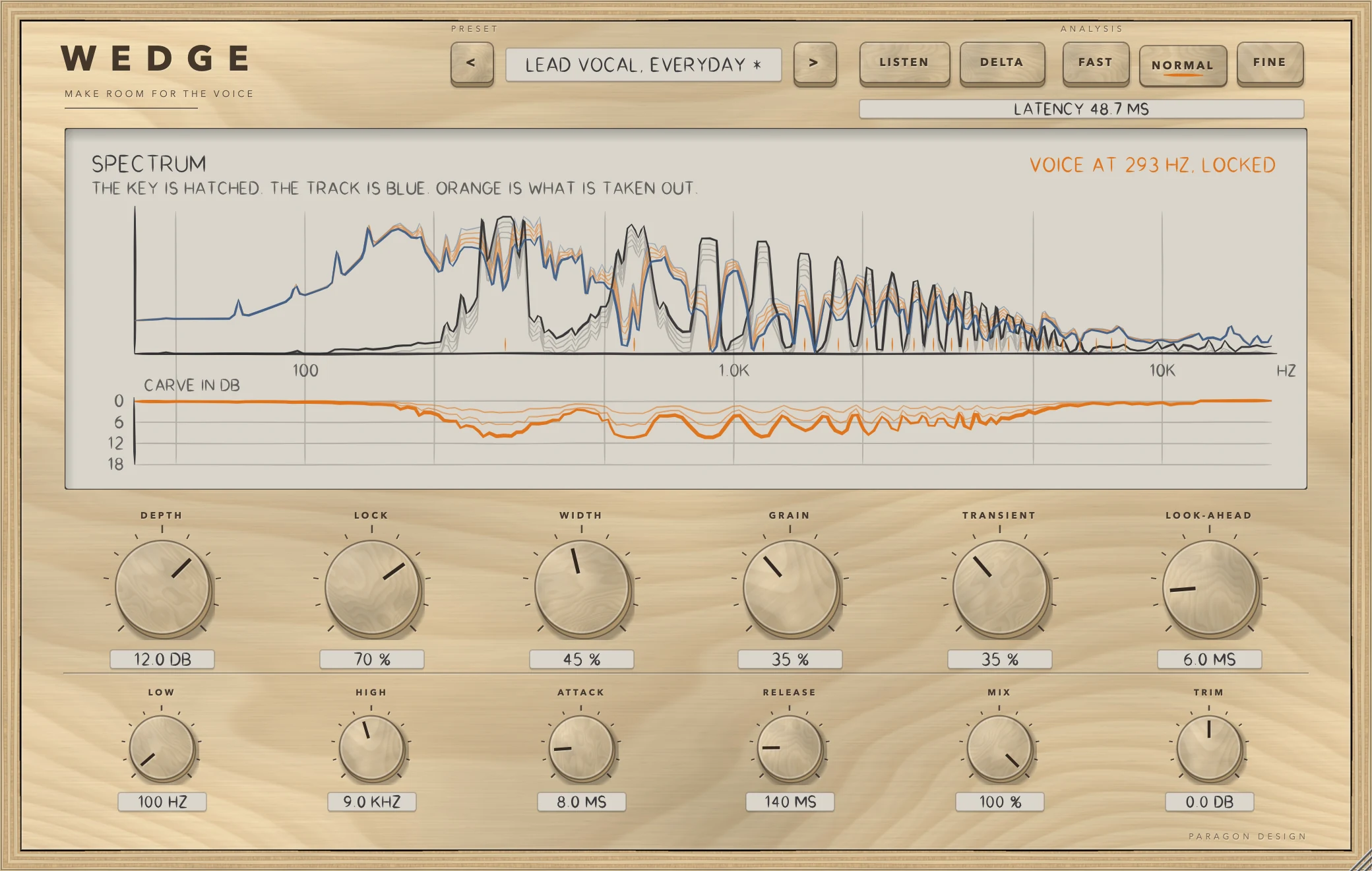
- Put WEDGE on the pad, guitar or keys and route the voice to its side chain (see Setting it up).
- Play a passage where the voice and the track sound together. If the display reads NO SIDECHAIN, the voice is not routed. If it reads THE KEY IS SILENT, the side chain is connected but the voice is not playing.
- The preset bar reads LEAD VOCAL, EVERYDAY. That preset is the state WEDGE opens in. Raise DEPTH until the voice sits. DEPTH is the most the track is turned down, from 0 to 18 dB.
- Press LISTEN to hear the key lined up with the track. Press it again to switch back. Press DELTA to hear only what the carve takes out.
- Look at the top right of the display. VOICE AT n HZ, LOCKED means the pitch tracker has found the voice. KEY NOT PITCHED, BROAD CARVE means it has not, and the carve is the broad band.
- Raise LOCK so the carve narrows to the voice's partials. Raise GRAIN and TRANSIENT to keep the track's own body and attacks.
- Check the latency tag, and set LOOK-AHEAD if you want the carve to arrive before the voice does.
How it works
PRESET
The two keys marked < and > step through the presets, and a click on the name opens a menu with the presets by category. An asterisk after the name means a control has moved since the preset loaded. Every preset sets all fifteen controls and leaves the host's bypass alone, so loading one also puts ANALYSIS back to NORMAL, MIX to 100 and TRIM to 0.
ANALYSIS
FAST, NORMAL and FINE choose the length of the analysis frame: 1024, 2048 or 4096 samples at 48 kHz. FAST gives the shortest delay and the softest notches. FINE gives the sharpest notches and the longest delay. NORMAL is the default. The frame overlaps by 75 percent at FAST and NORMAL and by 87.5 percent at FINE.
LISTEN and DELTA
LISTEN plays the side chain input, lined up with the track, in place of the track. Both outputs carry the same key. DELTA plays only what the carve takes out of the track, scaled by MIX. TRIM applies to both. Both are parameters and are saved with the project, so switch them off to hear the result.
The display
The upper half is titled SPECTRUM. The key draws as a hatched mountain, the track as a blue line, and in orange what is taken out. The light blue line is the track before the carve, the firm blue line is after it, and the orange hatching lies between them. Each spectrum is scaled to its own loudest point over a 54 dB window, so heights are relative, not absolute levels.
The lower half is titled CARVE IN DB. The carve hangs below a zero line, on a scale of 0, 6, 12 and 18 dB. Notches show as spikes. A small orange tick on the frequency axis marks each partial the carve is locked to. The readout at the top right says what the pitch tracker found.
DEPTH, LOCK and WIDTH
DEPTH is how far the track is turned down where the key is: 0 to 18 dB, default 9.
LOCK runs from a broad carve (0) to notches at the voice's own partials (100), default 60. The pitch tracker searches for a fundamental from 70 to 900 Hz. A partial counts in proportion to how strong it is in the key: fully within 12 dB of the strongest, and not at all at 36 dB below it, judged after an allowance for the usual fall of a voice's spectrum. How much of the carve is locked is LOCK multiplied by how voiced the key is, so a half-voiced frame is half notches and half band.
WIDTH runs from 0 to 100 percent, default 45. It sets how wide the carve is around the key: narrow notches and tight bands at the low end, broad ones at the high end. In the engine, WIDTH also sets how far below the key's loudest region the carve still reaches, from 16 dB at 0 to 30 dB at 100, and the width of each notch, from 7 percent of the fundamental at 0 to 30 percent at 100.
GRAIN, TRANSIENT and LOOK-AHEAD
GRAIN spares the track's own tonal peaks, so a held note keeps its body. It runs from 0 to 100 percent, default 35. A bin of the track counts as a peak when it stands more than about 3 dB above its surroundings, and is fully spared at 12 dB, in proportion to GRAIN.
TRANSIENT lets the track's attacks through uncarved. It runs from 0 to 100 percent, default 35. An attack is a frame whose energy rises 1 dB or more above the track's own recent average, and counts fully at 6 dB. GRAIN and TRANSIENT act on the carve at once, after ATTACK and RELEASE, because an attack has to be let through now.
LOOK-AHEAD delays the track so the carve is in place before the voice arrives. It runs from 0 to 40 ms, default 6. It moves the carve earlier by the amount you ask for, and it adds the same amount to the latency.
LOW and HIGH
LOW and HIGH set the limits of the carve. Below LOW and above HIGH the track is left alone. LOW runs from 40 to 4000 Hz, default 100. HIGH runs from 400 to 20000 Hz, default 9000. The edges are soft: the carve fades away within an octave outside them.
ATTACK and RELEASE
ATTACK is how fast the carve closes in when the key appears, from 0.5 to 50 ms, default 8. RELEASE is how fast it lets go when the key goes, from 10 to 800 ms, default 140. They are nominal times. The bass moves more slowly than the treble. The carve is recalculated once per frame step, which is 256 samples at FAST and 512 samples at NORMAL and FINE, so very short values cannot act faster than that.
MIX and TRIM
MIX blends carved and untouched track, from 0 to 100 percent, default 100. At 0 the track is the input delayed by the latency, bit for bit. TRIM is the output level, from -12 to +12 dB, default 0.
Control reference
Every control on the panel, as the plug-in itself labels it. The description is the tooltip the plug-in shows when you rest the pointer on the control.
Top bar
| No. | Control | What it does | Range | Default |
|---|---|---|---|---|
| 1 | <Key | Previous preset | ||
| 2 | >Key | Next preset | ||
| 3 | LISTENKey | Hear the sidechain input, lined up with the track. | ||
| 4 | DELTAKey | Hear only what the carve takes out of the track. | ||
| 5 | FASTKey | Shortest delay and the softest notches. | ||
| 6 | NORMALKey | A balance of delay and sharpness. | ||
| 7 | FINEKey | Sharpest notches, and the longest delay. |
Controls
| No. | Control | What it does | Range | Default |
|---|---|---|---|---|
| 8 | DEPTHKnob | How far the track is turned down where the key is. | 0 to 18 dB | 9 dB |
| 9 | LOWKnob | Below this the track is left alone. | 40 to 4000 Hz | 100 Hz |
| 10 | LOCKKnob | From a broad carve (0) to notches at the voice's own partials (100). Keeps the body of the track between them. | 0 to 100 % | 60 % |
| 11 | HIGHKnob | Above this the track is left alone. | 400 to 20000 Hz | 9000 Hz |
| 12 | WIDTHKnob | How wide the carve is around the key: narrow notches and tight bands, to broad ones. | 0 to 100 % | 45 % |
| 13 | ATTACKKnob | How fast the carve closes in when the key appears. | 0.5 to 50 ms | 8 ms |
| 14 | GRAINKnob | Spares the track's own tonal peaks, so a note keeps its body. | 0 to 100 % | 35 % |
| 15 | RELEASEKnob | How fast the carve lets go when the key goes. | 10 to 800 ms | 140 ms |
| 16 | TRANSIENTKnob | Lets the track's attacks through uncarved. | 0 to 100 % | 35 % |
| 17 | MIXKnob | Blend of carved and untouched track. | 0 to 100 % | 100 % |
| 18 | LOOK-AHEADKnob | Delays the track so the carve is in place before the voice arrives. | 0 to 40 ms | 6 ms |
| 19 | TRIMKnob | Output level. | −12 to 12 dB | 0 dB |
Recipes
Make room for a lead vocal in a pad
Choose Warm Pad Under Vocal from the Pads and Synths category. It sets DEPTH 9, LOCK 70, WIDTH 45, LOW 120 Hz, HIGH 8000 Hz, ATTACK 10 ms, RELEASE 200 ms, LOOK-AHEAD 6 ms, GRAIN 45 and TRANSIENT 20. Play the voice and the pad together. You should see the voice's hatched spectrum, orange hatching where the pad is lowered, and notches in the carve curve at the voice's partials.
Keep a strummed guitar's attack
Choose Acoustic Strum Under Vocal. It sets DEPTH 8, LOCK 60, WIDTH 45, LOW 150 Hz, HIGH 9000 Hz, ATTACK 5 ms, RELEASE 110 ms, GRAIN 30 and TRANSIENT 55. If the front of each strum is still being carved, raise TRANSIENT towards 100. The carve curve should flatten for a moment at each strum.
Lower music under a voiceover
Choose Music Under Voiceover from the Speech category. It sets DEPTH 12, LOCK 75, WIDTH 45, LOW 150 Hz, HIGH 6000 Hz, ATTACK 6 ms, RELEASE 300 ms, LOOK-AHEAD 20 ms, GRAIN 40 and TRANSIENT 20. At NORMAL the latency tag reads 62.7 ms at 48 kHz (2048 + 960 samples). In a test with 20 ms of look-ahead, the carve reached half its depth 32.0 ms before a burst of key signal began, against 12.0 ms before with no look-ahead.
Carve only the presence band
Choose Presence Only from the Character category. It sets DEPTH 8, LOCK 40, WIDTH 45, LOW 1500 Hz and HIGH 6000 Hz. The carve curve should stay at zero below roughly 900 Hz and above roughly 9.8 kHz, because the edges fade out within an octave. For the bottom end use Low Mud Only, which sets LOW 120 Hz and HIGH 500 Hz.
Duck a bed quickly with a broad carve
Choose Fast Duck. It sets DEPTH 8, LOCK 0, WIDTH 50, ATTACK 1 ms, RELEASE 50 ms, LOOK-AHEAD 10 ms, GRAIN 0 and TRANSIENT 0. LOCK at 0 gives the broad band carve. The readout may still name the voice's pitch, but the carve does not use it.
Check the side chain and hear what is taken out
Choose Hear the Key. It switches LISTEN on, so you hear the side chain input in place of the track. If it is the voice, the routing is right. Then choose Hear What Is Taken Out, which switches DELTA on with DEPTH 9. You hear only what the carve removes. Switch both off before judging the mix.
Presets
WEDGE has 41 presets in 9 categories. They are starting points chosen from measurements, not tuned by ear.
- Start: Flat Start
- Vocal Room: Lead Vocal, Everyday; Lead Vocal, Tight; Lead Vocal, Open; Intimate Vocal, Close Mic; Rap Vocal, Fast; Whispered Vocal; Backing Vocals Under Lead; Choir Under a Soloist
- Pads and Synths: Warm Pad Under Vocal; Bright Synth Under Vocal; String Bed Under Vocal; Organ Under Vocal; Ambient Wash, Gentle; Arpeggio Under Vocal; Synth Bass, Leave the Lows
- Guitars: Acoustic Strum Under Vocal; Fingerpicked Acoustic; Clean Electric Rhythm; Crunch Rhythm Guitar; Heavy Rhythm, Wall of Sound; Lead Guitar Behind the Vocal
- Keys: Piano Under Vocal; Electric Piano Under Vocal; Plucked Keys, Tight
- Mix Bus: Music Bus, Gentle; Music Bus, Firm; Instrument Bus, Dense Mix; Stems Under the Lead
- Speech: Music Under Voiceover; Music Under Dialogue, Subtle; Podcast Bed; Ambience Under Speech
- Character: Broad Carve, Band Only; Notches Only; Presence Only; Low Mud Only; Fast Duck; Smooth Glide
- Utility: Hear the Key; Hear What Is Taken Out
Flat Start is a plain broad carve: DEPTH 6, LOCK 0, WIDTH 50, ATTACK 10 ms, RELEASE 120 ms, LOOK-AHEAD 0, GRAIN 0 and TRANSIENT 0. It is not the state WEDGE opens in. That state is Lead Vocal, Everyday. In a test, every preset loaded exactly the values it names, and none made noise louder than it went in, within a margin of 1.3 in energy. The presets belong to WEDGE's own window: it reports a single unnamed program to the host. Every control, the number of the preset last loaded and the window size are saved with the project. In Logic Pro, plug-in settings are stored with the project file.
Measured
All figures are from the test run in the plug-in repository on 13 October 2026, which passed all 677 of its checks across the six plug-ins. They are on synthetic test signals, not on recordings of music. The sample rate is 48 kHz throughout.
| What was measured | Result | Conditions |
|---|---|---|
| Reconstruction when nothing is carved | Error of -138.8 dB at FAST, -138.8 dB at NORMAL, -139.2 dB at FINE, against the input delayed by the latency | 2.5 s of stereo pink noise at -18 dB RMS, no side chain |
| Latency | An impulse lands exactly at the reported latency | FAST, NORMAL and FINE, each with LOOK-AHEAD 0, 10 and 25 ms |
| Broad carve (LOCK 0) | 11.92 dB out of the key's band, 0.00 dB out of 150 to 300 Hz, 0.59 dB out of 4.5 to 7 kHz | DEPTH 12, WIDTH 40, NORMAL. White noise track at -20 dB. Key of noise at 800 to 1800 Hz, -20 dB. Measured over 1000 to 1500 Hz |
| Carve with LOCK 100 | 9.69 dB at the voice's partials, 2.31 dB between them: 7.4 dB apart | DEPTH 12, WIDTH 25. White noise track. Key a 200 Hz voice with 25 partials. Partials 3 to 12 |
| The same with LOCK 0 | 8.01 dB at the partials, 8.25 dB between them | Same signals |
| Pitch following | Worst pitch error 0.33 percent and worst third-partial error 0.33 percent over 192 frames | A voice gliding from 150 Hz to 250 Hz over 2.4 s, LOCK 100 |
| Unpitched key | Highest voicing 0.000. Band still carved by 11.87 dB at 1.8 to 3 kHz with LOCK at 100 | Key of noise at 1000 to 5000 Hz, -20 dB |
| Look-ahead | Carve reaches half depth 12.0 ms before the key's onset with no look-ahead, 32.0 ms before with 20 ms | Key burst at 1.0 s, track white noise at -22 dB, DEPTH 12, measured near 1200 Hz with the latency taken out |
| GRAIN | At the track's partials 10.43 dB at GRAIN 0, 0.38 dB at GRAIN 100. In the gaps 10.72 and 10.66 dB | Track a 220 Hz tone with 20 partials and noise at -34 dB. Key noise at 200 to 6000 Hz, -18 dB |
| TRANSIENT | Carve around attacks 10.31 dB at TRANSIENT 0, 0.50 dB at 100 | Pink noise bed at -48 dB with six plucks 30 dB above it. Key noise at 200 to 6000 Hz, -18 dB. First 20 ms of each attack |
| Real side chain bus through the processor | 1 kHz band down 11.42 dB, 5 kHz band down 0.00 dB | DEPTH 12, LOCK 0, LOOK-AHEAD 0, NORMAL. Key a 1 kHz tone with its second harmonic |
| Bypass | Bit-exact against the input delayed by 2336 samples | NORMAL, default look-ahead |
| Cost | 2.27 percent of one core at FAST, 1.97 at NORMAL, 3.16 at FINE | Stereo, 48 kHz, LOCK 70, GRAIN 35, TRANSIENT 35, DEPTH 12, voice-locked. Thread CPU time on the development Mac |
| The pitch tracker on sine tones | Worst error 0.001 to 0.058 percent from 82.4 Hz to 880 Hz, lowest confidence 0.998 | 48 kHz. At 44.1 kHz the worst error was 0.082 percent at 880 Hz |
| The pitch tracker on a sawtooth | 120 Hz read correctly on 85 of 85 frames | Sawtooth |
| The pitch tracker on pink noise | Mean confidence 0.101 | Not pitched |
Limits and what is not verified
- Nothing has been checked by ear. Every figure is a measurement of a synthetic signal, and the presets were chosen from numbers.
- LOCK follows one monophonic voice or lead line. The pitch tracker searches 70 to 900 Hz. A chord, a choir, a fundamental outside that span or a voice buried in other sound falls back to the broad carve. LOCK on polyphonic or very noisy keys is not verified.
- The key engages only when it is loud enough. The carve ramps in as the key's level rises from -66 dB to -52 dB RMS, and the display reads THE KEY IS SILENT below -78 dB.
- The carve is recalculated once per analysis frame step, so attack times shorter than the step cannot be resolved.
- Both channels share one carve curve, calculated from the louder channel of the track.
- The side chain's channels are added into one key. WEDGE cannot treat the left and right of the key differently.
- Every figure was measured at 48 kHz. Other sample rates are not verified. Above 64 kHz the analysis frame doubles in length, and that has not been tested.
- Not verified in Logic Pro: how the side chain is aligned with the track at the plug-in's input when the plug-in has latency, and whether Logic Pro applies a latency that changes while the project plays.
- Not verified: the licence panel and the trial in every host. They are checked in the plug-in's own tests and in one test host, and the Getting started manual lists what is not verified.
Troubleshooting
The plug-in passes my audio through and says TRIAL OVER: ENTER A LICENCE
The 14 days are over for WEDGE and no licence has been added. Press LICENCE in the top bar, choose the licence file that came with your order, or drop the file on the window, and WEDGE works again at once. If the panel says THIS LICENCE IS FOR another plug-in, that file does not cover WEDGE: the order page offers the file for your order.
The display reads NO SIDECHAIN
No side chain source is routed, or the host did not supply the side chain's channels. Choose the voice in the Side Chain pop-up menu of the plug-in window. WEDGE does not carve while this shows.
The display reads THE KEY IS SILENT
The side chain is connected, but its level is below -78 dB. Check that the source is playing and not muted.
The carve does nothing although the voice is playing
Look for these:
- DEPTH is 0, or MIX is 0.
- LOW and HIGH leave the voice's frequencies outside the carve.
- The key is quiet, below about -52 dB RMS, so the carve is only partly engaged.
- LISTEN or DELTA is on. LISTEN plays the key in place of the track.
The readout says KEY NOT PITCHED, BROAD CARVE
The key is not a single steady pitch between 70 and 900 Hz, such as a breath, a consonant, noise or a chord. LOCK cannot act, so WEDGE uses the broad carve. This is how it is meant to behave.
The track arrives late
WEDGE reports a latency of one analysis frame plus the look-ahead. If the host's delay compensation is off, the track is late by that amount. In Logic Pro, plug-in latency compensation is set with the Compensation pop-up menu in Logic Pro > Settings > Audio > General.
Low Latency Monitoring mode bypasses WEDGE while recording
In Logic Pro, Low Latency Monitoring mode bypasses plug-ins whose latency pushes a track over its limit, which can be set up to 30 ms. WEDGE at FAST with the default look-ahead reports 27.3 ms at 48 kHz, and the other settings report more.
The preset name has an asterisk
A control has moved since the preset loaded, so the name no longer describes the settings exactly.