What it is
BEVEL is an equaliser with 24 bands. Each band is a bell, a low shelf, a high shelf, a high-pass, a low-pass, a notch, a band pass, a tilt shelf, a flat tilt or an all-pass, and acts on both channels, on the middle, on the side, on the left channel alone or on the right alone. Three voicings change how the width of a bell follows its gain. PHASE chooses MINIMUM, which has no delay, MATCHED, which has none either and designs bells, shelves and tilts to follow the prototype curve they come from more closely near the top of the band, or LINEAR, which does not bend the phase and delays the sound by an amount you choose. This manual describes version 0.5.0.
A band can also be dynamic. Turn its RANGE away from 0 and its gain follows the level of a trigger: the band's own region of the sound, a span of frequencies you choose, the side chain, or, with SPECTRAL, each frequency on its own. A band that is not dynamic is a static filter, and a flat band does nothing.
In MINIMUM and MATCHED the signal runs through the STEREO bands in band order, then the LEFT bands on the left channel and the RIGHT bands on the right channel, then, if any MID or SIDE band is working, the MID bands on the middle and the SIDE bands on the side, then OUTPUT plus AUTO GAIN, then INVERT, then BYPASS. In LINEAR the same curve runs as one symmetric filter, and a SPECTRAL stage, when a band uses it, comes after the bands. There is no harmonic term and no nonlinearity in this version: every band is a filter. The display draws the curve in use and the spectrum, and you shape a band by dragging its node.
Setting it up
Formats and channels
BEVEL is an effect, in Audio Unit and VST3 formats. The VST3 is built from the same code, but no test loads it in a host. The main input and output are mono or stereo, with the same number of channels in and out. The optional side chain input is mono or stereo and starts switched off, so a stereo track has three layouts (side chain off, mono or stereo) and a mono track has three, and two in with one out, or the reverse, is refused. A host lists the Audio Unit as Bevel Equaliser, from Paragon Design (versions before 0.5.1 list it as Bevel). The bundle declares macOS 11.0 as the minimum, and the panel is 1360 by 1024 pixels, resizable from 70 to 170 percent.
Latency
MINIMUM and MATCHED have no delay, and the line under the preset bar reads NO DELAY. LINEAR delays the sound by a number of samples that depends on LATENCY and on the sample rate, and a working SPECTRAL band adds the length of its transform. BEVEL works the delay out from the controls and the sample rate, tells the host when it prepares and then on a 10 Hz timer, so a stopped host is told too, and writes it under the preset name, for example DELAY 213.3 MS (10240 SAMPLES). The values below follow from the filter's length rule: below 64 kHz the filter is 8192 points long at the default choice, 16384 below 128 kHz and 32768 above, the four keys are a quarter, a half, one and two times the default's length, and the delay is five eighths of the length. The latency tests read the delay back from the processor with no audio running, at 44.1, 48, 96 and 192 kHz (27 MS and 213 MS at each, all four keys at 48 kHz); the other cells follow from the same rule. In samples, with the time in brackets:
| Sample rate | LATENCY 27 MS | LATENCY 53 MS | LATENCY 107 MS | LATENCY 213 MS |
|---|---|---|---|---|
| 44.1 kHz | 1280 (29.0 ms) | 2560 (58.0 ms) | 5120 (116.1 ms) | 10240 (232.2 ms) |
| 48 kHz | 1280 (26.7 ms) | 2560 (53.3 ms) | 5120 (106.7 ms) | 10240 (213.3 ms) |
| 88.2 kHz | 2560 (29.0 ms) | 5120 (58.0 ms) | 10240 (116.1 ms) | 20480 (232.2 ms) |
| 96 kHz | 2560 (26.7 ms) | 5120 (53.3 ms) | 10240 (106.7 ms) | 20480 (213.3 ms) |
| 176.4 kHz | 5120 (29.0 ms) | 10240 (58.0 ms) | 20480 (116.1 ms) | 40960 (232.2 ms) |
| 192 kHz | 5120 (26.7 ms) | 10240 (53.3 ms) | 20480 (106.7 ms) | 40960 (213.3 ms) |
The key named for a time is a name: it is that time at 48, 96 and 192 kHz, and a little longer at 44.1, 88.2 and 176.4 kHz. LATENCY does nothing in MINIMUM and MATCHED, whatever it holds. A SPECTRAL band, working on a band whose RANGE is not 0, adds the length of its transform: 2048 samples at 44.1 and 48 kHz (46.4 and 42.7 ms), 4096 at 88.2 and 96 kHz and 8192 at 176.4 and 192 kHz, and the two add when both run: LINEAR at the default 107 MS with a SPECTRAL band is 7168 samples at 48 kHz. The stage stays out of the path, with no delay, when no band has SPECTRAL on and a RANGE other than 0.
In Logic Pro
- Click an Audio Effect slot in the channel strip, then choose Bevel Equaliser from the pop-up menu (versions before 0.5.1 list it as Bevel). Audio Units plug-ins appear in the Audio Units submenu.
- On a mono channel strip the Mono plug-in format loads a mono plug-in, and on a stereo one the Stereo format loads a stereo plug-in.
- To see the latency, hold the pointer over the plug-in slot. A help tag shows it in samples and seconds.
- To keep the tracks in time with LINEAR or SPECTRAL, choose Audio and Software Instrument Tracks, or All, from the Compensation pop-up menu in Logic Pro > Settings > Audio > General.
- To make a dynamic band read a side chain, click the Side Chain pop-up menu in the plug-in header area, choose one of the available sources, then press EXT KEY for the band. The side chain signal controls the plug-in and is not processed by it.
A first session
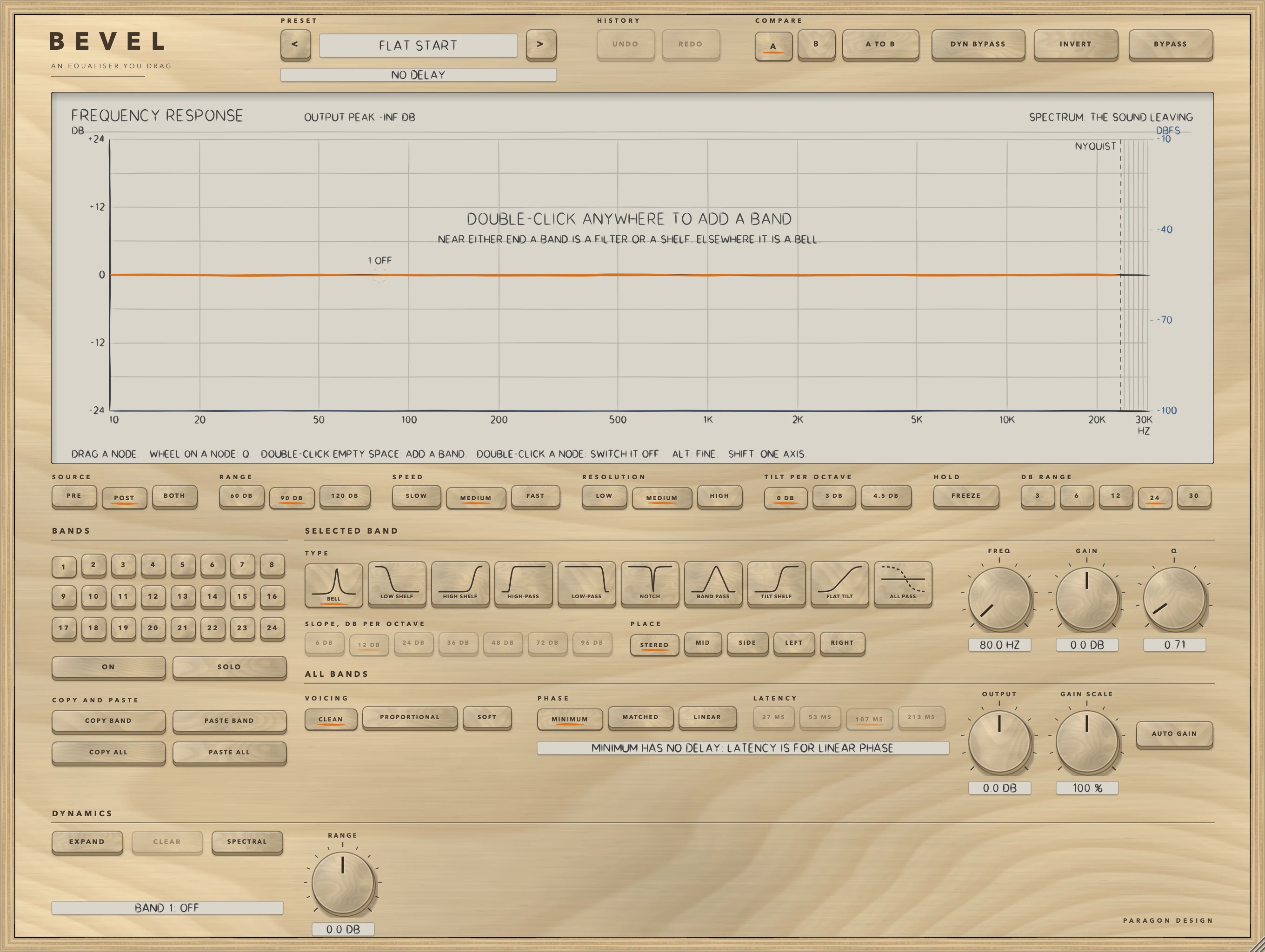
- Put BEVEL on a track. The preset bar reads FLAT START, the line under it NO DELAY, and the display DOUBLE-CLICK ANYWHERE TO ADD A BAND.
- Double-click the display near 3 kHz. Band 1 appears as a node numbered 1, a BELL at that frequency and height, and its key lights.
- Drag the node across for FREQ and up or down for GAIN, and turn the wheel over it for Q.
- Double-click near 30 Hz to add a HIGH-PASS in band 2, then press 24 DB under SLOPE, DB PER OCTAVE.
- Press PRE, POST and BOTH under SOURCE to switch the spectrum between the sound arriving, the sound leaving and both.
- Press BYPASS, then again, to compare. It does not match levels, and neither does AUTO GAIN: set the level with OUTPUT against your own meter. Or press B to keep a second setting beside A.
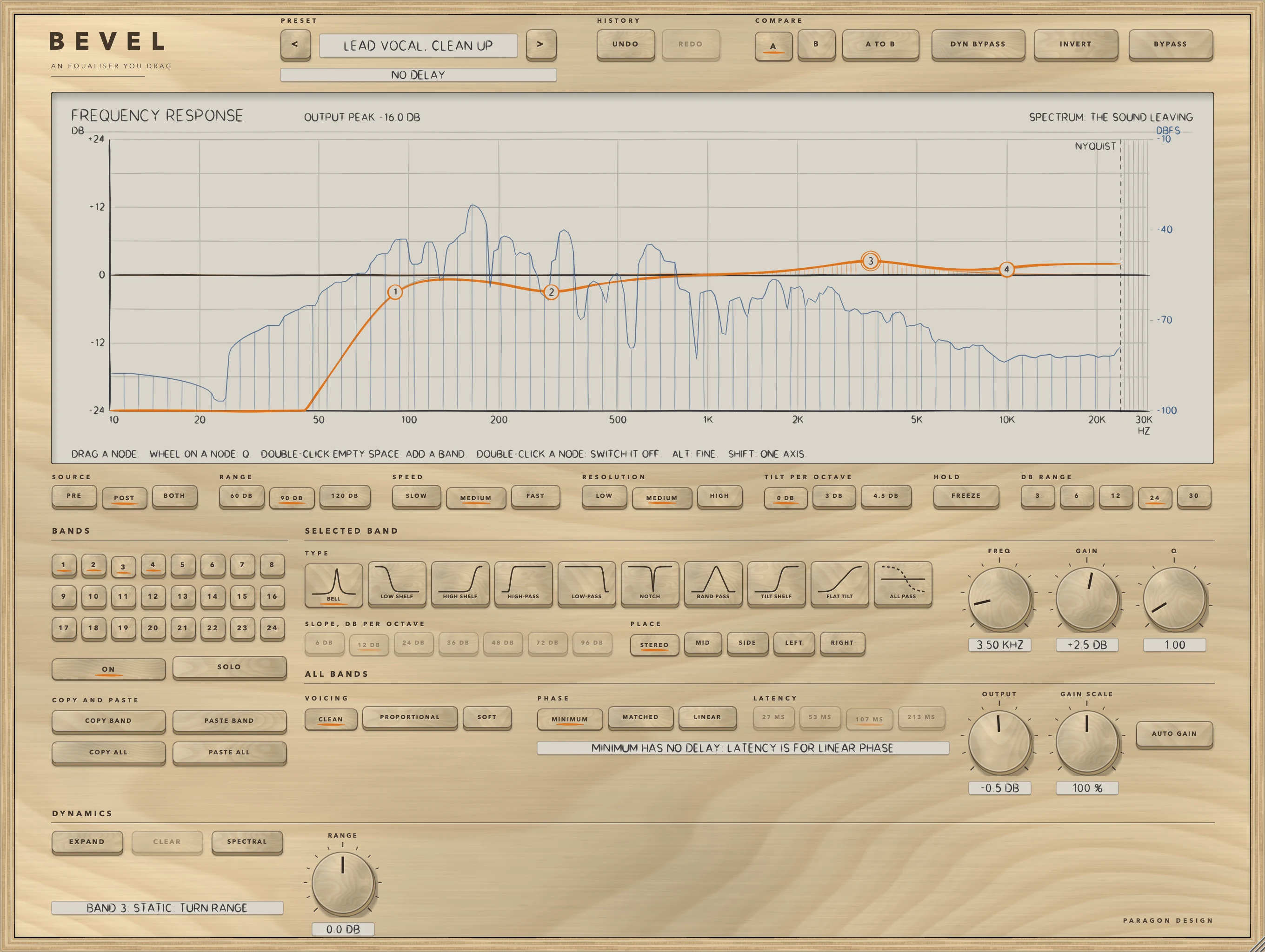
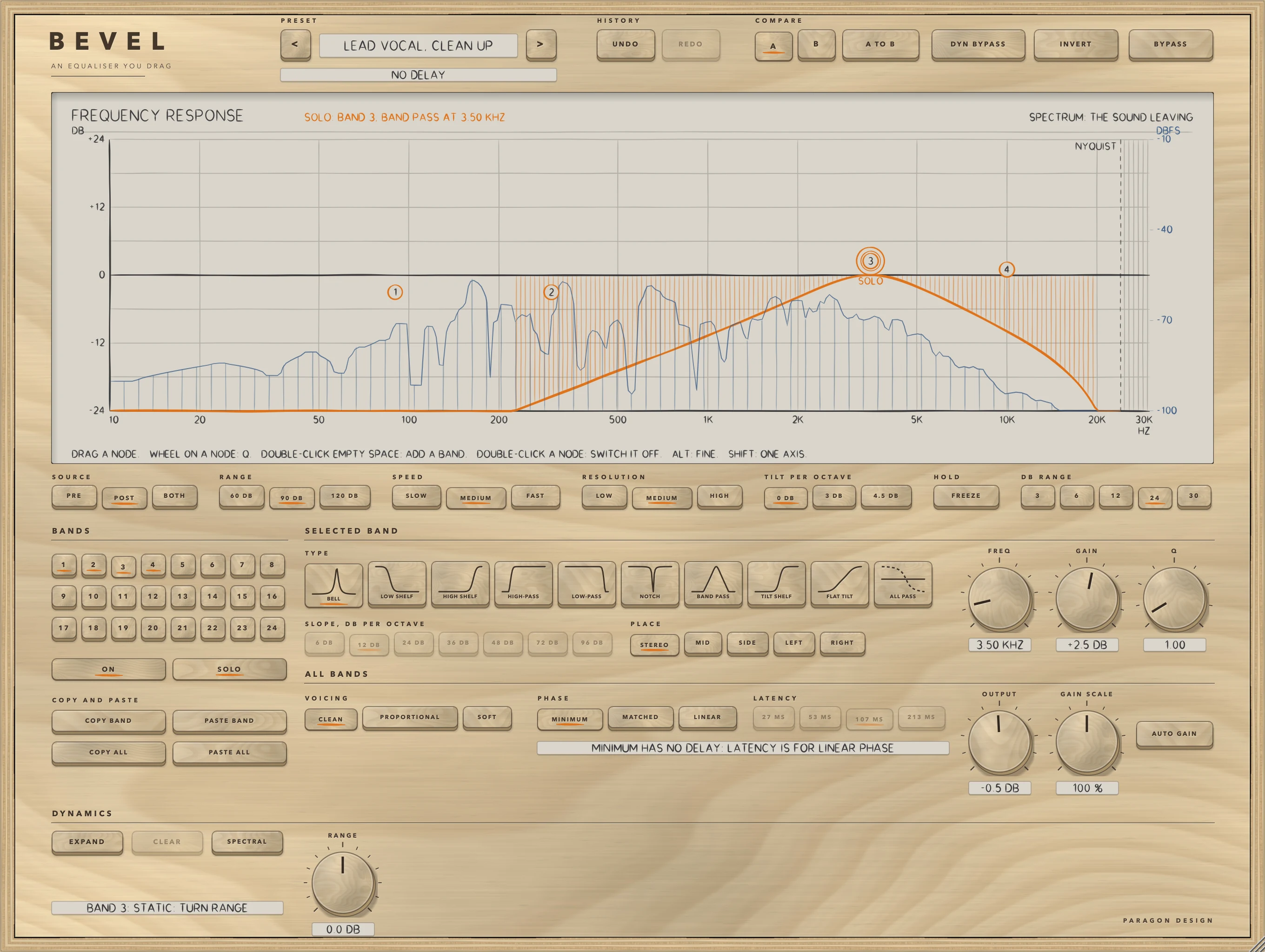
- Choose Lead Vocal, Clean Up from Vocal in the preset menu, as in the figure, then select band 3, the 3.5 kHz lift, and turn its RANGE to -6 dB: as the level in its region rises over its threshold, its gain moves from +2.5 dB toward -3.5 dB.
How it works
Hold the pointer over a control for a short description, and double-click a knob to return it to its default. The Control reference after this chapter lists every control with its limits and default; for FREQ, GAIN, Q and the DYNAMICS controls, which act on the selected band, it gives band 1's.
Top bar and presets
The keys < and > step through the 80 presets, and a click on the name opens a menu by category. An asterisk after the name means a control has moved since the preset loaded. A preset sets every control except BYPASS, INVERT and DYN BYPASS (the last two say in their tooltips that they are not part of a preset), and a band the preset does not name is off at its defaults. BYPASS crossfades over 5 ms to the input delayed by the same amount as when BEVEL is working, so it never moves anything in time, and it is also the host's bypass parameter.
UNDO and REDO step back and forward through up to 100 changes: a drag, a turn of a knob, a key, a band added or removed, a preset, A or B. The history is not kept with the session. Command-Z and Command-Shift-Z do the same.
A and B are two complete settings, every band and every control but BYPASS, and both are kept with the session. Press B and the first time B starts as a copy of what you have; each letter keeps what it had when you left it. A TO B writes the setting in use over the other letter. INVERT turns the polarity of both channels over at the output: an exact sign change, passed through zero over 5 ms so that nothing clicks. DYN BYPASS switches the dynamics of every band off at once, so each band is its static curve and a band's settings are kept.
The display and its gestures
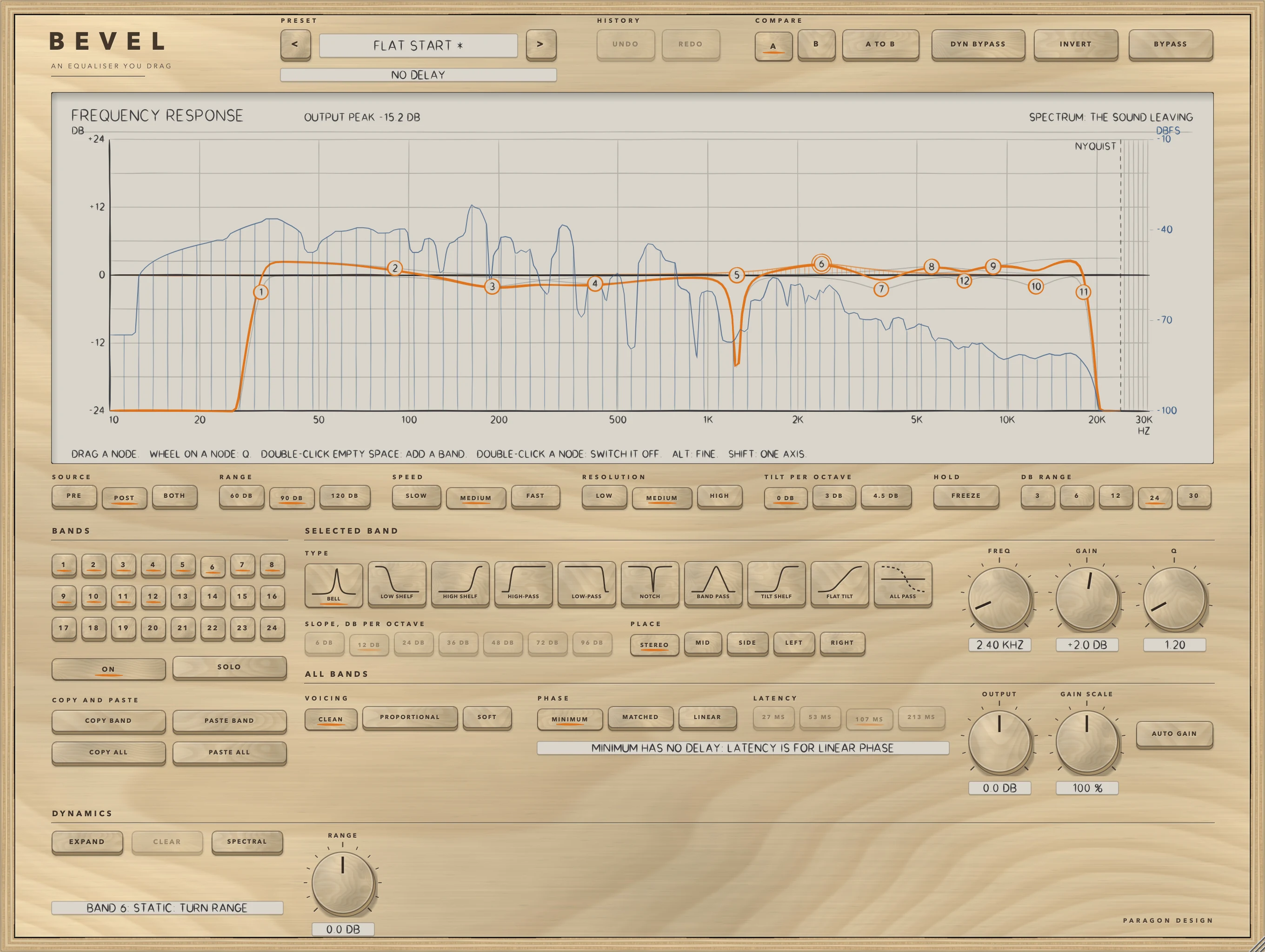
The plot runs from 10 Hz to 30 kHz, evenly in log frequency, and the DB RANGE keys under it choose how far it reaches above and below 0 dB: 3, 6, 12, 24 or 30. At 44.1 and 48 kHz the curves stop at the Nyquist frequency, which is marked, and the part of the plot above it is hatched. The heavy orange line is the curve of the whole, the sum in dB of the bands, drawn from the same designs the filters run; each band's own curve is drawn lightly, hatched down to 0 dB for the selected band. Behind them is the spectrum: the sound leaving, which is the default, the sound arriving, or both, with the sound arriving drawn faint. A numbered node sits on the curve of each band that is on, and a letter beside it, M, S, L or R, marks a band that is on MID, SIDE, LEFT or RIGHT.
Where a node sits depends on the shape. A bell's is at its gain, a shelf's at half its gain, a high-pass or low-pass at its response at the corner, and a notch, a band pass, an all-pass, a tilt shelf and a flat tilt at 0 dB, the point the curve turns about. When any band works on MID or SIDE the display draws the middle's curve in orange and the side's in blue and labels the two at the right edge; with only LEFT and RIGHT bands it draws the left channel's curve in orange and the right's in blue, and the curves are labelled the same way. With the pointer on a node the readout at the top shows, for example, BAND 3, BELL, 3.50 KHZ, +2.5 DB and Q 1.00; a high-pass or low-pass has no gain and shows its slope. Otherwise it reads OUTPUT PEAK, the level leaving, held and let go at 24 dB a second.
- Double-click an empty place to add the next unused band there: below 40 Hz a HIGH-PASS, below 90 Hz a LOW SHELF, up to 9 kHz a BELL, up to 12 kHz a HIGH SHELF, above that a LOW-PASS. A bell takes its gain from the height of the click and a shelf twice that. A new bell has Q 1.00, the others Q 0.71. With all of them on, the display writes ALL 24 BANDS ARE IN USE.
- Drag a node across for FREQ and up or down for GAIN. A bell follows the hand, and the gain of a shelf, a tilt shelf or a flat tilt moves by twice the node's height, as the curve turns about the node. A high-pass, low-pass, notch, band pass or all-pass moves across only.
- Turn the wheel over a node to set Q: each 0.5 of wheel doubles or halves it, between 0.1 and 18, and pushing the wheel up raises it.
- Double-click a node to switch its band off. It keeps its settings, and ON brings it back.
- Hold Alt, the Option key on a Mac, for fine moves: a tenth as far as the hand, and a fifth for the wheel. Hold Shift to move along the first axis the hand uses. Click a node to select its band.
A drag, a wheel turn and a double-click are each a parameter gesture a host can record.
The spectrum and its controls
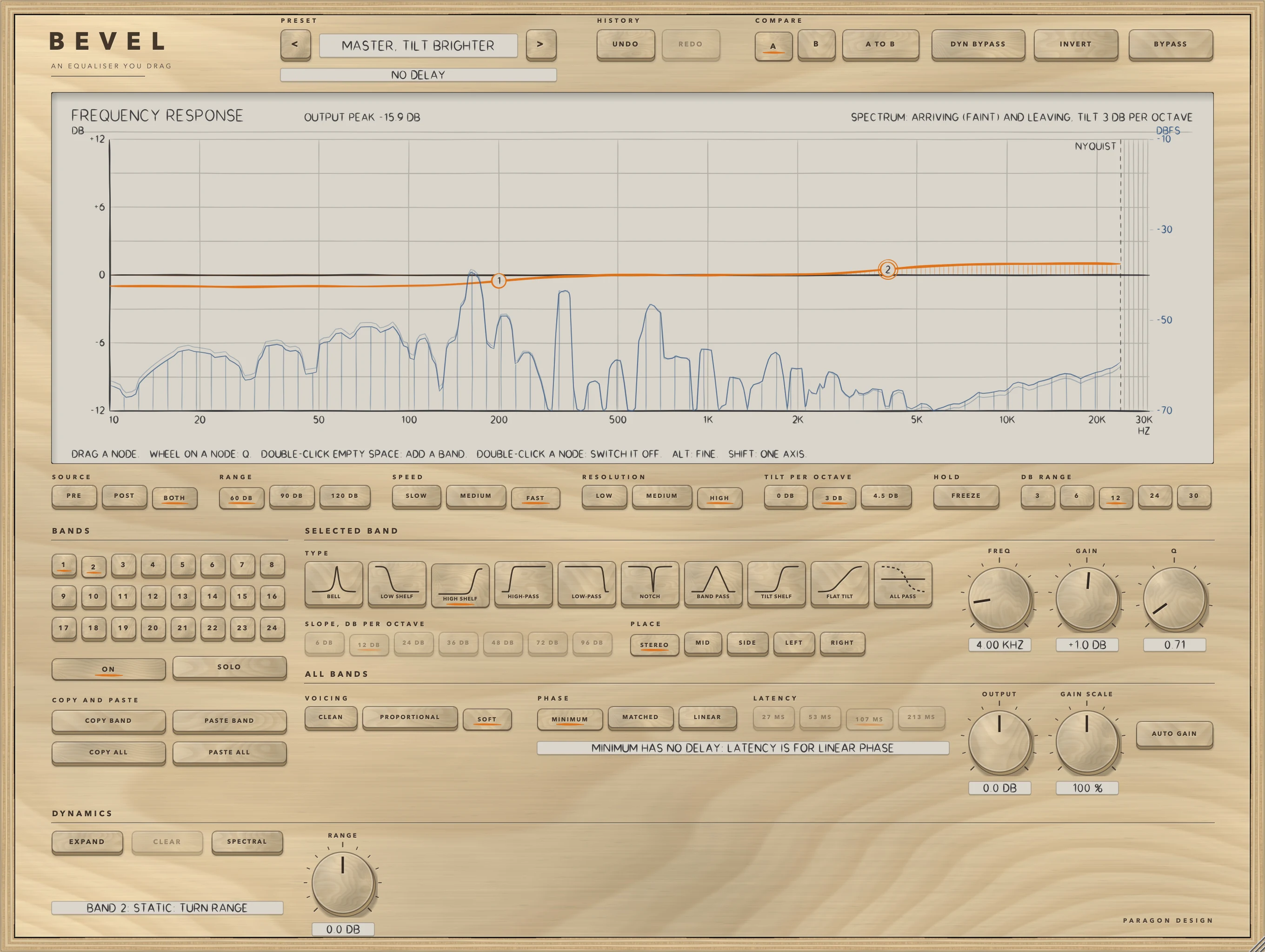
The row of keys under the display changes the picture and never the sound. SOURCE chooses PRE, POST or BOTH. RANGE shows 60, 90 or 120 dB, from -10 dBFS down to -70, -100 or -130. SPEED averages over 1.2 seconds (SLOW), 0.4 (MEDIUM) or 0.12 (FAST), each the time for a new steady level to be 63 percent reached. RESOLUTION is a transform of 2048, 4096 or 8192 points, bins 23.4, 11.7 or 5.9 Hz wide at 48 kHz. TILT PER OCTAVE tilts the picture about 1 kHz by 0, 3 or 4.5 dB per octave, higher on the right and lower on the left. HOLD, labelled FREEZE, holds the picture and is not kept with the session. The spectrum is the mean of left and right.
Bands
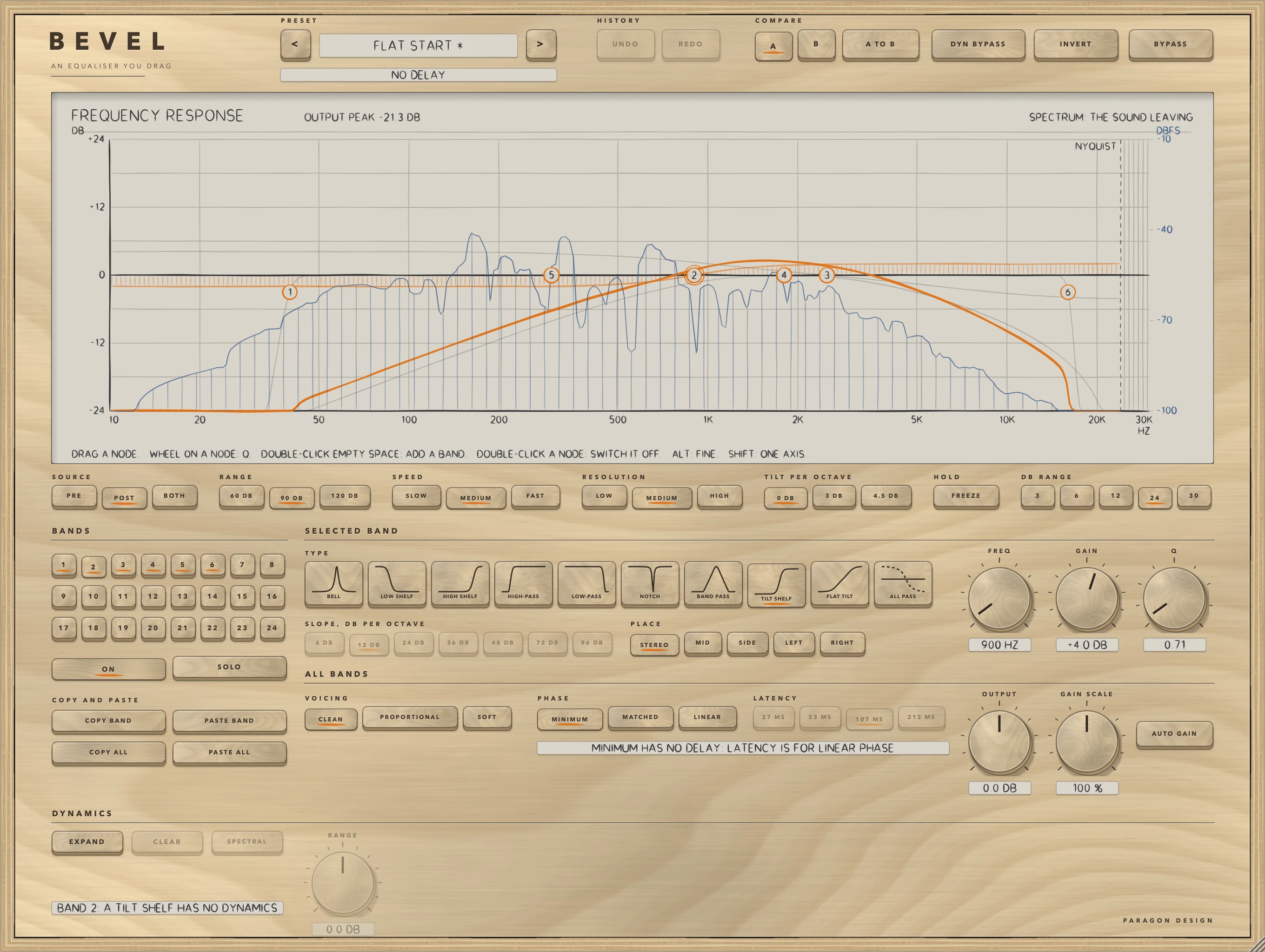
Twenty-four bands run, and the keys numbered 1 to 24 select the band the knobs and keys below edit (the Control reference lists them as BAND 1 to BAND 24). A lit key is a band that is on. ON switches the selected band on or off; a band that is off fades out, keeps its settings and takes no part. No band is on by default.
| Shape | FREQ is | GAIN | Q | SLOPE |
|---|---|---|---|---|
| BELL | the centre | -30 to +30 dB | how narrow, as VOICING reads it | none |
| LOW SHELF, HIGH SHELF | where it is half its gain in dB | -30 to +30 dB | how sharply it turns | none |
| HIGH-PASS, LOW-PASS | the corner | none | the response at the corner | 6, 12, 24, 36, 48, 72 or 96 dB per octave |
| NOTCH | the centre, where it is zero in MINIMUM | none | how narrow | none |
| BAND PASS | the centre, exactly 0 dB | none | how narrow | stacks 1, 2, 3, 4, 6 or 8 sections (6 DB is one section) |
| TILT SHELF | where it is 0 dB | the difference between the highs and the lows | how fast it turns | none |
| FLAT TILT | where it is 0 dB | about the tilt across four octaves centred on FREQ | does nothing | none |
| ALL PASS | the centre, half a turn of phase | none | how fast the phase turns | none |
FREQ runs from 10 Hz to 30 kHz, logarithmically, with the middle of the knob at 547.7 Hz. A band is never designed above 0.49 of the sample rate, so at 44.1 kHz every frequency above 21609 Hz gives the same filter. Q runs from 0.1 to 18, with a default of 0.7071, shown as 0.71. At the corner a high-pass or low-pass is 20 log10 of Q in dB: 3.01 dB down at the default Q and 6.02 dB up at Q 2, at every slope but 6 DB, which is one first-order section and is 3.01 dB down whatever Q is. GAIN starts at 0 dB, and a bell, shelf, tilt shelf or flat tilt at exactly 0 dB does nothing; a high-pass, low-pass, notch, band pass or all-pass always does something when on. GAIN is dimmed for the shapes that have none and the SLOPE keys are dimmed unless the band is a HIGH-PASS, LOW-PASS or BAND PASS. Moves glide and switches fade over about 10 ms. An all-pass changes the phase and not the level; in LINEAR it does nothing, and the panel says so.
PLACE
STEREO acts on left and right alike. MID acts on the middle, half of left plus right, and leaves the side exactly as it was. SIDE acts on the side, half of left minus right, and leaves the middle exactly as it was. LEFT acts on the left channel only, and RIGHT on the right channel only; with no other band on the other channel, that channel comes out exactly as it went in.
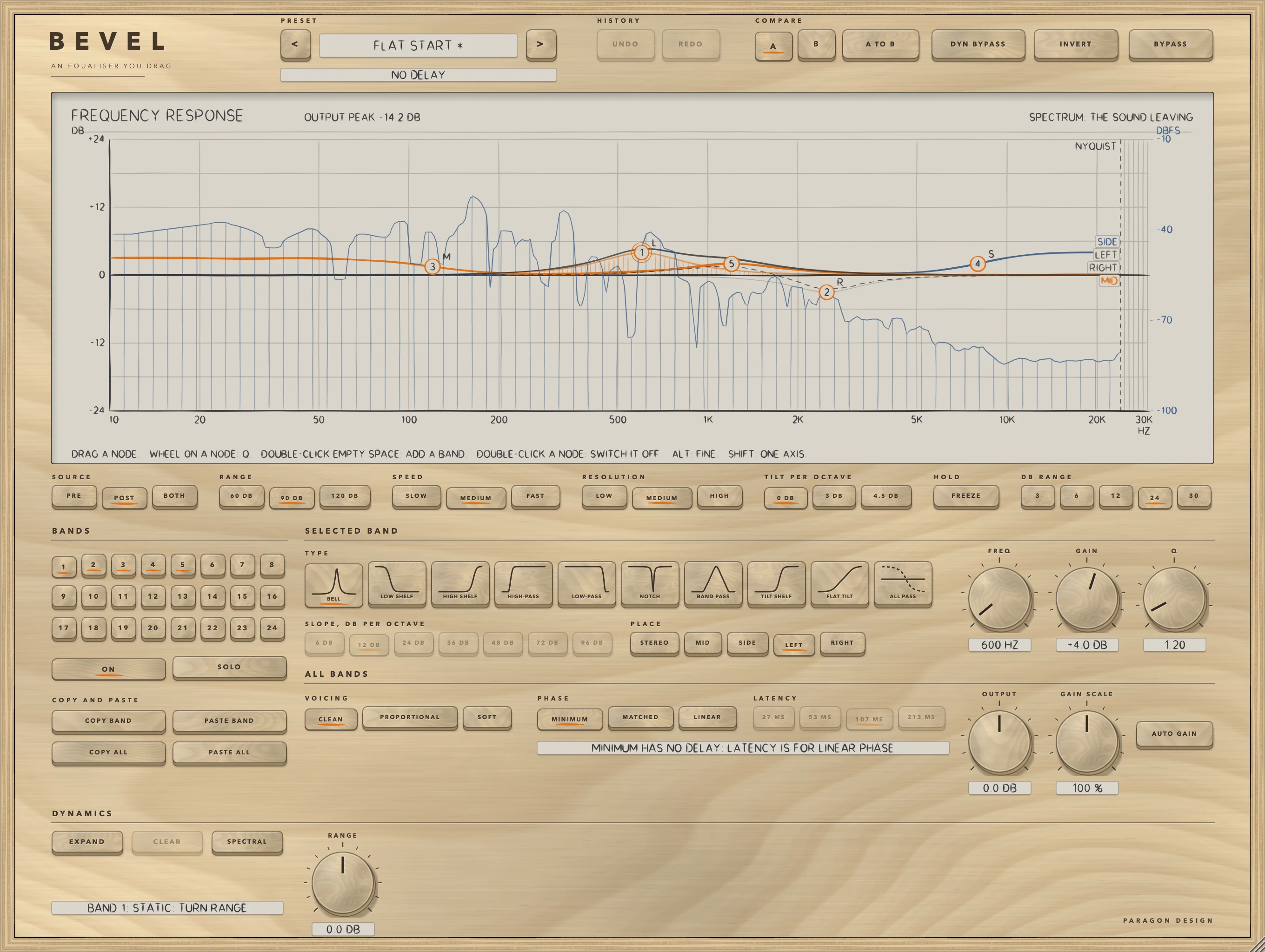
In MINIMUM and MATCHED the STEREO bands run first, then the LEFT and RIGHT bands, then BEVEL forms the middle and the side if a MID or SIDE band is working, runs the MID bands on the middle and the SIDE bands on the side, and puts them back: left is middle plus side, right is middle minus side. LEFT and RIGHT bands do not commute with MID and SIDE bands, which is why the path fixes their order. On a mono track the signal is all middle: a MID band acts on it as on a centred stereo signal, and SIDE, LEFT and RIGHT bands take no part.
VOICING
The three keys change how a bell's width follows its gain; every other shape ignores them. A bell is built with the Q you set, times qScale, times (1 plus qPerDb times the gain in dB, ignoring its sign), and a smaller Q is a wider bell.
| Voicing | qScale | qPerDb | Width at half the gain, Q 1 and Q 4 | Steepest flank, Q 1 and Q 4 |
|---|---|---|---|---|
| CLEAN | 1 | 0 | 1.387 and 0.359 octaves | 10.9 and 42.6 dB per octave |
| PROPORTIONAL | 1 | 1/12 | 0.714 and 0.180 octaves | 21.5 and 84.8 dB per octave |
| SOFT | 0.5 | 0 | 2.540 and 0.714 octaves | 6.0 and 21.5 dB per octave |
Measured on a +12 dB bell at 1 kHz, at a sample rate of 96 kHz, as the width where the bell is at half its gain in dB and the steepest slope. CLEAN keeps the Q you set at any gain. PROPORTIONAL multiplies it by 1 plus the gain in dB over 12, which is 2 at 12 dB, 2.5 at 18 dB and 3.5 at 30 dB, so a small move is wide and a large one narrow. SOFT builds the bell with half the Q, about twice as wide as CLEAN with its steepest flank about half as steep, for broad moves. A cut is the exact opposite of the boost of the same size in all three.
PHASE: MINIMUM, MATCHED and LINEAR
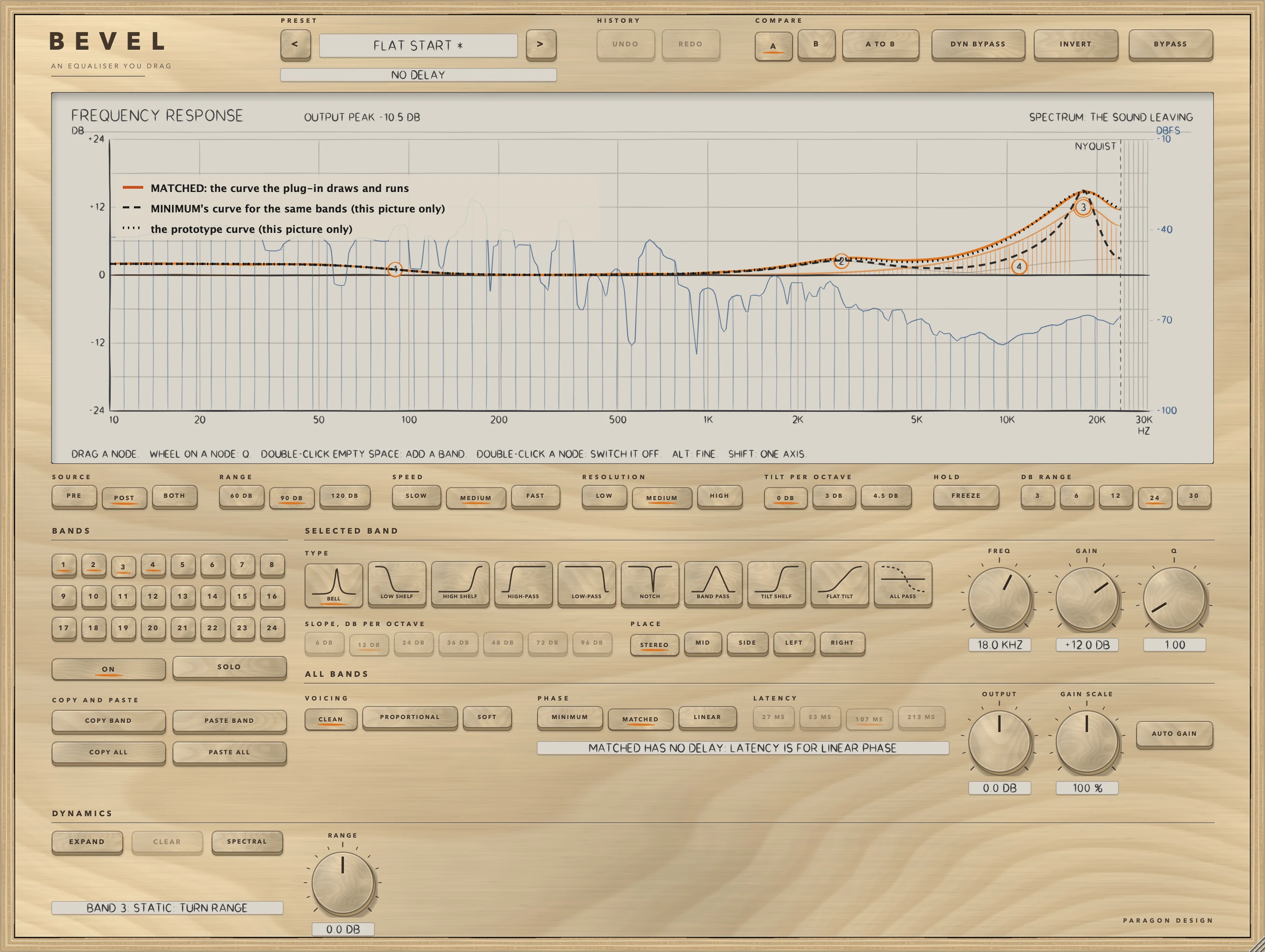
MINIMUM runs the filters directly with no delay, and a boost or cut bends the phase around it. It is also where a bell, shelf or notch near the top of the band departs from the curve it comes from: each band is designed from a continuous-time prototype by the bilinear transform with its centre pre-warped, which squeezes the response toward half the sample rate. A +12 dB bell at 20 kHz with Q 1 departs from the prototype by at most 8.159 dB at 44.1 kHz, 6.226 at 48, 3.295 at 96 and 0.951 at 192 kHz, measured from 20 Hz to 0.45 of the sample rate. The display draws the curve the engine runs, and nothing is corrected.
MATCHED has no delay and the same structure, one second-order section for each section of the prototype. It designs bells, shelves, tilts, notches and band passes so that the response equals the prototype's at 0 Hz, at the band's frequency and at half the sample rate, and follows it between: the same bell is 0.435, 0.445, 0.484 and 0.239 dB from the prototype at 44.1, 48, 96 and 192 kHz. High-pass, low-pass and all-pass bands keep MINIMUM's design in MATCHED, bit for bit, because the zeros of a cut are fixed at 0 Hz or at half the sample rate. Shelves and tilts with a Q of 3 or more are MINIMUM's design too, and between Q 1.5 and 3 the two designs are blended, so MATCHED gives little there. Near half the sample rate the phase of a bell, notch or band pass is further from the prototype's than MINIMUM's is: a bell by up to 67 degrees against 59 at 44.1 kHz. Switching between MINIMUM and MATCHED glides each band over about 20 ms, with no dip.
LINEAR runs the same curve, the one MINIMUM draws, as a symmetric filter that does not bend the phase. It is built bin by bin from the same designs and run by overlap-save in single precision, and its length, and so the delay, is set by LATENCY (see Latency). Detail narrower than a few bins is rounded off (see Limits). A flat path takes no part: with no band on, or every band at 0 dB, the output is the input delayed by the reported latency, bit for bit, and so is BYPASS. When a control moves, a new filter is designed in steps and crossfaded in over a hop, a little after the display moves. LINEAR follows MINIMUM's curve and not MATCHED's.
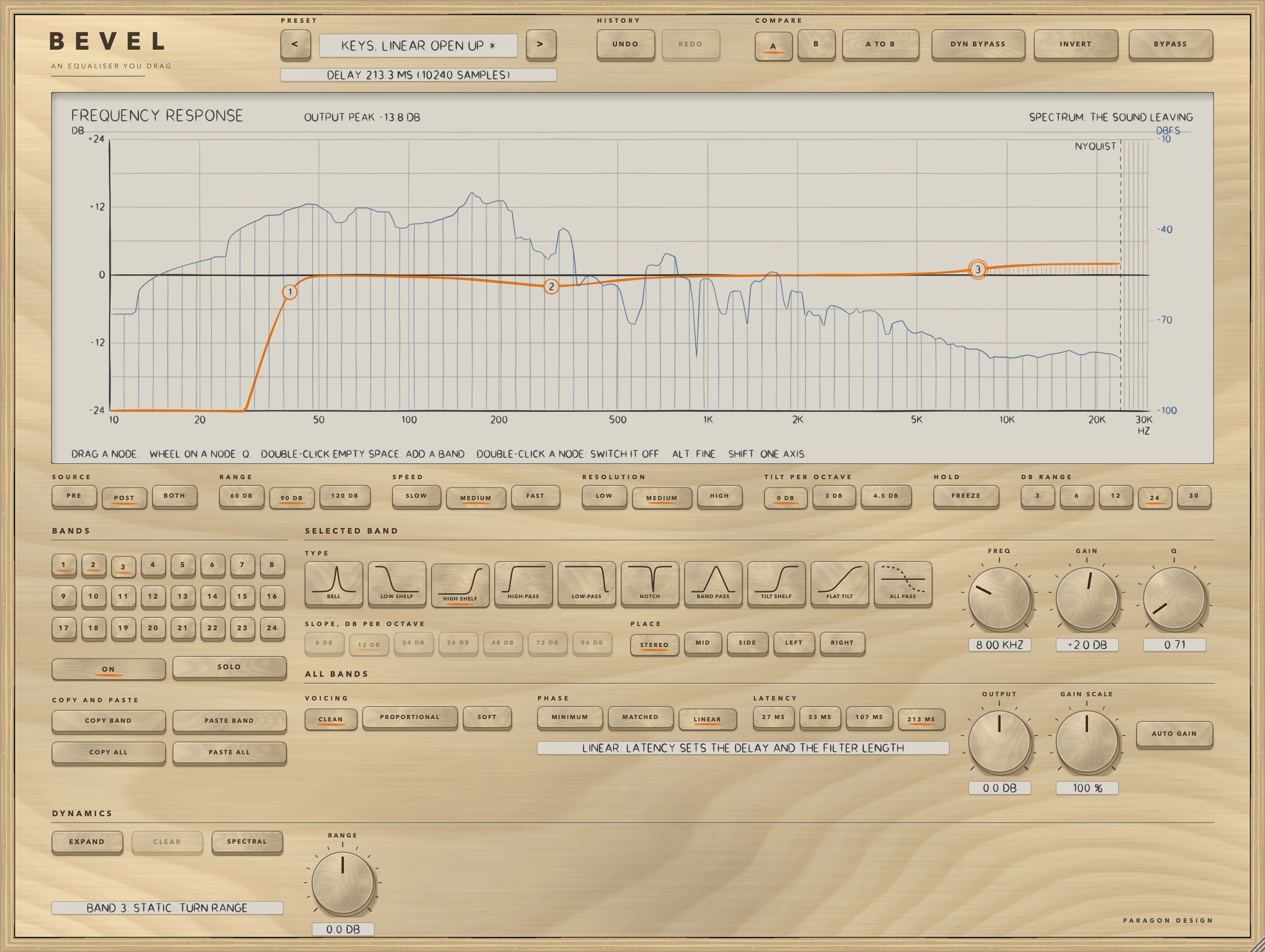
Each LATENCY key trades delay against what the filter can follow at low frequencies. A bell with a Q of 2 or less is followed within 0.5 dB, at 48 kHz, down to 20 Hz at 107 MS and 213 MS, from 120 Hz at 53 MS and from 520 Hz at 27 MS, and the pre-ringing of the filter cannot be longer than half its length: 21, 43, 85 and 171 ms. A shorter choice has less delay and cannot follow a narrow feature at low frequencies; it does not ring less for what it can follow.
Changing PHASE or LATENCY while playing leaves a gap: down over 5 ms, silence for the new delay when going to LINEAR, then up over 5 ms. Going to MINIMUM or MATCHED from LINEAR it is a dip of about 10 ms. MINIMUM and MATCHED glide into each other.
Dynamic bands
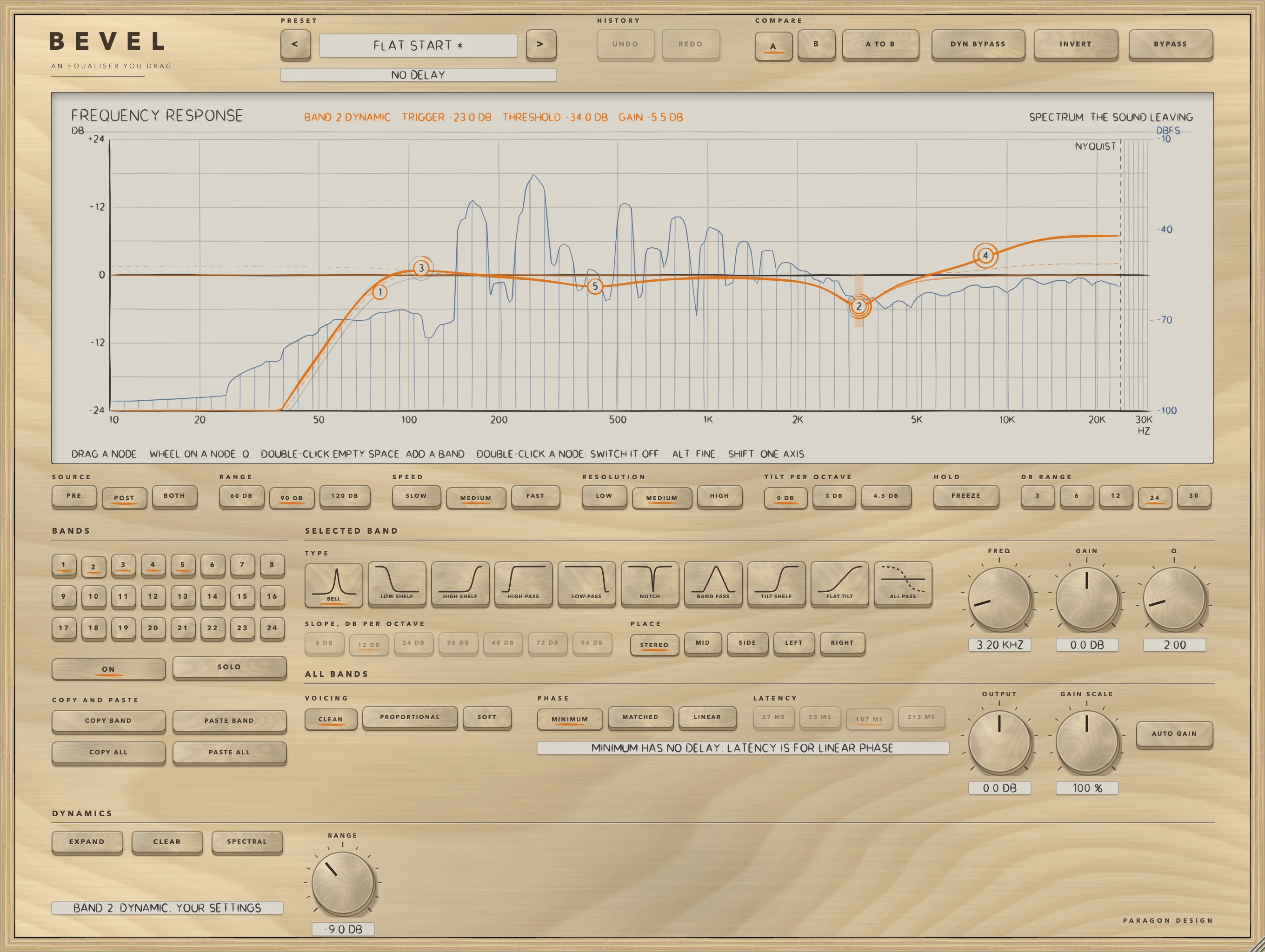
A band is dynamic when its RANGE is not 0. RANGE is how far the band's gain moves with the level of its trigger, from -30 to +30 dB: negative cuts as the trigger gets louder, positive boosts, and 0 is a static band exactly. The gain in force is the band's GAIN, as GAIN SCALE has scaled it, plus the dynamic part, held inside plus and minus 30 dB. A bell, a shelf or a flat tilt can be dynamic; the other shapes have no dynamics. CLEAR takes the selected band's RANGE back to 0 in one step. EXPAND shows the rest of the selected band's dynamics; collapsed, only RANGE and SPECTRAL show, and whatever the hidden controls hold still works.
The trigger's level goes through a curve. Nothing happens up to THRESHOLD, and the dynamic part rises along an S-shaped curve over the next 12 dB until the whole of RANGE is in force 12 dB over it: the curve is 3x squared minus 2x cubed, with x the distance over the threshold as a fraction of 12 dB. By the formula, with RANGE at -12 dB, a trigger 3 dB over the threshold gives -1.875 dB, 6 dB over gives -6.000 dB, 9 dB over gives -10.125 dB and 12 dB over gives -12.000 dB. THRESHOLD runs from -60 to 0 dB. ATTACK is how fast the dynamic gain moves while it is growing, the time to cover 63 percent of the way, from 0.1 to 250 ms; RELEASE is how fast it moves while shrinking, from 5 ms to 5 seconds. The gain is set every 16 samples, so an attack under about a third of a millisecond at 48 kHz is seen as one step.
AUTO sets THRESHOLD, ATTACK and RELEASE together, and a new band starts with AUTO on. The threshold follows the running level of the trigger, a power average with a time constant of 2 seconds that silence does not move, so the band reacts to what rises over its recent level at any programme level. ATTACK is 5 periods of the band's frequency and RELEASE 50, times 0.5 plus the size of RANGE over 24 dB: at 1 kHz with RANGE 12 dB, 5 ms and 50 ms. Turning THRESHOLD, ATTACK or RELEASE takes them over yourself.
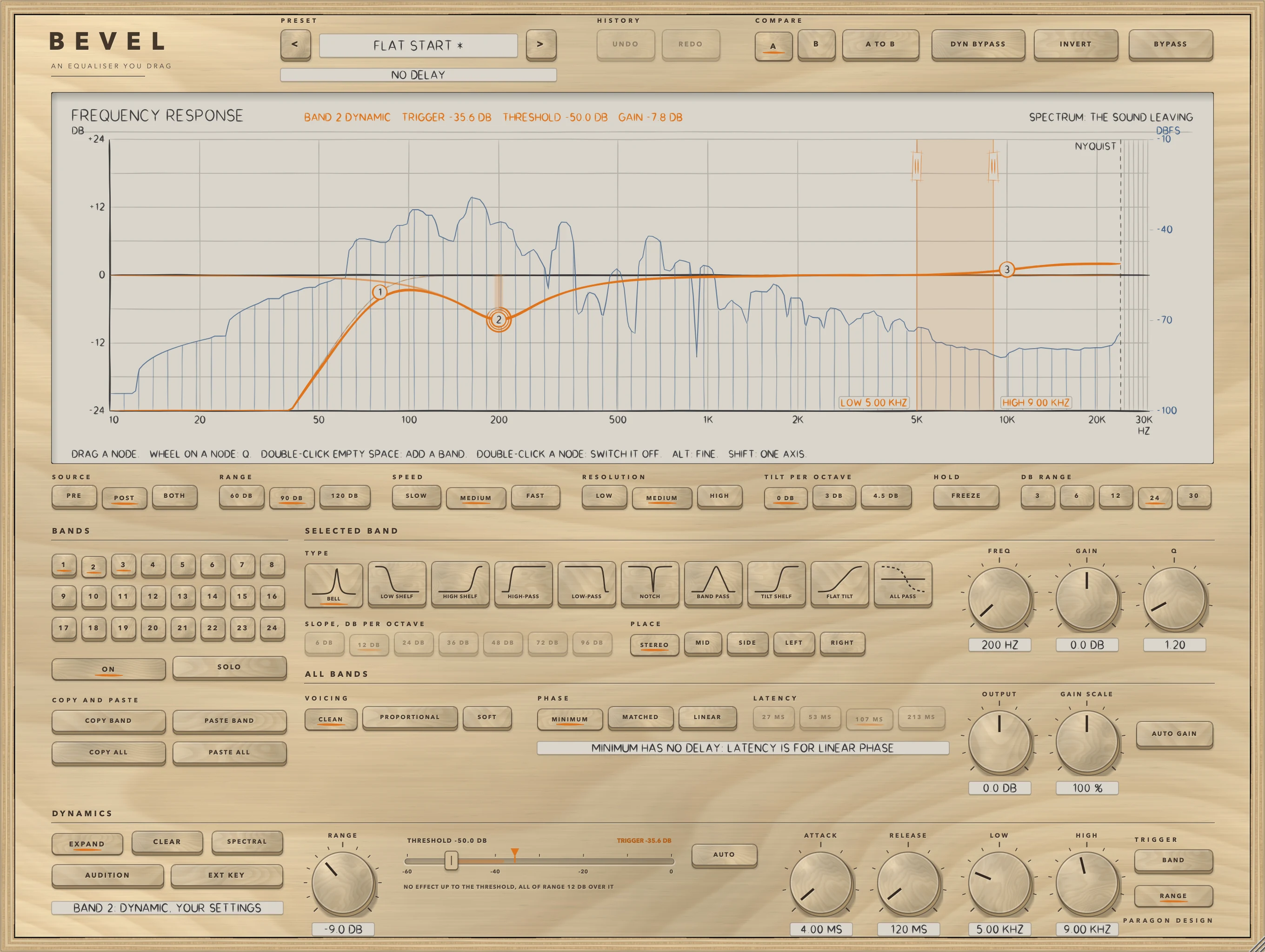
The trigger. TRIGGER BAND, the default, makes the band read its own region of the sound: a bell and a flat tilt a band pass around their frequency (the bell's Q held between 0.5 and 5), a low shelf the part below its frequency, a high shelf the part above it. TRIGGER RANGE makes it read the sound between LOW and HIGH, whatever its own frequency and Q, so a band at 200 Hz can be held down only while 7 kHz is loud. The span is a high-pass at LOW and a low-pass at HIGH in front of the detector, each a 4th-order Butterworth filter: 3.01 dB down at its corner, and with LOW at 200 Hz and HIGH at 8 kHz at 48 kHz it reads 24.10 dB down an octave under LOW and 38.17 dB down an octave over HIGH, as the low-pass steepens toward the Nyquist frequency. LOW and HIGH run from 20 Hz to 20 kHz, spaced evenly in octaves, with HIGH kept at least a third of an octave over LOW. Drag the two edges of the light band on the display, or turn the knobs; the first press of RANGE puts the span an octave either side of the band's frequency.
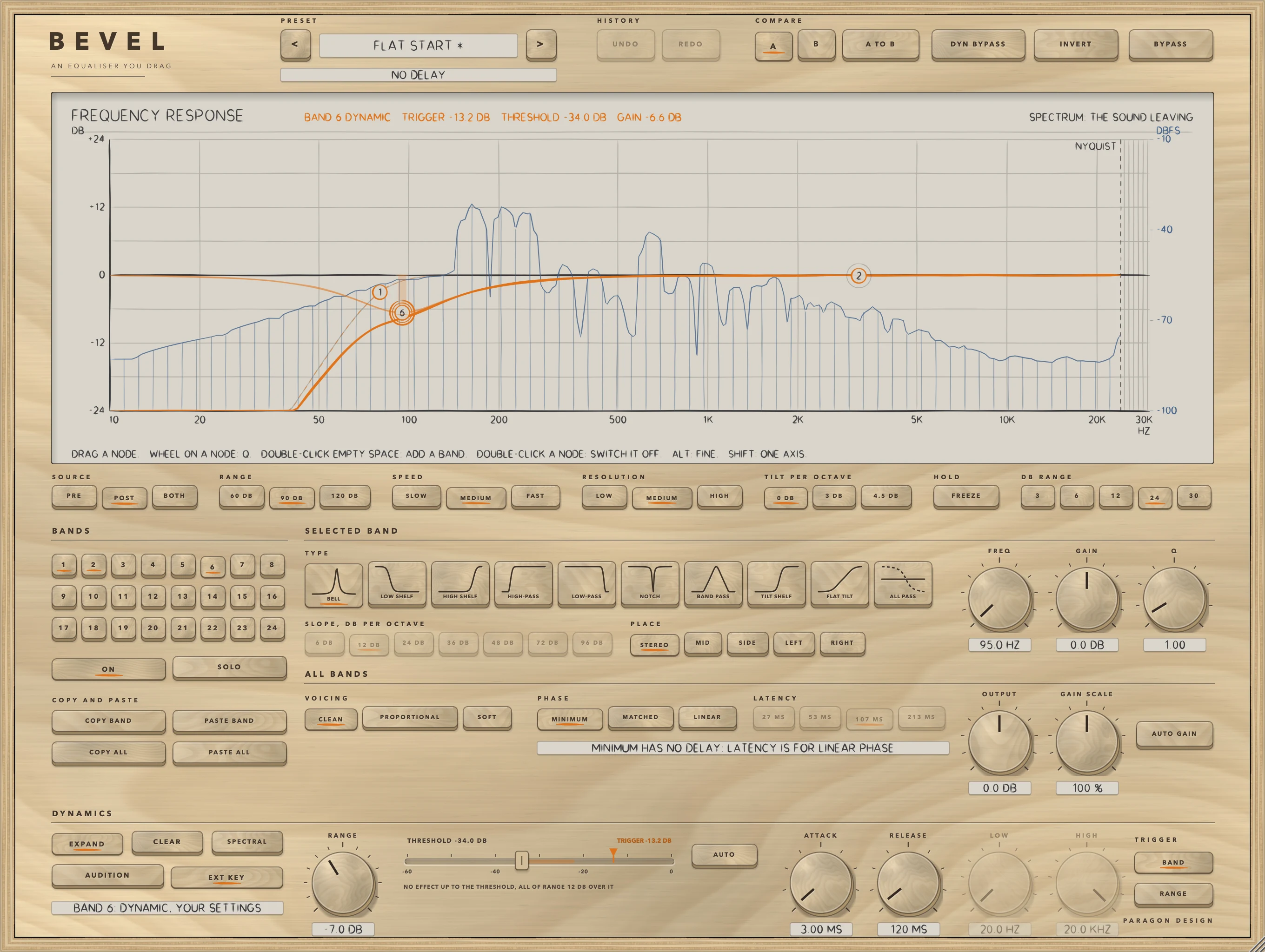
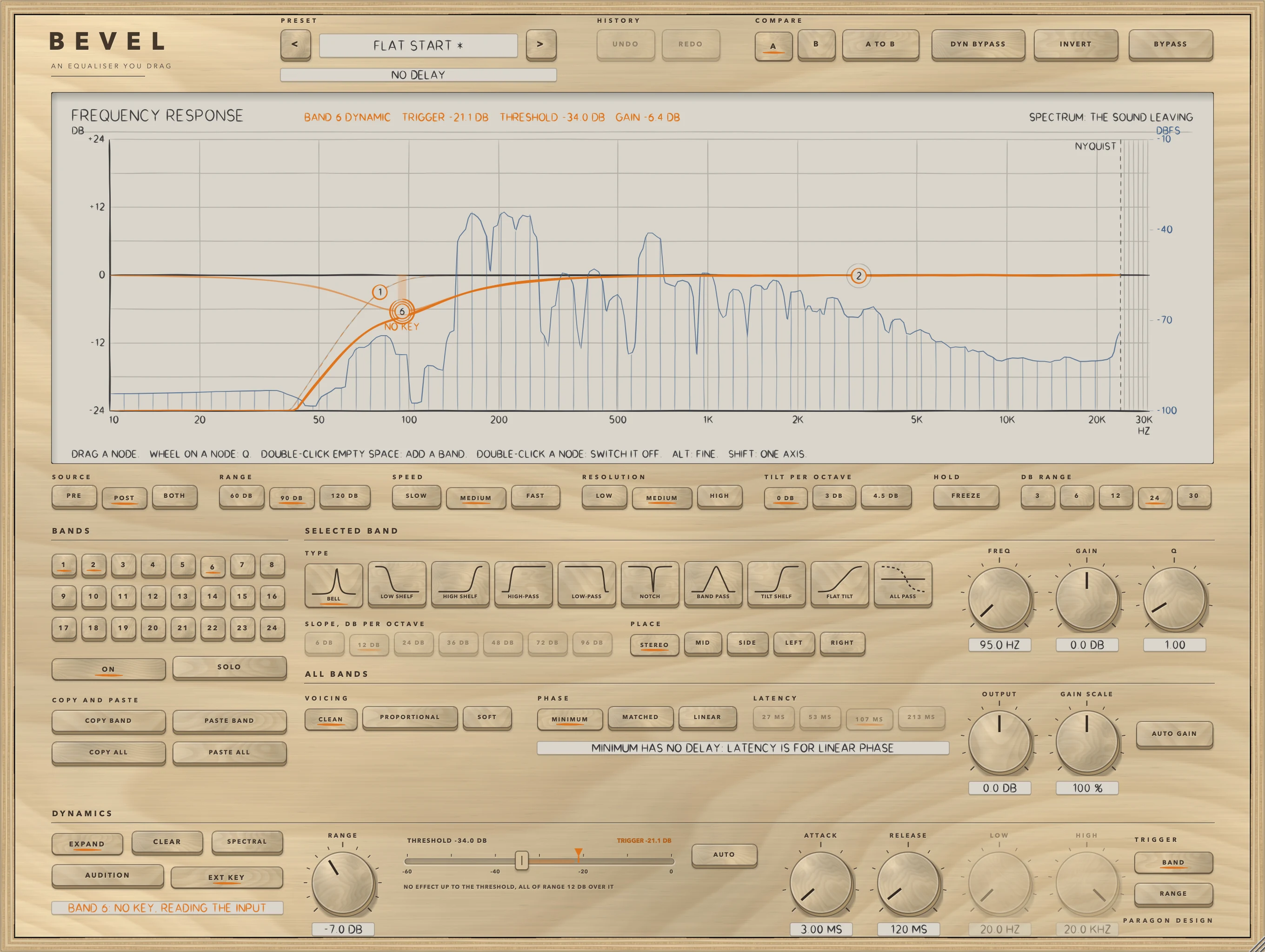
EXT KEY makes the trigger the side chain input instead of the sound, taken the same way: both sides for STEREO, the middle for MID, the side for SIDE, one side for LEFT and RIGHT, and a mono key is a centred signal. With no key connected the band reads the sound, and the display says NO KEY. AUDITION plays what the selected band's trigger hears instead of the sound: its region, or span, of the input, or of the key, through the same filters the detector uses. OUTPUT, AUTO GAIN and INVERT are off while it is on, and it ends when the window closes and is not kept.
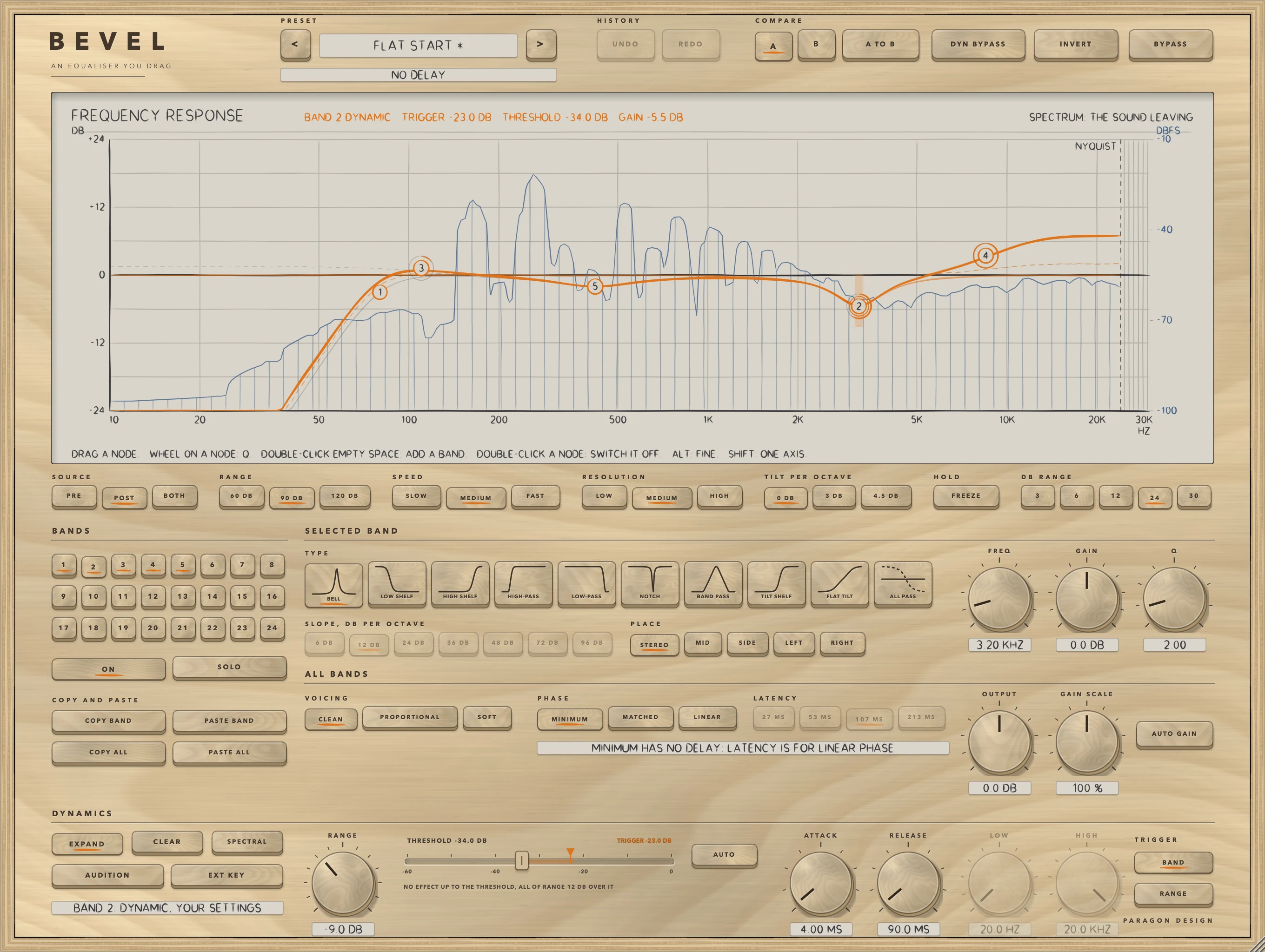
On the display. A dynamic band draws its curve at rest dashed and the curve in force solid. Its node rides the curve in force, a light bar at the selected or hovered band's node shows how far it can travel, from rest to the whole of RANGE, and a ring round the node fills as the dynamic gain grows. The readout of the selected dynamic band gives BAND n DYNAMIC, its trigger level, threshold and gain, for example TRIGGER -23.0 DB, THRESHOLD -34.0 DB and GAIN -5.5 DB. A line of lettering says when a mode stops the dynamics: DYNAMICS BYPASSED, NO KEY under the node, and LINEAR: REACTS LATER in the readout.
In LINEAR a dynamic band works, but later than in MINIMUM. The filter takes the gain only at hop boundaries, and from four hops earlier, so that it acts on the sound the reading came from. For a 1 kHz burst 40 dB over a quiet tone with ATTACK at 2 ms, the output gain reached 63 percent 5.4 ms later than in MINIMUM at 27 MS, 12.6 ms later at 53 MS, 30.6 ms at 107 MS and 66.9 ms at 213 MS, at 48 kHz.
SPECTRAL
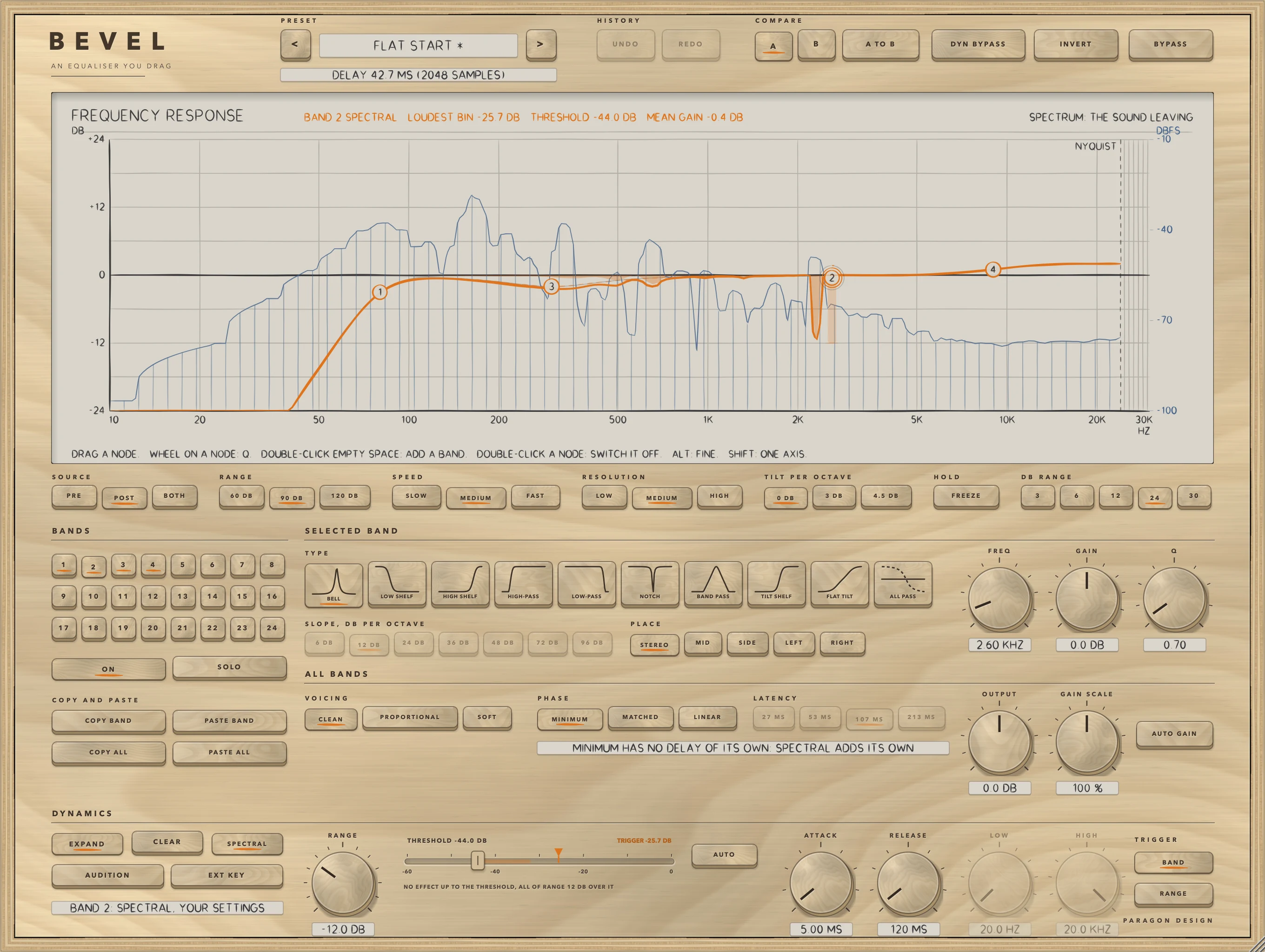
SPECTRAL works the selected band's dynamics out for each frequency of its own, in a short-time transform, instead of once for the whole band. A loud component inside the band is turned down alone, and quiet ones in the same band are left where they are. Each bin follows the same curve as before, nothing up to the threshold and the whole of RANGE 12 dB over it, from its own level, shaped by the band's own curve. The band's GAIN and shape still run as usual in the filters; the stage adds the dynamic part on top. It works on a bell, a shelf or a flat tilt that has a RANGE other than 0.
The transform is 2048 samples at 44.1 and 48 kHz, 4096 at 88.2 and 96 kHz and 8192 at 176.4 and 192 kHz, with a hop of a quarter of that: the same 42.7 ms window and 23.4 Hz bins at 48, 96 and 192 kHz. The delay is the transform's length, told to the host. The stage does not send the sound through the transform and back; it sends the change the gains make and adds it to the input held back by one transform, so with every gain at 1 the output is the input delayed, bit for bit, and the error of the transform is paid in proportion to the change. A bin's level is read on the scale where a steady sine reads its own level in dBFS: a -20 dBFS sine reads -20.000 dB at a bin's centre and 2.10 dB under half a bin off. White noise at -20 dBFS RMS reads -46.18 dB per bin on average at 44.1 and 48 kHz, -49.19 at 96 kHz and -52.19 at 192 kHz, so for noise-like material THRESHOLD goes about 26 dB under its RMS level at 48 kHz, 29 at 96 kHz and 32 at 192 kHz, while for tones it goes at their level.
Each bin takes the largest value of itself and its two neighbours before the band's shape is laid over it, so a cut spreads to the bins beside it and never gets shallower: one bin that moves, where the curve is flat at -12 dB, moves five, by -3, -9, -12, -9 and -3 dB. ATTACK and RELEASE work once a frame, so the shortest attack is a frame, 10.7 ms at 48 kHz. A frame's gains are laid over its whole length, so the gain runs ahead of the sound that causes it: for a -10 dBFS burst at 1 kHz over a -70 dBFS tone at the same frequency, with THRESHOLD at -40 dB at 48 kHz, the quiet tone's gain first left 0 by 0.1 dB 33.7 ms before the burst. Pressing SPECTRAL on or off while sound plays, with the stage already in the path, is a short dip through silence of the stage's delay, as changing PHASE is.
SOLO
SOLO plays only what the selected band acts on, through a filter that isolates it: a bell or a notch through a band pass at its frequency with its Q, a low shelf through a low-pass at its frequency, a high shelf through a high-pass, a high-pass, low-pass or band pass through itself, and a tilt or an all-pass the whole sound. OUTPUT, AUTO GAIN and INVERT are off while it is on. It follows the band you select, ends when the window closes and is not kept.
Copy and paste
COPY BAND copies the selected band's settings as plain text on the clipboard, to paste into another band, another BEVEL, or a note. PASTE BAND pastes it into the selected band, and refuses anything that is not a band. COPY ALL copies every band that is on, and PASTE ALL pastes a whole curve: its first band goes into the selected band and each of the others into the next band that is off. The text carries a version number; version 3 holds the four dynamics fields added in 0.5.0, text of versions 1 and 2 still reads with those fields at their defaults, and a later version is refused with a plain message.
OUTPUT, AUTO GAIN, GAIN SCALE and INVERT
OUTPUT is a gain after the equaliser, from -24 to +24 dB, and at 0 dB it changes nothing, bit for bit. AUTO GAIN adds the gain that cancels the average of the curve in dB over 20 Hz to 20 kHz, every octave counting alike. High-pass, low-pass, band pass and all-pass bands take no part in the average, and a band on MID, SIDE, LEFT or RIGHT counts half. A flat curve adds exactly 0 dB, and OUTPUT adds to it. AUTO GAIN is worked out from the curve and not from the sound, so it is not a loudness match.
GAIN SCALE, from 0 to 200 percent, scales the gain of every band together: 100 changes nothing, 0 takes every gain to nothing and 200 doubles every gain in dB. Bands with no gain are left alone, and the curves and nodes show the scaled gains. INVERT is described under Top bar and presets.
Names in the host
To a host BEVEL has 418 parameters: 408 for the bands and ten others. Band n, from 1 to 24, has 17: Band n On, Type, Frequency, Gain, Q, Slope and Place, and ten for the dynamics, Band n Dynamic Range, Threshold, Attack, Release, Auto, External Key, Spectral, Trigger, Trigger Low and Trigger High. The others are Output, Auto Gain, Voicing, Phase, Bypass, Gain Scale, Invert, Dynamics Bypass, Matched and Latency. The three PHASE keys set two parameters between them: Phase is MINIMUM or LINEAR, and Matched, which applies when Phase is MINIMUM, chooses MATCHED. Which band is selected, the spectrum's choices (but not FREEZE) and whether the dynamics section is expanded are kept with the saved state and are not host parameters. A state saved by an earlier version loads exactly, and the controls it did not have take their defaults.
Control reference
Every control on the panel, as the plug-in itself labels it. The description is the tooltip the plug-in shows when you rest the pointer on the control.
Top bar
| No. | Control | What it does | Range | Default |
|---|---|---|---|---|
| 1 | <Key | Previous preset | ||
| 2 | >Key | Next preset | ||
| 3 | UNDOKey | Undoes the last change made here: a drag, a turn of a knob, a key, a band added or removed, a preset, A or B. Up to 100 steps, not kept with the session. Command-Z. | ||
| 4 | REDOKey | Does again what UNDO undid. Command-Shift-Z. | ||
| 5 | SLOT AKey | Setting A: a complete setting, every band and every control but BYPASS, kept with the session. Click B to compare; the first time, B starts as a copy of what you have. | ||
| 6 | SLOT BKey | Setting B: the other complete setting. Click A to go back. Each letter keeps what it had when you left it. | ||
| 7 | COPY TO OTHER SLOTKey | Writes the setting in use over the other letter. | ||
| 8 | DYN BYPASSKey | Switches the dynamics of every band off at once: each band is its static curve, which in MINIMUM is the sound without any dynamic band, bit for bit. A band's settings are kept. It is not part of a preset. | ||
| 9 | INVERTKey | Flips the polarity of both channels at the output: a sign change, exact. Turning it over passes through zero in 5 ms, so nothing clicks. It is not part of a preset. | ||
| 10 | BYPASSKey | Hear the input, delayed by the same amount, so switching it never moves anything in time. |
Controls
| No. | Control | What it does | Range | Default |
|---|---|---|---|---|
| 11 | SOURCE PREKey | Behind the curve, show the spectrum of the sound arriving, before the equaliser. | ||
| 12 | BAND 1Key | Select band 1, to edit it below. A lit key is a band that is on; its node is on the display. | ||
| 13 | BAND 9Key | Select band 9, to edit it below. A lit key is a band that is on; its node is on the display. | ||
| 14 | BAND 17Key | Select band 17, to edit it below. A lit key is a band that is on; its node is on the display. | ||
| 15 | ONKey | Switch the selected band on or off. A band switched off fades out and keeps its settings. | ||
| 16 | COPY BANDKey | Copies the selected band's settings as plain text on the clipboard, to paste into another band, another BEVEL, or a note. | ||
| 17 | COPY ALLKey | Copies every band that is on, as plain text on the clipboard. | ||
| 18 | EXPANDKey | Shows the rest of the selected band's dynamics: THRESHOLD, AUTO, ATTACK, RELEASE, EXT KEY, AUDITION and the TRIGGER. Collapsed, only RANGE and SPECTRAL show; whatever the hidden controls are set to still works (a new band starts with AUTO on, which sets the threshold and the times for you). Kept with the session. | ||
| 19 | AUDITIONKey | Plays what the selected band's trigger hears instead of the sound: the band's own region of the input (or of the key, if EXT KEY is on), through the same filter the detector uses. OUTPUT, AUTO GAIN and INVERT are off while it is on. It follows the band you select, ends when the window closes and is not kept. A band needs to be on, and to be a bell, a shelf or a flat tilt. | ||
| 20 | BAND 2Key | Select band 2, to edit it below. A lit key is a band that is on; its node is on the display. | ||
| 21 | BAND 10Key | Select band 10, to edit it below. A lit key is a band that is on; its node is on the display. | ||
| 22 | BAND 18Key | Select band 18, to edit it below. A lit key is a band that is on; its node is on the display. | ||
| 23 | SOURCE POSTKey | Behind the curve, show the spectrum of the sound leaving, after the equaliser and OUTPUT. | ||
| 24 | BAND 3Key | Select band 3, to edit it below. A lit key is a band that is on; its node is on the display. | ||
| 25 | BAND 11Key | Select band 11, to edit it below. A lit key is a band that is on; its node is on the display. | ||
| 26 | BAND 19Key | Select band 19, to edit it below. A lit key is a band that is on; its node is on the display. | ||
| 27 | CLEARKey | Takes the selected band's RANGE back to 0: the band is static again (its settings are kept). One undo step. | ||
| 28 | BAND 4Key | Select band 4, to edit it below. A lit key is a band that is on; its node is on the display. | ||
| 29 | BAND 12Key | Select band 12, to edit it below. A lit key is a band that is on; its node is on the display. | ||
| 30 | BAND 20Key | Select band 20, to edit it below. A lit key is a band that is on; its node is on the display. | ||
| 31 | SOURCE BOTHKey | Show both: the sound arriving, faint, behind the sound leaving. | ||
| 32 | BAND 5Key | Select band 5, to edit it below. A lit key is a band that is on; its node is on the display. | ||
| 33 | BAND 13Key | Select band 13, to edit it below. A lit key is a band that is on; its node is on the display. | ||
| 34 | BAND 21Key | Select band 21, to edit it below. A lit key is a band that is on; its node is on the display. | ||
| 35 | SOLOKey | Hear only what the selected band acts on, through a filter that isolates it: a bell or a notch through a band pass at its frequency with its Q; a low shelf through a low-pass at its frequency; a high shelf through a high-pass; a high-pass, low-pass or band pass through itself; a tilt or an all-pass, the whole sound. OUTPUT, AUTO GAIN and INVERT are off while it is on. It follows the band you select, ends when the window closes and is not kept. | ||
| 36 | PASTE BANDKey | Pastes a band from the clipboard into the selected band. Anything that is not a band is refused, and nothing changes. | ||
| 37 | PASTE ALLKey | Pastes a whole curve from the clipboard: its first band goes into the selected band and each of the others into the next band that is off. Anything that is not a curve is refused. | ||
| 38 | EXT KEYKey | The selected band's trigger is the side chain input (the key) instead of the sound, taken the same way (both sides for STEREO, the middle for MID, the side for SIDE, one side for LEFT and RIGHT; a mono key is a centred signal). With no key connected the band reads the sound, and the display says NO KEY. | ||
| 39 | BAND 6Key | Select band 6, to edit it below. A lit key is a band that is on; its node is on the display. | ||
| 40 | BAND 14Key | Select band 14, to edit it below. A lit key is a band that is on; its node is on the display. | ||
| 41 | BAND 22Key | Select band 22, to edit it below. A lit key is a band that is on; its node is on the display. | ||
| 42 | SPECTRALKey | Works the selected band's dynamics out for each frequency of its own, in a short-time transform with bins 23.4 Hz wide at 48 kHz, instead of once for the whole band: a loud component inside the band is turned down alone, and quiet ones in the same band are left where they are. Each bin follows the same curve as before (nothing up to the threshold, the whole of RANGE 12 dB over it) from its own level, shaped by the band's own curve. The band's GAIN and shape still run as usual; this adds the dynamic part on top. While any band is spectral the plug-in adds 2048 samples of delay at 44.1 and 48 kHz (46.4 and 42.7 ms), 4096 at 88.2 and 96 kHz, 8192 at 176.4 and 192 kHz, and the host is told. Pressing it while sound plays is a short dip through silence, as changing PHASE is. It works on a bell, a shelf or a flat tilt that has a RANGE other than 0. | ||
| 43 | RANGE 60 DBKey | The spectrum shows 60 dB: from -10 down to -70 dBFS. | ||
| 44 | BAND 7Key | Select band 7, to edit it below. A lit key is a band that is on; its node is on the display. | ||
| 45 | BAND 15Key | Select band 15, to edit it below. A lit key is a band that is on; its node is on the display. | ||
| 46 | BAND 23Key | Select band 23, to edit it below. A lit key is a band that is on; its node is on the display. | ||
| 47 | BAND 8Key | Select band 8, to edit it below. A lit key is a band that is on; its node is on the display. | ||
| 48 | BAND 16Key | Select band 16, to edit it below. A lit key is a band that is on; its node is on the display. | ||
| 49 | BAND 24Key | Select band 24, to edit it below. A lit key is a band that is on; its node is on the display. | ||
| 50 | RANGE 90 DBKey | The spectrum shows 90 dB: from -10 down to -100 dBFS. | ||
| 51 | BELLKey | A bell: boosts or cuts around its frequency. Its width is set by Q and by the VOICING. | ||
| 52 | 6 DBKey | How steeply a high-pass or low-pass takes things out, and how many sections a band pass stacks: 6 dB per octave, built from one first-order section. | ||
| 53 | CLEANKey | A bell with the Q you set, at any gain: the usual audio-EQ cookbook peaking filter. A boost and a cut of the same size are exact opposites. | ||
| 54 | RANGEKnob | How far the selected band's gain moves with the level of its trigger. Negative cuts as the trigger gets louder, positive boosts, 0 is a static band exactly. The gain is the band's GAIN (as GAIN SCALE has scaled it) plus this much at full effect, held inside +-30 dB. A bell, a shelf or a flat tilt only. Double-click: 0. | −30 to 30 dB | 0 dB |
| 55 | RANGE 120 DBKey | The spectrum shows 120 dB: from -10 down to -130 dBFS. | ||
| 56 | 12 DBKey | How steeply a high-pass or low-pass takes things out, and how many sections a band pass stacks: 12 dB per octave, built from 1 second-order section. | ||
| 57 | PROPORTIONALKey | The bell gets narrower as its gain grows: the Q you set is multiplied by 1 plus the gain in dB over 12, so a small move is broad and a large one is pointed (2 times the Q at 12 dB, 2.5 times at 18 dB, 3.5 times at 30 dB). A cut matches the boost of the same size. | ||
| 58 | LOW SHELFKey | A low shelf: boosts or cuts everything below its frequency. At the frequency it is half its gain in dB. Q sets how sharply it turns. | ||
| 59 | SPEED SLOWKey | The spectrum averages over 1.2 seconds (the time for a new steady level to be 63 percent reached): steady and slow. | ||
| 60 | 24 DBKey | How steeply a high-pass or low-pass takes things out, and how many sections a band pass stacks: 24 dB per octave, built from 2 second-order sections. | ||
| 61 | HIGH SHELFKey | A high shelf: boosts or cuts everything above its frequency. At the frequency it is half its gain in dB. Q sets how sharply it turns. | ||
| 62 | 36 DBKey | How steeply a high-pass or low-pass takes things out, and how many sections a band pass stacks: 36 dB per octave, built from 3 second-order sections. | ||
| 63 | SPEED MEDIUMKey | The spectrum averages over 0.4 seconds (the time for a new steady level to be 63 percent reached). | ||
| 64 | SOFTKey | A bell built with half the Q you set, at any gain: about twice as wide as CLEAN's at the same setting, with its steepest flank about half as steep. Use it for broad moves. | ||
| 65 | 48 DBKey | How steeply a high-pass or low-pass takes things out, and how many sections a band pass stacks: 48 dB per octave, built from 4 second-order sections. | ||
| 66 | HIGH-PASSKey | A high-pass: takes out everything below its frequency, at the slope chosen with SLOPE. At the frequency it is Q as a ratio: 3.01 dB down at the default Q, 0.7071, which the panel shows as 0.71. The 6 DB slope is 3.01 dB down at the frequency whatever Q is. | ||
| 67 | SPEED FASTKey | The spectrum averages over 0.12 seconds (the time for a new steady level to be 63 percent reached): quick and restless. | ||
| 68 | 72 DBKey | How steeply a high-pass or low-pass takes things out, and how many sections a band pass stacks: 72 dB per octave, built from 6 second-order sections. | ||
| 69 | MINIMUM PHASEKey | No delay. The standard design of every band. A boost or cut also bends the phase around it, as any filter of this kind does, and near the top of the band a bell, shelf or notch departs from the prototype curve (the formula the filter is derived from), because the bilinear transform squeezes the response towards half the sample rate: a +12 dB bell at 20 kHz, Q 1, is 8.2 dB off it at 44.1 kHz and 0.95 dB at 192 kHz. | ||
| 70 | LOW-PASSKey | A low-pass: takes out everything above its frequency, at the slope chosen with SLOPE. At the frequency it is Q as a ratio: 3.01 dB down at the default Q, 0.7071, which the panel shows as 0.71. The 6 DB slope is 3.01 dB down at the frequency whatever Q is. | ||
| 71 | 96 DBKey | How steeply a high-pass or low-pass takes things out, and how many sections a band pass stacks: 96 dB per octave, built from 8 second-order sections. | ||
| 72 | RESOLUTION LOWKey | A transform of 2048 points: bins 23.4 Hz wide at 48 kHz. Quick, and coarse at the bottom. | ||
| 73 | MATCHED PHASEKey | No delay, the same structure as MINIMUM. Bells, shelves, tilts, notches and band passes are designed to follow the prototype curve at 0 Hz, at their frequency and at half the sample rate: a +12 dB bell at 20 kHz, Q 1, is within 0.44 dB of it at 44.1 kHz where MINIMUM is 8.2 dB off. Shelves and tilts fade into MINIMUM's design as Q goes from 1.5 to 3. High-pass, low-pass and all-pass bands are as in MINIMUM. Near half the sample rate the phase of a bell, notch or band pass is further from the prototype's than MINIMUM's is (a bell by up to 67 degrees against 59 at 44.1 kHz). Switching between the two changes each band over about 20 ms. | ||
| 74 | NOTCHKey | A notch: takes out a narrow band around its frequency. In MINIMUM it goes to nothing at the frequency itself; in LINEAR it is deep, but how deep depends on where that frequency falls between the filter's bins. Q sets how narrow. | ||
| 75 | STEREOKey | The band acts on left and right alike. | ||
| 76 | RESOLUTION MEDIUMKey | A transform of 4096 points: bins 11.7 Hz wide at 48 kHz. | ||
| 77 | BAND PASSKey | A band pass: passes a band around its frequency and takes out the rest. Exactly 0 dB at the frequency. Q sets how narrow. SLOPE stacks sections, each adding a skirt of about 6 dB per octave on both sides. | ||
| 78 | MIDKey | The band acts on the middle only: the sum of left and right, halved. The side is left exactly as it was. | ||
| 79 | LINEAR PHASEKey | The same curve as MINIMUM, as a symmetric filter that does not bend the phase. The sound is delayed by an amount LATENCY sets (the host is told, and the delay is written under the preset name). Detail narrower than a few of the filter's bins is rounded off. An all-pass does nothing in it. Changing PHASE or LATENCY while playing leaves a gap: going to LINEAR, the delay plus two 5 ms fades; going back, about 10 ms. | ||
| 80 | RESOLUTION HIGHKey | A transform of 8192 points: bins 5.9 Hz wide at 48 kHz. The finest, and it looks back over the longest stretch of sound. | ||
| 81 | AUTOKey | Sets THRESHOLD, ATTACK and RELEASE together. The threshold follows the running level of the trigger (a power average with a time constant of 2 seconds, which silence does not move), so the band reacts to what rises over its recent level at any programme level. ATTACK is 5 periods of the band's frequency and RELEASE 50, times 0.5 plus the size of RANGE over 24 dB (1 kHz, RANGE 12 dB: 5 ms and 50 ms). Press THRESHOLD, ATTACK or RELEASE to take them over yourself. | ||
| 82 | SIDEKey | The band acts on the side only: the difference of left and right, halved. The middle is left exactly as it was. | ||
| 83 | TILT SHELFKey | A tilt: a low shelf and a high shelf at the same frequency, one cutting what the other boosts, so the lows go one way and the highs the other. 0 dB at the frequency. GAIN is the difference between the highs and the lows. Q sets how fast it turns. | ||
| 84 | LATENCY 27 MSKey | The shortest delay: 1280 samples (26.7 ms at 48 kHz, 29.0 ms at 44.1; the same time at the higher rates). The filter is a quarter of the length of the default's: bells of Q 2 or less are followed within 0.5 dB from 520 Hz up at 48 kHz, and the pre-ringing cannot be longer than 21 ms. Live in LINEAR only. | ||
| 85 | TILT 0Key | The spectrum as it is. | ||
| 86 | LEFTKey | The band acts on the left channel only. With no other band on the right channel, the right channel comes out exactly as it went in. | ||
| 87 | ATTACKKnob | How fast the dynamic gain moves while it is growing: the time it takes to cover 63 percent of the way, 0.1 to 250 ms. The gain is set every 16 samples, so a time under about a third of a millisecond (at 48 kHz) is seen as one step. Turning it leaves AUTO. | 0.1 to 250 ms | 10 ms |
| 88 | LATENCY 53 MSKey | A delay of 2560 samples (53.3 ms at 48 kHz, 58.0 at 44.1). Half the length of the default's filter: bells of Q 2 or less are followed within 0.5 dB from 120 Hz up at 48 kHz, and the pre-ringing cannot be longer than 43 ms. Live in LINEAR only. | ||
| 89 | TILT 3Key | Tilts the picture of the spectrum about 1 kHz by 3 dB per octave: higher on the right, lower on the left. The picture only; the sound is not touched. | ||
| 90 | FLAT TILTKey | A straight tilt: rises or falls in a straight line against octaves, by about GAIN across the four octaves centred on the frequency, and flattens out beyond them. 0 dB at the frequency. Q does nothing. | ||
| 91 | RIGHTKey | The band acts on the right channel only. With no other band on the left channel, the left channel comes out exactly as it went in. | ||
| 92 | LATENCY 107 MSKey | The default: 5120 samples (106.7 ms at 48 kHz, 116.1 at 44.1), the delay LINEAR had before this control. Bells of Q 2 or less are followed within 0.5 dB down to 20 Hz and within 0.1 dB from 59 Hz up at 48 kHz; the pre-ringing cannot be longer than 85 ms. Live in LINEAR only. | ||
| 93 | TILT 4.5Key | Tilts the picture of the spectrum about 1 kHz by 4.5 dB per octave: higher on the right, lower on the left. The picture only; the sound is not touched. | ||
| 94 | ALL PASSKey | An all-pass: changes the phase and not the level. Half a turn of phase at its frequency; Q sets how fast the phase turns, and a higher Q delays the sound more at the frequency. In LINEAR it does nothing. | ||
| 95 | RELEASEKnob | How fast the dynamic gain moves while it is shrinking: the time it takes to cover 63 percent of the way back, 5 ms to 5 seconds. Turning it leaves AUTO. | 5 to 5000 ms | 100 ms |
| 96 | LATENCY 213 MSKey | The longest delay: 10240 samples (213.3 ms at 48 kHz, 232.2 at 44.1). Twice the length of the default's filter: bells of Q 2 or less are followed within 0.1 dB down to 20 Hz, and a Q 8 bell at 50 Hz within 0.5 dB from 73 Hz up at 48 kHz; the pre-ringing cannot be longer than 171 ms. Live in LINEAR only. | ||
| 97 | FREEZEKey | Holds the picture of the spectrum as it is; click again to let it move. Not kept with the session. | ||
| 98 | FREQKnob | The selected band's frequency, 10 Hz to 30 kHz. For a bell and a notch it is the centre; for a shelf the frequency where it is half its gain; for a high-pass or low-pass the corner. A band is never designed above 0.49 of the sample rate. Dragging the band's node across the display sets it too. | 10 to 30000 Hz | 80 Hz |
| 99 | OUTPUTKnob | Gain after the equaliser, -24 to +24 dB. It adds to AUTO GAIN. | −24 to 24 dB | 0 dB |
| 100 | LOWKnob | The low limit of the trigger range, 20 Hz to 20 kHz, kept at least a third of an octave under HIGH. It reads the sound through a 24 dB per octave high-pass at this frequency. Used with TRIGGER on RANGE. Dragging the left edge of the light band on the display sets it too (and takes HIGH along if they meet). Double-click: 20 Hz. | 20 to 20000 Hz | 20 Hz |
| 101 | PLOT 3Key | The curve plot reaches 3 dB above and below 0 dB. It changes the picture, not the sound. | ||
| 102 | GAINKnob | The selected band's gain, -30 to +30 dB (a bell, a shelf or a tilt). A band at exactly 0 dB does nothing at all. Dragging the node up or down sets it too. | −30 to 30 dB | 0 dB |
| 103 | GAIN SCALEKnob | Scales the gain of every band: 100 percent changes nothing, 0 takes every gain to nothing, 200 doubles every gain in dB. High-pass, low-pass, notch, band pass and all-pass bands have no gain and are left alone. The curves and the nodes show the scaled gains. Double-click to return to 100. | 0 to 200 % | 100 % |
| 104 | HIGHKnob | The high limit of the trigger range, 20 Hz to 20 kHz, kept at least a third of an octave over LOW. It reads the sound through a 24 dB per octave low-pass at this frequency. Used with TRIGGER on RANGE. Dragging the right edge of the light band on the display sets it too (and takes LOW along if they meet). Double-click: 20 kHz. | 20 to 20000 Hz | 20000 Hz |
| 105 | PLOT 6Key | The curve plot reaches 6 dB above and below 0 dB. | ||
| 106 | PLOT 12Key | The curve plot reaches 12 dB above and below 0 dB. | ||
| 107 | PLOT 24Key | The curve plot reaches 24 dB above and below 0 dB. | ||
| 108 | QKnob | The selected band's Q, 0.1 to 18: higher is narrower. In a bell the VOICING decides how it is used. In a high-pass or low-pass it is the response at the corner as a ratio. The wheel over the band's node sets it too. | 0.1 to 18 | 0.71 |
| 109 | AUTO GAINKey | Adds the gain that cancels the average of the curve over 20 Hz to 20 kHz, every octave counting alike. High-pass, low-pass, band pass and all-pass bands are left out of the average, and a band on MID, SIDE, LEFT or RIGHT counts half. OUTPUT adds to it. | ||
| 110 | TRIGGER BANDKey | The selected band reads its own region of the sound: a bell and a flat tilt a band-pass around their frequency (the bell's Q held between 0.5 and 5), a low shelf the part below its frequency, a high shelf the part above it. A spectral band reads each bin on its own. | ||
| 111 | TRIGGER RANGEKey | The selected band reads the sound between LOW and HIGH, whatever its own frequency and Q: a high-pass at LOW and a low-pass at HIGH, each 24 dB per octave (3.01 dB down at its corner; an octave under LOW it is 24.1 dB down, and over HIGH 24 dB or more, the more the higher the corner). The level of that stretch moves the whole band, so a band at 200 Hz can be held down only while 7 kHz is loud. A spectral band reads each bin on its own, weighted by those two filters: bins outside the range cannot move it. Drag the two edges of the light band on the display, or turn LOW and HIGH. The first press puts the range an octave either side of the band's frequency. | ||
| 112 | PLOT 30Key | The curve plot reaches 30 dB above and below 0 dB: the whole of a band's gain. |
Recipes
Cut rumble with a high-pass
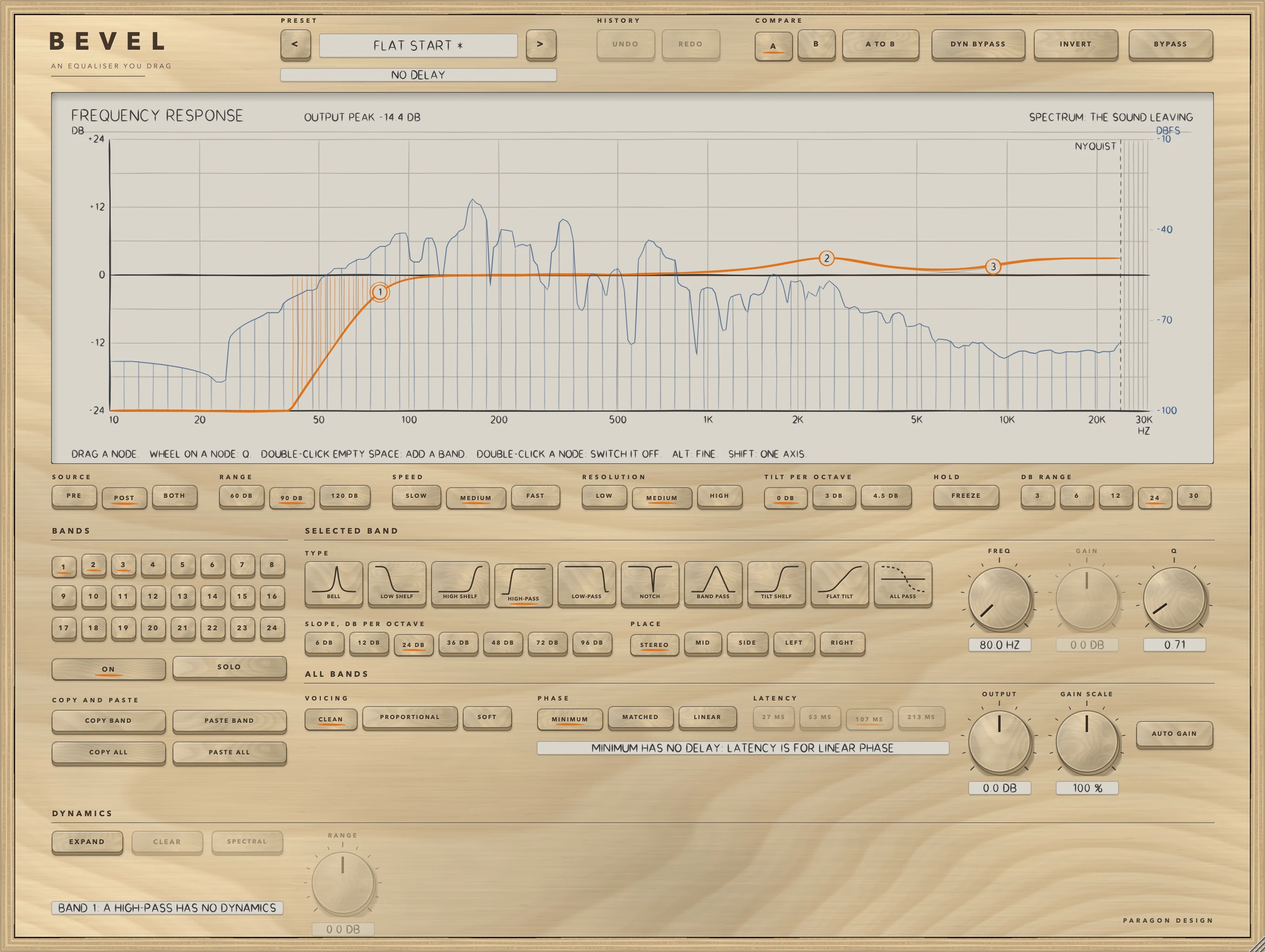
Double-click the display below 40 Hz, which adds a HIGH-PASS, set FREQ to 80 Hz and press 24 DB under SLOPE (Remove Rumble uses 36 DB). GAIN is dimmed, as in the figure, because a high-pass has none.
Take out mains hum
Choose Remove 50 Hz Hum: four notches of Q 18 at 50, 100, 150 and 200 Hz on bands 1 to 4. Remove 60 Hz Hum does the same at 60, 120, 180 and 240 Hz. A MINIMUM notch is zero at its frequency by design. Keep narrow notches in MINIMUM (see Limits).
Keep the low end in the centre
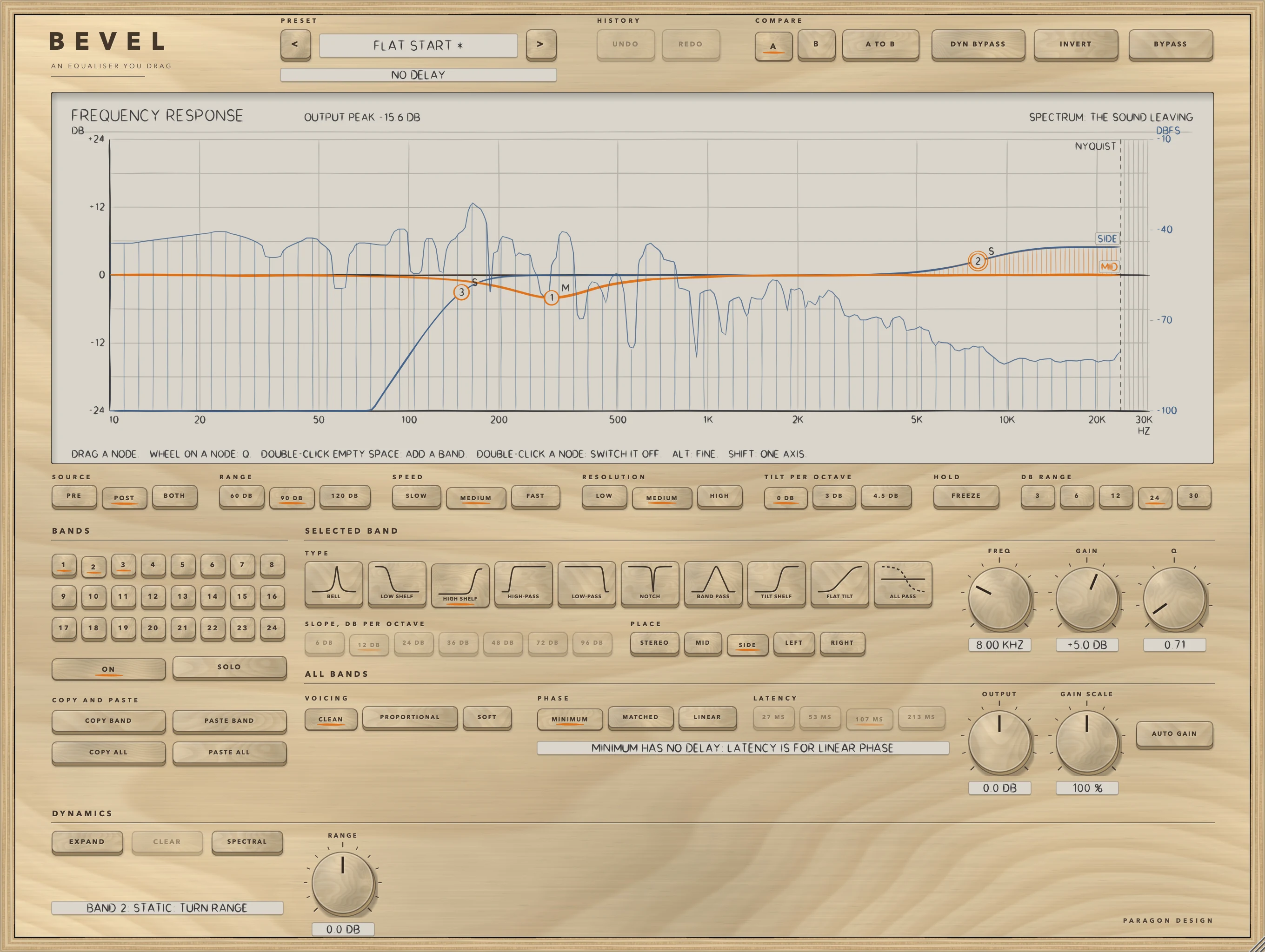
Choose Bass to the Centre: a 24 DB high-pass at 150 Hz on SIDE and nothing else, so the side loses what lies below 150 Hz and the middle is untouched. Master, Mid and Side Tidy sets a bell on MID and two bands on SIDE. In the figure one band is on MID, its node marked M, and two are on SIDE, marked S; band 2, selected, is a HIGH SHELF of +5.0 DB at 8.00 KHZ.
Hold a resonance down only while it rings
Choose Vocal, Hold Down a Resonance: a 12 DB high-pass at 80 Hz and a bell at 2.9 kHz with Q 6 and a GAIN of 0 dB, with RANGE at -9 dB, AUTO on and SPECTRAL on. A SPECTRAL band reads each frequency on its own, weighted by the band's own curve, so with a Q of 6 it watches the bins around 2.9 kHz, and with AUTO each bin's threshold is its own running level: what rises over a bin's recent level is turned down alone, and what does not is left. It adds 2048 samples of delay at 44.1 and 48 kHz, which the line under the preset name states. Vocal, Hold Down Harsh Bins is a wide bell at 3 kHz with RANGE -5 dB, SPECTRAL on and the trigger set to RANGE, 1.8 to 6 kHz.
Make room for a kick
Choose Bass, Make Room for the Kick: a bell at 80 Hz with Q 1.2, RANGE -6 dB, THRESHOLD -30 dB, ATTACK 3 ms and RELEASE 90 ms, with EXT KEY on. Route the kick to the side chain (see Setting it up) and the bell is turned down while the kick plays; with no key connected the display says NO KEY and the band reads the bass itself. Drum Bus, Mud Dips on Kick needs no side chain: it turns a bell at 250 Hz down by up to 4 dB while the sound between 50 and 100 Hz, the kick's region, is loud.
Compare a bell near the top of the band
Choose Master, Top Octave Lift, Matched: a +3 dB bell at 16 kHz and a +1.5 dB high shelf at 11 kHz with MATCHED on. Press MINIMUM to compare: at 44.1 kHz MATCHED's curve stays within 0.08 dB of the prototype's while MINIMUM's is 2.30 dB off. Fix, Notch the Whistle, Matched is a notch at 15.734 kHz, Q 12, with MATCHED on.
Presets
BEVEL has 80 presets in 9 categories. They are starting points chosen from measurements, not tuned by ear.
- Start: Flat Start
- Vocal: Lead Vocal, Clean Up; Lead Vocal, Forward; Vocal, Remove Mud; Vocal, Tame Harshness; Vocal, Add Air; Backing Vocal, Sit Back; Podcast, Close and Clear; Vocal, Telephone; Vocal, Band Pass Telephone; Vocal, Hold Back Harshness; Vocal, De-ess When Loud; Vocal, Presence Rises With Level; Vocal, Hold Down a Resonance; Vocal, Hold Down Harsh Bins
- Drums: Kick, Weight and Click; Snare, Crack; Snare, Fat; Toms, Clear Up; Overheads, Open Top; Hi-hat, Soften the Edge; Drum Bus, Fill Out; Room Mics, Pull Back; Kick, Hold Back the Boom; Snare, Hold Down the Ring; Drum Bus, Top Opens on Hits; Drum Bus, Mud Dips on Kick
- Bass: Bass Guitar, Round; Bass, Clear the Low End; Synth Bass, Make Room; Bass, Linear Low Pass, 96 dB; Bass, Even Out the Low End; Bass, Make Room for the Kick; Bass, Hold Down Boomy Notes
- Guitar: Electric Guitar, Rhythm; Electric Guitar, Lead; Acoustic Guitar, Bright; Acoustic Guitar, Thin Out; Guitar, Flat Tilt Darker; Guitar, Bite Only When Loud
- Keys: Piano, Clear and Bright; Electric Piano, Make Room; Synth Pad, Tuck Back; Keys, Linear Open Up; Piano, Control the Mud; Piano, Clear Mud on Low Notes
- Bus: Mix Bus, Gentle Smile; Group Bus, Clean Low End; Parallel Bus, Body; Drum Bus, Tilt and Low Cut; Mix Bus, Hold Back Build-Up; Bus, Tame Harsh Cymbals; Mix Bus, Low-Mid Opens With Kick
- Master: Master, Low Cut Only; Master, Tilt Brighter; Master, Mid and Side Tidy; Master, Tilt Shelf Up; Master, Flat Tilt Down; Master, Linear Low Cut, 96 dB; Master, Linear Phase Tidy; Master, Side Tilt Wider Top; Master, Air Opens With Level; Master, Linear Low End Control; Master, Side Air When Loud; Master, Top Octave Lift, Matched; Master, Hold Down Harsh Highs
- Fix: Remove Rumble; Remove 50 Hz Hum; Remove 60 Hz Hum; Cut Boxiness; Cut Sibilance; Reduce Room Boom; Roll Off the Top; Bass to the Centre; Fix, Bass Phase Shift; Fix, 6 dB Gentle Low Cut; Fix, Left and Right Apart; Fix, Resonance Held Down; Fix, Notch the Whistle, Matched; Fix, Hold Down Room Resonances
A preset sets every control except BYPASS, INVERT and DYN BYPASS, and a band it does not name is off at its defaults. FLAT START is the default state and what a new instance shows: no band on, OUTPUT 0 dB, AUTO GAIN off, GAIN SCALE 100 percent, CLEAN and MINIMUM, so the output is the input, bit for bit, with no delay. The presets grew with the plug-in. The 41 of 0.1.0 come first, with their names and every value; then presets that use the shapes, places and slopes of 0.2.0 and the dynamic bands of 0.3.0; then two that use MATCHED (Master, Top Octave Lift, Matched; Fix, Notch the Whistle, Matched); and, in 0.5.0, nine that use SPECTRAL or a trigger span (Vocal, Hold Down a Resonance; Bus, Tame Harsh Cymbals; Mix Bus, Low-Mid Opens With Kick; Drum Bus, Mud Dips on Kick; Piano, Clear Mud on Low Notes; Master, Hold Down Harsh Highs; Bass, Hold Down Boomy Notes; Fix, Hold Down Room Resonances; Vocal, Hold Down Harsh Bins). None of the new ones was listened to.
On pink noise at -18 dBFS RMS every preset of 0.4.0 and earlier changed the level by between -5.2 dB (Vocal, Band Pass Telephone) and +0.5 dB (Fix, Left and Right Apart), and the highest peak was -4.0 dBFS (Master, Top Octave Lift, Matched), against -4.9 for FLAT START. The preset trims were set from that measurement, and the presets are not level matched. The nine presets of 0.5.0 work on the level of what is played, so they were measured on a programme with level changes (14 s, peak -6 dBFS, 48 kHz): their level changes were between -0.89 and -0.01 dB, the largest gain a dynamic band used was between 1.09 and 8.94 dB, and the delay was 0 for the three that use a trigger span alone and 2048 samples for the six that use SPECTRAL. To the host BEVEL has one unnamed program, so the presets belong to its panel. In Logic Pro, plug-in settings are stored with the project file.
Measured
All figures are from the plug-in repository's tests, last run on 15 October 2026. WorkshopTests bevel ran 6130 checks, none failed (10:12 to 10:18 NZDT, on the tree that holds the finished 0.5.0 code, on a busy Mac), and the whole program ran 11173 checks, none failed, in the builder's tree before the merge; LATHE's equaliser group, which runs BEVEL's engine, ran 84 checks, none failed. The host test on the installed Audio Unit ran 67 checks, none failed, and Apple's Audio Unit validation (auval) passed with no warning and no failure, both on 15 October 2026 (about 10:27 NZDT) on the build made from the finished tree. The figures are on synthetic test signals, not recordings of music, at 48 kHz unless a row says otherwise. A figure marked limit is a bound the test sets, not a result. Every other figure is a measurement.
| What was measured | Result | Conditions |
|---|---|---|
| Response against the design curve | The worst difference at 44.1, 48, 96 and 192 kHz: bell and shelves 0.0000 dB; high-pass 0.0129, 0.0128, 0.0119 and 0.0127; low-pass 0.0140, 0.0134, 0.0084 and 0.0076; notch 0.0007, 0.0010, 0.0018 and 0.0017 dB (limit 0.05 dB). The shapes added in 0.2.0: band pass 0.0030, 0.0044, 0.0066 and 0.0023; tilt shelf and flat tilt 0.0001 to 0.0002; all-pass 0.0000; the 72, 96 and 6 dB cuts 0.0126, 0.0076, 0.0077 and 0.0057 dB. A boost plus the cut of the same size came to within 0.00002 dB of zero | Impulse response against a design written out again in the test, from 20 Hz to 0.45 of the sample rate where the curve is above -80 dB; every shape, three voicings, four settings each |
| Where the controls land, slopes | A bell's centre, a shelf's plateau and half-gain point, and a filter's corner were exact to 0.00000 dB at all four rates. The shallowest notch read -150.2 dB at its frequency. Slopes at 48 kHz over the first stopband octave: high-pass 11.80, 24.07, 36.14 and 48.18 dB per octave, low-pass 11.87, 24.22, 36.35 and 48.47 | Centres, plateaus and corners at 44.1, 48, 96 and 192 kHz; slopes between a quarter and a half of a high-pass corner and 2 and 4 times a low-pass corner |
| MATCHED against the prototype | A +12 dB bell at 20 kHz with Q 1 departs from the prototype's curve by at most 8.159, 6.226, 3.295 and 0.951 dB in MINIMUM and 0.435, 0.445, 0.484 and 0.239 dB in MATCHED, at 44.1, 48, 96 and 192 kHz | The response read back from an impulse against the prototype's transfer function written out again, from 20 Hz to 0.45 of the sample rate |
| Dynamic band: the curve and the times | The gain of a dynamic band against the curve, over 432 cases of four shapes, four RANGE values, three thresholds and a trigger from 4 dB under to 16 dB over: at most 0.0410 dB. With RANGE -12 dB, 0, 3, 6, 9 and 12 dB over the threshold gave -0.000, -1.880, -6.006, -10.130 and -12.000 dB against the curve's 0, -1.875, -6.000, -10.125 and -12.000. The 63 percent times for ATTACK and RELEASE of 10 and 100 ms were 10.33 and 101.33 ms; for 2 and 20 ms, 2.33 and 21.33 ms | 1 kHz tones; times at 48 kHz, the gain set every 16 samples. AUTO's times against its formula: at 1 kHz with RANGE -12 dB, 5.00 ms attack (formula 5.00) and 50.7 ms release (formula 50.0) |
| Dynamic band: AUTO and distortion | Three programmes of different loudness (peaks of -32, -12 and +8 dBFS) through a bell with AUTO gave dynamic gains that differed by at most 0.00002 dB. THD+N of a steady -10 dBFS tone through a 12 dB dynamic cut was -125.1 dB at worst over five cases and three ATTACK and RELEASE settings, the fastest 0.1 and 5 ms | Bell at 3 kHz, RANGE -9 dB for the programmes; threshold -30 dB for the distortion. A fast setting on a signal that changes level within a few periods has the gain modulation's sidebands (see Limits) |
| TRIGGER RANGE filters | The two filters are -3.010 dB at each corner; with LOW at 200 Hz and HIGH at 8 kHz, 24.10 dB down an octave under LOW and 38.17 dB down an octave over HIGH. AUDITION matched the filter written out again to 0.0000000075 | 48 kHz, formulas written out again in the test |
| SPECTRAL | A signal with every bin over the threshold got the same gain curve from a SPECTRAL band as from a time-domain one, within 0.3 dB per third of an octave (limit). Two tones in one band, one 20 dB over the threshold and one 20 dB under: the loud one moved by the curve within 0.5 dB (limit), the quiet one by at most 0.012 dB, where a time-domain band moved both. The delay was exactly 2048, 2048, 4096 and 8192 samples. The transform and back, which the stage does not use for the sound, is -136.9 to -136.0 dB under it | White noise far over the threshold, a bell at 1 kHz, RANGE -12 dB; five shapes at two rates for the tones; four rates |
| Rest, bypass, blocks | The output was the input bit for bit with no band on, with flat bands, and in bypass, delayed by the reported latency in LINEAR and with a working SPECTRAL stage. Blocks of 1, 7, 64 and 4096 samples gave exactly the output of 512. At its defaults the 0.5.0 engine gave the output of the frozen 0.4.0 engine bit for bit in MINIMUM, MATCHED and LINEAR | Pink noise; the frozen engines in tests/bevel040 |
| Moving a control | Through 13 changes the largest step between samples was at most 1.28 times the sine's own (a jump of FREQ from 100 Hz to 1.6 kHz at +12 dB, Q 4) and the largest second difference 3.84 times; the same jump with no glide reached 10.18 and 228.1 times, and switching a high-pass on and off with no glide reached 72.03 and 5497.7. In LINEAR the largest step was 0.995 to 1.000 times | A sine under each change, 60 to 200 Hz |
| LINEAR | The worst difference from the design curve was 0.0113, 0.0246, 0.0265 and 0.0137 dB at 44.1, 48, 96 and 192 kHz. The reported delay, the impulse response's largest tap and the filter's group delay agreed for every LATENCY choice to 0.001 sample. A dynamic band in LINEAR was later than in MINIMUM by 3.1, 9.6, 22.7 and 49.2 ms at the first dB and 5.4, 12.6, 30.6 and 66.9 ms at 63 percent for the four LATENCY choices | Sixteen settings; a 1 kHz burst 40 dB over a quiet tone, RANGE -12 dB, THRESHOLD -30 dB, ATTACK 2 ms at 48 kHz |
| Cost | The whole plug-in at 48 kHz, stereo, in percent of one core, with 0, 1, 4, 8 and 24 SPECTRAL bands: MINIMUM 0.15, 0.59, 1.07, 1.30 and 2.35; LINEAR 0.38, 0.82, 1.23, 1.46 and 2.51. Four SPECTRAL bands at 96 kHz cost 2.10 in MINIMUM and 2.58 in LINEAR | Thread CPU time, 512-sample blocks, the least of several runs, Intel Core i9, a quiet moment on a shared Mac (load 3.4 to 4.2). On a busier machine the same figures read 1.2 to 1.7 times higher |
The cost of bands that are not SPECTRAL, from the same tests on a busy Mac (load 8 to 39, so read them as upper readings): 24 bells and shelves still 1.34 to 1.39 percent of one core in MINIMUM and MATCHED, 2.42 and 2.50 with four of them dynamic, and about 8 with all 24 dynamic; LINEAR with eight busy bands still 0.88 to 1.09 percent at 44.1 and 48 kHz, 2.07 to 2.68 at 96 kHz and 4.22 to 5.92 at 192 kHz. A trigger on RANGE costs 1.10 to 1.32 times the same dynamic bands on BAND. The tests fail a run only over four times a budget, and five budgets printed "not met" on that run; each message says so.
Limits and what is not verified
- Nothing has been checked by ear. Every figure is a measurement of a synthetic signal, and the voicings, MATCHED, LINEAR, the dynamic bands and the 80 presets were chosen from numbers. The spectral band's artefacts and time behaviour matter most: whether a per-bin cut is steady on a voice or a mix, whether its gain running ahead of a sudden sound can be heard, and whether a band with a short ATTACK and RELEASE flutters. The nine presets of 0.5.0 and the two MATCHED presets have not been listened to.
- Cramping at the top of the audio band in MINIMUM. The design pre-warps the centre only, so a bell near the top of the band is not the prototype's bell: its gain at the centre is exact, but its shape is the prototype's read at warped frequencies, and the departure grows as the centre nears half the sample rate (8.159 dB for a +12 dB bell at 20 kHz at 44.1 kHz). MATCHED reduces it for bells, shelves, tilts, notches and band passes, and does not for high-pass, low-pass and all-pass bands, nor for shelves and tilts with a Q of 3 or more. In 8 of 768 extreme settings MATCHED is worse than MINIMUM: tilt shelves with Q 0.3 and their centre at 0.49 of the sample rate, +-30 dB, 13.26 dB from the prototype against 12.61 to 12.63. The phase of a bell, notch or band pass near half the sample rate is further from the prototype's in MATCHED. MATCHED's phase has not been measured against anything but the prototype's.
- LINEAR cannot do everything. A notch cannot be infinitely deep: for notches of Q 4 and 8 from 600 Hz to 9 kHz the depth at the notch frequency ran from -26.5 dB (the shallowest, with 5.86 Hz bins) to -127.6 dB, and the response was within 0.0326 dB of the design curve everywhere more than 6 bins from the null. Detail narrower than a few bins is rounded off, and a shorter LATENCY follows less of it at low frequencies (see PHASE). LINEAR follows MINIMUM's curve, not MATCHED's. An all-pass does nothing in LINEAR. A dynamic band in LINEAR reacts later, by up to 22.7 ms at the first dB and 66.9 ms at 63 percent in the measurements above.
- Changing PHASE, LATENCY or SPECTRAL while sound plays dips the output, and the first design of LINEAR's filter, made in one go at the change, takes longer than one block at the highest rates: at 192 kHz 3.7, 7.8 and 16.9 ms for LATENCY 53, 107 and 213 MS, against a block of 512 samples that is 2.7 ms long.
- SPECTRAL's gain runs ahead of the sound that causes it, by up to a window: in the test the quiet tone's gain first left 0 by 0.1 dB 33.7 ms before the burst. At 96 kHz four SPECTRAL bands cost more than the 2 percent the lower rates stay under, mono costs 0.66 to 0.87 of stereo and not half, and an instance holds 10.0 MB at 44.1 kHz, 9.9 at 48, 17.1 at 96 and 31.3 at 192 kHz.
- A fast ATTACK and RELEASE on material that changes level within a few periods puts the gain modulation's sidebands into the sound: two tones at 1000 and 1200 Hz through a bell at 1.1 kHz with ATTACK 0.1 ms and RELEASE 5 ms left a component at 1400 Hz, 34.4 dB under the louder tone.
- The spectrum is the mean of left and right, so sound only in the side does not show. It is a picture of the shape and not a meter.
- AUTO GAIN depends on PLACE and not on the channel count; on a mono track a MID band acts on the whole signal but counts half, and a SIDE band does nothing but still counts half.
- Not verified in Logic Pro: the points in the note under In Logic Pro, which rest on Apple's pages on plug-in latencies, plug-in formats, adding and bypassing plug-ins and side chains. A host that delivers a silent bus when no side chain is chosen would make EXT KEY read silence, with no NO KEY message; no real host was tried.
- Not verified: the VST3 in any host. The editor inside a real host: the host test checks that it opens at 1360 by 1024 and can be shown and hidden. The wheel, Alt and Shift on a real mouse or trackpad: the gestures are tested as arithmetic and through synthesized mouse events. A real host's delay compensation for LINEAR and SPECTRAL. Native Apple silicon: the development builds contain x86_64 code only, and a release build, which is universal, has not been run there. Sample rates between the four tested (88.2 and 176.4 kHz follow the sizes of 96 and 192 kHz by the same rule). Sessions of hours. Editors scaled by a host.
- The cost figures are from one Intel Mac, shared with other work, and moved by 1.2 to 1.7 times between a quiet and a busy run. BEVEL is a working name and may change.
Troubleshooting
Nothing changes
Check that the band is on: its key is lit. A bell, shelf, tilt shelf or flat tilt at exactly 0 dB does nothing, and a band with RANGE at 0 is static. A MID band does nothing to a signal that is only in the side, a SIDE band does nothing to a centred or mono signal, a LEFT band leaves the right channel alone and a RIGHT band the left. VOICING changes bells only. If the display moves but the sound does not, check BYPASS and DYN BYPASS.
The track is late, or there is a gap when I press LINEAR or SPECTRAL
PHASE is LINEAR or a band is SPECTRAL, and the line under the preset bar shows the delay. Press MINIMUM or MATCHED, and take SPECTRAL off or set RANGE to 0, for NO DELAY. With the host's delay compensation off, the track is late by the delay in the Latency tables. In Logic Pro, plug-in latency compensation is set with the Compensation pop-up menu in Logic Pro > Settings > Audio > General, and Apple's page says there can be a slight lag between starting playback and the tracks playing in sync. Pressing LINEAR or SPECTRAL while the project plays dips the output for the delay plus the two 5 ms fades.
A dynamic band does nothing
Its RANGE may be 0, which is a static band. The level of its trigger must rise over THRESHOLD, which AUTO sets from the running level, so a steady sound that has been there for a while does not move an AUTO band. Press AUDITION to hear what the trigger reads. With EXT KEY on and no key connected, the display says NO KEY and the band reads the sound; connect a side chain (see Setting it up). A tilt shelf, notch, band pass, high-pass, low-pass and all-pass have no dynamics.
GAIN is dimmed
A HIGH-PASS, LOW-PASS, NOTCH, BAND PASS or ALL PASS has no gain, so GAIN is dimmed and turning it does nothing. Use Q, the response at the corner for a high-pass or low-pass and the width for a notch, and SLOPE.
AUTO GAIN does not match the loudness
AUTO GAIN cancels the average of the curve in dB across 20 Hz to 20 kHz. It does not measure the signal, so how a sound changes depends on where its energy lies. Set the level with OUTPUT against your own meter.
A MID band on a mono track
A mono track has no side. BEVEL treats the signal as all middle, so a MID band acts on it as on a centred stereo signal, and SIDE, LEFT and RIGHT bands do nothing. On a mono channel strip Logic Pro loads the Mono plug-in format as a mono plug-in. AUTO GAIN still counts a MID or SIDE band at half.