What it is
SCRAPER is a de-esser, a dynamic band cutter. A band is placed with FREQUENCY, from 3 to 12 kHz, and Q, from 0.5 to 8. A detector listens to that band, and while its level is over THRESHOLD the band is turned down, by as much as the level is over it and never more than RANGE, from 0 to 18 dB. Nothing is taken off 3 dB or more under THRESHOLD; around it there is a knee 6 dB wide, which takes 0.75 dB off at the threshold itself; 3 dB and more over it the band is turned down decibel for decibel, up to RANGE.
ATTACK, from 0.1 to 10 ms, is how fast the cut comes in, and RELEASE, from 10 to 300 ms, how fast it lets go. With RELATIVE on, THRESHOLD is measured against the voice's own running level, so one setting follows a loud take and a quiet one; off, it is a level in dBFS. With WIDE on, the whole signal is turned down by the amount the band would have been, instead of only the band. LISTEN plays what the detector hears, to help find the frequency. BYPASS crossfades to the input over 5 ms.
There is no delay at any setting and no tail. With RANGE at 0 dB the output is the input, bit for bit, with WIDE on or off. SCRAPER has 10 host parameters and 20 presets in 6 categories. The engine is the de-essing form of the dynamic band in LATHE, copied for SCRAPER and held to the original, bit for bit, by a test.
SCRAPER is a premium plug-in: it works for 14 days and then needs a licence, as the Getting started manual describes. The name SCRAPER is a working name.
Setting it up
Formats and channels
SCRAPER is an effect, in Audio Unit and VST3 formats. The VST3 is built from the same code, but no test loads it in a host. A host lists the Audio Unit as Scraper De-Esser, from Paragon Design. It takes one channel in and gives one out, or takes two in and gives two out; one in and two out, and two in and one out, are refused. SCRAPER has no sidechain and no MIDI: the detector listens to its own input. The bundle declares macOS 11.0 as the minimum, and the panel is 1200 by 760 pixels, resizable from 70 to 170 percent.
Latency
SCRAPER has no delay: the processor told the host 0 samples at 44.1, 48, 88.2, 96, 176.4 and 192 kHz, at every setting, and BYPASS and a trial that is over keep it. The line under the preset name reads LATENCY 0 SAMPLES. The tail the host is told is 0 as well: after a burst of noise ends, the output of the cut at its slowest is under -100 dBFS within a few milliseconds, which the processor tests measure.
In Logic Pro
- Click an Audio Effect slot in the channel strip, then choose Scraper De-Esser from the pop-up menu. Audio Units plug-ins appear in the Audio Units submenu.
- On a mono channel strip the Mono plug-in format loads a mono plug-in, and on a stereo one the Stereo format loads a stereo plug-in. SCRAPER does not take one channel in and give two out.
- Audio effects can go in audio, instrument, aux and output channel strips.
A first session
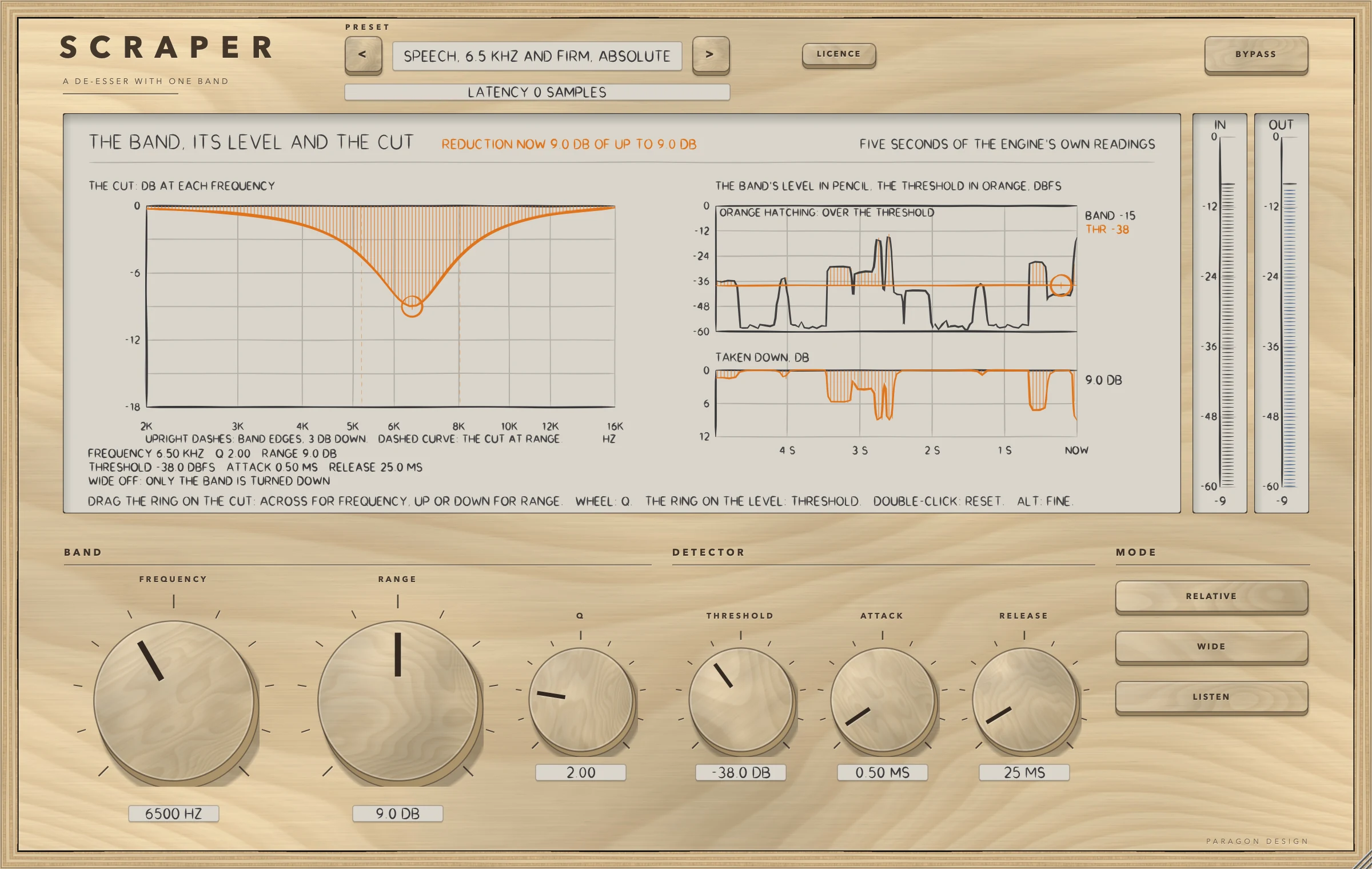
- Put SCRAPER on a voice. The panel opens with the preset Flat Start: RANGE is 0 dB, so nothing is turned down and the output is the input.
- Click the preset's name to see the menu and choose Speech, 6.5 kHz and Firm, Absolute. It sets FREQUENCY 6500 Hz, RANGE 9 dB, THRESHOLD -38 dBFS and RELATIVE off.
- Play the track. The display's head line says what SCRAPER is doing, for example REDUCTION NOW 9.0 DB OF UP TO 9.0 DB, and the pictures move: the cut, the band's level against the threshold, and the reduction.
- Press LISTEN and sweep FREQUENCY, or drag the ring on the cut across: you hear the band the detector hears. Find the frequency where the sibilance is loudest, and press LISTEN again.
- Drag the ring on the cut up or down for RANGE, turn the wheel over it for Q, and drag the ring on the level lane for THRESHOLD. A double-click resets one, and ALT held while dragging gives fine steps.
- Press WIDE to turn the whole signal down by the same amount instead of only the band, and press it off again.
- Press BYPASS to compare with the input.
How it works
Top bar and presets
The top bar has SCRAPER etched on it with A DE-ESSER WITH ONE BAND under it, the preset bar (the previous and next keys and the name, with a star once a control has moved), the line for the delay, the LICENCE key and BYPASS. A preset sets all 8 sound controls, which is every control but LISTEN and BYPASS. Neither of those is set by a preset.
The display
The display is titled THE BAND, ITS LEVEL AND THE CUT, and shows five seconds of the engine's own readings in three pictures. The first is the cut: the response of the engine's own bell from 2 to 16 kHz (with WIDE on a straight line, because the whole signal is turned down), dashed at the most RANGE allows and hatched at the reduction now, with the band's edges marked where the detector is 3 dB down. The second is the band's level against the threshold over the last five seconds, in dBFS, with the stretches over the threshold hatched. The third is the reduction over the last five seconds, in dB. Under the cut, three lines of words give the settings in plain terms, for example FREQUENCY 6.50 KHZ Q 2.00 RANGE 9.0 DB, and say whether WIDE is on. Two meters stand beside the display, IN and OUT.
The head line says what is happening: at Flat Start RANGE AT 0: THE OUTPUT IS THE INPUT, while it works REDUCTION NOW x DB OF UP TO y DB, with LISTEN on LISTEN: YOU HEAR THE BAND AT x, Q y, with BYPASS on BYPASSED: THE OUTPUT IS THE INPUT, and with the trial over THE TRIAL IS OVER. The lanes say NO SOUND when none has passed for five seconds.
Three handles are on the display. The ring on the cut sets FREQUENCY across and RANGE up or down, the wheel over it sets Q, and the ring on the level lane sets THRESHOLD. A double-click resets, and ALT gives fine steps.
FREQUENCY, Q and RANGE
The knobs are in three groups: BAND (FREQUENCY, RANGE and Q), DETECTOR (THRESHOLD, ATTACK and RELEASE) and MODE (the keys RELATIVE, WIDE and LISTEN). FREQUENCY and RANGE are the two largest knobs. FREQUENCY is the centre of the band the detector listens to and the cut turns down, from 3 to 12 kHz: a steady tone at that frequency is read at its own level at every Q, within 0.01 dB. RANGE is the most the band is turned down: a tone at FREQUENCY that is far over the threshold is turned down by exactly RANGE and never more, and at 0 dB the output is the input. Q is how narrow the band is. With WIDE off the cut is a bell of the same Q: with the band turned down 6 dB, a tone two octaves under FREQUENCY changes by 0.1 dB at Q 2 and by 1.2 dB at Q 0.5.
THRESHOLD and RELATIVE
THRESHOLD is the level the band is held to. With RELATIVE on it is measured against the voice: the voice's own running level, taken from the band 120 Hz to 4 kHz and averaged with a time constant of 0.3 s, read as -60 dBFS at the least. One setting then follows a loud take and a quiet one: the same programme 12 dB louder gives the same reduction. Until 3 ms of sound have passed the voice's level is not known and nothing is turned down. With RELATIVE off THRESHOLD is a level in dBFS, which suits a source recorded at a steady level and a finished mix.
ATTACK and RELEASE
ATTACK is how fast the cut comes in once the band is over the threshold: the reduction reaches 63 percent of a step in this time plus about 0.2 ms, which is the detector's own rise. RELEASE is how fast the cut lets go once the band is back under the threshold: the reduction falls to 1/e of its size, 37 percent, in this time.
WIDE
With WIDE off only the band is turned down. With WIDE on the whole signal is turned down by the amount the band would have been: a 7 kHz tone 10 dB over the threshold is turned down by about 10 dB, and so is a 1 kHz tone beside it. Use it when the loud band is the problem and the rest of the signal should come down with it.
LISTEN and BYPASS
LISTEN plays what the detector hears, the signal through the band-pass at FREQUENCY and Q, after a 5 ms crossfade. It is a monitoring state: it is off when a session loads, and no preset sets it. BYPASS crossfades to the input over 5 ms. There is no delay to keep, because the delay is 0 samples at every setting.
The controls
| Control | Values | Default | What it does |
|---|---|---|---|
| FREQUENCY | 3000 Hz to 12000 Hz | 7000 Hz | The centre of the band the detector listens to and the cut turns down, from 3 to 12 kHz. A steady tone at this frequency is read at its own level, at every Q (within 0.01 dB). The ring on the display sets it too, together with RANGE. |
| Q | 0.50 to 8.00 | 2.00 | How narrow the band is: a higher Q is narrower, from 0.5 to 8. With WIDE off the cut is a bell of the same Q. With the band turned down 6 dB, a tone two octaves under FREQUENCY changes by 0.1 dB at Q 2 and by 1.2 dB at Q 0.5. The wheel over the ring on the cut sets it too. |
| RANGE | 0.0 dB to 18.0 dB | 0.0 dB | The most the band is turned down, from 0 to 18 dB. A tone at FREQUENCY that is far over the threshold is turned down by exactly this much and never more. At 0 dB the output is the input, bit for bit. The ring on the display sets it too. |
| THRESHOLD | -60.0 dB to 0.0 dB | -18.0 dB | The level the band is held to, from -60 to 0 dB. Nothing is taken off 3 dB or more under it; around it there is a knee 6 dB wide, which takes 0.75 dB off at the threshold itself; 3 dB and more over it the band is turned down decibel for decibel, up to RANGE. With RELATIVE on it is measured against the voice, off it is in dBFS. The ring on the level lane sets it too. |
| RELATIVE | ON or OFF | ON | On, THRESHOLD is measured against the voice's own running level (the band 120 Hz to 4 kHz, averaged with a time constant of 0.3 s, and read as -60 dBFS at the least), so one setting follows a loud take and a quiet one: the same programme 12 dB louder gives the same reduction. Off, it is a level in dBFS. Until 3 ms of sound have passed the voice's level is not known and nothing is turned down. |
| ATTACK | 0.10 ms to 10.00 ms | 0.50 ms | How fast the cut comes in once the band is over the threshold, from 0.1 to 10 ms. The reduction reaches 63 percent of a step in this time plus about 0.2 ms, which is the detector's own rise. |
| RELEASE | 10 ms to 300 ms | 25 ms | How fast the cut lets go once the band is back under the threshold, from 10 to 300 ms: the reduction falls to 1/e of its size, 37 percent, in this time. |
| WIDE | ON or OFF | OFF | Off, only the band is turned down. On, the whole signal is turned down by the amount the band would have been: a 7 kHz tone 10 dB over the threshold is turned down by about 10 dB, and so is a 1 kHz tone beside it. |
| LISTEN | ON or OFF | OFF | Plays what the detector hears, the signal through the band-pass at FREQUENCY and Q, after a 5 ms crossfade. Use it to find the frequency. It is not saved: it is off when a session loads. |
| BYPASS | ON or OFF | OFF | Hear the input unchanged, after a 5 ms crossfade. There is no delay to keep: the delay is 0 samples at every setting. |
The licence
While the trial is over BYPASS is forced on and the controls are drawn dimmed, as the Getting started manual describes.
Control reference
Every control on the panel, as the plug-in itself labels it. The description is the tooltip the plug-in shows when you rest the pointer on the control.
Top bar
| No. | Control | What it does | Range | Default |
|---|---|---|---|---|
| 1 | <Key | Previous preset | ||
| 2 | >Key | Next preset | ||
| 3 | LICENCEKey | Shows who the plug-in is licensed to. Click to see the licence. | ||
| 4 | BYPASSKey | Hear the input unchanged, after a 5 ms crossfade. There is no delay to keep: the delay is 0 samples at every setting. |
Controls
| No. | Control | What it does | Range | Default |
|---|---|---|---|---|
| 5 | FREQUENCYKnob | The centre of the band the detector listens to and the cut turns down, from 3 to 12 kHz. A steady tone at this frequency is read at its own level, at every Q (within 0.01 dB). The ring on the display sets it too, together with RANGE. | 3000 to 12000 | 7000 |
| 6 | RANGEKnob | The most the band is turned down, from 0 to 18 dB. A tone at FREQUENCY that is far over the threshold is turned down by exactly this much and never more. At 0 dB the output is the input, bit for bit. The ring on the display sets it too. | 0 to 18 | 0 |
| 7 | CHOOSE FILEKey | Choose the licence file you were sent, a .pwlicense file. | ||
| 8 | PASTEKey | Put the text on the clipboard in the field below. | ||
| 9 | REMOVE LICENCEKey | Take this plug-in's licence off this computer. Press twice. | ||
| 10 | ACTIVATEKey | Use the licence in the field below: a key, or the whole text of a licence file. | ||
| 11 | QKnob | How narrow the band is: a higher Q is narrower, from 0.5 to 8. With WIDE off the cut is a bell of the same Q. With the band turned down 6 dB, a tone two octaves under FREQUENCY changes by 0.1 dB at Q 2 and by 1.2 dB at Q 0.5. The wheel over the ring on the cut sets it too. | 0.5 to 8 | 2 |
| 12 | THRESHOLDKnob | The level the band is held to, from -60 to 0 dB. Nothing is taken off 3 dB or more under it; around it there is a knee 6 dB wide, which takes 0.75 dB off at the threshold itself; 3 dB and more over it the band is turned down decibel for decibel, up to RANGE. With RELATIVE on it is measured against the voice, off it is in dBFS. The ring on the level lane sets it too. | −60 to 0 | −18 |
| 13 | BUYKey | Open the shop in your browser. | ||
| 14 | GET YOUR LICENCE AGAINKey | Open the page that sends you your licence again, in your browser. | ||
| 15 | ATTACKKnob | How fast the cut comes in once the band is over the threshold, from 0.1 to 10 ms. The reduction reaches 63 percent of a step in this time plus about 0.2 ms, which is the detector's own rise. | 0.1 to 10 | 0.5 |
| 16 | CLOSEKey | Close this panel (or press Escape). | ||
| 17 | RELEASEKnob | How fast the cut lets go once the band is back under the threshold, from 10 to 300 ms: the reduction falls to 1/e of its size, 37 percent, in this time. | 10 to 300 | 25 |
| 18 | RELATIVEKey | On, THRESHOLD is measured against the voice's own running level (the band 120 Hz to 4 kHz, averaged with a time constant of 0.3 s, and read as -60 dBFS at the least), so one setting follows a loud take and a quiet one: the same programme 12 dB louder gives the same reduction. Off, it is a level in dBFS. Until 3 ms of sound have passed the voice's level is not known and nothing is turned down. | ||
| 19 | WIDEKey | Off, only the band is turned down. On, the whole signal is turned down by the amount the band would have been: a 7 kHz tone 10 dB over the threshold is turned down by about 10 dB, and so is a 1 kHz tone beside it. | ||
| 20 | LISTENKey | Plays what the detector hears, the signal through the band-pass at FREQUENCY and Q, after a 5 ms crossfade. Use it to find the frequency. It is not saved: it is off when a session loads. |
Recipes
A lead voice with sibilance near 7 kHz
Choose Voice, 7 kHz and Light for a little off, at most 4 dB, or Voice, 7 kHz and Firm for more, at most 8 dB and starting a little earlier. The audit holds the sibilant bursts of the low voice to a reduction of 2.1 to 2.5 dB with the first and 4.1 to 4.5 dB with the second, and the voiced part to a change of less than 0.1 dB.
A lower voice with broad sibilance
Choose Voice, 5.5 kHz and Firm, Broad. The band is wide, Q 1, centred on 5.5 kHz, and turns down by at most 8 dB.
One hard sibilant
Choose Voice, 6.5 kHz and Firm, Narrow. Q 5 makes a narrow band, so the voice either side of it is left nearly as it is.
Speech recorded at a steady level
Choose Speech, 6.5 kHz and Firm, Absolute. RELATIVE is off, so THRESHOLD is a level in dBFS, -38 dBFS, and does not follow the voice.
Cymbals that are too loud
Choose Cymbals, 8 kHz and Medium, Wide. WIDE is on, so the whole signal is turned down by up to 6 dB while the band near 8 kHz is over the threshold. The audit holds the part of the programme under the band, 120 Hz to 2 kHz, to a change of -1.18 to -1.08 dB, which is what WIDE does.
A whistle or a spike near 12 kHz
Choose Special, 12 kHz and Firm, Narrow. 12 kHz is the highest frequency the control reaches, with a narrow band, Q 6, and the fastest attack and release.
Presets
SCRAPER has 20 presets in 6 categories. Flat Start is the plug-in's default state: choosing it returns every control to its default, which is rest. Every other preset is written as only what it changes from the defaults and is expanded to all 8 sound controls. Each is held to measurements, on named programmes made with the sibilance centred on the preset's FREQUENCY (a synthetic voice at a low pitch and at a high one, a harsh voice with a boost at 3.2 kHz, a noisy voice with room noise 18 dB under it, cymbal hits over a plucked-string bed, and the same hits over pink noise): how far the sibilant bursts come down, how much the voiced part changes, the largest reduction the band takes, and the delay.
| Category | Presets |
|---|---|
| Start | Flat Start |
| Voice | Voice, 7 kHz and Light; Voice, 7 kHz and Firm; Voice, 5.5 kHz and Firm, Broad; Voice, High and Light; Voice, 6.5 kHz and Firm, Narrow |
| Speech and Podcast | Speech, 6 kHz and Firm; Speech, 5 kHz and Medium, Broad; Speech, 7 kHz and Hard; Speech, 6.5 kHz and Firm, Absolute |
| Guitar and Cymbals | Cymbals, 8 kHz and Medium, Wide; Cymbals, 9 kHz and Light, Broad; Guitar, 4.5 kHz and Light; Guitar, 3.5 kHz and Medium, Narrow |
| Mix Bus | Mix Bus, 8 kHz and Light, Broad; Mix Bus, 10 kHz and Light; Mix Bus, 6 kHz and Medium, Absolute |
| Special | Special, 5 kHz and Hard, Wide; Special, 12 kHz and Firm, Narrow; Special, 3 kHz and Medium, Broad |
Every name says what the preset sets, and a test reads each name against its values. None of the presets has been listened to: they are numbers, not tuned by ear.
Measured
Everything here was run on one Intel Mac (Intel Core i9-10910, macOS 14, x86_64, Release), shared with other work, on 16 October 2026.
- SCRAPER's own test group ran 385 checks in four groups (the engine copy 23, the processor 161, the presets 33, the editor 168) and none failed. LATHE's dynamic band group, which the copy is held to, ran 353 checks and none failed. A run of the whole project's tests ran 14053 checks and none failed (21 minutes, with every plug-in's groups in it).
- The checks of the real editor, made with real mouse events and drawn at 70, 100 and 170 percent, ran 36, 13, 158, 259, 51, 7 and 3 (the control map, overlaps, every word, the fit of every word, the interaction, the cost and the leaks), and none failed.
- Apple's auval tool passes with 10 parameters, no warnings, and main bus layouts of one in one out and two in two out.
- The host test on the installed, signed release build of the Audio Unit (the Intel half of the universal package) ran 54 checks and none failed, and the allocator's bytes in use went from 368.3 to 367.8 MB over 30 editors. Apple's auval tool passes on the same build, and the Audio Unit's name there is Scraper De-Esser.
| What was measured | Result | Condition | Kind |
|---|---|---|---|
| The engine copy | Gives LATHE's output, bit for bit, in 432 runs | WIDE on and off, FREQUENCY 3 to 12 kHz, Q 0.5 to 8, RANGE 0 to 18 dB, THRESHOLD absolute and relative, ATTACK, RELEASE, LISTEN on and off, four sample rates, noise, sibilant bursts and the voice, with the setting moved three times in a run | exact |
| Rest | The output is the input, bit for bit, with WIDE on or off and a delay of 0: 144 runs of the engine, and the processor at six sample rates in both layouts; a denormal input number comes out as itself or 0 and a minus zero stays a minus zero | RANGE 0 | exact |
| A tone at FREQUENCY | Is read at its own level within 0.0054 dB, at every Q | -20 dB peak, FREQUENCY 3 to 12 kHz, Q 0.5 to 8, 44.1, 48 and 192 kHz | measured, under 0.01 dB |
| The knee | Within 0.0022 dB of its formula from 12 dB under the threshold to 21 dB over; 0.751 dB at the threshold itself | A tone at FREQUENCY | measured, under 0.01 dB |
| RANGE | The most the band is turned down: 3.000, 6.000, 9.000, 12.000 and 18.000 dB for RANGE 3, 6, 9, 12 and 18 | A tone at FREQUENCY 30 dB over the threshold | measured, under 0.001 dB |
| How far the bell reaches | With the band turned down 6 dB, a tone two octaves under FREQUENCY changes by -0.097 dB at Q 2 and -1.219 dB at Q 0.5 | RANGE 6 | measured, within 0.02 and 0.05 dB |
| WIDE | A 7 kHz tone 10 dB over the threshold is turned down 10.016 dB and a 1 kHz tone beside it 10.016 dB; with WIDE off the 1 kHz tone changes by -0.056 dB | THRESHOLD -30 dBFS, RANGE 18 dB, the 1 kHz tone at -50 dB | measured, within 0.1 dB |
| ATTACK | The reduction reaches 63 percent of a step in ATTACK plus 0.156 to 0.192 ms | ATTACK 0.1, 0.5, 2 and 10 ms at 48 and 96 kHz | measured, within 0.05 to 0.35 ms |
| RELEASE | The reduction falls to 1/e of its size in RELEASE within 0.042 ms: 10.04, 25.02, 100.00 and 300.00 ms for RELEASE 10, 25, 100 and 300 | 48 and 96 kHz | measured, under 0.15 ms |
| RELATIVE | The same programme 12 dB louder or 12 dB quieter gives the same reduction: the largest difference is 0.00000 dB | 6 s of a noisy voice, the reduction reaching 12.00 dB | measured, under 0.05 dB |
| The voice's running level | A time constant of 299.0 ms; a 1 kHz tone is read at its peak less 0.016 dB | A step in the programme, steady tones | measured, within 4 ms and 0.05 dB |
| The first 3 ms | A loud tone from the first sample is first turned down at 3.33 ms with RELATIVE on, and at 0.04 ms with it off | A loud tone from the first sample | measured |
| Delay and tail | 0 samples at every setting and rate; after a burst of noise ends the cut is under -100 dBFS within 2.25 ms at the longest | 12 runs: RANGE 18 dB, THRESHOLD -60 dBFS, RELEASE 300 ms | measured |
| BYPASS and LISTEN | Each crossfade is 239 samples (4.98 ms at 48 kHz); LISTEN is the band-pass within 4e-9 of full scale; the engine goes on working inside BYPASS | Mono and stereo, WIDE on and off | measured, and exact |
| Blocks | Blocks of 1, 7, 64 and 4096 samples give the output of 512, bit for bit, with nine changes of a control at nine sample positions | Mono and stereo, WIDE on and off | exact |
| Hostile input | Only numbers come out and the largest sample is 1.38 | Not-a-number, infinity, 1e30, denormals, a full-scale square wave, silence and full-scale noise: 28 runs of 3 s | measured, under 8 |
| Memory use | No allocation on the audio thread | 52 blocks, mono and stereo | exact |
| Through the installed Audio Unit | 0 of 1152000 samples differ from the engine's own strip in each of six stereo settings, and 0 of 576000 in the mono one | 12 s of a harsh voice, blocks of 480 | exact |
| Presets | 60 measurements, all inside their bounds | 20 presets on named programmes | measured against bounds |
| The display | The cut it draws is the engine's bell to within 1e-6 dB at four rates and three values of Q; every word fits: 258 paints and 9420 words | Real paints at several sizes | bound, and exact |
The host test exists because Apple's compiler once made another plug-in's installed build play only part of its sound while every other test passed. It found something of a different kind in SCRAPER: JUCE's conversion of a skewed scale moved 16 of 70 values by a float step in the installed plug-in, so a strip given the table's values differed from the installed Audio Unit by at most 6e-8 of full scale in five of the settings; given what the plug-in holds, read from the state it saves, 0 samples differ.
| Setting | Percent of one core |
|---|---|
| Flat Start | 0.28 to 0.29 |
| The default band with RANGE 8 dB and a reduction going on | 0.30 to 0.31 |
| A busy setting (6800 Hz, Q 1.6, RANGE 12 dB, THRESHOLD -26 dB) | 0.32 to 0.33 |
| WIDE on | 0.32 |
| The cut always in (RANGE 18 dB, THRESHOLD -60 dBFS, Q 8, 12 kHz) | 0.28 |
| LISTEN on, the dearest | 0.34 |
| Mono | 0.18 |
| BYPASS on, busy | 0.32 to 0.33 |
| The engine alone | 0.26 to 0.27 |
Those costs are thread CPU time at 48 kHz, stereo, in blocks of 512 samples, over 10 s of the synthetic voice, the least of several runs, on a shared machine at load averages of about 3 and 8; the budget the tests set is 2 percent of one core. The cost test inside the whole-program run, on a more loaded Mac, read 0.47 to 0.70.
The display's steady paint with sound running took 2.0 to 2.1 ms at 1x and 4.1 to 5.6 ms at 2x in two runs, against a budget of 8 ms; while a control moves at every paint it took 34 to 36 ms at 2x. Each meter takes under 0.8 ms, and an idle editor paints 0 times in 1.5 s. Thirty editors made, shown, resized and closed in the builder's run left the allocator's bytes in use at 387.7 MB from 392.8.
Limits and what is not verified
- Nothing has been listened to: the presets are numbers measured on a synthetic voice (noise bursts in a band of Q 1.5) and synthetic cymbals, and the words about what each is for are a judgement.
- Not verified: any host (what one does with the delay of 0 samples, the tail of 0, or the bypass parameter), the VST3 in any host, Apple silicon (the Mac the tests ran on is Intel, and the Apple silicon half of the release package was compiled and never run), sample rates under 44.1 kHz, and the real editor used by hand.
- Until 3 ms of sound have passed, a RELATIVE threshold does nothing: a loud tone from the first sample was first turned down at 3.33 ms.
- The voice's running level is read as -60 dBFS at the least, so on a programme quieter than that a RELATIVE threshold is relative to -60 dBFS, and "the same programme 12 dB quieter gives the same reduction" stops being true once the voice falls under that floor in the gaps: a quiet clean copy differed by 4.83 dB.
- WIDE turns the whole signal down, so the voiced part goes down with the sibilance: Special, 5 kHz and Hard, Wide takes 8.15 dB off the bursts and 1.13 dB off the voiced part, and Cymbals, 8 kHz and Medium, Wide takes the rest of the programme down by 1.13 dB while the hits come down 5.92 dB. With WIDE on there is no filter in the cut: Q does not shape it, and FREQUENCY and Q only steer the detector.
- The words "decibel for decibel" hold for steady tones. On noise-like bands the fast attack makes the reduction larger than the curve at the mean level: on steady noise from 5 to 9 kHz it was 3.80 dB more.
- ATTACK has a floor: the reduction's 63 percent time is ATTACK plus 0.156 to 0.192 ms, so an ATTACK of 0.1 ms is about 0.29 ms.
- The cut follows the reduction 16 samples late, which is the engine's rule, and with RANGE at 0 the filter is never put in the signal path.
- With LISTEN on the cut goes on working inside, so the display's cut and reduction are drawn while the output is the band-pass.
- The band's edges drawn on the display are the digital band-pass's, where the detector is 3 dB down, not the plain formula of FREQUENCY over Q: at 48 kHz the band at 7 kHz and Q 2 runs from 5615.6 to 8607.2 Hz, at 192 kHz it is 3465.7 Hz wide where the plain formula says 3500, and the broad bands (Q 0.5 and 0.7) are up to 13.41 percent of FREQUENCY away.
- The FREQUENCY tip's words "the cut turns down" are true with WIDE off. A steady tone is read at its own level within 0.01 dB at 44.1, 48 and 192 kHz and not tried at 88.2, 96 and 176.4 kHz.
- The five seconds the display shows are 512 slots of 10 ms (5.12 s) drawn in 500 columns; no test measures the span on screen. No test compares the drawn trace with the engine's pixel by pixel.
- A host sees one program; the 20 presets are in the editor's preset bar.
- The name SCRAPER is a working name.
Troubleshooting
The sound does not change. Flat Start has RANGE at 0 dB, so nothing is turned down. Raise RANGE, drag the ring on the cut up, or choose a preset. Check that BYPASS is off and that the line under the preset name does not say the trial is over.
The cut does not follow the sibilance. Press LISTEN and move FREQUENCY until you hear the sibilance in the band. A higher Q makes a narrower band, so a sibilance that spreads needs a lower Q.
The cut acts on the wrong parts of the signal. Raise THRESHOLD so that only the sibilance goes over it, and check RELATIVE: with it off, THRESHOLD is a level in dBFS and does not follow a voice that changes in level.
More than the band is turned down. WIDE is on, so the whole signal is turned down while the band is over the threshold. Turn it off to turn down only the band.
Nothing is turned down at the start of a sound. With RELATIVE on, until 3 ms of sound have passed the voice's level is not known and nothing is turned down.
The panel looks small or large. Drag a corner of the window: it keeps its proportions from 70 to 170 percent of 1200 by 760 pixels, and the width is saved with the project.