Paragon WorkshopThe free ones

CASK

A reverb with six modes.

Turn DECAY up and CASK lengthens the reverb: the time for it to fall 60 dB at 1 kHz, from 0.1 to 30 seconds, with the lows and the highs able to decay for a different time. Six modes set the room, a box you can see from above, and SIZE scales it. The display draws what the reverb is doing: the decay at every frequency, the room, the early reflections, the energy decay of the impulse response it makes, and the level of each of its sixteen delay lines. GATE, DUCK, WIDTH and FREEZE finish the job.

$49Available from next weekTell me when
Formats
Audio Unit, VST3
Channels
Mono in and mono out, mono in and stereo out, or stereo in and stereo out; stereo in and mono out is refused
Latency
None: 0 samples at every setting at 44.1, 48, 88.2, 96, 176.4 and 192 kHz, and with BYPASS on
CASK at work

What it does

CASK in six parts.

  1. 01

    Six modes, six rooms

    SMALL, LARGE, DIFFUSE, MEDIUM, HUGE and TINY each set the box the early reflections come from (from 4 by 5 by 2.6 m to 45 by 80 by 30 m), how much a wall keeps of a wave (0.72 to 0.90), and the lengths of the sixteen delay lines (6 to 171 ms at SIZE 1). DIFFUSE has no early reflections and is the late field alone. SIZE scales the room from 0.2 to 2.

  2. 02

    A decay you shape

    DECAY is the time for the reverb to fall 60 dB at 1 kHz, from 0.1 to 30 seconds. LOW DECAY makes the lowest frequencies decay for 0.25 to 2.5 times as long, around LOW FREQ, and DAMPING shortens the highs around HIGH FREQ. The curve on the display is the decay the engine's design gives at every frequency, and you can drag its rings.

  3. 03

    Early reflections and late field

    The first 36 arrivals from the box, at the level EARLY sets, and the late field, sixteen delay lines that feed one another through a mixing matrix, at the level LATE sets. DIFFUSION sets four allpass filters in front, MOD DEPTH and MOD RATE move the delay lines slowly, and PRE-DELAY waits up to 500 ms before the reverb starts.

  4. 04

    Filters in and out

    IN HP and IN LP are one-pole filters in front of the reverb, and OUT HP and OUT LP the same behind it, on the reverb only, so the dry sound is never filtered. Keep the lows out of the reverb with IN HP, or dull the reverb with OUT LP, without touching the sound it came from.

  5. 05

    Gate, duck, width and freeze

    GATE cuts the reverb off a while after the input falls under about -34 dBFS, and GATE HOLD sets how long it waits. DUCK turns the reverb down by up to 20 dB while the input is loud. WIDTH goes from 0, the same on both sides exactly, to 200 percent. FREEZE stops the input feeding the reverb and holds what is in it.

  6. 06

    Nothing until you ask

    MIX starts at 0, and with MIX at 0 and OUTPUT at 0 dB the output is the input, bit for bit, in all six modes and every layout. CASK adds no delay at any setting. BYPASS crossfades to the input over 5 ms and the reverb goes on running inside, so its tail is there when you switch it off.

CASK · The point of it

It draws the room it is making, and it adds nothing until you ask.

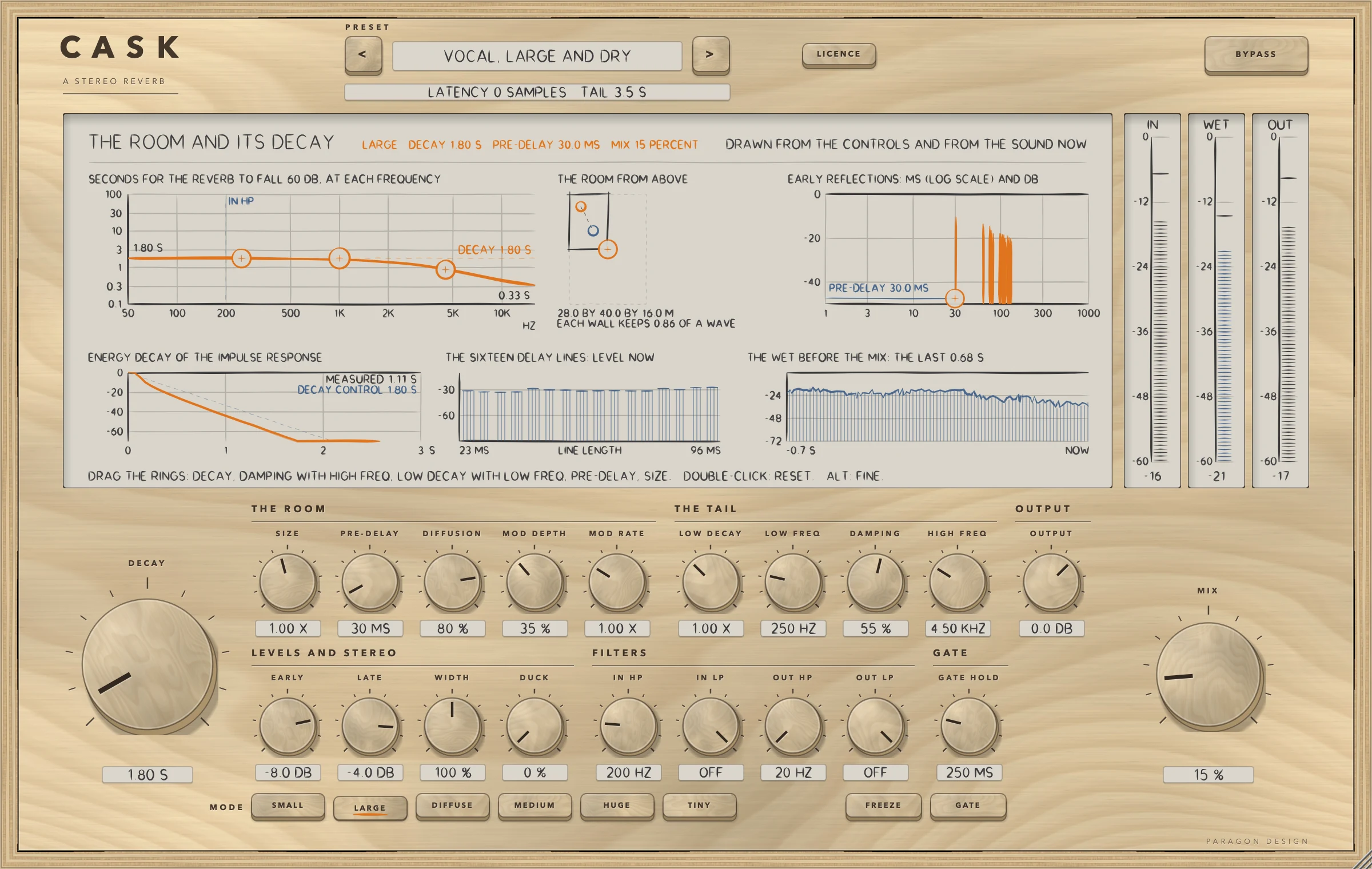
The display is six pictures from numbers the engine computes: the seconds to fall 60 dB at each frequency, the room from above with its three sides in metres, the first 36 reflections as stems against milliseconds, the energy decay of the impulse response the room makes, the level of each of the sixteen delay lines now, and the last part of the wet signal. Its head line says what CASK is doing, in orange.

Every one of the 26 presets is written as what it changes from the defaults and is held to two to five measurements, 112 in all: how far under the dry input the reverb sits, how long it takes to fall, where the first arrival lands, how much DUCK turns it down. The display says MEASURED and DECAY CONTROL for the decay of the impulse response and the number on the knob, because they are two numbers.

  • 0 samplesThe delay the processor told the host at every setting tried, at 44.1, 48, 88.2, 96, 176.4 and 192 kHz. BYPASS does not change it.
  • Bit for bitAt MIX 0 and OUTPUT 0 dB the output is the input in 36 runs (six modes, three layouts, with FREEZE, GATE, DUCK and DECAY 30 s on and off) and at six sample rates. A denormal input number comes out as 0 and a minus zero as plus zero.
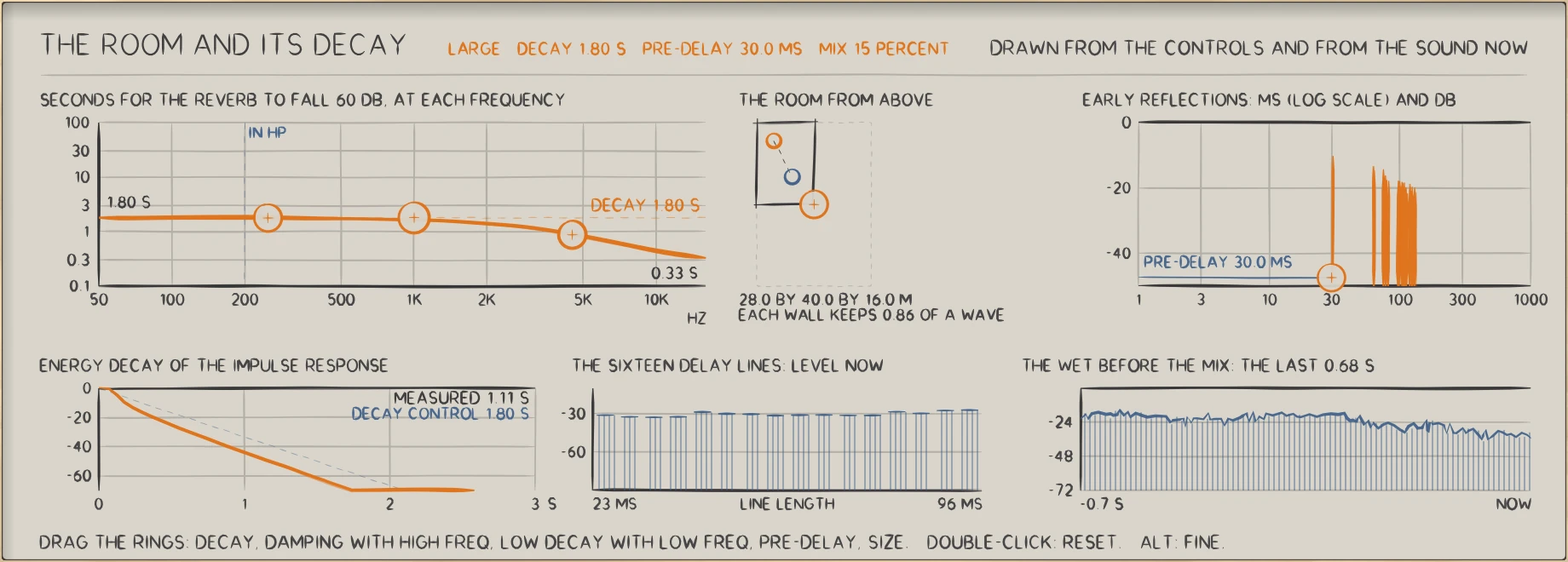
CASK: CASK with a vocal preset at work: the decay at every frequency, the room from above, the early reflections, the energy decay, the sixteen delay lines and the wet.
CASK with a vocal preset at work: the decay at every frequency, the room from above, the early reflections, the energy decay, the sixteen delay lines and the wet.

In use

The real window, as it looks at work.

These are captures of the built plug-in, drawn by the plug-in itself at twice the size.

CASK: A vocal preset with the voice just after a phrase: the decay at every frequency, the room, the early reflections, the energy decay, the sixteen delay lines and the wet, with the meters
A vocal preset with the voice just after a phrase: the decay at every frequency, the room, the early reflections, the energy decay, the sixteen delay lines and the wet, with the meters
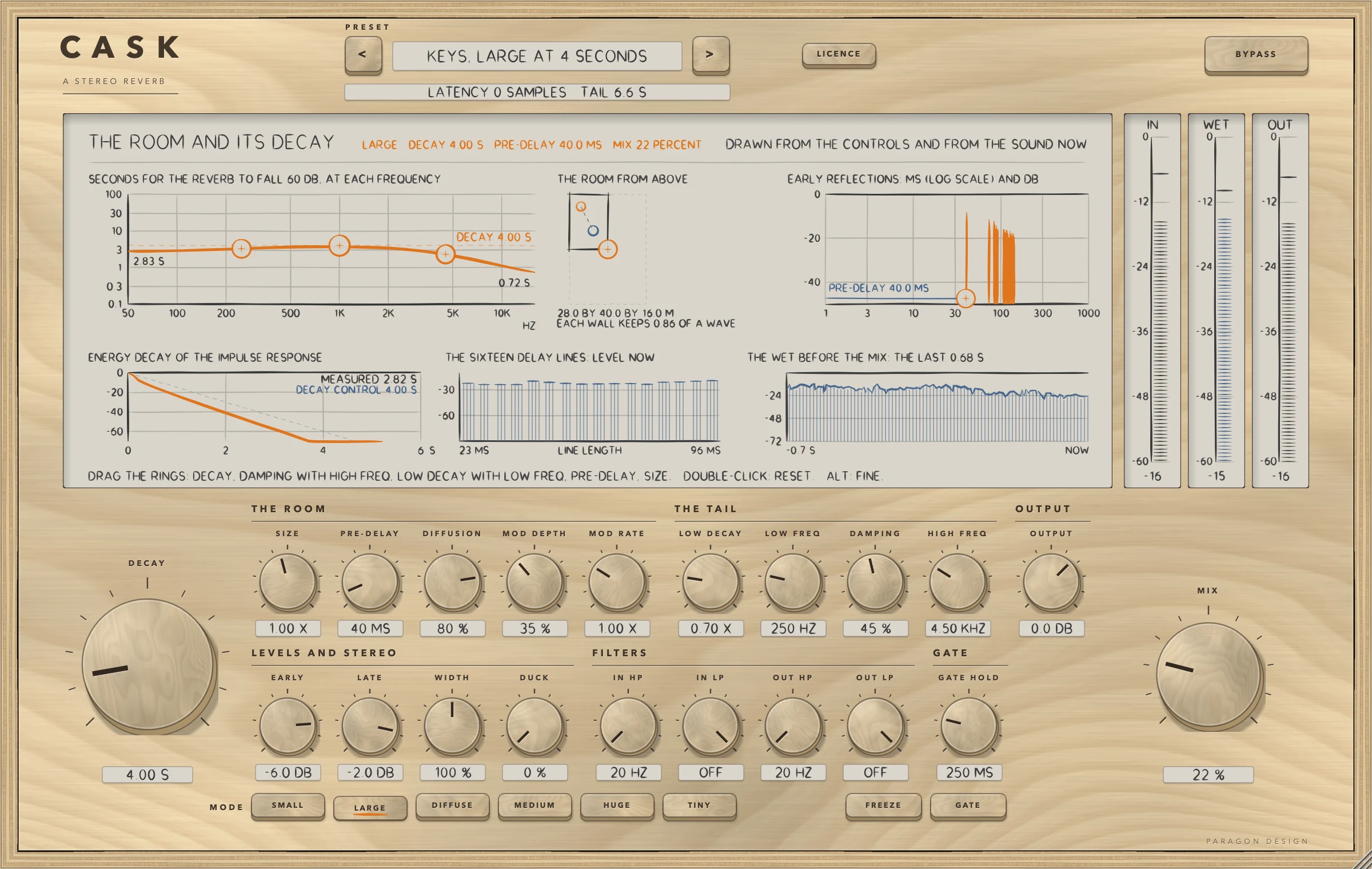
CASK: The LARGE mode: a box of 28 by 40 by 16 m, delay lines from 23 to 96 ms
The LARGE mode: a box of 28 by 40 by 16 m, delay lines from 23 to 96 ms
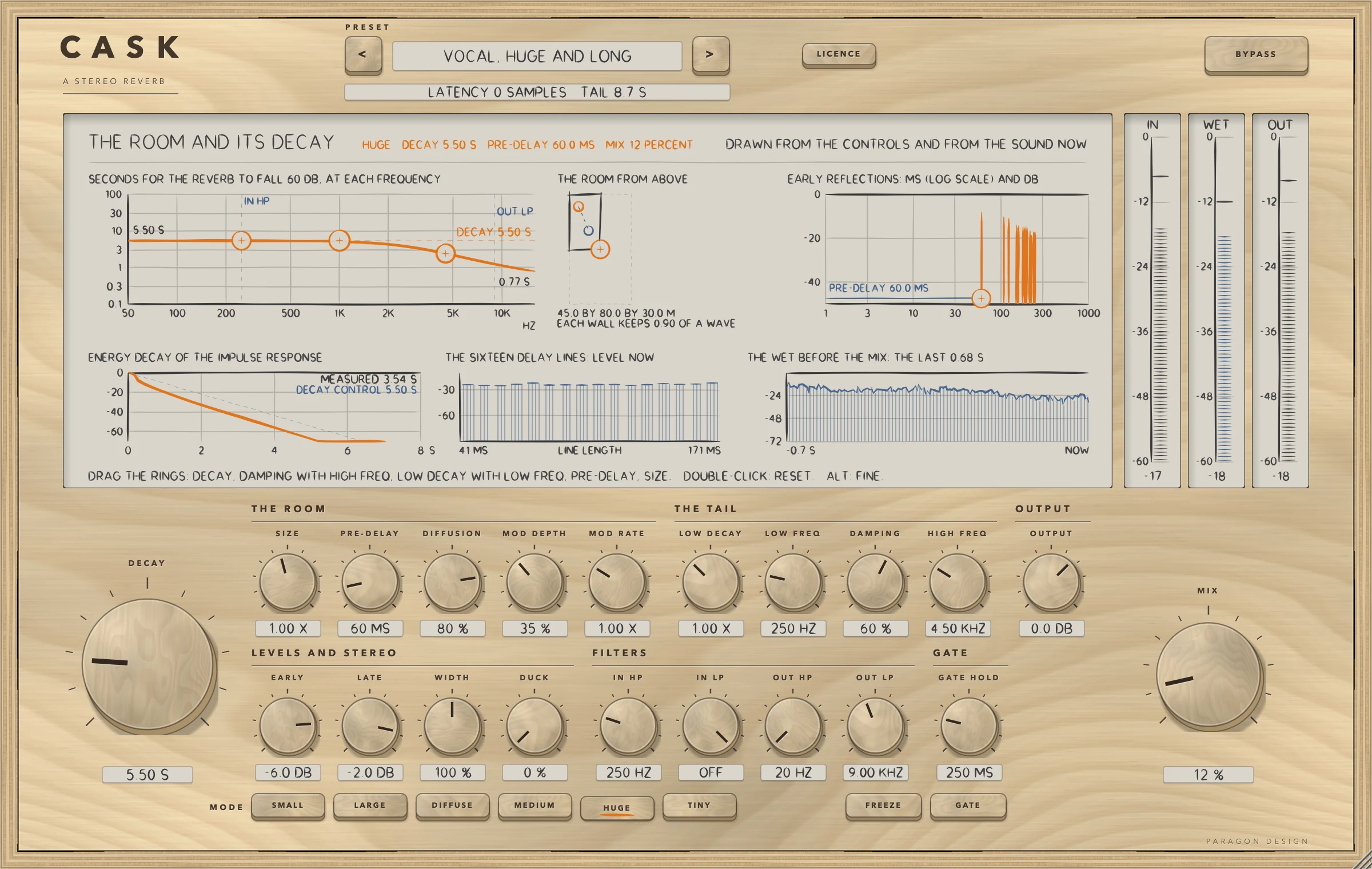
CASK: The HUGE mode with a long decay: a box of 45 by 80 by 30 m, delay lines from 41 to 171 ms
The HUGE mode with a long decay: a box of 45 by 80 by 30 m, delay lines from 41 to 171 ms
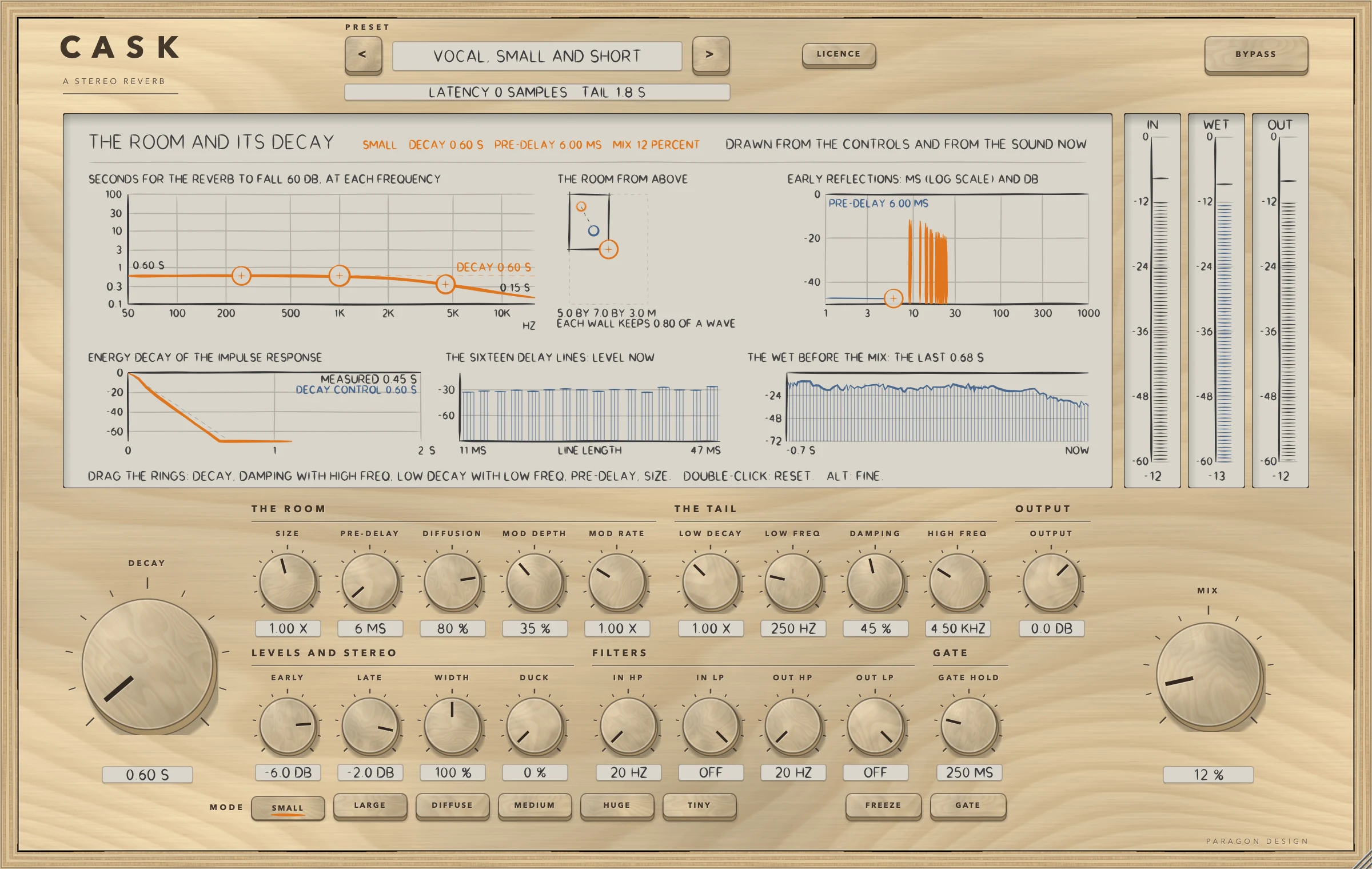
CASK: The SMALL mode: a box of 5 by 7 by 3 m, delay lines from 11 to 47 ms
The SMALL mode: a box of 5 by 7 by 3 m, delay lines from 11 to 47 ms
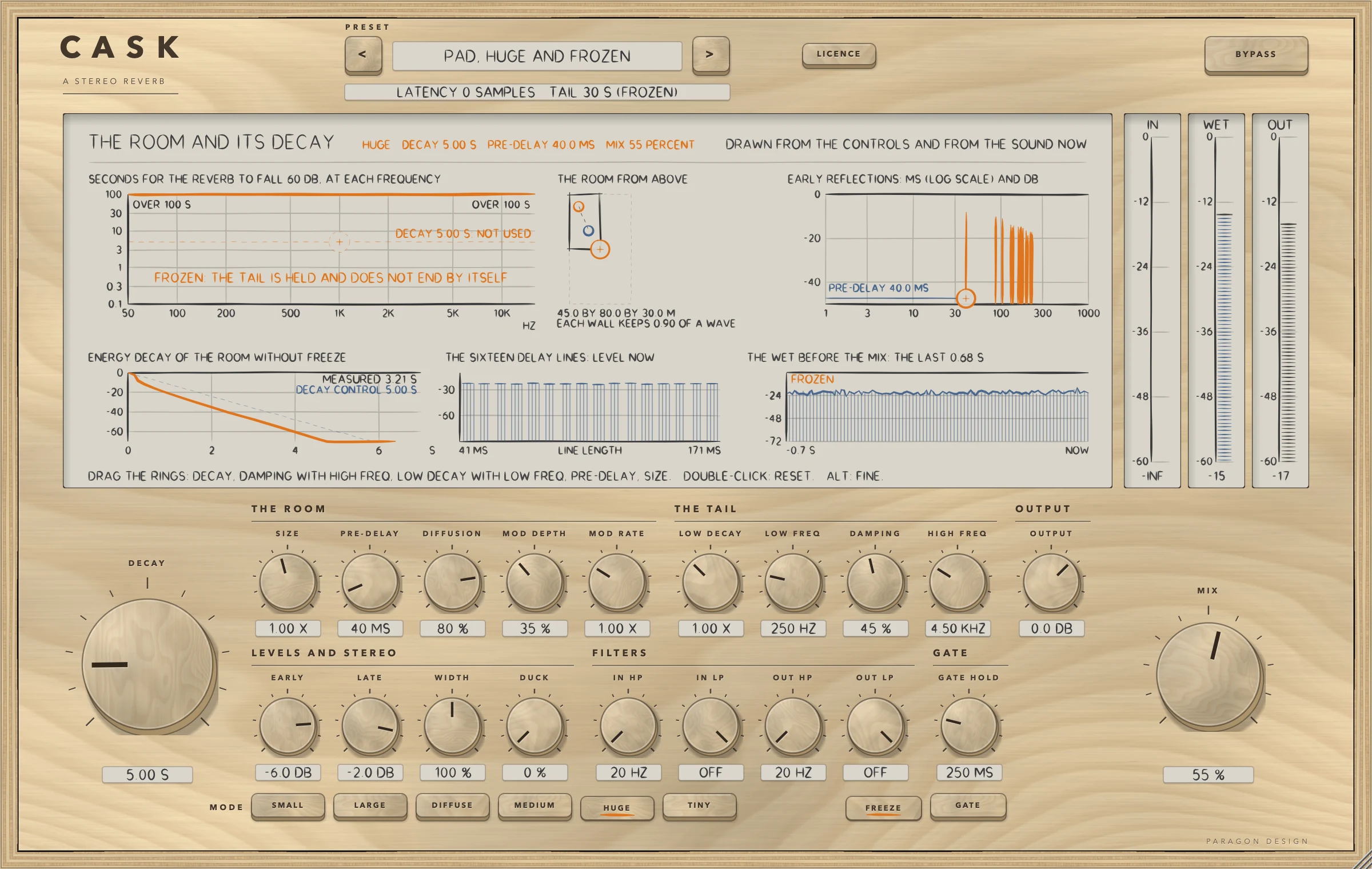
CASK: FREEZE on, holding what the noise left in the reverb, with a tail told to the host of 30 s
FREEZE on, holding what the noise left in the reverb, with a tail told to the host of 30 s
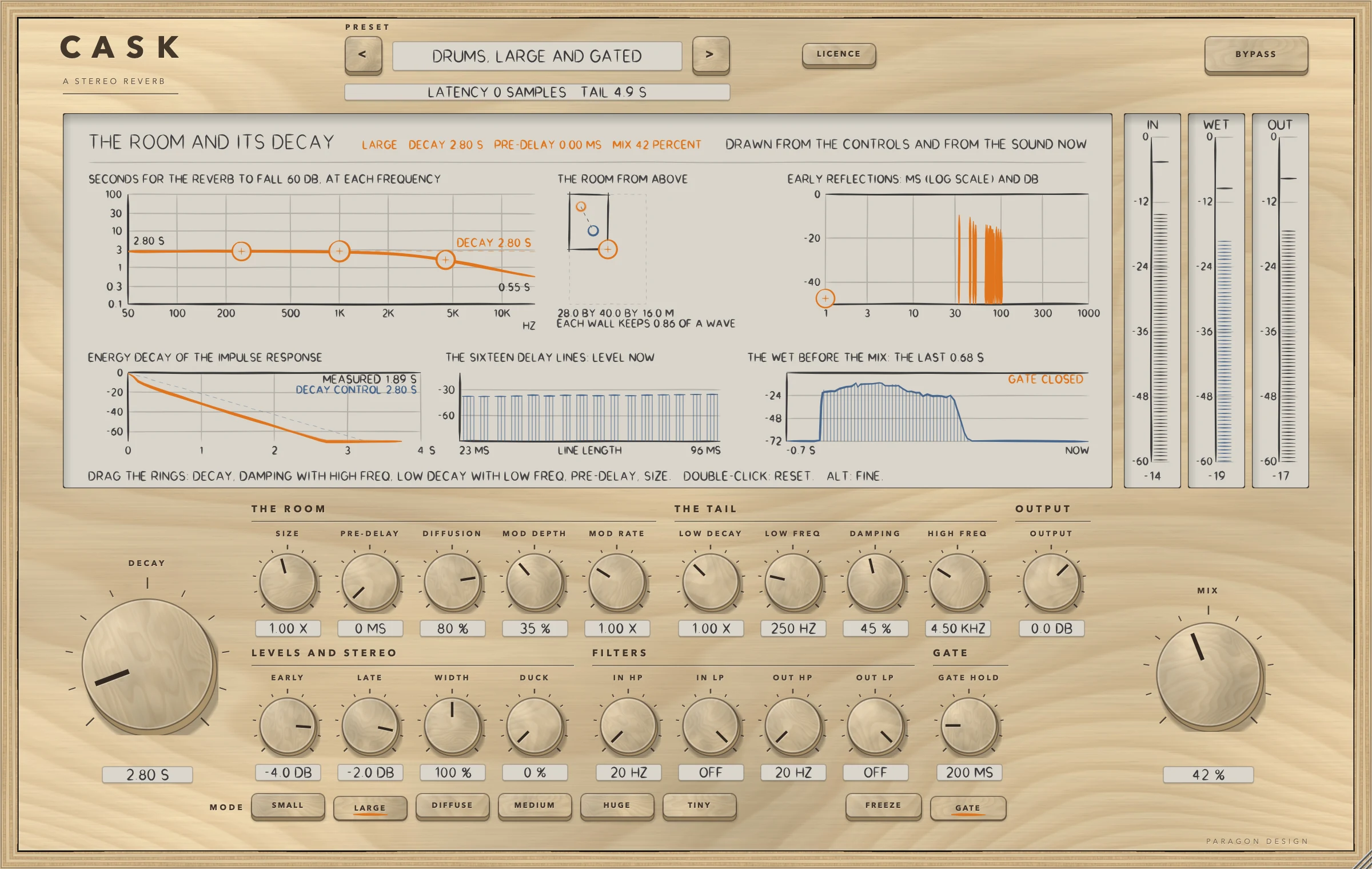
CASK: A gated drum preset after a burst: GATE closed, the reverb cut off
A gated drum preset after a burst: GATE closed, the reverb cut off
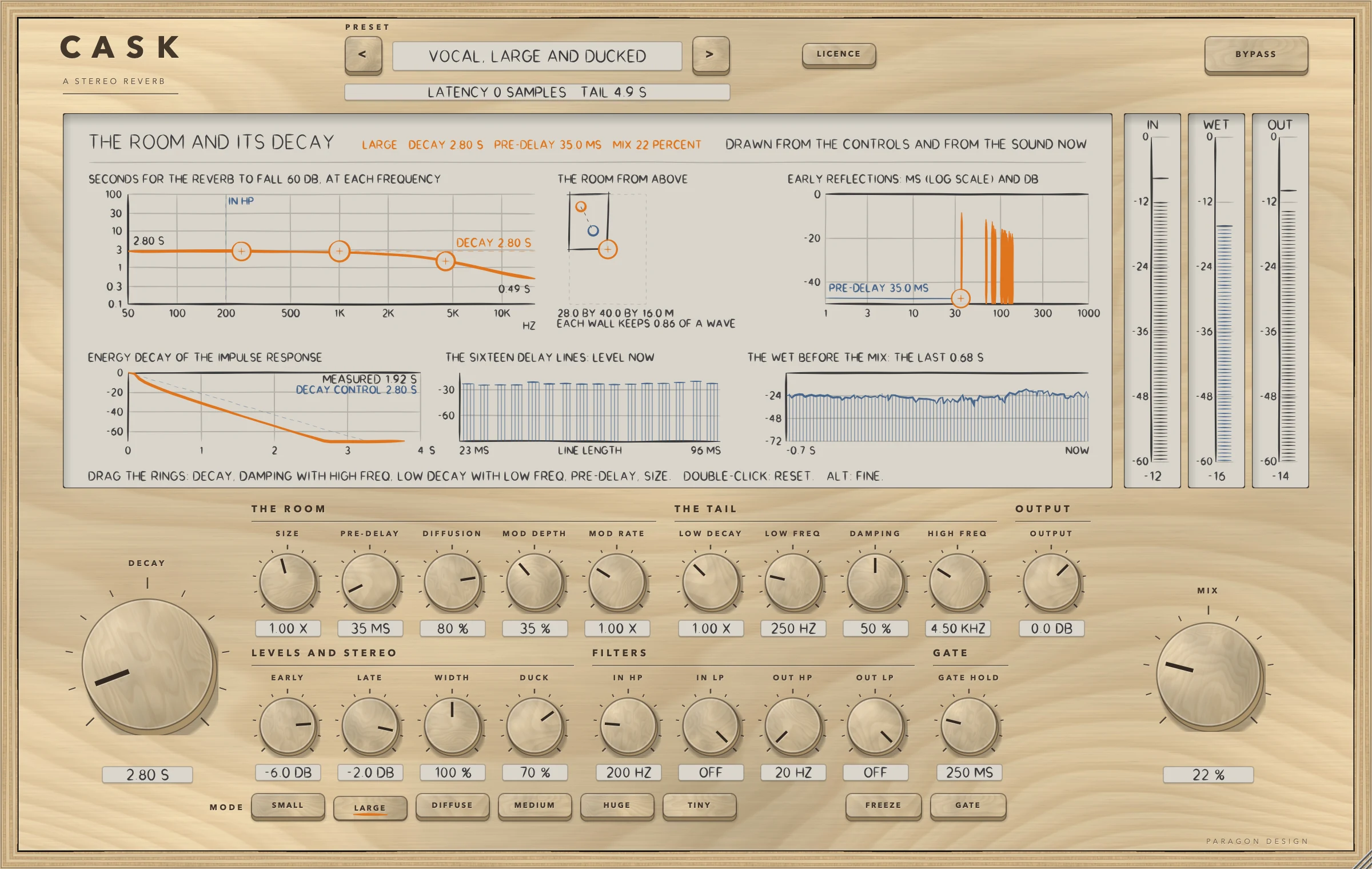
CASK: DUCK at work: the reverb turned down while the input is loud
DUCK at work: the reverb turned down while the input is loud
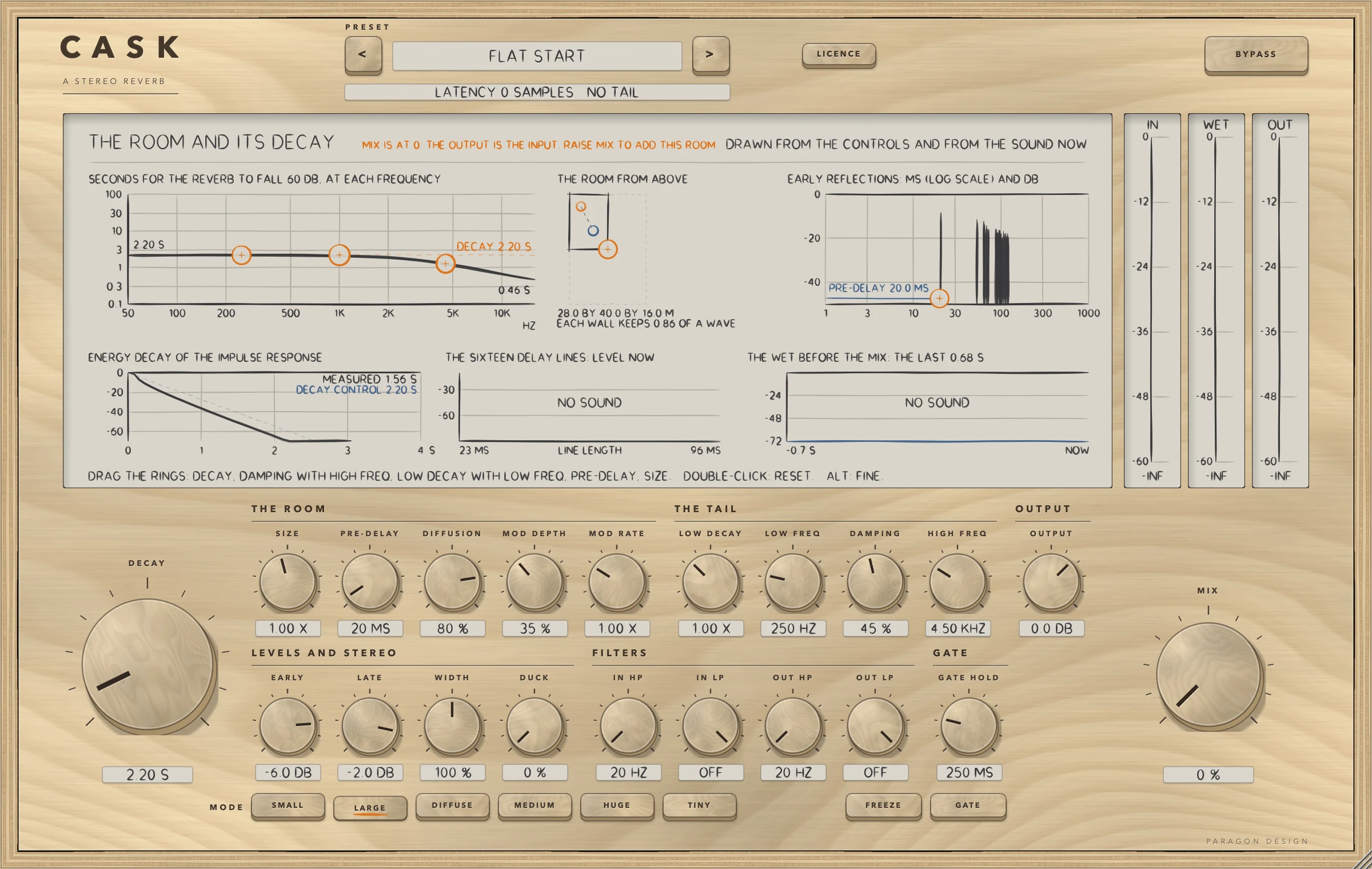
CASK: Flat Start with no sound: MIX is at 0 and the output is the input
Flat Start with no sound: MIX is at 0 and the output is the input

Specifications

Formats
Audio Unit, VST3
Listed in your host as
Cask Reverb
Channels
Mono in and mono out, mono in and stereo out, or stereo in and stereo out; stereo in and mono out is refused
Sidechain
None
Latency
None: 0 samples at every setting at 44.1, 48, 88.2, 96, 176.4 and 192 kHz, and with BYPASS on
Tail told to the host
1.4 times DECAY plus 1 s, at most 30 s, while MIX is above 0; 30 s with FREEZE on; none with MIX at 0
Decay
0.1 to 30 s at 1 kHz, with LOW DECAY 0.25 to 2.5 times and DAMPING shortening the highs
Modes
SMALL, LARGE, DIFFUSE, MEDIUM, HUGE and TINY
Editor
1200 x 760 pixels at 100 percent, resizable from 70 to 170 percent
Parameters
25
Presets
26 in 6 categories
CPU
The whole plug-in at its defaults 2.04, 2.20 and 2.19 percent of one core in three runs on a quiet machine on 16 October, 1.82 to 2.10 across the six modes and 2.06 to 2.16 at a heavy setting (stereo, 48 kHz, 512-sample blocks, thread CPU time; Intel Core i9, a shared machine). At load averages of 10 to 13 the same tests read 2.56 to 2.99. The budget of 3.0 percent holds in those runs

Measured

  1. 0 samplesThe delay the processor told the host at every setting tried, at 44.1, 48, 88.2, 96, 176.4 and 192 kHz. BYPASS does not change it.
  2. Bit for bitAt MIX 0 and OUTPUT 0 dB the output is the input in 36 runs (six modes, three layouts, with FREEZE, GATE, DUCK and DECAY 30 s on and off) and at six sample rates. A denormal input number comes out as 0 and a minus zero as plus zero.
  3. 112 measurementsTwo to five for each of the 26 presets, all inside their bounds in 106 runs of the engine on named programmes: the reverb's level under the dry input, the decay of the impulse response against its designed value, the first arrival, how much DUCK turns the reverb down, and for the frozen presets the held level.
  4. 43 checksRun by the host test on the installed, signed release build of the Audio Unit, none failed: the 25 parameters against the table, rest in three layouts and six modes, the delay and the tail read back from the Audio Unit, a vocal preset against the engine on the synthetic voice to within 3e-5 of full scale, bypass and the editor at four sizes. The allocator's bytes in use went from 337.5 to 334.3 MB over 30 editors. The test exists because Apple's compiler once made another plug-in's installed build play only part of its sound while every other test passed.
  5. 20 percentThe limit the engine's own tests set between the decay its design gives and the decay measured in octave bands; the worst deviations were 17.7 percent for a damped LARGE, 1.9 for a LARGE with long lows, 3.8 for a bright SMALL and 12.5 for a dark HUGE.

On synthetic test signals, by this plug-in’s own tests. Not a listening test.

Presets

26 presets, named for the job.

Starting points chosen from measurements, not tuned by ear. Each one sets every control, so the result does not depend on what was dialled in before it.

Start

  • Flat Start
  • Large at 25 Percent

Vocal

  • Vocal, Large and Dry
  • Vocal, Medium at 1 Second
  • Vocal, Small and Short
  • Vocal, Huge and Long
  • Vocal, Diffuse at 2 Seconds
  • Vocal, Large and Ducked

Drums

  • Drums, Tiny and Short
  • Drums, Small at 1 Second
  • Drums, Medium and Gated
  • Drums, Large and Gated
  • Snare, Diffuse and Gated

Keys and Guitar

  • Keys, Medium at 1.6 Seconds
  • Keys, Large at 4 Seconds
  • Guitar, Small and Wide
  • Guitar, Diffuse and Ducked

Strings and Pads

  • Strings, Huge at 5 Seconds
  • Pad, Large and Long Lows
  • Pad, Huge and Frozen
  • Pad, Large and Frozen

Special

  • Effect, Huge at 30 Seconds
  • Effect, Diffuse and Mono
  • Effect, Large and Long Gate
  • Send, Large at 100 Percent
  • Send, Tiny at 100 Percent

The first minutes

From empty to useful.

  1. 1

    Choose a preset

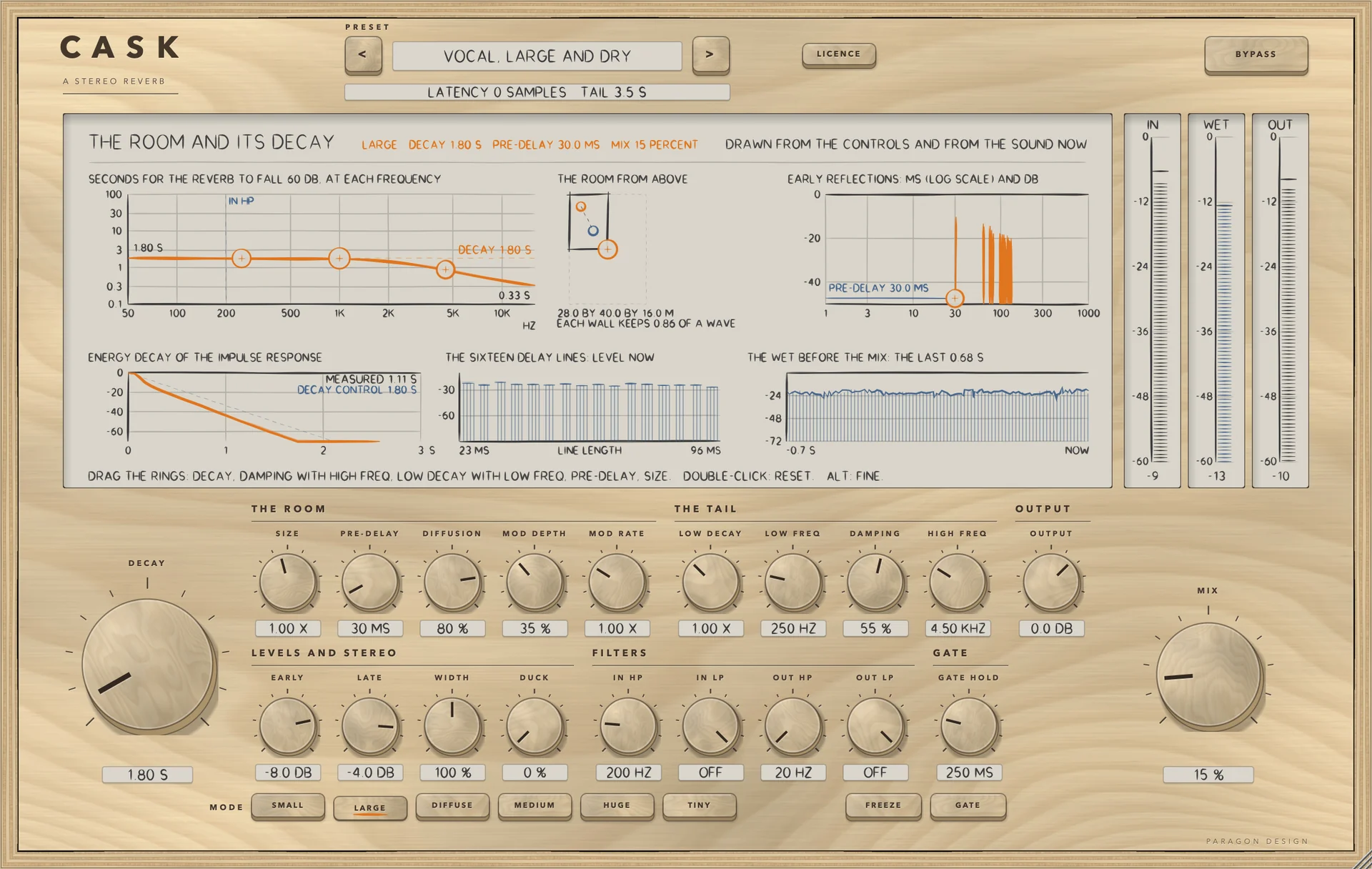
    Pick Vocal, Large and Dry. It sets the LARGE mode, DECAY 1.8 s, PRE-DELAY 30 ms, DAMPING 55 percent and a low MIX, and keeps the lows out of the reverb. Flat Start puts everything back.

  2. 2

    Shape the decay

    Drag the DECAY ring on the display, or turn the knob: the curve at the top left moves. Drag the low ring to lengthen the lows around LOW FREQ and the damping ring to shorten the highs around HIGH FREQ.

  3. 3

    Try a mode

    Press HUGE, then MEDIUM, then TINY. The room drawn in the middle of the display changes to the box of each mode, and the early reflections change with it.