What it is
RIDGE is a limiter. GAIN pushes the signal up and CEILING is the level the output is held to. Two stages do the holding. The release stage follows the level with ATTACK and RELEASE and has no look-ahead, so a fast peak passes it. The look-ahead stage reads the signal ahead of the output and brings the gain down before each peak arrives, and with TRUE PEAK on it searches for the peaks between the samples too. Seven styles are seven sets of numbers for those stages. This manual describes version 0.1.0.
The signal runs through these steps in order: the input, with anything that cannot be audio read as 0; the DC filter, if it is on; GAIN; the lift, in LIFT; the soft clip; the release stage; the look-ahead stage; the gain, applied to the delayed audio; DELTA, if it is on, then UNITY; dither; and BYPASS. RIDGE holds the sample peak to CEILING, with DITHER and EXT KEY off (see Limits). It does not hold the true peak there: PEAK SEARCH gives how far over it ended in the tests.
The display draws the last four seconds: the input after GAIN, the output, the gain taken off and the short-term loudness, with CEILING and the loudness TARGET as two lines you drag. Beside it a readout gives the loudness and the highest true peak.
Setting it up
Formats and channels
RIDGE is an effect, in Audio Unit and VST3 formats. The VST3 is built from the same code, but no test loads it in a host. It works on a mono or a stereo track, with the same number of channels in and out, and refuses surround layouts. A host lists the Audio Unit as Ridge Limiter, from Paragon Design (versions before 0.1.1 list it as Ridge). The bundle declares macOS 11.0 as the minimum, and the panel is 1080 by 690 pixels, resizable from 70 to 170 percent. The width you leave it at is kept in the saved state.
Sidechain input
The optional sidechain input is mono or stereo and starts switched off: the host has to connect a source. EXT KEY makes both stages read it instead of the signal. With nothing connected, or with the input enabled but no channels supplied, EXT KEY leaves them on the signal itself, and with EXT KEY off a connected source is ignored. GAIN is applied to the key too, and the DC filter, the lift and the soft clip do not touch it. The key is never heard. The signal itself still goes through GAIN, the DC filter, the lift and the soft clip, but the two stages never read it, so with EXT KEY on a signal over CEILING passes while the key is quiet, unless a soft clip is in force (SOFT CLIP above 0, or LOUD). That is by the code; no test tries it.
Through the processor, a -20 dBFS 1 kHz tone under a -6 dB CEILING, with GAIN at 0 and a 200 Hz key at 0 dBFS, was turned down by 6.00 dB with EXT KEY on. It was turned down by 0.000 dB with EXT KEY off, with it on and no sidechain bus, and with it on and the bus enabled but no sidechain channels in the host buffer. Through the installed Audio Unit, with the same GAIN and CEILING, the tone left at -20.00 dBFS with a silent key and at -24.97 dBFS with a key at -1 dBFS.
Latency
LOOK-AHEAD times the style's factor, in whole samples and never fewer than one, holds the signal back. With oversampling on (2X, 4X or 8X) RIDGE adds 72 samples, 24 for the peak search and 48 for the soft clip's filters, whether or not either is working. BYPASS keeps the delay. RIDGE works the delay out from the controls and the sample rate, tells the host on a 10 Hz timer and at once when the host prepares it, and shows it under the preset bar, as DELAY 4.50 MS (216 SAMPLES) for the default at 48 kHz. In samples, with the milliseconds in brackets:
| Sample rate | 3 ms, CLEAN, oversampling on | The same, OVERSAMPLING OFF | 10 ms, SAFE, oversampling on |
|---|---|---|---|
| 44.1 kHz | 204 (4.63 ms) | 132 (2.99 ms) | 778 (17.64 ms) |
| 48 kHz | 216 (4.50 ms) | 144 (3.00 ms) | 840 (17.50 ms) |
| 88.2 kHz | 337 (3.82 ms) | 265 (3.00 ms) | 1483 (16.81 ms) |
| 96 kHz | 360 (3.75 ms) | 288 (3.00 ms) | 1608 (16.75 ms) |
| 176.4 kHz | 601 (3.41 ms) | 529 (3.00 ms) | 2894 (16.41 ms) |
| 192 kHz | 648 (3.38 ms) | 576 (3.00 ms) | 3144 (16.38 ms) |
The last column is the longest delay at each rate. At 48 kHz in CLEAN with oversampling on, the delay runs from 77 samples at 0.1 ms to 552 at 10 ms (OFF: 5 to 480), and the STYLE table gives it for each style at 3 ms. The 48 kHz figures were read back from the processor, and the host test read 216, 144 and 230 samples (the default, OFF, and OFF with SAFE) back from the installed Audio Unit. The other rates are the same formula worked out, which is arithmetic and not a read-back, though the processor was read back at 44.1, 88.2, 96 and 192 kHz in other settings and the formula gave each. Nothing was read back at 176.4 kHz.
Licence and trial
RIDGE is a premium plug-in. It works in full for 14 days. The days are counted for each plug-in on its own. They start the first time the plug-in's window is opened, or after five minutes of audio have gone through it, whichever comes first. A host that only creates the plug-in to read what it is does not start them. In the top bar, beside the small wooden key marked LICENCE, a pencil line reads TRIAL: 9 DAYS LEFT, and the number falls by one each day. The last day reads 1 DAY LEFT. After it the line reads TRIAL OVER: ENTER A LICENCE, in orange.
When the trial is over RIDGE switches on its own bypass: the audio passes through unchanged, delayed by the latency it reports, after the 5 ms crossfade. The limiter does nothing then, so the ceiling is not held. The controls themselves are not moved.
To add a licence, press LICENCE and then CHOOSE FILE, or drop the licence file anywhere on the plug-in's window. One file covers every plug-in in an order, and RIDGE works again at once. Nothing saved in a session is changed when a trial ends or a licence arrives. The Getting started manual has the whole chapter, Licences and the trial.
In Logic Pro
- Click an Audio Effect slot in the channel strip, then choose Ridge Limiter from the pop-up menu (versions before 0.1.1 list it as Ridge). Audio Units plug-ins appear in the Audio Units submenu.
- On a mono channel strip the Mono plug-in format loads a mono plug-in, and on a stereo one the Stereo format loads a stereo plug-in.
- To use the sidechain, click the Side Chain pop-up menu in the plug-in header area, then choose one of the available sources. The side chain signal controls the plug-in and is not processed by it. Then press EXT KEY on the panel.
- To see the latency, hold the pointer over the plug-in slot. A help tag shows it in samples and seconds.
- To keep the tracks in time, choose Audio and Software Instrument Tracks from the Compensation pop-up menu in Logic Pro > Settings > Audio > General if only audio or software instrument channel strips carry plug-ins that cause latency, and All if aux or output channel strips do as well.
A first session
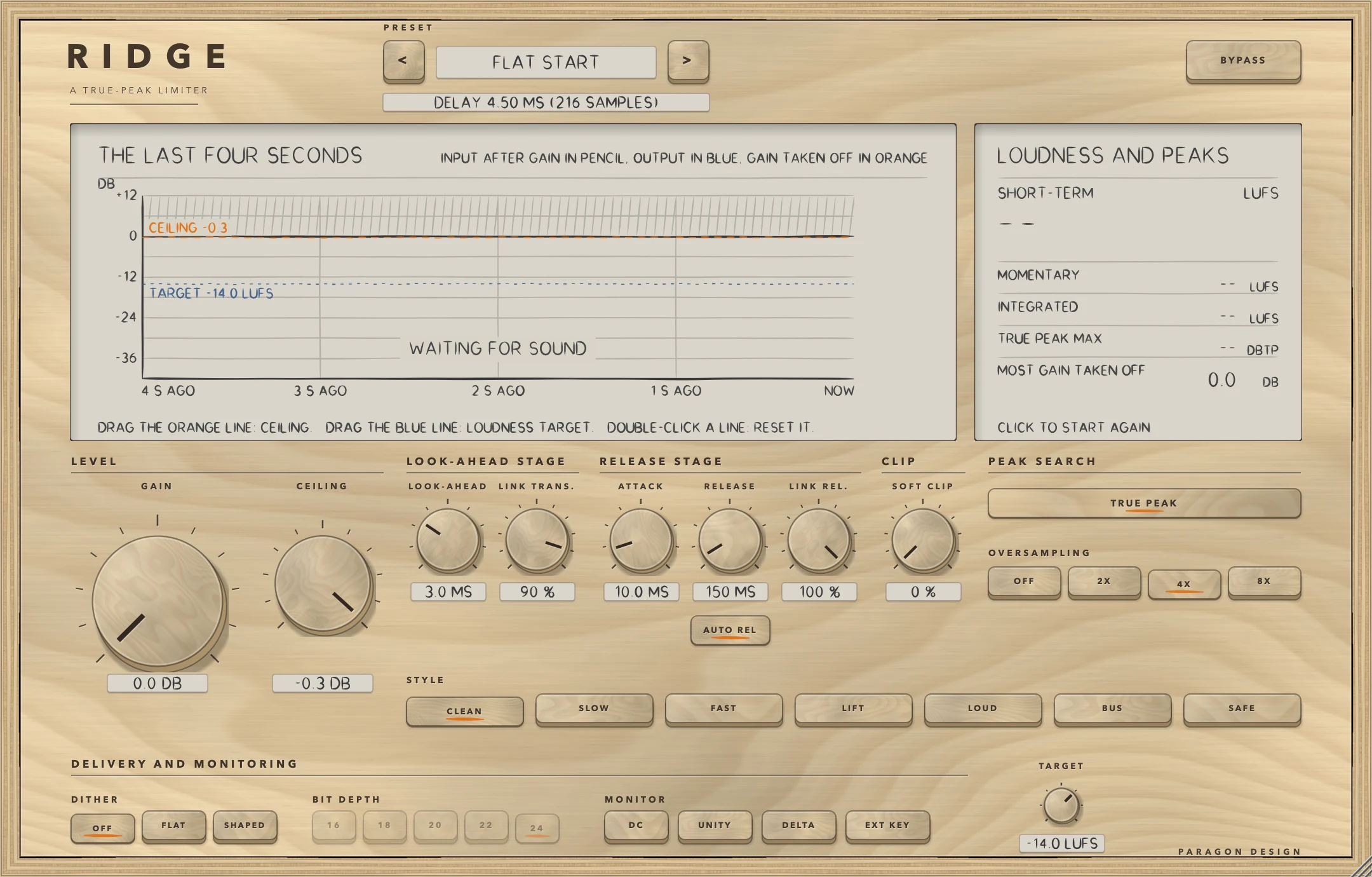
- Put RIDGE on the track you want to limit. The preset bar reads FLAT START, the line under it DELAY 4.50 MS (216 SAMPLES) at 48 kHz, and the display says WAITING FOR SOUND until sound arrives.
- Play the loudest part. The pencil line is the input after GAIN, the blue line the output and the dashed orange line CEILING. At GAIN 0 a quiet signal is only delayed.
- Turn GAIN up. Where peaks reach CEILING the gain taken off hangs from the orange line, and MOST GAIN TAKEN OFF rises.
- Drag the orange line to set CEILING, or turn CEILING. Drag the blue line to set TARGET.
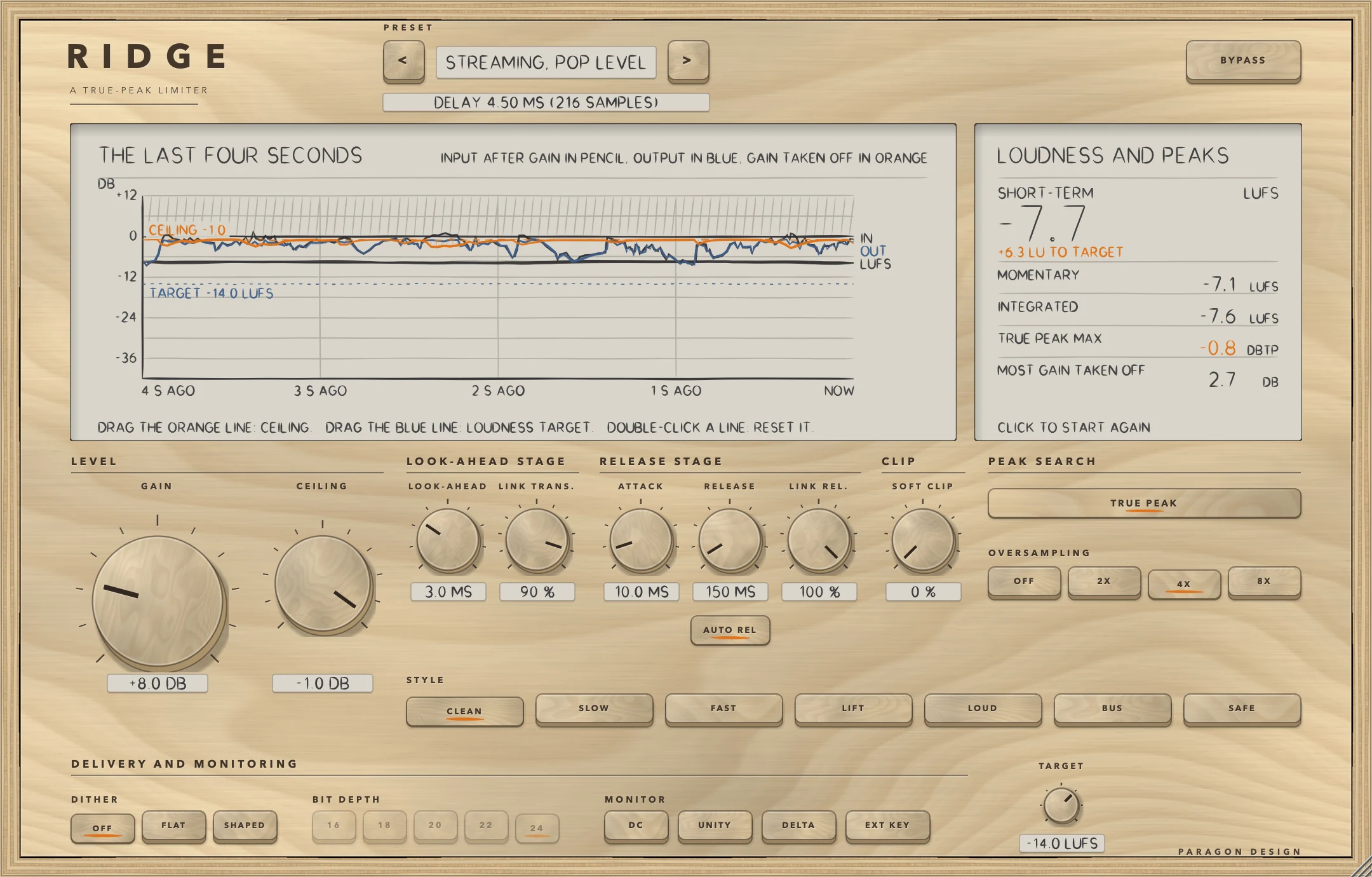
- After three seconds SHORT-TERM shows the loudness and, under it, the distance from TARGET. TRUE PEAK MAX turns orange when it is over CEILING by more than 0.05 dB, as in the figure: the sample peak is held to the ceiling, and the true peak can end a little over it.
- Press the STYLE keys in turn, starting from CLEAN. LIFT and LOUD change the signal in other ways (see STYLE), so neither is a plain limiter.
- Press DELTA to hear only what is taken away, then press it again.
- Press BYPASS to compare. It keeps the delay and does not match levels.
- Choose Streaming, Pop Level from Master in the preset menu, as in the figure: GAIN +8.0 DB into CEILING -1.0 DB, with CLEAN.
How it works
Rest the pointer on a control for 0.7 s for a short description, and double-click a knob to return it to its default. The Control reference after this chapter lists every control with its limits and default, but gives none for the keys, whose defaults are these: AUTO REL and TRUE PEAK on, OVERSAMPLING 4X, STYLE CLEAN, DITHER OFF, BIT DEPTH 24, and DC, UNITY, DELTA, EXT KEY and BYPASS off.
Top bar and presets
The keys < and > step through the 46 presets, and a click on the name opens a menu by category. An asterisk after the name means a control the preset sets has moved since it loaded. BYPASS crossfades, linearly over 5 ms, to the input delayed by the same amount as when RIDGE is working, so it never moves anything in time, and it is also the host's bypass parameter.
The display and its gestures
THE LAST FOUR SECONDS plots dB from +12 to -42 with a point every 10 ms. The pencil line is the input after GAIN (and after the lift, in LIFT), lined up with the output, and the blue line is the output; each point is the loudest sample in its 10 ms. The gain taken off hangs from the ceiling in orange, with hatching where it is over 0.2 dB. It counts the release stage and the look-ahead stage together, on the louder side, and not what the soft clip takes off. The bold line is the short-term loudness in LUFS on the same scale, from three seconds after sound starts.
The dashed orange line is CEILING and the dashed blue line TARGET, each named with its value, and both are handles. Drag the orange line to set CEILING from -30 to 0 dB and the blue line to set TARGET from -30 to -6 LUFS, in steps of 0.1; the line follows the hand, and with Alt held, the Option key on a Mac, a tenth as far. Double-click a line to put it back at -0.3 dB or -14 LUFS. A drag and a double-click are each a parameter gesture a host can record. At the top right the display says in orange, one message at a time and in this order of priority, when something is not the plain picture: BYPASSED, DELTA, EXTERNAL KEY: NO SIDECHAIN CONNECTED, UNITY or PEAK SEARCH NEEDS OVERSAMPLING. With nothing in the last four seconds it says WAITING FOR SOUND.
The readout
LOUDNESS AND PEAKS gives SHORT-TERM loudness large, in LUFS, with under it how far that is from TARGET (+6.3 LU TO TARGET), in orange when it is 1 LU or more away. Below are MOMENTARY and INTEGRATED in LUFS, TRUE PEAK MAX in dBTP and MOST GAIN TAKEN OFF in dB. Two dashes mean nothing to show yet: SHORT-TERM needs three seconds of sound, MOMENTARY and INTEGRATED 400 ms. A click on the readout clears TRUE PEAK MAX and MOST GAIN TAKEN OFF and starts the loudness again. The loudness follows ITU-R BS.1770-4 (K-weighted; MOMENTARY over 400 ms, SHORT-TERM over 3 s, INTEGRATED over the run since the reset, gated at -70 LUFS and at 10 LU under what passes that gate) and measures what leaves RIDGE, after DELTA, UNITY and BYPASS. TRUE PEAK MAX is read by a separate 4X meter, not by the peak search, and turns orange when it is over CEILING by more than 0.05 dB.
GAIN and CEILING
GAIN raises the signal before the limiter, from 0 to 36 dB. It starts at 0 dB exactly, so a new instance changes nothing, and the middle of the knob is 9 dB. CEILING is the level the output is held to, from -30 to 0 dB, starting at -0.3 dB, with the middle of the knob at -6 dB. More GAIN into the same CEILING gives a higher level and takes more off. Both glide, reaching 99 percent of a change in 30 ms. In every test the sample peak stayed at CEILING or under it, to within the 0.01 dB the tests allow, with one allowance: after CEILING is lowered the test lets the old ceiling apply for 150 ms.
RELEASE STAGE: ATTACK, RELEASE, LINK REL. and AUTO REL
The release stage reads the level of each sample after GAIN, the lift and the soft clip (or of the key, with EXT KEY on) and works out how far it is over a threshold. The threshold sits under CEILING by a distance the style sets, with a knee centred on it. Nothing happens until the level is half a knee under the threshold; inside the knee the reduction in dB grows as the square of the distance into it; above the knee it equals the amount over the threshold, so the level is held at the threshold. It has no look-ahead: a fast peak passes it, and the look-ahead stage catches it.
ATTACK is the time for the reduction to cover 63 percent of the way up, and RELEASE the time for it to fall to 37 percent of its depth, each multiplied by the style's factor (see STYLE). AUTO REL makes the release follow what the release stage has been doing: quick after a brief peak, long after a long push. Its time constant runs from a quick time up to RELEASE times the style's factor. The quick time is 12 percent of that and never under 5 ms, and the memory that moves it fills with a time constant of 0.4 s, fully only when the reduction is 6 dB or more. So with AUTO REL on, RELEASE times the style's factor is the longest the release takes, except in the case under Limits.
LINK REL. sets how far each side's reading is pulled up to the louder side's before the release stage works out its reduction, as a share of the difference in amplitude, not in dB. At 100 percent both sides read the louder one, and at 0 each reads only itself.
LOOK-AHEAD STAGE: LOOK-AHEAD and LINK TRANS.
The look-ahead stage reads the release stage's output LOOK-AHEAD ahead of the audio. For each sample it works out the gain that would bring the peak to CEILING, keeps the lowest gain over a window of LOOK-AHEAD times the style's factor, in whole samples, and runs that through 1, 2 or 3 moving averages in a row whose windows together are as long as the look-ahead. The gain comes down along a ramp as long as the look-ahead, straight with 1 average and starting more gently with 2 or 3, and is down when the peak leaves. It lets go with a time constant the style sets, from 15 to 120 ms. LOOK-AHEAD runs from 0.1 to 10 ms, starts at 3 ms and has its middle at 2 ms; a longer look-ahead brings the gain down more slowly and adds delay.
LINK TRANS. sets how far each side's peak reading is pulled up to the louder side's, as a share of the difference in amplitude, not in dB. At 100 percent both sides read the louder one and so get the same gain, and at 0 each reads only itself.
CLIP: SOFT CLIP
The soft clip comes before the release stage. Above a knee it bends the level towards CEILING with a tanh curve, and below the knee it changes nothing. The knee is at 1 less 0.6 times the amount, times CEILING: 0.5 dB under CEILING at 10 percent, 1.4 dB at 25, 3.1 at 50, 4.7 at 70 and 8.0 dB at 100. The amount in force is the SOFT CLIP control plus the style's own (35 percent in LOUD), to a most of 100 percent. With oversampling on the clip works on the signal interpolated to 2, 4 or 8 times the rate and brings it back down through a filter, and with OFF it uses first-order antiderivative anti-aliasing. It fades in and out over 2 ms when the amount in force goes to or from zero. What it takes off is not counted in the gain taken off, and DELTA includes it.
PEAK SEARCH: TRUE PEAK and OVERSAMPLING
TRUE PEAK makes the look-ahead stage search for the peaks between the samples. For each sample it interpolates the signal with a 48-tap windowed sinc to 2, 4 or 8 times the rate, which gives 1, 3 or 7 points between a sample and the next, and takes the largest of the sample and those points. With TRUE PEAK off it reads the samples only. It needs OVERSAMPLING of 2X or more: with OFF it does nothing, and if TRUE PEAK is on its key is then dimmed and the display says PEAK SEARCH NEEDS OVERSAMPLING. OVERSAMPLING also sets the rate the soft clip works at, and adds 72 samples of delay at 2X, 4X and 8X alike and none with OFF. 8X costs the most.
How far over a -1 dB ceiling the true peak ended, in dB, by a 16X interpolator of 128 taps a phase that is not RIDGE's own, on 3 s of band-limited programme driven 14 dB into it:
| Style | 2X | 4X | 8X |
|---|---|---|---|
| CLEAN | 0.066 | 0.025 | 0.004 |
| SLOW | 0.030 | 0.016 | 0.003 |
| FAST | 0.159 | 0.030 | 0.007 |
| LIFT | 0.063 | 0.022 | 0.006 |
| LOUD | 0.551 | 0.075 | 0.076 |
| BUS | 0.030 | 0.030 | 0.007 |
| SAFE | 0.014 | 0.005 | 0.004 |
| Band-limited drum bursts, the worst of the seven | 0.306 | 0.178 | 0.052 |
| Full-band noise, CLEAN | 0.749 | 0.749 | 0.691 |
| Unfiltered drum bursts, CLEAN | 0.288 | 0.219 | 0.162 |
These are measurements, not a guarantee: RIDGE does not keep the true peak under CEILING, and full-band material is the worst case for any estimate between the samples. A longer test at 4X, 8 s of band-limited programme the same on both channels, gave CLEAN 0.031, SLOW 0.020, FAST 0.031, LIFT 0.039, LOUD 0.141, BUS 0.025 and SAFE 0.020 (limit 0.15): another programme, so another figure. The limits and the figures at other sample rates are in Measured.
STYLE
The seven keys choose the numbers the two stages use. The Control reference gives each key's numbers in its description, and a test reads every one back from the engine. The release stage starts to act at its threshold less half its knee: 2.0 dB under CEILING in CLEAN and LIFT, 4.0 in SLOW, 5.0 in SAFE, 7.5 in BUS, and at CEILING in FAST and LOUD, which have a hard knee. So BUS holds a steady overload under the ceiling: a 1 kHz tone 6 dB over a -3 dB CEILING left at -4.29 dB with MOST GAIN TAKEN OFF at 7.85 dB, against -3.00 dB and 6.76 dB in CLEAN. LIFT raises the attacks of the signal before the limiter by up to 1.5 times (3.5 dB), whatever the level: a fast envelope over a slow one sets a boost of 1 plus a quarter of how far their ratio is over 1, to at most 1.5. LOUD's soft clip is built in, added to SOFT CLIP. CLEAN, SLOW, FAST, BUS and SAFE leave a quiet signal alone; LIFT and LOUD do not (Measured has the figures).
What each style measured:
| Style | Crest of the output | Distortion of a 47 Hz tone | Mean reduction | Delay at 3 ms, 48 kHz |
|---|---|---|---|---|
| CLEAN | 7.19 dB | -40.4 dB | 2.18 dB | 216 samples |
| SLOW | 7.59 dB | -44.9 dB | 2.68 dB | 259 samples |
| FAST | 6.83 dB | -32.7 dB | 1.73 dB | 158 samples |
| LIFT | 7.57 dB | -44.6 dB | 3.16 dB | 216 samples |
| LOUD | 5.46 dB | -11.2 dB | 0.12 dB | 187 samples |
| BUS | 7.68 dB | -41.5 dB | 2.72 dB | 173 samples |
| SAFE | 8.25 dB | -43.2 dB | 3.43 dB | 302 samples |
The programme was 10 s of a kick, a snare, noise bursts, a bass line and a chord, driven 8 dB into a -3 dB CEILING with LOOK-AHEAD 3 ms, ATTACK 10 ms, RELEASE 150 ms, AUTO REL off, both links at 100 percent and 4X. The crest is the peak over the RMS level of the output after the first 2 s. The distortion is harmonics 2 to 10 against the fundamental for a 46.875 Hz tone at -3 dBFS limited by 8 dB the same way. The mean reduction is the mean of the gain both stages took off, on the louder side, after the first 2 s. The test sets only that the styles differ and that LOUD's crest is under CLEAN's, SAFE's distortion under FAST's and LIFT's crest over CLEAN's (limits).
DELIVERY AND MONITORING: DITHER, BIT DEPTH, DC, UNITY, DELTA, EXT KEY and TARGET
DITHER (OFF, FLAT, SHAPED) and BIT DEPTH (16, 18, 20, 22, 24) act on the output; the BIT DEPTH keys are dimmed while DITHER is OFF, and the choice does nothing then. Dither comes after the limiter, DELTA and UNITY and before BYPASS, so the bypassed output is not dithered, and none is added while DELTA is on. FLAT is triangular noise with a peak of one step either side, then rounding to the bit depth. SHAPED feeds the rounding error back through two zeros at 4 kHz with a radius of 0.9, which lowers it at 2 to 6 kHz and raises it at 14 to 22 kHz (figures in Measured). DC is a second-order high-pass at 5 Hz on the signal, ahead of GAIN.
UNITY takes GAIN off again after the limiting, with a 30 ms glide, so what the limiter takes off shows as a lower level than the input by that amount. It lowers the DELTA signal too, and with LIFT and LOUD, which change a quiet signal, it is not exact. DELTA outputs what the soft clip and the limiter take away: the input after GAIN, and after the lift in LIFT, less the output. EXT KEY is described under Sidechain input. TARGET, from -30 to -6 LUFS and starting at -14, is the blue line and the distance under the loudness number. It never reaches the sound.
Changing a setting while sound plays
GAIN, CEILING, SOFT CLIP and UNITY glide. Three things cannot glide because they change the structure of the delay: LOOK-AHEAD in whole samples, the number of averages in the style's ramp, and OVERSAMPLING. A change to any of them is made under a dip: the output fades out over 3 ms, the change is made, the output stays exactly silent for twice the new look-ahead plus two samples, and it fades in over 3 ms. A change of STYLE dips unless the new style has the same look-ahead in samples and the same number of averages, as CLEAN and LIFT do. A change made after at least 50 ms without one is made at once; one that comes within 50 ms of the last waits until the changes stop, so turning LOOK-AHEAD with the hand dips at the first step and again 50 ms after the hand stops, and the sound plays between. By the code the dip is made in bypass too.
Names in the host
To a host, RIDGE has 20 parameters. Seven are named differently from the panel: LINK TRANS. is Link Transients, LINK REL. is Link Release, AUTO REL is Auto Release, EXT KEY is External Sidechain, DC is DC Filter, UNITY is Unity Gain and TARGET is Loudness Target. Which preset is loaded, and the editor's width, are kept with the saved state and are not host parameters.
Control reference
Every control on the panel, as the plug-in itself labels it. The description is the tooltip the plug-in shows when you rest the pointer on the control.
Top bar
| No. | Control | What it does | Range | Default |
|---|---|---|---|---|
| 1 | <Key | Previous preset | ||
| 2 | >Key | Next preset | ||
| 3 | BYPASSKey | Hear the input, delayed by the same amount, so switching it never moves anything in time. |
Controls
| No. | Control | What it does | Range | Default |
|---|---|---|---|---|
| 4 | GAINKnob | How hard the programme is pushed into the limiter, 0 to 36 dB. The ceiling is what it cannot cross, so more gain is louder and more is taken off. Double-click to reset. | 0 to 36 dB | 0 dB |
| 5 | OFFKey | No dither: the output is not quantised. | ||
| 6 | FLATKey | Flat dither: triangular noise of one step, then rounding to the bit depth beside it. | ||
| 7 | SHAPEDKey | Shaped dither: the same noise with the rounding error pushed up out of the 2 to 6 kHz band and into the highest frequencies. | ||
| 8 | CEILINGKnob | The loudest the output can be, -30 to 0 dB. With the peak search on it holds the peaks between the samples to within a fraction of a dB of it, and the sample peak to it. You can also drag the orange line on the display. | −30 to 0 dB | −0.3 dB |
| 9 | 16Key | Dither to 16 bits. It does nothing while dither is OFF. | ||
| 10 | 18Key | Dither to 18 bits. It does nothing while dither is OFF. | ||
| 11 | LOOK-AHEADKnob | How far ahead the look-ahead stage looks for peaks, 0.1 to 10 ms, times the style's scale. It has that long to bring the gain down, so a longer look-ahead brings it down more slowly. It adds delay, which is reported to the host. | 0.1 to 10 ms | 3 ms |
| 12 | CLEANKey | The plain limiter. The release stage starts 0.5 dB under the ceiling with a 3 dB knee, at the ATTACK and RELEASE set. The look-ahead stage ramps the gain down through 3 averages in a row and lets go with a 40 ms time constant. | ||
| 13 | 20Key | Dither to 20 bits. It does nothing while dither is OFF. | ||
| 14 | 22Key | Dither to 22 bits. It does nothing while dither is OFF. | ||
| 15 | LINK TRANS.Knob | How much one side's peaks turn the other side down in the look-ahead stage. At 100 the two sides always have the same gain; at 0 each side is turned down only by its own peaks. | 0 to 100 % | 90 % |
| 16 | 24Key | Dither to 24 bits. It does nothing while dither is OFF. | ||
| 17 | SLOWKey | The slowest release stage. It starts 1 dB under the ceiling with a 6 dB knee, at 1.5 times ATTACK and 1.4 times RELEASE. The look-ahead stage is 1.3 times LOOK-AHEAD, with 3 averages in a row and an 80 ms time constant. | ||
| 18 | ATTACKKnob | How fast the release stage takes hold of a loud passage: the time to cover 63 percent of the way, 0.05 to 100 ms, times the style's scale. Peaks that get past it are caught by the look-ahead stage. | 0.05 to 100 ms | 10 ms |
| 19 | DCKey | A 5 Hz high-pass ahead of everything, to take out an offset. | ||
| 20 | FASTKey | The shortest times. The release stage starts at the ceiling with a hard knee, at 0.6 times ATTACK and RELEASE. The look-ahead stage is 0.6 times LOOK-AHEAD, a straight ramp of 1 average, with a 15 ms time constant. | ||
| 21 | UNITYKey | Takes the gain off again after limiting, so that what is left is the limiting. With a style that leaves a quiet signal alone, a signal under the ceiling comes out at the level it went in. | ||
| 22 | RELEASEKnob | How fast the release stage lets go: the time for the reduction to fall to 37 percent of its depth, 5 ms to 3 s, times the style's scale. With AUTO REL on it is the longest the release takes. | 5 to 3000 ms | 150 ms |
| 23 | AUTO RELKey | The release follows the programme: short peaks let go quickly, a long overload slowly, up to the whole of RELEASE. | ||
| 24 | DELTAKey | Hear only what the limiter takes away. | ||
| 25 | LINK REL.Knob | The same for the release stage. At 100 the two sides always have the same release. | 0 to 100 % | 100 % |
| 26 | LIFTKey | As CLEAN, with the attacks of the signal raised before the limiter, by up to 1.5 times (3.5 dB), whatever the level. A signal far under the ceiling is changed too. | ||
| 27 | EXT KEYKey | The detectors listen to the sidechain input instead of the signal, for limiting one sound by another. With no sidechain connected it listens to the signal. | ||
| 28 | SOFT CLIPKnob | Rounds the peaks off before the limiter, so it has less to do. It acts on whatever is over the ceiling, however small the amount, and the amount sets how wide its knee is. LOUD adds 35 percent of its own. The soft clip is faded in and out over 2 ms. | 0 to 100 % | 0 % |
| 29 | LOUDKey | A hard knee at the ceiling, 0.8 times ATTACK and 0.7 times RELEASE, and a soft clip of 35 percent built in, added to the SOFT CLIP control. The look-ahead stage is 0.8 times LOOK-AHEAD, with 2 averages in a row and a 25 ms time constant. | ||
| 30 | TRUE PEAKKey | Searches for the peaks between the samples as well, which holds the peak after conversion to within a fraction of a dB of the ceiling. It needs oversampling of 2X or more: with oversampling OFF it does nothing. | ||
| 31 | OFFKey | No oversampling: the peaks between the samples are not searched for, and the soft clip uses first-order antiderivative anti-aliasing. There is no extra delay. | ||
| 32 | TARGETKnob | The loudness you are aiming for, -30 to -6 LUFS: the blue line on the display and the distance under the loudness number. It never changes the sound. You can also drag the blue line. | −30 to −6 LUFS | −14 LUFS |
| 33 | BUSKey | For a mix of many parts. The release stage starts 3 dB under the ceiling with a 9 dB knee, at 2 times ATTACK and 0.8 times RELEASE. The look-ahead stage is 0.7 times LOOK-AHEAD, with 3 averages in a row and a 60 ms time constant. | ||
| 34 | 2XKey | The peak search looks at one point between the samples, and the soft clip works at twice the rate. Adds 72 samples of delay. | ||
| 35 | 4XKey | The peak search looks at three points between the samples, and the soft clip works at four times the rate. Adds 72 samples of delay. | ||
| 36 | SAFEKey | The longest look-ahead stage: 1.6 times LOOK-AHEAD, 3 averages in a row and a 120 ms time constant. The release stage starts 2 dB under the ceiling with a 6 dB knee, at 1.2 times ATTACK and RELEASE. | ||
| 37 | 8XKey | The peak search looks at seven points between the samples, and the soft clip works at eight times the rate. Adds 72 samples of delay, and costs the most. |
Recipes
Push hard with LOUD and the soft clip
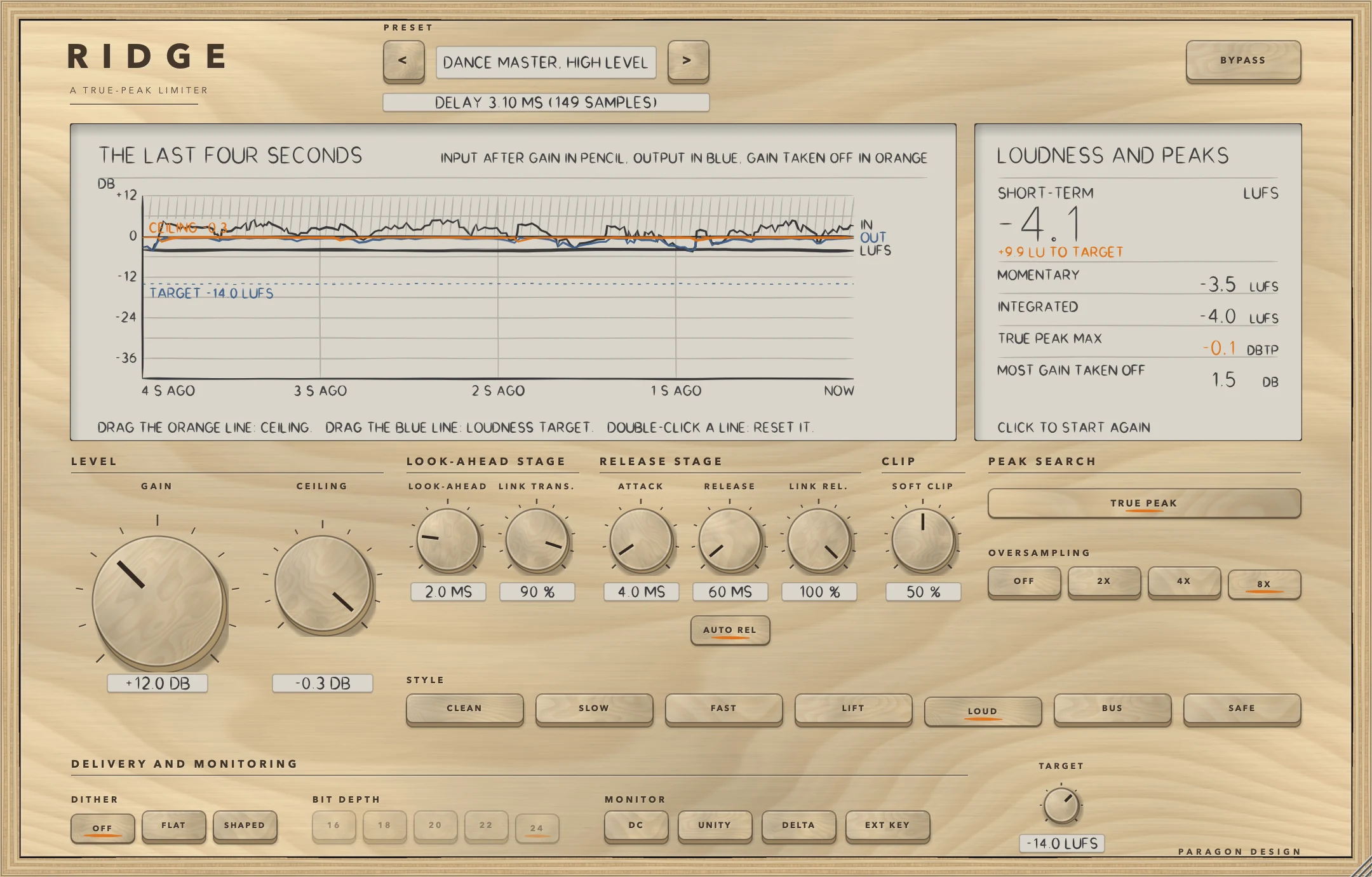
Choose Dance Master, High Level: LOUD, GAIN +12 dB into CEILING -0.3 dB, LOOK-AHEAD 2 ms, ATTACK 4 ms, RELEASE 60 ms, SOFT CLIP 50 percent, which with LOUD's 35 is 85 percent in force, and 8X. The soft clip's knee is then 6.2 dB under CEILING, at -6.5 dBFS, and the delay is 149 samples (3.10 ms at 48 kHz). In the figure MOST GAIN TAKEN OFF reads 1.5 DB although GAIN is +12.0 DB, because the soft clip does much of the work and that number does not count it; DELTA shows all of it. TRUE PEAK MAX is orange, at -0.1 DBTP against a CEILING of -0.3 DB.
Hear what is taken away
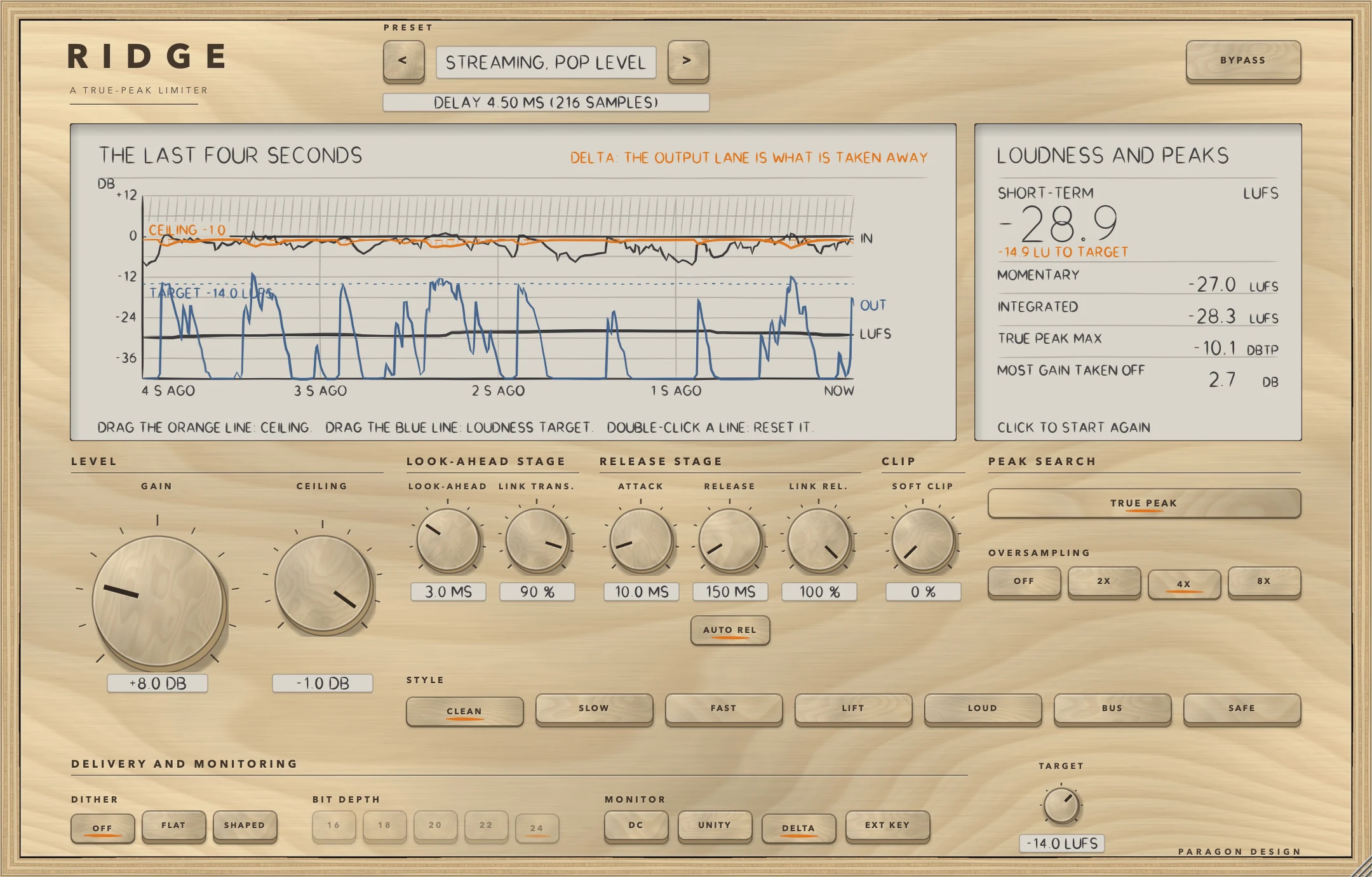
Press DELTA. The output becomes what the soft clip and the limiter take away, and the readout measures that. In the figure Streaming, Pop Level has DELTA on: the blue lane is the difference, rising where the limiter works and falling to the bottom of the plot where it does not. DELTA is silent when nothing is limited, and UNITY lowers it by GAIN.
Limit one sound by another
Connect the other track as the sidechain (see the sidechain steps under Setting it up) and press EXT KEY. GAIN raises the key as well, so GAIN and CEILING together set how loud the key must be before it turns the signal down. For a steady key the gain taken off is the amount the key goes over CEILING after GAIN, and it is taken off the signal and not the key; the figures are under Sidechain input.
Presets
RIDGE has 46 presets in 9 categories. They are starting points chosen from measurements, not tuned by ear.
- Start: Flat Start
- Vocal: Lead Vocal, Peaks; Vocal, Long Look-ahead; Rap Vocal, Level Up; Backing Vocals, Bus Style; Spoken Word, Level; Podcast Master
- Drums: Drum Bus, Limit; Kick, Peak Guard; Snare, Peak Guard; Overheads, Peak Catch; Room Mics, Hard Limit; Loop, Lifted Attacks
- Bass: Bass Guitar, Level; Sub Bass, Peak Guard
- Guitar: Acoustic Guitar, Peaks; Electric Guitar, Peaks
- Keys: Piano, Peaks; Synth Lead, Hold; Strings, Swell Guard
- Bus: Mix Bus, Light Limit; Mix Bus, Safety Net; Mix Bus, Slight Gain; Wide Bus, Unlinked; Stem Master
- Master: Streaming Master; Streaming, Pop Level; Light Touch; Club Master; Rock Master; Acoustic Master; Classical Peak Guard; Jazz Master; Hip-Hop Master; Dance Master, High Level; Metal Master; Master, Lifted Attacks; Vinyl Pre-Master; Broadcast Ceiling; Streaming Peak Check
- Utility: Hard Pump; Soft Clip, Full; Heavy Limit, 2X; Slow Release; Shortest Look-ahead; Parallel Source, Drums
Every preset sets the 12 controls of the sound (GAIN, CEILING, STYLE, LOOK-AHEAD, ATTACK, RELEASE, AUTO REL, LINK TRANS., LINK REL., SOFT CLIP, TRUE PEAK and OVERSAMPLING) and leaves DITHER, BIT DEPTH, DC, UNITY, DELTA, EXT KEY, TARGET and BYPASS as you set them. TRUE PEAK is on in every preset, Heavy Limit, 2X is the only preset at 2X, Dance Master, High Level the only one at 8X, and the rest use 4X. Hard Pump, Heavy Limit, 2X and Slow Release turn AUTO REL off. Seven presets set a soft clip, six of them with LOUD.
FLAT START is the default state and what a new instance shows: GAIN 0, CEILING -0.3 dB, CLEAN, LOOK-AHEAD 3 ms, ATTACK 10 ms, RELEASE 150 ms, AUTO REL on, links 90 and 100 percent, no soft clip, TRUE PEAK on and 4X. For a quiet signal the output is the input delayed by 216 samples at 48 kHz, bit for bit, even when it is loaded over heavy settings. Loading a preset can change the delay, from 75 samples (Shortest Look-ahead) to 686 (Classical Peak Guard, Sub Bass, Peak Guard and Vinyl Pre-Master) at 48 kHz, and while sound plays the change is made under a dip.
On pink noise at -18 dBFS RMS every preset changed the level by between -0.0 dB (no change; Streaming Peak Check and Mix Bus, Safety Net) and +11.1 dB (Dance Master, High Level), and none clipped it: the highest peak was -0.3 dBFS (Dance Master, High Level, against its CEILING of -0.3 dB), against -4.9 for FLAT START. No preset's output peak went over its own ceiling (limit 0.01 dB). On loud band-limited programme every preset's sample peak was at most 0.0000 dB over its ceiling (Hard Pump) and its true peak at most 0.188 dB over (Parallel Source, Drums), against limits of 0.20 dB at 4X and 8X and 0.35 dB at 2X. The presets are not level matched: the level change comes from GAIN. To the host RIDGE has one unnamed program, so the presets belong to its panel. In Logic Pro, plug-in settings are stored with the project file.
Measured
All figures are from the plug-in repository's tests, last run on 14 October 2026. The 233 checks of the RIDGE run (22 of them on kit pieces under its engine), the host test (47 checks) on the installed Audio Unit and Apple's Audio Unit validation (one warning: RELEASE read back 0.463790 against 0.463791 as its default) all passed. The whole set is 1777 checks; in its run of that day 2 failed, both CPU-cost checks of another plug-in, and none was RIDGE's. The figures are on synthetic signals, not recordings of music, at 48 kHz unless a row says otherwise. A figure marked limit is a bound the test sets, not a result. Every other figure is a measurement. Unless a row says otherwise, the ceiling, true-peak and style tests start from CLEAN, LOOK-AHEAD 3 ms, ATTACK 10 ms, RELEASE 150 ms, AUTO REL off, both links at 100 percent, no soft clip, TRUE PEAK on, 4X and a CEILING of -1 dB, and the rest tests from FLAT START.
| What was measured | Result | Conditions |
|---|---|---|
| The ceiling, by sample peak | The largest of 108 settings was -1.0000 dB against the -1.0 dB ceiling, and drum bursts and pink noise gave -1.0000 dB too (limit: 0.01 dB over). A full-scale square wave driven 36 dB into a -0.3 dB ceiling stayed no more than 0.01 dB over it in every style (a limit; no figure is printed). Every preset on loud band-limited programme: at most 0.0000 dB over its ceiling (Hard Pump). Around nine changes of a setting: -0.6018 to 0.0000 dB (limit 0.01 dB over) | Band-limited programme driven 14 dB into -1 dB, stereo, dither off. The 108: every style at 0.1 and 10 ms with OFF, 4X and 8X and the soft clip off and full (84), and CLEAN at 1, 3 and 6 ms with OFF, 2X, 4X and 8X and the soft clip off and half (24). Drum bursts and pink noise at -12 dBFS RMS: every style, soft clip off and full. After CEILING is lowered the old ceiling is allowed for 150 ms |
| The ceiling, by true peak | The table under PEAK SEARCH. Limits: 0.15 dB at 4X and 8X, 0.20 at 2X (LOUD 0.60), and for band-limited drum bursts 0.35, 0.20 and 0.15 at 2X, 4X and 8X; for full-band noise 1 dB. CLEAN and LOUD at 4X ended at most 0.085 dB over at 44.1 kHz, 0.024 at 88.2, 0.006 at 96 and 0.001 at 192 (limit 0.20). A tone at a quarter of the sample rate: -1.00 dBTP with the peak search and 1.51 dBTP without | The 16X measure looks only near the samples within 3 dB of the loudest. CLEAN at 4X read with 256 and 64 taps a phase gave 0.017 and 0.017 dB (limit: within 0.05 dB). Tone: driven 6 dB into -1 dB |
| TRUE PEAK MAX | Against the 16X measure the readout read up to 0.151 dB lower (LOUD at 2X) and up to 0.020 dB higher (limit: within 0.2 dB). A tone at a quarter of the sample rate with samples at -3.01 dBFS read -0.148 dBTP (limit: within 0.2 dB of 0) | The readout's own 4X meter; CLEAN and LOUD at 2X, 4X and 8X, programme driven 14 dB into -1 dB |
| Release stage | A steady level followed the curve to 0.00000 dB in every style (limit 0.01 dB). ATTACK and RELEASE times differed from the set times multiplied by the factors by at most 2.78 and 0.48 percent (limit 3 percent). With AUTO REL and RELEASE 150 ms the reduction fell to 37 percent after 23, 28, 42, 77, 125 and 147 ms for overloads of 5, 20, 60, 200, 600 and 1500 ms (the test asks only that it never shortens) | The release stage alone; times at 44.1, 48, 96 and 192 kHz, five styles; AUTO REL in CLEAN |
| Look-ahead stage and links | A quarter, half and three quarters of the way through the ramp the gain was 25.8, 50.5 and 75.3 percent of the way down with 1 average (FAST), 13.5, 51.0 and 87.5 with 2 (LOUD) and 8.1, 51.1 and 92.8 with 3 (CLEAN), each within 4 points of the expected shape (limit). With both links at 0 the quiet side changed by 0.00 dB (limit 0.05 dB), and at 100 by -6.00 dB (limit: more than 3 dB) | Ramps: a key 6 dB over CEILING. Links: 440 Hz at 0 dBFS left, 1.5 kHz at -30 dBFS right, CEILING -6 dB |
| At rest, in bypass, block size | CLEAN, SLOW, FAST, BUS and SAFE gave the input delayed by the reported latency, bit for bit, in 160 settings, on a mono track (OFF and 4X) and, for CLEAN and SAFE, at four rates. LIFT differed from it by 12.2 dB under the input (level +1.65 dB), LOUD by 30.3 dB under at 4X (-0.018 dB) and 10.7 dB under with OFF (-0.390 dB); the checks ask only that they are not exact. After 12 dB of gain into the ceiling for 1 s, then GAIN back at 0, the output was exactly the delayed input again 2.27 s later in CLEAN and 2.85 s in SAFE. Bypass gave the delayed input bit for bit in all seven styles, from the start and, after its crossfade, when switched on while working; in CLEAN it was exact from sample 239 of the change (a 5 ms crossfade is 240 samples; limit 241). Blocks of 1, 7, 64 and 4096 samples gave exactly the output of 512 | Rest: FLAT START settings, pink noise at -30 dBFS RMS with clicks at -14 dBFS; five styles, OFF to 8X, TRUE PEAK on and off, 0.1 to 10 ms. Let-go: RELEASE 150 ms, AUTO REL off, the default CEILING. Bypass and blocks: a busy setting (GAIN 14 dB, CEILING -1.5 dB, AUTO REL on, links under 100 percent, SOFT CLIP 30 percent, shaped dither, DC filter) |
| Soft clip | The worst alias component of a 9.98 kHz tone clipped 12 dB was -22.3 dB with OFF, -93.8 dB at 2X and -93.7 dB at 4X and 8X (limit: 4X at least 15 dB under OFF) | Tone at -6 dBFS, GAIN 12 dB, CEILING -1 dB, CLEAN, soft clip 100 percent |
| DELTA, UNITY, sidechain | Output plus DELTA against the gained input: 0.000000178 (limit 0.000001). UNITY: a -30 dBFS tone with GAIN +12 dB came out within 0.05 dB of its level (limit). The sidechain figures are under Sidechain input, with limits of more than 3 dB down with a key and within 0.05 dB otherwise | DELTA: 36 settings, six styles without LIFT, OFF, 4X, 8X, soft clip 0 and 50 percent. UNITY: SLOW |
| Dither and DC filter | 16-bit FLAT: error power -96.3 dBFS, every sample on the grid to 0.000000 of a step (limits: within 1.5 dB of -96.3, and 0.01 of a step). SHAPED against FLAT: -141.9 against -126.4 dB at 2 to 6 kHz and -117.4 against -126.5 dB at 14 to 22 kHz (limits: at least 8 dB lower and 4 dB higher). DC filter: an offset of 0.1 came out as 0.0000 with it on and 0.1000 with it off (limits: under 0.003, and within 0.002 of 0.1) | A 1 kHz tone at -20 dBFS, OFF, 16 bits, the error as the average level per bin. DC: 220 Hz at -20 dBFS plus 0.1 |
| Loudness meter | A -23 dBFS 997 Hz stereo sine read -23.000 LUFS in all three windows (limits: 0.1 LU, and 0.001 LU for integrated). 20 s at -23 then 20 s at -55 read -23.033 LUFS integrated, so the gate left the quiet part out (limit: within 0.15) | The engine's own meters read -23.0 in all three windows (limit 0.1) and said nothing for short-term until 3 s had played |
| Moving a control | The largest step between samples of a 100 Hz sine, as a multiple of the step the sine makes at its final level: GAIN swept 0 to +24 dB in a quarter of a second 1.000 (7.78 with no glide) and jumped to +12 dB 1.000 (53.41). The largest of any other control was 1.488 (SOFT CLIP swept 0 to 100 percent), then 1.463 (OVERSAMPLING with the soft clip at half) | Limits: 1.15 times the sine's own step (1.1 for ATTACK and RELEASE) plus the step of the fade where there is one. Mono, one control moved every 480 samples |
| The delay and the dips | The reported delay was the measured delay of an impulse for every OVERSAMPLING choice with 0.5, 3 and 10 ms. LOOK-AHEAD 3 to 8 ms left the input at once, was back after 1058 samples (22.0 ms) and was silent for 771 (16.1 ms). STYLE SAFE to CLEAN at 10 ms: 1250 (26.0 ms) and 963 (20.1 ms). Any OVERSAMPLING change: 578 (12.0 ms) and 291 (6.1 ms). Thirty steps of 0.1 ms in LOOK-AHEAD, 10 ms apart, gave 2 dips and none during the drag after the first | Delay: CLEAN. Dips: a constant input of 0.1, mono, CLEAN at 4X |
| Cost | Engine alone: the default (GAIN 12 dB into the ceiling) 1.74 percent of one core, OVERSAMPLING OFF 1.20, 8X 1.86, LOUD with the soft clip at 50 percent 3.28, the heaviest (LOUD, soft clip 50 percent, 8X, shaped dither, DC filter, 10 ms) 4.42. Whole plug-in: 1.82 for the default and 4.31 for the heaviest (limits: default under 3 percent, heaviest under 25) | Stereo, 48 kHz, 512-sample blocks, pink noise at -10 dBFS RMS, thread CPU time, the least of up to ten runs for the four lighter settings and of three for the two heavier ones. The tests' budget for the default is 2 percent of one core: it met that on this run, and LOUD with the soft clip and the heaviest setting did not. The run of the whole set read 1.79 and 4.56 for the whole plug-in |
Limits and what is not verified
- Nothing has been checked by ear. Every figure is a measurement of a synthetic signal, and the styles, the soft clip, the dither and the presets were chosen from numbers. Pink noise stands in for real material, and the preset level changes are on it.
- RIDGE's engine was ported, with permission, from another person's limiter, and every figure here comes from RIDGE's own tests.
- The true peak is not held to the ceiling: it ended up to 0.551 dB over on programme (LOUD at 2X), 0.306 dB over on band-limited drum bursts (2X) and 0.749 dB over on full-band noise (2X and 4X). The measure is a 16X interpolator that is not RIDGE's and looks only near the samples within 3 dB of the loudest, a converter's own reconstruction was not tried, and the other sample rates were run for CLEAN and LOUD at 4X only. TRUE PEAK MAX read up to 0.151 dB under that measure.
- The ceiling figures were run in stereo, with dither off and EXT KEY off. Dither comes after the limiter, so with it on a sample can sit a few steps of the bit depth past the ceiling (by the code, untested). With EXT KEY on, CEILING does not hold the signal, apart from any soft clip.
- LIFT and LOUD change a signal that is not being limited, so GAIN 0 is not neutral in them and UNITY is not exact. The gain taken off does not count what the soft clip removes.
- Changing LOOK-AHEAD, STYLE or OVERSAMPLING while sound plays mutes the output for twice the new look-ahead plus two samples, between two fades of 3 ms: 6.1 to 20.1 ms of silence in the cases measured, and 32 ms for SAFE at 10 ms by the formula. The delay moves with it, so automating them dips at each change. The click checks did not cover DELTA, DC, EXT KEY, UNITY, DITHER, TRUE PEAK, the links or AUTO REL; by the code DELTA, DC and EXT KEY switch at once with no crossfade.
- With AUTO REL on and RELEASE times the style's factor under 41.7 ms, the quick time is 5 ms and not 12 percent. Under 5 ms (RELEASE under 8.3 ms in FAST, 7.1 in LOUD, 6.3 in BUS) it is the longer time, so a long overload shortens the release. This is by the code: the test ran in CLEAN at RELEASE 150 ms.
- The sidechain tests used a stereo key. By the code, with oversampling on the key acts 48 samples (1 ms at 48 kHz) early against the signal, because it skips the 48 samples the signal goes through in the soft clip's stage. No test covers that.
- On a mono track RIDGE was tested at rest, in bypass, in the click and dip checks, in the meters and with one preset; the ceiling figures are stereo. Nothing was measured at 176.4 kHz or below 44.1 kHz, though Apple's validation rendered at 11.025 and 22.05 kHz without error. Dither was measured at 16 bits only and shaped dither at 48 kHz only, and the loudness meter on tones and one gating case, not a recording.
- Not verified in Logic Pro: the points in the note under In Logic Pro, which rest on Apple's pages on plug-in latencies, plug-in formats, adding and bypassing plug-ins and side chains.
- Not verified: the VST3 in any host. The editor inside a real host: the host test checks only that it opens at 1080 by 690 and shows. The knobs and the two lines on a real mouse or trackpad. Native Apple silicon: the installed Audio Unit contains x86_64 code only, and a universal release build has not been run there.
- The cost figures are from one Mac and moved from run to run. RIDGE is a working name and may change.
- Not verified: the licence panel and the trial in every host. They are checked in the plug-in's own tests and in one test host, and the Getting started manual lists what is not verified.
Troubleshooting
The plug-in passes my audio through and says TRIAL OVER: ENTER A LICENCE
The 14 days are over for RIDGE and no licence has been added. Press LICENCE in the top bar, choose the licence file that came with your order, or drop the file on the window, and RIDGE works again at once. If the panel says THIS LICENCE IS FOR another plug-in, that file does not cover RIDGE: the order page offers the file for your order.
Nothing is taken off
If MOST GAIN TAKEN OFF stays at 0.0 the peaks are under the ceiling after GAIN: raise GAIN or lower CEILING (FLAT START has GAIN at 0). Check that BYPASS is off. With EXT KEY on and a quiet key the limiter leaves the signal alone (a soft clip still acts on it), and with no sidechain connected the display says EXTERNAL KEY: NO SIDECHAIN CONNECTED and RIDGE reads the signal instead. The soft clip's work is not counted, so with LOUD or a SOFT CLIP the output can be reduced while the gain taken off reads little.
The track is late, or there is a gap when I change a setting
The delay is on the line under the preset bar. If the host's delay compensation is off, the track is late by that delay (see the Latency table). In Logic Pro, plug-in latency compensation is set with the Compensation pop-up menu in Logic Pro > Settings > Audio > General, and Apple's page says that with compensation on there can be a slight lag between starting playback and the tracks playing in sync. Changing LOOK-AHEAD, STYLE or OVERSAMPLING while sound plays dips the output for the times given in Measured.
TRUE PEAK MAX is orange
The true peak is over CEILING by more than 0.05 dB. RIDGE holds the sample peak to the ceiling and the true peak to within the figures under PEAK SEARCH, which are not zero. Lower CEILING by the margin you need, choose 4X or 8X, and check that TRUE PEAK is on and its key is not dimmed: OVERSAMPLING OFF turns the search off.
EXT KEY does nothing
The host has to connect the sidechain and supply its channels. In Logic Pro, choose a source in the Side Chain pop-up menu in the plug-in header area. The display says EXTERNAL KEY: NO SIDECHAIN CONNECTED until a block has arrived with the sidechain's channels, and with a silent key nothing is taken off. Whether Logic Pro shows that menu for RIDGE was not tried.