What it is
CHEST is a rack: eight processors in one plug-in, run one after another in an order you set. They are LATCH, a gate and expander with a look-ahead; EQ, an equaliser with five bands; CLAMP, a compressor with six voicings; SCRAPER, a de-esser; CHAR, a saturator with three curves; TAP, a delay; CASK, a reverb; and RIDGE, a limiter with a ceiling. They start in that order, LATCH, EQ, CLAMP, SCRAPER, CHAR, TAP, CASK, RIDGE, and every one of them starts off.
A strip of eight tiles runs across the panel in chain order. Each tile has its place number, the module's name, a lamp that is the module's ON switch and a small live meter. Click a tile and the panel under the strip shows that module: its display, its main controls and the rest. Drag a tile to another place and the order changes, under a short dip in the sound (3 ms down, silence, 3 ms up), with every module starting afresh. A module that is off is not run, so the rack costs what its working modules cost, and the signal goes through it delayed by that module's own delay, so switching a module never moves anything in time.
IN TRIM and OUT LEVEL, each from -24 to +24 dB, and BYPASS belong to the rack. The rack tells the host one delay: the sum of the eight modules' own delays, whether the modules are on or not. At the defaults it is 241 samples, 5.0 ms at 48 kHz.
The modules are the engines of the Workshop's single plug-ins and of LATHE, used without change: the gate, the de-esser and the saturator are LATHE's modules, the equaliser is built on the one in BEVEL, and the compressor, the delay, the reverb and the limiter are the engines of CLAMP, TAP, CASK and RIDGE. A test holds each module in the rack to its engine run alone, bit for bit.
With all eight modules off, the default order and both levels at 0 dB, which is the preset Flat Start, the output is the input delayed by the told delay, bit for bit. CHEST has 123 host parameters and 22 chain presets in 8 categories. Every preset sets all 122 sound controls and the order of the modules.
CHEST is a premium plug-in: it works for 14 days and then needs a licence, as the Getting started manual describes. The name CHEST is a working name.
Setting it up
Formats and channels
CHEST is an effect, in Audio Unit and VST3 formats. The VST3 is built from the same code, but no test loads it in a host. A host lists the Audio Unit as Chest Effects Rack, from Paragon Design. It takes one channel in and gives one out, takes one in and gives two out, or takes two in and gives two out; two in and one out is refused. CHEST has no sidechain and no MIDI. With one in and two out, the one input is used on both sides before the first module. With one in and one out, TAP and CASK are given the mono input on both sides and their stereo output is folded to one channel by (left plus right) divided by 2. The panel is 1440 by 960 pixels, resizable from 70 to 170 percent.
Latency
The host is told the sum of the eight modules' own delays, on or off. LATCH's look-ahead is OFF, 1, 2, 5 or 10 ms. CLAMP's look-ahead is OFF, 1, 2 or 5 ms. CHAR's oversampling is 0, 25 or 29 samples for OFF, 2X and 4X. RIDGE's is its look-ahead times its style's scale, plus 72 samples for any oversampling above OFF. SCRAPER, EQ, TAP and CASK have none. At the defaults (CHAR at 2X, RIDGE at 3 ms with 4X, the rest off) the delay is 241 samples at 48 kHz. The line under the preset name reads DELAY 241 SAMPLES (5.0 MS), and says NO TAIL, or the tail in seconds. BYPASS keeps the delay.
| Sample rate | At the defaults | Most | Least |
|---|---|---|---|
| 44.1 kHz | 229 samples | 1469 samples | 13 samples |
| 48 kHz | 241 samples | 1589 samples | 14 samples |
| 88.2 kHz | 362 samples | 2835 samples | 26 samples |
| 96 kHz | 385 samples | 3077 samples | 29 samples |
| 176.4 kHz | 626 samples | 5569 samples | 53 samples |
| 192 kHz | 673 samples | 6053 samples | 58 samples |
The most is LATCH at 10 ms, CLAMP at 5 ms, CHAR at 4X and RIDGE at 10 ms in its SAFE style with any oversampling. The most and the least were found by trying every combination of the six controls that change the delay (10,080 of them), and the most equals the function the rack uses for it at every rate. A change of a look-ahead, an oversampling choice or RIDGE's style, or of the order, changes what the host has been told, within a tenth of a second.
The tail the host is told is the delay alone while TAP and CASK are off or have MIX at 0. Otherwise it is the longer of CASK's, 1.4 times DECAY plus 1 s, at most 30 s, and 30 s with FREEZE on, and TAP's, the longer of TIME and TIME times RIGHT TO LEFT, times the repeats to fall 60 dB plus one, plus 0.3 s, at most 20 s, and 20 s with FREEZE on or FEEDBACK at 99.5 percent or more, each only while that module is on and its MIX is above 0, plus the delay. BYPASS does not change the tail told.
The dip under a change of order
The order, a look-ahead, an oversampling choice and RIDGE's style are structural: changing one is done under a dip. The output fades out over 3 ms. The change is made at the next multiple of 32 samples, with every module reset and every ring cleared, so what follows the dip is what a fresh chain of the engines in the new order gives. The output stays silent while twice the new delay plus 128 samples go through, and then fades in over 3 ms. Because every module starts afresh, an echo or reverb tail that was sounding is cut by the change.
| Sample rate | Default delay | Dip | Longest delay | Dip |
|---|---|---|---|---|
| 44.1 kHz | 229 samples | 19.8 ms | 1469 samples | 76.1 ms |
| 48 kHz | 241 samples | 19.0 ms | 1589 samples | 75.2 ms |
| 96 kHz | 385 samples | 15.6 ms | 3077 samples | 71.7 ms |
In Logic Pro
- Click an Audio Effect slot in the channel strip, then choose Chest Effects Rack from the pop-up menu. Audio Units plug-ins appear in the Audio Units submenu.
- On a mono channel strip the Mono plug-in format loads a mono plug-in, and on a stereo one the Stereo format loads a stereo plug-in. Mono->Stereo takes the mono strip into the plug-in's mono input and gives a stereo output from that point.
- To see the delay, hold the pointer over the plug-in slot: a help tag shows the latency in samples and seconds. To keep tracks in time, use the Compensation pop-up menu in Logic Pro > Settings > Audio > General.
A first session
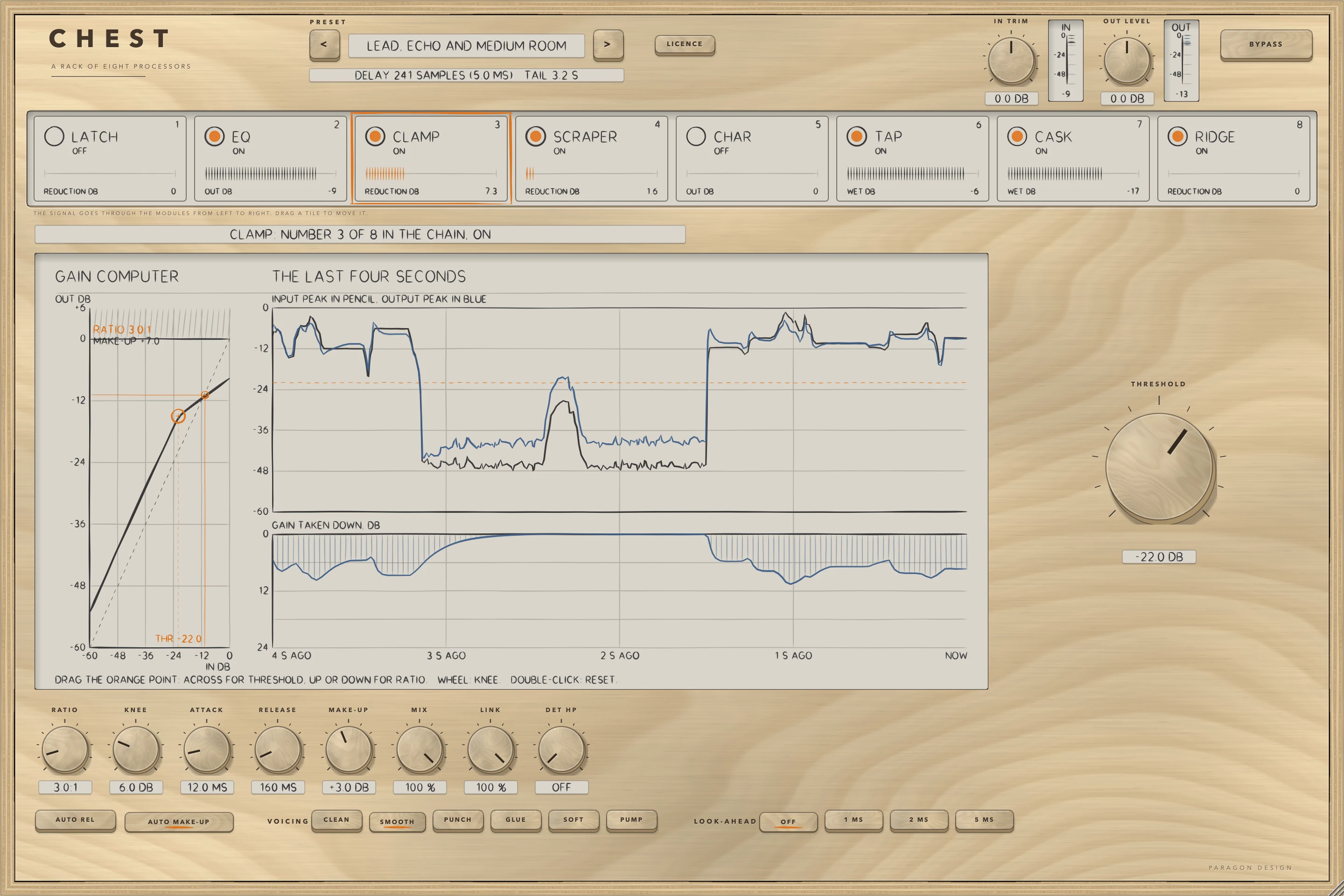
- Put CHEST on a voice. The panel opens with the preset Flat Start: every module is off, the strip's lamps are dark and the output is the input, delayed 241 samples.
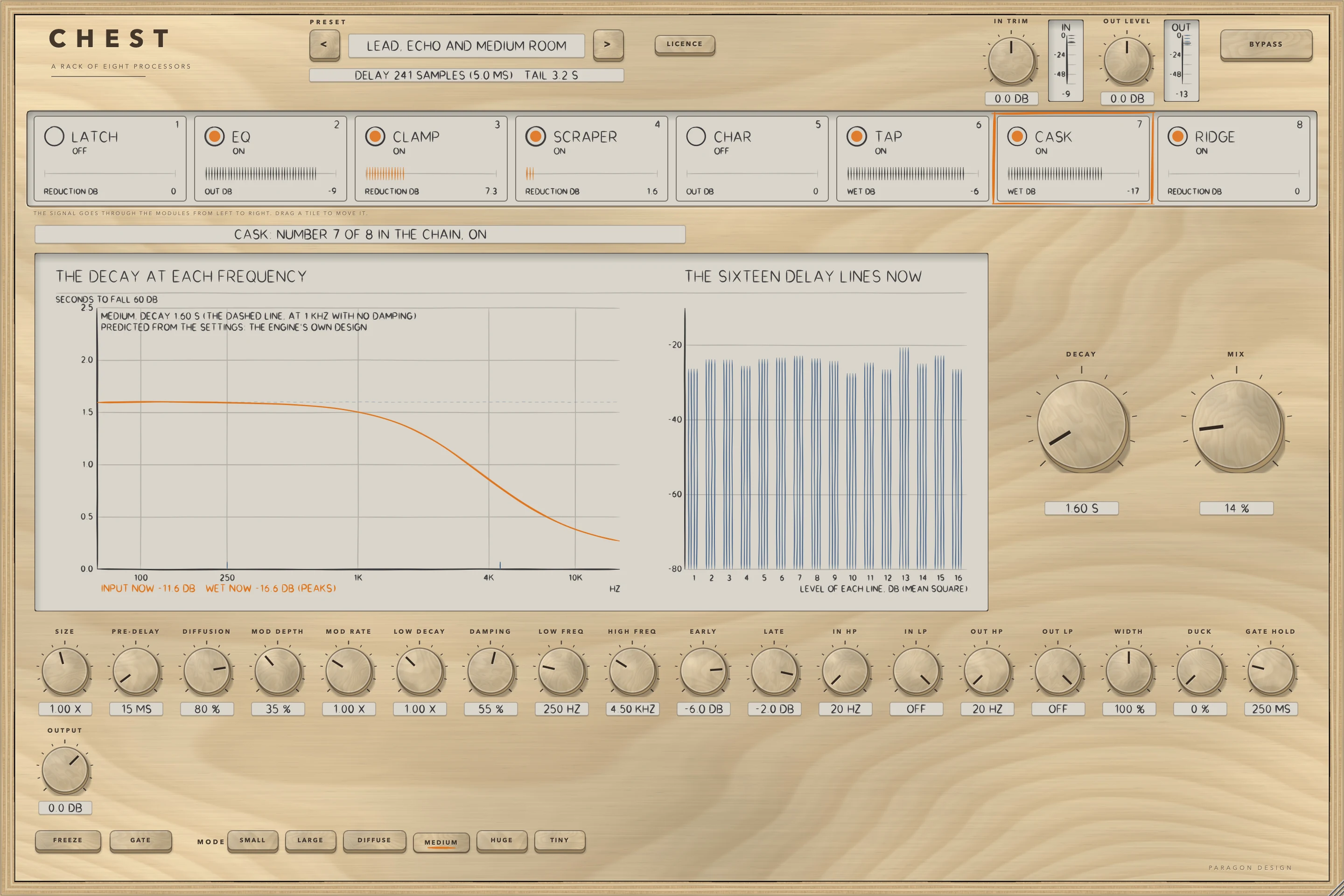
- Click the preset's name to see the menu and choose Lead, Echo and Medium Room. EQ, CLAMP, SCRAPER, TAP, CASK and RIDGE come on, and their lamps light; LATCH and CHAR stay off. The line under the preset name now ends with the tail the host is told, TAIL 3.2 S.
- Play the track. The small meters on the tiles move: the gain taken off for CLAMP, SCRAPER and RIDGE, the peak level out of EQ, and the peak level of the wet signal for TAP and CASK.
- Click the tile of CLAMP. The panel under the strip changes to its display, THRESHOLD as the large control, and the other controls in rows.
- Drag the tile of CLAMP to the first place. The tiles slide aside to show where it will land, and when you let go the sound dips for about 19 ms while the order changes.
- Switch RIDGE off with the lamp on its tile, and on again. Press BYPASS to compare with the input, which is delayed by the same delay.
How it works
Top bar and presets
The top bar has CHEST etched on it with A RACK OF EIGHT PROCESSORS under it, the preset bar (the previous and next keys and the name, with a star once a control has moved), the line for the delay and the tail, the LICENCE key and its slip, IN TRIM and OUT LEVEL as large knobs with the IN and OUT meters, and the BYPASS key. A preset sets every sound control (all 122: every control but BYPASS, with the ON switches and both levels included) and the order of the modules.
The strip and the order
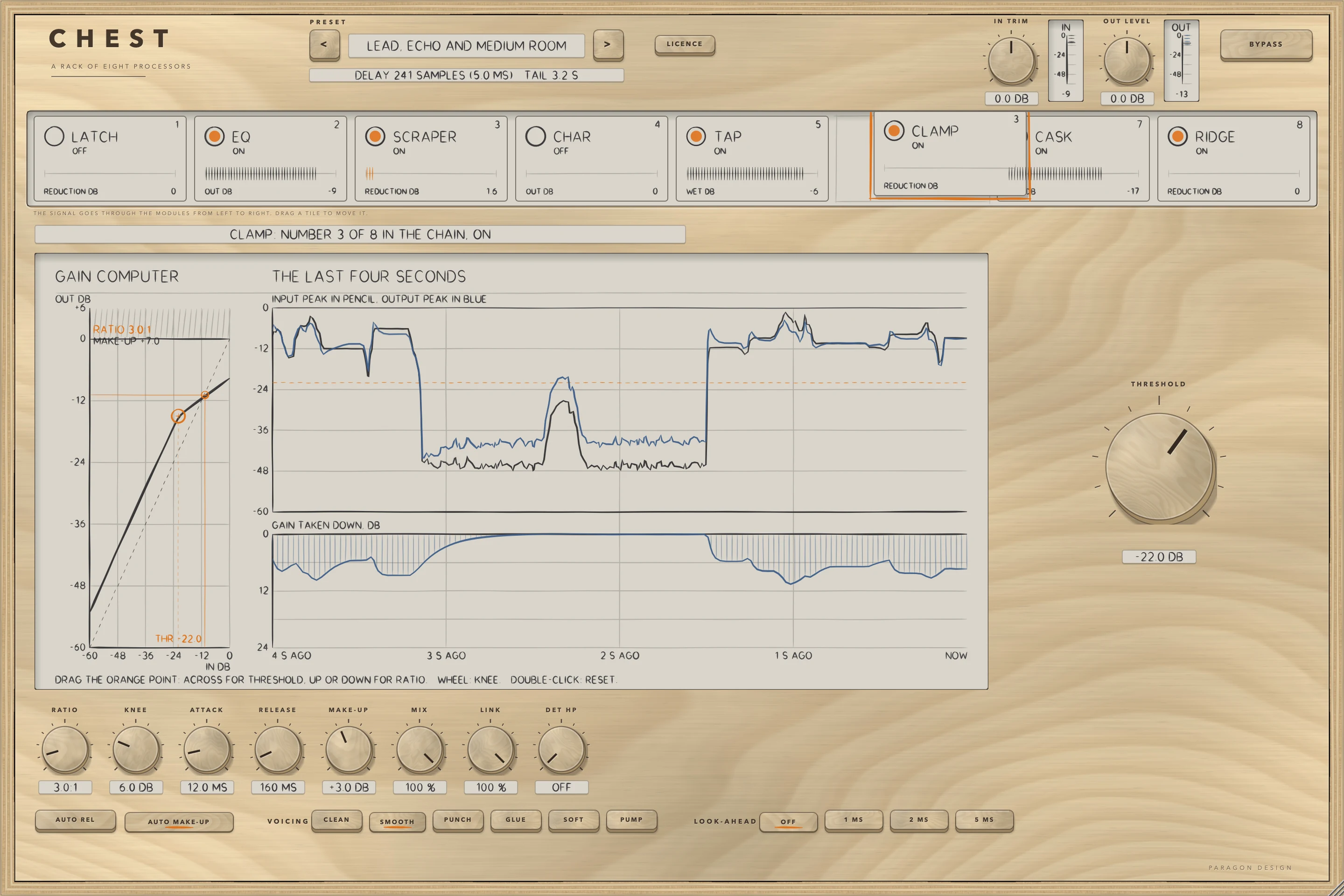
The strip holds the eight tiles in chain order. A click selects a tile, and the selected tile has an orange outline. A drag lifts a tile and the others slide aside to show where it will land; letting go changes the order through the dip. Each tile has a small live meter with its own legend:
| Module | Meter | What it reads |
|---|---|---|
| LATCH, SCRAPER, CLAMP, RIDGE | REDUCTION DB | The gain the module is taking off, in dB |
| EQ, CHAR | OUT DB | The peak level out of the module |
| TAP, CASK | WET DB | The peak level of the wet signal |
A module that is off reads exactly 0 in its meter, and so do all of them while BYPASS is on. The help tag on a tile says that a change of order dips the output for about 19 ms at 48 kHz with the default delay and up to 75 ms with the longest, and that every module starts afresh.
The order is not a host parameter: it is saved in the plug-in's state, with the presets, as the eight module numbers in chain order. It cannot be automated. A saved state whose order is not a permutation of the eight is read as the default order.
Switching a module on and off
Each module's ON is a host parameter, so it can be automated. A module that is off is not run, and the signal goes through it delayed by that module's own delay. Going on, the module is reset and run for its own delay's worth of samples (the output is the delayed input meanwhile), and then a 5 ms crossfade goes to its output. Going off, the crossfade goes the other way and the module is then reset and idle. Rest, with every module off, is the input delayed by the told delay, bit for bit, in every layout, at every block size and rate.
IN TRIM, OUT LEVEL and BYPASS
IN TRIM is the level into the first module and OUT LEVEL the level out of the last, each from -24 to +24 dB. Each glides over 30 ms, and at 0 dB it is not multiplied at all, so rest stays the input bit for bit; a value within 0.001 dB of 0 is read as exactly 0 dB. BYPASS is a 5 ms crossfade to the input delayed by the rack's delay, and the modules go on running inside it, so switching BYPASS off brings in a sound that is already there.
The panel of a module
The panel under the strip shows the selected module. Its display is on the left, and across the whole width for the equaliser. Its main controls are large on the right: THRESHOLD for LATCH, RANGE for SCRAPER, none for EQ, THRESHOLD for CLAMP, DRIVE for CHAR, TIME and MIX for TAP, DECAY and MIX for CASK, and CEILING for RIDGE. The other knobs are in rows under both, then the keys: the switches first, and each choice of seven options or fewer as a label and its keys. Every one of the 123 parameters has exactly one place, and a test holds that both ways. A module that is off still draws its settings and says so, for example LATCH IS OFF; with no sound the live parts of a display are empty.
Tempo
TAP's SYNC reads the host's tempo from the play head when it has one between 20 and 999 beats a minute. The last good tempo is kept, and 120 beats a minute is used until the host gives one.
What differs from the single plug-ins
Some controls are not in the rack because it has no sidechain and no monitoring states: LATCH and SCRAPER have no LISTEN, SCRAPER is only the form of the de-esser that works on sibilance, CLAMP has no external sidechain, no LISTEN and no BYPASS of its own, and RIDGE has no dither, bit depth, DC filter, DELTA, external key, loudness target or BYPASS of its own. RIDGE's LOOK-AHEAD is a choice of six values (0.5, 1, 2, 3, 5 and 10 ms) where it is continuous in the single plug-in, because a change of look-ahead is a structural change made under the dip. Three defaults differ so that a module that is switched on does something: TAP's MIX is 25 percent, CASK's MIX is 20 percent and CHAR's DRIVE is 30 percent. Every module's ON is off.
The licence
While the trial is over BYPASS is forced on, the delay is kept, and every control, the strip's lamps included, is drawn dimmed, as the Getting started manual describes. Licensed and trial are the same sound.
Control reference
Every control on the panel, as the plug-in itself labels it. The description is the tooltip the plug-in shows when you rest the pointer on the control.
The eight modules
The modules are listed here in the order they start in. Each table gives the control as the panel names it, its values, its default and what it does, in the panel's own words. Every module has an ON switch, the lamp on its tile, which is off at the start.
LATCH
LATCH turns the signal down while it is under a threshold. In GATE mode it opens at THRESHOLD and closes HYSTERESIS dB under it, and while it is closed the signal is down by RANGE. In EXPAND mode every dB under the threshold costs RATIO minus 1 more dB, down to RANGE. ATTACK, HOLD and RELEASE time the gain. LOOK-AHEAD delays the signal by up to 10 ms while the detector reads it undelayed, so the gate is already opening when a sound arrives. KEY HP and KEY LP filter what the detector hears. The display draws the gate's curve with its threshold, the level and the gain taken off, from the rack's own history. Off, the signal goes through LATCH unchanged but delayed by its look-ahead.
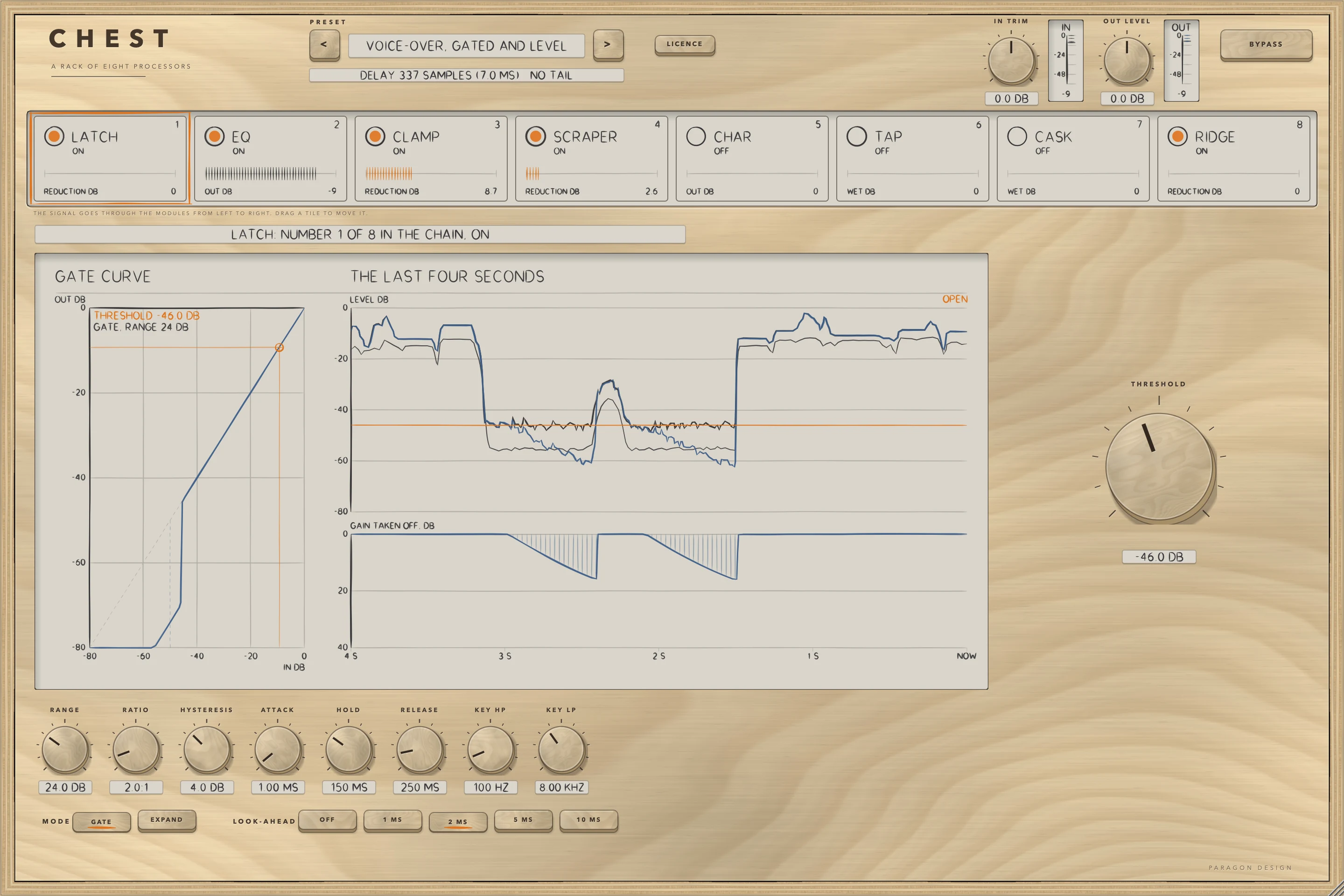
| Control | Values | Default | What it does |
|---|---|---|---|
| MODE | GATE, EXPAND | GATE | GATE opens at the threshold and closes down by RANGE. EXPAND turns the signal down by RATIO minus 1 dB for every dB under the threshold, down to RANGE. |
| THRESHOLD | -80.0 dB to 0.0 dB | -50.0 dB | The level, in dB, above which the gate is open. A steady sine reads as its peak level. |
| RANGE | 0.0 dB to 80.0 dB | 18.0 dB | How far the signal is turned down while the gate is closed, in dB. |
| RATIO | 1.2:1 to 10.0:1 | 2.0:1 | EXPAND only: every dB under the threshold costs RATIO minus 1 more dB, down to RANGE. |
| HYSTERESIS | 0.0 dB to 12.0 dB | 4.0 dB | GATE only: the gate opens at the threshold and closes this many dB under it. |
| ATTACK | 0.05 ms to 50.00 ms | 1.00 ms | The time constant of the gain as it rises when the gate opens, in ms. |
| HOLD | 0 ms to 500 ms | 80 ms | How long the gate keeps its gain up after the level falls under the threshold, in ms. |
| RELEASE | 5 ms to 2.00 s | 200 ms | The time constant of the gain as it falls when the gate closes, in ms. |
| LOOK-AHEAD | OFF, 1 MS, 2 MS, 5 MS, 10 MS | OFF | Delays the signal by this long while the detector reads it undelayed, so the gate is already opening when a sound arrives. The delay is part of the rack's delay. |
| KEY HP | OFF to 1.00 kHz | 100 Hz | A 2nd-order high-pass on the signal the detector reads, in Hz. At its lowest setting it is off. |
| KEY LP | 1.00 kHz to OFF | 8.00 kHz | A 2nd-order low-pass on the signal the detector reads, in Hz. At its highest setting it is off. |
EQ
EQ has five bands: a low shelf, three bells (LOW-MID, MID and PRESENCE) and a high shelf. Each band has its own ON key, a frequency and a gain of up to 15 dB either way, and the three bells have a Q. A band that is off does nothing, whatever its gain. The display is the five bands' summed curve across the whole width of the panel, with a node for each band: drag a node for its frequency and gain, turn the wheel over it for Q, and double-click it for the default. The module has no delay and no spectrum under the curve.
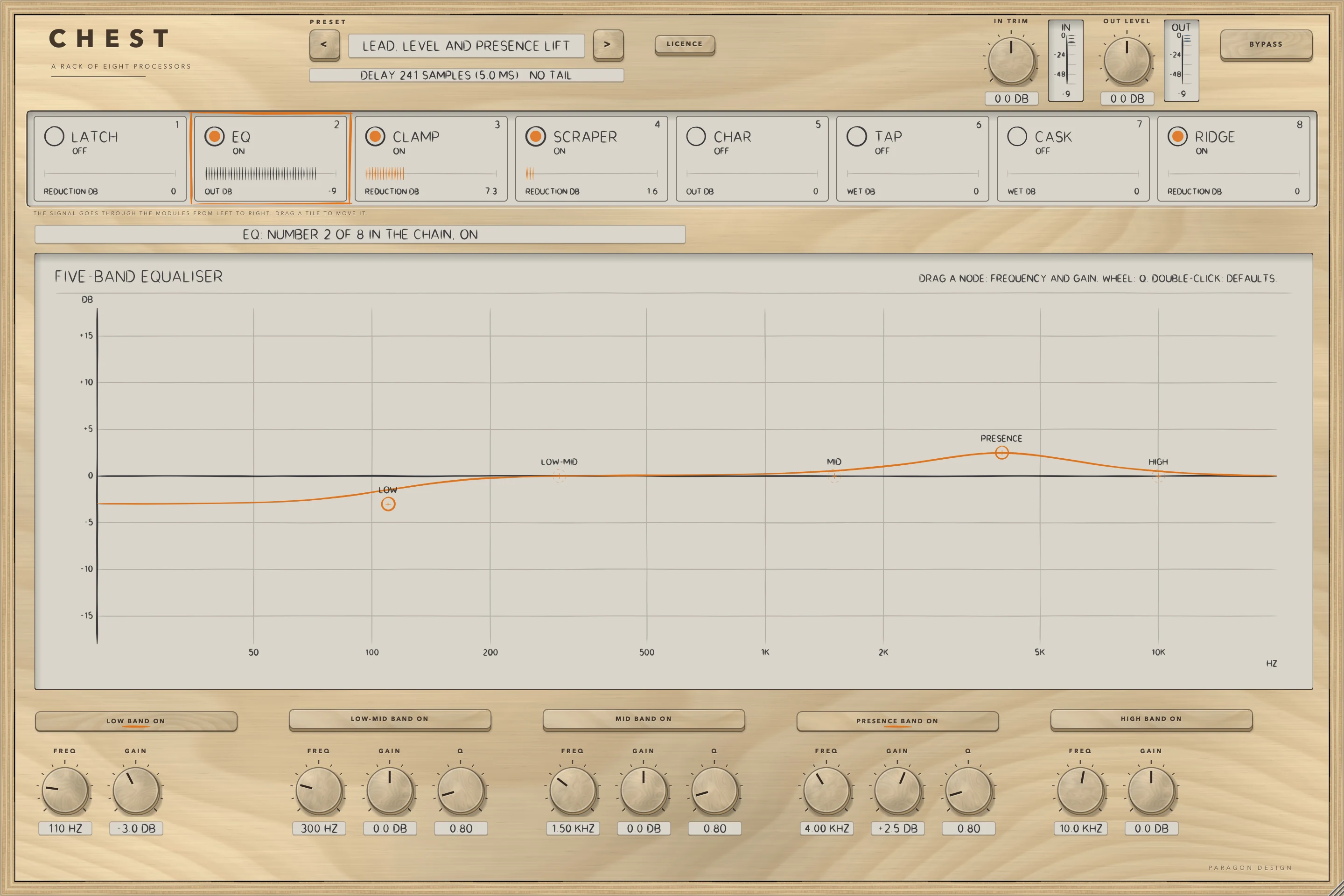
| Control | Values | Default | What it does |
|---|---|---|---|
| LOW ON | ON or OFF | OFF | Switches the Low band on. A band that is off does nothing, whatever its gain. |
| LOW FREQ | 40 Hz to 400 Hz | 100 Hz | The frequency of the corner of the low shelf, in Hz. |
| LOW GAIN | -15.0 dB to +15.0 dB | 0.0 dB | The boost or cut of the Low band, in dB, up to 15 dB either way. |
| LOW-MID ON | ON or OFF | OFF | Switches the Low-mid band on. A band that is off does nothing, whatever its gain. |
| LOW-MID FREQ | 100 Hz to 1.00 kHz | 300 Hz | The frequency of the centre of the bell, in Hz. |
| LOW-MID GAIN | -15.0 dB to +15.0 dB | 0.0 dB | The boost or cut of the Low-mid band, in dB, up to 15 dB either way. |
| LOW-MID Q | 0.30 to 5.00 | 0.80 | The width of the Low-mid bell: a higher Q is a narrower bell. |
| MID ON | ON or OFF | OFF | Switches the Mid band on. A band that is off does nothing, whatever its gain. |
| MID FREQ | 400 Hz to 4.00 kHz | 1.50 kHz | The frequency of the centre of the bell, in Hz. |
| MID GAIN | -15.0 dB to +15.0 dB | 0.0 dB | The boost or cut of the Mid band, in dB, up to 15 dB either way. |
| MID Q | 0.30 to 5.00 | 0.80 | The width of the Mid bell: a higher Q is a narrower bell. |
| PRESENCE ON | ON or OFF | OFF | Switches the Presence band on. A band that is off does nothing, whatever its gain. |
| PRESENCE FREQ | 1.50 kHz to 8.00 kHz | 4.00 kHz | The frequency of the centre of the bell, in Hz. |
| PRESENCE GAIN | -15.0 dB to +15.0 dB | 0.0 dB | The boost or cut of the Presence band, in dB, up to 15 dB either way. |
| PRESENCE Q | 0.30 to 5.00 | 0.80 | The width of the Presence bell: a higher Q is a narrower bell. |
| HIGH ON | ON or OFF | OFF | Switches the High band on. A band that is off does nothing, whatever its gain. |
| HIGH FREQ | 3.00 kHz to 16.0 kHz | 10.0 kHz | The frequency of the corner of the high shelf, in Hz. |
| HIGH GAIN | -15.0 dB to +15.0 dB | 0.0 dB | The boost or cut of the High band, in dB, up to 15 dB either way. |
CLAMP
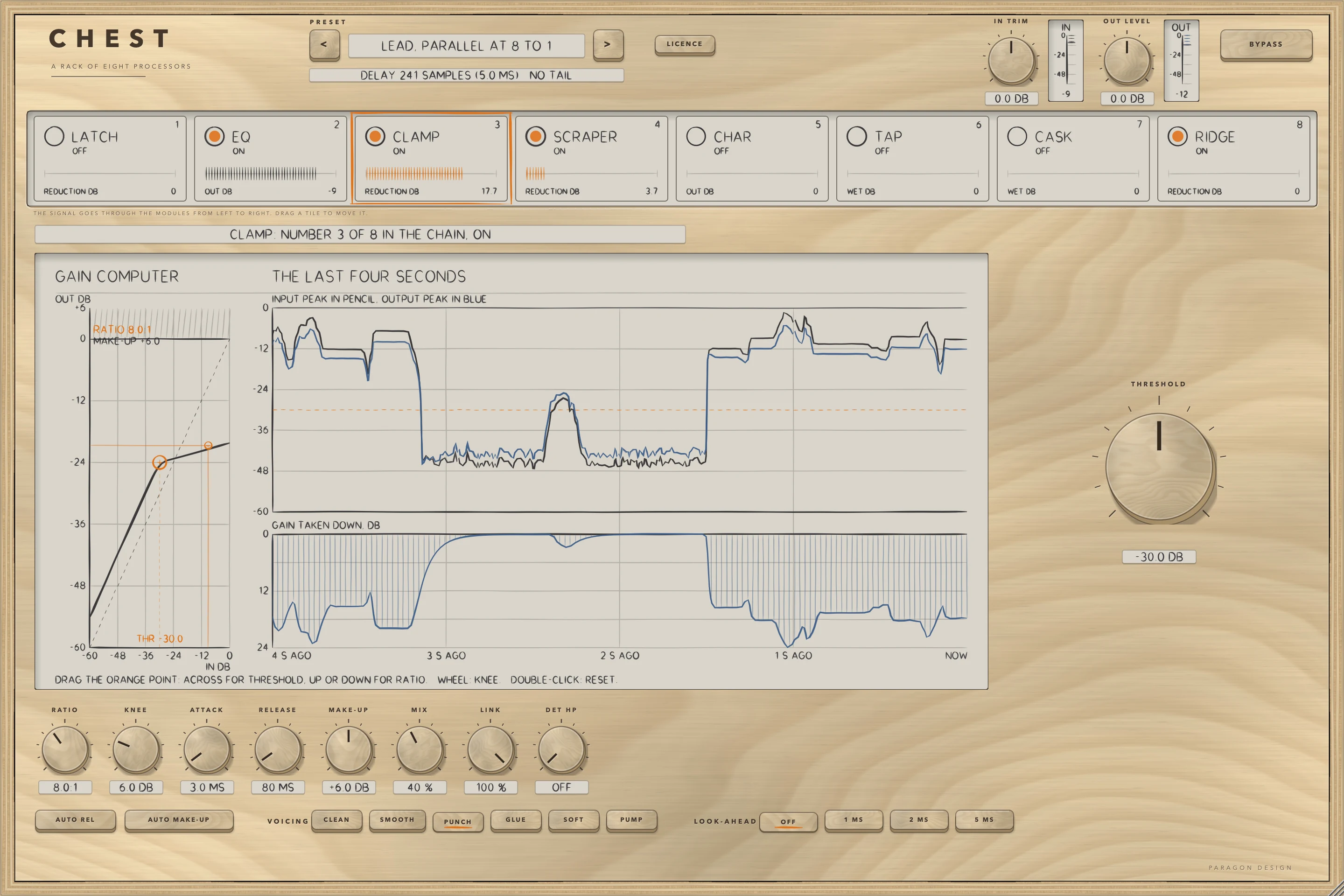
CLAMP is a compressor with a soft knee, a ratio up to INF:1 and six voicings, which are six sets of numbers for the detector, the attack and release laws and the knee. MIX blends the compressed signal with the dry one, delayed to match, which is parallel compression. LINK sets how far the two sides are turned down together. LOOK-AHEAD delays the signal by up to 5 ms while the detector reads it undelayed. The display is the single plug-in's, adapted to the rack's history. Off, the signal goes through CLAMP unchanged but delayed by its look-ahead.
| Control | Values | Default | What it does |
|---|---|---|---|
| THRESHOLD | -60.0 dB to 0.0 dB | -18.0 dB | The level, in dB, above which the compressor turns the signal down. A steady sine reads as its peak level. |
| RATIO | 1.0:1 to INF:1 | 3.0:1 | How much a level over the threshold is turned down: at 3:1 a level 3 dB over comes out 1 dB over. At INF:1 the compressor is a limiter. |
| KNEE | 0.0 dB to 24.0 dB | 6.0 dB | The width, in dB, of the soft knee round the threshold. 0 is a hard knee. |
| ATTACK | 0.1 ms to 100.0 ms | 10.0 ms | How quickly the gain comes down, in ms. The voicing multiplies it. |
| RELEASE | 10 ms to 2.00 s | 150 ms | How quickly the gain comes back, in ms. The voicing shapes it. |
| AUTO REL | ON or OFF | OFF | Hands the release to the voicing's own program-dependent law. |
| MAKE-UP | -12.0 dB to +24.0 dB | 0.0 dB | Gain added after the compressor, in dB. |
| AUTO MAKE-UP | ON or OFF | OFF | Adds the gain that gives a steady sine 6 dB over the threshold its own level back; MAKE-UP then trims it. |
| MIX | 0 % to 100 % | 100 % | The compressed signal against the dry signal, delayed to match, in percent. 100 is all compressed. |
| LINK | 0 % to 100 % | 100 % | How far the two sides are turned down together: 100 percent turns both down by the same amount, 0 lets each side go its own way. |
| DET HP | OFF to 500 Hz | OFF | A 2nd-order high-pass on the signal the detector reads, in Hz. At its lowest setting it is off. |
| VOICING | CLEAN, SMOOTH, PUNCH, GLUE, SOFT, PUMP | CLEAN | Which of six sets of numbers the detector, the attack and release laws and the knee follow. The help tag of each key describes it. |
| LOOK-AHEAD | OFF, 1 MS, 2 MS, 5 MS | OFF | Delays the signal by this long while the detector reads it undelayed, so the gain is already down when a peak arrives. The delay is part of the rack's delay. |
SCRAPER
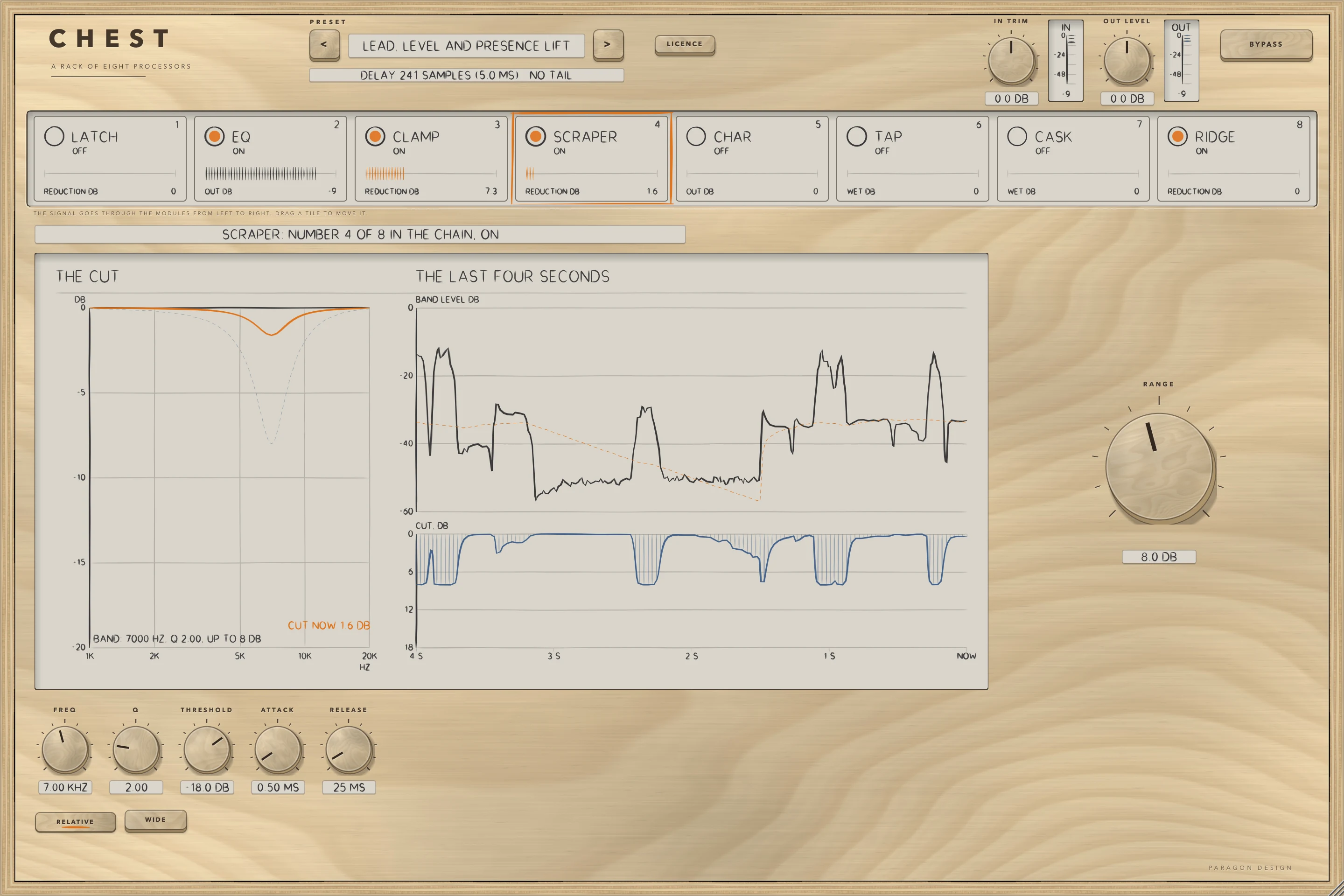
SCRAPER is a de-esser: a band is watched and turned down while it is over a threshold. FREQ and Q place the band, RANGE is the most it is turned down, and THRESHOLD is measured against the voice's own running level over 300 ms while RELATIVE is on. WIDE turns the whole signal down by the same amount instead of only the band. The display draws the cut's curve, the band's level and the cut. It has no delay.
| Control | Values | Default | What it does |
|---|---|---|---|
| FREQ | 3.00 kHz to 12.0 kHz | 7.00 kHz | The centre of the band that is watched and turned down, in Hz. |
| Q | 0.50 to 8.00 | 2.00 | The width of the band: a higher Q is a narrower band. |
| RANGE | 0.0 dB to 18.0 dB | 8.0 dB | The most the band is turned down, in dB. |
| THRESHOLD | -60.0 dB to 0.0 dB | -18.0 dB | The level of the band above which it is turned down, in dB: against the voice's running level with RELATIVE on, in dBFS with it off. |
| RELATIVE | ON or OFF | ON | On, THRESHOLD is measured against the voice's own running level over 300 ms. Off, it is a level in dBFS. |
| ATTACK | 0.10 ms to 10.00 ms | 0.50 ms | How quickly the turn-down comes in, in ms. |
| RELEASE | 10 ms to 300 ms | 25 ms | How quickly the turn-down lets go, in ms. |
| WIDE | ON or OFF | OFF | On, the whole signal is turned down by the same amount while the band is over the threshold, instead of only the band. |
CHAR
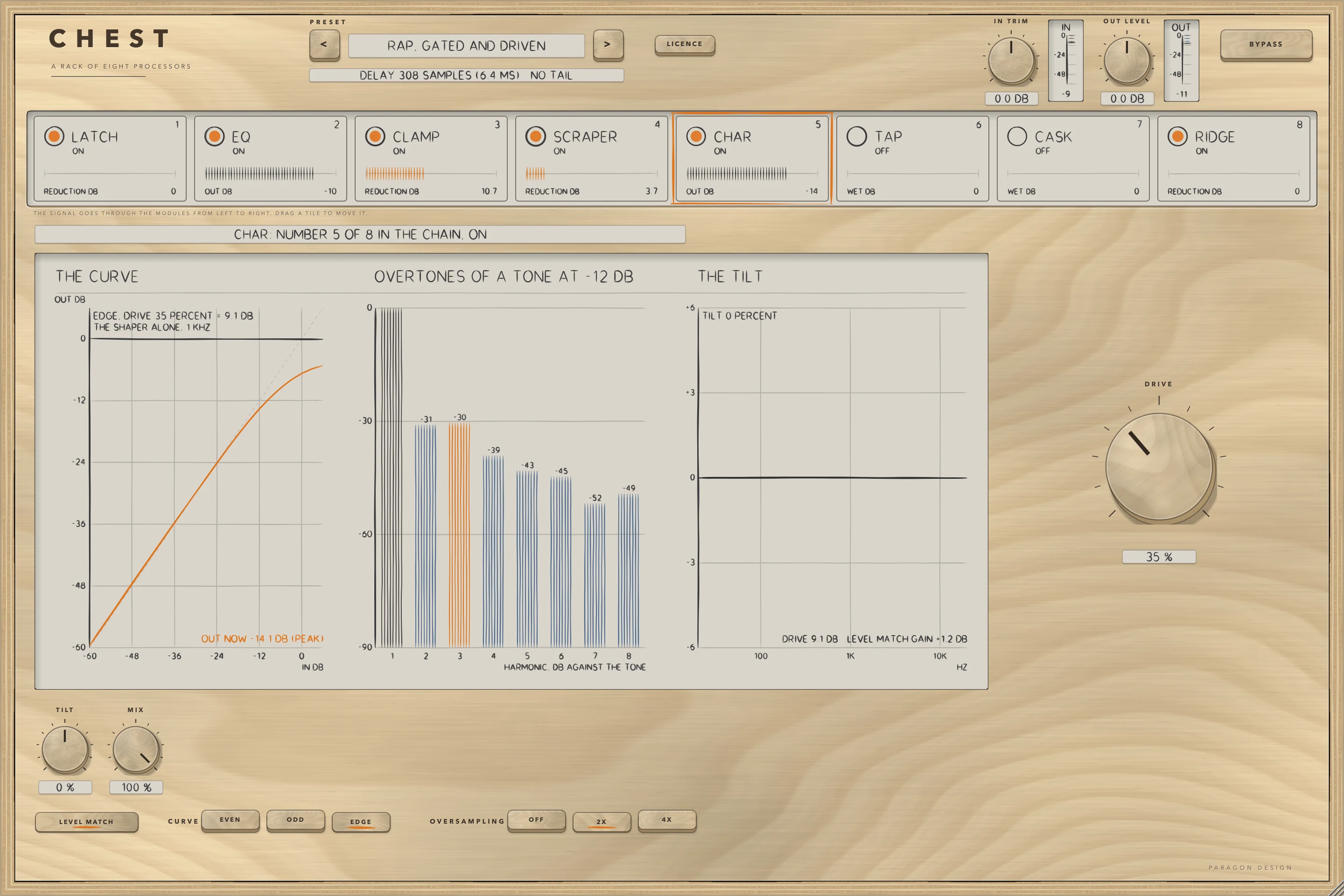
CHAR is a saturator with three curves: EVEN makes the second harmonic first, ODD only odd harmonics, and EDGE both kinds. DRIVE runs from 0 to 100 percent, which is 0 to 26 dB into the curve, and the shaped signal is blended in over the first 6 dB, so a DRIVE of 0 is the input exactly. OVERSAMPLING keeps the aliases down at a cost in delay. The display draws the curve and the overtones, each found by running the module on test tones, and the tilt.
| Control | Values | Default | What it does |
|---|---|---|---|
| CURVE | EVEN, ODD, EDGE | EVEN | Which harmonics come first: EVEN makes the second harmonic first, ODD only odd harmonics, EDGE both kinds. |
| DRIVE | 0 % to 100 % | 30 % | The gain into the shaper: 0 to 26 dB for 0 to 100 percent. The shaped signal is blended in over the first 6 dB, so a drive of 0 is the input exactly. |
| TILT | -100 % to +100 % | 0 % | A low shelf and a high shelf about 650 Hz, up to 4 dB each way at the ends of the control, after the level match. |
| MIX | 0 % to 100 % | 100 % | The shaped signal against the dry signal, in percent. |
| OVERSAMPLING | OFF, 2X, 4X | 2X | Runs the shaper at 2 or 4 times the sample rate so that the harmonics it makes do not fold back. The delay is 25 samples at 2X and 29 at 4X, and is part of the rack's delay. |
| LEVEL MATCH | ON or OFF | ON | Brings the shaped signal to the level of the dry signal. |
TAP
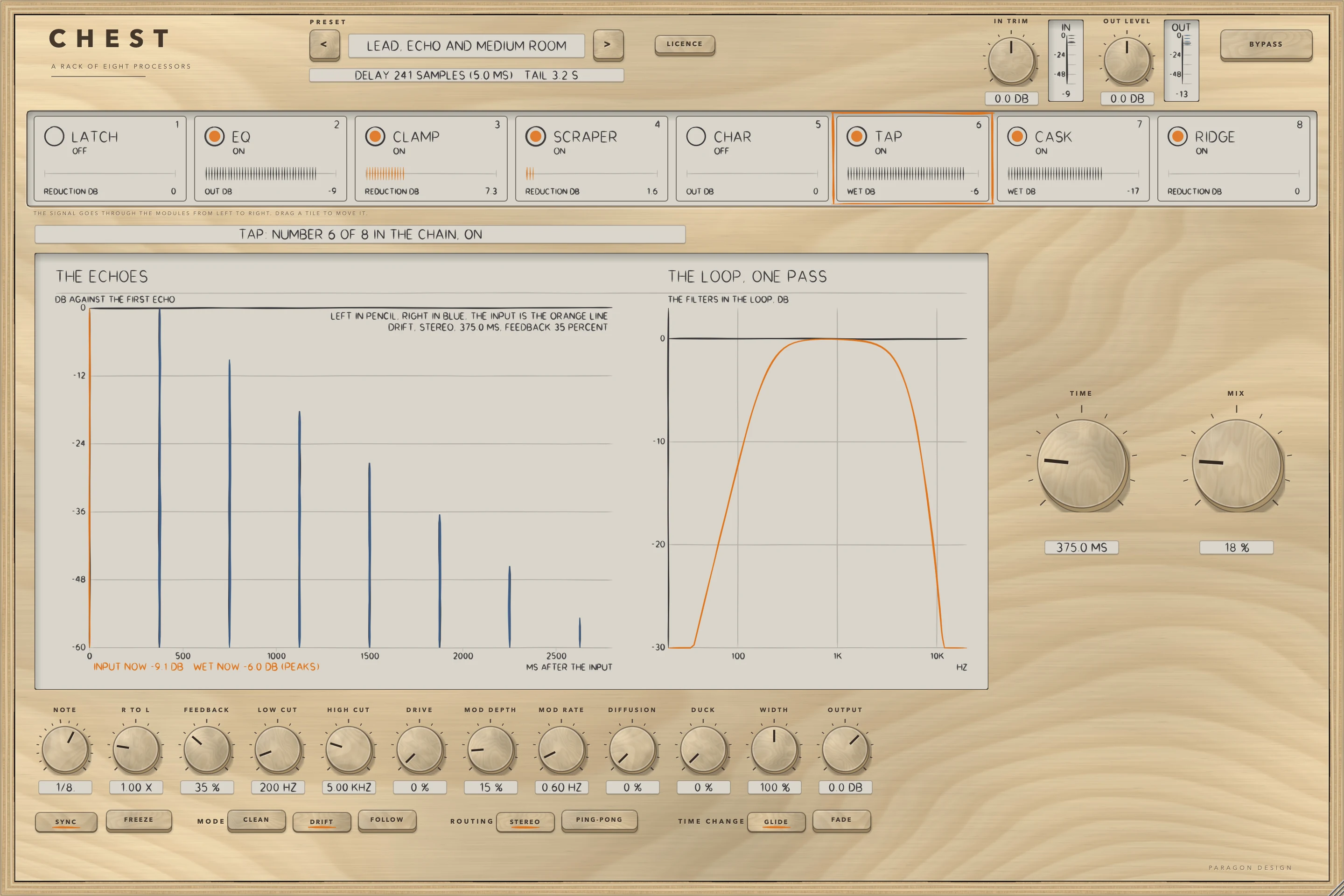
TAP is a delay with three characters. CLEAN leaves the loop to its filters, DRIFT puts a slow movement and a saturation in it, and FOLLOW lets the corner of the loop's low-pass fall as the time rises. The time is in milliseconds or, with SYNC on, a note at the host's tempo. In PING-PONG each echo goes to the other side. The display draws the echoes, found by running the engine on an impulse, and the loop's filters. It has no delay.
| Control | Values | Default | What it does |
|---|---|---|---|
| MODE | CLEAN, DRIFT, FOLLOW | DRIFT | The loop's character: the filters on every trip round it, the way the delay time is moved and the saturator's bias. The help of each key gives its numbers. |
| ROUTING | STEREO, PING-PONG | STEREO | How the echoes use the two sides. |
| TIME CHANGE | GLIDE, FADE | GLIDE | How a change of the time is made while sound plays. |
| TIME | 1.0 ms to 2.00 s | 375.0 ms | The delay of the left side, from the input to its first echo, in milliseconds. With SYNC on, NOTE sets the time instead. |
| SYNC | ON or OFF | OFF | Sets the time from NOTE at the host's tempo (120 beats a minute when the host gives none), in place of TIME. |
| NOTE | 1/64, 1/32T, 1/32, 1/16T, 1/16, 1/8T, 1/16., 1/8, 1/4T, 1/8., 1/4, 1/2T, 1/4., 1/2, 1/2., 1/1 | 1/8. | The note value that sets the time while SYNC is on, from 1/64 to 1/1 (4 beats), at the host's tempo (120 beats a minute when the host gives none). |
| R TO L | 0.25 x to 4.00 x | 1.00 x | The right side's delay as a multiple of the left side's. A delay under 39 samples (0.81 ms at 48 kHz) is read as 39 samples. |
| FEEDBACK | 0 % to 110 % | 40 % | How much of each echo goes round the loop again, in percent. Above 95 percent the loop runs into a soft limiter, which is in full force by 110 percent. |
| LOW CUT | OFF to 2.00 kHz | OFF | A high-pass in the loop, acting on every trip round it. At 20 Hz it is off. The character's own high-pass acts as well, and the higher corner of the two wins. |
| HIGH CUT | 500 Hz to OFF | OFF | A low-pass in the loop, acting on every trip round it. At 20 kHz it is off. The character's own low-pass acts as well. |
| DRIVE | 0 % to 100 % | 0 % | Saturation in the loop, worked at twice the sample rate. Nothing happens below 0.2 percent. |
| MOD DEPTH | 0 % to 100 % | 20 % | How far the delay time is moved. The swing grows with the square of the setting: at 100 percent it is 4 ms in CLEAN and FOLLOW, and up to 4.55 ms in DRIFT. |
| MOD RATE | 0.05 Hz to 8.00 Hz | 0.60 Hz | How fast the delay time is moved, in Hz. DRIFT also moves it with a second sine at 0.37 times this rate. |
| DIFFUSION | 0 % to 100 % | 0 % | How much of a chain of four allpass filters is mixed into the loop on every trip. Nothing happens below 0.2 percent. |
| DUCK | 0 % to 100 % | 0 % | Turns the echoes down while the input is loud, by up to 26 dB. It follows the signal the module is given, so a quiet input ducks less. |
| WIDTH | 0 % to 200 % | 100 % | 0 makes the echoes the same on both sides, exactly. 100 percent leaves them as they are and 200 percent doubles the difference between the sides. |
| FREEZE | ON or OFF | OFF | Stops the input feeding the delay and holds what it contains: each trip round the loop is at a gain of 0.99997, with no filter, drive, diffusion or movement. |
| MIX | 0 % to 100 % | 25 % | 0 is the input alone, exactly. The output is the input times (1 minus MIX) plus the echoes times MIX. |
| OUTPUT | -24.0 dB to +12.0 dB | 0.0 dB | The level of the output of this module, the input and the echoes alike, in dB. |
CASK
CASK is a reverb with six modes, each a box with its own early reflections, and a decay shaped by two corners. DECAY is the time for the reverb to fall 60 dB at 1 kHz. GATE cuts the reverb off a while after the input falls, DUCK turns it down while the input is loud, and FREEZE holds what is in it. The display draws the decay at each frequency, from the engine's own design, and the level of each of the sixteen delay lines. It has no delay.
| Control | Values | Default | What it does |
|---|---|---|---|
| MODE | SMALL, LARGE, DIFFUSE, MEDIUM, HUGE, TINY | LARGE | The kind of room: the size of the box the early reflections come from, how much of a wave its walls keep, and the lengths of the sixteen delay lines. A change of mode turns the reverb down for 60 ms. |
| SIZE | 0.20 x to 2.00 x | 1.00 x | Scales the box and the lengths of the sixteen delay lines. A change glides for about a second, and DECAY stays as it is set. |
| DECAY | 0.10 s to 30.00 s | 2.20 s | The time for the reverb to fall by 60 dB at 1 kHz, in seconds, with DAMPING at 0 and LOW DECAY at 1. The curve on the display shows the decay at every frequency. |
| PRE-DELAY | 0 ms to 500 ms | 20 ms | The time before the reverb starts, in milliseconds. Moving it fast bends what the reverb hears for a moment. |
| DIFFUSION | 0 % to 100 % | 80 % | In front of the delay lines, four allpass filters on each side have a feedback gain of 0.75 times this setting as a fraction of 1 (the last two, 0.83 times that). |
| MOD DEPTH | 0 % to 100 % | 35 % | How far a slow sine wave moves each of the sixteen delay lines: up to 2.2 ms at 100 percent, less below it. |
| MOD RATE | 0.20 x to 3.00 x | 1.00 x | A multiplier on the speeds of those sine movements, which are 0.07 to 0.40 Hz at 1x. |
| LOW DECAY | 0.25 x to 2.50 x | 1.00 x | The decay of the lowest frequencies as a multiple of DECAY, the change coming in around LOW FREQ. The curve on the display shows it. |
| DAMPING | 0 % to 100 % | 45 % | How much shorter the highs decay: at HIGH FREQ the decay is about DECAY times (1 minus 0.93 times DAMPING). With DAMPING up, the decay at 1 kHz is a little shorter than DECAY too. |
| LOW FREQ | 100 Hz to 800 Hz | 250 Hz | Where the low shelf in each loop acts, in Hz: the corner for LOW DECAY. |
| HIGH FREQ | 1.50 kHz to 12.0 kHz | 4.50 kHz | Where the low-pass in each loop reaches the shorter decay that DAMPING asks for, in Hz. |
| EARLY | OFF to +6.0 dB | -6.0 dB | The level of the early reflections (the first 36 arrivals from the box), in dB. At its lowest setting they are off. The DIFFUSE mode has none. |
| LATE | OFF to +6.0 dB | -2.0 dB | The level of the late field (the sixteen delay lines), in dB. At its lowest setting it is off. |
| IN HP | 20 Hz to 1.00 kHz | 20 Hz | A one-pole high-pass in front of the reverb, in Hz. It is never off: at 20 Hz it takes 3 dB off at 20 Hz. |
| IN LP | 1.00 kHz to OFF | OFF | A one-pole low-pass in front of the reverb, in Hz. At its highest setting it is off. |
| OUT HP | 20 Hz to 1.00 kHz | 20 Hz | A one-pole high-pass behind the reverb, on the reverb only, in Hz. It is never off: at 20 Hz it takes 3 dB off at 20 Hz. |
| OUT LP | 1.00 kHz to OFF | OFF | A one-pole low-pass behind the reverb, on the reverb only. At its highest setting it is off. |
| WIDTH | 0 % to 200 % | 100 % | 0 makes the reverb the same on both sides, exactly. 100 percent leaves it as it is and 200 percent doubles the difference between the sides. |
| DUCK | 0 % to 100 % | 0 % | Turns the reverb down while the input is loud, by up to 90 percent of it (20 dB). It follows the signal it is given, so a quiet input ducks it less. |
| FREEZE | ON or OFF | OFF | Stops the input feeding the reverb and holds what is in it. The held tail does not end by itself, and its level drifts: by up to 3 dB in a minute in the measurements made. |
| GATE | ON or OFF | OFF | Cuts the reverb off a while after the input falls under 0.02 (about -34 dBFS): see GATE HOLD. |
| GATE HOLD | 40 ms to 1.00 s | 250 ms | How long the gate waits after the input falls under 0.02 (about -34 dBFS) before it cuts the reverb off, in ms. |
| MIX | 0 % to 100 % | 20 % | 0 is the input alone, bit for bit. The output is the input times (1 minus MIX) plus the reverb times MIX times 1.5, so 100 percent is the reverb alone at 1.5 times its level. |
| OUTPUT | -24.0 dB to +12.0 dB | 0.0 dB | The level of the output of this module, the input and the reverb alike, in dB. |
RIDGE
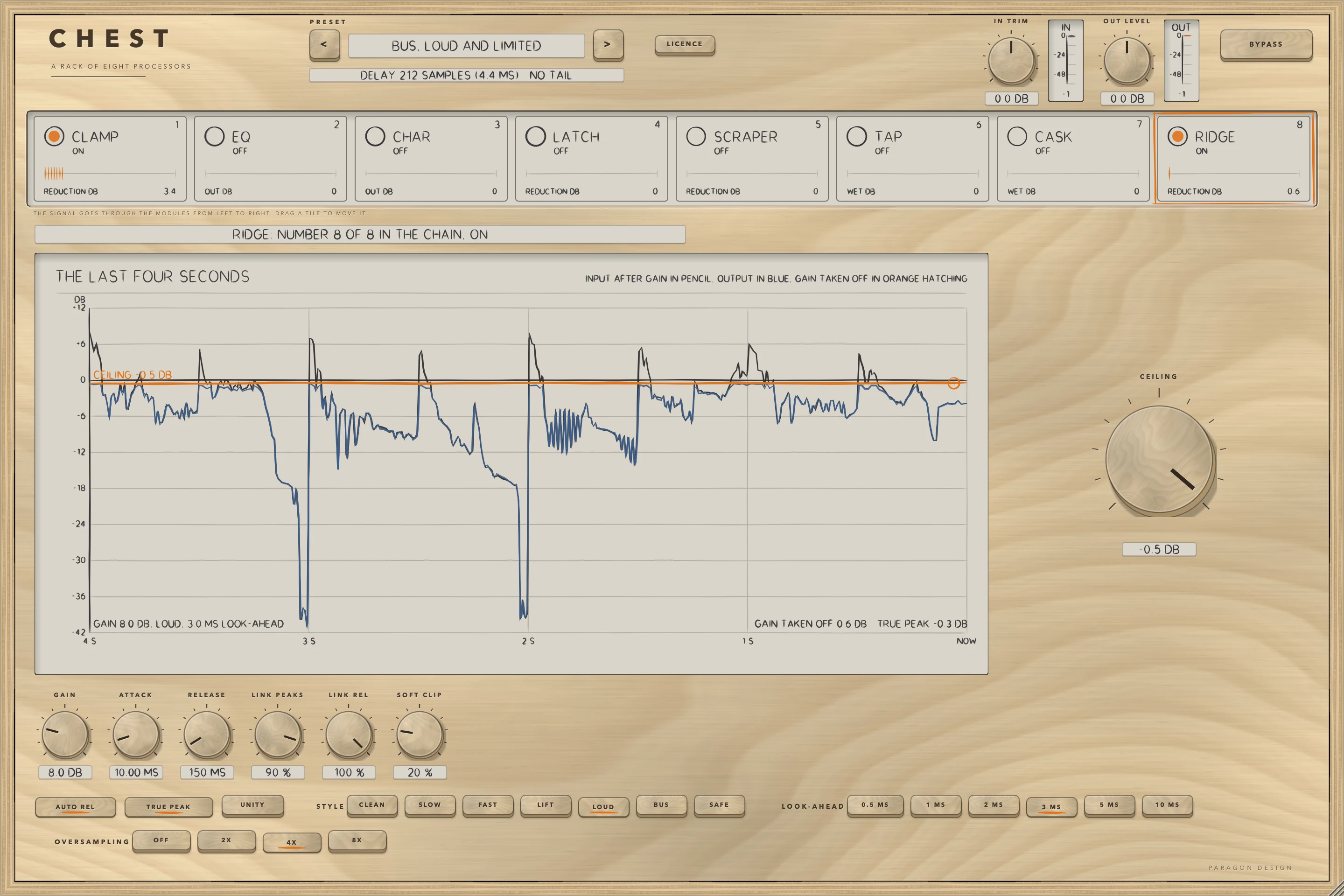
RIDGE is a limiter with a ceiling: GAIN pushes the signal into it, and CEILING is the level it holds the sample peaks to. Seven styles set the release stage, the look-ahead stage and the soft clip. TRUE PEAK searches for the peaks between the samples as well, and needs oversampling. The display draws the last four seconds with a ceiling you can drag. Off, the signal goes through RIDGE unchanged but delayed by its look-ahead.
| Control | Values | Default | What it does |
|---|---|---|---|
| GAIN | 0.0 dB to 36.0 dB | 0.0 dB | Gain added in front of the limiter, in dB: how hard the signal is pushed into it. |
| CEILING | -30.0 dB to 0.0 dB | -0.3 dB | The level the limiter holds the sample peaks to, in dB. |
| STYLE | CLEAN, SLOW, FAST, LIFT, LOUD, BUS, SAFE | CLEAN | Which of seven sets of numbers the release stage, the look-ahead stage and the soft clip follow. The help tag of each key describes it. |
| LOOK-AHEAD | 0.5 MS, 1 MS, 2 MS, 3 MS, 5 MS, 10 MS | 3 MS | How far ahead the limiter looks for peaks, in ms, times the style's scale. The delay is part of the rack's delay. |
| ATTACK | 0.05 ms to 100.00 ms | 10.00 ms | The attack of the release stage, in ms, times the style's scale. |
| RELEASE | 5 ms to 3.00 s | 150 ms | The release of the release stage, in ms, times the style's scale. |
| AUTO REL | ON or OFF | ON | Lets the release of the release stage follow the programme. |
| LINK PEAKS | 0 % to 100 % | 90 % | How far one side's peaks turn the other side down in the look-ahead stage, in percent. |
| LINK REL | 0 % to 100 % | 100 % | How far one side turns the other down in the release stage, in percent. |
| SOFT CLIP | 0 % to 100 % | 0 % | The soft clip in front of the limiter, in percent. The style may add to it. |
| TRUE PEAK | ON or OFF | ON | Searches for the peaks between the samples as well. It needs oversampling. |
| OVERSAMPLING | OFF, 2X, 4X, 8X | 4X | The oversampling of the peak search and of the soft clip. Any setting but OFF adds 72 samples to the delay. |
| UNITY | ON or OFF | OFF | Takes GAIN off again after limiting, to compare at equal loudness. |
Recipes
A lead vocal in one step
Choose Lead, Level and Presence Lift. EQ takes 3 dB off the low end at 110 Hz and adds 2.5 dB at 4000 Hz, CLAMP compresses 3:1 over -22 dB with the SMOOTH voicing, SCRAPER turns 7000 Hz down by up to 8 dB, and RIDGE holds the peaks to -1 dB. Click each tile in turn to see its panel.
A vocal with an echo and a room
Choose Lead, Echo and Medium Room. TAP repeats at 1/8. at the host's tempo (DRIFT, 35 percent feedback, 18 percent mix) and CASK adds the MEDIUM room, with a decay of 1.6 s and a mix of 14 percent. Both add to the tail the host is told.
A voice-over from a room with some noise
Choose Voice-over, Gated and Level. LATCH gates at -46 dB, down by 24 dB, with a look-ahead of 2 ms, which adds 2 ms to the rack's delay. CLAMP levels the voice and SCRAPER takes the edge off 6500 Hz.
A room that is compressed with the source
Choose Room Into the Compressor. CASK comes before CLAMP, so the room is compressed with the source. Drag the tiles to try your own order: every change is made under a dip, and every module starts afresh.
A ceiling and nothing else
Choose Bus, Ceiling Only. RIDGE holds the peaks to -1 dB in its SAFE style and every other module is off, so the rack's delay is RIDGE's alone.
Presets
CHEST has 22 presets in 8 categories. Flat Start is the plug-in's default state: choosing it returns every control to its default and the modules to their first order, which is rest. Every other preset is written as only what it changes from the defaults, and expanded to all 122 sound controls and the order of the modules. Seven of the 22 are in another order than the default: the drum kits and the basses, the two bus presets that put CLAMP or EQ first, and Room Into the Compressor, which puts CASK first. Each preset has its intent in words, written from its settings, and two to four measurements the audit holds it to (Flat Start two, every other four: 86 in all), each on a named programme: VOICE (a synthetic voice, 12 s), DRUMS (120 beats a minute, 8 s), BASS (eight plucked notes, 8 s), GUITAR (four chords of six strings, 10 s) and MIX (the three added, 12 s), each followed by 3 s of silence for a tail. The bounds were put round what the audit read: 0.5 dB for a level, 1 dB for a reduction, 1.5 dB for the level of a wet signal, 3 dB for a tail, and the delay exactly.
| Category | Presets |
|---|---|
| Start | Flat Start |
| Vocal | Lead, Level and Presence Lift; Lead, Parallel at 8 to 1; Lead, Echo and Medium Room; Backing, Level and Wide; Rap, Gated and Driven |
| Spoken word | Voice-over, Gated and Level; Podcast, Even Level |
| Drums | Kit, Compressed and Low Lift; Kit, Room and Ceiling; Snare, Gated Tail; Kit, Parallel at 10 to 1 |
| Bass | Bass, Even and Level; Bass, Edge and Limit |
| Guitar | Guitar, Echo and Room, Wide; Guitar, Driven and Short Room |
| Mix bus | Bus, GLUE Voicing and Ceiling; Bus, Loud and Limited; Bus, Ceiling Only |
| Special | Space, Long and Damped; Slapback and Tiny Room; Room Into the Compressor |
Every name says what the preset sets, and a test reads each name against its values. None of the presets has been listened to: they are numbers, not tuned by ear.
Measured
Everything here was run on one Intel Mac (Intel Core i9-10910, 10 cores, macOS 14, x86_64, Release), shared with other work at a load average of 5 to 11, on 16 October 2026.
- CHEST's own test group ran 490 checks in four groups (the rack 247, the processor 176, the presets 23, the editor 44) and none failed. The whole project's tests ran 13354 checks and none failed (23 minutes 28 seconds, with CHEST's groups counting 488); the rack check, the help tag and the display handles were added after that run, and the four CHEST groups were run again on the final build.
- The checks of the real editor, made with real mouse events and drawn at 70, 100 and 170 percent, ran 624, 49, 975, 1, 31, 12 and 3 (the control map, overlaps, every word, the fit of every word, the interaction, the cost and the leaks), and none failed. The one fit check is an aggregate of 699 words in 27 paints.
- Apple's auval tool passes with all 123 parameters, and main bus layouts of one in one out, one in two out and two in two out. It prints 8 warnings, each for a control with a skewed scale (see Limits).
- The host test on the installed, signed release build of the Audio Unit (the Intel half of the universal package) ran 64 checks and none failed, and the allocator's bytes in use went from 554.0 to 549.5 MB over 30 editors. Apple's auval tool passes on the same build, and the Audio Unit's name there is Chest Effects Rack.
| What was measured | Result | Condition | Kind |
|---|---|---|---|
| Rest | The output is the input delayed by the told delay, bit for bit: 241 samples at 48 kHz | All eight off, the default order, both levels at 0 dB; blocks of 1, 7, 64, 333, 512 and 4096 samples; six sample rates; three layouts | exact |
| Each module alone | The module equals its engine run alone, bit for bit | Eight modules, two settings each, two orders | exact |
| All eight on | The rack equals the engines chained by hand, bit for bit, after the dip | Six orders | exact |
| Through the installed Audio Unit | 0 samples differ from the rack's own in 67 runs | 32 with each module on its own, 6 at rest, 10 with chains, 12 at six sample rates and 7 with host tempi of 120, 90, 150, 60, 10, 5000 and 120 | exact |
| A change of order | The largest step between samples is 0.02386 before the dip, 0.02386 across it and 0.02327 after it; the input sine's own step is 0.03263 | A held sine, the order changed during it | bound |
| Delay | The delay told, the sum of the modules' own delays and the place of an impulse are one number | 72 structures and rates | exact |
| Delay limits | 241 samples at the defaults, 1589 at the most and 14 at the least, at 48 kHz | Every combination of the six controls that change it | exact |
| Meters | A module that is off, and BYPASS, read exactly 0 in every strip meter | Five seconds of loud programme | exact |
| Off means off | After everything is on and then all off, the output is the delayed input, bit for bit, 0.3 s later | Every order tried | exact |
| IN TRIM and OUT LEVEL | Within 0.001 dB of the value set, and exactly 1.0 at 0 dB | The values tried | bound |
| BYPASS | The input delayed by the rack's delay, bit for bit, after 5 ms; the delay is unchanged | Both layouts of the tests and the host test | exact |
| Blocks | Blocks of 1 to 4096 samples give the same output, with 8 changes of a control at unaligned samples; the same settings given again change nothing | Chains of several modules | exact |
| Hostile input | Only numbers come out and none is over 64; silence in gives silence out, under 1e-6 | Not-a-number, infinity, 1e30, denormals and full scale | bound |
| Memory use | No allocation on the audio thread | All layouts | exact |
| Presets | 86 measurements, all inside their bounds | 22 presets on five named programmes | measured against bounds |
The host test, run with a throwaway home folder on the installed, signed Audio Unit, ran 64 checks and none failed (95 to 115 seconds a run). It checks that the host lists the plug-in as Chest Effects Rack, that all 123 controls are there under their ids with the table's names, steps and texts, that the three layouts are accepted and stereo in mono out is refused, that the delay and the tail read from the controls match the rack's functions (241 samples at the defaults, 216 with CHAR off, 245 at 4X, 1589 at the most), rest and BYPASS, and that the editor opens at 1440 by 960 pixels and takes 70, 100 and 170 percent. The test exists because Apple's compiler once made another plug-in's installed build play only part of its sound while every other test passed, and it found something in CHEST: a control with a skewed scale can hold a value one step of a 32-bit float from the one a test computes, because the plug-in is compiled with link-time optimisation and the test is not. Given what the plug-in holds, read from the state it saves, 0 samples differ in all 67 runs; given the test's own conversion, 5 of the first 48 runs differed, by at most 4.2e-7.
| Setting | Percent of one core |
|---|---|
| The rack alone, Flat Start | 0.07 |
| LATCH on its own | 0.20 |
| EQ on its own | 0.25 |
| CLAMP on its own | 0.33 |
| SCRAPER on its own | 0.37 |
| CHAR on its own | 0.99 |
| TAP on its own | 1.25 |
| RIDGE on its own | 1.38 |
| CASK on its own | 2.24 |
| All eight on, setting A: CHAR 2X, RIDGE 4X, CASK LARGE, TAP DRIFT | 6.72 |
| All eight on, setting B: CASK HUGE, RIDGE 8X with a 5 ms look-ahead, CHAR 4X, TAP ping-pong in FOLLOW | 7.60 |
| The whole plug-in, Flat Start | 0.17 |
| The whole plug-in, all eight on, in the busy state, two in two out | 8.30 |
| The whole plug-in, all eight on, in the busy state, one in two out | 8.51 |
| The whole plug-in, all eight on, in the busy state, one in one out | 7.28 |
Those costs are thread CPU time at 48 kHz, stereo, in blocks of 512 samples, over 10 s of a programme, the least of three runs, on a shared machine. The tests set a budget of 1.0 percent for Flat Start and 12.0 for all eight on, and fail only over four times the budget. The load moves the figures by about a fifth: the same build read 6.98, 6.80 and 5.99 for the whole plug-in with all eight on an hour earlier.
Paint costs are the thread CPU time of one paint of each part of the editor with sound running, the least of three runs at a load average of about 4.5 to 5.6, against a budget of 8 ms at 2x. An idle editor paints the strip at most once in 1.5 s.
| Part | At 1x | At 2x |
|---|---|---|
| Strip | 1.08 ms | 1.40 ms |
| IN and OUT meters | 0.07 ms | 0.08 to 0.09 ms |
| LATCH | 0.66 ms | 2.48 ms |
| SCRAPER | 3.92 ms | 5.75 ms |
| EQ | 1.21 ms | 3.05 ms |
| CLAMP | 4.97 ms | 7.75 ms |
| CHAR | 0.64 ms | 2.40 ms |
| TAP | 1.53 ms | 3.13 ms |
| CASK | 3.03 ms | 4.54 ms |
| RIDGE | 4.29 ms | 7.17 ms |
An earlier set of three runs read CLAMP at 8.23 ms and RIDGE at 7.86 ms at 2x, so the busiest panels sit right at the budget on a shared Mac.
Limits and what is not verified
- Nothing has been listened to: the presets, the voicings, the defaults and the dip are described by what they were measured to do, not by how they sound.
- Not verified: any host (what one does with the delay of 241 samples at the default, with a change of the delay while it plays, with a tail of 30 seconds while CASK is frozen, with one channel in and two out, with the bypass parameter, or with the order saved in a project), the VST3 in any host, Apple silicon (the Mac the tests ran on is Intel, and the Apple silicon half of the release package was compiled and never run), and the real editor used by hand. The strip's drag was exercised by the checks sending the strip real mouse events, a click, a lamp, a drag to another place and the order that results, and not by a hand.
- Not tried: a tempo other than 120, 90, 150 and 60 beats a minute (10 and 5000 were given to check that they are ignored), a sample rate other than 44.1, 48, 88.2, 96, 176.4 and 192 kHz, and a block size of a host other than 480 in the host test and 1 to 4096 in the tests. The time the dip takes was measured as samples of silence, not as anything heard.
- A reorder, or a change of a look-ahead, an oversampling choice or RIDGE's style, makes a dip and restarts the modules, so a reverb or echo tail that was sounding is cut by it.
- The order is saved in the state and in presets and is not automatable. The ON switches are automatable and change over 5 ms.
- BYPASS leaves the modules running inside it, so what they are doing is not interrupted.
- SYNC uses 120 beats a minute until the host gives a tempo, and keeps the last tempo between 20 and 999.
- The rack leaves out the sidechain, LISTEN, CLAMP's and RIDGE's own BYPASS, and RIDGE's dither, bit depth, DC filter, DELTA, external key and loudness target. RIDGE's LOOK-AHEAD is a choice of six values, and the defaults of TAP's MIX, CASK's MIX and CHAR's DRIVE differ from the single plug-ins.
- EQ's display has no spectrum under the curve. Display handles to drag exist only on the displays of EQ, CLAMP and RIDGE.
- The words of the controls' help tags are the single plug-ins' and LATHE's own. The modules equal their engines bit for bit, so the claims carry over, but they were not measured again in the rack, for example CASK's "turns the reverb down for 60 ms" and CHAR's "up to 4 dB each way". RIDGE's legend INPUT AFTER GAIN IN PENCIL is not exact in the LIFT style, where the lane is after the lift's boost too.
- The preset intents are written from the settings, and the bounds come from the audit.
- auval prints 8 warnings, "Parameter did not retain default value when set", each for a control with a skewed scale: CASK DECAY, LOW DECAY and LOW FREQUENCY, RIDGE RELEASE, EQ LOW FREQUENCY, CLAMP MAKE-UP and RATIO, and LATCH RATIO. The value read back is the same to six decimals except for RIDGE RELEASE (0.463790 against 0.463791).
- The host test's editor rounds are not a clean measure of a leak at CHEST's size. The allocator's count of bytes in use moved between readings of the same build by -36 to +23 MB over 30 rounds, because JUCE's image cache holds or releases images, and a leak only goes up. Of 15 runs 14 passed; the one that failed read +23.1 MB at 30 rounds and +23.2 MB at 90, so it did not go on growing.
- With all eight modules on, CHEST takes 6 to 8.5 percent of one core on the machine used, and CLAMP's and RIDGE's panels paint at the budget on a shared Mac.
- The whole project's tests were not run again after the last changes to CHEST (two rack checks, the help tag and the display handles); the four CHEST groups, the host test, auval and the shot checks were.
- The name CHEST is a working name.
Troubleshooting
The sound does not change. Flat Start has every module off. Click the lamp on a tile, or choose a preset. Check that BYPASS is off and that the licence slip does not say the trial is over.
There is a short gap when I drag a tile or change a look-ahead. That is the dip: the order or the delay changes, so the output fades out over 3 ms, stays silent while twice the new delay plus 128 samples go through, and fades in over 3 ms. It is about 19 ms at 48 kHz with the default delay.
A reverb or echo tail stops when I drag a tile. Every module starts afresh after a change of order, so the tail is cut. Change the order when no tail is sounding.
The delay in the top bar is not 241 samples. The delay is the sum of the modules' own delays, on or off, and it changes with LATCH's, CLAMP's and RIDGE's look-ahead, CHAR's oversampling, RIDGE's oversampling and RIDGE's style. The default is 241 samples at 48 kHz.
CHEST uses more of the processor than I expect. Every module that is on adds its own cost, and CASK is the dearest, then RIDGE and TAP. Switch off the modules you do not need: a module that is off is not run. The figures in Measured were taken on a shared machine and read higher when it is busy.
The meter on a tile reads nothing. A module that is off reads exactly 0 in its meter, and so do all of them while BYPASS is on.
A control I want is not there. The rack leaves out the sidechain, LISTEN and the single plug-ins' own BYPASS, among others; see What differs from the single plug-ins.
The panel looks small or large. Drag a corner of the window: it keeps its proportions from 70 to 170 percent of 1440 by 960 pixels, and the width is saved with the project.