What it is
CHAR is a saturator. The sound is pushed into one of three curves by DRIVE, which runs from 0 to 100 percent and is 0 to 26 dB of gain into the curve. EVEN adds even harmonics first: a biased tanh between a low shelf up and the same shelf down. ODD adds odd harmonics only: a symmetric tanh with a low bump in front, and the top is lost as the level rises. EDGE adds both kinds: two unequal exponentials, one for each polarity. The shaped signal is blended in over the first 6 dB of drive, so a DRIVE of nothing is the input exactly and a small one adds only a little of the shaped sound.
OVERSAMPLING (OFF, 2X or 4X) works the curve at two or four times the sample rate to keep aliases down. TILT is a low shelf and a high shelf about 650 Hz, turned opposite ways, that comes after the curve. LEVEL MATCH brings the shaped sound back towards the level of the dry input. MIX blends the shaped sound with the dry input. OUTPUT is a plain gain after everything else.
With DRIVE at 0, TILT at 0 and OUTPUT at 0 dB the output is the input delayed by the reported delay, bit for bit. CHAR has 8 host parameters and 20 presets in 8 categories. The engine is LATHE's tone module, copied for CHAR and held to the original bit for bit by a test.
CHAR is a premium plug-in: it works for 14 days and then needs a licence, as the Getting started manual describes. The name CHAR is a working name.
Setting it up
Formats and channels
CHAR is an effect, in Audio Unit and VST3 formats. The VST3 is built from the same code, but no test loads it in a host. A host lists the Audio Unit as Char Saturator, from Paragon Design. It takes one channel in and gives one out, or takes two in and gives two out; any other layout is refused. CHAR has no sidechain and no MIDI. The bundle declares macOS 11.0 as the minimum, and the panel is 1200 by 760 pixels, resizable from 70 to 170 percent.
Latency
OVERSAMPLING sets the delay: 0 samples with OFF, 25 with 2X and 29 with 4X, at every sample rate. The processor told the host those numbers at 44.1, 48, 88.2, 96, 176.4 and 192 kHz, and the line under the preset name reads, for example, LATENCY 25 SAMPLES (0.52 MS). BYPASS keeps the delay, so switching it never moves a track in time.
| Sample rate | OFF | 2X (25 samples) | 4X (29 samples) |
|---|---|---|---|
| 44.1 kHz | 0 | 0.567 ms | 0.658 ms |
| 48 kHz | 0 | 0.521 ms | 0.604 ms |
| 88.2 kHz | 0 | 0.283 ms | 0.329 ms |
| 96 kHz | 0 | 0.260 ms | 0.302 ms |
| 176.4 kHz | 0 | 0.142 ms | 0.164 ms |
| 192 kHz | 0 | 0.130 ms | 0.151 ms |
The tail the host is told is the delay, and 0.2 seconds more while DRIVE is above 0 or TILT is not 0 and BYPASS is off. The 0.2 seconds is there because the 10 Hz high-pass in the curve takes out the offset a curve with even harmonics makes, and after a loud burst it needs time to settle: in the engine's test the output was under -100 dBFS within 169.4 ms of a full-scale burst's end in the worst of 48 cases. Changing OVERSAMPLING while sound plays moves the delay, so CHAR makes the change under a short dip: the output falls to silence over 3 ms, stays silent while twice the new delay plus 128 samples go through, and comes back over 3 ms. The whole dip measured from 6.66 ms (192 kHz, to OFF) to 10.82 ms (44.1 kHz, to 4X).
In Logic Pro
- Click an Audio Effect slot in the channel strip, then choose Char Saturator from the pop-up menu. Audio Units plug-ins appear in the Audio Units submenu.
- On a mono channel strip the Mono plug-in format loads a mono plug-in, and on a stereo one the Stereo format loads a stereo plug-in. CHAR does not take one channel in and give two out.
- To see the delay, hold the pointer over the plug-in slot: a help tag shows the latency in samples and seconds. To keep tracks in time, use the Compensation pop-up menu in Logic Pro > Settings > Audio > General.
A first session
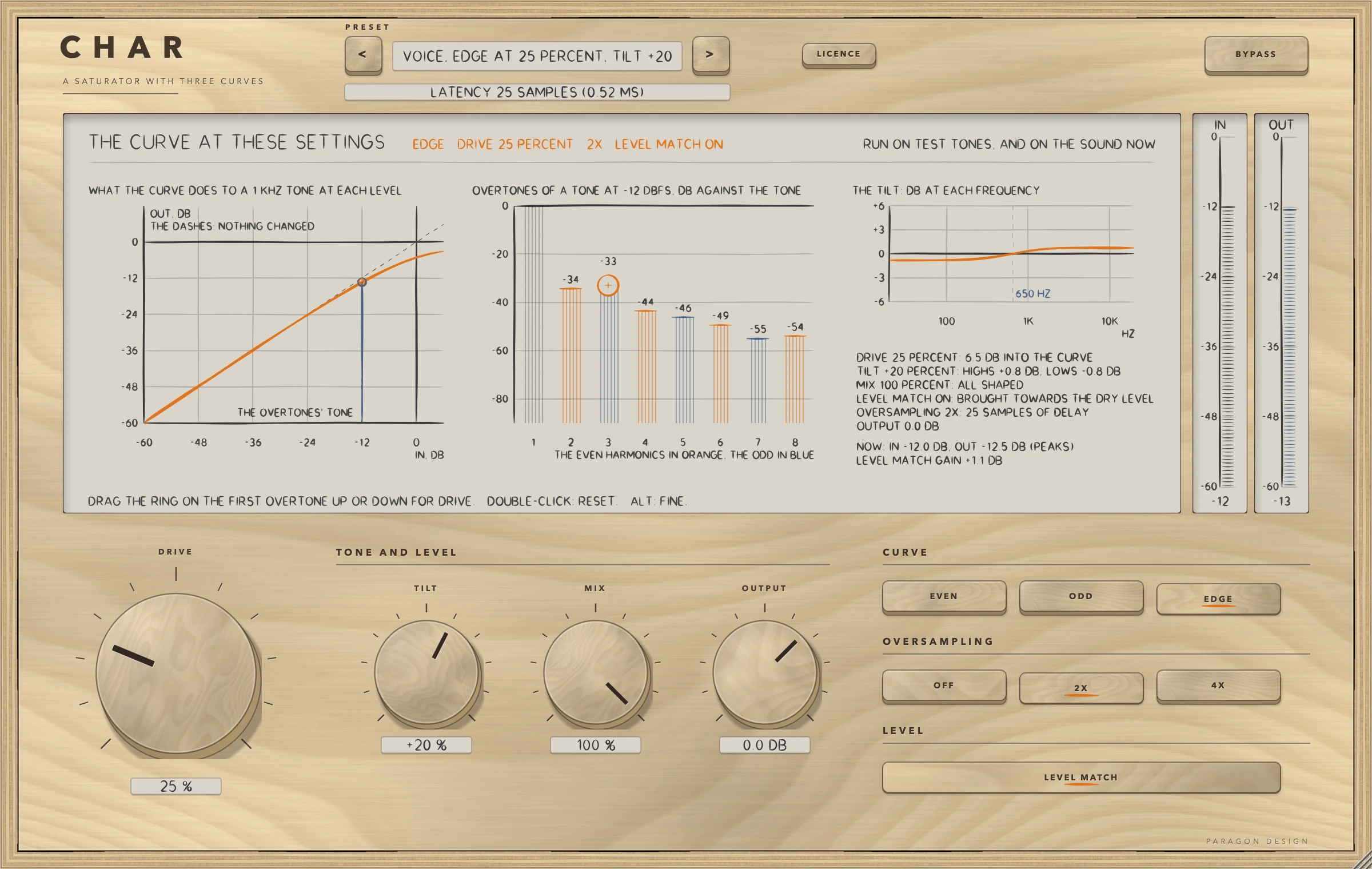
- Put CHAR on a voice, a drum bus or a bass. The panel opens with the preset Flat Start: DRIVE is 0, so the output is the input, delayed 25 samples.
- Click the preset's name to see the menu and choose Voice, Edge at 25 Percent, Tilt +20. It sets the EDGE curve, DRIVE 25 percent and TILT +20 percent.
- Play the track. The display's head line says in orange what CHAR is doing: the curve, DRIVE, the oversampling and LEVEL MATCH.
- Look at the three pictures. The left one is what the curve does to a 1 kHz tone at each level, against a dashed line of nothing changed. The middle one is the first eight overtones of a tone at -12 dBFS, the even ones in orange and the odd ones in blue. The right one is the tilt.
- Drag the ring on the first overtone up or down: it sets DRIVE. A double-click puts DRIVE back to 0, and ALT held while dragging gives fine steps.
- Press EVEN, ODD and EDGE in turn. The bars move: ODD has no even harmonics, EVEN leads with the second.
- Press 4X. The line under the preset name changes to 29 samples.
- Turn LEVEL MATCH off and on to hear what the curve does to the level, and press BYPASS to compare with the dry input.
How it works
Top bar and presets
The top bar has CHAR etched on it with A SATURATOR WITH THREE CURVES under it, the preset bar (the previous and next keys and the name, with a star once a control has moved), the line for the delay, the LICENCE key and BYPASS. A preset sets every sound control: all seven, which is every control but BYPASS.
The display
The display is one picture of three parts, all computed by the engine from test tones, plus the sound as it passes. Its head line says in orange what CHAR is doing, or that DRIVE is at 0 and the output is the input delayed, or that BYPASS is on, or that the trial is over.
- What the curve does to a 1 kHz tone at each level: the transfer curve of the chosen curve and DRIVE, at 23 levels from -60 dB, against the dashed line of nothing changed. While sound passes, the input's peak is marked, and what the curve gives for it.
- The overtones of a tone at -12 dBFS: eight bars in dB against the tone, the even harmonics in orange and the odd in blue, with NONE where a harmonic is under -89 dB. A ring on the first overtone's bar (the second harmonic for EVEN, the third for ODD and EDGE) is the DRIVE handle.
- The tilt: the response from 20 Hz to 20 kHz, the two shelves, with 650 Hz marked, and in words what the controls ask for: DRIVE in dB into the curve, TILT, MIX, LEVEL MATCH, OVERSAMPLING and its delay, and OUTPUT. While sound passes it also says NOW: IN and OUT in dB, as peaks, and the gain LEVEL MATCH is applying.
Two meters, IN and OUT, stand at the right, from -60 to 0 dB with a held mark that falls at 24 dB a second.
The three curves
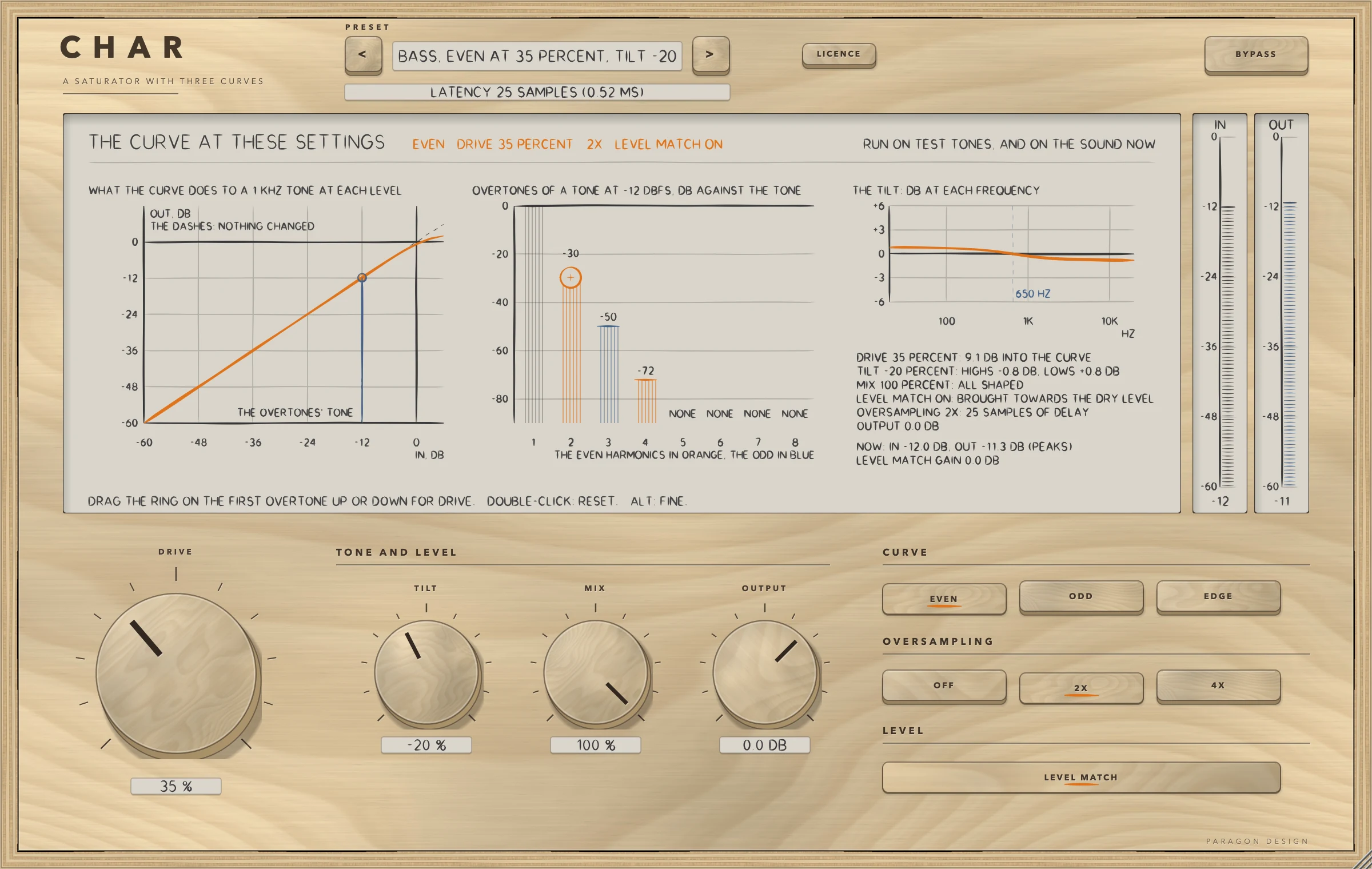
At DRIVE 50 percent, with LEVEL MATCH off, a 1 kHz tone at -12 dBFS gets:
| Curve | Second harmonic | Third harmonic | Other |
|---|---|---|---|
| EVEN | 26 dB under the tone | 42 dB under | even harmonics first |
| ODD | none above -120 dB | 29 dB under | no second or fourth harmonic above -120 dB |
| EDGE | 32 dB under | 27 dB under | both kinds |
These are the engine's own measurements, one tone and one setting each; between the figures the behaviour has not been measured.
DRIVE and OVERSAMPLING
DRIVE is the gain into the curve: 0 to 100 percent is 0 to 26 dB, and the display says what it is now.
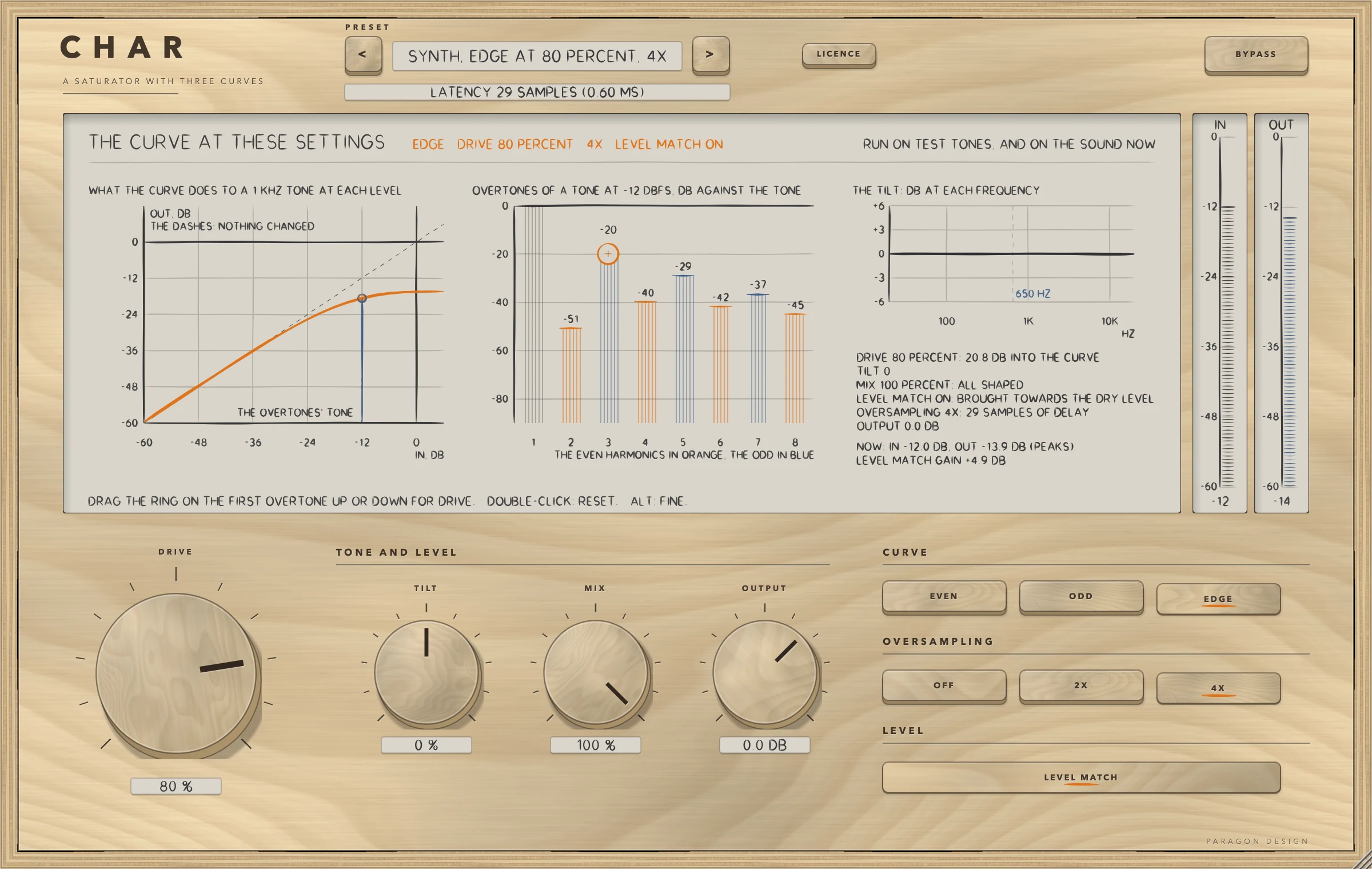
A curve at high DRIVE makes harmonics above half the sample rate, and these fold back down as aliases. OVERSAMPLING works the curve at a higher rate to push them down. For a 9.5 kHz tone at -6 dBFS with DRIVE at 100 percent the alias sits 11 to 13 dB under the tone with OFF, 72 to 89 dB under it with 2X, and 78 to 95 dB under it with 4X, over the three curves. OFF adds no delay, 2X adds 25 samples and 4X adds 29. The default is 2X.
TILT, LEVEL MATCH and MIX
TILT, from -100 to +100 percent, is a low shelf and a high shelf about 650 Hz (Q 0.5), turned opposite ways. At +100 percent the response is 0 dB at 650 Hz, 4 dB up at 20 kHz and 4 dB down at 20 Hz; at -100 percent it is the other way. TILT comes after LEVEL MATCH.
LEVEL MATCH, on by default, brings the shaped sound towards the level of the dry input. It measures a mean square over 0.3 seconds and smooths its gain over 0.5 seconds, with one gain for both channels. On pink noise at -18 dBFS RMS it came within 0.35 dB of the dry level. With LEVEL MATCH off the shaped sound keeps the level the curve gives it.
MIX, from 0 to 100 percent, blends the shaped sound with the dry input: 100 percent is all shaped, 0 is the dry input alone, delayed by the delay in the top bar. A curve at a high DRIVE with MIX at 30 percent works in parallel.
OUTPUT and BYPASS
OUTPUT, from -24 to +12 dB, is a plain gain after the curve, LEVEL MATCH, TILT and MIX. It glides with a time constant of 20 ms (63 percent of a step after 20 ms), and at 0 dB it is not applied at all, so rest stays the input bit for bit. After OUTPUT returns to 0 dB the output is the delayed input bit for bit only after 270.5 ms. A value of OUTPUT within 0.001 dB of 0 is read as exactly 0 dB. BYPASS crossfades to the input over 5 ms, delayed by the delay in force, and the engine goes on running inside, so switching BYPASS off brings in a sound that is already there. BYPASS does not pass through OUTPUT.
The licence
While the trial is over BYPASS is forced on and the controls are drawn dimmed, as the Getting started manual describes.
Control reference
Every control on the panel, as the plug-in itself labels it. The description is the tooltip the plug-in shows when you rest the pointer on the control.
Top bar
| No. | Control | What it does | Range | Default |
|---|---|---|---|---|
| 1 | <Key | Previous preset | ||
| 2 | >Key | Next preset | ||
| 3 | LICENCEKey | Shows who the plug-in is licensed to. Click to see the licence. | ||
| 4 | BYPASSKey | Hear the input unchanged, after a 5 ms crossfade. The delay stays as it is, so nothing moves in time. |
Controls
| No. | Control | What it does | Range | Default |
|---|---|---|---|---|
| 5 | DRIVEKnob | Gain into the curve: 0 to 100 percent is 0 to 26 dB, and the display says what it is now. At 0, with TILT at 0 and OUTPUT at 0 dB, the output is the input delayed by the amount in the top bar, bit for bit. | 0 to 100 | 0 |
| 6 | CHOOSE FILEKey | Choose the licence file you were sent, a .pwlicense file. | ||
| 7 | PASTEKey | Put the text on the clipboard in the field below. | ||
| 8 | TILTKnob | A low shelf and a high shelf about 650 Hz, turned opposite ways: at +100 percent the response is 0 dB at 650 Hz, 4 dB up at 20 kHz and 4 dB down at 20 Hz, at -100 percent the other way. The display draws the curve. It comes after LEVEL MATCH. | −100 to 100 | 0 |
| 9 | REMOVE LICENCEKey | Take this plug-in's licence off this computer. Press twice. | ||
| 10 | ACTIVATEKey | Use the licence in the field below: a key, or the whole text of a licence file. | ||
| 11 | MIXKnob | The shaped sound against the dry input: 100 percent is all shaped, 0 is the dry input alone, delayed by the amount in the top bar (bit for bit with TILT at 0 and OUTPUT at 0 dB). | 0 to 100 | 100 |
| 12 | OUTPUTKnob | The level of the output in dB, after the curve, LEVEL MATCH, TILT and MIX. BYPASS does not pass through it. At 0 dB it does nothing. | −24 to 12 | 0 |
| 13 | BUYKey | Open the shop in your browser. | ||
| 14 | GET YOUR LICENCE AGAINKey | Open the page that sends you your licence again, in your browser. | ||
| 15 | EVENKey | Even harmonics first: at DRIVE 50 percent a 1 kHz tone at -12 dBFS gets a second harmonic 26 dB under it and a third 42 dB under it (measured with LEVEL MATCH off). | ||
| 16 | OFFKey | No oversampling: the delay is 0 samples. A 9.5 kHz tone at -6 dBFS with DRIVE at 100 percent makes an alias 11 to 13 dB under it. | ||
| 17 | LEVEL MATCHKey | On, the shaped sound is brought towards the level of the dry input: within 0.35 dB of it on pink noise at -18 dBFS RMS, with one gain for both sides. Off, it keeps the level the curve gives it. TILT comes after it. | ||
| 18 | CLOSEKey | Close this panel (or press Escape). | ||
| 19 | ODDKey | Odd harmonics only: the same tone gets a third harmonic 29 dB under it and no second or fourth harmonic above -120 dB (measured with LEVEL MATCH off). | ||
| 20 | 2XKey | Twice the sample rate: the delay is 25 samples at every rate, and the same alias is 72 to 89 dB under the tone. | ||
| 21 | EDGEKey | Both kinds: the same tone gets a second harmonic 32 dB under it and a third 27 dB under it (measured with LEVEL MATCH off). | ||
| 22 | 4XKey | Four times the sample rate: the delay is 29 samples at every rate, and the same alias is 78 to 95 dB under the tone. |
Recipes
A little saturation on a voice
Choose Voice, Even at 20 Percent. EVEN adds the second harmonic first. Raise or lower DRIVE with the ring on the display, and leave LEVEL MATCH on so that a comparison with BYPASS is not a comparison of levels.
Drums with both kinds of harmonic
Choose Drums, Edge at 50 Percent. EDGE adds both kinds of harmonic. If the level jumps, leave LEVEL MATCH on or lower OUTPUT.
Saturation in parallel
Choose Bass, Edge at 90 Percent, Mix 30, 4X. MIX 30 percent keeps the dry bass and adds the shaped sound under it, and 4X keeps the aliases down at that DRIVE.
A light touch on a bus
Choose Bus, Odd at 15 Percent or Bus, Even at 10 Percent. A low DRIVE adds a few harmonics and little else; the preset's measurements say how little.
Aliasing on purpose
Choose Special, Edge at 100, No Oversampling. With oversampling off the aliases sit only 11 to 13 dB under a high tone: this is the setting for when that is what you want.
Presets
CHAR has 20 presets in 8 categories. Flat Start is the plug-in's default state: choosing it returns every control to its default, which is rest. Every other preset is written as only what it changes from the defaults and is expanded to all seven sound controls. Each is held to two to four measurements, 68 in all, on named programmes: the second and third harmonic against the tone, the change of level with LEVEL MATCH on, the shaped sound's level against the dry, the peak from 0.1 seconds, the alias, and the delay. The two presets with LEVEL MATCH off say the level change they make, and OUTPUT brings them back to the level of the dry.
| Category | Presets |
|---|---|
| Start | Flat Start |
| Voice | Voice, Even at 20 Percent; Voice, Odd at 30 Percent; Voice, Edge at 25 Percent, Tilt +20 |
| Drums | Drums, Edge at 50 Percent; Drums, Odd at 70 Percent, 4X; Drums, Even at 80 Percent, Mix 40 |
| Bass | Bass, Even at 35 Percent, Tilt -20; Bass, Odd at 50 Percent, 4X; Bass, Edge at 90 Percent, Mix 30, 4X |
| Guitar and Keys | Guitar, Edge at 40 Percent; Guitar, Odd at 60 Percent, Match Off; Keys, Even at 25 Percent |
| Mix Bus | Bus, Odd at 15 Percent; Bus, Even at 10 Percent; Bus, Even at 60 Percent, Mix 25 |
| Synth | Synth, Edge at 80 Percent, 4X; Synth, Odd at 100 Percent, Match Off |
| Special | Special, Edge at 100, No Oversampling; Special, Even at 100, Tilt +60 |
Every name says what the preset sets, and a test reads each name against its values. None of the presets has been listened to: they are numbers, not tuned by ear.
Measured
Everything here was run on one Intel Mac (Intel Core i9-10910, macOS 14, x86_64, Release), shared with other work, on 16 October 2026.
- CHAR's own test group ran 335 checks in four groups (the engine copy 29, the processor 187, the presets 34, the editor 85) and none failed. LATHE's tone group, which the copy is held to, is unchanged. A run of the whole project's tests ran 13354 checks and none failed.
- The checks of the real editor, made with real mouse events and drawn at 70, 100 and 170 percent, ran 40, 13, 124, 215, 95, 7 and 3 (the control map, overlaps, every word, the fit of every word, the interaction, the cost and the leaks), and none failed.
- Apple's auval tool passes: 8 parameters, no warnings, and main bus layouts of one in one out and two in two out.
- The host test on the installed, signed release build of the Audio Unit ran 51 checks and none failed.
| What was measured | Result | Condition | Kind |
|---|---|---|---|
| The engine copy | gives the original's output bit for bit in 756 runs, and in 120 more | every curve and oversampling, DRIVE in seven steps, four sample rates, noise, two tones and the voice, with the setting moved twice during the run; then TILT, MIX and LEVEL MATCH in turn | bound |
| Rest | The output is the input delayed by the reported delay, bit for bit, in 54 runs and at six sample rates, in both layouts; MIX 0 with the curve working at DRIVE 60 also gives it | DRIVE 0, TILT 0 and OUTPUT 0 dB, every curve, oversampling, MIX and LEVEL MATCH setting | bound |
| Delay | 0, 25 or 29 samples for OFF, 2X and 4X; an impulse at rest came out exactly that late | six settings at six sample rates, and read back from the Audio Unit | bound |
| Tail | the output was under -100 dBFS within 169.4 ms of a burst's end in the worst case | 48 runs after a full-scale burst of 0.1 s: every curve, two oversamplings, two drives, TILT at both ends, two frequencies | bound |
| The dip under a change of OVERSAMPLING | 6.66 ms (192 kHz, to OFF) to 10.82 ms (44.1 kHz, to 4X), to the sample | every ordered pair of the three settings at six sample rates | measured |
| Through the installed Audio Unit | 0 of 1152000 samples differ from the engine's own strip in each of five stereo settings, and 0 of 576000 in a mono one | EDGE, ODD, EVEN and EDGE at four different settings, and Flat Start | bound |
| Harmonics | EVEN: second 26 dB and third 42 dB under the tone. ODD: third 29 dB under, no second or fourth above -120 dB. EDGE: second 32 dB and third 27 dB under | a 1 kHz tone at -12 dBFS, DRIVE 50 percent, LEVEL MATCH off | measured |
| Aliases | 11 to 13 dB under the tone with OFF, 72 to 89 dB with 2X and 78 to 95 dB with 4X | a 9.5 kHz tone at -6 dBFS, DRIVE 100 percent, three curves | measured |
| LEVEL MATCH | within 0.35 dB of the dry level, with one gain for both sides | pink noise at -18 dBFS RMS | bound |
| Hostile input | only numbers come out, and nothing over 64 | not-a-number, infinity, 1e30, denormals, a full-scale square wave, silence, and full-scale noise at DRIVE 100, TILT +100 and OUTPUT +12 dB | bound |
| Memory use | no allocation on the audio thread | both layouts | bound |
| Presets | 68 measurements, two to four for each of the 20 presets, all inside their bounds in 86 runs of CHAR's own signal path (5.2 to 8.1 s in the three runs logged) | five named programmes | measured against bounds |
| Paint | the display takes 2.16 ms at 1x and 4.79 ms at 2x with sound running (budget 8 ms: met); 31.65 ms at 2x while a control moves at every paint (reported, not held); an idle editor paints 0 times in 1.5 s | upper bounds, including the snapshot | measured |
| Memory over 30 editors | the allocator's bytes in use went from 353.5 to 360.5 MB | the editor opened and closed 30 times after 30 rounds to settle first | measured |
| Cost | Flat Start 0.12 percent of one core; 2X at DRIVE 60 0.88 (EVEN), 0.82 (ODD) and 0.89 (EDGE); 4X at DRIVE 60 1.49, 1.37 and 1.49; the heavy setting (ODD, DRIVE 100, TILT +100, MIX 50, 4X, OUTPUT +6 dB) 1.44; the engine alone 0.10 | thread CPU time, stereo, 48 kHz, 512-sample blocks, 10 s of the synthetic voice, a quiet Mac at a load average of about 4; the budget is 2.0 | measured |
The processor adds 0.02 point of one core to the engine alone. The cost moves with the machine's load: on a busy Mac, at a load average of 16 to 33, the dearest 4X curve read 1.8 percent and once 2.19, over the budget, so 4X at a high DRIVE is the setting that can pass 2 percent of one core on a loaded machine.
Limits and what is not verified
- Nothing has been listened to: the curves, the presets and the defaults are described by what they were measured to do, not by how they sound.
- The harmonic figures in the tips are measured at DRIVE 50 percent and the alias figures at 100 percent, on one tone each, over the three curves. The behaviour between those figures has not been measured.
- Sample rates under 44.1 kHz were not tried: the delay, the dip and the alias figures were measured at 44.1 to 192 kHz.
- Not verified: any host (what one does with the delay of 25 samples at the default, the tail of 0.2 seconds, the dip under a change of OVERSAMPLING, or the bypass parameter), the VST3 in any host, Apple silicon (the Mac the tests ran on is Intel, and the Apple silicon half of the release package was compiled and never run), and the real editor used by hand.
- With 4X at a high DRIVE on a loaded machine CHAR can pass 2 percent of one core: it is the setting to check first when the processor is busy.
- LEVEL MATCH is slow: it reads a window of 0.3 s and settles over 0.5 s, so on short sounds it does not hold the level. With LEVEL MATCH on, Drums, Edge at 50 Percent measured 0.96 dB under the dry level.
- The first picture draws the curve as straight lines between 23 probe points 3 dB apart, for a 1 kHz tone only. The curves change with frequency, and the picture says 1 kHz tone.
- A denormal input number comes out as itself or as 0, which is one of the two exceptions to a bit-for-bit rest.
- The name CHAR is a working name.
Troubleshooting
The sound does not change. DRIVE starts at 0 and Flat Start leaves it there, so the output is the input. Raise DRIVE, or choose a preset. Check that BYPASS is off and that the line under the preset name does not say the trial is over.
The level jumps when I raise DRIVE. LEVEL MATCH is off, or you have raised OUTPUT. With LEVEL MATCH on, the shaped sound is brought towards the dry level, within 0.35 dB on pink noise at -18 dBFS RMS in the test.
There is a short gap when I change OVERSAMPLING. That is the dip: the delay changes, so CHAR makes the change under 3 ms down, a silence of twice the new delay plus 128 samples, and 3 ms up, about 7 to 11 ms in all.
The high end is harsh at high DRIVE. With oversampling off aliases are only 11 to 13 dB under the tone. Press 2X or 4X.
CHAR uses more CPU than I expect. 4X at a high DRIVE is the dearest setting. The figures in Measured were taken on a quiet machine, and read higher when the machine is busy.
The panel looks small or large. Drag a corner of the window: it keeps its proportions from 70 to 170 percent of 1200 by 760 pixels, and the width is saved with the project.