What it is
A comparison between two versions of a mix, two converters or two plug-in settings is only fair when the levels agree. A louder version is easy to prefer for that reason alone. LEVEL takes the level out of the comparison. You put up to four sources in its slots, each the live input or a file. LEVEL measures every source to BS.1770-4, sets one gain per slot so that they all play at the same loudness, and holds those gains still for the whole of a test.
Two tests are built in. In a blind ABX, X is secretly A or B on every trial, you say which, and LEVEL reports the exact binomial p-value of your score. In a blind ranking, the sources are shuffled under hidden labels, you put them in order from best to worst over three rounds, and LEVEL shows the mean rank of each. While a test runs the loudness chart is withdrawn and the loudness strip is crossed out, so nothing on the panel depends on which source you are hearing. The hidden answers are never written to the saved state.
LEVEL changes level and nothing else: a gain per slot, a short crossfade when you switch slot, and an output trim. It is a listening tool. It does not improve the audio, it does not protect against clipping (it only warns you), and it does not measure true peak.
Setting it up
Formats and channels
LEVEL is an effect in Audio Unit and VST3 formats. It works on a mono or a stereo channel, with the same number of channels in and out. It has no side chain input. It reports no latency to the host.
Where to put it
The slot you select replaces the signal passing through LEVEL. Put it last in the chain of the channel strip, bus or output you listen through. On a single track, only that track is replaced; the rest of the project plays as before. On the output, slot A (the live input) is the whole mix, and the file slots replace it.
Slots and files
Slot A is set to the live input when LEVEL opens. Only one slot can be the live input at a time. Every other slot can hold a file, and slot A can hold one too.
- The file chooser offers WAV, AIFF, FLAC, MP3, AAC (M4A), CAF, Ogg Vorbis and other formats macOS can decode. You can also drop a file onto a slot.
- A file can be up to 12 minutes long. A longer file is refused.
- A mono file plays to both sides. A file with more than two channels uses its first two.
- A file is converted to the host's sample rate when it loads, and loaded again if the host's rate changes.
- The saved project keeps the path of each file, not the audio. If a file has moved, its slot reads FILE MISSING when the project opens.
Sample rates and latency
The loudness meter was checked at 44.1 kHz and 48 kHz. Other sample rates are not verified. LEVEL adds no latency at any rate, so there is nothing to compensate.
Licence and trial
LEVEL is a premium plug-in. It works in full for 14 days. The days are counted for each plug-in on its own. They start the first time the plug-in's window is opened, or after five minutes of audio have gone through it, whichever comes first. A host that only creates the plug-in to read what it is does not start them. In the top bar, beside the small wooden key marked LICENCE, a pencil line reads TRIAL: 9 DAYS LEFT, and the number falls by one each day. The last day reads 1 DAY LEFT. After it the line reads TRIAL OVER: ENTER A LICENCE, in orange.
When the trial is over LEVEL switches on its own bypass: the input passes straight through, so no file or slot plays, and a test that was running ends. The panel says TRIAL OVER: ENTER A LICENCE, and neither an ABX test nor a ranking can begin. The slots and the session stay as they were.
To add a licence, press LICENCE and then CHOOSE FILE, or drop the licence file anywhere on the plug-in's window. One file covers every plug-in in an order, and LEVEL works again at once. Nothing saved in a session is changed when a trial ends or a licence arrives. The Getting started manual has the whole chapter, Licences and the trial.
In Logic Pro
- Click an Audio Effect slot in the channel strip, then choose Level Blind Listening Test from the pop-up menu (versions before 0.1.1 list it as Level). Audio Units plug-ins are in the Audio Units submenu of that menu.
- To open the plug-in window again later, click the centre area of the plug-in slot.
A first session
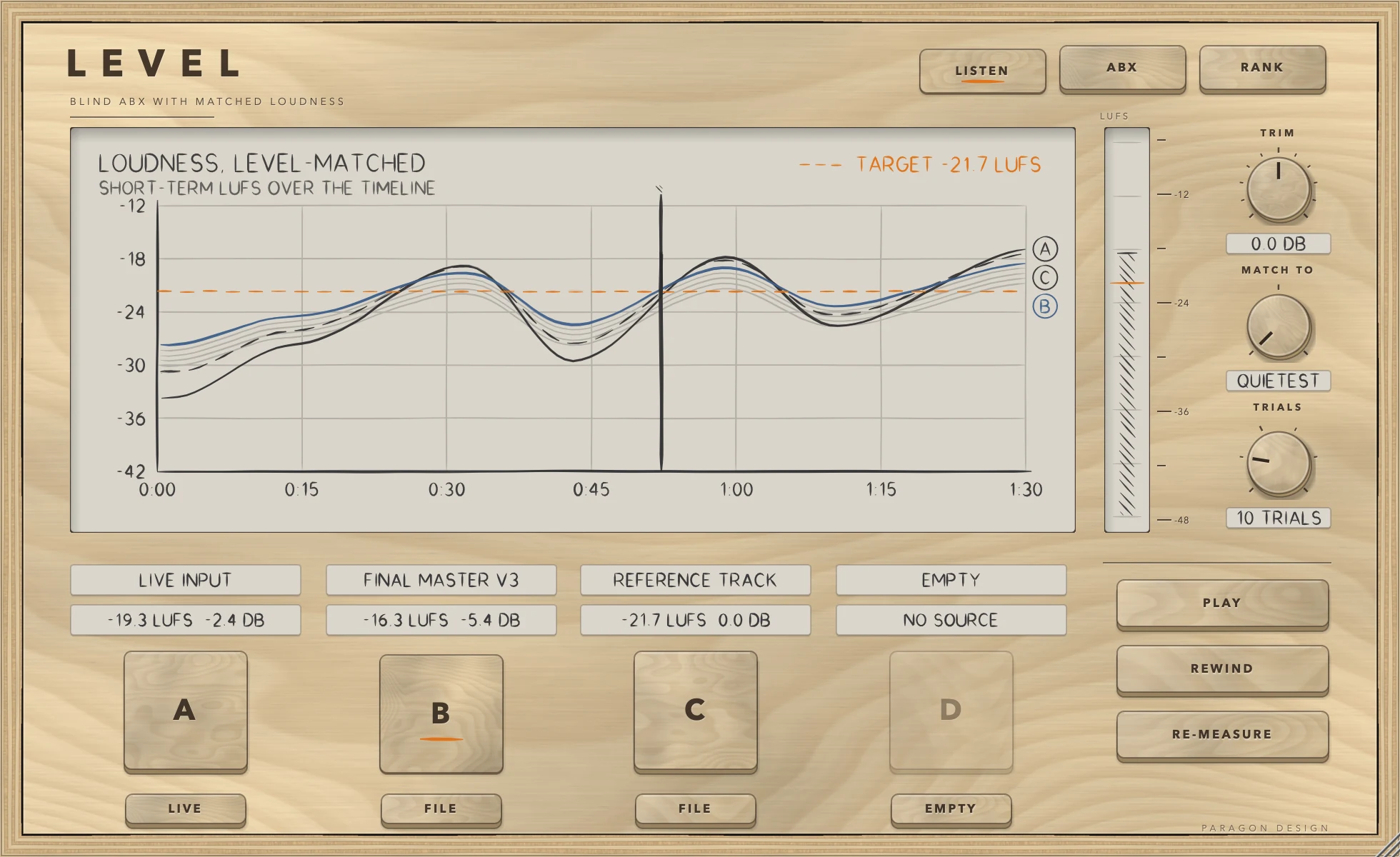
- Insert LEVEL as the last effect on the channel strip you listen through (see Setting it up).
- Look at slot A. Its name reads LIVE INPUT and the small key beneath it reads LIVE. Play your project. The value line reads MEASURING until LEVEL has heard 3 seconds of programme above its absolute gate of -70 LUFS. Then it shows the loudness in LUFS and the gain LEVEL applies in DB.
- Click the small key under slot B, which reads EMPTY. Choose Load a file... and pick a file. You can also drop a file onto the slot. Fill slots C and D the same way if you want more than two sources.
- Press PLAY to hear the files while the host is stopped. They start from the beginning. When the host plays, the files follow the host's position instead.
- Click the slot keys A to D to switch between sources. Each one plays at the same loudness. The chart shows the short-term loudness of every source along the timeline, with its gain applied, and an orange dashed line marks the target everything is matched to.
- To run a blind ABX, press the ABX key. Choose how many trials with TRIALS. The display says READY. PRESS BEGIN. when the test can start. Press BEGIN.
- Use the A, B and X keys to listen as often as you like. Answer with X IS A or X IS B. After the last trial the display shows YOU GOT n OF N and the p-value. Press END TEST to close it.
- To run a blind ranking, press the RANK key, then BEGIN. The keys now carry hidden labels. Click each label to hear it, press PLACE to give the best one first place, and so on down. Press NEXT ROUND when a round is complete. After round three the display shows the mean rank of each source.
How it works
LISTEN, ABX and RANK
The three keys at the top right choose the mode. LISTEN lets you hear the sources one at a time, matched in loudness. ABX is the blind test of whether X is the same as A or as B. RANK is the blind ranking of the sources from best to worst. Changing mode ends a test that is running.
The four slots
Each slot has a large key (A, B, C, D), a name line, a value line and a small source key beneath.
- The name line reads LIVE INPUT, the file name without its extension (shortened to 20 characters), LOADING n PERCENT, or EMPTY.
- The value line reads the measured loudness in LUFS, then the gain in DB. It reads MEASURING while a live level is not yet known, and CLIPS BY n DB when the gain would take a file's peaks past full scale.
- The small key reads EMPTY, LIVE or FILE. Click it to open a menu with Live input, Load a file... and Clear this slot. In a test it is hidden.
In LISTEN the large keys choose what you hear, with an 8 ms crossfade between sources. In ABX, A and B select the two sources and X appears once the test has begun. In a ranking the large keys become the hidden labels 1 to 4.
The display
In LISTEN the display is titled LOUDNESS, LEVEL-MATCHED, with the subtitle SHORT-TERM LUFS OVER THE TIMELINE. Each source draws as a line with a circled letter at its end, A and C in graphite and B and D in blue, with C and D dashed. The orange dashed line and the label TARGET n LUFS show the loudness the sources are matched to. A vertical line is the playhead: solid while the timeline plays, dashed while it is stopped. The line of the source you are hearing has a few strokes of shading under it.
A file draws in full as soon as it has loaded. The live source draws only while the timeline plays, at the position the host reports. LEVEL records the live loudness for the first 12 minutes of the timeline.
In ABX and RANK the display explains the test, shows READY. PRESS BEGIN. or says what is missing, then shows the trial count, the tally of right and wrong answers, and the result.
The LUFS strip
The slim strip beside the display is a loudness meter from -48 to -6 LUFS, with an orange tick at the target. It shows the short-term loudness of what you are hearing, with the matching gain added. In a test it is crossed out, because its level would give the answer away.
TRIM, MATCH TO and TRIALS
- TRIM is the output trim, from -12 to +12 dB, default 0. Double-click to reset it. It is applied after the slot you hear, and not in host bypass.
- MATCH TO is what every source is matched to: QUIETEST (the default), SLOT A, or EBU -23, the EBU R128 level of -23 LUFS.
- TRIALS is the number of trials in an ABX test: 5, 10, 15, 20, 25 or 30, default 10.
PLAY, REWIND and RE-MEASURE
PLAY plays the files from the start while the host is stopped. When the host plays, the files follow it. While the internal transport runs, the key reads STOP. After STOP, PLAY carries on from where it stopped, and at the end of the longest file it starts again from the beginning. REWIND goes back to the start of the files. RE-MEASURE appears when a slot is the live input. It forgets the live level and measures again from now.
How the match is made
LEVEL measures each file once, when it loads, as integrated loudness to BS.1770-4 with its absolute and relative gates. It measures the live input continuously, so the live level is the integrated loudness of everything it has heard since it started or since you pressed RE-MEASURE.
Each slot's gain is the target minus the slot's loudness, limited to between -40 dB and +20 dB. The target depends on MATCH TO:
- QUIETEST: the loudness of the quietest slot that has a level. Every other slot comes down to it.
- SLOT A: the loudness of slot A. Quieter slots are raised to it.
- EBU -23: -23 LUFS. Louder slots come down and quieter slots go up.
A slot with no level yet gets 0 dB and does not set the target. The gains are recalculated about ten times a second while you listen, so a live level that is still settling moves them. When a test begins the gains are frozen and stay frozen until the test ends. In an ABX only the two sources under test count towards the target.
Blind ABX
On every trial X is A or B, chosen by an independent fair coin and kept out of sight. You listen to A, B and X as often as you like, then answer. After the last trial LEVEL reports how many you got right and the chance of scoring that well or better by guessing. That chance is the exact binomial p-value, with each trial a 50 percent coin.
The panel prints the p-value to three decimal places when it is below 0.1 and to two above that, and prints P < 0.001 when it is smaller than that. Below 0.05 the result is drawn in orange with the words UNLIKELY TO BE LUCK. At or above 0.05 it says COULD WELL BE GUESSING. A bar chart shows how likely each score is by guessing, with your score marked.
ABX compares the first two filled slots in order. Fill slots A and B, because the A and B keys on the panel stand for slots A and B.
Blind ranking
A ranking runs three rounds. Each round shuffles the sources under the labels 1 to 4. You click a label to hear it. PLACE puts the label you are hearing in the next place down, starting with first place. UNDO takes the last placement back. When every label is placed, NEXT ROUND starts the next round, and in the last round the key reads SEE RESULT. The result lists the sources by mean rank over the three rounds, where 1 is best. Sources need at least two slots filled.
Control reference
Every control on the panel, as the plug-in itself labels it. The description is the tooltip the plug-in shows when you rest the pointer on the control.
Top bar
| No. | Control | What it does | Range | Default |
|---|---|---|---|---|
| 1 | LISTENKey | Hear the sources one at a time, matched in loudness. | ||
| 2 | ABXKey | Blind ABX test: is X the same as A, or as B? | ||
| 3 | RANKKey | Blind ranking: put the sources in order, best to worst. |
Controls
| No. | Control | What it does | Range | Default |
|---|---|---|---|---|
| 4 | AKey | |||
| 5 | EMPTYKey | Choose what plays in this slot: the live input, or a file. You can also drop a file here. | ||
| 6 | BKey | |||
| 7 | EMPTYKey | Choose what plays in this slot: the live input, or a file. You can also drop a file here. | ||
| 8 | CKey | |||
| 9 | EMPTYKey | Choose what plays in this slot: the live input, or a file. You can also drop a file here. | ||
| 10 | DKey | |||
| 11 | EMPTYKey | Choose what plays in this slot: the live input, or a file. You can also drop a file here. | ||
| 12 | PLAYKey | Plays the files from the start while the host is stopped. When the host plays, the files follow it. | ||
| 13 | REWINDKey | Back to the start of the files. | ||
| 14 | RE-MEASUREKey | Forget the live level and measure it again from now. | ||
| 15 | TRIMKnob | Output trim. Double-click to reset. | −12 to 12 dB | 0 dB |
| 16 | MATCH TOKnob | What every source is matched to: the quietest, slot A, or the EBU R128 level of -23 LUFS. | 0 to 2 | 0 |
| 17 | TRIALSKnob | How many trials an ABX test runs. | 0 to 5 | 1 |
During a test
| No. | Control | What it does | Range | Default |
|---|---|---|---|---|
| 18 | XKey | X is secretly A or B. Listen as often as you like, then answer. | ||
| 19 | BEGINKey | |||
| 20 | END TESTKey | |||
| 21 | X IS AKey | Say that X is the same as A. | ||
| 22 | X IS BKey | Say that X is the same as B. | ||
| 23 | PLACEKey | |||
| 24 | UNDOKey | |||
| 25 | NEXT ROUNDKey |
Recipes
Compare two bounces at the same loudness
- Click the small key under slot A, choose Load a file..., and pick the first bounce. This replaces the live input in slot A.
- Load the second bounce into slot B.
- Leave MATCH TO on QUIETEST and the mode on LISTEN.
- Press PLAY, then click A and B to switch.
You should see two lines on the chart, the value lines showing two different loudness figures, and the louder file carrying a negative gain while the quieter file carries 0.0 DB. The orange target line sits at the quieter file's loudness.
Run a 20-trial ABX on two versions
- Fill slots A and B with the two versions.
- Set TRIALS to 20 and press ABX.
- When the display reads READY. PRESS BEGIN., press BEGIN.
- On each trial listen to A, B and X, then press X IS A or X IS B.
You should see TRIAL n OF 20 and a running SCORE. After the last trial, 15 of 20 right reads P = 0.021, which is below 0.05, so the panel says UNLIKELY TO BE LUCK. Ten of twenty is about what guessing gives.
Rank four masters blind
- Load four files, one in each slot A to D.
- Press RANK, then BEGIN.
- In each of the three rounds, click each label, press PLACE for the best one first, then the next best, until all four are placed.
- Press NEXT ROUND, and in the last round SEE RESULT.
The result shows the four sources in order with their mean ranks. A source that was always first has a mean rank of 1.00.
Match everything to the broadcast level
- Load the sources you want to hear.
- Set MATCH TO to EBU -23.
- Use TRIM for the final listening level.
Each slot is brought to -23 LUFS, within the limits of -40 dB and +20 dB of gain. If a quiet file is lifted so far that its peaks pass full scale, its value line reads CLIPS BY n DB.
Compare the live mix with a reference file
- Leave slot A as the live input and load the reference into slot B.
- Set MATCH TO to SLOT A, so the reference is brought to the loudness of the mix.
- Play the part of the mix you care about. If the live level was measured over the wrong passage, press RE-MEASURE and play it again.
- Click A and B to switch.
The live level is the integrated loudness of what has played since the measurement began, so a short passage gives a different match from a whole song.
Audition files with the host stopped
- Load files into the slots and press LISTEN.
- Press PLAY. The key now reads STOP.
- Click the slot keys to switch, and press REWIND to return to the start.
Presets
LEVEL has no factory presets and no preset bar. The three knobs, the mode, the slot contents and the window size are saved with the project. In Logic Pro, plug-in settings are stored with the project file.
A test in progress is not saved. When a project is restored, no test resumes.
Measured
Every figure below is from the test run in the plug-in repository on 13 October 2026, which passed all 677 of its checks across the six plug-ins. All of them are on synthetic test signals, not on recordings of music.
| What was measured | Result | Conditions |
|---|---|---|
| Integrated loudness against an independent EBU R128 meter (ffmpeg, ebur128 filter) | -19.568 LUFS here, -19.573 LUFS from ffmpeg: 0.005 LU apart | 48 kHz, 32 s of stereo pink noise in four segments (-20, -52, silence, -26 dB RMS), gates exercised |
| The same, at 44.1 kHz | -19.647 LUFS here, -19.652 LUFS from ffmpeg | 44.1 kHz, same programme |
| A 997 Hz tone at -20 dBFS peak, both channels | -20.0000 LUFS at 48 kHz, -19.9972 LUFS at 44.1 kHz | 20 s of sine |
| The same tone in one channel only | 3.01 LU lower: -23.0103 LUFS at 48 kHz, -23.0075 LUFS at 44.1 kHz | 20 s of sine |
| Streaming meter against the offline measure, whatever the block size | -19.6310 LUFS at every block size tried: 1, 37, 480, 4800, 4801 and 9999 samples | 48 kHz, the same programme with a second of silence added |
| Two files 8 LU apart, after matching | -0.0021 LU apart | 12 s of pink noise each, 48 kHz, MATCH TO QUIETEST |
| Gain applied to the louder of those files | -7.9518 dB, equal to the measured loudness gap | The same files |
| A file at 44.1 kHz loaded into a 48 kHz session | Loudness matches the offline measure to within 0.05 LU (the test limit) and the duration is 10.0000 s | 10 s of pink noise |
| Output trim of -6.02 dB | Halves the level (0.5000) | 3 s ramp file, 256-sample blocks |
| Live input at -6.02 dB of gain | Half the amplitude (0.5000) | 1 kHz sine at 0.5 |
| Host bypass | The output equals the input, bit for bit | 1 kHz sine, one block |
| Matching gain during a test | The live slot's gain stayed at -9.0336 dB while the live input rose by 6 dB | Live slot A against a file in slot B, ABX running |
| ABX p-values | 10 of 10: 0.0010. 9 of 10: 0.0107. 5 of 10: 0.6230. 12 of 16: 0.0384. 15 of 20: 0.0207. 12 of 12: 1 in 4096 (0.0002) | Exact binomial, each checked against its exact fraction to within 1e-12 |
| Is X really A about half the time? | X was A on 0.4957 of 12000 trials; random answers scored 0.5011 | 400 sessions of 30 trials |
| Mean ranks of three sources over three rounds | Sum to 6.0000 (1 + 2 + 3) | Ranking session with hidden labels |
| Routing in a blind test | On every trial the audio at X came from the slot the hidden answer names | Live slot A against a file in slot B |
Limits and what is not verified
- Nothing has been checked by ear. Every figure on this page is a measurement of a synthetic signal.
- LEVEL matches integrated loudness. It does not match short-term loudness, peak level or spectrum, and it does not measure true peak.
- It does not limit. A file raised by the match can pass full scale, and the only warning is CLIPS BY n DB in the slot's value line.
- The gain is limited to between -40 dB and +20 dB. A source further from the target than that is not fully matched.
- The live level is the integrated loudness of everything heard since LEVEL started or since RE-MEASURE, so it depends on what was played.
- A file can be up to 12 minutes long, and the live chart covers the first 12 minutes of the timeline.
- ABX uses the first two filled slots. If slot B is empty and slot C is filled, the B key is dimmed on the panel while the test would use slot C.
- A ranking is always three rounds.
- The p-value assumes each trial is an independent fair coin, which is how LEVEL draws X. It says nothing about listening fatigue or any order effects.
- Sample rates other than 44.1 kHz and 48 kHz are not verified.
- Not verified in Logic Pro: what position the host reports to a plug-in at the start of a project, which decides where a file starts when the host plays. The reload of files after a change of host sample rate was tested on the processor directly, not in Logic Pro.
- Not verified: the licence panel and the trial in every host. They are checked in the plug-in's own tests and in one test host, and the Getting started manual lists what is not verified.
Troubleshooting
The plug-in passes my audio through and says TRIAL OVER: ENTER A LICENCE
The 14 days are over for LEVEL and no licence has been added. Press LICENCE in the top bar, choose the licence file that came with your order, or drop the file on the window, and LEVEL works again at once. If the panel says THIS LICENCE IS FOR another plug-in, that file does not cover LEVEL: the order page offers the file for your order.
BEGIN is dimmed and the display names a reason
The reasons LEVEL gives are:
- LOAD A SECOND SOURCE: fewer than two slots are filled.
- SLOT A IS LOADING (or B, C, D): a file is still loading.
- PLAY THE LIVE SIGNAL FOR A FEW SECONDS: the live slot has not yet heard 3 seconds of programme above -70 LUFS. Play it.
- SLOT B HAS NO LEVEL YET (or A, C, D): a file has no measurable loudness. A silent file, or one that is entirely below the -70 LUFS gate, is measured as having none.
All filled slots must have a level before a test can begin, including slots that the ABX would not use.
A slot shows an error and CHOOSE ANOTHER
The file could not be read, was empty, or was longer than 12 minutes. The name line shows the start of the reason. Choose another file.
A slot reads FILE MISSING after the project opens
The file was moved or deleted after the project was saved. The project stores only the path. Load the file again from its new place.
A slot reads MEASURING and never finishes
For the live input, LEVEL has not yet heard 3 seconds of programme above -70 LUFS. Play the project. If the host is stopped or the track is silent, the meter has nothing to measure. A file slot reads MEASURING if the file has no measurable loudness (see above).
The files are silent
A file slot plays only while the timeline runs. Start the host, or press PLAY when the host is stopped. Host bypass also takes the files out, because bypass passes the live input straight through.
The B key is dimmed in ABX
Slot B is empty. The B key stands for slot B. Fill slot B.
CLIPS BY n DB
The match has raised that file so far that its peaks pass full scale. Use MATCH TO QUIETEST, lower TRIM, or accept the warning if your host has headroom after LEVEL.
The live loudness keeps changing while I listen
It is the integrated loudness so far, so it moves as you play. Press RE-MEASURE to restart it. During a test the gains are frozen and do not move.