Paragon WorkshopThe free ones

TAP

A delay with three characters.

Set a time in milliseconds, or a note at the host's tempo, and TAP repeats what you play, each repeat going round a loop you shape: filtered, saturated, spread by allpass filters and moved by a slow sine. Three characters set what the loop does to a repeat, ping-pong hands each one to the other side, and DUCK, WIDTH and FREEZE finish the job. The display draws every repeat as a stem, in pencil on the left and blue on the right, and you drag the first one for the time and the second for the feedback.

$39Available from next weekTell me when
Formats
Audio Unit, VST3
Channels
Mono in and mono out, mono in and stereo out, or stereo in and stereo out; stereo in and mono out is refused
Latency
None: 0 samples at every setting at 44.1, 48, 88.2, 96, 176.4 and 192 kHz, and with BYPASS on
TAP at work

What it does

TAP in six parts.

  1. 01

    Three characters

    CLEAN leaves the loop to LOW CUT and HIGH CUT alone. DRIFT puts a 30 Hz high-pass and a 7 kHz low-pass in the loop, moves the time with a 7.3 Hz sine and a slow random walk, and saturates with a bias. FOLLOW lets the loop's low-pass corner fall as the time rises, from 9 kHz at 40 ms to 1.8 kHz at 1 s. The display draws what each does to a repeat on every trip.

  2. 02

    Milliseconds or notes

    TIME sets the delay from 1 to 2000 ms. With SYNC on, NOTE sets it at the host's tempo from 16 values, 1/64 to 1/1 with triplets and dotted notes: 375 ms for a dotted eighth at 120 beats a minute. Through the Audio Unit a quarter-note echo came out at 24000, 32000, 19200 and 48000 samples at 120, 90, 150 and 60 beats a minute, exactly the note.

  3. 03

    Stereo or ping-pong

    In STEREO each side repeats on its own. In PING-PONG the input feeds the left delay as the mean of both sides and each echo goes to the other side. R TO L sets the right delay as a multiple of the left, from 0.25 to 4, and WIDTH works on the middle and side of the echoes: 0 makes them the same on both sides, exactly.

  4. 04

    A loop you shape

    LOW CUT and HIGH CUT filter every trip round the loop. DRIVE saturates it at twice the sample rate. DIFFUSION mixes in four allpass filters of 1.3 to 4.3 ms. MOD DEPTH and MOD RATE move the time, GLIDE bends the pitch as a time changes and FADE crossfades the two reads over 30 ms. FEEDBACK goes to 110 percent, with a soft limiter in the loop from 95.

  5. 05

    Ducking and freeze

    DUCK turns the echoes down while the input is loud, by up to 26 dB, and lets them back in the gaps. FREEZE stops the input feeding the delay and holds what it contains at a gain of 0.99997 a trip, with no filter, drive, diffusion or movement: the held loop changed by -0.34 dB in half a minute in the engine's test.

  6. 06

    Nothing until you ask

    MIX starts at 0, and with MIX at 0 and OUTPUT at 0 dB the output is the input, bit for bit, in every setting tried and every layout. TAP adds no delay at any setting. BYPASS crossfades to the input over 5 ms and the delay goes on running inside, so its repeats are there when you switch it off.

TAP · The point of it

It draws every repeat, and it adds nothing until you ask.

The top plot shows the time and the level of every repeat against a count of beats, the left side in pencil and the right in blue, with a ring on the first repeat for the time and a ring on the second for the feedback. Under it the response of the loop for one trip, in dB against frequency, and the last five seconds of the input and the wet with their peaks. The plot is drawn from the numbers the engine computes, not from a picture.

Every one of the 26 presets is written as what it changes from the defaults and is held to three measurements, 78 in all: where the first echo of an impulse lands against the time asked, how far under the dry input the repeats sit, how far the second round is under the first. The installed Audio Unit and the engine differed by 0.000000000 on 14 seconds of voice, in each of two presets.

  • 0 samplesThe delay the processor told the host at every setting tried, at 44.1, 48, 88.2, 96, 176.4 and 192 kHz, and read back from the Audio Unit at 48 kHz. BYPASS does not change it.
  • Bit for bitAt MIX 0 and OUTPUT 0 dB the output is the input in 36 runs and at six sample rates in three layouts, with FEEDBACK 110, FREEZE, DUCK, DRIVE, DIFFUSION, MOD DEPTH, WIDTH 200 and R TO L set. Through the installed Audio Unit 18 of 18 runs were equal. A denormal input number comes out as 0 and a minus zero as plus zero.
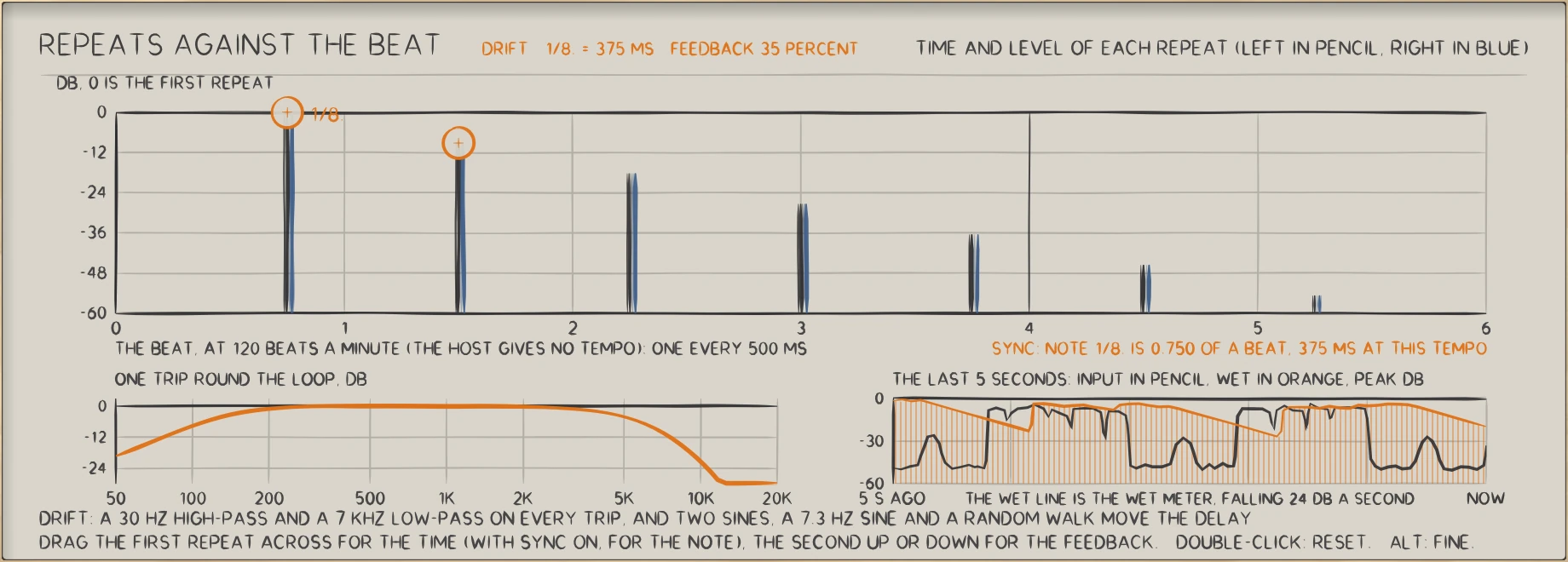
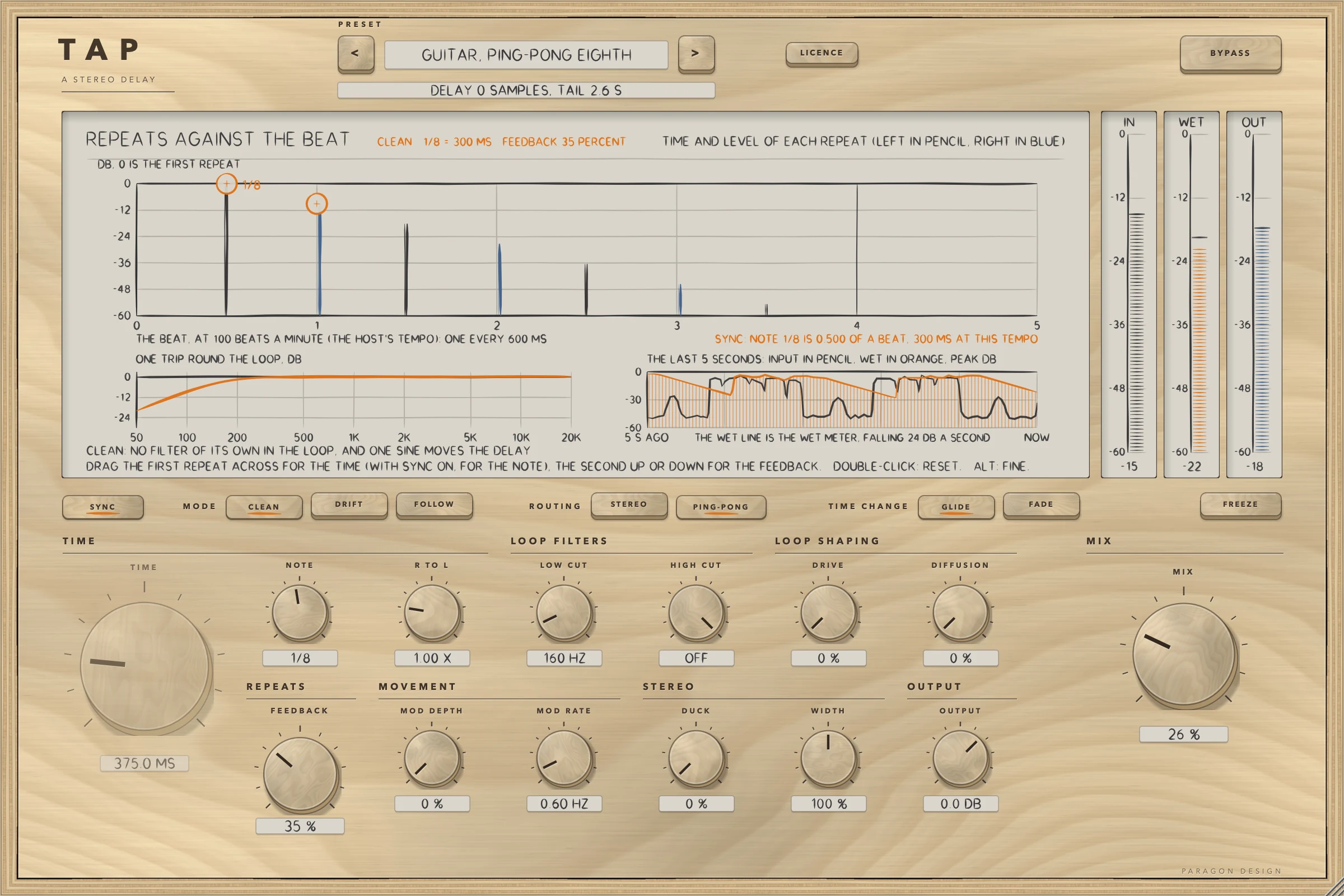
TAP: TAP with a preset at work: every repeat as a stem, the loop's response for one trip, and the last five seconds.
TAP with a preset at work: every repeat as a stem, the loop's response for one trip, and the last five seconds.

In use

The real window, as it looks at work.

These are captures of the built plug-in, drawn by the plug-in itself at twice the size.

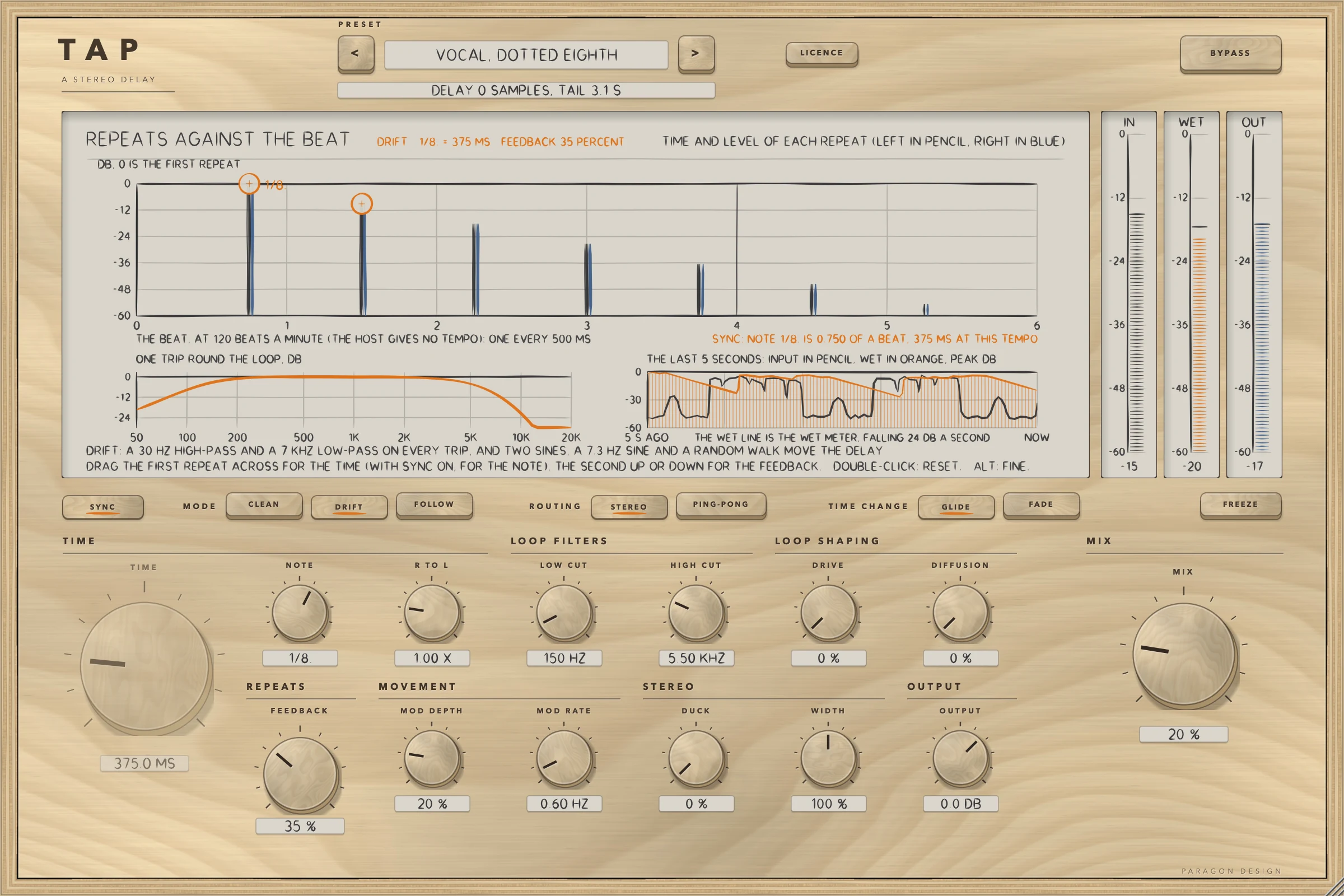
TAP: A synced vocal preset with the voice playing: every repeat as a stem, the loop's response, the last five seconds and the meters
A synced vocal preset with the voice playing: every repeat as a stem, the loop's response, the last five seconds and the meters
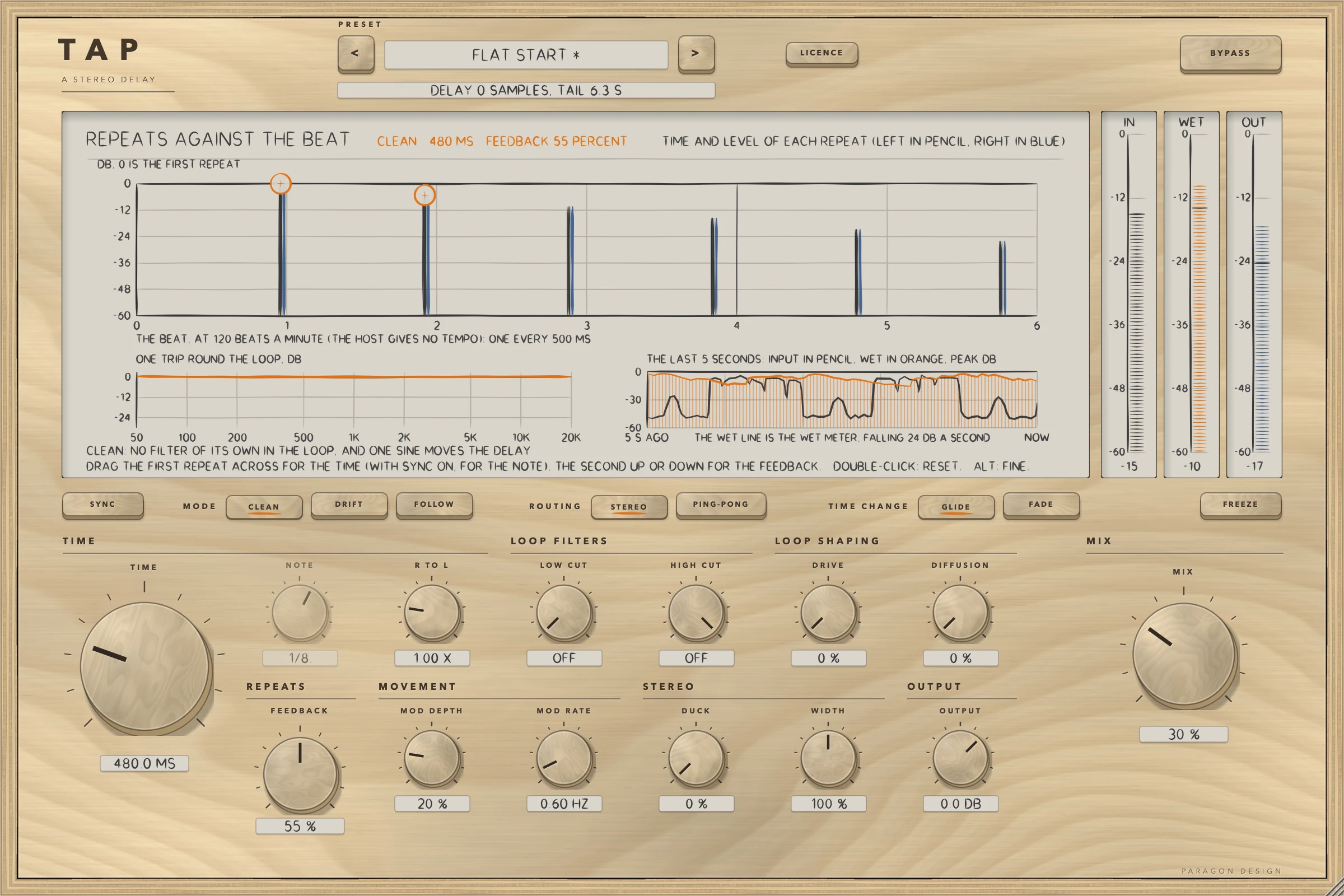
TAP: CLEAN at TIME 480 ms, FEEDBACK 55 percent: the loop's response is flat
CLEAN at TIME 480 ms, FEEDBACK 55 percent: the loop's response is flat
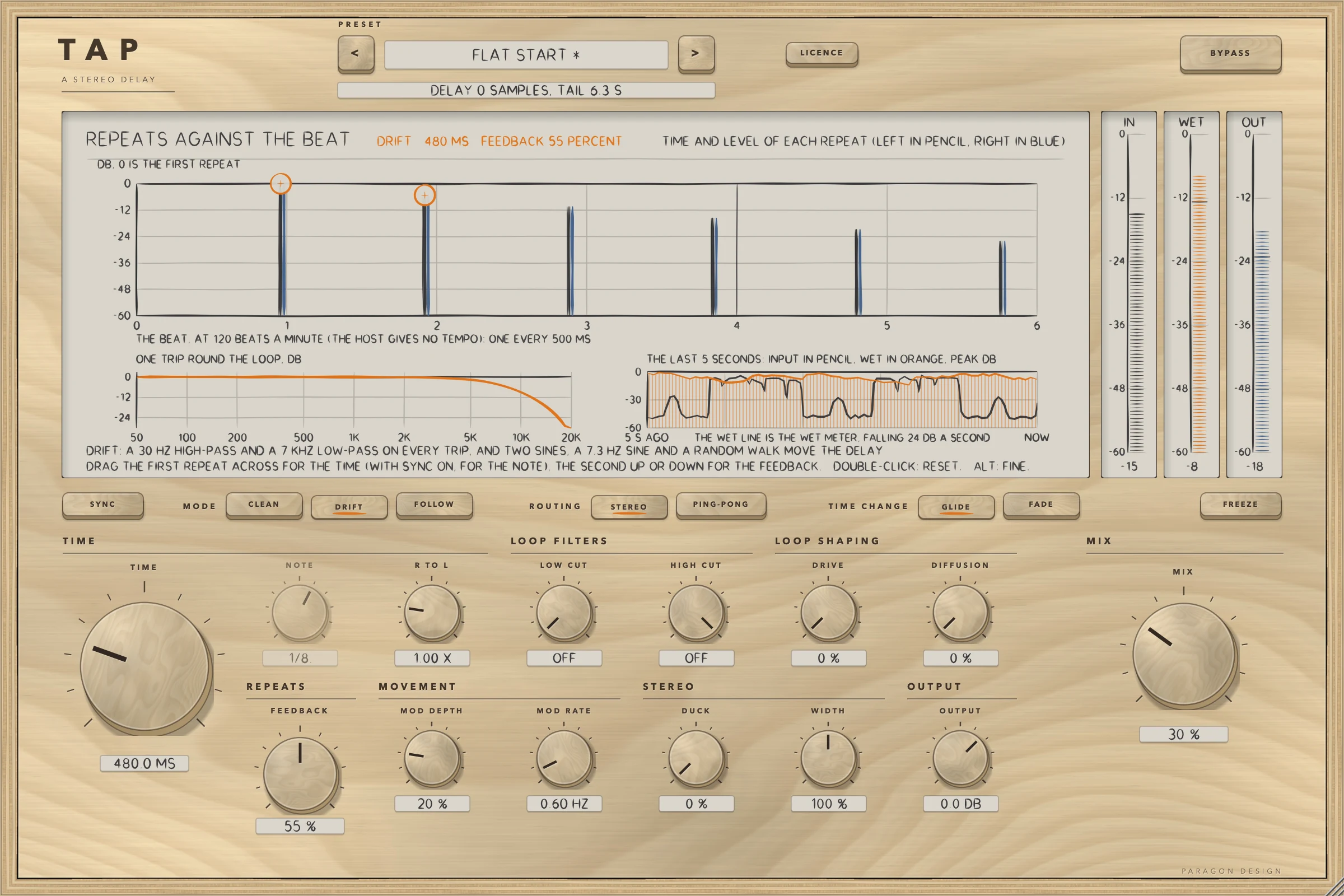
TAP: The same delay in DRIFT: a 7 kHz roll-off in the loop on every trip
The same delay in DRIFT: a 7 kHz roll-off in the loop on every trip
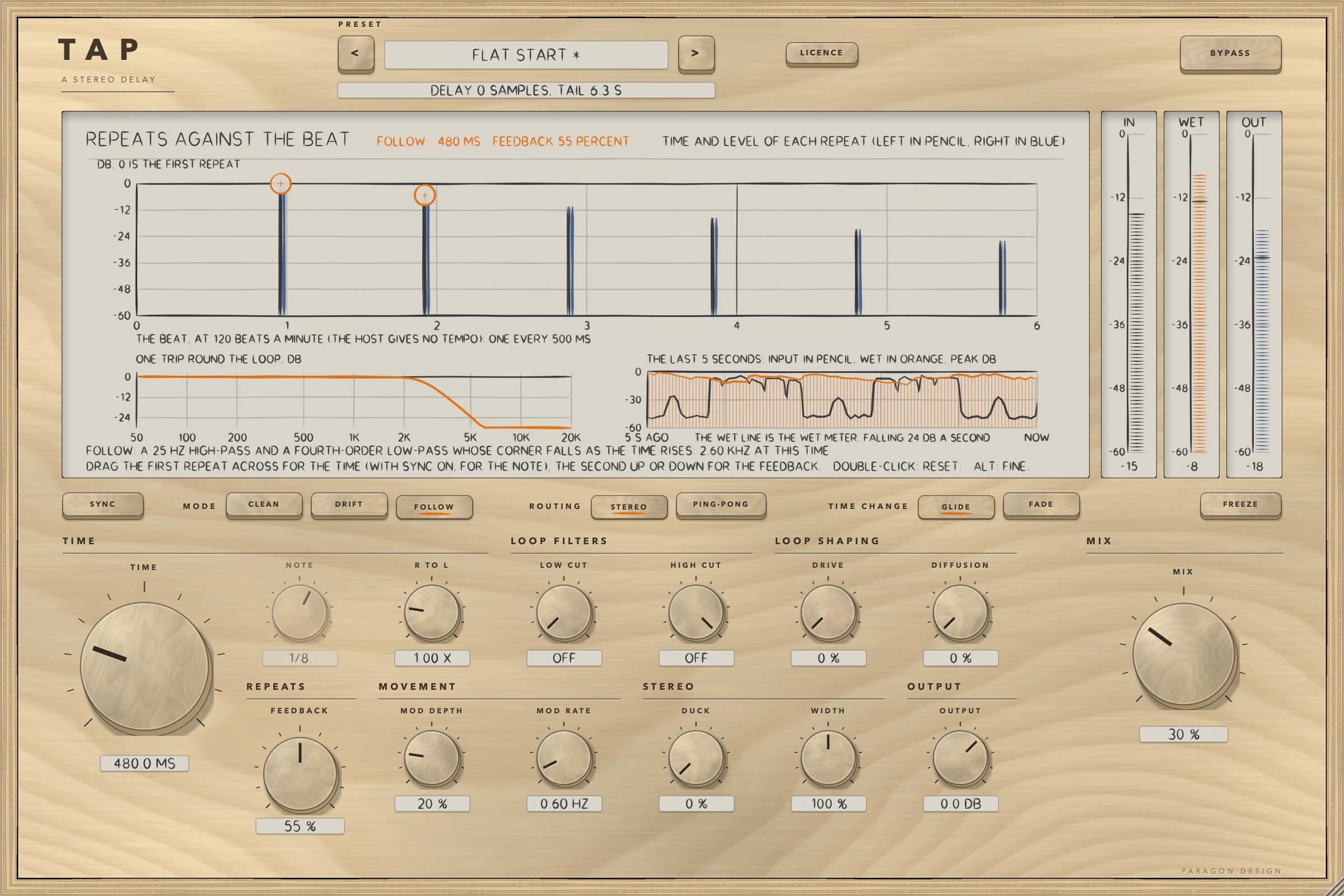
TAP: The same delay in FOLLOW: the loop's corner at 2.60 kHz for this time
The same delay in FOLLOW: the loop's corner at 2.60 kHz for this time
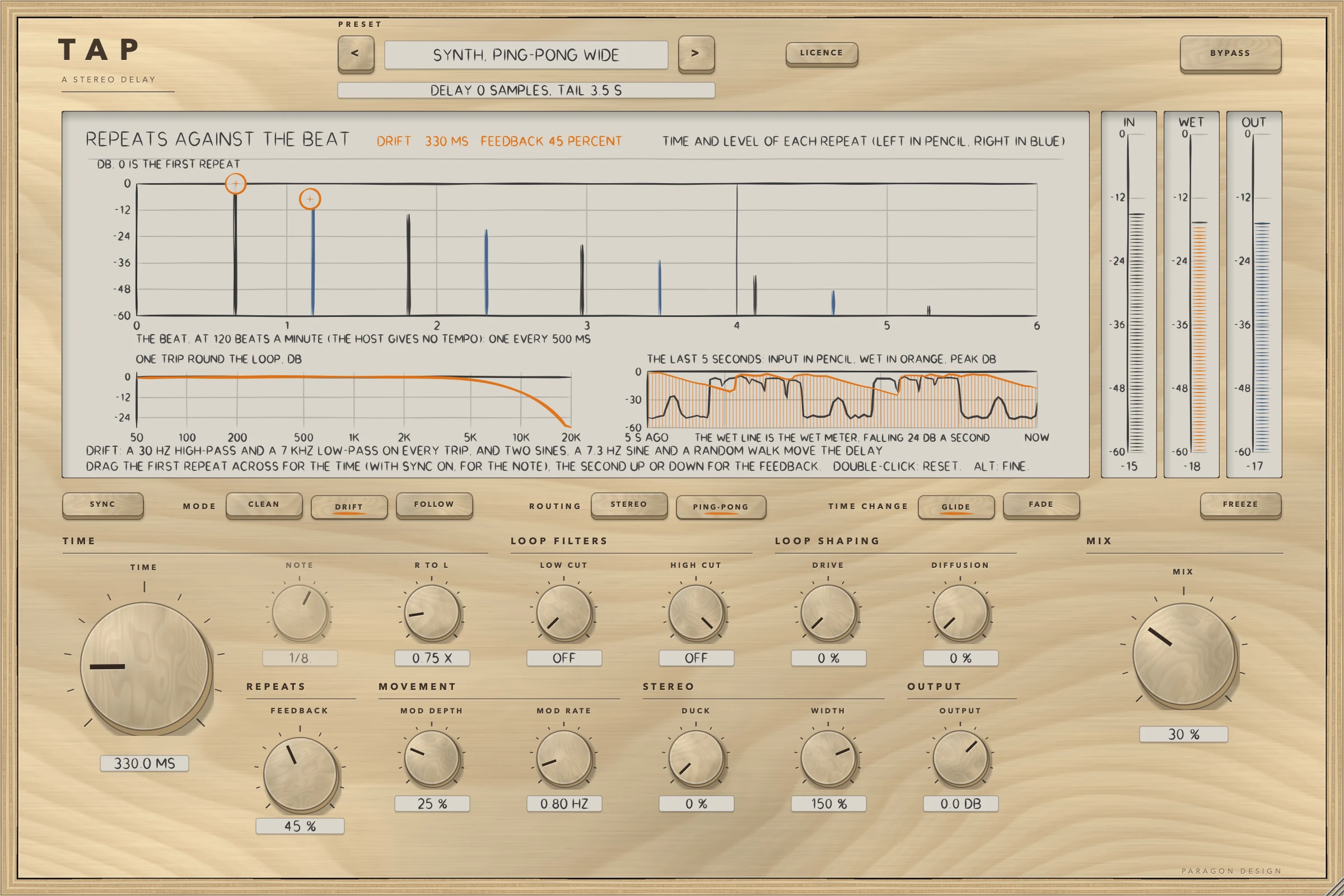
TAP: PING-PONG with R TO L 0.75 and WIDTH 150 percent: the pencil and blue repeats alternate
PING-PONG with R TO L 0.75 and WIDTH 150 percent: the pencil and blue repeats alternate
TAP: SYNC on at 100 beats a minute: a note sets the time and the TIME knob is dimmed
SYNC on at 100 beats a minute: a note sets the time and the TIME knob is dimmed
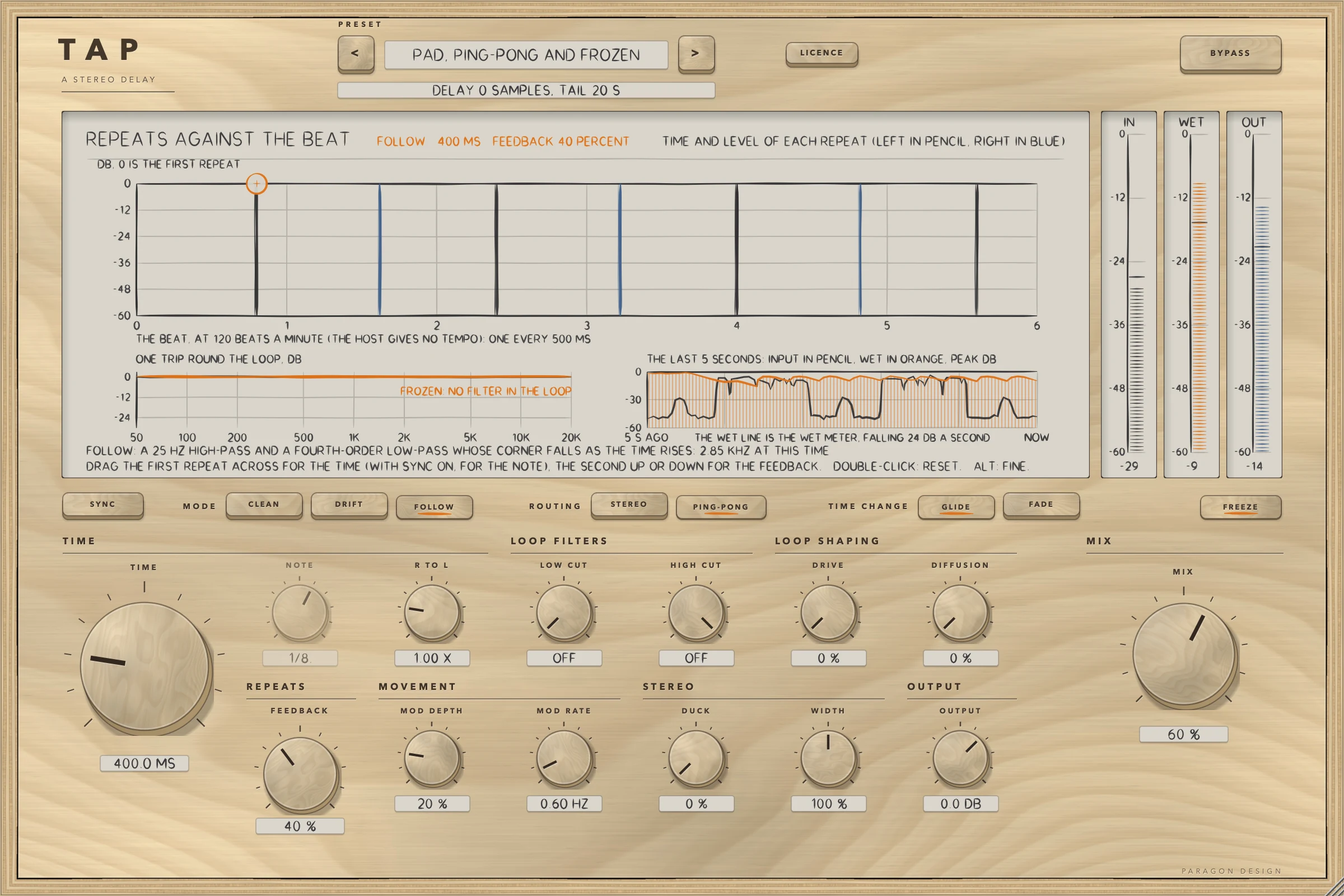
TAP: FREEZE on: the held loop at 0 dB on every trip, with no filter in it, and a tail told to the host of 20 s
FREEZE on: the held loop at 0 dB on every trip, with no filter in it, and a tail told to the host of 20 s
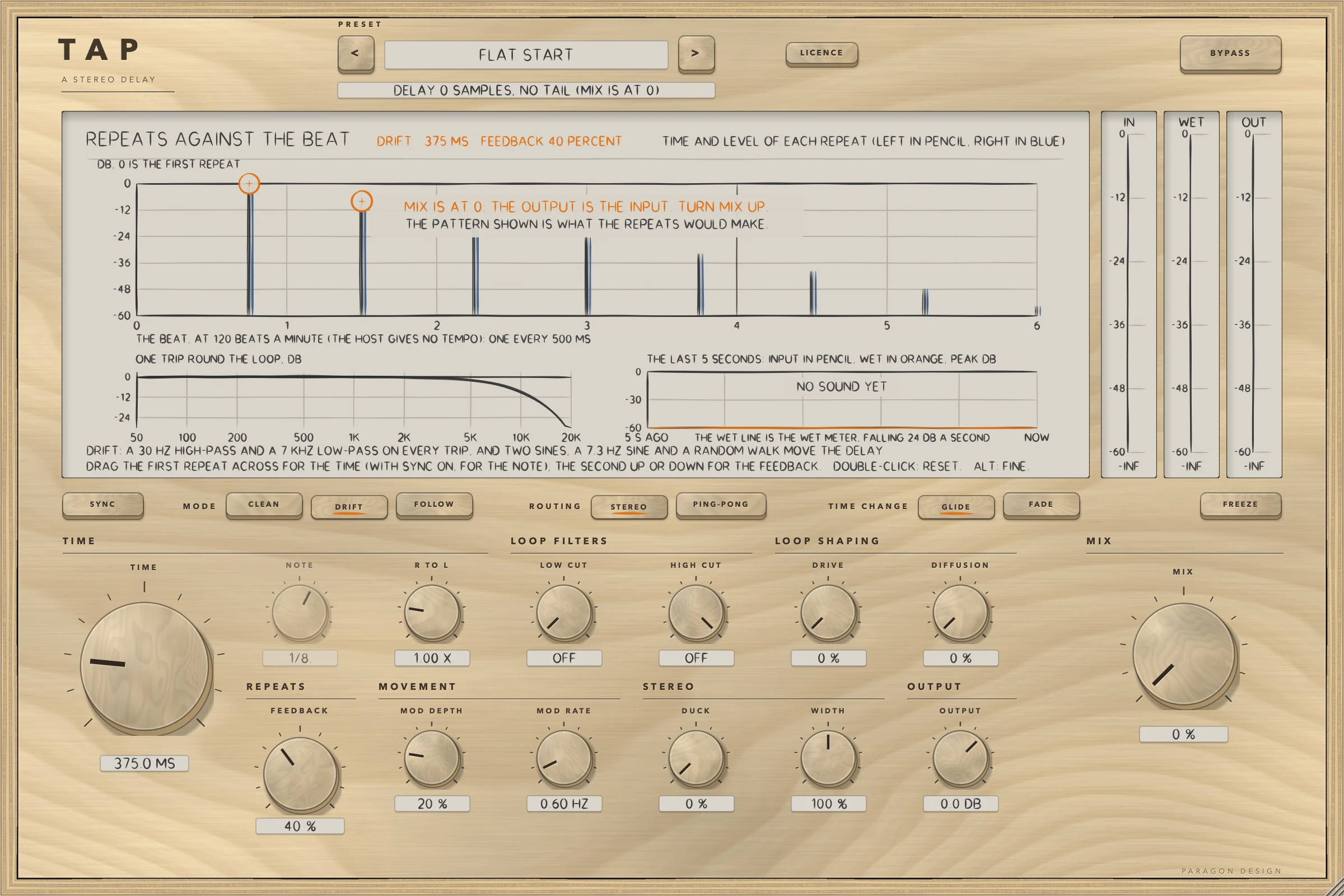
TAP: Flat Start with no sound: MIX is at 0 and the output is the input
Flat Start with no sound: MIX is at 0 and the output is the input

Specifications

Formats
Audio Unit, VST3
Listed in your host as
Tap Delay
Channels
Mono in and mono out, mono in and stereo out, or stereo in and stereo out; stereo in and mono out is refused
Sidechain
None
Latency
None: 0 samples at every setting at 44.1, 48, 88.2, 96, 176.4 and 192 kHz, and with BYPASS on
Tail told to the host
The longer of TIME and TIME times R TO L, times the repeats to fall 60 dB plus one, plus 0.3 s, at most 20 s; 20 s with FREEZE on or FEEDBACK at 99.5 percent or more; none with MIX at 0
Time
1 to 2000 ms, or a note from 1/64 to 1/1 at the host's tempo (120 beats a minute until the host gives one)
Feedback
0 to 110 percent, with a soft limiter in the loop from 95
Characters
CLEAN, DRIFT and FOLLOW
Editor
1200 x 800 pixels at 100 percent, resizable from 70 to 170 percent
Parameters
20
Presets
26 in 7 categories
CPU
Flat Start 1.27, 1.50, 1.68 and 1.46 percent of one core in four runs on 16 October, and 2.02, 2.30, 3.38 and 2.33 at a heavy setting (stereo, 48 kHz, 512-sample blocks, thread CPU time; Intel Core i9, a shared machine, so the readings move: the engine's own notes read 1.11 on a quiet Mac). The budget of 1.5 percent holds in two of the four runs

Measured

  1. 0 samplesThe delay the processor told the host at every setting tried, at 44.1, 48, 88.2, 96, 176.4 and 192 kHz, and read back from the Audio Unit at 48 kHz. BYPASS does not change it.
  2. Bit for bitAt MIX 0 and OUTPUT 0 dB the output is the input in 36 runs and at six sample rates in three layouts, with FEEDBACK 110, FREEZE, DUCK, DRIVE, DIFFUSION, MOD DEPTH, WIDTH 200 and R TO L set. Through the installed Audio Unit 18 of 18 runs were equal. A denormal input number comes out as 0 and a minus zero as plus zero.
  3. 0.000000000The difference between the installed Audio Unit and the engine on 14 seconds of voice, with the controls as the host's 0 to 1 scale gives them, in each of two presets. The test exists because Apple's compiler once made another plug-in's installed build play only part of its sound while every other test passed.
  4. 78 of 78Measurements, three for each of 26 presets, inside their bounds: for example the second round of Guitar, Slap measured -21.01 dB under the first (bound -21.6 to -20.5) and the held loop of Loop, Held changed by -0.0250 dB (bound -0.029 to -0.022).
  5. 0.000 samplesHow far the first echo came from the note at 120 beats a minute, for each of the 16 note values, in the engine's own test. Blocks of 1, 7, 64 and 4096 samples gave the output of 512, bit for bit, with nine changes of control at nine sample positions.

On synthetic test signals, by this plug-in’s own tests. Not a listening test.

Presets

26 presets, named for the job.

Starting points chosen from measurements, not tuned by ear. Each one sets every control, so the result does not depend on what was dialled in before it.

Start

  • Flat Start

Slap and Short

  • Guitar, Slap
  • Vocal, Slap
  • Drums, Short Repeat
  • Doubler, 30 Milliseconds
  • Doubler, Shortest Time

Synced

  • Vocal, Eighth Note
  • Vocal, Dotted Eighth
  • Guitar, Quarter Note
  • Synth, Sixteenth Triplet
  • Keys, Half Note

Long and Filtered

  • Vocal, Long Echo
  • Dub, Long Feedback
  • Ambient, Two Seconds
  • Pad, Long and Wide

Ping-pong

  • Vocal, Ping-pong Quarter
  • Guitar, Ping-pong Eighth
  • Synth, Ping-pong Wide
  • Pad, Ping-pong and Frozen

Ducked

  • Vocal, Ducked Eighth
  • Vocal, Ducked Dotted Eighth
  • Lead, Ducked Slap

Special

  • Loop, Held
  • Loop, 98 Percent Feedback
  • Loop, Driven
  • Smear, Diffused Repeats

The first minutes

From empty to useful.

  1. 1

    Choose a preset

    Pick Vocal, Dotted Eighth. It turns SYNC on at the default note, sets FEEDBACK 35 percent, cuts the loop at 150 Hz and 5.5 kHz, and sets MIX to 20 percent. Flat Start puts everything back.

  2. 2

    Drag a repeat

    Drag the first repeat on the display across to change the time, or with SYNC on, the note, and the second up or down to change the feedback. A double-click resets a ring.

  3. 3

    Try a character

    Press CLEAN, DRIFT and FOLLOW in turn and watch the loop's response change, then press PING-PONG to hand each repeat to the other side.