What it is
A drum hit has two parts that you often want to treat apart: the first few milliseconds, and the tail that follows. CHISEL gives each its own control. ATTACK turns the front of every hit up or down. SUSTAIN turns the tail up or down. Neither moves the other.
It works across the whole spectrum with no crossover bands, so there is nothing to ring and no phase shift from band edges. The signal goes through a short-time Fourier analysis. In each of 24 bands, spaced evenly in log frequency from 60 Hz to 16 kHz, CHISEL follows the level, finds where a hit begins, and gives the attack and the sustain their own gains. The gains are joined across frequency by straight lines and applied to the bins.
Hit Match goes a step further. Load a reference hit, or take one from the input, and CHISEL measures how that hit is shaped: the energy in its first 11 ms against the energy 30 to 120 ms later, band by band, whatever the level. It then measures the same thing on its own output and nudges the attack and sustain of each band until the two agree.
CHISEL is for hits: drums, plucks, percussion. It leaves steady sound alone. It is not a compressor, it does not change pitch, and it cannot make a hit out of material that has no clear front.
Setting it up
Formats, channels and latency
CHISEL is an effect in Audio Unit and VST3 formats. It works on a mono or a stereo channel, with the same number of channels in and out. It has no side chain input. Both channels share one set of gains.
The latency is one analysis frame. It is 256 samples at FAST, 512 at NORMAL and 1024 at FINE, which is 5.3, 10.7 and 21.3 ms at 48 kHz. The panel shows the figure as LATENCY n MS REPORTED TO THE HOST. Above 64 kHz the frame is twice as long. Bypass and a MIX of 0 keep the same delay, so switching them never moves the track.
Where to put it
Put CHISEL on a drum track or bus. It shapes what it receives, so what comes before it in the chain matters.
Reference hits
LOAD HIT accepts WAV, AIFF, FLAC, MP3, AAC (M4A), CAF, Ogg Vorbis and other formats macOS can decode. A file can be up to 12 minutes long, and its channels are averaged into one. The reference can be a one-shot or a loop. You can drop a file on the window. The saved project keeps the reference profile and what has been learned, not the file.
Sample rates
The measurements here were taken at 48 kHz. Other rates are not verified.
Licence and trial
CHISEL is a premium plug-in. It works in full for 14 days. The days are counted for each plug-in on its own. They start the first time the plug-in's window is opened, or after five minutes of audio have gone through it, whichever comes first. A host that only creates the plug-in to read what it is does not start them. In the top bar, beside the small wooden key marked LICENCE, a pencil line reads TRIAL: 9 DAYS LEFT, and the number falls by one each day. The last day reads 1 DAY LEFT. After it the line reads TRIAL OVER: ENTER A LICENCE, in orange.
When the trial is over CHISEL passes the audio through unchanged, delayed by the latency it reports, so that tracks stay in time. It holds MIX at 0, DELTA off and OUTPUT at 0 while it does. The controls themselves are not moved. Hit Match neither learns, captures nor loads a reference while the trial is over, and what it had learned, and the session, stay exactly as they were.
To add a licence, press LICENCE and then CHOOSE FILE, or drop the licence file anywhere on the plug-in's window. One file covers every plug-in in an order, and CHISEL works again at once. Nothing saved in a session is changed when a trial ends or a licence arrives. The Getting started manual has the whole chapter, Licences and the trial.
In Logic Pro
- Click an Audio Effect slot in the channel strip, then choose Chisel Transient Shaper from the pop-up menu (versions before 0.1.1 list it as Chisel).
- To reopen the plug-in window, click the centre area of the plug-in slot.
- To see the latency, hold the pointer over the plug-in slot. A help tag shows it in samples and seconds.
A first session
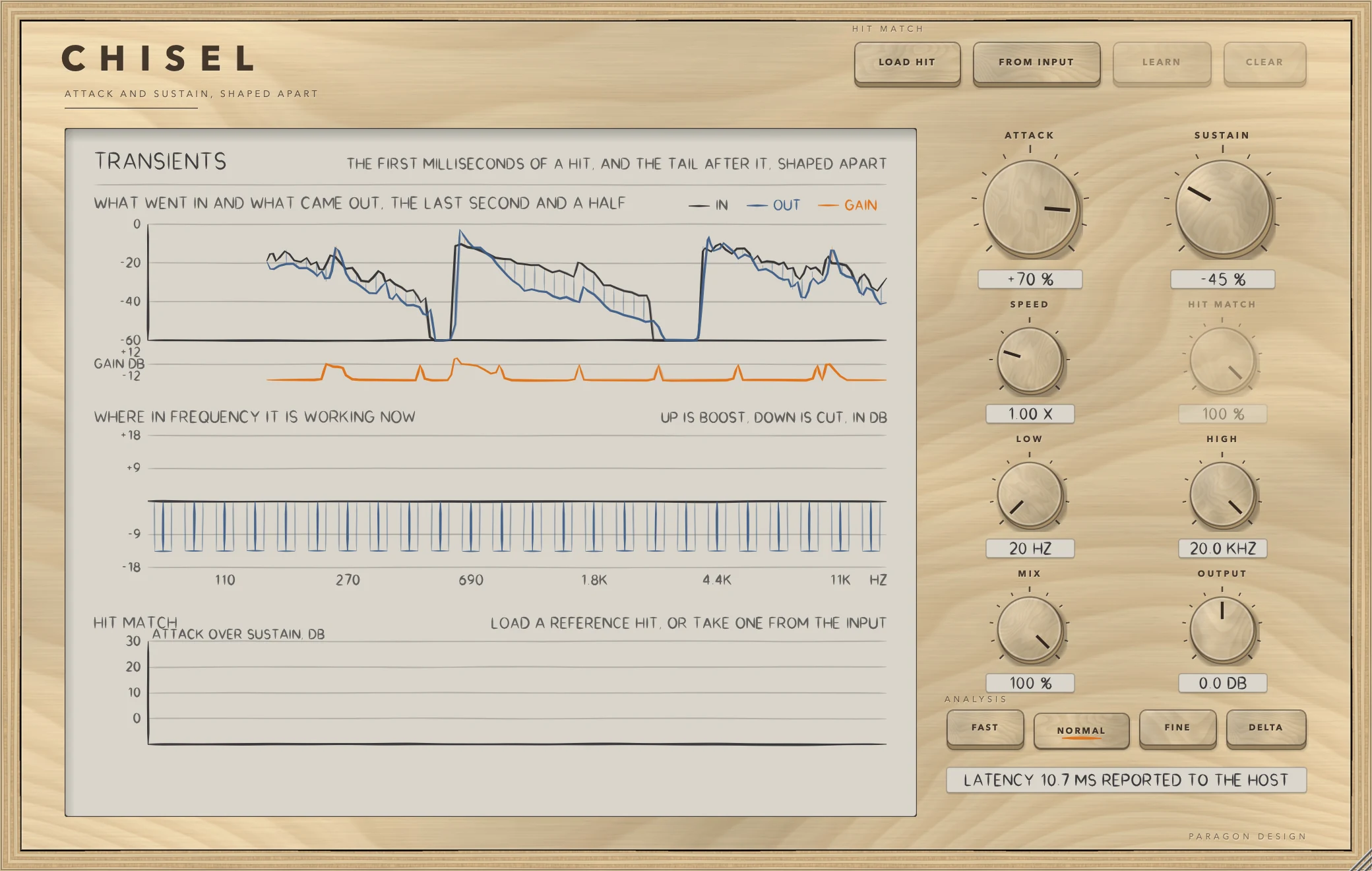
- Put CHISEL on a drum track (see Setting it up) and play it. The top plot, WHAT WENT IN AND WHAT CAME OUT, draws the input in graphite and the output in blue, with the mean gain in orange beneath.
- Raise ATTACK for more snap. Lower SUSTAIN for a tighter tail. At 0 percent for both, nothing is shaped.
- Press DELTA to hear only what the shaping adds or takes away. Press it again to switch back.
- Look at the middle plot, WHERE IN FREQUENCY IT IS WORKING NOW. Orange bars up are boost and blue bars down are cut.
- Use LOW and HIGH to keep the shaping out of the bottom and the top of the spectrum.
- To try Hit Match, press LOAD HIT and choose a reference hit. Press LEARN and play your own hits through. The bottom plot shows the reference's shape in blue and your output's in graphite. Press LEARN again to hold what it has learned.
How it works
HIT MATCH keys
LOAD HIT chooses a reference hit: a kick, a snare, any one-shot or loop. FROM INPUT plays the reference through the plug-in instead: press, play a few hits, press again to keep them as the reference. While it is capturing, the key reads KEEP IT. LEARN is available once there is a reference. Play your own hits through while it is on. CHISEL adjusts its attack and sustain, band by band, until they are shaped like the reference, then holds what it learned. CLEAR forgets the reference and what was learned.
The display
The display is titled TRANSIENTS and has three plots.
- What went in and what came out, the last second and a half. Input in graphite, output in blue, and the mean gain in orange on a strip from -12 to +12 dB.
- Where in frequency it is working now. One bar for each of the 24 bands, up for boost and down for cut, from -18 to +18 dB. Dashed lines mark LOW and HIGH.
- Hit Match. The attack over sustain, in dB, band by band, for the reference in blue and for the output in graphite. Small bars below show what has been learned, the attack offset in orange and the sustain offset in blue. A line of text reports the state: LOAD A REFERENCE HIT, OR TAKE ONE FROM THE INPUT, LISTENING FOR THE REFERENCE with a count of hits heard, LEARNING with the hits heard and the error in dB, or the reference's name followed by LEARNED with its error, or NOT LEARNED YET.
ATTACK and SUSTAIN
ATTACK turns the first milliseconds of every hit up or down, from -100 to +100 percent, default 0. SUSTAIN turns the tail after the hit up or down, with the same span and default. Double-click either to reset it.
At +100 percent ATTACK adds up to 12 dB to the front of a hit, and at -100 percent it takes away up to 18 dB. SUSTAIN adds up to 12 dB at +100 and takes away up to 30 dB at -100. These are the most the two controls themselves move a band. The gain on any band is limited to between -36 and +30 dB.
How a hit is found
In each band CHISEL keeps a fast envelope, a slow one and a held peak that lets go at 8 dB a second. A hit begins in a band when the fast envelope jumps at least 6 dB above where it was a few frames earlier, and at least 3 dB above the slow envelope. The jump needed is larger for the lowest bands, which have few bins and fluctuate on their own. A band with nothing in it, far below the loudest band, is left alone, and two onsets must be at least 40 ms apart.
The attack is a window after the onset of 14 ms divided by SPEED. The gain is full for the first 35 percent of the window and eases to nothing by its end. The sustain is the fall from the held peak: it starts to count when the fast envelope is 1.5 dB below the peak and counts fully at 5 dB below. The sustain gain eases in and is cleared by a new onset, so a noisy tail does not flutter. Detection is done band by band, not bin by bin, because a detector working on single bins chattered on noise.
SPEED
SPEED sets how quickly CHISEL decides a hit has begun and ended. Faster suits tight, short hits. It runs from 0.40 to 3.00 times, default 1.00. It scales the attack window and the speed of the envelopes and of the held peak's fall.
HIT MATCH
HIT MATCH is how much of what Hit Match learned is used, from 0 to 100 percent, default 100. At 0 the hits are shaped as if nothing had been learned. The learning itself only updates while HIT MATCH is above 20 percent.
Hit Match measures a hit as the energy in its first 11 ms against the energy 30 to 120 ms after it, per band, whatever the level, and takes the median over the hits kept (up to 24). A hit counts only if it rises out of quiet, with its peak at least 18 dB above the level before it. Another hit starting within the 120 ms spoils it, and about 50 ms must pass after one hit before the next can start. A band counts if it matters in at least half the hits.
While LEARN is on, CHISEL listens to its own output. After every six hits it compares them with the reference and moves the offsets: the attack and the sustain of each band, in opposite directions, so that together they close 45 percent of the gap at HIT MATCH 100 percent. The offsets are limited to 18 dB. They are laid on the same windows the measurement uses: the first 11 ms after an onset for the attack and about 30 to 120 ms after it for the sustain.
LOW and HIGH
Below LOW and above HIGH the sound is left alone. LOW runs from 20 Hz to 4 kHz, default 20 Hz. HIGH runs from 500 Hz to 20 kHz, default 20 kHz. The shaping arrives over about a third of an octave at each edge.
MIX and OUTPUT
MIX blends shaped and untouched sound, from 0 to 100 percent, default 100. At 0, with OUTPUT at 0 dB, the output is the input delayed by the latency, bit for bit. OUTPUT is the output level, from -12 to +12 dB, default 0.
ANALYSIS
FAST, NORMAL and FINE choose the analysis frame: 256, 512 or 1024 samples, with NORMAL the default. FAST gives the shortest delay and the least detail in the low end. FINE gives the most detail in the low end and the longest delay. DELTA is beside them: it plays only what the shaping adds or takes away, at the OUTPUT level. MIX does not scale it.
Control reference
Every control on the panel, as the plug-in itself labels it. The description is the tooltip the plug-in shows when you rest the pointer on the control.
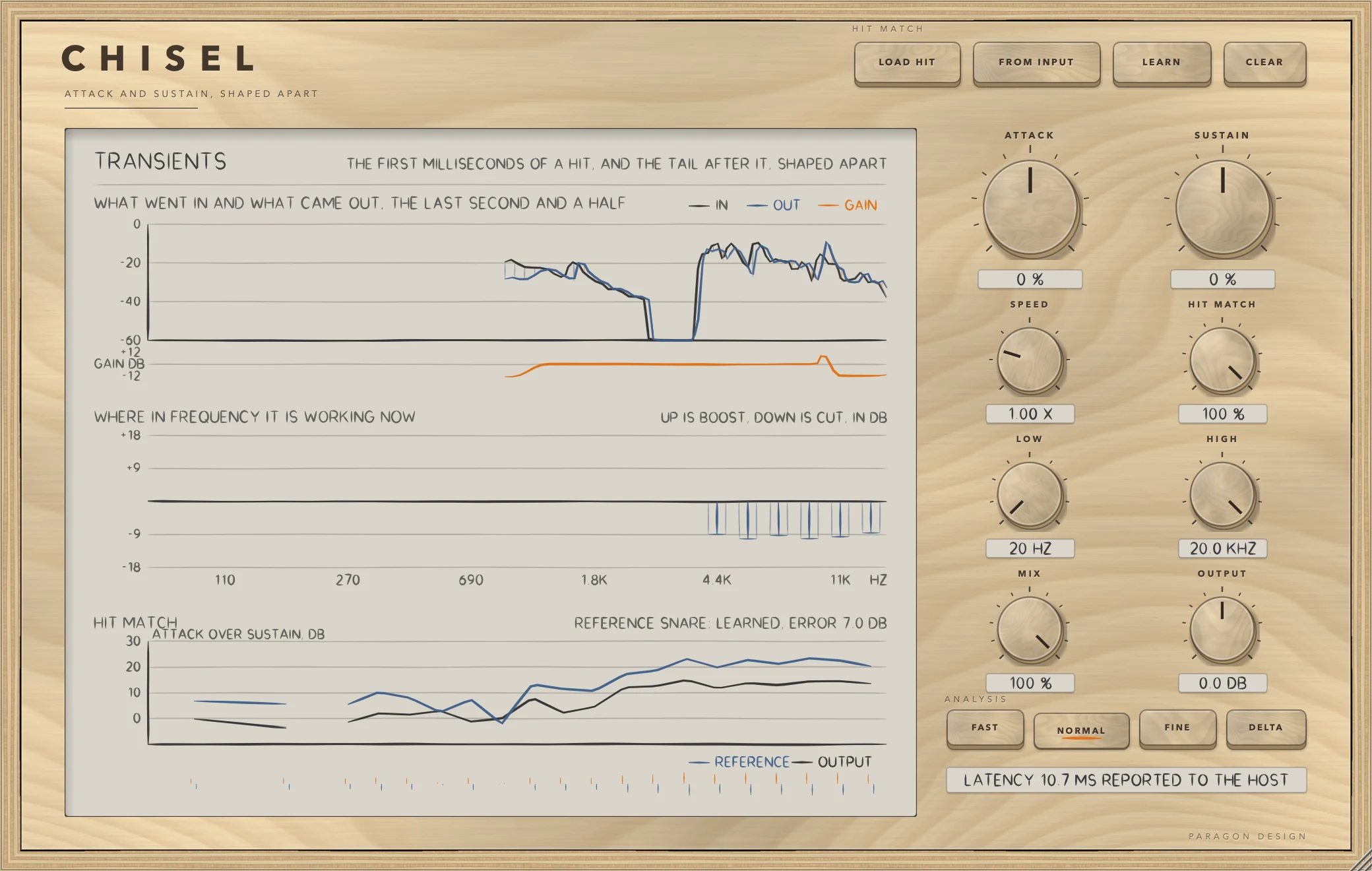
Top bar
| No. | Control | What it does | Range | Default |
|---|---|---|---|---|
| 1 | LOAD HITKey | Choose a reference hit: a kick, a snare, any one-shot or loop. You can also drop a file on the window. | ||
| 2 | FROM INPUTKey | Play the reference through this plug-in instead: press, play a few hits, press again to keep them as the reference. | ||
| 3 | LEARNKey | Play your own hits through while this is on. CHISEL adjusts its attack and sustain, band by band, until they are shaped like the reference, then holds what it learned. | ||
| 4 | CLEARKey | Forget the reference and what was learned. |
Controls
| No. | Control | What it does | Range | Default |
|---|---|---|---|---|
| 5 | ATTACKKnob | Turns the first milliseconds of every hit up or down. Double-click to reset. | −100 to 100 % | 0 % |
| 6 | SPEEDKnob | How quickly it decides a hit has begun and ended. Faster suits tight, short sounds. | 0.4 to 3 x | 1 x |
| 7 | LOWKnob | Below this the sound is left alone. | 20 to 4000 Hz | 20 Hz |
| 8 | MIXKnob | Blend of shaped and untouched sound. | 0 to 100 % | 100 % |
| 9 | FASTKey | Shortest delay, and the least detail in the low end. | ||
| 10 | NORMALKey | A balance of delay and detail. | ||
| 11 | SUSTAINKnob | Turns the tail after the hit up or down. Double-click to reset. | −100 to 100 % | 0 % |
| 12 | HIT MATCHKnob | How much of what Hit Match learned is used. | 0 to 100 % | 100 % |
| 13 | HIGHKnob | Above this the sound is left alone. | 500 to 20000 Hz | 20000 Hz |
| 14 | OUTPUTKnob | Output level. | −12 to 12 dB | 0 dB |
| 15 | FINEKey | Most detail in the low end, and the longest delay. | ||
| 16 | DELTAKey | Hear only what the shaping adds or takes away. |
Recipes
Add snap to a snare
Set ATTACK to +40 percent and leave SUSTAIN at 0. Press DELTA to hear the added front, then switch it off. On the display, the orange bars rise in the middle plot at each hit.
Tighten a ringing tom
Set SUSTAIN to -50 percent and SPEED to 1.50 times. The faster SPEED suits tight, short hits. On the display, the blue bars hang downwards as the tail dies away.
Soften a harsh attack
Set ATTACK to -40 percent. In a test, ATTACK at -100 percent lowered the attack-to-sustain ratio of a set of hits by 11.7 dB.
Shape only the top of a drum bus
Set LOW to 2 kHz, ATTACK to +60 percent and SUSTAIN to -30 percent. Below LOW the sound is left alone. In a test with LOW at 2 kHz, a low thump changed by under 0.7 dB, while a high click's attack-to-sustain ratio moved from -3.4 dB to -0.2 dB.
Teach CHISEL a snare
- Press LOAD HIT and choose a clean one-shot, or a loop of single snare hits.
- Leave HIT MATCH at 100 percent and press LEARN.
- Play several dozen hits of your own snare through, with a gap between them. Learning moves once for every six hits it counts. In the test the error fell from 16.6 dB after six hits to 4.5 dB after thirty.
- Watch the status line report LEARNING and a falling error. Press LEARN again to hold the result.
- Press DELTA to hear what the learned shape adds, or turn HIT MATCH down to use less of it.
In a test, 84 dull hits were played toward a snappy reference, 60 of them were counted, giving 10 updates, and the gap to the reference fell from 18.02 dB over 16 bands to 2.78 dB over 15 bands.
Take the reference from the input
Press FROM INPUT, play a few clear hits of the sound you want to copy, and press the key again, which now reads KEEP IT. Those hits become the reference. Press LEARN, then play the material you want to reshape.
Presets
CHISEL has no factory presets and no preset bar. ATTACK, SUSTAIN, SPEED, HIT MATCH, LOW, HIGH, MIX, OUTPUT, the analysis setting, DELTA, the window size, the reference profile with its name and the learned offsets are saved with the project. In Logic Pro, plug-in settings are stored with the project file.
Measured
All figures are from the test run in the plug-in repository on 13 October 2026, which passed all 677 of its checks across the six plug-ins. They are on synthetic test signals, not on recordings of music. The sample rate is 48 kHz throughout. The test hits are bursts of noise with an attack ramp and an exponential decay.
| What was measured | Result | Conditions |
|---|---|---|
| Attack to sustain ratio of the hits | -3.0 dB untouched. ATTACK +100: 7.4 dB. ATTACK -100: -14.7 dB. SUSTAIN -100: 3.3 dB. SUSTAIN +100: -10.7 dB | 12 hits 0.45 s apart, 0.5 ms attack, 70 ms decay, NORMAL. Ratio is the energy over 0 to 8 ms minus that over 30 to 120 ms after the onset |
| Each end leaves the other alone | The tail moved by under 2 dB with ATTACK +100, and the first 3 ms moved by under 2 dB with SUSTAIN -100 (test limits) | Same hits |
| Shape, not level | The same hits 28 dB apart were shaped alike to within 1 dB (test limit) | ATTACK +100, SUSTAIN -50 |
| A steady tone | Changed by less than -50 dB relative to the signal with ATTACK and SUSTAIN both at +100 (the test limit, not a measured value) | A 440 Hz sine at 0.2 with a fade-in, 3 s |
| A steady tone with a noise floor | Changed by less than -19 dB (the test limit). The largest gain still applied at the end was 1.420 dB, in the band at 1753 Hz | Same tone plus pink noise at -26 dB RMS, both controls at +100 |
| LOW and HIGH | With LOW at 2 kHz, a low thump changed by under 0.7 dB (test limit) | A low thump and a high click, ATTACK +100, SUSTAIN -100 |
| Two channels | A left channel at -12 dB and a right at -24 dB were shaped alike to within 1.5 dB (test limit) | ATTACK +80, SUSTAIN -80 |
| Reconstruction | The output is the input delayed by the frame to better than -120 dB (test limit) | Pink noise at -18 dB, frames of 256, 512 and 1024 samples, blocks of 37 samples |
| At rest | Output equals the input delayed by the latency to better than -110 dB (test limit). With MIX at 0 the output is bit for bit | All three analysis settings |
| DELTA | Delta plus the delayed input equals the shaped output to better than -100 dB (test limit) | ATTACK +100, SUSTAIN -100 |
| Latency | 512 samples at NORMAL and 1024 at FINE | Reported to the host. FAST is 256 |
| Hit measurement | Snappy and dull hits differ by 16.7 dB over 16 shared bands, and twelve hits are found as twelve | 12 hits of each, noise bursts 0.35 s apart |
| Hit Match learning | The gap to the reference fell from 18.02 dB over 16 bands to 2.78 dB over 15 bands, after 10 updates. The mean error as the loop ended was 3.90 dB | Dull hits learned toward a snappy reference, NORMAL. 84 hits were played and 60 counted. Then fresh hits went through the frozen offsets |
| Offsets | Limited to 18 dB | Same test |
| Crowded hits | Hits 90 ms apart overlap each other's tails and are left out: no more than 2 of 12 were counted (test limit) | Snappy hits at 90 ms |
| No hits | Steady noise and silence have no hits in them | 4 s of pink noise at -24 dB, 2 s of silence |
| Level independence of the measurement | The same hits 20 dB quieter gave a profile within 0.8 dB of the original (test limit) | Snappy hits |
| Cost | 0.43 percent of one core at FAST, 0.52 at NORMAL, 0.36 at FINE | Stereo, 48 kHz, ATTACK +60, SUSTAIN -40, 10 s of pink noise. Thread CPU time on the development Mac |
Limits and what is not verified
- Nothing has been checked by ear. Every figure is a measurement of a synthetic signal.
- Hit Match was tested on synthetic noise bursts. How it behaves on recorded drums, and with a reference taken from the input, is not verified.
- A hit has to rise out of quiet, and hits closer than about 0.17 seconds (120 ms of tail plus about 50 ms) are left out of the measurement. A dense loop gives few or no hits to measure.
- Steady sound is left alone, but not perfectly. On a tone with a noise floor, a gain of 1.420 dB was still being applied in one band at the end of the test.
- Both channels share one set of gains, so a hit in one channel shapes both.
- The bands run from 60 Hz to 16 kHz, with the first and last band's gain used beyond them.
- Learning updates only while HIT MATCH is above 20 percent.
- A reference file can be up to 12 minutes long, and its channels are added together.
- Every figure was measured at 48 kHz. Other sample rates are not verified. Above 64 kHz the frames are twice as long, and that has not been tested.
- Not verified in Logic Pro: whether the new latency takes effect at once when you change ANALYSIS during playback.
- Not verified: the licence panel and the trial in every host. They are checked in the plug-in's own tests and in one test host, and the Getting started manual lists what is not verified.
Troubleshooting
The plug-in passes my audio through and says TRIAL OVER: ENTER A LICENCE
The 14 days are over for CHISEL and no licence has been added. Press LICENCE in the top bar, choose the licence file that came with your order, or drop the file on the window, and CHISEL works again at once. If the panel says THIS LICENCE IS FOR another plug-in, that file does not cover CHISEL: the order page offers the file for your order.
LEARN is dimmed
LEARN needs a reference. Load one with LOAD HIT, or capture one with FROM INPUT. It is also dimmed while FROM INPUT is capturing.
Nothing is being learned
Check these:
- HIT MATCH is above 20 percent. At or below that the learning does not update.
- The status line counts hits: LEARNING: n HITS HEARD. If n does not rise, hits are not being counted. They may be too close together, or they do not rise out of quiet.
- The reference is loaded. The HIT MATCH knob is dimmed when there is none.
The status line says NO HIT FOUND IN THIS FILE
The reference file has no hit that rises clearly out of quiet. Choose a one-shot, or a loop with gaps between hits. Other messages, such as CANNOT READ THIS FILE, THE FILE IS EMPTY and FILE IS LONGER THAN 12 MINUTES, name a problem with the file itself.
FROM INPUT now reads KEEP IT
CHISEL is capturing hits from the input. Play a few, then press it again to keep them as the reference. A capture with no hit counted is not kept.
ATTACK and SUSTAIN do nothing on a sustained sound
This is by design. A steady sound has no onset, so it is left alone.
The track arrives late
CHISEL reports one frame of latency to the host. If the host's delay compensation is off, the track is late by that amount. In Logic Pro, plug-in latency compensation is set with the Compensation pop-up menu in Logic Pro > Settings > Audio > General.
LOAD HIT is dimmed
A file is still loading, or FROM INPUT is capturing. The status line reads LOADING n PERCENT while a file loads.