What it is
TAP is a stereo delay. A repeat goes round a loop: it is written into a delay line, read back at the delay time, filtered, saturated, spread by four allpass filters and fed back in, so that each trip round the loop is one more repeat. TIME sets the delay in milliseconds, from 1 to 2000, or with SYNC on, NOTE sets it as a note value at the host's tempo. FEEDBACK sets how much of each repeat goes round again, from 0 to 110 percent.
Three characters, CLEAN, DRIFT and FOLLOW, set what the loop does to a repeat: DRIFT and FOLLOW have filters of their own in the loop and move the delay time, and each saturates with a different bias. LOW CUT and HIGH CUT trim the loop further. ROUTING chooses STEREO, where each side repeats on its own, or PING-PONG, where each repeat is handed to the other side. R TO L sets the right side's delay as a multiple of the left's. MOD DEPTH and MOD RATE move the delay time, DRIVE saturates the loop, and DIFFUSION mixes in a chain of four allpass filters. DUCK turns the repeats down while the input is loud, WIDTH sets the difference between the two sides, FREEZE holds what the loop contains, and TIME CHANGE chooses how a change of time is made: GLIDE or FADE. MIX is the share of repeats in the output and OUTPUT is the level.
With MIX at 0 and OUTPUT at 0 dB the output is the input itself, bit for bit, in every mode and every layout, and TAP adds no delay at any setting. It has 20 host parameters and 26 presets in seven categories, and it is the delay engine that LATHE uses for its echo send, used here unchanged.
TAP is a premium plug-in: it works for 14 days and then needs a licence, as the Getting started manual describes. The name TAP is a working name.
Setting it up
Formats and channels
TAP is an effect, in Audio Unit and VST3 formats. The VST3 is built from the same code, but no test loads it in a digital audio workstation. A host lists the Audio Unit as Tap Delay, from Paragon Design. It takes one channel in and gives one out, takes one in and gives two out, or takes two in and gives two out. Two in and one out is refused. TAP has no sidechain and no MIDI. The bundle declares macOS 11.0 as the minimum, and the panel is 1200 by 800 pixels, resizable from 70 to 170 percent.
Latency
TAP adds no delay. The processor told the host 0 samples at 44.1, 48, 88.2, 96, 176.4 and 192 kHz, at every setting the tests tried, and read back from the Audio Unit at 48 kHz, and the line under the preset name reads DELAY 0 SAMPLES. BYPASS does not change it.
The tail is the time the host should keep playing after the input stops. TAP tells the host the longer of TIME and TIME times R TO L, multiplied by the number of repeats it takes to fall by 60 dB plus one, plus 0.3 seconds, and never more than 20 seconds. The number of repeats is the logarithm of 0.001 divided by the logarithm of FEEDBACK as a fraction. It tells the host 20 seconds while FREEZE is on or FEEDBACK is 99.5 percent or more, and 0 with MIX at 0. The line under the preset name shows it, for example TAIL 3.5 S. The figures are worked out from the controls on a 10 Hz timer and when playback starts, so a host that is stopped is told too.
| Setting | Tail told to the host |
|---|---|
| The defaults with MIX 30 (TIME 375 ms, FEEDBACK 40 percent) | 3.502 s |
| TIME 200 ms, R TO L 2, FEEDBACK 50 percent | 4.686 s |
| TIME 2 s, FEEDBACK 90 percent | 20 s |
| FEEDBACK 100 percent, or FREEZE on | 20 s |
| MIX at 0 | 0 |
The figures are read back from the Audio Unit by the host test. A delay that repeats for longer than 20 seconds, such as TIME 2 s at FEEDBACK 90 percent, repeats for longer than the host is told.
In Logic Pro
- Click an Audio Effect slot in the channel strip, then choose Tap Delay from the pop-up menu. Audio Units plug-ins appear in the Audio Units submenu.
- On a mono channel strip the Mono plug-in format loads a mono plug-in, and on a stereo one the Stereo format loads a stereo plug-in. Mono->Stereo takes the mono strip into the plug-in's mono input and gives a stereo output from that point.
- Audio effects can go in audio, instrument, aux and output channel strips. To use TAP as a send delay, put it on an aux channel strip and set MIX to 100 percent, so that the repeats alone come out and the input does not.
- To see that TAP adds no delay, hold the pointer over the plug-in slot: a help tag shows the latency in samples and seconds.
A first session
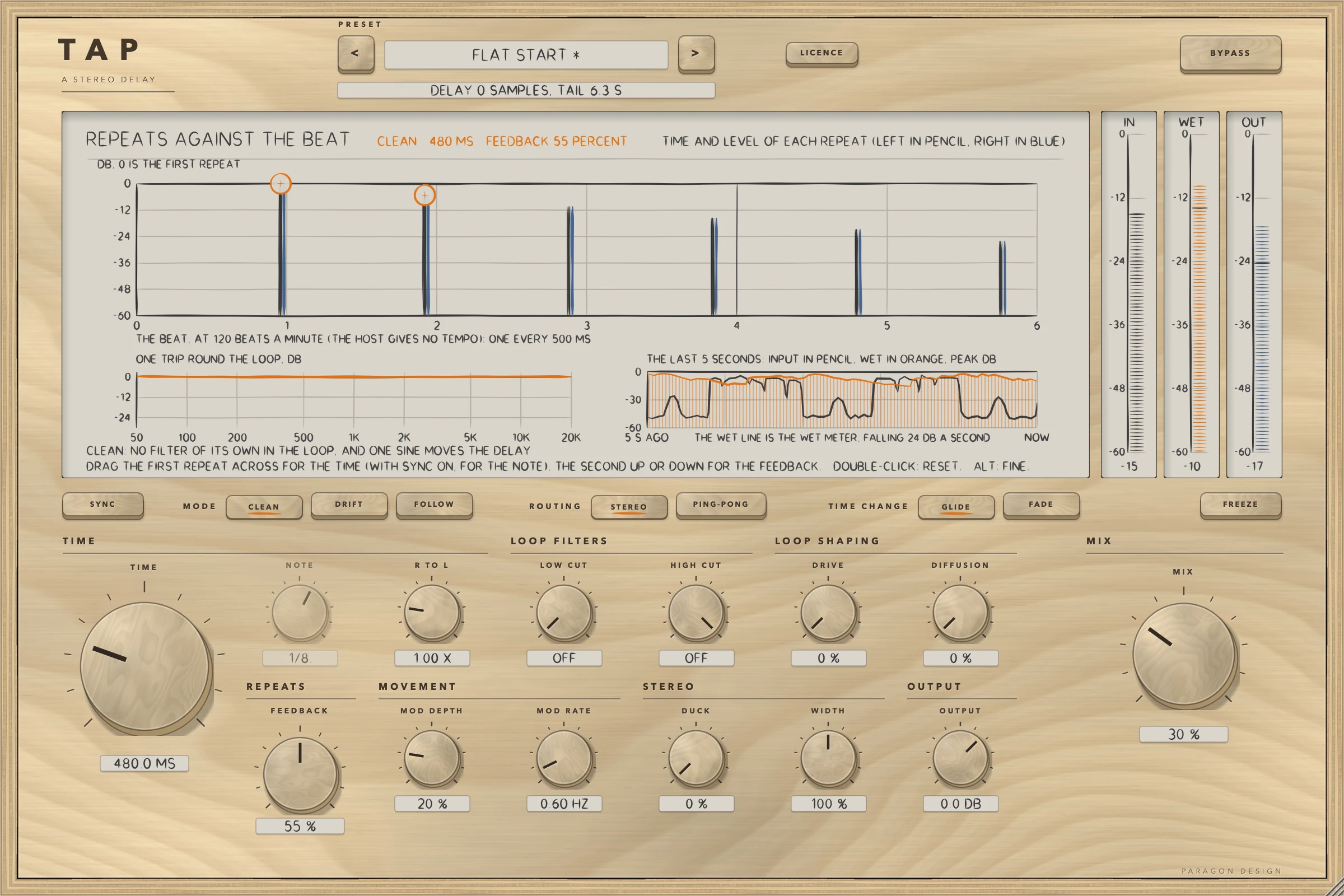
- Put TAP on a vocal. The panel opens with the preset Flat Start: MIX is 0, so you hear the input and nothing else.
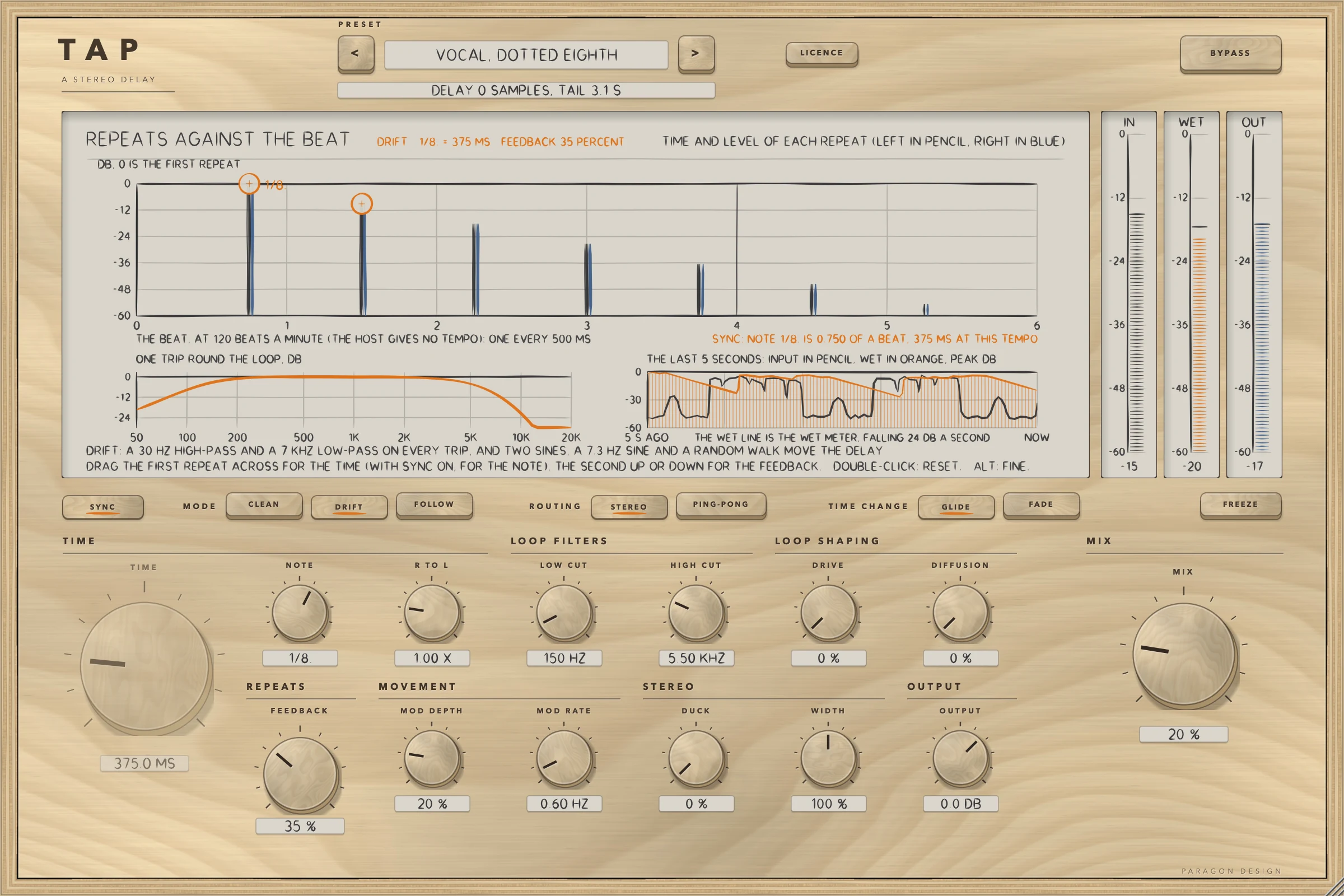
- Click the preset's name to see the menu and choose Vocal, Dotted Eighth. It turns SYNC on and sets FEEDBACK 35 percent, LOW CUT 150 Hz, HIGH CUT 5.5 kHz and MIX 20 percent.
- Play the track. The display's top plot, headed REPEATS AGAINST THE BEAT, draws each repeat as a stem: the left side in pencil, the right in blue.
- Drag the first repeat across to change the time, or with SYNC on, the note. Drag the second repeat up or down to change FEEDBACK.
- Turn MIX up or down. At 100 percent only the repeats come out.
- Press CLEAN, DRIFT and FOLLOW in turn. The curve at the lower left, headed ONE TRIP ROUND THE LOOP, shows what each does to a repeat on every trip.
- Press PING-PONG to hand each repeat to the other side.
- Raise DUCK to turn the repeats down while the voice is loud and let them come back in the gaps.
- Press BYPASS and press it again to compare. The delay goes on running while BYPASS is on, so its repeats are there when you switch it off.
How it works
Top bar, display and presets
The top bar has TAP etched on it with A STEREO DELAY under it, the preset bar (the previous and next keys and the name, with a star once a control has moved), the line for the delay and the tail, the LICENCE key and BYPASS. A preset sets every sound control: FREEZE is a sound control, so a preset loaded after a frozen one lets the loop go. BYPASS is not part of a preset.
The display is one picture of three parts, all drawn from numbers the engine computes. The top plot shows the time and the level of every repeat against a count of beats, left in pencil and right in blue, with two rings: the first repeat for TIME (or NOTE with SYNC on) and the second for FEEDBACK. A double-click on a ring resets it and ALT held while dragging gives fine steps. The plot at the lower left, ONE TRIP ROUND THE LOOP, shows the loop's response in dB against frequency: the filters of the character, LOW CUT and HIGH CUT. The plot at the lower right shows the last 5 seconds: the input in pencil, the wet in orange, with their peaks in dB. The wet line and the meter hold a reading and fall at 24 dB a second.
The three characters
| Character | In the loop on every trip | Movement of the delay time | Saturator | A change of time glides with |
|---|---|---|---|---|
| CLEAN | LOW CUT and HIGH CUT only | one sine, up to 4 ms at MOD DEPTH 100 percent | no bias | a time constant of 0.10 s |
| DRIFT (the default) | a 30 Hz high-pass and a 7 kHz low-pass (second order, Q 0.62) | a 7.3 Hz sine and a slow random walk, together up to 4.55 ms at MOD DEPTH 100 percent | a bias of 0.12 times DRIVE | 0.30 s |
| FOLLOW | a 25 Hz high-pass and a fourth-order low-pass whose corner falls as the time rises: 9 kHz at 40 ms or less, 4.5 kHz at 160 ms, 1.8 kHz at 1 s or more | one sine, up to 4 ms at MOD DEPTH 100 percent | a bias of 0.04 times DRIVE | 0.16 s |
The swing of the delay time grows with the square of MOD DEPTH. MOD RATE, from 0.05 to 8 Hz, sets the speed, and DRIFT also moves the time with a second sine at 0.37 times that rate.
TIME, NOTE, SYNC and R TO L
TIME is the delay of the left side from the input to its first echo, from 1 to 2000 ms. SYNC sets the time from NOTE in place of TIME, at the host's tempo, or 120 beats a minute when the host gives none. NOTE has 16 values:
| Note | Beats | Time at 120 beats a minute | Time at 100 beats a minute |
|---|---|---|---|
| 1/64 | 0.0625 | 31.25 ms | 37.5 ms |
| 1/32T | 0.0833 | 41.67 ms | 50 ms |
| 1/32 | 0.125 | 62.5 ms | 75 ms |
| 1/16T | 0.1667 | 83.33 ms | 100 ms |
| 1/16 | 0.25 | 125 ms | 150 ms |
| 1/8T | 0.3333 | 166.67 ms | 200 ms |
| 1/16. | 0.375 | 187.5 ms | 225 ms |
| 1/8 | 0.5 | 250 ms | 300 ms |
| 1/4T | 0.6667 | 333.33 ms | 400 ms |
| 1/8. | 0.75 | 375 ms | 450 ms |
| 1/4 | 1 | 500 ms | 600 ms |
| 1/2T | 1.3333 | 666.67 ms | 800 ms |
| 1/4. | 1.5 | 750 ms | 900 ms |
| 1/2 | 2 | 1000 ms | 1200 ms |
| 1/2. | 3 | 1500 ms | 1800 ms |
| 1/1 | 4 | 2000 ms | 2400 ms |
R TO L, from 0.25 to 4, is the right side's delay as a multiple of the left side's. A delay under 39 samples (0.81 ms at 48 kHz) cannot be reached: it is read as 39 samples.
TIME CHANGE: GLIDE and FADE
GLIDE moves the read position to the new time, so the pitch of what is in the line bends while it moves, down to 0.60 times and up to 1.40 times at the most: a 200 Hz tone goes down to 119.9 Hz and up to 279.9 Hz in the tests. FADE reads the line at the new time at once and crossfades the two reads over 30 ms. Changing the character while sound plays makes a step in the sound.
FEEDBACK
FEEDBACK is how much of each echo goes round the loop again, from 0 to 110 percent. Above 95 percent the loop runs into a soft limiter, which is in full force by 110 percent. At 100 percent or more the repeats do not die away, and the tail told to the host is 20 seconds. Each trip round the loop applies LOW CUT, DRIVE, the character's filters and DIFFUSION, so the echoes change as they repeat.
LOW CUT, HIGH CUT, DRIVE and DIFFUSION
LOW CUT is a high-pass in the loop that acts on every trip, from 20 Hz (off) to 2 kHz. The character's own high-pass acts as well and the higher corner of the two wins. HIGH CUT is a low-pass in the loop, from 500 Hz to 20 kHz (off). DRIVE is saturation in the loop, worked at twice the sample rate, from 0 to 100 percent, and nothing happens below 0.2 percent. DIFFUSION is how much of a chain of four allpass filters (1.3, 2.1, 3.1 and 4.3 ms, and 1.13 times longer on the right) is mixed into the loop on every trip, from 0 to 100 percent.
ROUTING, WIDTH and DUCK
In STEREO both sides repeat on their own: each input feeds its own delay. In PING-PONG the input goes to the left delay only, as the mean of both sides, and each echo is handed to the other side: left, right, left. WIDTH, from 0 to 200 percent, works on the middle and the side of the echoes. At 0 the echoes are the same on both sides, exactly; at 200 the side is twice what it is at 100. DUCK, from 0 to 100 percent, turns the echoes down while the input is loud, by up to 26 dB, and follows the signal TAP is given, so a quiet input ducks less.
FREEZE
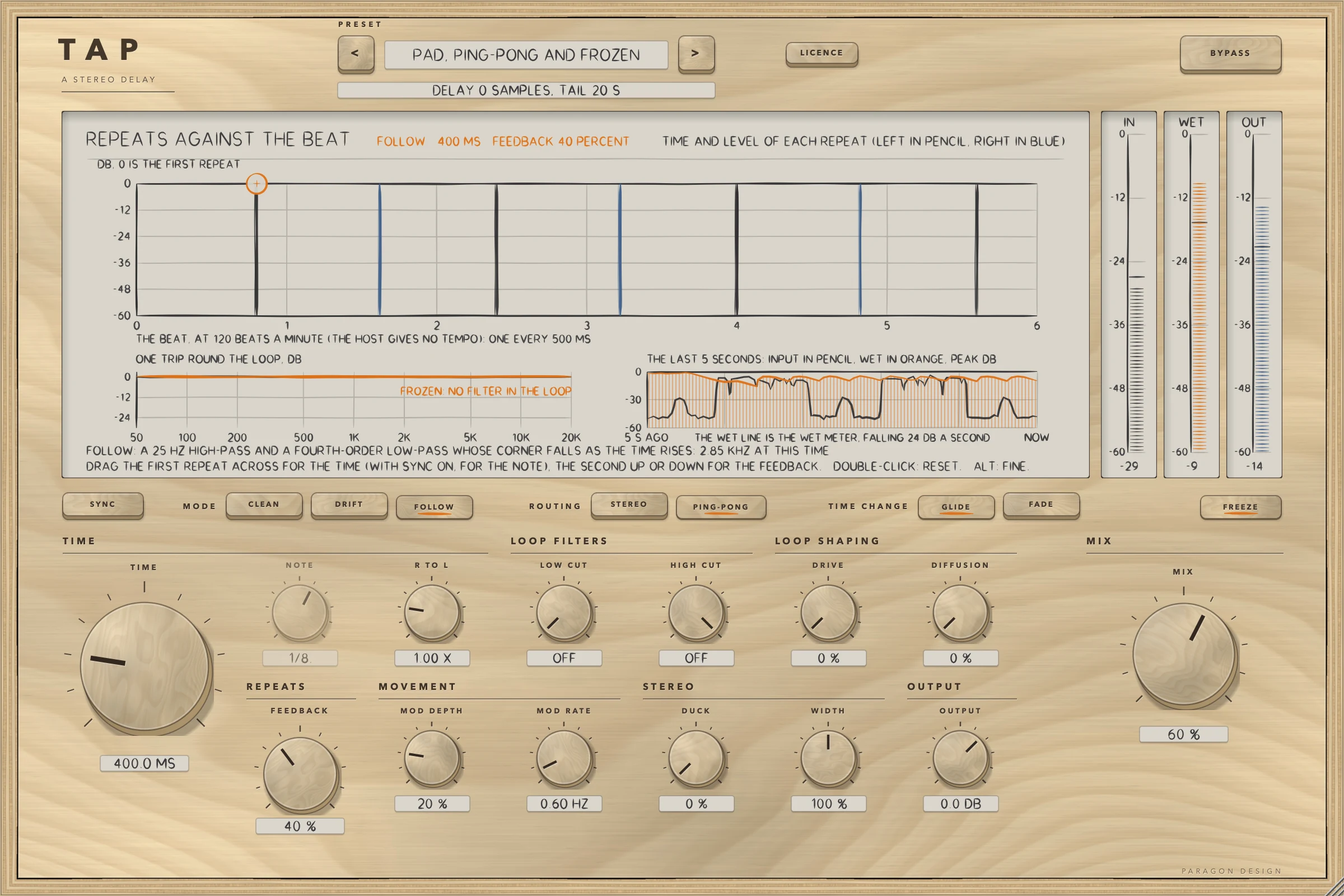
FREEZE stops the input feeding the delay and holds what it contains: each trip round the loop is at a gain of 0.99997, with no filter, drive, diffusion or movement. The held loop changes by about -0.34 dB in half a minute in the tests, so it does not hold a level for ever. A preset with FREEZE on, loaded into an empty delay, holds silence.
MIX and OUTPUT
The output is the input times 1 minus MIX plus the echoes times MIX, all times OUTPUT. MIX goes from 0 to 100 percent and starts at 0. OUTPUT goes from -24 to +12 dB and acts on the input and the echoes alike, so only at 0 dB with MIX at 0 is the output the input itself. A value of OUTPUT within 0.001 dB of 0 is read as exactly 0 dB.
BYPASS and the licence
BYPASS crossfades to the input over 5 ms. TAP has no delay, so the bypassed sound is the input itself, and the delay goes on running inside. While the trial is over BYPASS is forced on and the controls are drawn dimmed, as the Getting started manual describes.
Control reference
Every control on the panel, as the plug-in itself labels it. The description is the tooltip the plug-in shows when you rest the pointer on the control.
Top bar
| No. | Control | What it does | Range | Default |
|---|---|---|---|---|
| 1 | PREVIOUS PRESETKey | Previous preset | ||
| 2 | NEXT PRESETKey | Next preset | ||
| 3 | LICENCEKey | Opens the licence panel: the trial, a licence file, a key. | ||
| 4 | BYPASSKey | Hear the input unchanged, after a 5 ms crossfade. The delay goes on running inside, so its echoes are there when BYPASS is switched off. |
Controls
| No. | Control | What it does | Range | Default |
|---|---|---|---|---|
| 5 | SYNCKey | Sets the time from NOTE at the host's tempo (120 beats a minute when the host gives none), in place of TIME. | ||
| 6 | TIMEKnob | The delay of the left side, from the input to its first echo, in milliseconds. With SYNC on, NOTE sets the time instead. | 1 to 2000 | 375 |
| 7 | CLEANKey | The loop is left to LOW CUT and HIGH CUT alone. One sine moves the delay, by up to 4 ms at MOD DEPTH 100 percent. A change of time glides with a time constant of 0.10 s. The saturator has no bias. | ||
| 8 | NOTEKnob | The note value that sets the time while SYNC is on, from 1/64 to 1/1 (4 beats), at the host's tempo (120 beats a minute when the host gives none). | 0 to 15 | 9 |
| 9 | FEEDBACKKnob | How much of each echo goes round the loop again, in percent. Above 95 percent the loop runs into a soft limiter, which is in full force by 110 percent. | 0 to 110 | 40 |
| 10 | DRIFTKey | A 30 Hz high-pass and a 7 kHz low-pass (second order, Q 0.62) act on every pass of the loop. The delay is moved by two sines, a 7.3 Hz sine and a slow random walk, together up to 4.55 ms at MOD DEPTH 100 percent. A change of time glides with a time constant of 0.30 s. The saturator has a bias of 0.12 x DRIVE. | ||
| 11 | R TO LKnob | The right side's delay as a multiple of the left side's. A delay under 39 samples (0.81 ms at 48 kHz) is read as 39 samples. | 0.25 to 4 | 1 |
| 12 | MOD DEPTHKnob | How far the delay time is moved. The swing grows with the square of the setting: at 100 percent it is 4 ms in CLEAN and FOLLOW, and up to 4.55 ms in DRIFT. | 0 to 100 | 20 |
| 13 | FOLLOWKey | A 25 Hz high-pass and a fourth-order low-pass act on every pass of the loop, and its corner falls as the delay time rises: 9 kHz at 40 ms or less, 4.5 kHz at 160 ms, 1.8 kHz at 1 s or more. One sine moves the delay, by up to 4 ms at MOD DEPTH 100 percent. A change of time glides with a time constant of 0.16 s. The saturator has a bias of 0.04 x DRIVE. | ||
| 14 | LOW CUTKnob | A high-pass in the loop, acting on every trip round it. At 20 Hz it is off. The character's own high-pass acts as well, and the higher corner of the two wins. | 20 to 2000 | 20 |
| 15 | MOD RATEKnob | How fast the delay time is moved, in Hz. DRIFT also moves it with a second sine at 0.37 times this rate. | 0.05 to 8 | 0.6 |
| 16 | STEREOKey | Both sides repeat on their own: each input feeds its own delay. | ||
| 17 | HIGH CUTKnob | A low-pass in the loop, acting on every trip round it. At 20 kHz it is off. The character's own low-pass acts as well. | 500 to 20000 | 20000 |
| 18 | DUCKKnob | Turns the echoes down while the input is loud, by up to 26 dB. It follows the signal the plug-in is given, so a quiet input ducks less. | 0 to 100 | 0 |
| 19 | PING-PONGKey | The input goes to the left delay only, as the mean of both sides, and each echo is handed to the other side: left, right, left. | ||
| 20 | DRIVEKnob | Saturation in the loop, worked at twice the sample rate. Nothing happens below 0.2 percent. | 0 to 100 | 0 |
| 21 | WIDTHKnob | 0 makes the echoes the same on both sides, exactly. 100 percent leaves them as they are and 200 percent doubles the difference between the sides. | 0 to 200 | 100 |
| 22 | DIFFUSIONKnob | How much of a chain of four allpass filters is mixed into the loop on every trip. Nothing happens below 0.2 percent. | 0 to 100 | 0 |
| 23 | OUTPUTKnob | The level of the output, the input and the echoes alike, in dB. Only at 0 dB with MIX at 0 is the output the input itself. | −24 to 12 | 0 |
| 24 | GLIDEKey | A change of time moves the read position to the new time, so the pitch of what is in the line bends while it moves (down to 0.60 and up to 1.40 times at the most). | ||
| 25 | FADEKey | A change of time reads the line at the new time at once and crossfades the two reads over 30 ms. | ||
| 26 | MIXKnob | 0 is the input alone, exactly. The output is the input times (1 minus MIX) plus the echoes times MIX. | 0 to 100 | 0 |
| 27 | INPUT PEAK METERKey | |||
| 28 | WET PEAK METERKey | |||
| 29 | FREEZEKey | Stops the input feeding the delay and holds what it contains: each trip round the loop is at a gain of 0.99997, with no filter, drive, diffusion or movement. | ||
| 30 | OUTPUT PEAK METERKey |
Recipes
A slap behind a voice
Choose Vocal, Slap: a single close repeat at 95 ms, FEEDBACK 10 percent, with the loop trimmed at 120 Hz and 7 kHz and the delay moved a little by DRIFT. Lower MIX to push the repeat further back.
A delay that follows the song
Choose Vocal, Eighth Note or Vocal, Dotted Eighth. SYNC is on, so NOTE sets the time at the host's tempo. Press the other NOTE values to hear the time change; GLIDE bends the repeats as it does.
A ping-pong around the stereo field
Choose Guitar, Ping-pong Eighth: PING-PONG routing with SYNC on at 1/8, FEEDBACK 35 percent and LOW CUT 160 Hz. Raise WIDTH to spread the echoes further apart.
A delay that gets out of the way
Choose Vocal, Ducked Eighth or Lead, Ducked Slap. DUCK turns the repeats down while the input is loud and lets them come back in the gaps. Lower DUCK to hear more of the repeats during loud parts.
A doubler
Choose Doubler, 30 Milliseconds: a repeat 30 ms behind with R TO L at 1.10, no feedback, and MOD DEPTH 35 percent. Its two sides are held to a correlation of -0.30 to -0.19 on the synthetic voice, so they differ.
A loop that holds
Choose Loop, Held, or press FREEZE yourself while a repeat rings, and stop the input. The repeat goes round the loop and is held. Choose a different preset, or press FREEZE again, to let it go.
Presets
TAP has 26 presets in seven categories. Flat Start is the plug-in's default state: choosing it returns every control to its default. Every other preset is written as only what it changes from the defaults and is expanded to all 19 sound controls. Each is held to three measurements, 78 in all, of programmes and measures that the tests define: for example the time of the first echo of an impulse against the time asked, the level of the repeats under the dry input, how far the second round of echoes is under the first, the peak, and for the frozen presets the held level and how much it changes.
| Category | Presets |
|---|---|
| Start | Flat Start |
| Slap and Short | Guitar, Slap; Vocal, Slap; Drums, Short Repeat; Doubler, 30 Milliseconds; Doubler, Shortest Time |
| Synced | Vocal, Eighth Note; Vocal, Dotted Eighth; Guitar, Quarter Note; Synth, Sixteenth Triplet; Keys, Half Note |
| Long and Filtered | Vocal, Long Echo; Dub, Long Feedback; Ambient, Two Seconds; Pad, Long and Wide |
| Ping-pong | Vocal, Ping-pong Quarter; Guitar, Ping-pong Eighth; Synth, Ping-pong Wide; Pad, Ping-pong and Frozen |
| Ducked | Vocal, Ducked Eighth; Vocal, Ducked Dotted Eighth; Lead, Ducked Slap |
| Special | Loop, Held; Loop, 98 Percent Feedback; Loop, Driven; Smear, Diffused Repeats |
None of the presets has been listened to. The settings were tuned to the numbers the tests hold them to, not by ear.
Measured
Everything here was run on one Intel Mac (Intel Core i9-10910, macOS 14, x86_64, Release), shared with other work, on 15 and 16 October 2026. The last runs are from the morning of 16 October.
- TAP's own test group ran 306 checks (the processor 161, the presets 26, the editor 119) and none failed. The delay engine's own group, which LATHE shares, ran 281 and none failed.
- The checks of the real editor, made with real mouse events, drawn at 70, 100 and 170 percent, ran 74, 15, 1066, 206, 54, 5 and 3 (the control map, overlaps, every word, the fit of every word, the interaction, the cost and the leaks), and none failed.
- Apple's auval tool passes: 46 PASS lines and no warning, 20 parameters, and main bus layouts of one in one out, one in two out and two in two out.
- The host test on the installed Audio Unit ran 55 checks and none failed in each of its last six runs.
- A run of the whole project's tests, 22 minutes long, ran 13341 checks on 16 October and none failed. An earlier run that morning had stopped at a fault in another plug-in's tests, which was being edited at the time.
| What was measured | Result | Condition | Kind |
|---|---|---|---|
| Rest | The output is the input bit for bit in 36 runs and at six sample rates in three layouts. A denormal input number comes out as 0 and a minus zero as plus zero | MIX 0, OUTPUT 0 dB, pink noise at -14 dBFS, FEEDBACK 110, FREEZE, DUCK, DRIVE, DIFFUSION, MOD DEPTH, WIDTH 200 and R TO L set or not | bound |
| Through the installed Audio Unit | 18 of 18 runs equal to the input, delay 0 | three layouts, three characters, 100 blocks of 480 samples | bound |
| Delay | 0 samples | seven settings at six sample rates, and read back from the Audio Unit at 48 kHz | bound |
| Tail | 3.502, 4.686, 20.000 and 0 s, each equal to the figure worked out by hand | read back from the Audio Unit | measured |
| The processor against the engine | equal bit for bit in three layouts | a busy setting, 4 s of voice | bound |
| Block size | blocks of 1, 7, 64 and 4096 samples give the output of 512, bit for bit, also with nine changes of control at nine sample positions | DRIFT, PING-PONG, a busy setting | bound |
| Tempo | the first echo within 0.000 samples of the note at 120 beats a minute, for all 16 notes. Through the Audio Unit a quarter-note echo is 24000, 32000, 19200 and 48000 samples at 120, 90, 150 and 60 beats a minute | 48 kHz | bound, measured |
| BYPASS | the input bit for bit; the delay runs on inside, and 300 samples after BYPASS goes off the output is the engine's own, sample for sample | three layouts | bound |
| Hostile input | only numbers come out; the largest sample is 1.00 against a bound of 16 | not-a-number, infinity, 1e30, denormals, a full-scale square wave, noise and silence, FEEDBACK 110, MIX 100 | bound |
| Memory use | no allocation on the audio thread | 39 blocks in each of three layouts, controls and tempo moved | bound |
| Saved state | all 20 controls come back; garbage, a state cut short, another plug-in's state, out-of-bounds values and a later version are handled | processor and Audio Unit | bound |
| Presets | 78 of 78 measurements inside their bounds: for example Flat Start changes the level by 0.0000 dB (bound 0.001), the second round of Guitar, Slap is -21.01 dB under the first (bound -21.6 to -20.5), and the held loop of Loop, Held changes by -0.0250 dB (bound -0.029 to -0.022) | each preset on its named programmes | measured against bounds |
| A preset through the Audio Unit | the Audio Unit and the engine differ by 0.000000000 on 14 s of voice, with the controls as the host's 0 to 1 scale gives them | Vocal, Ducked Eighth and Synth, Ping-pong Wide | bound |
| WIDTH | at 0 the difference between the sides is exactly 0; at 200 the side is 2.0000 times its size at 100 | noise, all three characters, by a small program run by hand | measured |
| Paint | the display takes 1.52 ms at 1x and 3.01 ms at 2x (budget 8 ms); an idle editor paints 0 times in 1.5 s | upper bounds, including the snapshot | measured |
| Memory over 30 editors | the allocator's bytes in use changed by +4.3, -7.8, 0.0, -3.8, -0.4 and +9.9 MB in six runs (limit 12 MB) | the editor opened and closed 30 times after 30 rounds to settle first | bound, measured |
| Cost | Flat Start 1.27, 1.50, 1.68 and 1.46 percent of one core in four runs (budget 1.5); a heavy setting (DRIVE, DIFFUSION and MOD DEPTH at 100, both cuts, PING-PONG) 2.02, 2.30, 3.38 and 2.33 (a stated limit, budget 3.0) | thread CPU time, stereo, 48 kHz, 512-sample blocks, 10 s of pink noise | measured |
The cost moves with the machine's load: the engine's own notes read 1.11 percent on a quiet Mac, and the figures above were taken while other work was running.
Limits and what is not verified
- Nothing has been listened to: the characters, the presets and the defaults are described by what they were measured to do, not by how they sound.
- Not verified: any host (what one does with TAP's tempo, tail and bypass), the VST3 in any host, Apple silicon (the Mac the tests ran on is Intel, and the Apple silicon half of the release package was compiled and never run), the real editor used by hand, and a frozen loop for longer than 30 seconds.
- A change of CHARACTER while sound plays makes a step: the largest step in the engine's test was 5.8 times the test tone's own. FOLLOW's corner jumps with the time under FADE.
- The echo of an impulse peaks at 0.966, and a delay under 39 samples is read as 39 samples.
- The tail told to the host is capped at 20 seconds, so a delay set to repeat for longer than that repeats for longer than the host is told.
- In DRIFT and FOLLOW with DRIVE above 0, the start of playback can leave a trace in silence: up to -66.5 dBFS at DRIVE 100 (about -73 dBFS at DRIVE 10) in the first second. It dies away at FEEDBACK 40. At FEEDBACK 110 it can seed the loop (0.07 after 20 s in one test). The presets Synth, Sixteenth Triplet, Dub, Long Feedback and Loop, Driven are affected. The cause is known and a one-line change would remove it; it is not made in this version.
- The heavy setting named in Measured is over the CPU budget of 1.5 percent; it is a stated limit.
- Some statements in the panel's own tips are backed by reading the source or by a small program, not by a test in the project's tests: the loop gain of 0.99997 while frozen, the soft limiter above 95 percent FEEDBACK, that PING-PONG feeds the left delay with the mean of both sides, that the higher corner of LOW CUT and the character's high-pass wins, and the WIDTH figures.
- A denormal input number comes out as itself or as 0, and a minus zero comes out as plus zero. These are the two exceptions to a bit-for-bit rest.
- The name TAP is a working name.
Troubleshooting
I hear no repeats. MIX starts at 0, and Flat Start leaves it there. Raise MIX, or choose a preset. Check that BYPASS is off and that the line under the preset name does not say the trial is over.
The repeats are not in time with the song. SYNC is off, so TIME sets the delay in milliseconds, or the host is not giving TAP a tempo and TAP is using 120 beats a minute. Press SYNC and choose a NOTE. Whether a host gives TAP its tempo is not verified here.
The tail runs on for ever. With FEEDBACK at 100 percent or more, or with FREEZE on, the repeats do not die away. Lower FEEDBACK, or press FREEZE again. The host is told at most 20 seconds of tail.
The repeats change pitch when I turn TIME. GLIDE moves the read position, so the pitch of what is in the line bends. Press FADE for a crossfade over 30 ms instead.
There is a faint noise in silence at the start. See Limits: in DRIFT or FOLLOW with DRIVE up, a trace of up to -66.5 dBFS can appear for a second after playback starts. Lower DRIVE or press CLEAN.
TAP uses more CPU on a busy Mac. The figures in Measured were taken at a quiet load, and read higher when the machine is busy: that is the load, not the code.
The panel looks small or large. Drag a corner of the window: it keeps its proportions from 70 to 170 percent of 1200 by 800 pixels, and the width is saved with the project.