What it is
VENEER is a channel strip. One plug-in holds an input stage, a gate or expander, colour, a four-band equaliser, a compressor, a de-esser and an output stage. The gate, colour, EQ, compressor and de-esser each have their own on switch, so a strip can be as small as an EQ or as full as a vocal chain.
Colour can follow the playing. A saturator that works on level distorts the loudest part of a sound most, which for a drum hit is its first few milliseconds, and leaves the tail alone. VENEER lets you choose. A detector finds the front of each hit and the fall after it, and the drive is raised or lowered on each, by up to 12 dB, with ATTACK and SUSTAIN. SQUEEZE raises the drive as the compressor pulls down, by 0.6 dB for each dB of gain reduction at 100 percent. There are four characters of shaping and a fifth, CLEAN, that only tilts the tone.
The only delay in the strip comes from the oversampling in colour: 25 samples at 2X, 29 at 4X and none at OFF. With every section at rest, the strip returns the input delayed by exactly that, bit for bit. In bypass, once its 5 ms crossfade is over, it does the same. Switching a section on or off never moves anything in time.
The colour characters are described by what they do to the signal, with the numbers in the Measured chapter. None of them is a model of any piece of equipment. Only colour is level-matched.
Setting it up
Formats, channels and side chain
VENEER is an effect in Audio Unit and VST3 formats. It works on a mono or a stereo track, with the same number of channels in and out. It has an optional side chain input, mono or stereo, which only the gate and the compressor can use. The side chain input starts switched off. EXT KEY, under the gate and under the compressor, makes that section listen to the side chain instead of the signal. With EXT KEY on and nothing connected to the side chain, the section listens to the signal itself. With a side chain connected but silent, a gate stays shut.
Where to put it
Put VENEER on the track or bus you want to shape. The order inside it is fixed: input, gate or expander, colour, EQ and compressor, de-esser, output. Two keys change it. COMP > EQ puts the compressor before the EQ. POST puts colour after the EQ and compressor.
Latency
The latency depends only on the colour oversampling, whether or not colour is switched on: 0 samples at OFF, 25 at 2X and 29 at 4X. The default is 2X, so a new VENEER reports 25 samples, which is 0.52 ms at 48 kHz. The panel shows the figure under the ORDER keys as DELAY 0.52 MS (25 SAMPLES), or NO DELAY at OFF. The figures are whole numbers of samples at every sample rate. A change of oversampling reaches the host after a short pause. Loading a preset can change it: the three Mix Bus presets use 4X and Lo-fi Grit uses OFF.
Sample rates
At 44.1, 88.2, 96 and 192 kHz the strip at rest was a delay of exactly the reported number of samples, bit for bit. The EQ, the compressor and colour together agreed with the drawn curves within the test limit of 1.5 dB. Every other measurement in this manual was taken at 48 kHz.
Licence and trial
VENEER is a premium plug-in. It works in full for 14 days. The days are counted for each plug-in on its own. They start the first time the plug-in's window is opened, or after five minutes of audio have gone through it, whichever comes first. A host that only creates the plug-in to read what it is does not start them. In the top bar, beside the small wooden key marked LICENCE, a pencil line reads TRIAL: 9 DAYS LEFT, and the number falls by one each day. The last day reads 1 DAY LEFT. After it the line reads TRIAL OVER: ENTER A LICENCE, in orange.
When the trial is over VENEER switches on its own bypass: the track passes through unchanged, delayed by the latency it reports, after the 5 ms crossfade the BYPASS key makes. The controls themselves are not moved.
To add a licence, press LICENCE and then CHOOSE FILE, or drop the licence file anywhere on the plug-in's window. One file covers every plug-in in an order, and VENEER works again at once. Nothing saved in a session is changed when a trial ends or a licence arrives. The Getting started manual has the whole chapter, Licences and the trial.
In Logic Pro
- Click an Audio Effect slot in the channel strip, then choose Veneer Channel Strip from the pop-up menu (versions before 0.1.1 list it as Veneer). Audio Units plug-ins appear in the Audio Units submenu of the plug-in menu.
- The plug-in window opens when you insert a plug-in. To reopen it, click the centre area of the plug-in slot.
- To use the side chain, click the Side Chain pop-up menu in the plug-in header area and choose an audio or software instrument track, a hardware input or a bus. The side chain signal controls the plug-in and is not processed by it. Then switch EXT KEY on under the gate or the compressor.
- Once a source is chosen, an indicator with a left-pointing arrow appears after the plug-in name in the slot.
- To see the latency, hold the pointer over the plug-in slot. A help tag shows it in samples and seconds.
A first session
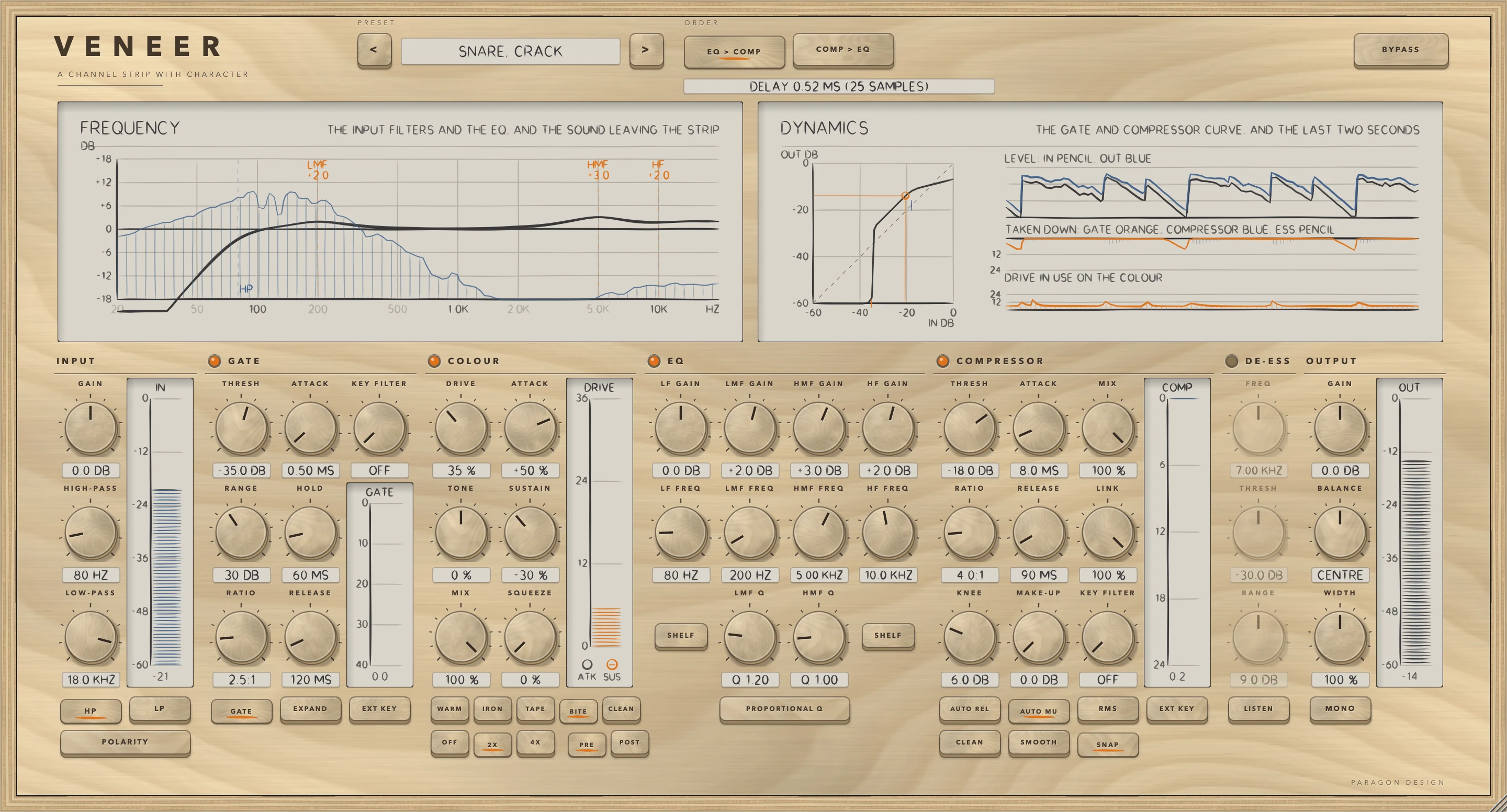
- Put VENEER on a track (see Setting it up). The preset bar reads FLAT START. Only the EQ lamp is lit, and every EQ gain is at 0, so the strip returns the input delayed by 25 samples.
- Click the name in the preset bar and choose a preset from the menu, which is grouped by category. The figure shows Snare, Crack from Drums. Every preset sets every control, so the result does not depend on what was set before.
- Look at the lamps beside GATE, COLOUR, EQ, COMPRESSOR and DE-ESS. A lit lamp is a section that is on. The knobs of a section that is off are dimmed.
- In COLOUR, choose a character and raise DRIVE. Raise ATTACK to put more drive on the front of each hit. Lower SUSTAIN to keep the tail clean. The ATK lamp on the DRIVE meter lights while the front of a hit is detected, and the SUS lamp while a tail is.
- Play the track and watch DYNAMICS. The lane DRIVE IN USE ON THE COLOUR shows the drive rising and falling with the playing.
- Press COMP > EQ to put the compressor before the EQ, or POST to put colour after the EQ and compressor. Each change fades the output out and back in over a few milliseconds.
- Press BYPASS to compare with the input. Bypass does not match levels, so the level may change when you press it.
How it works
Hold the pointer over a control and a short description appears. Double-click a knob to return it to its default.
PRESET, ORDER and BYPASS
The keys marked < and > step through the presets, and a click on the name opens a menu by category. An asterisk after the name means a control has moved since the preset loaded. ORDER chooses EQ > COMP, in which the compressor sees the EQ'd signal, or COMP > EQ, in which the EQ shapes what the compressor has done. BYPASS crossfades over 5 ms to the input delayed by the same amount as the strip, so it never moves anything in time. The meters and DYNAMICS keep working in bypass. The spectrum in FREQUENCY shows what leaves the strip, so in bypass it shows the input.
FREQUENCY and DYNAMICS
FREQUENCY draws the input filters and the four EQ bands as one curve, from 20 Hz to 20 kHz, with lines every 6 dB from -18 to +18. A dashed orange line marks each EQ band in use, named LF, LMF, HMF or HF with its gain, and dashed blue lines marked HP and LP mark the filters. A hatched blue trace shows the spectrum of what leaves the strip, on its own scale from -100 dB at the bottom to -10 dB at the top.
DYNAMICS has the curve of the gate and compressor together on the left, with in and out axes from -60 to 0 dB. The gate threshold is marked in orange on the bottom edge, the compressor threshold in blue on the curve, and a dot shows the input peak now. The curve leaves out colour and EQ. On the right, three lanes cover about the last two and a half seconds, although the panel's caption says two. LEVEL shows the input in pencil and the output in blue. TAKEN DOWN shows the gate in orange, the compressor in blue and the de-esser in pencil, to 24 dB. DRIVE IN USE ON THE COLOUR runs to 36 dB.
The meters IN, GATE, DRIVE, COMP and OUT hold their peaks and let go at a steady rate: 24 dB a second for levels and 30 dB a second for reductions and drive. IN and OUT also show a mark that holds the highest peak for 1.2 seconds and then falls. It turns orange above -1 dB.
INPUT
GAIN is the level into the strip, from -24 to +24 dB, default 0. POLARITY turns the signal upside down, for two microphones on one source that cancel each other.
HIGH-PASS takes out what is below its frequency: rumble, handling noise, plosives. It runs from 20 to 500 Hz, default 80 Hz, at 18 dB per octave, and the HP key switches it on. LOW-PASS takes out what is above its frequency. It runs from 2 to 20 kHz, default 18 kHz, at 12 dB per octave, and the LP key switches it on. Each filter fades in and out over 5 ms when switched. The IN meter reads the peak level after GAIN, POLARITY and the filters, from 0 down to -60 dB.
GATE
The lamp and name switch the gate or expander on or off. The keys GATE and EXPAND choose the mode. GATE is open or closed. EXPAND turns down gradually, by the ratio, from the threshold.
- THRESH, -80 to 0 dB, default -45: the level where it opens. Below it a gate closes and an expander turns down.
- RANGE, 0 to 80 dB in half-dB steps, default 40: how far down it takes the signal when it is closed.
- RATIO, 1.2 to 10:1, default 2.5, for the expander only: each dB under the threshold becomes RATIO minus 1 further dB of cut, down to RANGE.
- ATTACK, 0.05 to 50 ms, default 1: how fast it opens.
- HOLD, 0 to 500 ms, default 50: how long it stays open once the signal has dropped.
- RELEASE, 5 to 1500 ms, default 150: how fast it closes.
- KEY FILTER, 20 to 2000 Hz, default 20, which reads OFF: a high-pass on what the gate listens to, so a rumble or a bleed that is not the thing to be gated cannot hold it open.
- EXT KEY: the gate listens to the side chain input instead of the signal.
A gate stays open until the level is 3 dB under THRESH and HOLD has run out, so a level wobbling around the threshold does not make it chatter. Both channels share one gain. The GATE meter shows the reduction, from 0 to 40 dB.
COLOUR
The lamp and name switch colour on or off. The keys WARM, IRON, TAPE, BITE and CLEAN choose the character.
- WARM makes mostly even harmonics while it is pushed gently, and more harmonics as it saturates.
- IRON saturates the low end first and bends the high end much less. Its high end also rolls off more as the drive rises.
- TAPE makes odd harmonics only, and rolls the high end off more as the level rises.
- BITE treats positive and negative swings unequally, so it makes both even and odd harmonics.
- CLEAN does no shaping. Only TONE acts.
DRIVE, 0 to 100 percent, default 25, sets a base drive of up to 26 dB. TONE, -100 to +100 percent, default 0, tilts the result about 650 Hz with shelves of up to 4 dB each way. It works at any drive, and with CLEAN. MIX, 0 to 100 percent, default 100, blends coloured and untouched signal.
ATTACK and SUSTAIN, -100 to +100 percent, default 0, add drive while a hit is arriving and while a note or a hit dies away. Up puts grit there and down keeps it clean. At +100 or -100 percent each moves the drive by up to 12 dB. SQUEEZE, 0 to 100 percent, default 0, raises the drive with the compressor's gain reduction. With colour before the compressor (PRE), it follows the reduction from the block before. The total drive is held between 0 and 36 dB.
A hit is found when the fast level rises 6 dB above where it was a few control blocks before, and 3 dB above the slow level, no sooner than 40 ms after the last one. The ATTACK weight stays full for 5 ms after the start of a hit and falls to nothing by 14 ms. The SUSTAIN weight follows how far the level has fallen from a held peak: nothing at 2 dB down, full at 6 dB down, and held at nothing for the first 20 ms of a hit.
The shaped signal is brought back to the level of the dry, slowly, with one gain for both channels: a 0.3 s mean square, smoothed over 0.5 s and limited to 30 dB either way. TONE comes after this match, or the match would undo it.
OFF, 2X and 4X choose the oversampling, default 2X. OFF has no delay, but the harmonics colour makes can fold back down as aliasing. 2X delays by 25 samples and keeps most of the aliasing out. 4X delays by 29 samples and keeps out more. The oversampler is linear-phase. PRE puts colour before the EQ and compressor and POST puts it after them. The default is PRE. The DRIVE meter shows the drive in use, from 0 to 36 dB, with the lamps ATK and SUS for the two windows above.
EQ
The lamp and name switch the equaliser on or off. It is on by default, and with every gain at 0 it changes nothing. Every gain runs from -18 to +18 dB, default 0. There are four bands.
- LF GAIN and LF FREQ set the low band, 20 to 400 Hz, default 80 Hz.
- LMF GAIN, LMF FREQ and LMF Q set the low-mid bell: 100 to 2000 Hz, default 400 Hz, and a Q of 0.3 to 5, default 1.
- HMF GAIN, HMF FREQ and HMF Q set the high-mid bell: 500 to 8000 Hz, default 2500 Hz, and a Q of 0.3 to 5, default 1.
- HF GAIN and HF FREQ set the high band, 1.5 to 20 kHz, default 8000 Hz.
A higher Q is narrower. The SHELF key under the low band and the one under the high band each switch that band between a shelf, which acts on everything below or above its frequency, and a bell. The legend reads SHELF or BELL for the state in force, and both bands start as shelves. A shelf has a Q of 0.7, and so does a low or high band set to BELL.
PROPORTIONAL Q makes bells narrower as they are pushed: the Q is multiplied by 1 plus the gain in dB divided by 12. It applies to the two bells, and to the low and high bands when they are set to BELL.
COMPRESSOR
The lamp and name switch the compressor on or off. It is a feed-forward compressor with a soft knee. It works in dB and has no latency.
- THRESH, -60 to 0 dB, default -18: the level above which it turns the signal down.
- RATIO, 1.2 to 20:1, default 4: how much it turns down what is over the threshold. 20:1 and up is a limiter.
- KNEE, 0 to 24 dB, default 6: how gradually it comes in around the threshold. Zero is a hard corner.
- ATTACK, 0.1 to 100 ms, default 10, and RELEASE, 10 to 1500 ms, default 120: how fast it turns down and lets go. RELEASE is ignored while AUTO REL is on. Both are time constants, roughly the time to cover two-thirds of a change.
- MAKE-UP, 0 to 24 dB, default 0: gain after the compressor.
- MIX, 0 to 100 percent, default 100: compressed against untouched signal, which is parallel compression.
- LINK, 0 to 100 percent, default 100: how much the two sides of a stereo signal are turned down together. At 0 each side stands alone and at 100 both follow the louder side.
- KEY FILTER, 20 to 500 Hz, default 20, which reads OFF: a high-pass on what the compressor listens to, so the bass does not drive it.
AUTO REL picks the release from how hard it is squeezing: 600 ms for a touch, down to 80 ms for a hard squeeze. AUTO MU adds to MAKE-UP half of what a full-scale signal would lose at the current THRESH and RATIO. RMS makes it listen to the average level, over about 10 ms, instead of the peaks. EXT KEY makes it listen to the side chain input.
The keys CLEAN, SMOOTH and SNAP choose the ballistics. CLEAN is a plain attack and release. SMOOTH is two releases at once, a quick one and a slow one, so a short peak lets go fast and a long push lets go slowly. SNAP gets faster the further and deeper it goes: the attack the further over the threshold, the release the deeper the reduction. The peak detector rises at once and falls with a time constant of 25 ms. The COMP meter shows the gain reduction, from 0 to 24 dB.
DE-ESS
The lamp and name switch the de-esser on or off. FREQ, 2 to 12 kHz, default 7 kHz, is where the sibilance is. THRESH, -60 to 0 dB, default -30, is how loud the S has to be before it is turned down. RANGE, 0 to 18 dB, default 9, is the most it will turn the S down.
The de-esser listens through a band-pass at FREQ and pulls in a dynamic cut at the same frequency, so only that band is turned down. Both channels share one cut, and there is no latency. LISTEN, while DE-ESS is on, plays what the detector hears in place of the signal. The de-esser has no meter of its own. Its reduction is the pencil line in the TAKEN DOWN lane of DYNAMICS.
OUTPUT
GAIN, -24 to +24 dB, default 0, is the level out of the strip. BALANCE, -100 to +100 percent, default 0, moves the stereo picture left or right and reads CENTRE at the middle. At the extreme, the side you move away from is silent. WIDTH, 0 to 200 percent, default 100, runs from mono through as it came to twice as wide. MONO plays the strip in mono, to check how it folds down. With every output control at rest the signal is not touched. The OUT meter shows the peak level and, as a narrower bar, the RMS level of the output stage, from 0 down to -60 dB. It reads ahead of BYPASS.
Control reference
Every control on the panel, as the plug-in itself labels it. The description is the tooltip the plug-in shows when you rest the pointer on the control.
Top bar
| Control | What it does | Range | Default |
|---|---|---|---|
| <Key | Previous preset | ||
| >Key | Next preset | ||
| EQ > COMPKey | The EQ comes first, then the compressor: the compressor sees the EQ'd sound. | ||
| COMP > EQKey | The compressor comes first, then the EQ: the EQ shapes what the compressor has done. | ||
| BYPASSKey | Hear the input, delayed by the same amount, so switching it never moves anything in time. |
1INPUT
| Control | What it does | Range | Default |
|---|---|---|---|
| GAINKnob | Level into the strip. Double-click to reset. | −24 to 24 dB | 0 dB |
| HIGH-PASSKnob | Takes out what is below this: rumble, handling noise, plosives. Switch it on with the key underneath. | 20 to 500 Hz | 80 Hz |
| LOW-PASSKnob | Takes out what is above this. Switch it on with the key underneath. | 2000 to 20000 Hz | 18000 Hz |
| HPKey | High-pass filter on or off (18 dB per octave). | ||
| POLARITYKey | Turns the signal upside down. For two microphones on one source that cancel each other. | ||
| LPKey | Low-pass filter on or off (12 dB per octave). |
2GATE
| Control | What it does | Range | Default |
|---|---|---|---|
| GATEKey | Switch the gate, or expander, on or off. | ||
| THRESHKnob | The level where it opens. Below this it closes (or, as an expander, turns down). | −80 to 0 dB | −45 dB |
| RANGEKnob | How far down it takes the signal when it is closed. | 0 to 80 dB | 40 dB |
| RATIOKnob | Expander only: how firmly it turns down what is below the threshold. | 1.2 to 10 :1 | 2.5 :1 |
| GATEKey | A gate: open or closed. | ||
| ATTACKKnob | How fast it opens. | 0.05 to 50 ms | 1 ms |
| HOLDKnob | How long it stays open once the signal has dropped. | 0 to 500 ms | 50 ms |
| RELEASEKnob | How fast it closes. | 5 to 1500 ms | 150 ms |
| EXPANDKey | An expander: turns down gradually, by the ratio, from the threshold. | ||
| KEY FILTERKnob | A high-pass on what the gate listens to, so a rumble or a bleed that is not the thing to be gated cannot hold it open. | 20 to 2000 Hz | 20 Hz |
| EXT KEYKey | The gate listens to the sidechain input instead of the signal. |
3COLOUR
| Control | What it does | Range | Default |
|---|---|---|---|
| COLOURKey | Switch colour on or off. | ||
| DRIVEKnob | How hard the sound is pushed into the character. | 0 to 100 % | 25 % |
| TONEKnob | Tilts the result about 650 Hz: darker to the left, brighter to the right. It follows the colour, so it works at any drive. | −100 to 100 % | 0 % |
| MIXKnob | Blend of coloured and untouched sound. | 0 to 100 % | 100 % |
| WARMKey | Mostly even harmonics while it is pushed gently, fuller as it saturates. Smooth and forgiving. | ||
| OFFKey | No oversampling: no delay, but the harmonics it makes can fold back down as aliasing. | ||
| IRONKey | Fills up in the low end first and barely touches the top, which darkens as it is driven. | ||
| 2XKey | Twice the rate: 25 samples of delay, reported to the host. Keeps most of the aliasing out. | ||
| ATTACKKnob | Drive added while a hit is arriving. Up for grit on the front of every hit, down to keep the front clean. Double-click to reset. | −100 to 100 % | 0 % |
| SUSTAINKnob | Drive added while a note or a hit dies away. Up to thicken the tail, down to keep it clean. Double-click to reset. | −100 to 100 % | 0 % |
| SQUEEZEKnob | Drive that rises with the compressor's gain reduction: the harder it is squeezed, the more it sings. | 0 to 100 % | 0 % |
| TAPEKey | Odd harmonics only, with the top rolling off as the level rises. | ||
| 4XKey | Four times the rate: 29 samples of delay, reported to the host. Cleanest. | ||
| BITEKey | Unequal for positive and negative swings: both kinds of harmonic, and an edge. | ||
| PREKey | Colour comes before the EQ and compressor, as an input stage does. | ||
| CLEANKey | No shaping at all. Only the tone control acts, so you can tilt the sound without colouring it. | ||
| POSTKey | Colour comes after the EQ and compressor, as a tape machine or a bus does. |
4EQ
| Control | What it does | Range | Default |
|---|---|---|---|
| EQKey | Switch the equaliser on or off. | ||
| LF GAINKnob | Low band: boost or cut. | −18 to 18 dB | 0 dB |
| LF FREQKnob | Low band: frequency. | 20 to 400 Hz | 80 Hz |
| SHELFKey | Low band as a shelf (everything below the frequency) or a bell. | ||
| LMF GAINKnob | Low-mid band: boost or cut. | −18 to 18 dB | 0 dB |
| LMF FREQKnob | Low-mid band: frequency. | 100 to 2000 Hz | 400 Hz |
| LMF QKnob | Low-mid band: how narrow it is. Higher is narrower. | 0.3 to 5 | 1 |
| PROPORTIONAL QKey | The bells get narrower as they are pushed: a small move is broad and gentle, a big one is pointed. | ||
| HMF GAINKnob | High-mid band: boost or cut. | −18 to 18 dB | 0 dB |
| HMF FREQKnob | High-mid band: frequency. | 500 to 8000 Hz | 2500 Hz |
| HMF QKnob | High-mid band: how narrow it is. Higher is narrower. | 0.3 to 5 | 1 |
| HF GAINKnob | High band: boost or cut. | −18 to 18 dB | 0 dB |
| HF FREQKnob | High band: frequency. | 1500 to 20000 Hz | 8000 Hz |
| SHELFKey | High band as a shelf (everything above the frequency) or a bell. |
5COMPRESSOR
| Control | What it does | Range | Default |
|---|---|---|---|
| COMPRESSORKey | Switch the compressor on or off. | ||
| THRESHKnob | The level above which it turns the signal down. | −60 to 0 dB | −18 dB |
| RATIOKnob | How much it turns down what is over the threshold. 20:1 and up is a limiter. | 1.2 to 20 :1 | 4 :1 |
| KNEEKnob | How gradually it comes in around the threshold. Zero is a hard corner. | 0 to 24 dB | 6 dB |
| AUTO RELKey | Picks the release from how hard it is squeezing: slow for a touch, quick for a hard squeeze. | ||
| CLEANKey | A plain attack and release. | ||
| ATTACKKnob | How fast it turns down once the level is over the threshold. | 0.1 to 100 ms | 10 ms |
| RELEASEKnob | How fast it lets go. Ignored while AUTO is on. | 10 to 1500 ms | 120 ms |
| MAKE-UPKnob | Gain after the compressor, to bring the level back up. | 0 to 24 dB | 0 dB |
| AUTO MUKey | Make-up gain that follows the threshold and ratio. | ||
| SMOOTHKey | Two releases at once, a quick one and a slow one: a short peak lets go fast, a long push lets go slowly. | ||
| MIXKnob | Blend of compressed and untouched sound: parallel compression. | 0 to 100 % | 100 % |
| LINKKnob | How much the two sides of a stereo signal are turned down together. 100 keeps the image steady. | 0 to 100 % | 100 % |
| KEY FILTERKnob | A high-pass on what the compressor listens to, so the bass does not drive it. | 20 to 500 Hz | 20 Hz |
| RMSKey | Listens to the average level instead of the peaks: smoother, slower to catch a spike. | ||
| SNAPKey | Catches peaks hard: the attack and release get faster the further and deeper it goes. | ||
| EXT KEYKey | The compressor listens to the sidechain input instead of the signal. |
6DE-ESS
| Control | What it does | Range | Default |
|---|---|---|---|
| DE-ESSKey | Switch the de-esser on or off. | ||
| FREQKnob | Where the harsh S sounds are. | 2000 to 12000 Hz | 7000 Hz |
| THRESHKnob | How loud the S has to be before it is turned down. | −60 to 0 dB | −30 dB |
| RANGEKnob | The most it will turn the S down. | 0 to 18 dB | 9 dB |
| LISTENKey | Hear what the de-esser is listening to. |
7OUTPUT
| Control | What it does | Range | Default |
|---|---|---|---|
| GAINKnob | Level out of the strip. Double-click to reset. | −24 to 24 dB | 0 dB |
| BALANCEKnob | Moves the stereo picture left or right. | −100 to 100 % | 0 % |
| WIDTHKnob | 0 is mono, 100 is as it came, 200 is twice as wide. | 0 to 200 % | 100 % |
| MONOKey | Hear the strip in mono, to check how it folds down. |
Recipes
Grit on the front of a snare, a clean tail
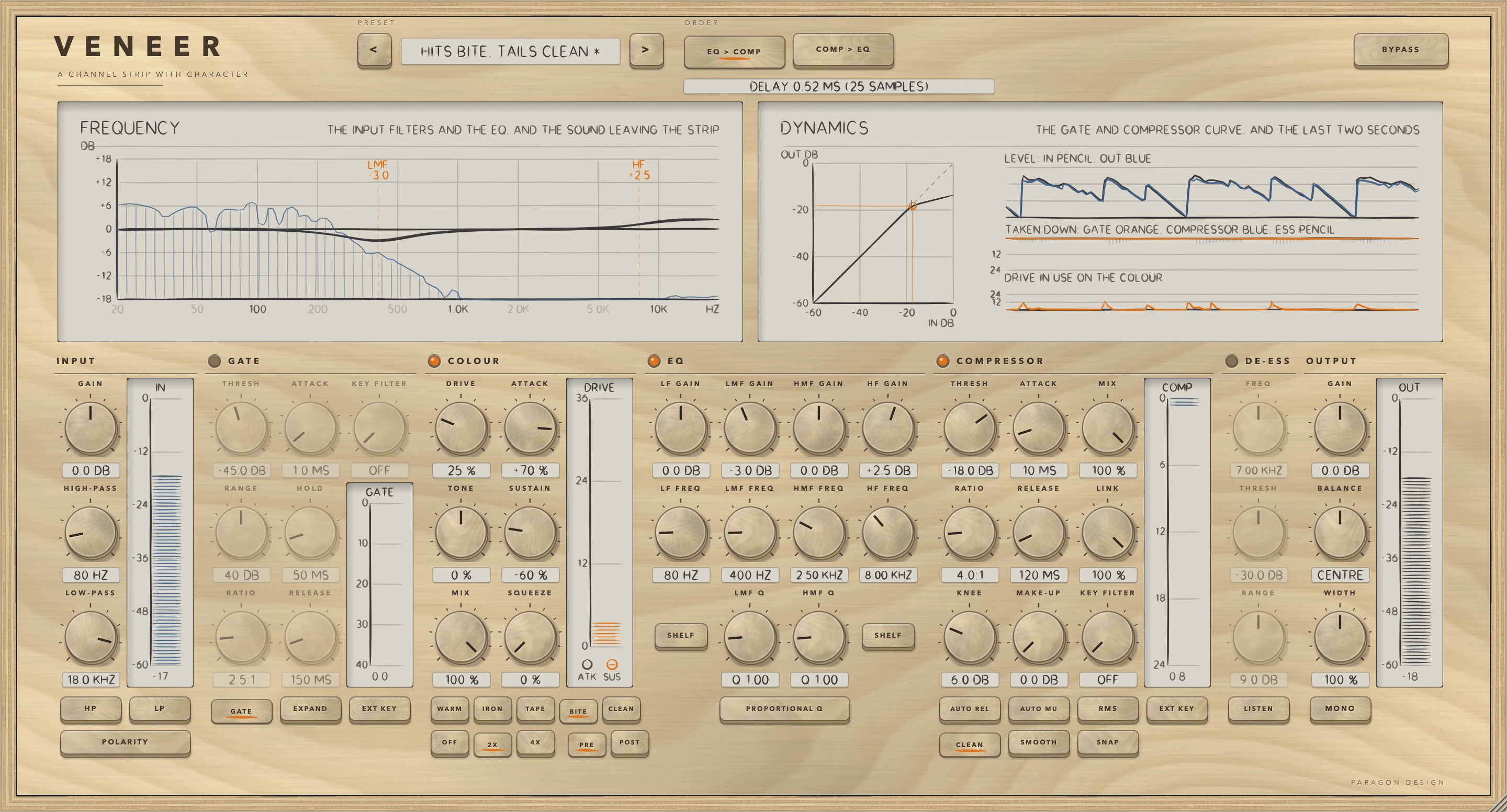
Choose Hits Bite, Tails Clean from Character. It switches colour on with BITE at DRIVE 25 percent, ATTACK +70 percent and SUSTAIN -60 percent. The other sections stay at their defaults, so the EQ is on with every gain at 0. The ATK lamp on the DRIVE meter lights at the front of each hit.
The numbers come from a test on sine bursts with TAPE at DRIVE 30 percent. ATTACK +100 raised the distortion in the first 15 ms from -39.4 dB to -22.9 dB and left the tail at -50.1 dB. With SUSTAIN at -100 as well, the front was 35 dB more distorted than the tail. For the other way round, choose Tails Bloom: WARM at DRIVE 25 percent, ATTACK -20 percent and SUSTAIN +60 percent.
Start a vocal chain
Choose Lead Vocal, Everyday from Vocal. It switches on the high-pass at 80 Hz, cuts 2 dB at 300 Hz with Q 1.2, boosts 2 dB at 3500 Hz and adds 2.5 dB as a high shelf at 12 kHz. Colour is WARM at DRIVE 20 percent with ATTACK +15 percent. The compressor is at -20 dB and 3:1 with SMOOTH and AUTO MU, and the de-esser is on at 7 kHz, -30 dB and 6 dB. Then move only what the voice needs, and press BYPASS to compare.
Key the compressor from another track
- Route the other track to the plug-in's side chain, as in Setting it up.
- Switch the COMPRESSOR on. Set THRESH to -30 dB, RATIO to 10:1, ATTACK to 1 ms and KNEE to 0.
- Press EXT KEY under the compressor.
The compressor now reacts to the side chain instead of the track. In a test with these settings, a 1 kHz tone at -40 dBFS, far under the threshold, came out more than 12 dB lower with a 200 Hz tone at -6 dBFS on the side chain than without it. The 12 dB is the test limit.
Glue a mix bus
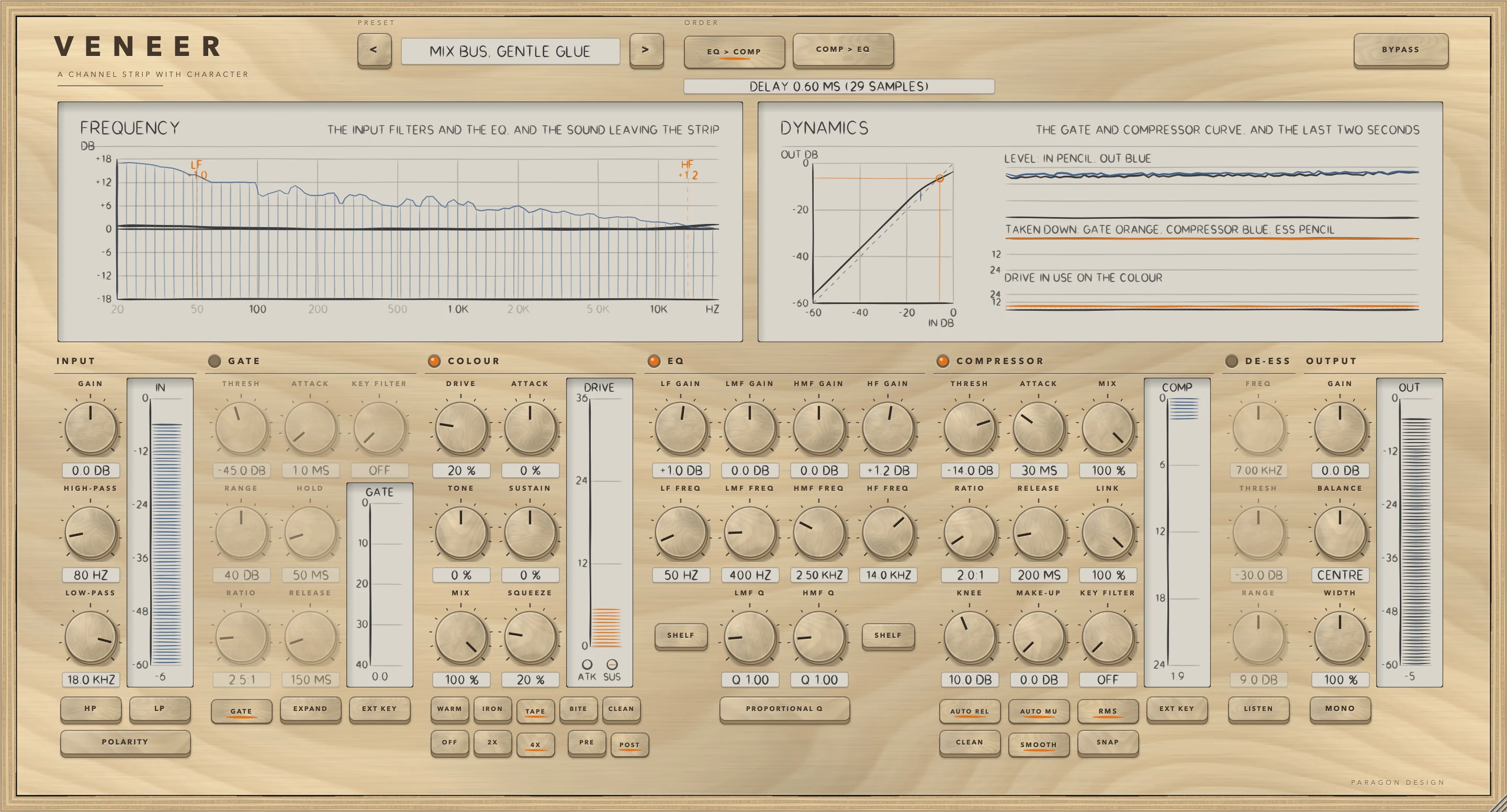
Choose Mix Bus, Gentle Glue from Mix Bus. It sets TAPE at DRIVE 20 percent with SQUEEZE 20 percent, after the EQ and compressor (POST), at 4X oversampling, so it reports 29 samples. The EQ adds 1 dB as a low shelf at 50 Hz and 1.2 dB as a high shelf at 14 kHz. The compressor is at -14 dB and 2:1, with SMOOTH, AUTO REL, a 10 dB knee, RMS and AUTO MU. On pink noise at -18 dBFS RMS this preset raised the level by 2.7 dB, the most of the 34 presets, so lower OUTPUT GAIN before you compare with BYPASS.
Decide the order
- Set LMF GAIN to +12 dB at 1000 Hz. Set the compressor to THRESH -18 dB, RATIO 4:1 and KNEE 0.
- Play a 1 kHz tone at -20 dBFS. With EQ > COMP the tone left at -15.5 dBFS. The boost brought it to -8 dBFS ahead of the compressor, which then took off 7.5 dB. With COMP > EQ the tone left at -8.0 dBFS. At -20 dBFS it was under the threshold when it reached the compressor, so only the boost acted.
- The place of colour matters in the same way. In a second test, TAPE at DRIVE 40 percent, the same 12 dB boost and a tone at -24 dBFS gave a third harmonic 67.1 dB under the tone with colour before the EQ (PRE), and 33.5 dB under it with colour after (POST). After the boost the tone reaches colour 12 dB higher, so colour is driven harder.
Presets
VENEER has 34 presets in 8 categories, named for the job. They are starting points chosen from numbers, not tuned by listening.
- Start: Flat Start
- Vocal: Lead Vocal, Everyday; Lead Vocal, Forward and Bright; Lead Vocal, Dark and Close; Backing Vocal, Sit Back; Rap Vocal, Upfront; Whisper and Breath; Spoken Word
- Drums: Kick, Punch; Kick, Deep; Snare, Crack; Snare, Fat; Toms, Tidy; Overheads, Smooth; Drum Bus, Glue; Parallel Smash
- Bass: Bass Guitar, Round; Bass Guitar, Clank and Growl; Synth Bass, Solid
- Guitar: Electric Guitar, Rhythm; Electric Guitar, Lead; Acoustic Guitar, Open; Acoustic Guitar, Strummed Bed
- Keys: Piano, Natural; Electric Piano, Warm; Synth Pad, Tuck Back
- Mix Bus: Mix Bus, Gentle Glue; Mix Bus, Warm Tape; Master, Light Touch
- Character: Hits Bite, Tails Clean; Tails Bloom; Squeeze Sings; Iron Low End; Lo-fi Grit
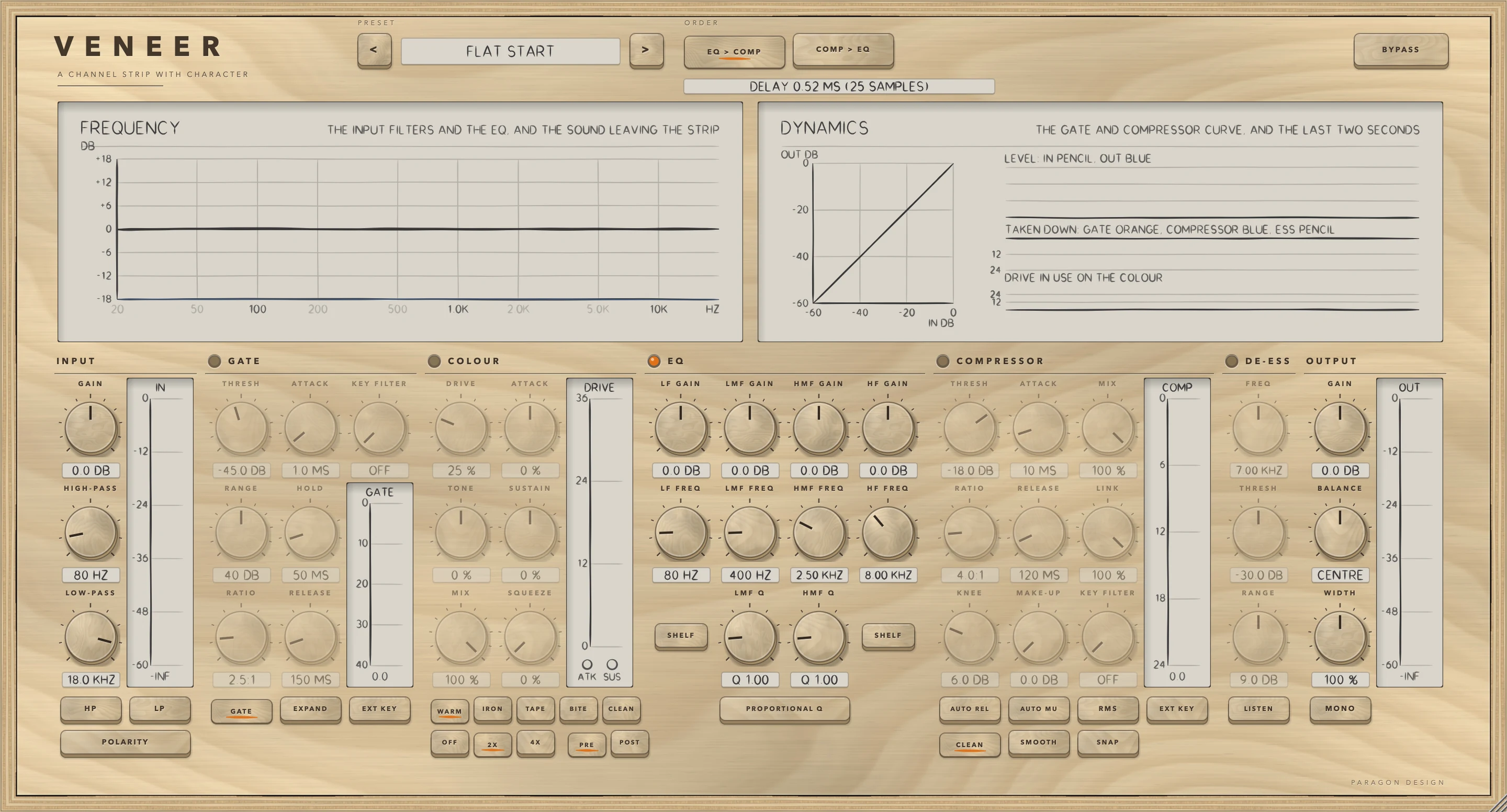
Flat Start is exactly the plug-in's default state: the EQ on with every gain at 0, every other section off and 2X oversampling. Every preset sets every control except BYPASS, so loading one also puts ORDER, the oversampling and the position of colour where the preset says. The Mix Bus presets use POST and 4X. Lo-fi Grit uses OFF. All others use 2X.
On pink noise at -18 dBFS RMS the presets change the level from -7.3 dB (Synth Pad, Tuck Back) to +2.7 dB (Mix Bus, Gentle Glue). The presets belong to VENEER's own window: it reports a single unnamed program to the host. Every control, the number of the preset last loaded and the window size are saved with the project. In Logic Pro, plug-in settings are stored with the project file.
Measured
All figures are from the test run in the plug-in repository on 13 October 2026, which passed all 677 of its checks across the six plug-ins. They are on synthetic test signals, not on recordings of music. The sample rate is 48 kHz unless a row says otherwise. Where a row says test limit, only the limit was checked and the measured value was not logged.
| What was measured | Result | Conditions |
|---|---|---|
| Strip at rest, and bypass | A delay of exactly 0, 25 or 29 samples at OFF, 2X and 4X, with nothing else changed, bit for bit. Bypass gave the same | 1 s of stereo pink noise at -20 dBFS RMS. Bypass was checked from 3000 samples after the switch, with every section in use before it |
| Harmonics under the fundamental | Second and third: WARM -26.1 and -42.1 dB, TAPE -118.5 and -28.7 dB, BITE -31.9 and -26.6 dB. Harmonics 2 to 5 together: WARM -26.0 dB, TAPE -28.7 dB, BITE -25.0 dB | 1 kHz at -12 dBFS, DRIVE 50 percent, OFF, mono |
| IRON and SQUEEZE | A 60 Hz tone had at least 12 dB more distortion than a 5 kHz tone. With 12 dB of gain reduction supplied, SQUEEZE at 100 percent added more than 6 dB of distortion, and with none under 0.5 dB (test limits) | IRON as above. SQUEEZE: TAPE, DRIVE 10 percent, 1 kHz at -14 dBFS |
| Level through colour | Output within 0.13 dB of the input | Pink noise at -18 dBFS RMS, level over the last 3 s of 8 s. WARM, IRON, TAPE and BITE at DRIVE 30 and 90 percent, OFF |
| Alias at 10 kHz | -43.3 dB at OFF, -79.1 dB at 2X, -83.6 dB at 4X | A 9.5 kHz tone at -8 dBFS through BITE at DRIVE 80 percent, against the tone |
| ATTACK and SUSTAIN | Distortion in the attack and in the tail. No steering: -39.4 and -50.1 dB. ATTACK +100: -22.9 and -50.1. SUSTAIN +100: -38.4 and -36.3. ATTACK +100 with SUSTAIN -100: -23.1 and -58.1 | Sine bursts at -12 dBFS peak, 1 ms rise, 120 ms decay. TAPE, DRIVE 30 percent, OFF. Attack 1 to 15 ms after the start of a burst, tail 60 to 120 ms |
| Oversampler | Round trip at 18, 20 and 22 kHz: 2X -0.002, -0.005 and -1.59 dB, 4X -0.001, -0.002 and -1.59 dB. Flat within 0.02 dB from 100 Hz to 15 kHz (test limit). Images of a 15 kHz tone: 2X at 33 kHz -78.0 dB, 4X at 33, 63 and 81 kHz -78.5, -102.9 and -68.4 dB, all under the -65 dB test limit | Sine at amplitude 0.5. Images against the tone |
| EQ | Four bells at +9 dB read +9.0000 dB at 120, 450, 3000 and 9000 Hz. A low shelf of +6 dB gave 5.8209 dB at 40 Hz and a high shelf of -6 dB gave -5.9478 dB at 17 kHz (test limits 0.4 and 0.6 dB). Q 1 at 1 kHz is 1.39 octaves wide at half the gain, at +3 and +12 dB. With PROPORTIONAL Q, 1.12 octaves at +3 dB and 0.71 at +12 dB. With every band at 0 dB the signal is untouched, bit for bit | Shelf corners 100 Hz and 8 kHz. Widths calculated from the filter's response |
| Filters and output | The high-pass at 100 Hz was -3.0103 dB at 100 Hz and -18.1294 dB at 50 Hz. The low-pass at 8 kHz was -3.0103 dB at 8 kHz. WIDTH 200 percent doubled the side signal (2.0000) | Sine waves |
| Gate | A tone 10 dB under the threshold was cut by 29.9176 dB, and one 10 dB over was untouched (0.0000). With a 0.5 ms attack the gain was 0.723 at 0.5 ms (63 percent of the way is 0.644) and 1.000 at 4 ms. A 2:1 expander cut a tone 10 dB under the threshold by 10.0089 dB. A quiet right channel stayed open while the left was loud (0.0000 dB). A 40 Hz rumble opened a gate with no key filter and not with KEY FILTER at 250 Hz (test limit 25 dB) | THRESH -40, RANGE 30, ATTACK 0.5 ms, HOLD 20 ms, RELEASE 80 ms. Expander RANGE 40. 1 kHz tones. Rumble at -20 dBFS |
| Compressor | Within 0.45 dB of the soft-knee formula (test limit). A 10 ms attack took 10.0 ms to reach 63 percent of the reduction and a 100 ms release took 130.0 ms to fall to 37 percent, with a final reduction of 19.0 dB. MAKE-UP 6 dB added 6.0000 dB, AUTO MU 7.5000 dB, and MIX 50 percent changed the level by -3.3757 dB at 9.0 dB of reduction | Curve: THRESH -24, 1 kHz from -50 to 0 dBFS, ratios 2, 4, 10 and 20 with knees 0, 6, 12 and 0. Timing: THRESH -30, 20:1, KNEE 0. Make-up: THRESH -20, 4:1, KNEE 0 |
| Key filter, link and AUTO REL | A 60 Hz note at -10 dBFS turned a 1 kHz tone at -40 dBFS down by 17.8 dB with no key filter and by 0.0 dB with KEY FILTER at 300 Hz. With LINK at 0 the right channel was left alone (0.0000). Time to fall to 37 percent: 330 ms after a light squeeze and 166.667 ms after a hard one, against 308.333 ms for a fixed 300 ms | THRESH -30. Key filter 10:1, LINK 8:1. AUTO REL 20:1, KNEE 0, ATTACK 2 ms, RELEASE 300 ms. Light squeeze: tone at -24 dBFS. Hard squeeze: -3 dBFS |
| De-esser | The 7.5 kHz band fell by 8.3 dB and the 300 Hz tone by 0.01 dB. The reduction meter read 9.0 | FREQ 7.5 kHz, THRESH -30, RANGE 9. A noise band at -16 dBFS RMS over a 300 Hz tone at -20 dBFS |
| Order and place | EQ then compressor -15.5 dBFS, compressor then EQ -8.0 dBFS. Third harmonic under the tone: -67.1 dB with colour before the EQ, -33.5 dB after it and -33.5 dB when moved while playing. Changing the order while playing ended in the new order with no jump and went through silence (test limits: largest step under 0.35, lowest 1 ms peak under 0.02) | 1 kHz at -20 dBFS, LMF +12 dB at 1 kHz, compressor 4:1 from -18 dB, KNEE 0. Colour: TAPE, DRIVE 40 percent, 2X, tone at -24 dBFS |
| Drawn curves | Measured and drawn values were equal to two decimals at 50, 100, 400, 1500 and 8000 Hz: -18.03, -2.59, 6.00, 0.48 and 0.01 dB (test limit 0.2 dB). The gate and compressor curve was within 1.0 dB of the strip at six levels (test limit) | High-pass at 100 Hz and LMF +6 dB at 400 Hz, sines at -26 dBFS |
| Side chain | A gate on a silent side chain stayed shut, under -60 dBFS, and opened when the key was pink noise at -10 dBFS RMS, above -21.5 dBFS. A compressor on the side chain turned down a tone at -40 dBFS by more than 12 dB (test limits) | Gate THRESH -30, RANGE 60. Compressor THRESH -30, 10:1, ATTACK 1 ms, KNEE 0, a 200 Hz tone at -6 dBFS as the key |
| Cost | The whole strip, every section on, 2X colour: 1.91 percent of one core. Colour alone at 2X: 1.04 percent | Stereo, 48 kHz, thread CPU time on the development Mac |
| Presets and random settings | All 34 presets matched their stored values when loaded and ran on noise without a non-number or a peak above +18 dBFS (test limit). Level change from -7.3 to +2.7 dB. 120 random settings of every control but BYPASS gave nothing but numbers, with no sample above +60 dBFS (test limit) | Pink noise at -18 dBFS RMS, left channel, over the second second of 2 s. Random: noise at -14 dBFS RMS with clicks |
| Processor | A new VENEER reports 25 samples. In its default state it delays by 25 samples and otherwise leaves the signal untouched. At OFF it has no delay. It runs on a mono track (numbers only) | Through the plug-in processor |
Limits and what is not verified
- Nothing has been checked by ear. Every figure is a measurement of a synthetic signal, and the presets were chosen from numbers.
- The colour characters are described by their measured harmonics and levels. They are not models of any equipment.
- Colour's level match is slow. A sudden change in level is not matched at once. Only colour is matched. The gate, compressor, EQ, output and BYPASS change the level as you set them.
- The DYNAMICS curve leaves out colour and EQ.
- Changing ORDER or the place of colour dips the output. It fades to silence over 3 ms, the change is made at the start of the next 256-sample processing chunk, and the output fades back in over 3 ms. The silence between the two fades lasts no longer than the rest of one 256-sample chunk.
- The cost of 4X oversampling was not measured.
- The test on a mono track checked only that the output was valid numbers.
- Not verified in Logic Pro: how the side chain is delivered relative to the plug-in's latency compensation, and whether Logic Pro applies the new latency when OFF, 2X or 4X is changed while the project plays.
- Not verified: the licence panel and the trial in every host. They are checked in the plug-in's own tests and in one test host, and the Getting started manual lists what is not verified.
Troubleshooting
The plug-in passes my audio through and says TRIAL OVER: ENTER A LICENCE
The 14 days are over for VENEER and no licence has been added. Press LICENCE in the top bar, choose the licence file that came with your order, or drop the file on the window, and VENEER works again at once. If the panel says THIS LICENCE IS FOR another plug-in, that file does not cover VENEER: the order page offers the file for your order.
The panel shows a delay with everything off
The colour oversampling is on 2X by default, and it costs 25 samples whether or not COLOUR is on. Choose OFF for NO DELAY.
Colour seems to do nothing
Colour leaves the signal untouched when COLOUR is off, when MIX is 0, and when CLEAN is chosen with TONE at 0. With a shaping character it also needs something to act on: DRIVE above 0, or ATTACK or SUSTAIN away from 0, or SQUEEZE with the COMPRESSOR on and pulling the level down, which the COMP meter shows.
EXT KEY has no effect, or the gate stays shut
If nothing is connected to the side chain, the gate or compressor listens to the signal itself. Choose a source in the Side Chain pop-up menu of the plug-in window. If a source is connected but silent, a gate on it stays shut.
The level changes when I load a preset or press BYPASS
The presets change the level, from -7.3 dB to +2.7 dB on pink noise at -18 dBFS RMS. BYPASS does not match levels either. Use OUTPUT GAIN to level-match before you compare.
There is a gap when I change ORDER, PRE or POST
The output fades to silence, the change is made, and the output fades back in. See the limits above.
Only a thin band of the signal is audible
LISTEN under DE-ESS is on. It plays only what the de-esser's detector hears. Switch it off.
The track is late against other tracks
VENEER reports 25 samples at 2X and 29 at 4X. If the host's delay compensation is off, the track is late by that amount. In Logic Pro, plug-in latency compensation is set with the Compensation pop-up menu in Logic Pro > Settings > Audio > General.