What it is
GAUGE listens to the song as it plays and tells you, in plain numbers, whether it is ready to release. It measures loudness against a target you choose and true peak against a ceiling you choose. It also reads stereo, low-end phase, spectrum, DC offset and clipping, and writes a verdict in words.
Load a reference track and GAUGE does a second job. It finds the sections of both songs from the music itself, pairs them, and plays the reference at the gain that matches your mix's loudness, one paired section at a time. You hear your chorus against the reference's chorus, not against its verse.
GAUGE never changes the mix. The signal passes through untouched, bit for bit, until you switch on REF or MONO to listen. It is not a limiter or a loudness normaliser, and it makes no claim about what any service will do to your file. The target and the ceiling are yours to set, and the verdict applies plain rules of thumb to them.
Setting it up
Formats, channels and latency
GAUGE is an effect in Audio Unit and VST3 formats, on a mono or a stereo channel with the same number of channels in and out. It has no side chain input. It reports no latency.
Where to put it
Put GAUGE last in the chain of the stereo output, so it reads what you would bounce. It measures the signal at its own input, so anything after it is not in the numbers. The numbers always describe the mix, even while REF plays the reference.
The timeline
GAUGE writes loudness every 100 ms and a spectral row every half second into tables indexed by the host's timeline, so it knows where in the song each reading belongs. The tables hold the first 12 minutes of the timeline. If the host gives no timeline, GAUGE counts time itself and treats the song as playing while there is a signal at its input.
Reference files
The file chooser offers WAV, AIFF, FLAC, MP3, AAC (M4A), CAF, Ogg Vorbis and other formats macOS can decode, and you can drop a file on the window. A reference can be up to 12 minutes long. It is converted to the host's sample rate when it loads, and loaded again if the rate changes. The project keeps the file's path, not the audio, and the REFERENCE area reads FILE MISSING if the file has moved.
Sample rates
The loudness meter was checked at 44.1 kHz and 48 kHz. Every other measurement, the section finding and the reference playback were tested at 48 kHz only. Other rates are not verified.
Licence and trial
GAUGE is a premium plug-in. It works in full for 14 days. The days are counted for each plug-in on its own. They start the first time the plug-in's window is opened, or after five minutes of audio have gone through it, whichever comes first. A host that only creates the plug-in to read what it is does not start them. In the top bar, beside the small wooden key marked LICENCE, a pencil line reads TRIAL: 9 DAYS LEFT, and the number falls by one each day. The last day reads 1 DAY LEFT. After it the line reads TRIAL OVER: ENTER A LICENCE, in orange.
GAUGE has no delay and nothing to bypass. When the trial is over the mix passes through untouched, REF and MONO fade out over 8 ms, and GAUGE stops measuring: the loudness slots, the section rows and the automatic reset stop, and what was measured stays. RESET and loading a reference do nothing.
To add a licence, press LICENCE and then CHOOSE FILE, or drop the licence file anywhere on the plug-in's window. One file covers every plug-in in an order, and GAUGE works again at once. Nothing saved in a session is changed when a trial ends or a licence arrives. The Getting started manual has the whole chapter, Licences and the trial.
In Logic Pro
- Audio effects can go in audio, instrument, aux and output channel strips. Click an Audio Effect slot of the output channel strip, then choose Gauge Mix Check and Reference from the pop-up menu (versions before 0.1.1 list it as Gauge).
- Audio Units plug-ins are in the Audio Units submenu of that menu.
- Open the plug-in window by clicking the centre area of the plug-in slot.
A first session
- Put GAUGE last on the output channel strip.
- Play the song from the start. The display reads NOTHING MEASURED YET: PLAY THE SONG FROM THE START until music arrives, then MEASURED m:ss OF MUSIC. The verdict needs 3 seconds of music.
- Set TARGET to the loudness you are aiming for, or open TARGETS and choose a level. Set CEILING to the highest true peak you allow.
- Read the VERDICT on the CHECK sheet. Press COPY REPORT to put every number and the verdict on the clipboard as plain text.
- To compare with a reference, press LOAD REFERENCE and choose a file, or drop a file on the window. The REFERENCE area shows its name, loudness, length and the number of sections found.
- Press COMPARE. After about eight seconds of music the sections of your mix appear, and orange lines pair them with the reference's sections.
- Press REF to hear the reference at your mix's loudness. Press MIX to go back at any moment.
How it works
SHEET
CHECK and COMPARE choose which sheet the display shows. RESET forgets everything measured, including the map of the song, and starts again. COPY REPORT copies the numbers and the verdict as plain text, then reads COPIED for a moment.
The CHECK sheet
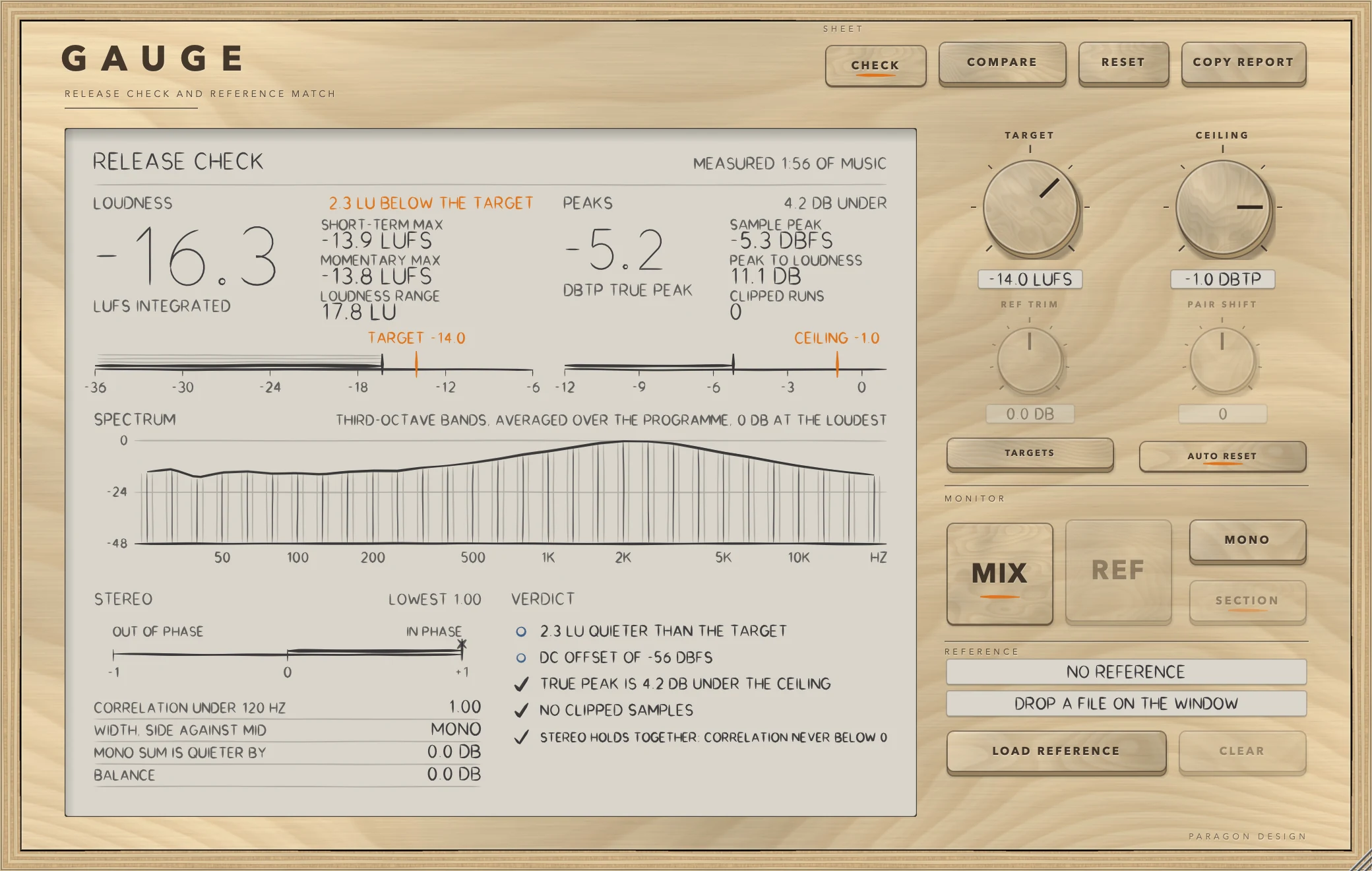
The sheet is headed RELEASE CHECK, and in four blocks it shows what GAUGE measured.
- Loudness. The integrated loudness is the big figure, in LUFS to BS.1770-4, with the words ON TARGET when it is within 0.5 LU of TARGET and otherwise how many LU above or below. Beside it are SHORT-TERM MAX, MOMENTARY MAX and LOUDNESS RANGE (to EBU Tech 3342).
- Peaks. The true peak is in dBTP, measured on a signal oversampled four times as BS.1770-4 Annex 2 describes, against CEILING. Beside it are SAMPLE PEAK, PEAK TO LOUDNESS (true peak minus integrated loudness) and CLIPPED RUNS, which counts runs of two or more consecutive samples at full scale. A lone full-scale sample is not a clip.
- Spectrum. Thirty one-third-octave bands from 25 Hz to 20 kHz, with 0 dB at the loudest band. The mix's spectrum is a running average that follows about the last 17 seconds. The panel text says the bands are averaged over the programme, which is the case for the first 17 seconds and for a reference.
- Stereo. The correlation runs from -1 (out of phase) to +1 (in phase), smoothed over 0.4 s, with LOWEST marking the lowest value seen while the signal was above -60 dBFS. CORRELATION UNDER 120 HZ is the same measure on the low end. WIDTH, SIDE AGAINST MID is the side energy against the mid energy in dB, and reads MONO when the side is more than 50 dB below the mid. MONO SUM IS QUIETER BY is how much quieter the mono sum is than the stereo. BALANCE is left against right in dB.
The verdict
The VERDICT block lists up to six lines, problems first, then notes, then what is fine. A cross is a problem, a small circle is a note and a tick is fine. If there are more lines the sheet says AND n MORE IN THE REPORT. The rules are:
- Loudness within 0.5 LU of TARGET is fine. Otherwise it is a note that says how many LU louder or quieter.
- True peak over CEILING is a problem, with how many dB over. Under it is fine.
- Any run of clipped samples is a problem.
- Correlation that dips below -0.3 is a problem, and below 0 is a note. Staying above 0 is fine.
- A mono sum more than 3 dB quieter than stereo, a correlation under 120 Hz below 0.5, a balance beyond 1 dB, or a DC offset above 0.001 each add a note.
- Before 3 seconds of music have been measured, the verdict says KEEP PLAYING: NOT ENOUGH MUSIC MEASURED YET.
TARGET, CEILING and TARGETS
TARGET is the loudness you are aiming for, from -30 to -6 LUFS, default -14. CEILING is the highest true peak you allow, from -6 to 0 dBTP, default -1. TARGETS sets TARGET to one of four levels: -14, -11 and -19 LUFS, which its labels give as the normal, loud and quiet levels of a streaming service, and -23 LUFS, labelled EBU R128 broadcast. It is a shortcut for the knob and not a bank of presets.
The COMPARE sheet
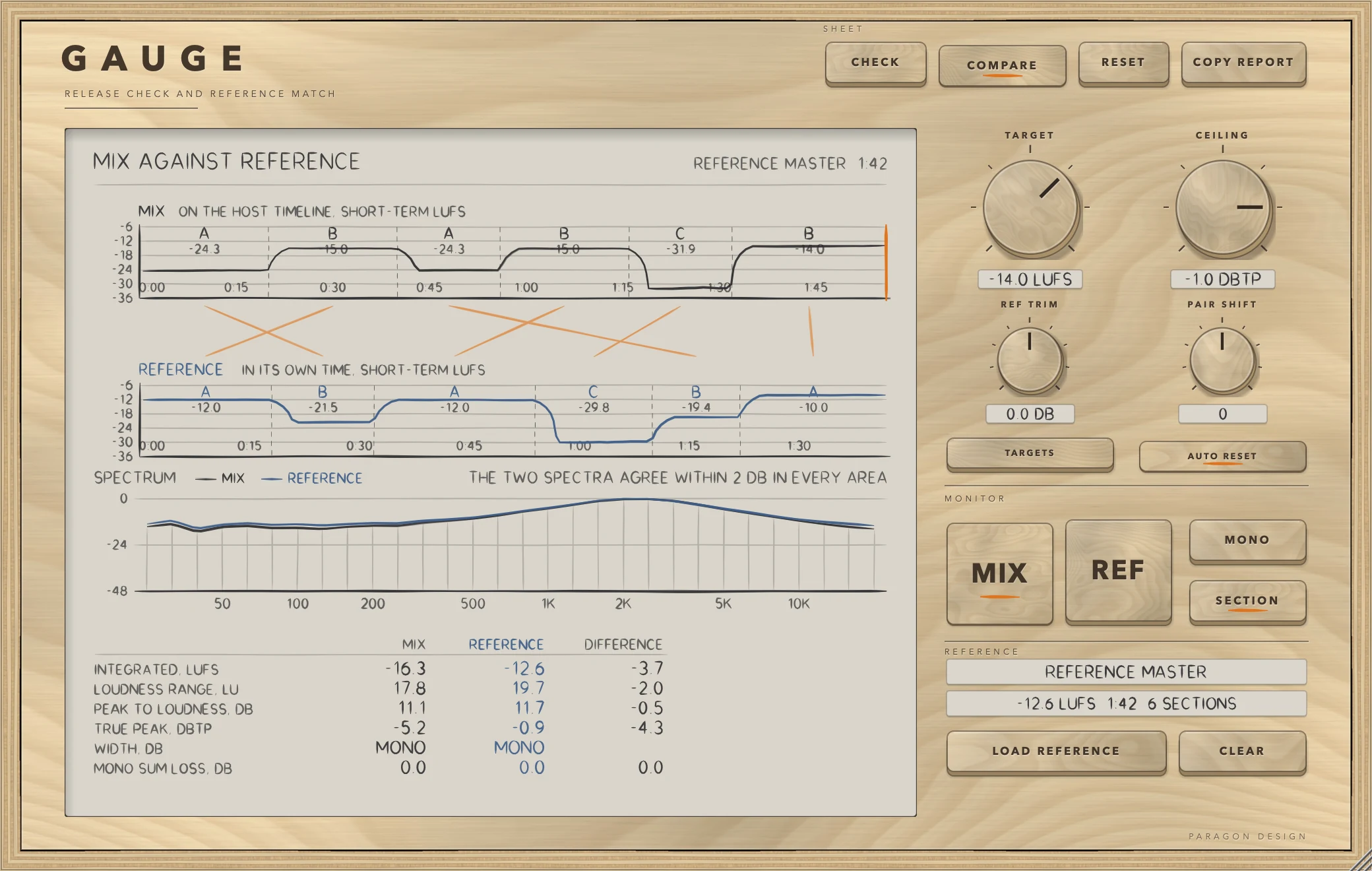
The sheet is headed MIX AGAINST REFERENCE. The upper lane is the mix on the host timeline and the lower lane is the reference in its own time, each as short-term loudness with its sections marked A, B, C and the loudness of each. Orange lines pair a mix section with a reference section. Below them the spectrum draws the mix and the reference together, with a sentence naming the area that differs most, such as THE MIX HAS 5.0 DB LESS HIGH, or saying that the two agree within 2 dB in every area. At the bottom are six figures side by side with their difference: INTEGRATED, LOUDNESS RANGE, PEAK TO LOUDNESS, TRUE PEAK, WIDTH and MONO SUM LOSS.
A playhead moves on the mix lane while the timeline plays, and on the reference lane while the reference is heard. The NOW PLAYING text names the pairing in force, for example MIX B WITH REFERENCE B, and the gain applied, REFERENCE n DB TO MATCH.
How the sections are found
GAUGE finds the sections of a song from its sound. It measures sixteen half-octave bands from 63 Hz every half second, adds the loudness, and looks for points where the sound before is unlike the sound after. A section is at least 7 seconds long, and a song can have up to 24. Sections with similar spectra and loudness share a letter, numbered by first appearance: A, B, C. GAUGE does not guess labels such as verse or chorus. The first sections appear after about eight seconds of music, and the mix's sections are refreshed about once a second.
A section's loudness is measured over its own stretch, as if it were a programme of its own, leaving out the first and last second so that a neighbouring section does not lift it.
How the pairing works
GAUGE pairs the loudest kind of section in the mix with the loudest kind in the reference, the next with the next, and the nth appearance of a kind with the nth appearance of its partner. The gain for a pair is the mix section's loudness minus the reference section's, limited to 30 dB either way. A pair whose loudness is unknown for either side gets no gain and reads NO LEVEL MATCH YET.
REF TRIM and PAIR SHIFT
REF TRIM sets the reference level on top of the loudness match, from -12 to +12 dB, default 0, and double-click resets it. PAIR SHIFT moves every pairing along the reference by that many sections, from -4 to +4, default 0, when the automatic pairing is not the one you want. It is available only when a reference is loaded and SECTION is on.
MONITOR
MIX plays the mix as it is. REF plays the reference in its place, brought to the loudness of the mix. REF is available only when a reference is loaded, and it plays only while the timeline runs. MONO plays the mono sum of whatever is playing.
The key beside MONO reads SECTION or WHOLE. In SECTION the reference plays the stretch that matches the section of the mix, looping inside it, at that section's gain. At every jump there is a 32 ms crossfade, and the gain changes with a 120 ms smoother. In WHOLE the reference follows the host timeline at one gain: the mix's integrated loudness minus the reference's, once 3 seconds of the mix have been measured. SECTION also uses that one gain wherever no pairing applies yet.
REFERENCE
The two tags show the reference's name in capitals and its loudness in LUFS, length and number of sections. LOAD REFERENCE chooses a file. CLEAR removes it.
AUTO RESET
With AUTO RESET on, the numbers start again when the song begins from the top: when playback starts within the first second of the timeline, or the timeline jumps back there. The map of the song's sections is kept, and the new pass writes over it. With AUTO RESET off, the measurement carries on. Only RESET clears the map.
Control reference
Every control on the panel, as the plug-in itself labels it. The description is the tooltip the plug-in shows when you rest the pointer on the control.
Top bar
| No. | Control | What it does | Range | Default |
|---|---|---|---|---|
| 1 | CHECKKey | The release numbers, read against the target and the ceiling. | ||
| 2 | COMPAREKey | The mix beside the reference: loudness over time, the sections, and the spectrum. | ||
| 3 | RESETKey | Forget everything measured, and the map of the song, and start again. | ||
| 4 | COPY REPORTKey | Copy every number and the verdict to the clipboard as plain text. |
Controls
| No. | Control | What it does | Range | Default |
|---|---|---|---|---|
| 5 | TARGETKnob | The loudness the release is aimed at. TARGETS has the presets. | −30 to −6 LUFS | −14 LUFS |
| 6 | REF TRIMKnob | Reference level, on top of the loudness match. Double-click to reset. | −12 to 12 dB | 0 dB |
| 7 | TARGETSKey | Set the target to a streaming or broadcast level. | ||
| 8 | MIXKey | Hear the mix as it is. | ||
| 9 | LOAD REFERENCEKey | Choose a reference track. You can also drop a file on the window. | ||
| 10 | REFKey | Hear the reference in its place, brought to the loudness of the mix. | ||
| 11 | CEILINGKnob | The highest true peak the release may reach. | −6 to 0 dBTP | −1 dBTP |
| 12 | PAIR SHIFTKnob | Moves every section pairing one section along the reference, when the automatic pairing is not the one you want. | −4 to 4 | 0 |
| 13 | AUTO RESETKey | Start measuring again when the song begins from the top. The map of the song's sections is kept. | ||
| 14 | CLEARKey | Remove the reference. | ||
| 15 | MONOKey | Hear the mono sum of whatever is playing. | ||
| 16 | SECTIONKey | SECTION: the reference plays the stretch that matches the section of the mix, at that section's loudness. WHOLE: the reference plays alongside the timeline at one level. |
Recipes
Check a master against a streaming level
- Open TARGETS and choose the -14 LUFS entry. Leave CEILING at -1.0 dBTP.
- Play the song from the start and let it run to the end.
- On CHECK, read the figure beside the big integrated loudness. ON TARGET means within 0.5 LU. Otherwise the sheet says how far above or below you are.
- Read the VERDICT and press COPY REPORT.
Find where a mix is brighter or darker than a reference
- Load the reference and press COMPARE.
- Play the mix. When the spectrum has settled, read the sentence above it.
- THE MIX HAS 5.0 DB LESS HIGH, for instance, names the area with the biggest gap. The areas are LOW (25 to 125 Hz), LOW MID (160 to 500 Hz), MID (630 to 2000 Hz), HIGH MID (2.5 to 6.3 kHz) and HIGH (8 to 20 kHz). The sentence appears only when the biggest gap is 2 dB or more.
Hear chorus against chorus at the same loudness
- Load the reference, set the key beside MONO to SECTION, and play the mix.
- Press REF while a section of the mix plays. The reference plays the paired section, looping inside it.
- Read NOW PLAYING on COMPARE to see which sections are paired and the gain.
- Press MIX to go back.
Correct a wrong pairing
If the reference's verse is paired with your chorus, set PAIR SHIFT to +1 or -1. Every pairing moves one section along the reference. Check NOW PLAYING again.
Check mono compatibility
- Press MONO while the song plays and listen.
- On CHECK, read CORRELATION UNDER 120 HZ, MONO SUM IS QUIETER BY and the LOWEST mark on the correlation scale. The verdict flags a mono sum more than 3 dB down, and a low end that is not centred.
Send the numbers to someone
Press COPY REPORT, then paste. The text lists LOUDNESS, PEAKS, STEREO and FAULTS, then the VERDICT. With a reference loaded it adds the same numbers for the reference, the differences, the spectrum by area and the section pairing.
Presets
GAUGE has no factory presets and no preset bar. TARGET, CEILING, REF TRIM, PAIR SHIFT, the SECTION or WHOLE choice, AUTO RESET, which sheet is showing, the window size and the reference's path are saved with the project. The measurements are not saved. In Logic Pro, plug-in settings are stored with the project file.
Measured
All figures are from the test run in the plug-in repository on 13 October 2026, which passed all 677 of its checks across the six plug-ins. They are on synthetic test signals, not on recordings of music. The sample rate is 48 kHz unless it says otherwise.
| What was measured | Result | Conditions |
|---|---|---|
| Integrated loudness against an independent EBU R128 meter (ffmpeg, ebur128 filter) | -18.23 LUFS here, -18.2 from ffmpeg, which prints one decimal | 58 s of five pink-noise sections at -30, -19, -27, -17 and -33 dB, with three isolated peak samples. Test limit 0.1 LU |
| LOUDNESS RANGE against the same meter | 13.24 LU here, 13.2 from ffmpeg | Same programme. Test limit 0.35 LU |
| True peak against the same meter | -0.42 dBTP here, -0.5 from ffmpeg | Same programme. Test limit 0.15 dB |
| True peak between samples | Sample peak -3.01 dBFS, true peak -0.05 dBTP, where the waveform reaches full scale | A sine at a quarter of the sample rate, 45 degrees of phase |
| A tone at -20 dBFS | Reads -20 dBTP | 997 Hz sine |
| Correlation | +1.0000 for identical channels, -1.0000 for inverted channels, -0.0430 for unrelated channels | 6 s of pink noise at -20 dB |
| Mono sum | 0.0000 dB lost for identical channels, 3.2009 dB for unrelated channels | Same noise |
| Balance | 6 dB down on the right reads +6.0206 dB | Same noise |
| Low-end correlation | Bass in phase reads 1.000, bass out of phase reads -1.000 | 60 Hz bass with unrelated 3 kHz content |
| Spectrum bands | Pink noise from 160 Hz to 12.5 kHz spreads 0.5 dB across the bands. White noise rises 11.7 dB over 12 bands, about 1.0 dB a band | 8 s of noise |
| DC offset | An offset of 0.05 reads 0.0496 | 10 s of a 440 Hz sine with the offset added |
| Clipping | Three runs of full-scale samples count as 3, and a lone sample as none | Sine with four-sample runs |
| Section starts | Found at 0, 20, 40, 56, 76 and 92 s, where the song was built to change | A synthetic song of six sections of differently coloured noise, A B A B C B |
| Section loudness against a direct measure | Worst difference 0.02 LU | Same song |
| Reference heard section by section against the mix | Worst difference 0.03 LU. Gains were -2.85, -3.00, -4.94, -2.00, -1.12 and -4.01 dB | Six paired sections of synthetic noise, SECTION mode |
| What plays in SECTION | The paired stretch of the reference times the gain, to within 2e-4 of full scale | Same test |
| Jumps between sections | Largest step between samples 0.0345, where a hard splice would step about 0.4 | Two tones, a pairing built by hand |
| AUTO RESET | 12.0 s measured, then 2.0 s after starting again with it on, against 15.0 s with it off | 12 s of noise, then a second stopped, then 2 s from the top |
| Pass-through | Every output sample equals its input sample, bit for bit | 3 s of stereo pink noise, 480-sample blocks |
| Bypassed with the reference switched in | The input comes straight out | Reference of synthetic noise, bypass on |
| MONO | Both sides equal the average of the two inputs to within 1e-6 | 2 s of pink noise |
| The processor against an offline measure | Integrated -16.75 LUFS, LOUDNESS RANGE 17.78 LU, true peak -6.05 dB. Limits 0.05 LU and 0.3 LU | Synthetic song of six sections played through the processor |
Limits and what is not verified
- Nothing has been checked by ear. Every figure is a measurement of a synthetic signal.
- The section finding was tested on synthetic songs. A test on a real recording exists, but it did not run in the last test run, because its file could not be opened. How it behaves on real music is not verified.
- Pairing is by loudness rank and by order of appearance. If the two songs are structured differently the pairing can be wrong, and PAIR SHIFT is the remedy.
- The verdict is a set of plain rules of thumb. They are not a standard, and they know nothing of any delivery specification beyond the TARGET and CEILING you set.
- The mix's spectrum follows about the last 17 seconds, while the CHECK sheet's caption says it is averaged over the programme.
- The tables and the section map hold the first 12 minutes of the timeline. A reference can be up to 12 minutes long.
- Loudness is measured to BS.1770-4 and checked against an independent meter. Correlation, width, mono loss and the bands are plain measures with no standard behind them.
- GAUGE does not alter the mix, but it also does not protect it: it will not stop a clip or a true peak over the ceiling.
- Sample rates other than 44.1 kHz and 48 kHz are not verified, and the section finding at rates other than 48 kHz is not verified.
- Not verified in Logic Pro: what timeline position the host reports when you start from the top, which AUTO RESET relies on. Also not verified: how GAUGE behaves during an offline bounce.
- Not verified: the licence panel and the trial in every host. They are checked in the plug-in's own tests and in one test host, and the Getting started manual lists what is not verified.
Troubleshooting
The plug-in passes my audio through and says TRIAL OVER: ENTER A LICENCE
The 14 days are over for GAUGE and no licence has been added. Press LICENCE in the top bar, choose the licence file that came with your order, or drop the file on the window, and GAUGE works again at once. If the panel says THIS LICENCE IS FOR another plug-in, that file does not cover GAUGE: the order page offers the file for your order.
The display reads NOTHING MEASURED YET
No music has reached GAUGE. Play the song from the start. If the host gives no timeline, GAUGE treats the song as playing only while there is a signal at its input.
The verdict reads KEEP PLAYING: NOT ENOUGH MUSIC MEASURED YET
The numbers need 3 seconds of music above the gate. Keep playing.
The numbers start again every time I press play
AUTO RESET is on, and playback is starting within the first second of the timeline. Switch AUTO RESET off to let the measurement carry on. Press RESET if you want to clear the map too.
COMPARE shows no sections
The display reads THE SECTIONS APPEAR AFTER ABOUT EIGHT SECONDS OF MUSIC, or PLAY THE SONG: THE MAP FILLS IN AS IT GOES. Sections appear only while the song plays, written against the host's timeline.
REF, SECTION, PAIR SHIFT or REF TRIM are dimmed
They need a reference. Load one with LOAD REFERENCE or by dropping a file on the window. PAIR SHIFT also needs SECTION on.
The reference is silent
REF plays only while the timeline runs. Start the host.
The REFERENCE area says CHOOSE ANOTHER FILE
The file could not be read, was empty, or was longer than 12 minutes. Choose another file. After a project opens, FILE MISSING means the file has moved.
NOW PLAYING says NO LEVEL MATCH YET
The loudness of that mix section or its reference section is not known yet, so no pair gain exists. The reference plays at the single whole-file gain instead.
The reference seems too loud or too quiet
The reference follows the match, plus REF TRIM. Check REF TRIM, and check whether SECTION or WHOLE is chosen, because the gain differs between them.