What it is
CLAMP is a compressor. It turns the signal down when the level goes over THRESHOLD, by an amount set by RATIO, and six voicings change how it reads the level and how it lets go. This manual describes version 0.1.0.
The detector reads the input, or the sidechain when EXT KEY is on, and never the output. CLAMP works out a gain from that reading, applies it to the input, adds make-up, and blends the result with the same input, delayed to match. There is no harmonic term and no nonlinearity in this version: the only distortion is the gain moving within a wave.
The display draws the curve in use with the level on it, and the last four seconds of levels and gain taken down. You set THRESHOLD and RATIO by dragging a point on it.
Setting it up
Formats and channels
CLAMP is an effect, in Audio Unit and VST3 formats. The VST3 is built from the same code, but no test loads it in a host. It works on a mono or a stereo track, with the same number of channels in and out. The bundle declares macOS 11.0 as the minimum, and the panel is 900 by 580 pixels, resizable from 70 to 170 percent.
Sidechain input
The optional sidechain input is mono or stereo and starts switched off: the host has to connect a source. EXT KEY makes the detector listen to it instead of the signal. With nothing connected, or with the input enabled but no channels supplied, EXT KEY leaves the detector on the signal itself. A source that is connected but silent turns nothing down, and with EXT KEY off a connected source is ignored.
Latency
LOOK-AHEAD holds the signal back by 1, 2 or 5 ms, in whole samples rounded half up, and CLAMP reports the delay to the host after a short pause. The panel states it under the preset bar, as NO DELAY or, for example, DELAY 5.00 MS (240 SAMPLES). In samples:
| Sample rate | OFF | 1 MS | 2 MS | 5 MS |
|---|---|---|---|---|
| 44.1 kHz | 0 | 44 | 88 | 221 |
| 48 kHz | 0 | 48 | 96 | 240 |
| 88.2 kHz | 0 | 88 | 176 | 441 |
| 96 kHz | 0 | 96 | 192 | 480 |
| 192 kHz | 0 | 192 | 384 | 960 |
In Logic Pro
- Click an Audio Effect slot in the channel strip, then choose Clamp Compressor from the pop-up menu (versions before 0.1.1 list it as Clamp). Audio Units plug-ins appear in the Audio Units submenu.
- To use the sidechain, click the Side Chain pop-up menu in the plug-in header area and choose an audio or software instrument track, a hardware input or a bus. The sidechain signal controls the plug-in and is not processed by it. Then press EXT KEY on the panel.
- To see the latency, hold the pointer over the plug-in slot. A help tag shows it in samples and seconds.
A first session
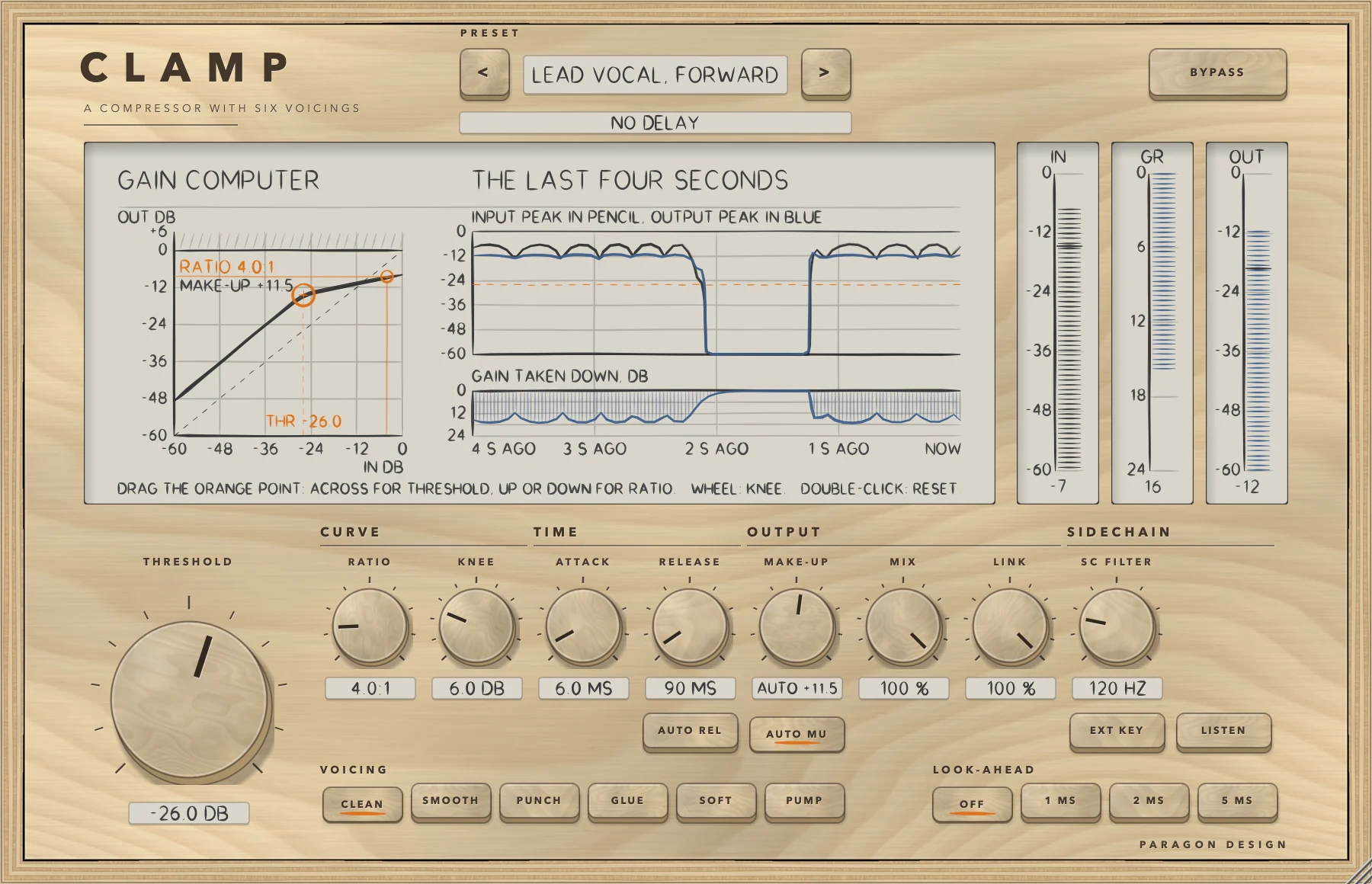
- Put CLAMP on a track. The preset bar reads PLAIN START and the line under it reads NO DELAY.
- Play the loudest part. The dashed orange line across INPUT PEAK IN PENCIL, OUTPUT PEAK IN BLUE is THRESHOLD.
- Drag the orange point left until the GR meter and the lane GAIN TAKEN DOWN, DB move on the loud parts. Drag it up or down to change RATIO.
- Set ATTACK and RELEASE. A shorter RELEASE brings GAIN TAKEN DOWN, DB back to 0 sooner.
- Press AUTO MU, then BYPASS, to compare. AUTO MU restores only a steady sine 6 dB over THRESHOLD, and BYPASS does not match levels.
- Click the other voicings in turn, then choose Lead Vocal, Forward from Vocal in the preset menu, as in the figure.
How it works
Hold the pointer over a control for a short description, and double-click a knob to return it to its default. The Control reference after this chapter lists every control with its limits and default.
Top bar and presets
The keys < and > step through the 37 presets, and a click on the name opens a menu by category. An asterisk after the name means a control has moved since the preset loaded. BYPASS crossfades over 5 ms to the input delayed by the same amount as when CLAMP is working, so it never moves anything in time. It is also the host's bypass parameter.
The display and its gestures
GAIN COMPUTER plots level in (IN DB) against level out (OUT DB, to +6). The heavy line is the curve in use, with the voicing's knee and the make-up added. A small orange circle marks where the level is now, from the detector's reading.
THE LAST FOUR SECONDS has two lanes. INPUT PEAK IN PENCIL, OUTPUT PEAK IN BLUE shows the signal at the main input, which differs from the detector's reading with EXT KEY or SC FILTER, and what leaves. Its dashed orange line is THRESHOLD. GAIN TAKEN DOWN, DB runs from 0 to 24. MIX changes the output trace, not the curve or that lane.
- Drag the orange point across for THRESHOLD and up or down for RATIO. At 100 percent size each 36 pixels down doubles RATIO, each 36 up halves it, and a long drag down reaches infinity. The press must land on the point.
- Turn the wheel over the plot to set KNEE.
- Double-click the plot to put THRESHOLD, RATIO and KNEE back to -18 DB, 3.0:1 and 6.0 DB.
Each is a parameter gesture a host can record.
The meters
IN and OUT read the peak level at the main input and at the output, from 0 to -60 dB, and GR the gain reduction, from 0 to 24 dB. They hold their peaks and let go at 24 dB a second (IN and OUT) and 30 (GR), whatever the block size (tested at 64 and 4096 samples).
THRESHOLD
THRESHOLD is the big knob. A steady sine at this peak level is where compression starts. Both detector readings are calibrated to a sine's peak, the same in all six voicings.
That does not carry over to noise, a voice or a mix: the momentary reading follows the peaks, the RMS reading follows the power (the RMS level plus 3.01 dB), and each voicing mixes the two in its own share. Pink noise at -18 dBFS RMS is reduced, on average, as much as a steady sine whose peak level is above that RMS level by 8.7 dB in CLEAN, 6.0 SMOOTH, 8.5 PUNCH, 4.1 GLUE, 7.1 SOFT and 9.9 PUMP (threshold -30 dB, 4:1, knee 6 dB, ATTACK 5 ms, RELEASE 150 ms). It cannot be made the same for noise, so set THRESHOLD by the GR meter and the display.
CURVE: RATIO and KNEE
RATIO at 4:1 turns 4 dB over the threshold into 1 dB over, and 1:1 does nothing. The end stop is infinity, read out as INF:1, where the curve is flat above the knee. KNEE is centred on THRESHOLD, from half the KNEE under it to half over it. Inside it the curve is quadratic in CLEAN, PUNCH, SOFT and PUMP and eased in SMOOTH and GLUE.
TIME: ATTACK, RELEASE and AUTO REL
ATTACK is the time for the reduction to cover 63 percent of the way, multiplied by the voicing's factor. The reduction is held and a new peak is taken at once, so a slow ATTACK delays the reduction of a short peak rather than skipping it. RELEASE is the time to fall to 37 percent in CLEAN and PUNCH, the time to recover 24 dB in PUMP, and the slowest time constant in SMOOTH, GLUE and SOFT. AUTO REL gives the voicing its own law, short after a brief peak and longer as the overload goes on, and the RELEASE read-out then says AUTO.
OUTPUT: MAKE-UP, AUTO MU, MIX and LINK
MAKE-UP raises the compressed side only, so with MIX under 100 the dry side is not raised. AUTO MU adds the reduction a steady sine 6 dB over THRESHOLD receives, so that sine leaves at the level it arrived, and MAKE-UP then trims it. It is 4.5 dB in CLEAN at -24 dB, 4:1 and knee 0.
MIX blends compressed and dry, the dry delayed to match: MIX 0 is the delayed input, bit for bit. LINK 100 gives both sides of a stereo signal the gain of the louder side and LINK 0 leaves each alone. In between, each side is read as louder than it is by LINK times its distance under the louder side, in dB. LINK does nothing on a mono track.
SIDECHAIN: SC FILTER, EXT KEY and LISTEN
SC FILTER is a second-order high-pass, 12 dB per octave, on what the compressor listens to, signal or sidechain. It acts on the detector only. EXT KEY listens to the sidechain input instead of the signal. LISTEN plays the detector signal in place of the output: the signal or the sidechain after SC FILTER, delayed by LOOK-AHEAD, with no gain. It switches over 5 ms, and BYPASS overrides it.
VOICING
The six keys choose how CLAMP reads the level and lets go. The momentary reading is the size of each sample, and the average is an RMS reading over the window. Each becomes a reduction through the curve, and the share mixes the two. A test reads this table back from the engine.
| Voicing | Job | Average share and window | ATTACK is multiplied by | Release with the knob |
|---|---|---|---|---|
| CLEAN | the plain compressor | none | 1 | exponential |
| SMOOTH | voices and single instruments | 50 percent, 12 ms | 1.5 | adapting, fast 0.25 |
| PUNCH | drums | none | 3 | exponential |
| GLUE | buses at low ratios | 85 percent, 25 ms | 2 | adapting, fast 0.4 |
| SOFT | no firm threshold | 35 percent, 8 ms | 1.5 | adapting, fast 0.5 |
| PUMP | a straight-line release | none | 0.5 | linear, 40 ms hold |
In the adapting law the release time moves from the fast time, that fraction of RELEASE, to the slow time, RELEASE, as a memory charges while the level is over the knee and empties when it is not. A short peak lets go fast and a long push slowly. AUTO REL gives every voicing the adapting law, with times of its own. SOFT's ratio rises from 1:1 towards RATIO: the slope of the curve, 1 minus 1 over the ratio, reaches 63 percent of its full value 9 dB over THRESHOLD. PUMP holds the gain for 40 ms after the level falls, then lets it return at 24 dB per RELEASE.
LOOK-AHEAD
The compressor reads the signal as it arrives while the signal is held back, so the gain is already moving when a peak reaches the output. The dry side of MIX, LISTEN and BYPASS are held back by the same amount, and a sidechain is not delayed. Changing LOOK-AHEAD while audio plays fades the output to silence over 3 ms, moves the delay and fades back in.
Names in the host
To a host, CLAMP has 16 parameters. Five are named differently from the panel: SC FILTER is Sidechain High-pass, EXT KEY is External Sidechain, LISTEN is Listen to Sidechain, AUTO REL is Auto Release and AUTO MU is Auto Make-up.
Control reference
Every control on the panel, as the plug-in itself labels it. The description is the tooltip the plug-in shows when you rest the pointer on the control.
Top bar
| No. | Control | What it does | Range | Default |
|---|---|---|---|---|
| 1 | <Key | Previous preset | ||
| 2 | >Key | Next preset | ||
| 3 | BYPASSKey | Hear the input, delayed by the same amount, so switching it never moves anything in time. |
Controls
| No. | Control | What it does | Range | Default |
|---|---|---|---|---|
| 4 | THRESHOLDKnob | The level above which it turns the signal down. A steady sine at this peak level is where compression starts (a little before, with a soft knee). You can also drag the orange point on the display across. Double-click to reset. | −60 to 0 dB | −18 dB |
| 5 | RATIOKnob | How much it turns down what is over the threshold: at 4:1, 4 dB over comes out 1 dB over. The end stop is infinity, a limiter. Dragging the orange point up or down on the display sets it too. | 1 to 20 :1 | 3 :1 |
| 6 | CLEANKey | The plain compressor. The detector follows the waveform sample by sample, ATTACK and RELEASE are the times set, and the curve is the usual soft knee. | ||
| 7 | SMOOTHKey | For voices and single instruments. Half of what the detector reads is an average over 12 ms, the attack is 1.5 times ATTACK, and the release time starts at a quarter of RELEASE and moves towards the whole of it as the push goes on (63 percent of the way after 150 ms). | ||
| 8 | KNEEKnob | How gradually it comes in around the threshold. Zero is a hard corner. The wheel over the display sets it too. | 0 to 24 dB | 6 dB |
| 9 | PUNCHKey | For drums. The attack is 3 times ATTACK, so the front of each hit passes before the gain comes down, and the release is the time set. | ||
| 10 | ATTACKKnob | How fast it turns down once the level is over the threshold: the time to cover 63 percent of the way. Each voicing multiplies it: PUNCH by 3, GLUE by 2, SMOOTH and SOFT by 1.5, PUMP by 0.5, CLEAN by 1. | 0.1 to 100 ms | 10 ms |
| 11 | GLUEKey | For buses at low ratios. The detector mostly reads an average over 25 ms, so brief peaks count for less and the whole mix moves together. The attack is twice ATTACK, and the release time starts at 40 percent of RELEASE and moves towards the whole of it as the push goes on (63 percent of the way after 250 ms). | ||
| 12 | RELEASEKnob | How fast it lets go: the time for the reduction to fall to 37 percent of its depth in CLEAN and PUNCH, the time to recover 24 dB in PUMP, and the slowest of the time constants in the voicings with an adapting release. Ignored while AUTO is on. | 10 to 2000 ms | 150 ms |
| 13 | AUTO RELKey | Hands the release to the voicing's own program-dependent law: short after a brief peak, longer the longer the overload goes on. The RELEASE knob is ignored. | ||
| 14 | SOFTKey | A curve with no firm threshold. The ratio starts at 1:1 and rises towards the RATIO set as the level climbs: the slope of the curve, 1 minus 1 over the ratio, reaches 63 percent of its full value 9 dB over THRESHOLD. The release time starts at half of RELEASE and moves towards the whole of it as the push goes on (63 percent of the way after 200 ms). | ||
| 15 | MAKE-UPKnob | Gain after the compressor. With AUTO on it trims the automatic make-up. | −12 to 24 dB | 0 dB |
| 16 | AUTO MUKey | Adds make-up automatically: the reduction that a steady sine 6 dB over the threshold receives, so that sine leaves at the level it arrived. The MAKE-UP knob then trims it. | ||
| 17 | PUMPKey | An audible release. The attack is half of ATTACK, the gain is held for 40 ms after the level falls, and it then comes back in a straight line at 24 dB per RELEASE. | ||
| 18 | MIXKnob | Blend of compressed and dry sound, with the dry delayed to match: parallel compression. | 0 to 100 % | 100 % |
| 19 | OFFKey | No look-ahead and no delay. The compressor reacts as the sound arrives. | ||
| 20 | LINKKnob | How much the two sides of a stereo signal are turned down together. 100 keeps the image steady; 0 treats each side on its own. | 0 to 100 % | 100 % |
| 21 | 1 MSKey | The sound is held back 1 ms, which is reported to the host, while the compressor reads it as it arrives, so the gain is already moving when a peak reaches the output. | ||
| 22 | SC FILTERKnob | A high-pass on what the compressor listens to, so low notes do not drive it. It acts on the detector only, never on the sound. OFF at the left. | 20 to 500 Hz | 20 Hz |
| 23 | EXT KEYKey | The compressor listens to the sidechain input instead of the signal. With no sidechain connected it listens to the signal. | ||
| 24 | 2 MSKey | The sound is held back 2 ms, reported to the host, so the gain is already moving when a peak reaches the output. | ||
| 25 | LISTENKey | Hear what the compressor is listening to: the signal, or the sidechain, after the filter. | ||
| 26 | 5 MSKey | The sound is held back 5 ms, reported to the host, so the gain is already moving when a peak reaches the output. |
Recipes
Level a voice with SMOOTH
Choose SMOOTH and set THRESHOLD -22 dB, RATIO 3:1, KNEE 8 dB, ATTACK 12 ms, RELEASE 140 ms and SC FILTER 80 Hz, with AUTO MU on and MAKE-UP +1.5 dB (Lead Vocal, Even). Drag the orange point across until GR moves on the loud words. GAIN TAKEN DOWN, DB should rise on them and fall back toward 0 in the gaps.
Keep the front of a snare with PUNCH
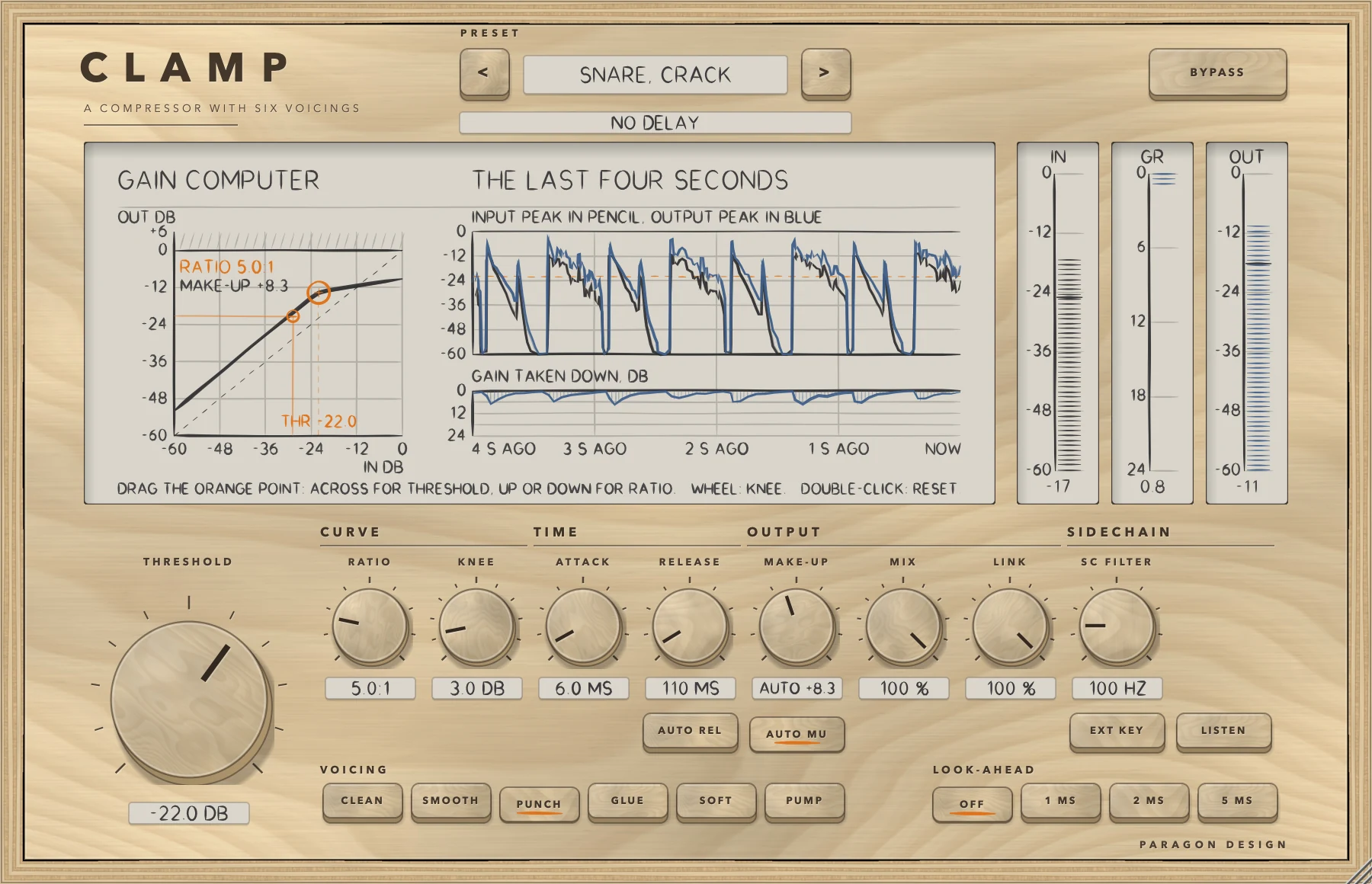
Choose PUNCH and set THRESHOLD -22 dB, RATIO 5:1, KNEE 3 dB, ATTACK 6 ms, RELEASE 110 ms and SC FILTER 100 Hz, with AUTO MU on and MAKE-UP +3.5 dB (Snare, Crack). PUNCH multiplies ATTACK by 3, so 6 ms acts as 18 ms and the front of each hit passes before the gain comes down. On drum-like noise bursts the first 15 ms of a hit lost 2.6 dB of energy in PUNCH and 4.9 dB in CLEAN (see Measured). In the figure GAIN TAKEN DOWN, DB dips once per hit.
Bus compression with GLUE and AUTO REL
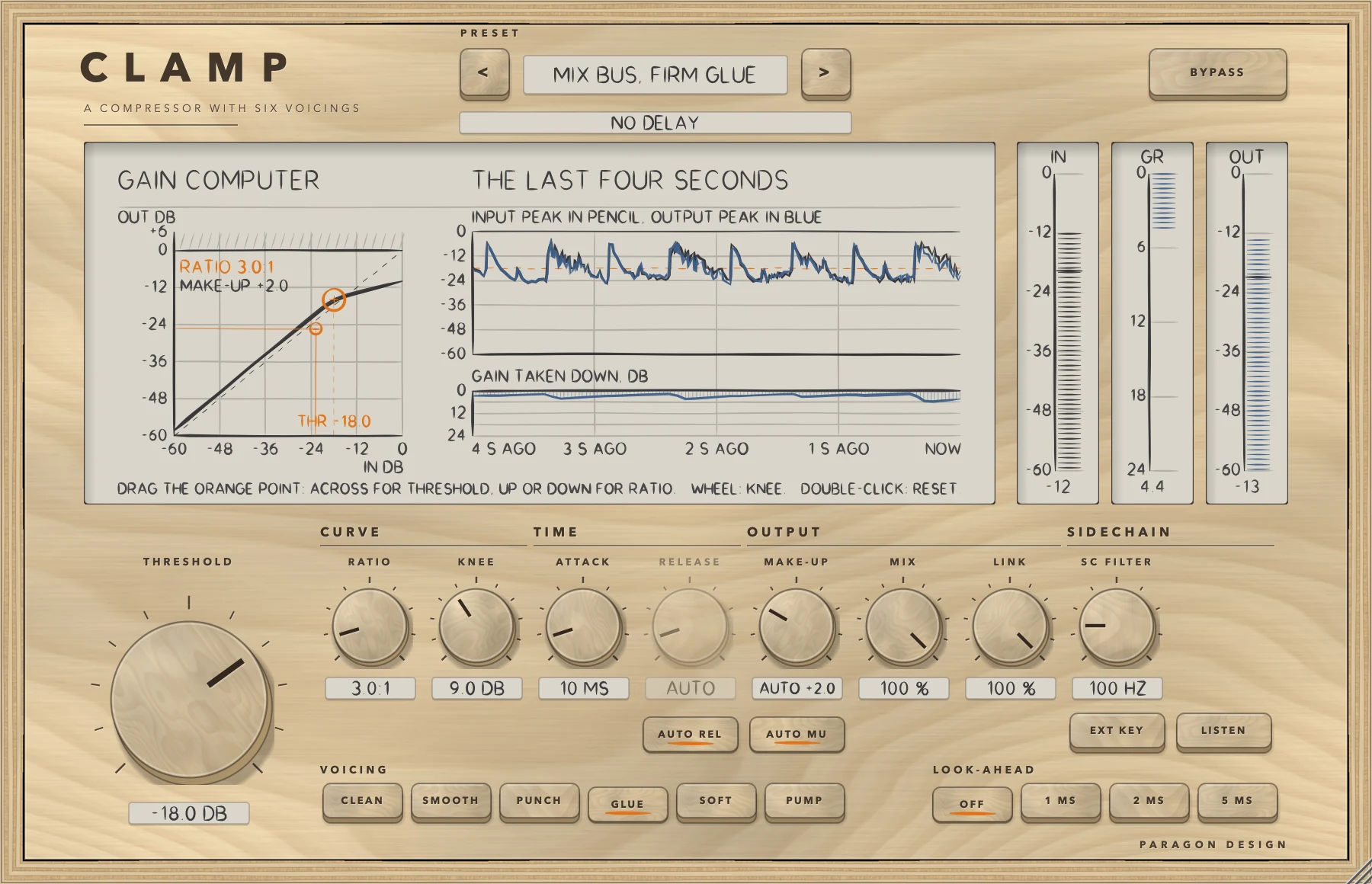
Choose GLUE and set THRESHOLD -18 dB, RATIO 3:1, KNEE 9 dB, ATTACK 10 ms and SC FILTER 100 Hz, with AUTO REL and AUTO MU on and MAKE-UP -2 dB (Mix Bus, Firm Glue). AUTO REL makes CLAMP ignore RELEASE. GLUE mostly reads an average, so on the same bursts the first 15 ms lost only 1.2 dB, against 4.9 dB in CLEAN (see Measured). In the figure GAIN TAKEN DOWN, DB moves slowly instead of dipping once per hit.
Duck one track under another
Connect the other track as the sidechain (see In Logic Pro). Choose CLEAN and set THRESHOLD -30 dB, RATIO 6:1, KNEE 3 dB, ATTACK 5 ms, RELEASE 200 ms and SC FILTER 80 Hz, then press EXT KEY (Duck Under the Key). Leave AUTO MU off, because make-up raises the track even while the key is silent. While the key plays, GR moves and IN still follows the track. A 200 Hz key at -6 dBFS turned a -40 dBFS tone down 21.54 dB (see Measured).
Presets
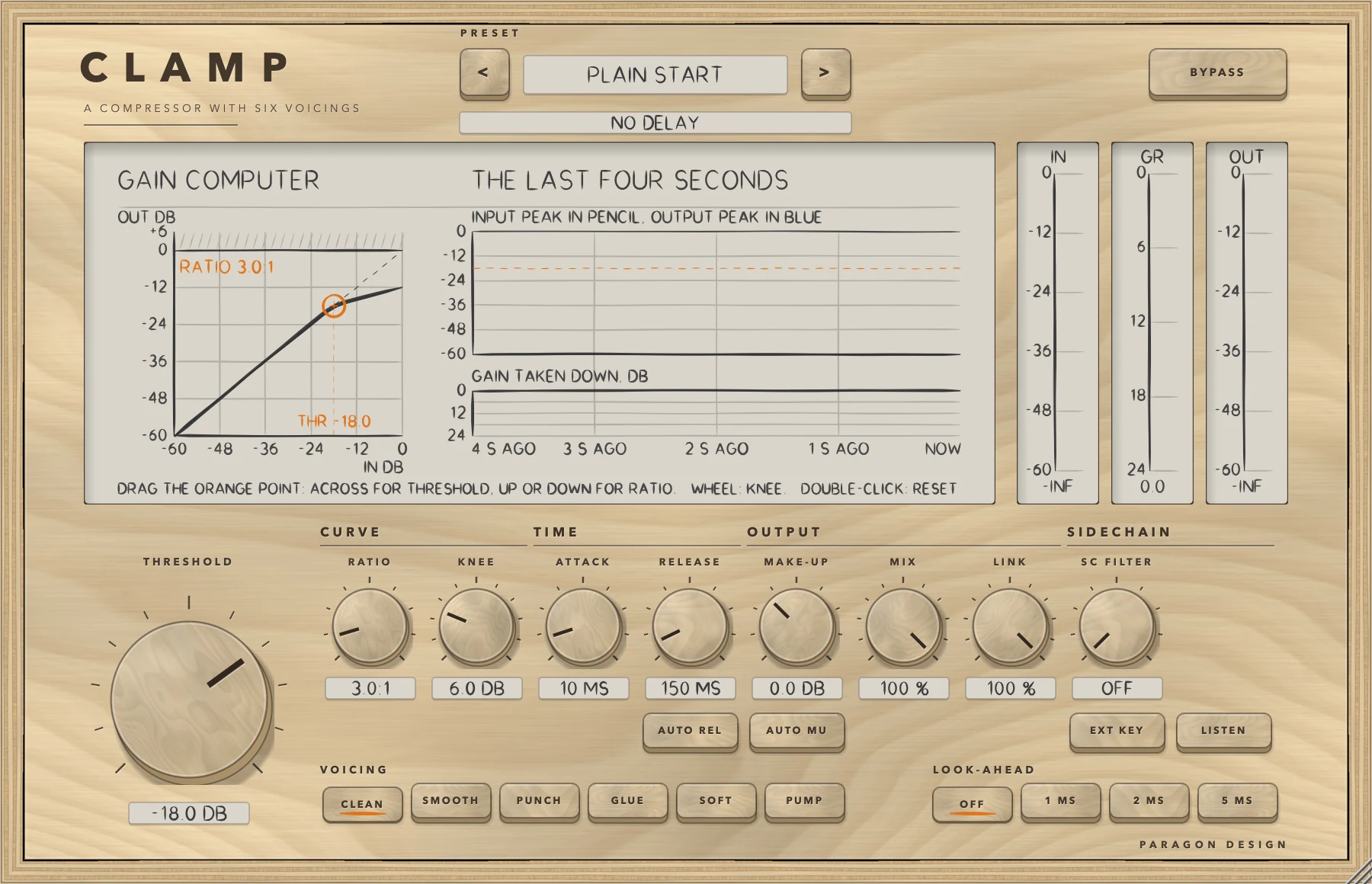
CLAMP has 37 presets in 9 categories. They are starting points chosen from measurements, not tuned by ear.
- Start: Flat Start; Plain Start
- Vocal: Lead Vocal, Even; Lead Vocal, Forward; Vocal, Tame the Peaks; Backing Vocals, Sit Back; Rap Vocal, Tight; Spoken Word, Gentle
- Drums: Kick, Keep the Click; Snare, Crack; Snare, Fat and Short; Toms, Even Up; Overheads, Calm the Crash; Drum Bus, Glue; Drum Room, Pump; Parallel Smash
- Bass: Bass Guitar, Even; Bass, Hold It Down; Synth Bass, Level
- Guitar: Electric Guitar, Rhythm; Electric Guitar, Sustain; Acoustic Guitar, Strummed; Acoustic Guitar, Picked
- Keys: Piano, Natural; Electric Piano, Even; Synth Pad, Tuck Back
- Bus: Mix Bus, Gentle Glue; Mix Bus, Firm Glue; Group Bus, Level; Parallel Bus, Body
- Master: Master, Light Touch; Master, Peak Control; Master, Slow Level
- Utility: Duck Under the Key; Catch the Peaks; Level Rider, Slow; Squash and Blend
Every preset sets all 15 controls, every one except BYPASS. FLAT START is RATIO 1:1 with the others at their defaults, so the output is the input, bit for bit, with no delay. PLAIN START is the default state and what a new instance shows. Loading a preset can change the delay: Master, Light Touch uses 1 MS, Vocal, Tame the Peaks and Master, Peak Control use 2 MS, Catch the Peaks uses 5 MS, and the rest use OFF. Duck Under the Key switches EXT KEY on.
On pink noise at -18 dBFS RMS every preset but PLAIN START changed the level by between -5.6 and +0.2 dB through its MAKE-UP setting, and none clipped it: the highest peak was -1.1 dBFS. PLAIN START changed it by -6.4 dB. To the host CLAMP has one unnamed program, so the presets belong to its panel. In Logic Pro, plug-in settings are stored with the project file.
Measured
All figures are from the plug-in repository's tests, last run on 14 October 2026: the 288 CLAMP checks, the host test (37 checks) on the installed Audio Unit and Apple's Audio Unit validation all passed. The figures are on synthetic test signals, not recordings of music, at 48 kHz unless a row says otherwise. A figure marked limit is a bound the test sets, not a result. Every other figure is a measurement.
| What was measured | Result | Conditions |
|---|---|---|
| At rest, in bypass, by block size | The input delayed by the reported latency, bit for bit, in all six voicings, every LOOK-AHEAD, stereo and mono, with a loud sidechain on. The same in bypass after its 5 ms crossfade. Identical output at blocks of 1, 7, 64, 512 and 4096 samples | Rest: RATIO 1:1, MAKE-UP 0, AUTO off, MIX 100, or a threshold nothing reaches; pink noise at -20 dBFS; 44.1, 48, 88.2, 96 and 192 kHz. Bypass: heavy settings, pink noise at -16 dBFS. Blocks: six voicings, LISTEN and bypass, on drum-like bursts with noise |
| Curve | A settled 1 kHz sine landed within 0.0143 dB of the curve in every voicing (limit 0.1 dB). At 50 Hz the worst voicing landed 0.156 dB from it, because the held reduction lets go between cycles (limit 0.3 dB) | 1080 cases: 15 levels from -60 to 0 dBFS, ratios 2, 4, 10 and INF:1, knees 0, 6 and 12 dB, threshold -24, ATTACK 2, RELEASE 300. 50 Hz: -12 dBFS, threshold -24, 4:1, knee 6, ATTACK 5, RELEASE 200 |
| Attack, release, AUTO REL | At ATTACK 10 ms the reduction took 10.0, 17.1, 30.0, 26.8, 16.4 and 5.0 ms to reach 63 percent in CLEAN, SMOOTH, PUNCH, GLUE, SOFT and PUMP. CLEAN, PUNCH and PUMP read ATTACK times the factor within 3 percent plus 0.05 ms, and CLEAN and PUNCH read RELEASE within 3 percent plus 0.1 ms (limits). The AUTO REL time never shortened as the overload grew from 5 to 1500 ms: in CLEAN 45 ms after 5 ms and 348 ms after 1500 ms | Attack: step from -60 to -6 dBFS at 4 kHz, threshold -30, 10:1, knee 0, RELEASE 300. Release and AUTO REL: 1 kHz at -6 dBFS then silence, threshold -30, 10:1, knee 0, ATTACK 1; 21 dB of reduction. Limits: ATTACK 0.5 to 50 ms, RELEASE 30 to 800 ms, five sample rates |
| Voicings on drums | First 15 ms of a hit, in dB of energy against the input: CLEAN -4.9, SMOOTH -2.6, PUNCH -2.6, GLUE -1.2, SOFT -1.6, PUMP -6.4 | Drum-like noise bursts at -6 dBFS peak, 0.5 s apart, hits 5 to 10; threshold -24, 4:1, knee 6, ATTACK 10, RELEASE 150 |
| Distortion | THD+N, everything but the fundamental, of a 100 Hz sine: worst CLEAN -38.4 dB at ATTACK 1 and RELEASE 50, -66.6 dB at 10 and 300; PUMP under -250 dB | Sine at -6 dBFS, threshold -30, 10:1, knee 6; at least 13.9 dB of reduction in every voicing |
| LINK and MIX | LINK 100, 50 and 0 turned the left side (-6 dBFS) down 15.74 dB and the right side (-30 dBFS) 15.74, 5.24 and 0.00 dB. MIX 50 matched the mean of the delayed dry and the compressed sound to within 2e-7, and MIX 0 the delayed dry, bit for bit (limits, on sample values) | LINK: 1 kHz, threshold -24, 8:1, knee 0, ATTACK 1. MIX: pink noise at -18 dBFS, threshold -30, 6:1, MAKE-UP +3 dB, LOOK-AHEAD OFF and 2 MS |
| Sidechain and SC FILTER | A -40 dBFS tone was turned down 21.54 dB by a 200 Hz key at -6 dBFS with EXT KEY on, and 0.000 dB with it off or with no key supplied. A 50 Hz key at -10 dBFS turned it down 17.83 dB with SC FILTER off and 0.000 dB at 200 Hz. Through the installed Audio Unit the tone left at -40.0 dBFS with a silent key and -63.9 dBFS with a loud one | Main: 1 kHz at -40 dBFS, threshold -30, 10:1, knee 6, ATTACK 1. Installed Audio Unit: threshold -30, RATIO INF:1, knee 0 |
| LOOK-AHEAD and AUTO MU | With 5 MS the reduction began 240 samples before a burst reached the output, and the first 2 ms of the burst left -16.6 dB against the input's energy, against -3.8 dB with OFF. A sine 6 dB over THRESHOLD left within 0.1 dB of the level it arrived with AUTO MU (limit) | Burst: 2 kHz at -6 dBFS, ATTACK 4, threshold -30, 10:1, knee 0. AUTO MU: every voicing, three thresholds, four ratios, two knees |
| Cost | The whole plug-in used 0.29 to 0.70 percent of one core across four runs (limit 2 percent) | Stereo, 512-sample blocks, 5 MS, SC FILTER on, heavy reduction, thread CPU time |
Limits and what is not verified
- Nothing has been checked by ear. Every figure is a measurement of a synthetic signal, and the voicings and presets were chosen from numbers.
- Pink noise stands in for real material. The preset level matching and the noise figures under THRESHOLD are on it.
- The momentary reading is a sample peak, so a sine can read under its true peak by up to 0.47 dB at 5 kHz and 1.25 dB at 8 kHz at 48 kHz (worked out from the sample spacing). An 8 kHz tone was reduced 1.1 dB less at 48 kHz than at the other rates.
- GLUE cannot release faster than its 25 ms window lets its reading fall: RELEASE 30 ms read back 108 ms at 21 dB of reduction.
- CLAMP has no output ceiling control. In the preset check on pink noise at -18 dBFS RMS, Catch the Peaks, which sets RATIO to INF:1 with a -6 dB threshold, left a highest peak of -5.9 dBFS.
- Not verified in Logic Pro: how the sidechain is delivered relative to the plug-in's latency compensation. Also not verified: whether a Side Chain pop-up menu is shown for CLAMP, whether the new latency is applied when LOOK-AHEAD is changed while the project plays, and whether Logic Pro's bypass uses the plug-in's own bypass parameter.
- Not verified: the VST3 in any host. The editor inside a real host: the host test checks only that it opens at 900 by 580 and can be shown and hidden. Native Apple silicon: the development builds contain x86_64 code only, and a release build, which is universal, has not been run there.
- The processor test on a mono track checked only that the output was valid numbers. The cost figures are from one Mac and moved from run to run. CLAMP is a working name and may change.
Troubleshooting
The panel shows a delay, or the track is late
LOOK-AHEAD is on. Choose OFF for NO DELAY. If the host's delay compensation is off, the track is late by the reported 48, 96 or 240 samples at 48 kHz. In Logic Pro, plug-in latency compensation is set with the Compensation pop-up menu in Logic Pro > Settings > Audio > General.
Nothing is turned down
If GR reads 0, THRESHOLD is above the level, RATIO is at 1:1 as in FLAT START, or EXT KEY is on with a silent sidechain connected. If GR moves but the output does not change, MIX is at 0 or BYPASS is on. With EXT KEY on and nothing connected, the detector listens to the signal itself.
The level changes when I load a preset or press BYPASS
The presets are level-matched roughly, on pink noise only, and PLAIN START lowered it by 6.4 dB. BYPASS does not match levels. MAKE-UP and AUTO MU add gain to the compressed side even when GR reads 0.
RELEASE does nothing, or I hear the key
AUTO REL is on, and the RELEASE read-out says AUTO. Or LISTEN is on, which plays what the detector hears, after SC FILTER, in place of the signal.