Paragon WorkshopThe free ones

PLANE

A resonance reducer.

Turn DEPTH up and PLANE turns down the narrow peaks that stand out of the sound around them, frame by frame, by no more than the depth you set. GRAIN holds the cut off the partials of a played note, TRANSIENT holds it off the front of a hit, and a weighting curve you drag says where PLANE works and where it leaves the sound alone. The display shows what is being taken out as it goes, and DELTA plays only that.

Formats
Audio Unit, VST3
Channels
Mono or stereo, same in and out
Latency
FAST 1024, NORMAL 2048 or FINE 4096 samples at 44.1 and 48 kHz (21.3, 42.7 or 85.3 ms at 48 kHz); twice as many at 88.2 kHz and above. The same at every DEPTH
PLANE at work

What it does

PLANE in six parts.

  1. 01

    Peaks that stand out, and nothing else

    PLANE compares each frequency with the average level around it, over 0.75 octave at SHARPNESS 0 and 0.16 octave at 100, and takes the part that stands out by more than SELECTIVITY (1.5 dB at 0, 11.0 dB at 100), up to DEPTH, at most 18 dB. ATTACK (0.2 to 50 ms) and RELEASE (5 to 500 ms) set how fast a cut grows and lets go. In SOFT a frequency is judged against its surroundings only, so PLANE does the same thing at any level; HARD folds in a floor that follows the level of the programme.

  2. 02

    Two protections

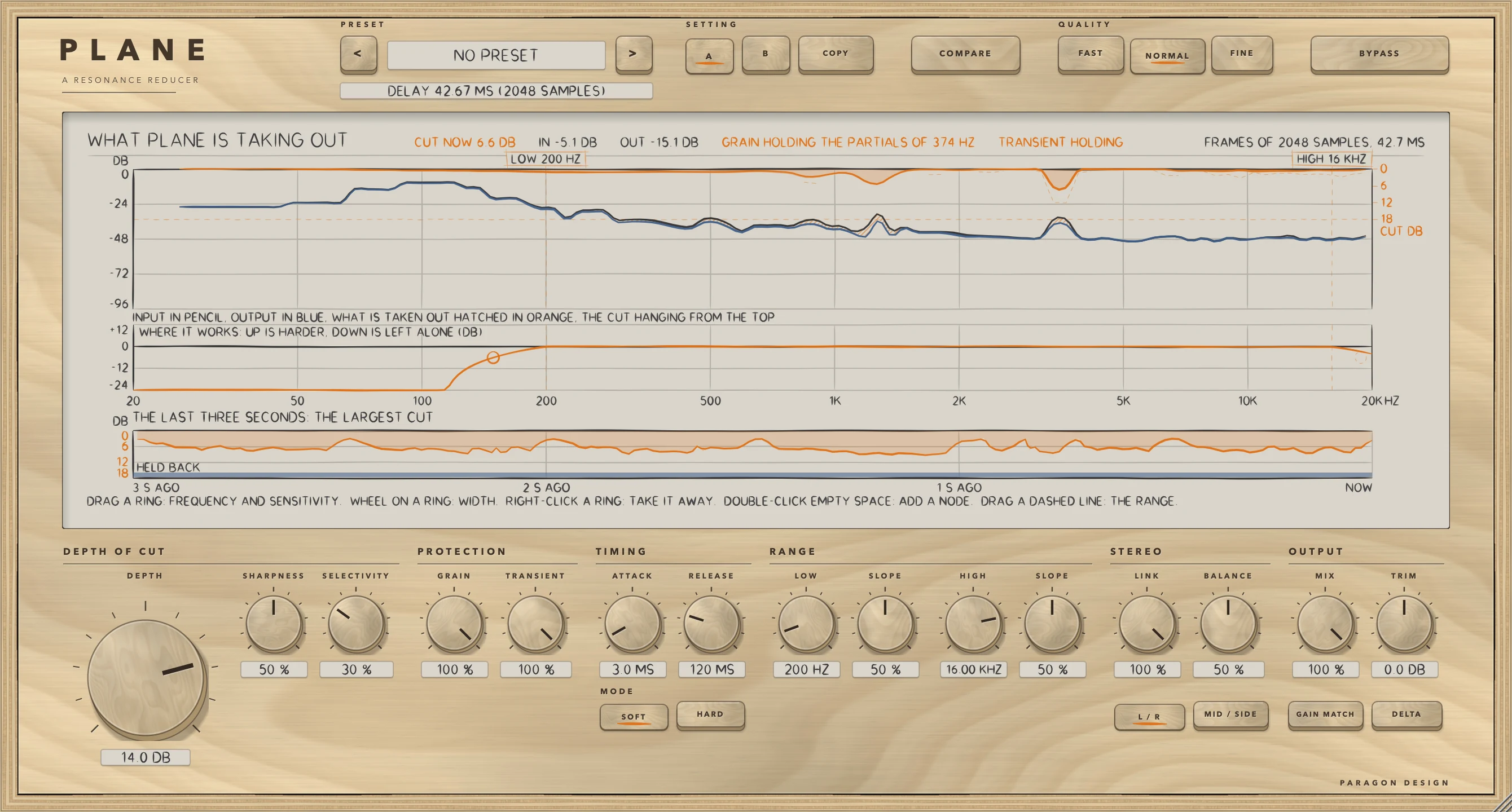
    GRAIN looks for the regular spacing of a played note's partials and spares them, while a lone ring or a room mode, which has no series behind it, is still taken. TRANSIENT holds the cut off the front of a hit, so that attacks pass and only the ring that follows is taken. The display says when either is holding.

  3. 03

    Where it works

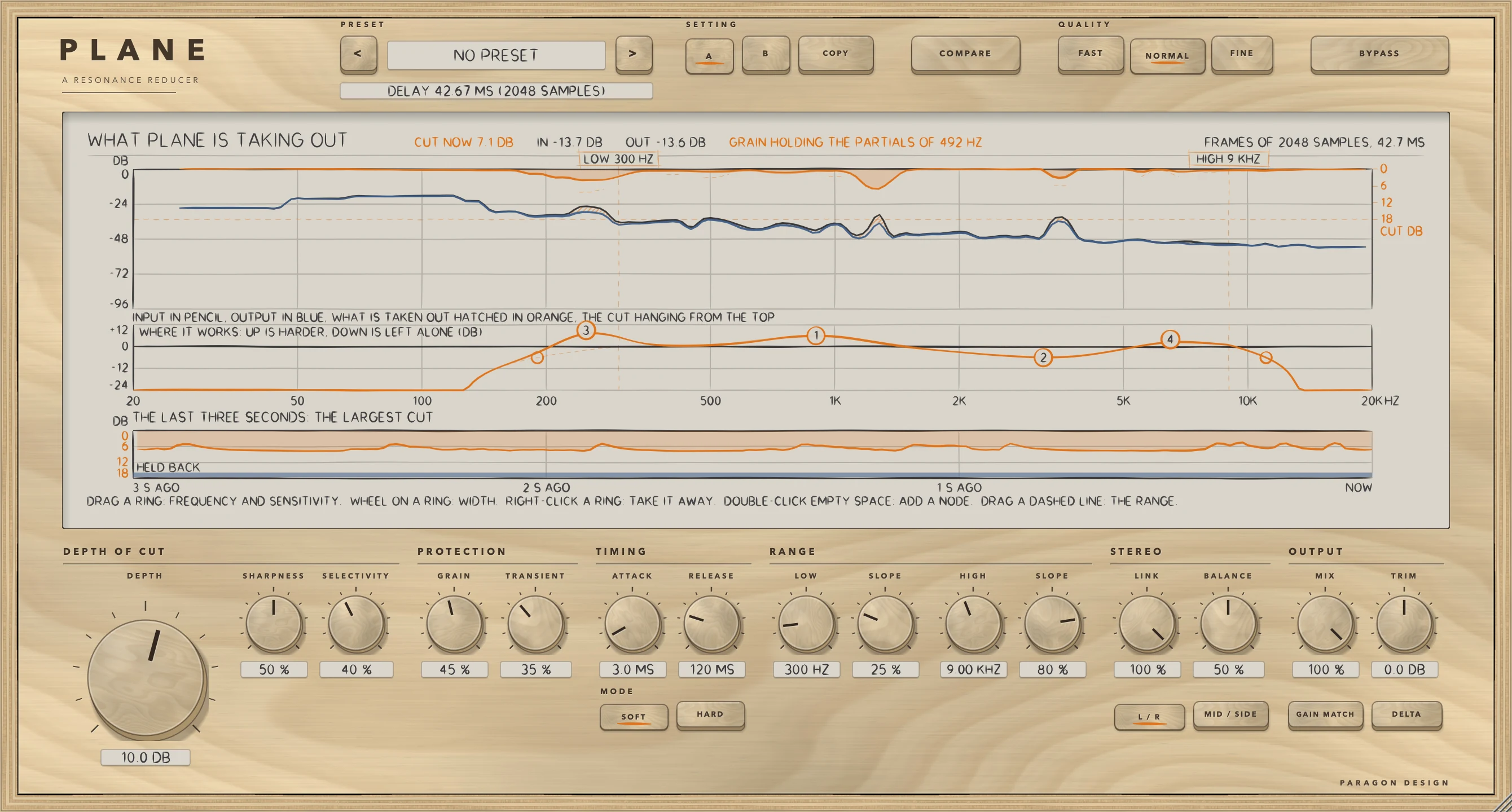
    A weighting curve on the display: LOW and HIGH bounds, each with its own slope (the dashed lines are draggable), and up to four nodes, each with a frequency, a width and a sensitivity. A ring raises or lowers how hard PLANE works around it; right-click one to take it away.

  4. 04

    Stereo

    Left and right, or middle and side. LINK from 0 to 100 percent decides whether the two are cut together (one cut, worked out from the louder side at each frequency, so the image does not move) or each on its own, and BALANCE chooses which side is worked on: the side that is left alone comes out as it went in.

  5. 05

    Hear what it does

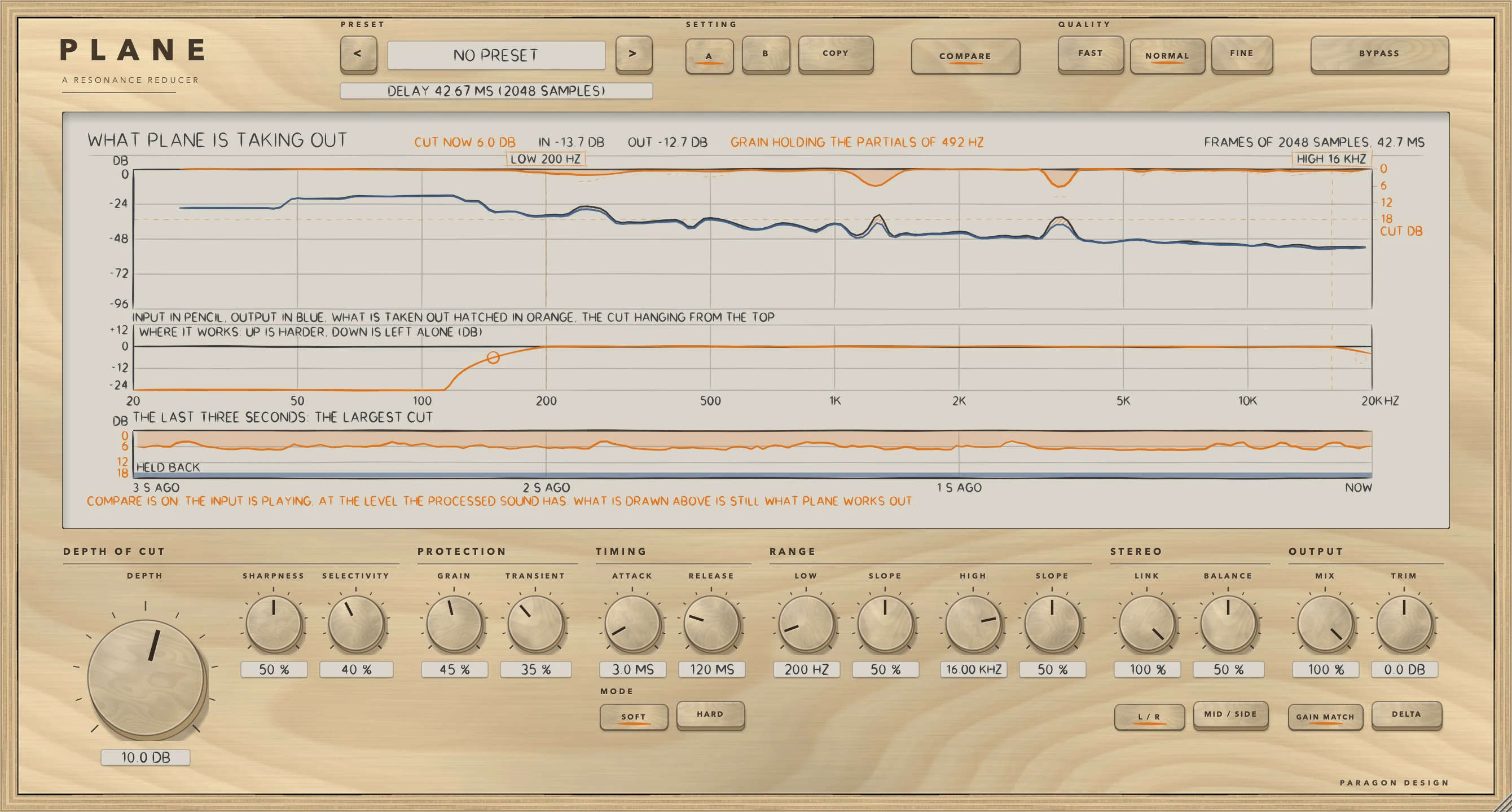
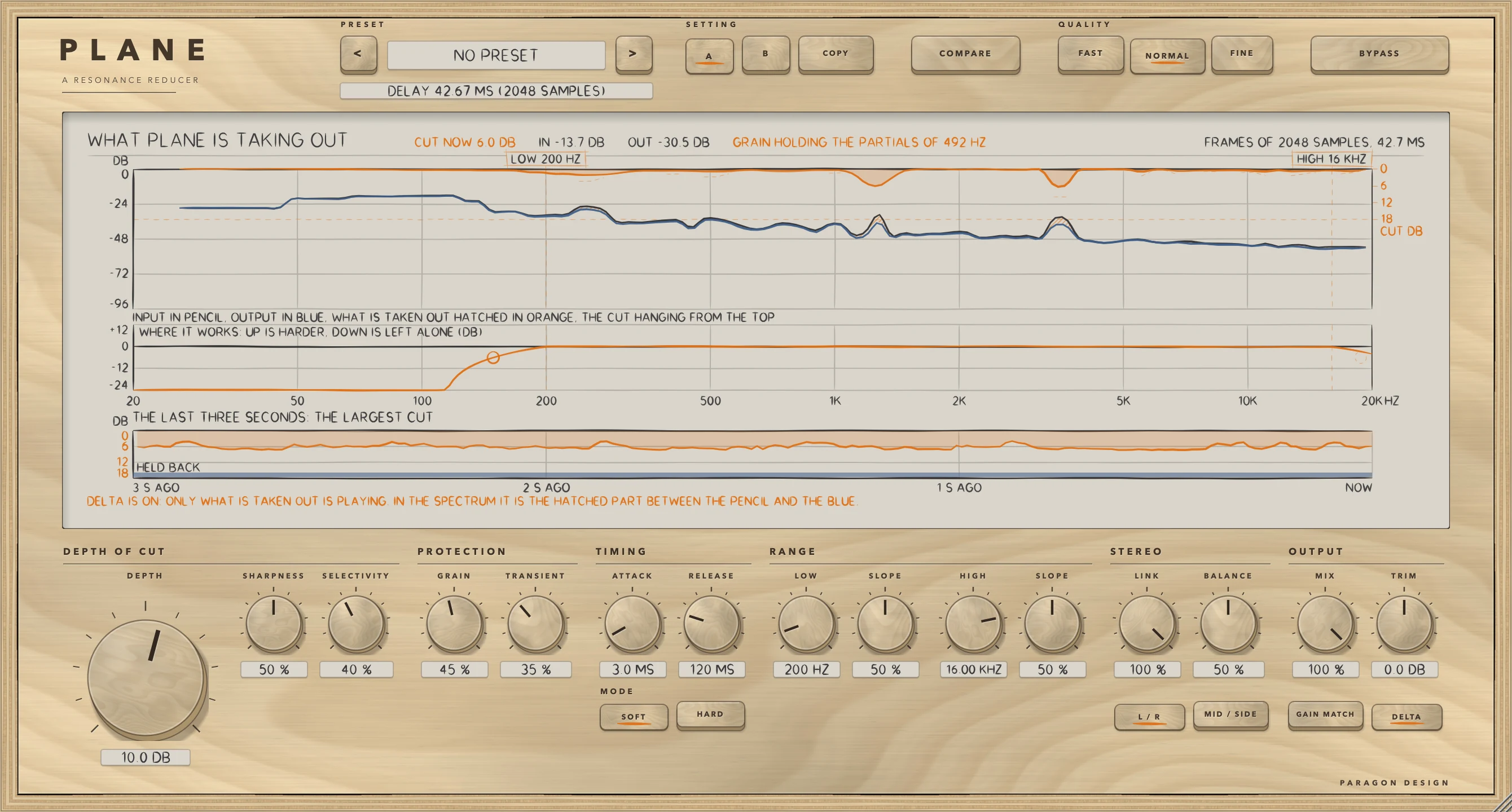
    DELTA plays only what is being taken out. COMPARE plays the input, delayed to match, at the level the processed path is running at, and GAIN MATCH gives back the energy that was taken. A and B hold two complete settings, COPY writes one over the other, and there are 41 presets.

  6. 06

    Three qualities, one stated delay

    FAST analyses frames of 1024 samples, NORMAL 2048 and FINE 4096, twice as many above 64 kHz. The delay is one frame, 21.3, 42.7 or 85.3 ms at 48 kHz, and PLANE tells the host. A longer frame separates frequencies that are closer together and reacts later.

PLANE · The point of it

It does nothing until you ask, and it shows what it takes.

At DEPTH 0 the output is the input delayed by the reported latency, bit for bit, in each of the 48 combinations of settings the test tries. The display draws what PLANE is taking out as it goes: the input in pencil, the output in blue, the cut hatched in orange and hanging from the top, and under it the last three seconds of the largest cut.

PLANE 2 is a rebuild of the free resonance reducer in the Workshop's birch and pencil, with the same sound. Against the engine of version 1, run on the same signals, every non-DELTA setting of the 57 tried came out 111.4 to 125.1 dB below the output (the bound is 100 dB), and version 1's 38 parameters and session format are kept.

  • 111.4 dBThe least any non-DELTA setting of 57 came out below the output when the new engine was compared with version 1's on the same signals (up to 125.1 dB; the bound is 100 dB). The DELTA settings came out 94.3 to 102.3 dB below the DELTA output, and version 1's DELTA left a rounding trace 138.5 to 139.6 dB under the programme at DEPTH 0, where the new one is silent.
  • Bit for bitAt DEPTH 0 the output is the input delayed by the reported latency, in each of 48 combinations of settings. Version 1 was 138.0 to 139.5 dB under it. Going from DEPTH 12 to 0, the output was exactly the delayed input after 0.39, 0.41 and 0.44 s in FAST, NORMAL and FINE at RELEASE 120 ms.
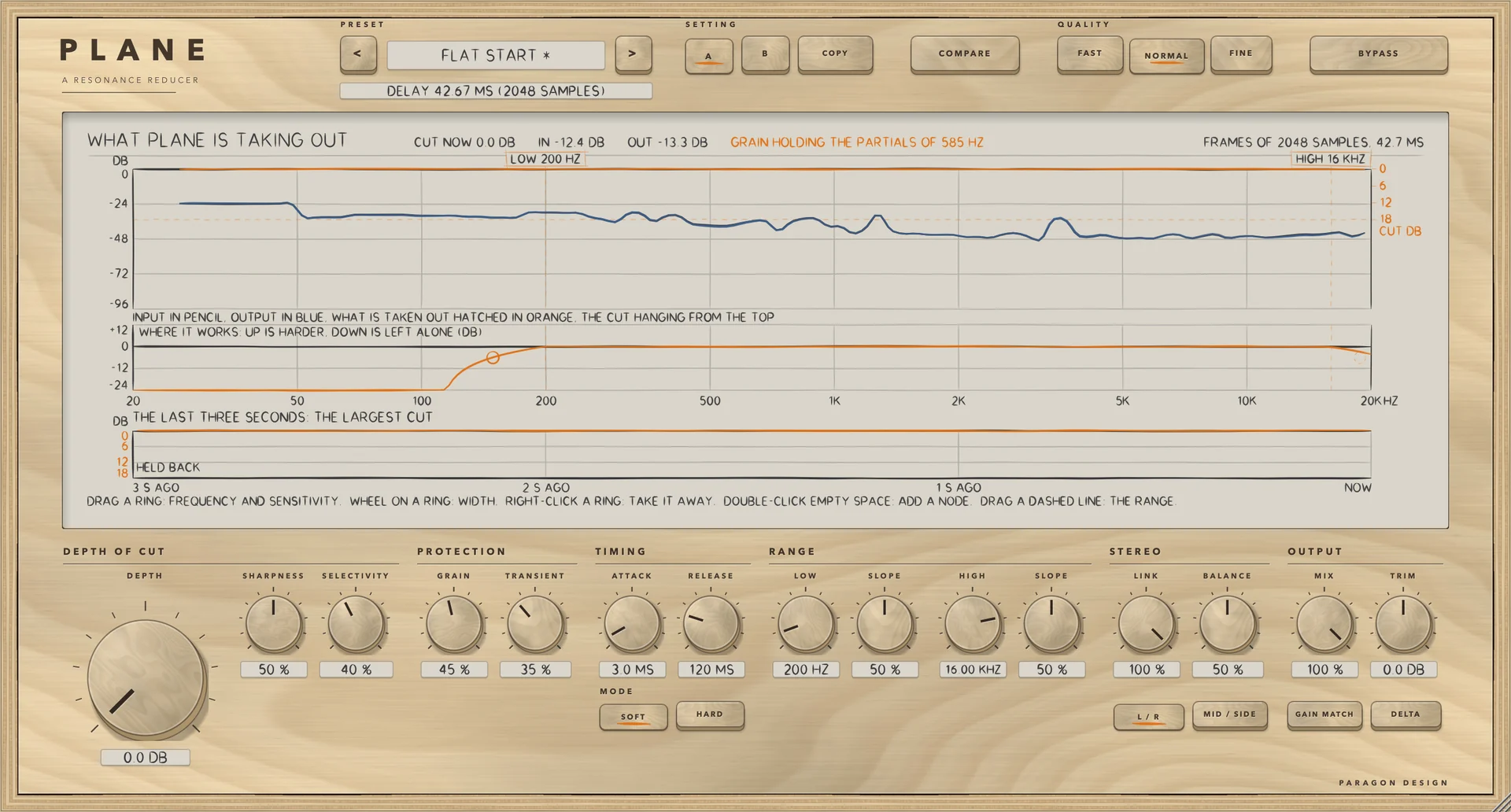
PLANE: What PLANE is taking out: the input in pencil, the output in blue, the cut in orange, the weighting curve and the last three seconds.
What PLANE is taking out: the input in pencil, the output in blue, the cut in orange, the weighting curve and the last three seconds.

In use

The real window, as it looks at work.

These are captures of the built plug-in, drawn by the plug-in itself at twice the size.

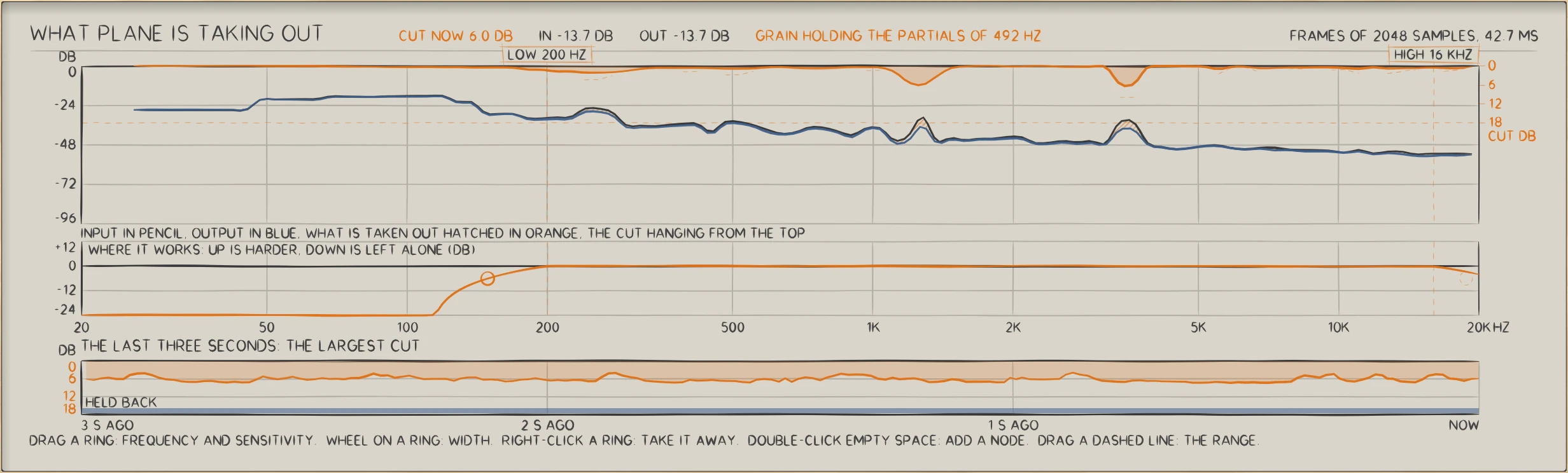
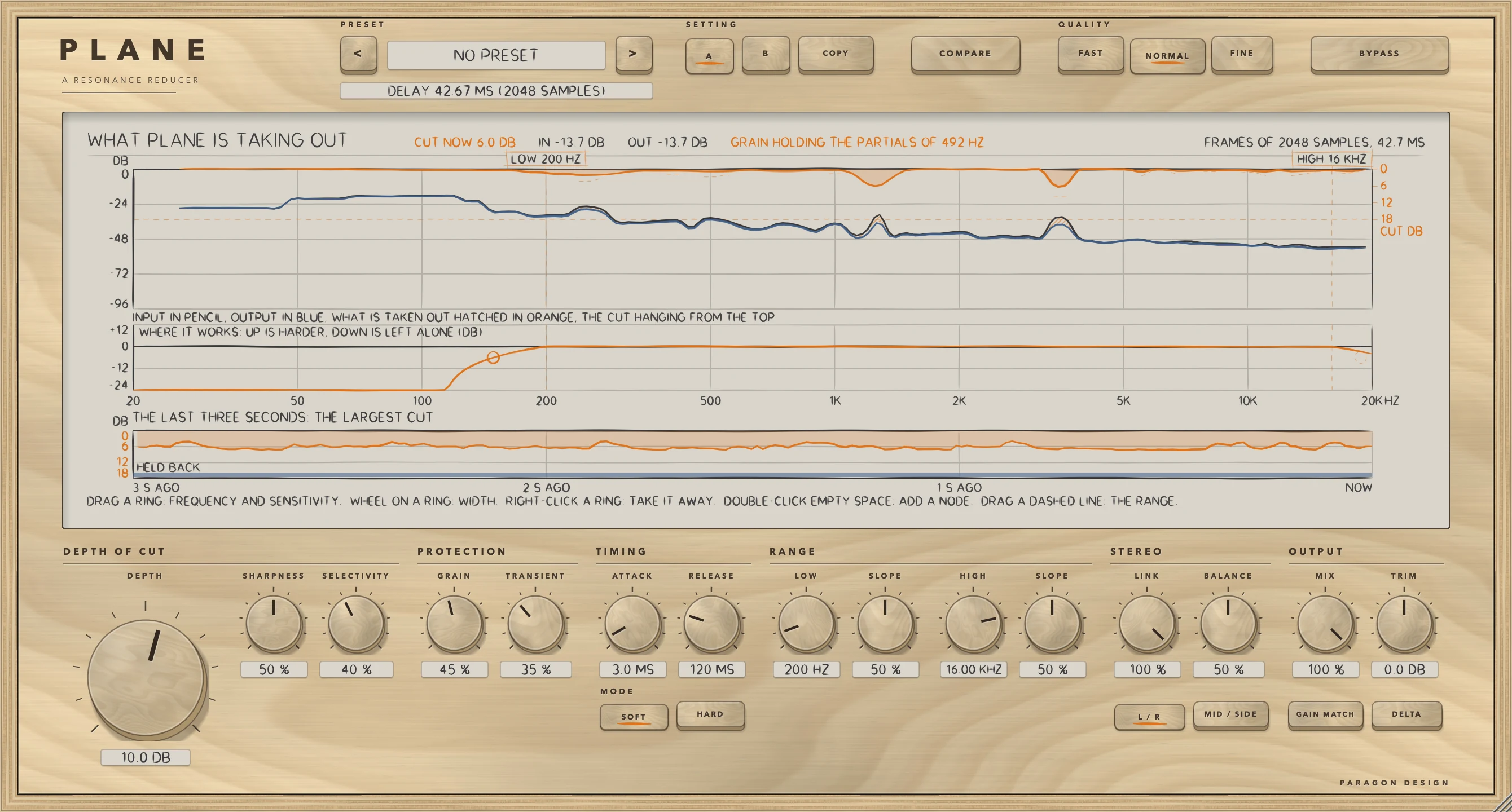
PLANE: A resonant programme with DEPTH at 10 dB: the input in pencil, the output in blue, what is taken out hatched in orange and hanging from the top, and the last three seconds of the largest cut underneath
A resonant programme with DEPTH at 10 dB: the input in pencil, the output in blue, what is taken out hatched in orange and hanging from the top, and the last three seconds of the largest cut underneath
PLANE: Four nodes on the weighting curve and a narrowed range, LOW 300 Hz and HIGH 9 kHz, with their dashed edges: a ring raises or lowers how hard PLANE works around its frequency
Four nodes on the weighting curve and a narrowed range, LOW 300 Hz and HIGH 9 kHz, with their dashed edges: a ring raises or lowers how hard PLANE works around its frequency
PLANE: GRAIN and TRANSIENT at 100 with DEPTH 14 dB: the cut held off the partials of a chord (GRAIN HOLDING THE PARTIALS OF 374 HZ) and off the front of the hits (TRANSIENT HOLDING)
GRAIN and TRANSIENT at 100 with DEPTH 14 dB: the cut held off the partials of a chord (GRAIN HOLDING THE PARTIALS OF 374 HZ) and off the front of the hits (TRANSIENT HOLDING)
PLANE: COMPARE and GAIN MATCH on: the input, delayed and at the level the processed path is running at
COMPARE and GAIN MATCH on: the input, delayed and at the level the processed path is running at
PLANE: DELTA on: only what is being taken out
DELTA on: only what is being taken out
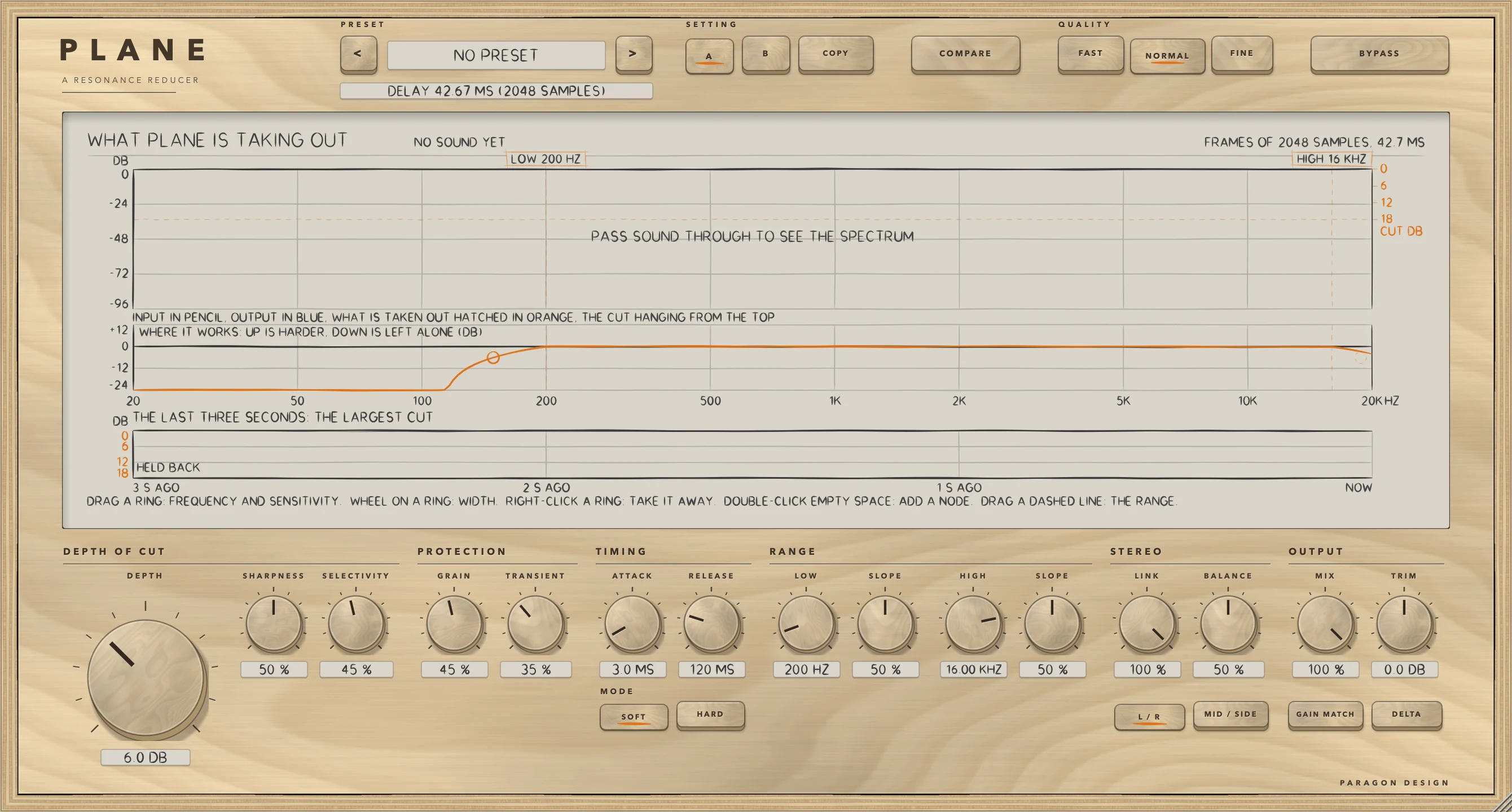
PLANE: The plug-in's own state: DEPTH 6 dB, nothing played
The plug-in's own state: DEPTH 6 dB, nothing played

Specifications

Formats
Audio Unit, VST3
Listed in your host as
Plane Resonance Reducer
Channels
Mono or stereo, same in and out
Sidechain
None
Latency
FAST 1024, NORMAL 2048 or FINE 4096 samples at 44.1 and 48 kHz (21.3, 42.7 or 85.3 ms at 48 kHz); twice as many at 88.2 kHz and above. The same at every DEPTH
Depth
0 to 18 dB
Attack, release
0.2 to 50 ms; 5 to 500 ms
Range
LOW 20 Hz to 2 kHz and HIGH 1 to 20 kHz, each with a slope, and up to four nodes
Stereo
Left and right, or middle and side, with LINK and BALANCE
Editor
1340 x 720 pixels at 100 percent, resizable from 70 to 170 percent
Parameters
38
Presets
41 in 7 categories
CPU
FAST 0.95, NORMAL 0.81 and FINE 1.39 percent of one core at the default settings, and 1.13, 0.99 and 1.75 at the heaviest (stereo, 48 kHz, 512-sample blocks, thread CPU time, the least of several runs; Intel Core i9, a shared machine, so the readings move: with the load average at 12, FINE's heaviest read 2.34, over its budget of 2)

Measured

  1. 111.4 dBThe least any non-DELTA setting of 57 came out below the output when the new engine was compared with version 1's on the same signals (up to 125.1 dB; the bound is 100 dB). The DELTA settings came out 94.3 to 102.3 dB below the DELTA output, and version 1's DELTA left a rounding trace 138.5 to 139.6 dB under the programme at DEPTH 0, where the new one is silent.
  2. Bit for bitAt DEPTH 0 the output is the input delayed by the reported latency, in each of 48 combinations of settings. Version 1 was 138.0 to 139.5 dB under it. Going from DEPTH 12 to 0, the output was exactly the delayed input after 0.39, 0.41 and 0.44 s in FAST, NORMAL and FINE at RELEASE 120 ms.
  3. 0 of 192000Samples that differed between the installed Audio Unit and the engine, in each of six settings (the installed VST3: 12 checks, none differing). The test exists because Apple's compiler once made an installed build play only the correction while every other test passed.
  4. 1.00 timesThe largest step between samples of a sine as MIX moves, as a multiple of the sine's own step (version 1: 3.85). TRIM 0.96 (4.80), QUALITY from NORMAL to FINE 1.38 (19.5), left and right to middle and side 1.08 (7.67).
  5. -0.027 dBHow far COMPARE's level departs from the processed path's with GAIN MATCH off, and -0.025 dB with it on (the bound is 0.1 dB).

On synthetic test signals, by this plug-in’s own tests. Not a listening test.

Presets

41 presets, named for the job.

Starting points chosen from measurements, not tuned by ear. Each one sets every control, so the result does not depend on what was dialled in before it.

Voice

  • Lead Vocal
  • Sibilance
  • Vocal Air
  • Backing Stack
  • Dialogue

Drums

  • Cymbal Wash
  • Snare Ring
  • Overheads
  • Room Mics
  • Drum Bus

Guitar

  • Amp Fizz
  • Acoustic
  • Bass Boom
  • Piano Ring

Keys

  • Synth Harshness
  • Strings Section
  • Brass Bite

Master

  • Master Gentle
  • Mix Bus Harsh
  • De-Mud
  • Sides Only
  • Centre Only
  • Air Polish
  • Digital Edge
  • Pre-Limiter
  • Low End Focus
  • Vocal Pocket
  • Dense Mix
  • Rock Master
  • Electronic Master
  • Orchestral Master
  • Acoustic Master
  • Hip Hop Master
  • Bright Room Fix
  • Vinyl Prep
  • Stem Master
  • Loudness Guard

Utility

  • Resonance Hunt
  • Shallow, Wide
  • Plain Start

Start

  • Flat Start

The first minutes

From empty to useful.

  1. 1

    Set the depth

    Play something with a ring in it and raise DEPTH. The display hatches in orange what is being taken out, and DELTA plays only that.

  2. 2

    Say where

    Drag the dashed lines to set LOW and HIGH, double-click empty space on the curve to add a node and drag its ring: frequency across, sensitivity up and down, the wheel for width.

  3. 3

    Protect the music

    Raise GRAIN to spare a note's partials and TRANSIENT to spare the front of a hit, then press COMPARE: it plays the input at the level the processed path is running at.