Paragon WorkshopThe free ones

WEDGE

Make room for the voice.

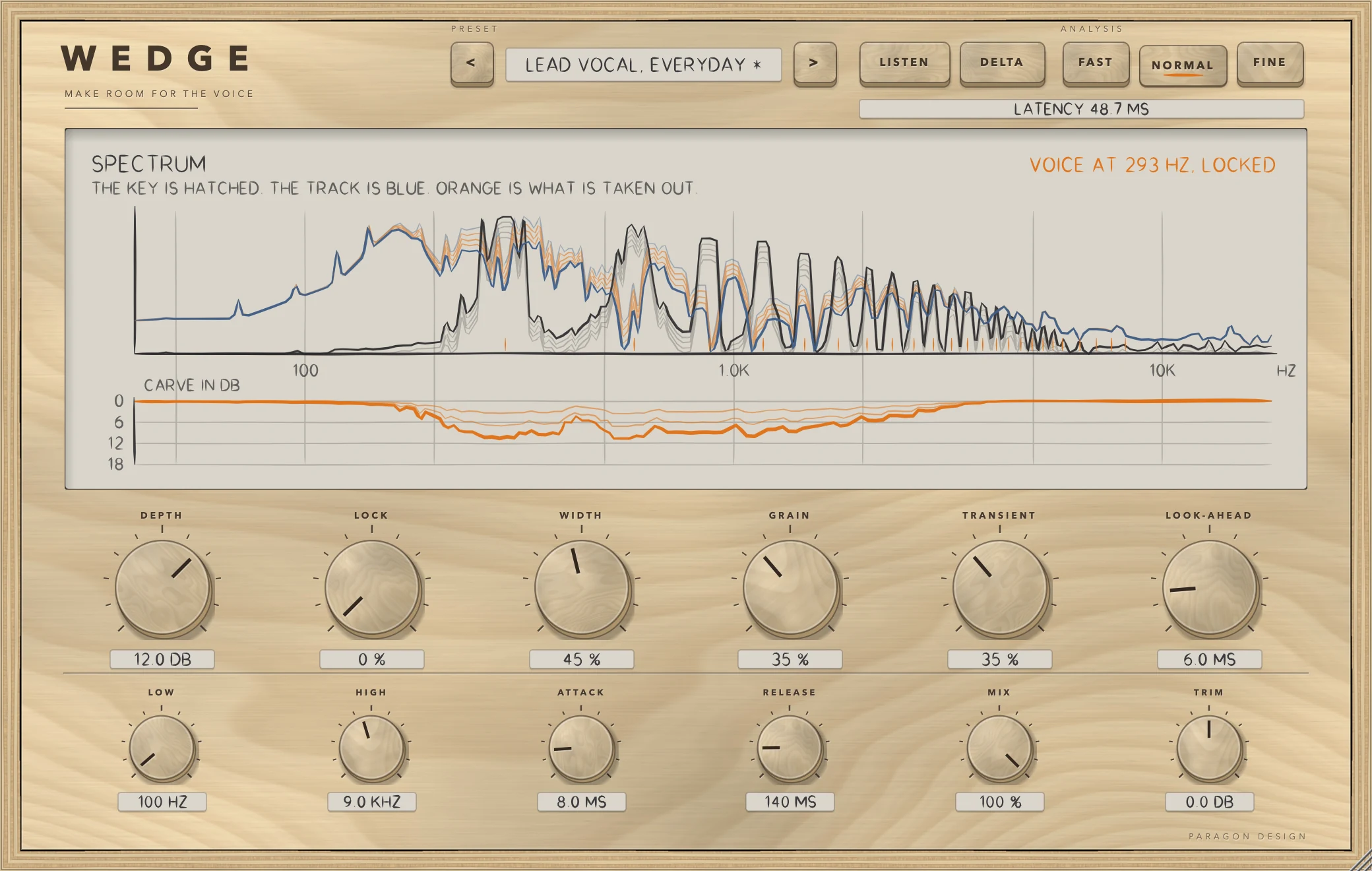
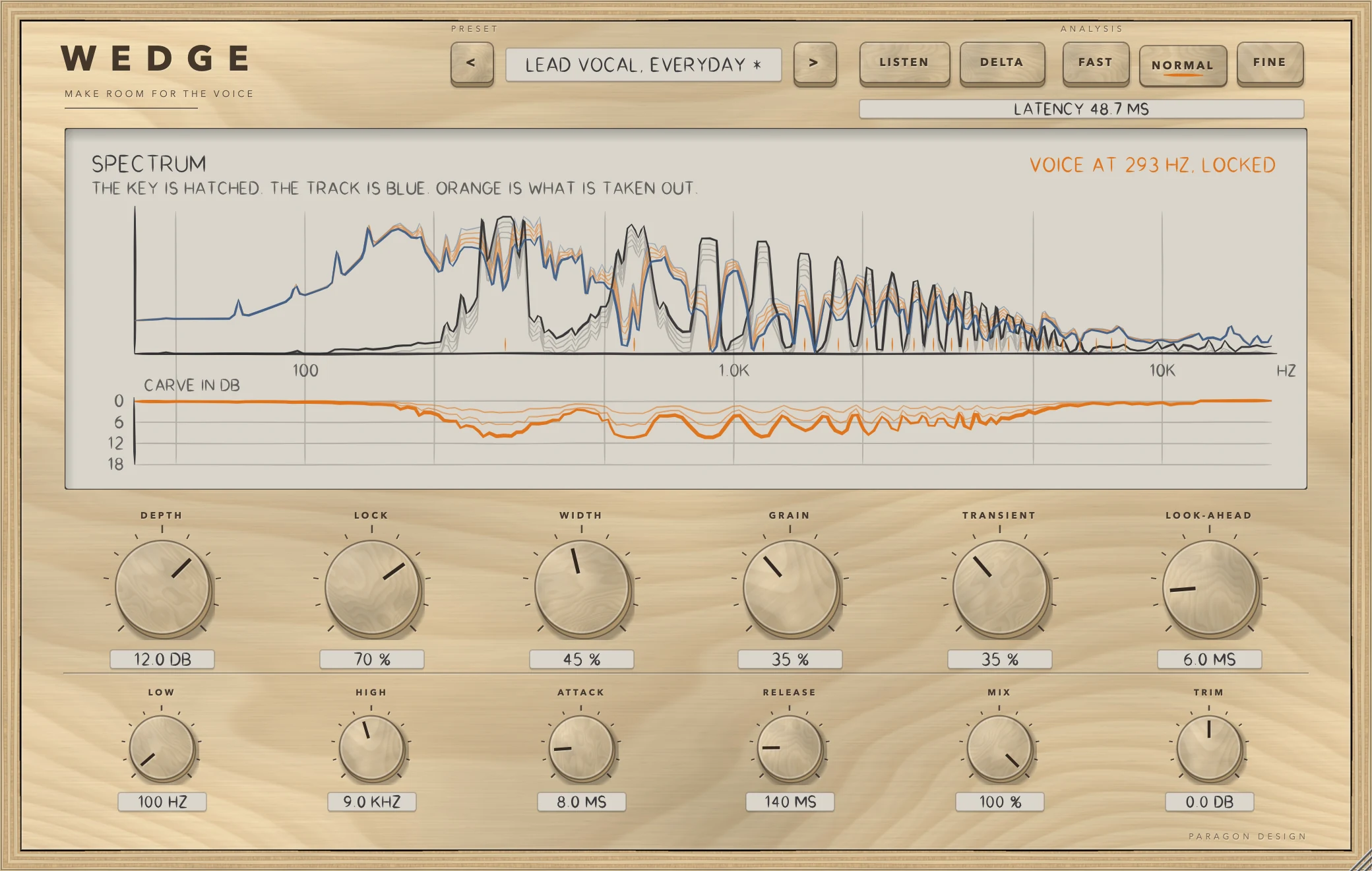
Send the voice to WEDGE's sidechain and it carves the pad, the guitar or the keys out of the way, only where the voice is and only while it is there. LOCK reads the voice's pitch and cuts at its partials, so the body of the track between them stays.

$49Available from next weekTell me when
Formats
Audio Unit, VST3
Channels
Mono or stereo, same in and out
Latency
One analysis frame plus the look-ahead: 1312, 2336 or 4384 samples at 48 kHz with the default 6 ms look-ahead
WEDGE at work

What it does

WEDGE in four parts.

  1. 01

    A carve that goes where the voice is

    A spectral carve driven by the sidechain. A 12 dB carve took 11.9 dB out of the key's band and 0.0 dB out of 150 to 300 Hz.

  2. 02

    LOCK: notches at the partials

    LOCK finds the pitch of the key and cuts narrow notches at its partials: 9.7 dB at the partials and 2.3 dB between them at LOCK 100. A breath or a snare is not pitched, and WEDGE falls back to the broad carve.

  3. 03

    Spares what should stay

    GRAIN spares the track's own tonal peaks, so a held note keeps its body (0.4 dB carved at the track's partials at GRAIN 100, against 10.4 at 0). TRANSIENT lets attacks through uncarved (0.5 dB against 10.3).

  4. 04

    In place before the voice arrives

    LOOK-AHEAD delays the track so the carve is there first, moving it earlier by exactly the amount asked for. LISTEN plays the key; DELTA plays only what the carve takes out.

WEDGE · The point of it

The carve follows the voice's own partials.

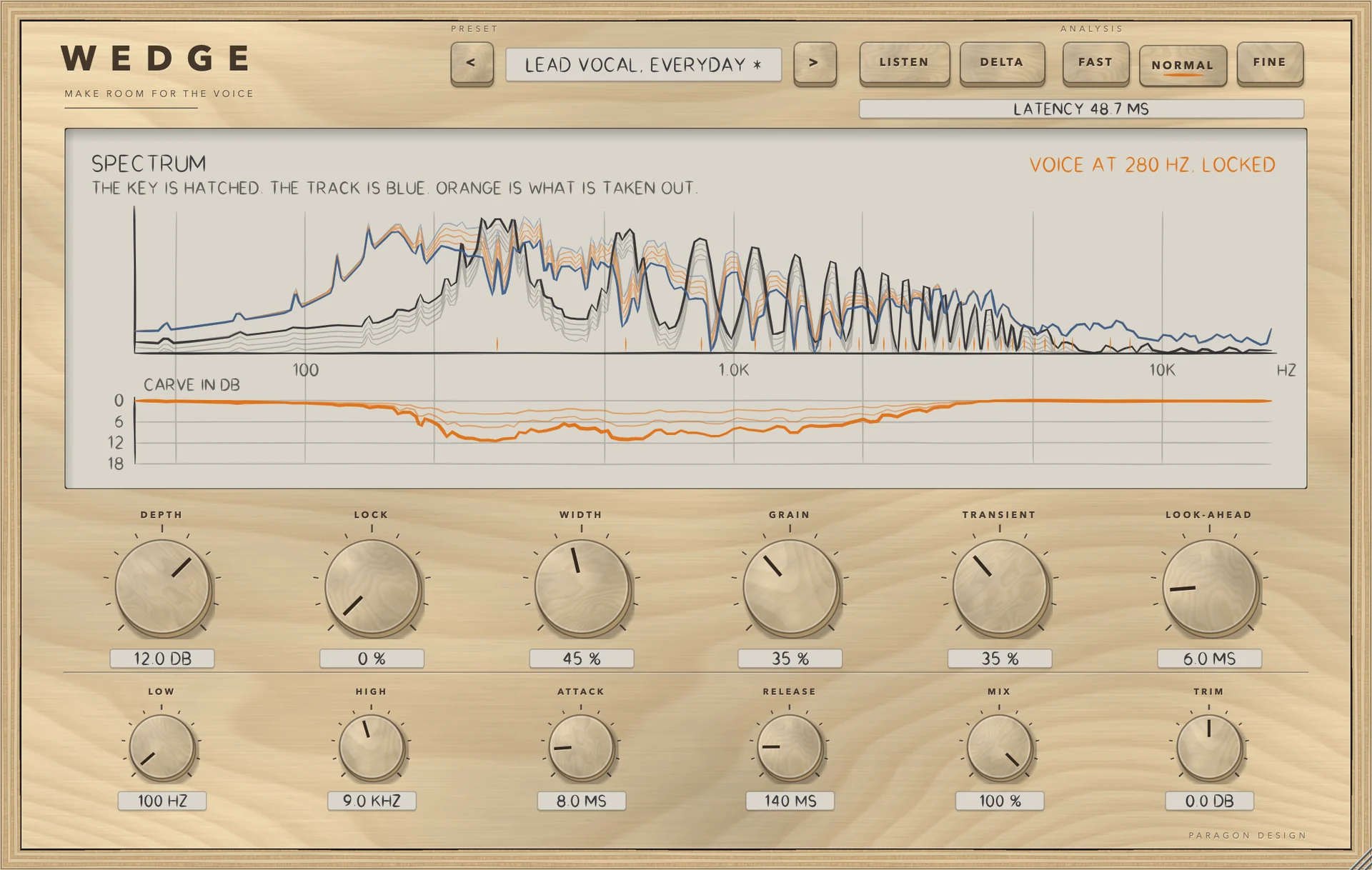
A broad dip in the mids makes room, and makes the pad thin everywhere the voice is not. WEDGE looks at the key signal frame by frame, reads its pitch, and puts narrow notches on the track at the key's partials. The body of the track in between is left alone.

When the voice glides, the notches glide with it: over a glide from 150 to 250 Hz (about three quarters of an octave) the worst pitch error was 0.33 percent. When the key is not pitched, a breath or a consonant, the carve becomes a broad band so nothing is missed.

  • 11.9 dBTaken out of the key's band by a 12 dB carve, with 0.0 dB out of 150 to 300 Hz.
  • 7.4 dBBetween the partials and the gaps: 9.7 dB against 2.3 dB at LOCK 100.
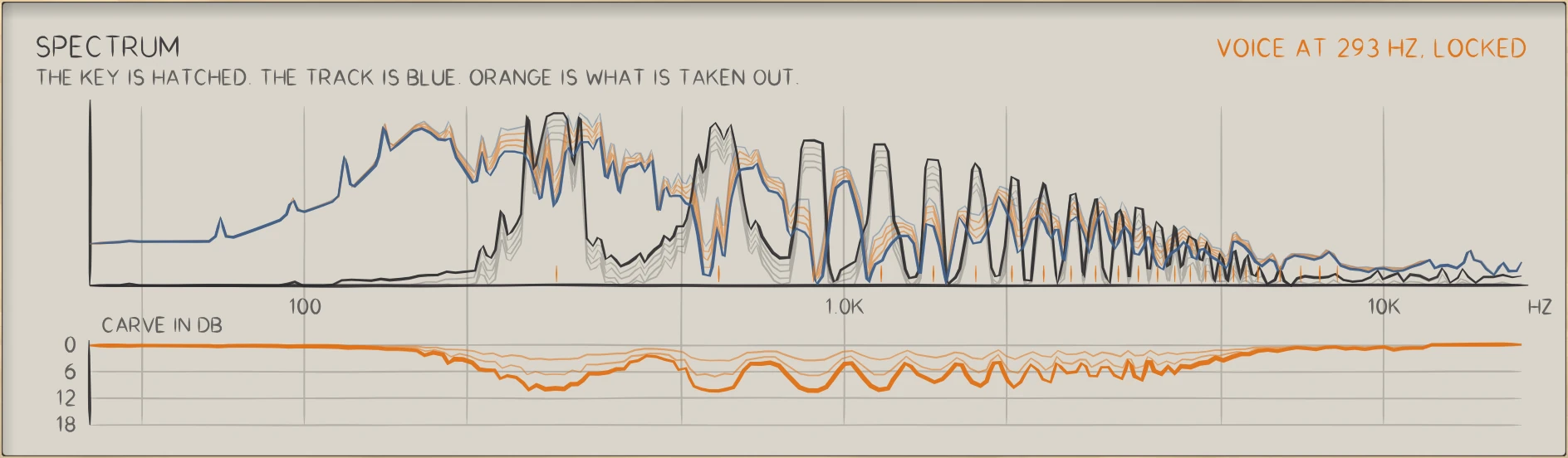
WEDGE: The key is hatched, the track is blue, and orange is what is taken out, frame by frame.
The key is hatched, the track is blue, and orange is what is taken out, frame by frame.

In use

The real window, as it looks at work.

These are captures of the built plug-in, drawn by the plug-in itself at twice the size.

WEDGE: Locked to a voice at 293 Hz
Locked to a voice at 293 Hz
WEDGE: LOCK at zero: a broad band carve
LOCK at zero: a broad band carve
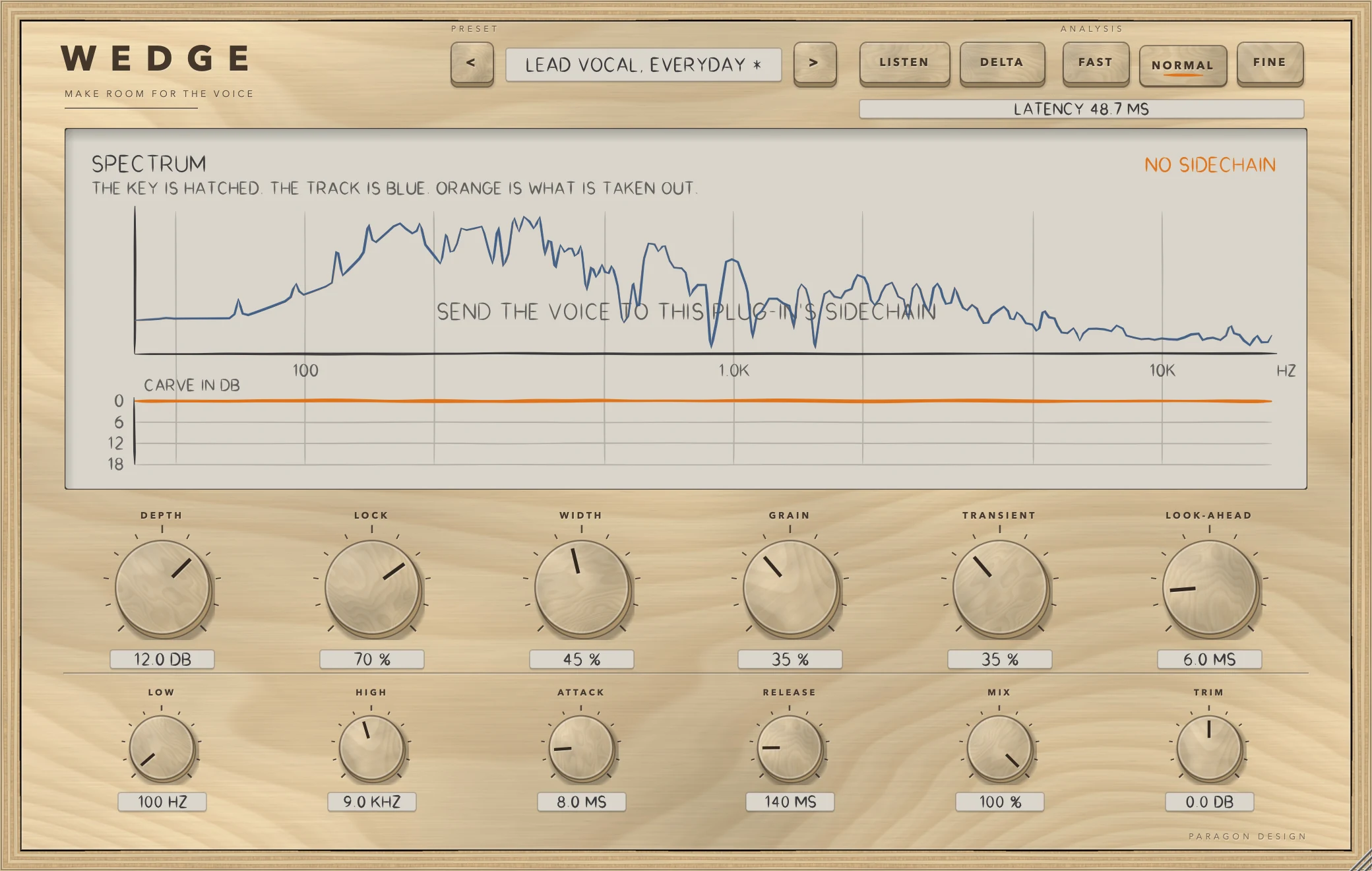
WEDGE: Waiting for a sidechain
Waiting for a sidechain

Specifications

Formats
Audio Unit, VST3
Listed in your host as
Wedge Sidechain Carver
Channels
Mono or stereo, same in and out
Sidechain
Stereo or mono key input
Quality
FAST, NORMAL, FINE
Latency
One analysis frame plus the look-ahead: 1312, 2336 or 4384 samples at 48 kHz with the default 6 ms look-ahead
Depth
0 to 18 dB
Look-ahead
0 to 40 ms
Parameters
16
Presets
41 in 9 categories
CPU
2.3, 2.0 and 3.2 percent of one core (FAST, NORMAL, FINE; stereo, 48 kHz, voice-locked, Intel Core i9)

Measured

  1. 11.9 dBTaken out of the key's band by a 12 dB carve, with 0.0 dB out of 150 to 300 Hz.
  2. 7.4 dBBetween the partials and the gaps: 9.7 dB against 2.3 dB at LOCK 100.
  3. 0.33 %Worst pitch error following a voice that glides from 150 to 250 Hz.
  4. -139 dBReconstruction error when nothing is carved: the track comes back as it went in.

On synthetic test signals, by this plug-in’s own tests. Not a listening test.

Presets

41 presets, named for the job.

Starting points chosen from measurements, not tuned by ear. Each one sets every control, so the result does not depend on what was dialled in before it.

Start

  • Flat Start

Vocal Room

  • Lead Vocal, Everyday
  • Lead Vocal, Tight
  • Lead Vocal, Open
  • Intimate Vocal, Close Mic
  • Rap Vocal, Fast
  • Whispered Vocal
  • Backing Vocals Under Lead
  • Choir Under a Soloist

Pads and Synths

  • Warm Pad Under Vocal
  • Bright Synth Under Vocal
  • String Bed Under Vocal
  • Organ Under Vocal
  • Ambient Wash, Gentle
  • Arpeggio Under Vocal
  • Synth Bass, Leave the Lows

Guitars

  • Acoustic Strum Under Vocal
  • Fingerpicked Acoustic
  • Clean Electric Rhythm
  • Crunch Rhythm Guitar
  • Heavy Rhythm, Wall of Sound
  • Lead Guitar Behind the Vocal

Keys

  • Piano Under Vocal
  • Electric Piano Under Vocal
  • Plucked Keys, Tight

Mix Bus

  • Music Bus, Gentle
  • Music Bus, Firm
  • Instrument Bus, Dense Mix
  • Stems Under the Lead

Speech

  • Music Under Voiceover
  • Music Under Dialogue, Subtle
  • Podcast Bed
  • Ambience Under Speech

Character

  • Broad Carve, Band Only
  • Notches Only
  • Presence Only
  • Low Mud Only
  • Fast Duck
  • Smooth Glide

Utility

  • Hear the Key
  • Hear What Is Taken Out

The first minutes

From empty to useful.

  1. 1

    Route the voice

    Put WEDGE on the pad, guitar or keys. Send the voice to its sidechain input.

  2. 2

    Set the depth

    Raise DEPTH until the voice sits. Use LISTEN to hear the key, DELTA to hear what is removed.

  3. 3

    Lock it

    Raise LOCK so the carve narrows to the voice's partials, and GRAIN and TRANSIENT to keep the track's body and attacks.