What it is
PLANE is a resonance reducer. It listens to the sound in short frames, compares each frequency with the average level around it, and turns down the ones that stand out, by no more than the DEPTH you set, 18 dB at most. SHARPNESS says how narrow a peak must be to count and how hard it is taken, and SELECTIVITY how far it must stand out. ATTACK and RELEASE set how fast a cut grows and lets go. GRAIN holds the cut off the partials of a played note, and TRANSIENT holds it off the front of a hit. A weighting curve on the display, with a LOW and a HIGH bound and up to four nodes, says where PLANE works in full and where it leaves the sound alone. This manual describes version 2.0.0.
PLANE works on left and right or on middle and side, with LINK and BALANCE. MIX blends the processed sound with the input, TRIM sets the level after, GAIN MATCH gives back the energy that was taken, DELTA plays only what is being taken out, and COMPARE plays the input at the level the processed path is running at. The sound goes through one stage: the output is the input delayed by one analysis frame, plus a correction worked out from each frame, so where no frequency is being turned down the correction is exactly 0 and the output is the input delayed, bit for bit.
PLANE 2.0.0 is a rebuild in the Workshop's birch and pencil of the free PLANE that was already out. The sound, the 38 parameters and the session format are the earlier version's; the interface, the VST3 format, the delay reported from the controls, an exact rest and a bypass that crossfades are new. It is free: it has no licence, no trial and no key.
Setting it up
Formats and channels
PLANE is an effect, in Audio Unit and VST3 formats. The VST3 is built from the same code and was hosted by a small test host of its own, but no digital audio workstation has loaded it. It works on a mono or a stereo track, with the same number of channels in and out, and has no side chain. A host lists the Audio Unit as Plane Resonance Reducer, from Paragon Design (versions before 2.0.1 list it as Plane). The bundle declares macOS 11.0 as the minimum, and the panel is 1340 by 720 pixels, resizable from 70 to 170 percent. The size is not kept: the editor opens at 1340 by 720 each time.
Latency
PLANE delays the sound by one analysis frame, and the length of a frame is what QUALITY chooses. The delay is the same at every DEPTH, including 0, and the line under the preset name reads, for example, DELAY 42.67 MS (2048 SAMPLES). PLANE works the delay out from the QUALITY control and the sample rate, tells the host when it prepares and then on a 10 Hz timer, so a stopped host is told too. In samples, with the time in brackets; 88.2 and 176.4 kHz follow the same rule as 96 and 192 kHz, which were tested:
| Sample rate | FAST | NORMAL | FINE |
|---|---|---|---|
| 44.1 kHz | 1024 (23.2 ms) | 2048 (46.4 ms) | 4096 (92.9 ms) |
| 48 kHz | 1024 (21.3 ms) | 2048 (42.7 ms) | 4096 (85.3 ms) |
| 88.2 kHz | 2048 (23.2 ms) | 4096 (46.4 ms) | 8192 (92.9 ms) |
| 96 kHz | 2048 (21.3 ms) | 4096 (42.7 ms) | 8192 (85.3 ms) |
| 176.4 kHz | 2048 (11.6 ms) | 4096 (23.2 ms) | 8192 (46.4 ms) |
| 192 kHz | 2048 (10.7 ms) | 4096 (21.3 ms) | 8192 (42.7 ms) |
Frames are doubled above 64 kHz, once, so 176.4 and 192 kHz use the sizes of 96 kHz. Changing QUALITY while sound plays makes a short dip: down over 3 ms, silent for the new frame's length plus one sample (1025, 2049 or 4097 samples at 44.1 and 48 kHz), then up over 3 ms.
In Logic Pro
- Click an Audio Effect slot in the channel strip, then choose Plane Resonance Reducer from the pop-up menu (versions before 2.0.1 list it as Plane). Audio Units plug-ins appear in the Audio Units submenu.
- On a mono channel strip the Mono plug-in format loads a mono plug-in, and on a stereo one the Stereo format loads a stereo plug-in.
- To see the latency, hold the pointer over the plug-in slot. A help tag shows it in samples and seconds.
- To keep the tracks in time, choose Audio and Software Instrument Tracks, or All, from the Compensation pop-up menu in Logic Pro > Settings > Audio > General.
A first session
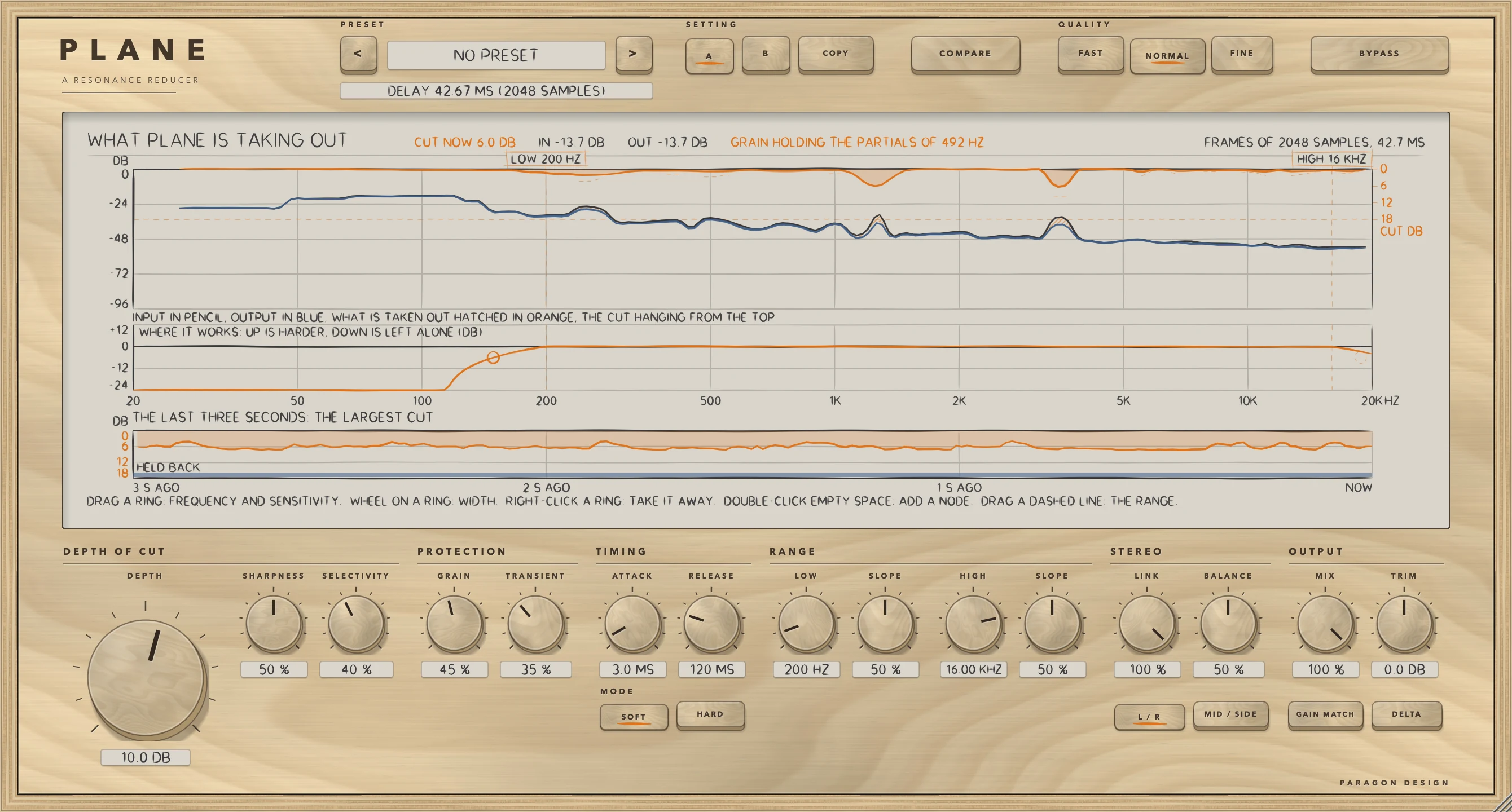
- Put PLANE on a track. It opens at its own settings, not at rest: DEPTH 6 dB, NORMAL, SOFT, and the preset bar reads NO PRESET. The preset Flat Start is the setting that does nothing.
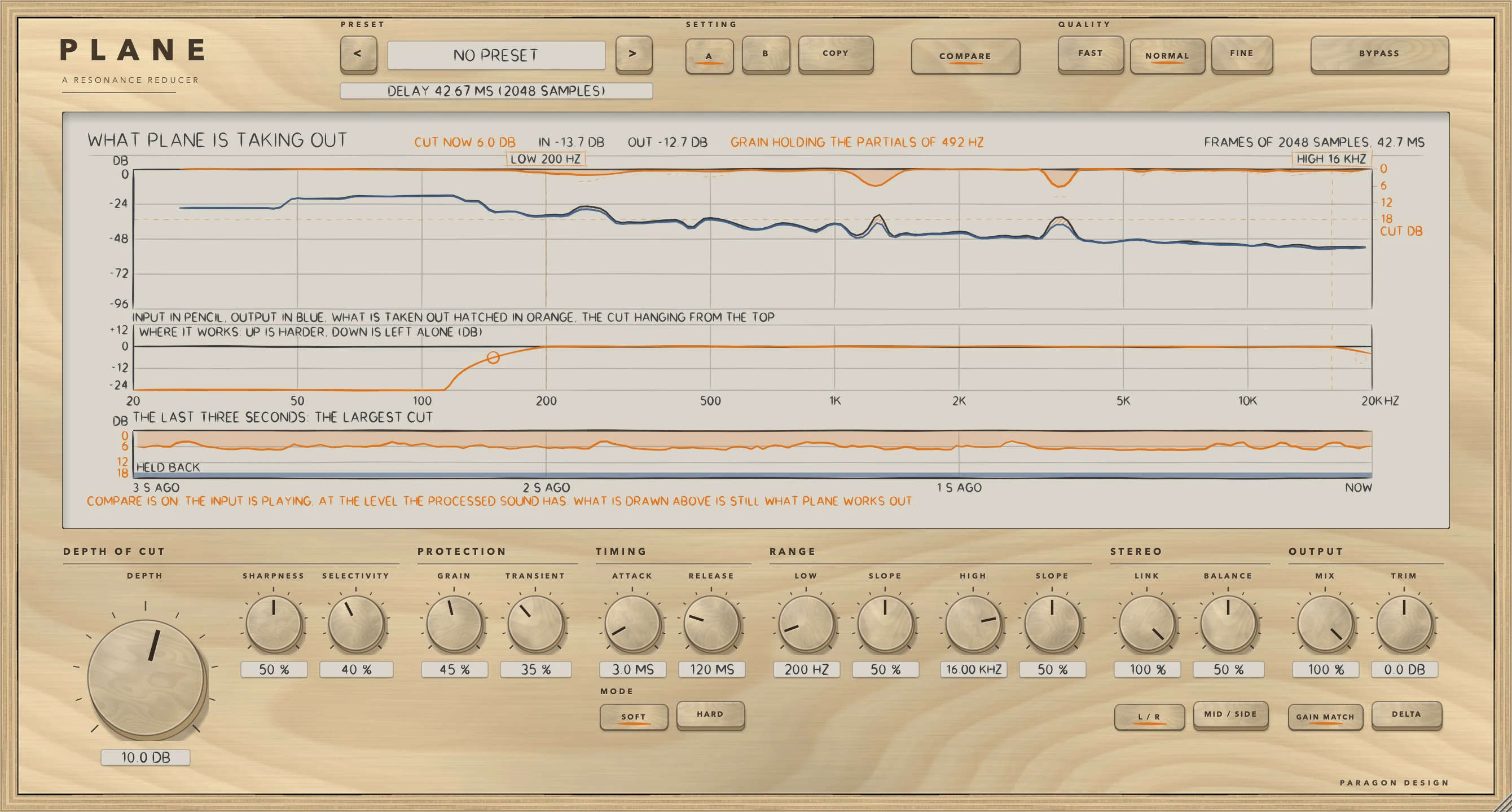
- Play something with a ringing tone in it. The display draws the input in pencil, the output in blue, what is taken out hatched in orange between them, and the cut hanging from the top.
- Raise DEPTH, the big knob. The most any one frequency is turned down is the number it shows, up to 18 dB.
- Press DELTA to hear only what is being taken out, then press it again.
- Raise GRAIN to spare a note's partials, and TRANSIENT to spare the front of a hit. The display says GRAIN HOLDING or TRANSIENT HOLDING when either is acting.
- Press COMPARE to hear the input, delayed to match, at the level the processed path is running at, and press it again to come back.
- Or choose a preset from the menu, for example Voice, Lead Vocal.
How it works
Hold the pointer over a control for a short description, and double-click a knob to return it to its default. The Control reference after this chapter lists every control with its limits and default.
Top bar and presets
The keys < and > step through the 41 presets, and a click on the name opens a menu by category. The line under the name gives the delay. A and B are two complete settings, kept with the session; COPY writes the setting in use over the other one. BYPASS crossfades over 5 ms to the input delayed by the same amount, so switching it never moves anything in time, and it is also the host's bypass parameter. QUALITY is FAST, NORMAL or FINE (see Latency).
The display and its gestures
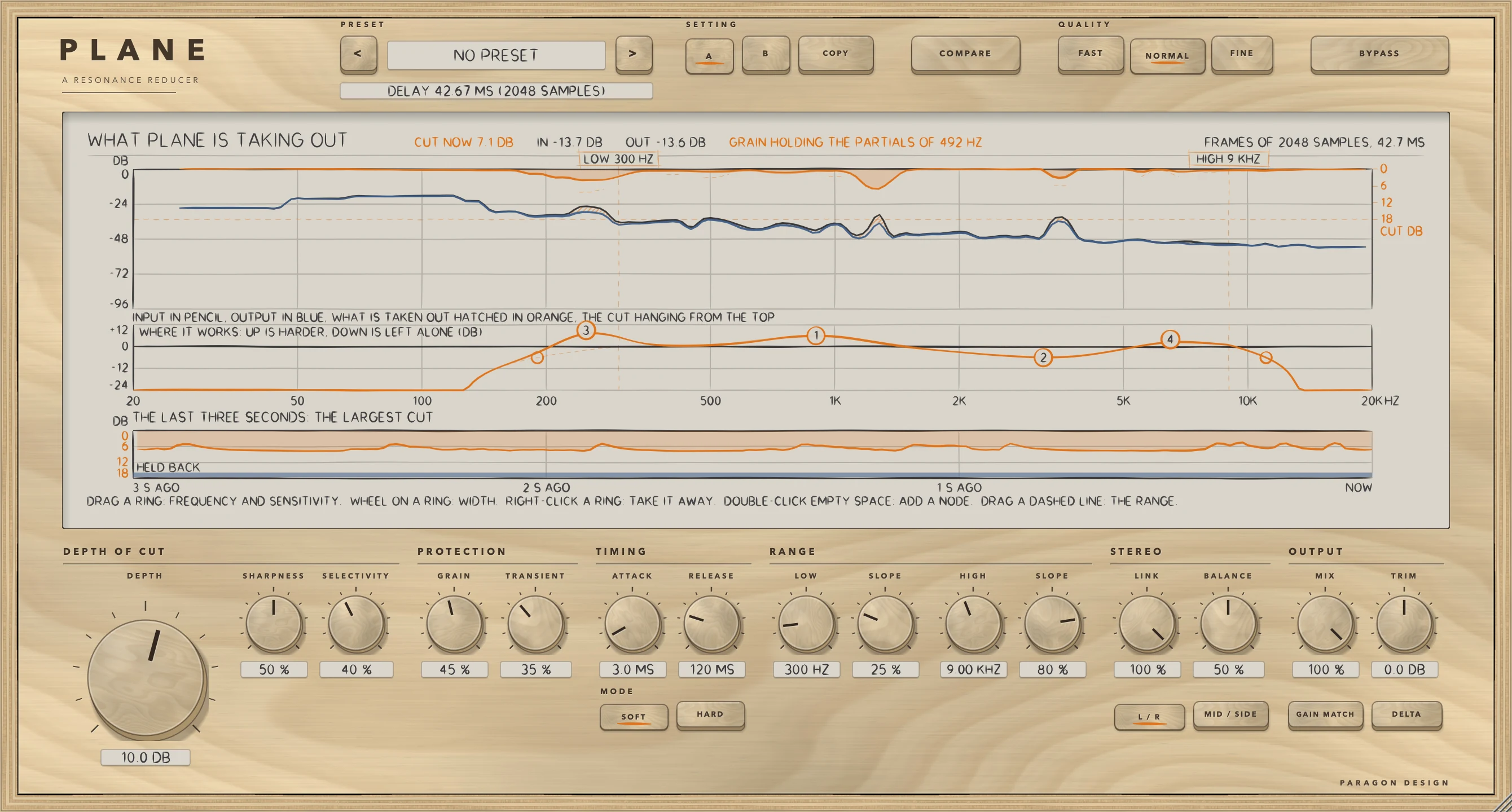
One display holds three lanes under one frequency axis from 20 Hz to 20 kHz, evenly in log frequency. The top lane is the spectrum, from 25 Hz to 20 kHz in 96 bands, 0 dB at the top for a full-scale sine and -96 dB at the bottom: the input in pencil and the output in blue, what was taken out hatched in orange between them, and the cut in each band hanging from the top edge in orange (0 dB at the top and DEPTH's 18 dB at 0.36 of the lane's height, with the scale at the right). Where GRAIN or TRANSIENT held a wanted cut back, the cut that was wanted is drawn dashed. The middle lane is the weight: how hard PLANE works at each frequency, from +12 dB at the top to -24 dB at the bottom, drawn from the same function the engine builds its table from, with the span's own part dashed under it. The bottom lane is the history: the largest cut of the last three seconds, hanging from the top, with a strip along the bottom where GRAIN or TRANSIENT was holding.
A line at the top of the display says CUT NOW, the largest cut at this moment, IN and OUT, the peak levels, GRAIN HOLDING with the spacing of the partials it found, TRANSIENT HOLDING, and the frame, for example FRAMES OF 2048 SAMPLES, 42.7 MS. CUT NOW, IN and OUT are not averages: IN and OUT are peak levels that fall 24 dB a second and CUT NOW is the largest cut of the bands, falling 30 dB a second. The display shows what PLANE works out whatever DELTA, COMPARE or BYPASS is playing. A line at the bottom says what the hand can do, or what it is on.
- Drag a ring for a node's frequency and sensitivity: across sets FREQUENCY, up and down sets SENSITIVITY, and the ring follows the hand without a jump. Hold Alt, the Option key on a Mac, to move it a tenth as far.
- Turn the wheel over a ring to set WIDTH, from 0.2 to 8: each 0.5 of wheel doubles or halves it, and Alt makes it a fifth as far.
- Double-click empty space to add the first node that is off, at the hand's frequency and sensitivity. A fifth says ALL FOUR NODES ARE IN USE.
- Right-click a ring to take its node away.
- Drag a dashed line to move a bound of the span: LOW is held between 20 Hz and 2 kHz and under HIGH, and HIGH between 1 kHz and 20 kHz and over LOW. A double-click on the line puts that bound and its slope back.
- Drag the small ring on a bound's roll-off to set its SLOPE, where the weight has fallen to a half: nearer the bound is steeper. A ring that would fall past an end of the axis, as HIGH at 16 kHz with SLOPE 50 does (its place is 21 kHz), is drawn dashed and held 10 pixels inside the end.
A drag, a wheel turn and a double-click are each a parameter gesture a host can record.
DEPTH, SHARPNESS and SELECTIVITY
DEPTH is the most that any one frequency is turned down, from 0 to 18 dB. At 0 PLANE does nothing, and the sound is the input delayed by the amount the line under the preset name says. A cut does not leave at once when DEPTH goes to 0: it lets go with a time constant of 25 ms, and the output is exactly the delayed input about 0.4 s later.
PLANE sets each frequency against a log-frequency average of its own neighbourhood. SHARPNESS is the width of that neighbourhood, 0.75 octave at 0 and 0.16 octave at 100, and it also sets how hard a peak is taken: 0.55 dB for each dB it stands out at 0 and 1.15 dB at 100. SELECTIVITY is how far a frequency has to stand out above the average before anything is taken, 1.5 dB at 0 and 11.0 dB at 100. A frequency over the threshold is turned down by the excess times the slope, times the weight the span from LOW to HIGH and the nodes give its frequency, and never by more than DEPTH. SHARPNESS now sets the width as soon as it moves, where version 1 worked the width out only when a node or a bound moved (see Measured).
MODE, ATTACK and RELEASE
SOFT measures a frequency only against the level around it, so PLANE does the same thing at any level of the programme. HARD folds in a floor that follows the level of the programme: quiet passages are left alone and loud ones are worked harder. ATTACK is how fast a cut grows once a resonance is found, from 0.2 to 50 ms as a time constant, and RELEASE how fast it lets go, from 5 to 500 ms. Low frequencies take 2.2 times the setting and high frequencies 0.55 times. The cut is worked out once for each step between frames, so nothing is faster than a quarter of a step for ATTACK (2.7 ms at NORMAL and 48 kHz) or one step for RELEASE (10.7 ms at NORMAL and 48 kHz).
GRAIN and TRANSIENT
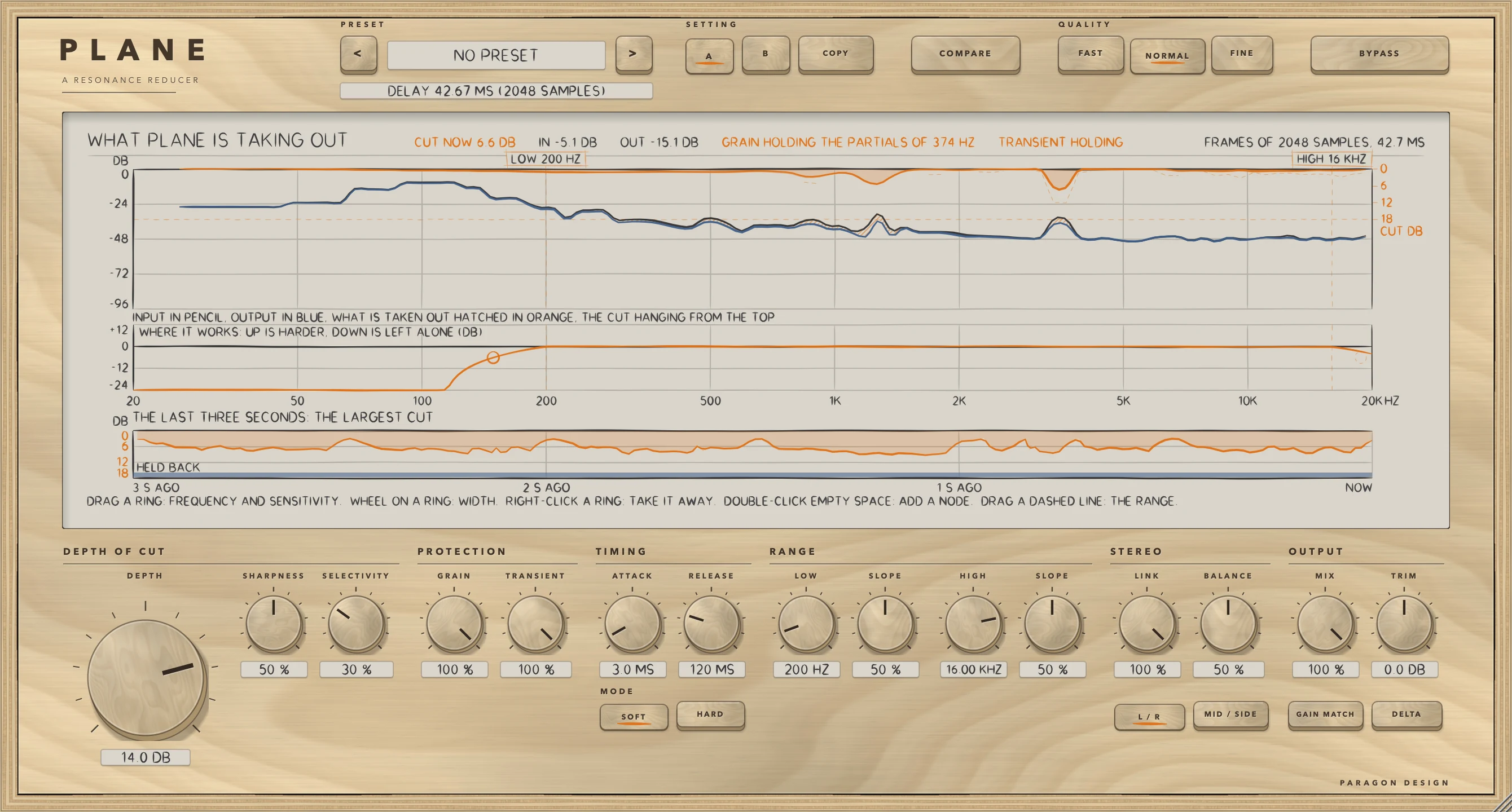
GRAIN looks for a regular spacing in a coarse spectrum up to 3.2 kHz, the series of partials a played note lays down, and spares those frequencies: at 100 a series that has been found is spared by up to 95 percent. A lone ring or a room mode has no series behind it and is still taken. TRANSIENT holds the cut off the front of a hit, so that attacks pass and only the ring that follows is taken: the hold begins when the level of a frame rises more than 1 dB over its running average, is complete at 6 dB, and dies away over the frames that follow.
RANGE: LOW, HIGH and the nodes
LOW is the lowest frequency PLANE works on in full, from 20 Hz to 2 kHz, and below it the weight falls away at its SLOPE: the weight reaches nothing in 2.9 octaves at SLOPE 0 and in 0.5 octave at 100. HIGH is the highest, from 1 kHz to 20 kHz, with a SLOPE of its own. Each of the four nodes has a frequency (20 Hz to 20 kHz), a width (0.2 to 8) and a sensitivity (-12 to +12 dB): a node raises or lowers the weight around its frequency, so a positive sensitivity makes PLANE work harder there and a negative one leaves that stretch more alone.
STEREO
L / R works on the left and the right side, and MID / SIDE on the middle, half the sum of the two sides, and the side, half their difference. LINK says how much the two are cut together: at 100 one cut, worked out from the louder of the two sides at each frequency, goes on both and the image does not move, and at 0 each side is analysed on its own; with MID / SIDE it is the middle and the side that are linked. BALANCE says which side is worked on: at 0 only the left (the middle, in MID / SIDE), at 50 both, at 100 only the right (the side). The side that is left alone comes out as it went in. Changing the stereo mode needs no dip: the corrections wait in left and right.
OUTPUT, GAIN MATCH, DELTA and COMPARE
MIX is how much of the processed sound is heard against the input, delayed to match: 0 is the input alone and 100 the processed sound alone. TRIM is a gain after the processing, from -12 to +12 dB. GAIN MATCH gives back the energy that was taken, measured from the spectrum, so that switching PLANE on and off compares the sound and not the loudness; it is measured frame by frame, so it is close and not exact. DELTA plays only what is being taken out, the input less the processed sound.
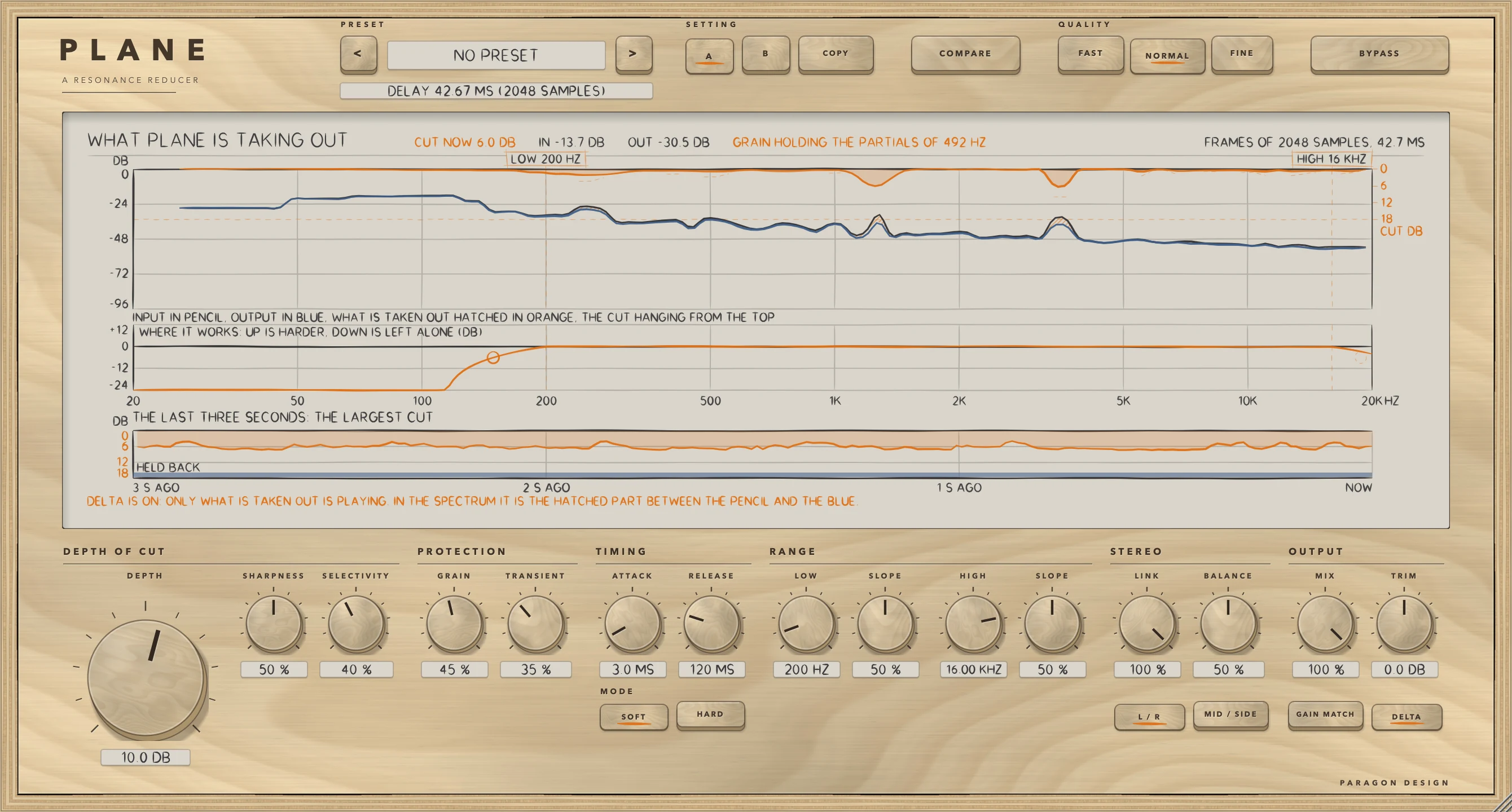
COMPARE plays the unprocessed signal, delayed to match, at the level the processed path is running at, so the two can be compared without leaving PLANE. Together with GAIN MATCH on it came within 0.03 dB of the processed level on the test signal.
Names in the host
To a host PLANE has 38 parameters, with the ids and names of version 1: Depth of Cut, Sharpness, Selectivity, Attack, Release, Grain, Transient, Mode, Quality, Low Bound, Low Slope, High Bound, High Slope, Stereo Mode, Link, Balance, Mix, Trim, Gain Match, Delta, Compare and Bypass, and for each of four nodes On, Freq, Width and Sens. Which preset is loaded and the two settings A and B are kept with the saved state and are not host parameters; COMPARE, DELTA and BYPASS are not kept in a setting. A session saved by version 1 loads, and the controls keep their meaning.
Control reference
Every control on the panel, as the plug-in itself labels it. The description is the tooltip the plug-in shows when you rest the pointer on the control.
Top bar
| No. | Control | What it does | Range | Default |
|---|---|---|---|---|
| 1 | <Key | Previous preset | ||
| 2 | >Key | Next preset | ||
| 3 | AKey | Setting A. Two complete settings are held independently and saved with the session. | ||
| 4 | BKey | Setting B. Two complete settings are held independently and saved with the session. | ||
| 5 | COPYKey | Writes the live settings over the other setting. | ||
| 6 | COMPAREKey | Plays the unprocessed signal, delayed to match, at the level the processed path is running at, so the two can be compared without leaving PLANE. | ||
| 7 | FASTKey | Analysis frames of 1024 samples (2048 above 64 kHz), stepping every 5.3 ms at 48 kHz. The delay is one frame, 21.3 ms at 48 kHz, and the host is told. A longer frame separates frequencies that are closer together and reacts later. | ||
| 8 | NORMALKey | Analysis frames of 2048 samples (4096 above 64 kHz), stepping every 10.7 ms at 48 kHz. The delay is one frame, 42.7 ms at 48 kHz, and the host is told. A longer frame separates frequencies that are closer together and reacts later. | ||
| 9 | FINEKey | Analysis frames of 4096 samples (8192 above 64 kHz), stepping every 10.7 ms at 48 kHz. The delay is one frame, 85.3 ms at 48 kHz, and the host is told. A longer frame separates frequencies that are closer together and reacts later. | ||
| 10 | BYPASSKey | Hear the input, delayed by the same amount, so that switching it never moves anything in time. It fades over 5 ms. |
Controls
| No. | Control | What it does | Range | Default |
|---|---|---|---|---|
| 11 | DEPTHKnob | The most that any one frequency is turned down: 18 dB at the top of the knob. At 0 PLANE does nothing, and the sound is the input delayed by the amount the delay line under the preset name says. Double-click to reset. | 0 to 18 dB | 6 dB |
| 12 | SHARPNESSKnob | How narrow a peak has to be to count as a resonance, and how hard it is taken. A frequency is compared with the average level around it, over 0.75 octave at 0 and 0.16 octave at 100, and 0.55 dB is taken for each dB it stands out at 0 and 1.15 dB at 100. | 0 to 100 % | 50 % |
| 13 | SELECTIVITYKnob | How far a frequency has to stand out above the average level around it before anything is taken: 1.5 dB at 0 and 11.0 dB at 100. | 0 to 100 % | 45 % |
| 14 | GRAINKnob | Holds the cut off the partials of a note. PLANE looks for a regular spacing in the spectrum, the series of partials a played note lays down, and spares those frequencies; a lone ring or a room mode has no series behind it and is still taken. At 100 a series that has been found is spared by up to 95 percent. | 0 to 100 % | 45 % |
| 15 | TRANSIENTKnob | Holds the cut off the front of a hit, so that attacks pass and only the ring that follows is taken. The hold begins when the level of a frame rises more than 1 dB over its running average and is complete at 6 dB, and dies away over the frames that follow. | 0 to 100 % | 35 % |
| 16 | ATTACKKnob | How fast a cut grows once a resonance is found, 0.2 to 50 ms, as a time constant. Low frequencies take 2.2 times this and high frequencies 0.55 times. The cut is worked out once for each step between frames, so nothing is faster than a quarter of one (2.7 ms at NORMAL, 48 kHz). | 0.2 to 50 ms | 3 ms |
| 17 | SOFTKey | A frequency is measured only against the level around it, so PLANE does the same thing at any level of the programme. | ||
| 18 | RELEASEKnob | How fast a cut lets go, 5 to 500 ms, as a time constant. Low frequencies take 2.2 times this and high frequencies 0.55 times. Nothing is faster than one step between frames (10.7 ms at NORMAL, 48 kHz). | 5 to 500 ms | 120 ms |
| 19 | HARDKey | A floor that follows the level of the programme is folded in: quiet passages are left alone and loud ones are worked harder. | ||
| 20 | LOWKnob | The lowest frequency PLANE works on in full, 20 Hz to 2 kHz. Below it the weight falls away at the slope. The dashed line on the display moves it too, and a double-click on the line puts it back. | 20 to 2000 Hz | 200 Hz |
| 21 | SLOPEKnob | How quickly the weight falls away below the low bound: it reaches nothing in 2.9 octaves at 0 and in 0.5 octave at 100. The small ring on the display's curve sets it too. | 0 to 100 % | 50 % |
| 22 | HIGHKnob | The highest frequency PLANE works on in full, 1 kHz to 20 kHz. Above it the weight falls away at the slope. The dashed line on the display moves it too, and a double-click on the line puts it back. | 1000 to 20000 Hz | 16000 Hz |
| 23 | SLOPEKnob | How quickly the weight falls away above the high bound: it reaches nothing in 2.9 octaves at 0 and in 0.5 octave at 100. The small ring on the display's curve sets it too. | 0 to 100 % | 50 % |
| 24 | LINKKnob | How much the two sides are cut together. At 100 one cut, worked out from the louder of the two sides at each frequency, goes on both and the image does not move. At 0 each side is analysed on its own. With MID / SIDE it is the middle and the side that are linked. | 0 to 100 % | 100 % |
| 25 | L / RKey | Work on the left and the right side. | ||
| 26 | BALANCEKnob | Which side is worked on: at 0 only the left (the middle, in MID / SIDE), at 50 both, at 100 only the right (the side). The side that is left alone comes out as it went in. | 0 to 100 % | 50 % |
| 27 | MID / SIDEKey | Work on the middle and the side: the middle is half the sum of the two sides and the side half their difference. | ||
| 28 | MIXKnob | How much of the processed sound is heard against the input, delayed to match: 0 is the input alone and 100 the processed sound alone. | 0 to 100 % | 100 % |
| 29 | GAIN MATCHKey | Gives back the energy that was taken, measured from the spectrum, so that switching PLANE on and off compares the sound and not the loudness. | ||
| 30 | TRIMKnob | Gain after the processing, -12 to +12 dB. | −12 to 12 dB | 0 dB |
| 31 | DELTAKey | Plays only what is being taken out. |
Recipes
Find the offender
Choose Resonance Hunt from Utility: DEPTH 14 dB over the whole spectrum from 60 Hz, SHARPNESS 90, SELECTIVITY 70, ATTACK 0.8 ms, RELEASE 60 ms, GRAIN and TRANSIENT at 0, FINE. It is deep and narrow on purpose. Press DELTA to hear what it takes out, find the frequency the display keeps cutting, then back off DEPTH.
Calm the ring after a snare
Choose Snare Ring from Drums: DEPTH 10 dB from 250 Hz to 4 kHz, SHARPNESS 86, SELECTIVITY 66, ATTACK 1 ms, RELEASE 60 ms, GRAIN 20, TRANSIENT 75, FINE, with one node. TRANSIENT at 75 holds the cut off the front of the hit, so the attack passes and only the ring that follows is taken. Watch TRANSIENT HOLDING on the display.
Work only the sides of a mix
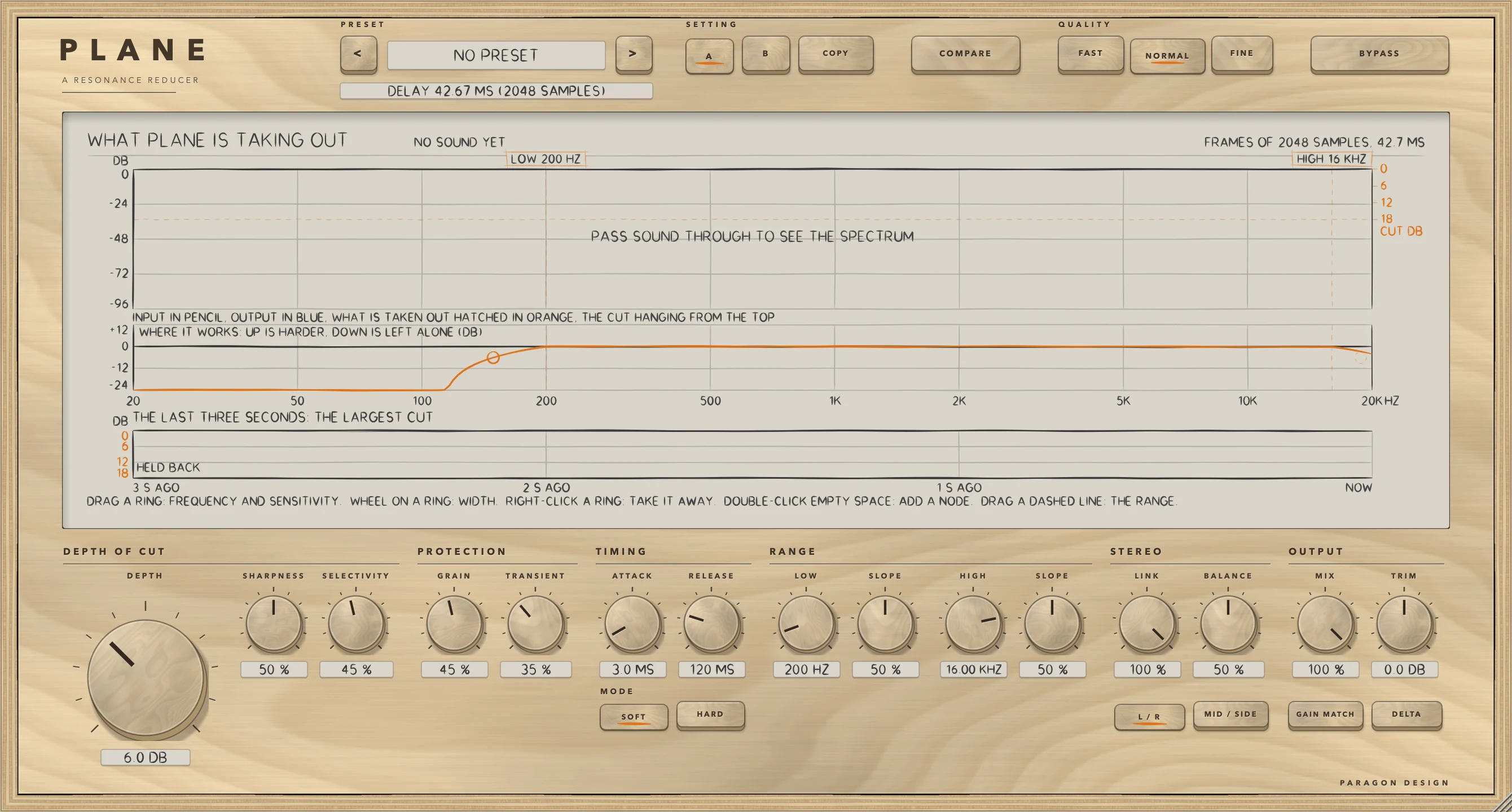
Choose Sides Only from Master: MID / SIDE, LINK 0 and BALANCE 100, DEPTH 6 dB from 300 Hz to 18 kHz, FINE. With BALANCE at 100 only the side is worked on, and the middle comes out as it went in. Centre Only is the other way round, with BALANCE at 0.
A shallow pass over a finished mix
Choose Master Gentle: DEPTH 3.5 dB from 200 Hz to 18 kHz, SHARPNESS 40, SELECTIVITY 35, ATTACK 5 ms, RELEASE 150 ms, FINE. Press COMPARE with GAIN MATCH on to hear the input at the level the processed path is running at, so that the comparison is of the sound and not of the loudness.
Presets
PLANE has 41 presets in 7 categories. They are starting points chosen from measurements, not tuned by ear.
- Start: Flat Start
- Voice: Lead Vocal; Sibilance; Vocal Air; Backing Stack; Dialogue
- Drums: Cymbal Wash; Snare Ring; Overheads; Room Mics; Drum Bus
- Guitar: Amp Fizz; Acoustic; Bass Boom; Piano Ring
- Keys: Synth Harshness; Strings Section; Brass Bite
- Master: Master Gentle; Mix Bus Harsh; De-Mud; Sides Only; Centre Only; Air Polish; Digital Edge; Pre-Limiter; Low End Focus; Vocal Pocket; Dense Mix; Rock Master; Electronic Master; Orchestral Master; Acoustic Master; Hip Hop Master; Bright Room Fix; Vinyl Prep; Stem Master; Loudness Guard
- Utility: Resonance Hunt; Shallow, Wide; Plain Start
Every preset sets every control. Flat Start is the setting that does nothing: DEPTH 0, MIX 100, TRIM 0, GAIN MATCH off, the nodes off, SOFT, NORMAL, L / R and LINK 100, so the output is the input delayed, bit for bit. It is listed first, in its own Start group, and it is the last of the 41 in the host's order. Version 1's forty presets keep their order and values; two names changed so that the name Flat Start means the setting that does nothing: version 1's Transparent is now Shallow, Wide, and its Flat Start, which was the starting settings with GRAIN and TRANSIENT off, is now Plain Start. The plug-in opens at its own starting settings (DEPTH 6 dB), which are not rest. Each preset's description is made from its own values, so it carries true numbers, after a one-line use.
On pink noise at -18 dBFS RMS through the processor, the level change of the 41 presets runs from -0.21 dB (Dense Mix) to +0.98 dB (Loudness Guard), and the highest peak is -3.2 dBFS (Loudness Guard); none clips. The presets are not level matched. To the host PLANE has one unnamed program, so the presets belong to its panel. In Logic Pro, plug-in settings are stored with the project file.
Measured
All figures are from the plug-in repository's tests, last run on 15 October 2026. WorkshopTests plane ran 750 checks, none failed, in the builder's run and again in mine (10:56 to 10:58 NZDT): the groups are kit 150, engine 49, oracle 80, robust 111, compat 94, processor 29, presets 48 and view 189. The builder's run of the whole program at 10:33 had 1 failed check of 7093, another plug-in's CPU limit (3.02 against 3.0) at a load average of 12, and that plug-in's own group passed on a re-run. The host test on the installed Audio Unit ran 53 checks, none failed, and again on the universal release build's Intel half (11:01 NZDT); auval passes on the installed copy, which is component version 2.0.0. The figures are on synthetic test signals, not recordings of music, at 48 kHz unless a row says otherwise. A figure marked bound is a bound the test sets, not a result. Every other figure is a measurement.
| What was measured | Result | Conditions |
|---|---|---|
| Same sound as version 1 | Every case that is not a DELTA case came out 111.4 to 125.1 dB below the output's RMS (bound 100 dB): 1 to 3 units in the last place of a float at the loud peaks. MIX 0, and COMPARE with GAIN MATCH, were identical bit for bit. The DELTA cases came out 94.3 to 102.3 dB below the DELTA output and 109.0 to 117.3 dB below the programme | A copy of version 1's engine run beside the new one on ten seconds of a pink bed, a held chord with a ringing tone, drum hits and a panned element, over 57 cases: each quality, SOFT and HARD, L / R and M / S with LINK 0, 50 and 100, GRAIN and TRANSIENT at 0, at their defaults and at 100, one and four nodes, narrow and widest spans, extremes of the controls, mono, 44.1, 96 and 192 kHz |
| DELTA at DEPTH 0 | The new DELTA is exactly 0. Version 1's DELTA, a subtraction of two nearly equal signals, had a rounding noise of 138.5 to 139.6 dB below the programme | Peak 1.5e-7 to 1.8e-7 in version 1 |
| Rest and bypass | At DEPTH 0 the output was the input delayed by the reported latency, bit for bit, in all 48 combinations of 4 rates, 3 qualities, mono and stereo, L / R and M / S, with busy settings, MIX 0, COMPARE with GAIN MATCH, and BYPASS from the start and switched on mid-run. Version 1 was 138.0 to 139.5 dB under the delayed input. Blocks of 1, 7, 64, 512 and 4096 samples gave exactly the output of 512 | Settings changed at several sample positions for the block test |
| Letting go at DEPTH 0 | From DEPTH 12 to 0 at RELEASE 120 ms the output was exactly the delayed input after 0.39 s in FAST, 0.41 in NORMAL and 0.44 in FINE, and after 0.40, 0.43 and 0.46 s at RELEASE 500 ms | A cut lets go with a time constant of 25 ms when DEPTH goes to 0 |
| Moving a control | The largest step between samples of a sine as a multiple of its own, version 1 against the new: MIX 3.85 and 3.31 against 1.00; TRIM 4.80 and 4.34 against 0.96; BALANCE 3.85 against 1.00; COMPARE 3.82 against 1.00; DELTA 3.35 and 2.77 against 1.00; L / R to M / S 7.67 against 1.08; QUALITY NORMAL to FINE 19.48 against 1.38 and NORMAL to FAST 15.82 against 1.46 | A sine under each change. Every other control reads the same in both (0.73 to 1.16, the engine's own ballistics) |
| Changing QUALITY | The audio thread made 0 allocations and 0 frees over two passes of 375 blocks with every setting changed every 40 blocks. Version 1's engine, given the same schedule of QUALITY, made 1280 allocations and 1280 frees. The dip is silent for exactly the new frame's length plus one sample | The counter was first shown to count a deliberate allocation |
| SHARPNESS while running | SHARPNESS moved from 20 to 90 at 0.85 s, the last three seconds against an engine that had 90 from the start: version 1 -29.0 dB, the new engine -3034.9 dB (RMS of the difference against RMS of the output) | The one place the sound differs from version 1's at a setting that has settled, on purpose |
| COMPARE | The level of COMPARE came within -0.027 dB of the processed path's with GAIN MATCH off and -0.025 dB with it on (bound 0.1 dB) | The test signal |
| The installed binaries against the engine | The Audio Unit and the engine differed in 0 of 192000 samples in each of six settings, by at most 0.000000000. The installed VST3, hosted by a small test host, did the same: 12 checks, none differing | Six settings from the plug-in's own to DEPTH 15 with MIX, TRIM and GAIN MATCH, DELTA and COMPARE, on a stereo programme in blocks of 480 |
| Cost | The whole plug-in at 48 kHz, stereo, in percent of one core, at the default and at the heaviest setting: FAST 0.95 and 1.13, NORMAL 0.81 and 0.99, FINE 1.39 and 1.75. A paint of the display at 2x cost 8.8 ms with sound running and 19.2 ms while a bound was dragged | Thread CPU time, 512-sample blocks, GRAIN and TRANSIENT on, the least of several runs on a shared Intel Core i9. The heaviest setting has GRAIN and TRANSIENT at 100, LINK 0, HARD, GAIN MATCH and two nodes on |
At a load average of 12 the same cost figures read 1.26 and 1.50, 1.10 and 1.32, and 1.86 and 2.34, and FINE at its heaviest setting was over the 2 percent the Workshop aims at; the test prints "not met" and fails only over four times its budget. Repeated lines of lettering on the display are kept as pictures, which took a paint from 30.4 to 8.8 ms and the paint while dragging a bound from 51.0 to 19.2 ms; an idle editor repaints 0 times in 3 seconds.
Limits and what is not verified
- Nothing has been checked by ear. Every figure is a measurement of a synthetic signal: the cuts, GRAIN's finding of partials, TRANSIENT's hold and the presets were chosen and tested from numbers. GRAIN's pitch finder was tried on synthetic signals only (a held chord, a ringing tone, hits), not on real instruments.
- The delay is one analysis frame at every setting, from 21.3 ms at FAST to 85.3 ms at FINE at 48 kHz, so PLANE is not for a track that is being played through live.
- A change of QUALITY while sound plays makes a silent dip of the new frame's length, because the frame changes. Every other control glides.
- COMPARE and GAIN MATCH are close and not exact: GAIN MATCH is measured frame by frame, and with LINK under 100 (two gain curves) it pairs the last curve's spectrum with the first curve's cuts, as version 1 did.
- FINE at its heaviest setting is over the 2 percent the Workshop aims at on a busy machine (2.34 at a load average of 12).
- Some preset descriptions name the problem a preset is for in plain words, such as fizz, boom, harsh and glare. They describe the material and say nothing about what PLANE does to the sound.
- Version 1's sessions: no session saved by the real version 1 was available, so the test that loads one uses a file written by hand in version 1's format from its source.
- A compiler fault found while building PLANE: at its highest optimisation level with link-time optimisation, Apple's compiler once made the first installed Audio Unit play only the correction, with silence at DEPTH 0, while every test of the engine passed. The loop was split, and the host test now compares the installed binary with the engine in six settings, as the figures above show. Nothing proves other engines are free of it.
- Not verified in Logic Pro: the points in the note under In Logic Pro, which rest on Apple's pages on plug-in latencies, plug-in formats and adding and bypassing plug-ins.
- Not verified: the VST3 in any digital audio workstation, the editor inside a real host, native Apple silicon (the development builds contain x86_64 code only, and a release build, which is universal, has not been run there), the cost under a real host's load, and the window size, which is not kept. PLANE is a rebuild of an existing plug-in and the name is not new.
Troubleshooting
Nothing changes
DEPTH may be at 0, which does nothing; the sound is then the input delayed. A resonance has to stand out above the average level around it by more than SELECTIVITY's threshold, so a high SELECTIVITY takes fewer peaks, and the weight has to be above 0 at its frequency: check that LOW and HIGH include it. With BALANCE at 0 or 100 only one side is worked on. If the display moves but the sound does not, check BYPASS, COMPARE and MIX.
The track is late
PLANE always delays the sound by one analysis frame, and the line under the preset name shows it. With the host's delay compensation off, the track is late by the delay in the Latency table. In Logic Pro, plug-in latency compensation is set with the Compensation pop-up menu in Logic Pro > Settings > Audio > General, and Apple's page says there can be a slight lag between starting playback and the tracks playing in sync. FAST has the shortest delay.
There is a gap when I change QUALITY
A change of QUALITY changes the frame, so the output dips: down over 3 ms, silent for the new frame's length plus one sample, then up over 3 ms. Change it while the transport is stopped.
It cuts the front of notes, or takes the body of a held note
Raise TRANSIENT to hold the cut off the front of a hit, and GRAIN to spare a played note's partials. The display says when either is holding. A lone ring or a room mode has no series of partials behind it and is still taken.
The level changes when I switch it on
PLANE takes energy out. Press GAIN MATCH to give back the energy that was taken, measured from the spectrum, or use TRIM. COMPARE plays the input at the level the processed path is running at, so the two can be compared without the level moving.
A cut stays for a moment after I set DEPTH to 0
A cut lets go with a time constant of 25 ms when DEPTH goes to 0, so the output is exactly the delayed input about 0.4 s later.