What it is
When two recordings of one sound disagree about time, polarity or phase, they cancel each other where you wanted them to add. Two microphones on one drum, a direct box and a miked amp, a close microphone and a room microphone: all three can do it. SQUARE measures the lag between a track and a reference to a fraction of a sample, says whether the track is upside down, and moves the track into line.
The track is the main input. The reference is on the side chain. SQUARE compares the two with a phase-transform cross-correlation, which judges timing by phase and so is not fooled by two signals that differ in tone. A negative peak means the track is inverted. ALIGN NOW sets DELAY and POLARITY for you.
Two recorders that do not share a clock slide apart at a steady rate, so a track that starts in step can finish out of step. SQUARE takes a reading about once a second and keeps the lag against the position in the song. FOLLOW applies a straight line fitted through the last 90 seconds of readings. HOLD applies the map learned on an earlier pass, and needs no reference.
SQUARE changes time, polarity and phase, and nothing else. At rest it is a delay and nothing more, bit for bit. It does not fix timing that wanders from moment to moment, because it applies a steady delay and a straight-line drift.
Setting it up
Formats, channels and the reference
SQUARE is an effect in Audio Unit and VST3 formats. The track can be mono or stereo, with the same number of channels in and out. The reference input, which the plug-in calls Reference, can be mono or stereo. It starts switched off. Until a source is routed to it the panel reads NO REFERENCE ON THE SIDECHAIN, and ALIGN NOW, SUM and REF are dimmed.
Where to put it
Put SQUARE on the track that has to move, and send the signal to line up with, the reference, to its side chain. Both channels of a stereo track share one delay, one rotation and one polarity. The measurement uses the track's channels added together.
Latency
SQUARE always delays the track by its reported latency, which is 16 samples plus the RANGE. At 48 kHz that is 256, 976 or 2416 samples for 5 MS, 20 MS and 50 MS, which is 5.3, 20.3 or 50.3 ms. The panel shows the figure as LATENCY n MS REPORTED TO THE HOST. A positive DELAY adds to that delay. A negative DELAY takes less of it, which is how the track moves earlier than the rest of the project once the host has compensated. The plug-in holds the reference back by the same latency, so SUM and REF stay in step with the track.
At other sample rates the RANGE is converted to samples and the 16 samples are added. The latency changes when you change RANGE, and SQUARE reports the new figure to the host.
Sample rates
The measurements here were taken at 48 kHz. Other sample rates are not verified.
Licence and trial
SQUARE is a premium plug-in. It works in full for 14 days. The days are counted for each plug-in on its own. They start the first time the plug-in's window is opened, or after five minutes of audio have gone through it, whichever comes first. A host that only creates the plug-in to read what it is does not start them. In the top bar, beside the small wooden key marked LICENCE, a pencil line reads TRIAL: 9 DAYS LEFT, and the number falls by one each day. The last day reads 1 DAY LEFT. After it the line reads TRIAL OVER: ENTER A LICENCE, in orange.
When the trial is over SQUARE switches on its own bypass: the track passes through unchanged, delayed by the delay it reports. It neither measures nor aligns while the trial is over, so MEASURE and ALIGN NOW do nothing, and DELAY and the drift map stay as they were.
To add a licence, press LICENCE and then CHOOSE FILE, or drop the licence file anywhere on the plug-in's window. One file covers every plug-in in an order, and SQUARE works again at once. Nothing saved in a session is changed when a trial ends or a licence arrives. The Getting started manual has the whole chapter, Licences and the trial.
In Logic Pro
- Click an Audio Effect slot in the channel strip of the track to align, then choose Square Time and Phase Aligner from the pop-up menu (versions before 0.1.1 list it as Square).
- In the header area of the plug-in window, click the Side Chain pop-up menu and choose the reference track, hardware input or bus. The side chain signal controls the plug-in and is not processed by it.
- To reopen the plug-in window, click the centre area of the plug-in slot.
- To read the latency, hold the pointer over the plug-in slot. A help tag shows it in samples and seconds. Logic Pro delays the other channel strips to match when plug-in latency compensation is on.
A first session
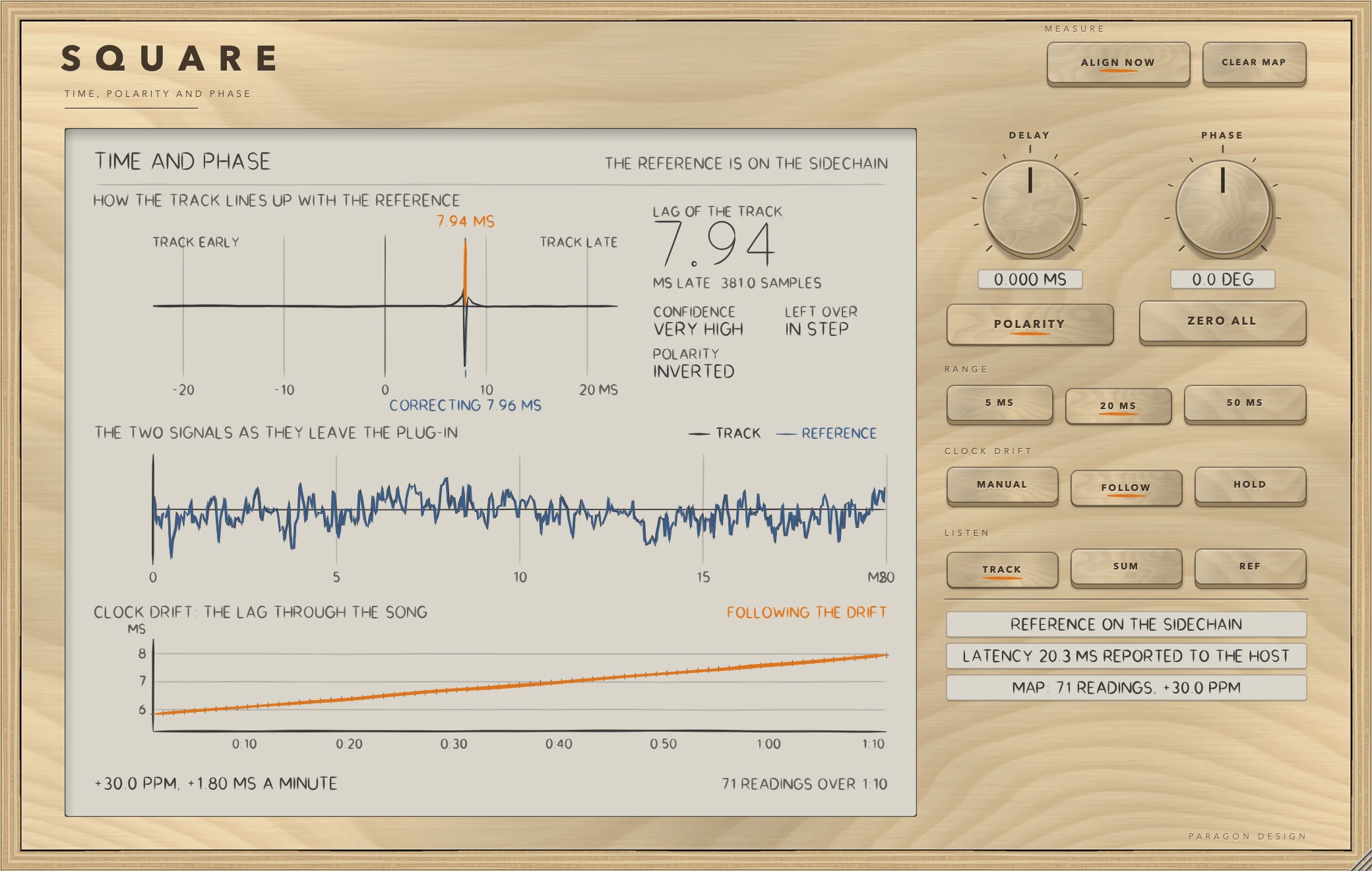
- Put SQUARE on the track and route the reference to its side chain (see Setting it up). The status line reads REFERENCE ON THE SIDECHAIN.
- Play the song. The display reads PLAY THE SONG: THE MEASUREMENT NEEDS ABOUT TWO SECONDS until it has enough.
- Press ALIGN NOW. SQUARE measures the lag and the polarity from what has just been heard, then sets DELAY and POLARITY to put the track in line. It widens RANGE if the correction needs it, up to 50 MS, and it sets the clock drift mode to MANUAL.
- Check the readouts. LAG OF THE TRACK shows the lag it found, CONFIDENCE says how sure it is, and LEFT OVER reads IN STEP when the correction has taken the lag out.
- Press SUM to hear the track and the reference together. When they are in step and in phase the sum is fuller. Press TRACK to go back, and REF to hear the reference alone.
- For a long recording from two recorders, press FOLLOW. On a second pass, press HOLD, and the map learned on the first pass does the work.
- Use PHASE for any remaining mismatch, and ZERO ALL to start again.
How it works
MEASURE
ALIGN NOW measures the lag and the polarity from what has just been heard and sets DELAY and POLARITY to put the track in line with the reference. It sets RANGE if the lag needs a wider one and it sets CLOCK DRIFT to MANUAL. It cannot run unless a reference is present and the timeline has been playing for long enough. CLEAR MAP forgets the drift map.
The display
The display is titled TIME AND PHASE and says at the top right whether the reference is on the side chain.
- How the track lines up with the reference. A correlation curve against lag in milliseconds, with TRACK EARLY at the left and TRACK LATE at the right. An orange line marks the measured lag and a dashed blue line, labelled CORRECTING, marks the correction in force.
- Readouts. LAG OF THE TRACK is the lag in milliseconds, with LATE or EARLY and the figure in samples. CONFIDENCE reads VERY HIGH, HIGH, FAIR, LOW or NONE. POLARITY reads INVERTED or IN PHASE, with FLIP IT or SET IT BACK in orange if the POLARITY key disagrees with the measurement. LEFT OVER is what remains after the correction, IN STEP when within half a sample.
- The two signals as they leave the plug-in. The track in graphite and the reference in blue over 20 ms, one over the other. A steady tone stands still.
- Clock drift: the lag through the song. One small cross for each reading, an orange line through them, the rate in ppm and in milliseconds a minute, and the number of readings and the time they cover. The text at the top right names the mode: FOLLOWING THE DRIFT, HOLDING THE MAP or MANUAL: THE DRIFT IS ONLY RECORDED.
DELAY, PHASE, POLARITY and ZERO ALL
DELAY runs from -100 to +100 ms, default 0. A positive value holds the track back and a negative value brings it forward, within the RANGE. Asked for more than the RANGE allows, it holds at the end of the RANGE and the display says BEYOND THE RANGE: WIDEN IT. While FOLLOW or HOLD is on, SQUARE chooses the delay and DELAY is a trim on top of it. When you leave MANUAL, SQUARE sets DELAY back to 0, so an earlier ALIGN NOW is not counted twice. Double-click to reset.
PHASE runs from -180 to +180 degrees, default 0, and turns the phase of the whole signal by that angle at every frequency. It is built from a pair of allpass chains kept 90 degrees apart, and it is skipped altogether at 0 degrees. A rotated signal differs from a plain delay of the input by the smooth phase curve of the allpass. POLARITY turns the track upside down. ZERO ALL puts DELAY, PHASE and POLARITY back to nothing.
Changes are smoothed. A polarity change takes 2 ms. A delay move of less than 2 samples glides, and a larger one is crossfaded over 32 ms. The phase angle moves with a time constant of about 10 ms, and switching the rotation on or off fades over about 30 ms.
RANGE
RANGE is how far the track can move either way: 5 MS, 20 MS (the default) or 50 MS. A wider RANGE costs more latency. 50 MS is for far room microphones.
CLOCK DRIFT
MANUAL keeps the delay you set. Readings are still taken and kept. FOLLOW measures all the time and follows the lag as the two clocks drift apart. It applies a line fitted through the readings of the last 90 seconds, and a stray reading does not pull it. It needs at least three readings spread over 8 seconds before it will fit a rate. HOLD uses the map learned on an earlier pass. It needs no reference and it holds through jumps and loops, because the map is indexed by position on the timeline and carried beyond its ends at the overall rate. The map is saved with the project, and it holds up to four hours of readings.
LISTEN
TRACK is the track. SUM is the track and the reference together, added. REF is the reference alone. Both of the last two need a reference on the side chain, and both are heard held back by the same latency as the track.
How the lag is measured
Every reading uses the newest 65536 samples of the track and the reference, stopping a short guard before the present. That is about 1.4 seconds at 48 kHz. It looks for lags within 100 ms either way, in the band from 80 Hz to 6 kHz. The integer lag comes from one inverse transform and the fraction from fine evaluations of the correlation around the peak. A reading counts only if its confidence, the peak against the rest of the correlation, reaches 8 and the normalised peak is at least 0.02. The words on the panel follow the confidence: 100 or more is VERY HIGH, 30 or more HIGH, 12 or more FAIR, 8 or more LOW, and below that NONE.
A positive lag means the track is later than the reference. A reading is taken about once for every second of song that has gone by, while the timeline plays and the reference is present. A jump in the timeline starts the count again and discards audio from before the jump.
The three status lines
The first says whether the reference is on the side chain: REFERENCE ON THE SIDECHAIN, SIDECHAIN IS SILENT or NO REFERENCE ON THE SIDECHAIN. The second says LATENCY n MS REPORTED TO THE HOST. The third says MAP: n READINGS and the rate in ppm, or MAP: NO READINGS YET.
Control reference
Every control on the panel, as the plug-in itself labels it. The description is the tooltip the plug-in shows when you rest the pointer on the control.
Top bar
| No. | Control | What it does | Range | Default |
|---|---|---|---|---|
| 1 | ALIGN NOWKey | Measure the lag and the polarity from what has just been heard, and set DELAY and POLARITY to put the track in line with the reference. | ||
| 2 | CLEAR MAPKey | Forget the drift map. |
Controls
| No. | Control | What it does | Range | Default |
|---|---|---|---|---|
| 3 | DELAYKnob | Holds the track back (positive) or brings it forward (negative), within the range. While FOLLOW or HOLD is on, SQUARE chooses the delay and this is a trim on top. Double-click to reset. | −100 to 100 ms | 0 ms |
| 4 | POLARITYKey | Turn the track upside down. | ||
| 5 | 5 MSKey | The track can move up to 5 ms either way. Reports 5 ms of latency. | ||
| 6 | MANUALKey | The delay you set stays as it is. Readings are still taken and kept. | ||
| 7 | TRACKKey | Hear the track. | ||
| 8 | 20 MSKey | Up to 20 ms either way. | ||
| 9 | FOLLOWKey | Measure all the time and follow the lag as the two recorders' clocks drift apart. | ||
| 10 | SUMKey | Hear the track and the reference together: when they are in step and in phase the sum is fuller. | ||
| 11 | PHASEKnob | Turns the phase of the whole signal by this angle at every frequency. Double-click to reset. | −180 to 180 deg | 0 deg |
| 12 | ZERO ALLKey | Delay, phase and polarity back to nothing. | ||
| 13 | 50 MSKey | Up to 50 ms either way, for far room mics. | ||
| 14 | HOLDKey | Use the drift map learned from an earlier pass: no reference needed, and it holds through jumps and loops. | ||
| 15 | REFKey | Hear the reference alone. |
Recipes
Line up a direct box and a miked amp
- Put SQUARE on the amp microphone's track and the direct box on its side chain.
- Play a passage with a clear attack and press ALIGN NOW.
- Read LAG OF THE TRACK and POLARITY. A filter and a distorting amp both change the tone, and the timing is still found: in a test, a low-passed copy and the same copy driven into a saturator gave lags 0.002 samples apart.
- Press SUM and compare it with TRACK.
Fix two microphones on one snare
Put one microphone on the side chain and the other on the track, then press ALIGN NOW and read POLARITY. If the two are upside down against each other, POLARITY reads INVERTED and ALIGN NOW has already switched POLARITY on. Press SUM to check that the combination is fuller.
Bring in a room microphone
- Choose 50 MS for RANGE if the room microphone is far from the source.
- Press ALIGN NOW. If the lag is longer than the current RANGE, ALIGN NOW widens it.
- If LEFT OVER does not read IN STEP, play a little longer and press ALIGN NOW again.
Follow the drift of a long recording
- Press ALIGN NOW once, near the start.
- Press FOLLOW and play the song through with the reference on the side chain. The status line counts readings and shows the rate, in the form MAP: n READINGS, +x.x PPM.
- Switch to HOLD for the next pass, and take the reference away if you wish.
- Press CLEAR MAP to start the map again.
Fine-tune with PHASE
- After ALIGN NOW, press SUM.
- Move PHASE a little each way, within -180 to +180 degrees, and listen for the fuller sum.
- Press ZERO ALL to go back to nothing.
Check that the reference is what you think
Press REF. You hear the reference alone, held back by the same latency as the track. Press TRACK to return.
Presets
SQUARE has no factory presets and no preset bar. DELAY, PHASE, the POLARITY key, RANGE, the clock drift mode, LISTEN, the window size and the drift map are saved with the project. In Logic Pro, plug-in settings are stored with the project file.
Measured
All figures are from the test run in the plug-in repository on 13 October 2026, which passed all 677 of its checks across the six plug-ins. They are on synthetic test signals, not on recordings of music. The sample rate is 48 kHz throughout.
| What was measured | Result | Conditions |
|---|---|---|
| Lag found on clean signals | 0.000, 37.000, -120.000, 5.300, 311.250, -411.800 and 1500.501 samples, for true lags of 0, 37, -120, 5.30, 311.25, -411.80 and 1500.50 | Pink noise at -20 dB, 65536-sample window |
| Worst error of those lags | Under 0.03 sample (the test limit). The largest error seen was 0.001 | Same signals |
| An inverted copy | Found and reported as inverted, with lag 77.4 within 0.03 sample | Same noise, delayed 77.4 samples and turned over |
| A low-passed copy and the same copy driven into a saturator | Lags 187.045 and 187.047 samples | Noise delayed 183.6 samples, low-passed at 3200 Hz, then driven through tanh |
| Unrelated signals | Not taken for a match | Two different pink noises |
| ALIGN NOW on a late, inverted track | Lag 350.880 samples, inverted, confidence 2098.82. DELAY set to -7.3100 ms. The track then matches the reference to better than -60 dB (test limit) | Band-limited pink noise delayed 350.88 samples (7.31 ms) and turned over. RANGE 20 MS |
| Drift found | 20.0001 ppm and 50.0011 ppm. The map held 199 readings at each | Synthetic drift in the track's clock over 200 s |
| FOLLOW over 200 s of drift | Output within 0.019 sample of the reference at 20 ppm and 0.045 sample at 50 ppm | The track began 153.6 samples late. Left alone, the track was 341.5 samples out at 20 ppm and 623.3 at 50 ppm |
| HOLD on a second pass, with no reference | Within 0.018 sample at 20 ppm and 0.042 sample at 50 ppm | Same signals |
| The drift model with stray readings | Rate found 0.8001 samples a second (16.7 ppm), lag 260.0089 samples at 200 s, where the truth was 0.8 and 260 | 100 readings with noise of 0.05 sample and a wrong peak one time in nine |
| Rest state | Output equals the input delayed by 976 samples, bit for bit | 20 MS, every control at rest, stereo, through the processor |
| Latency | 976 samples at 20 MS, equal to 16 plus 960 | Reported to the host |
| Delay in force | DELAY of 2.5, -3.1, 11.337 and -17.9 ms reported as 120.0, -148.8, 544.176 and -859.2 samples. The output matched the input delayed by the latency plus that, to better than -80 dB (test limit) | 20 MS |
| A request beyond the RANGE | Held at 240.0 samples, with the flag the display shows as BEYOND THE RANGE: WIDEN IT | 40 ms asked for with 5 MS |
| Phase rotation | The two allpass chains stay 90 degrees apart from 25 Hz to 18 kHz to within 0.25 degree, rotations of 45, 90 and -120 degrees are exact to within 0.25 degree, and the level changes by less than 0.002 (test limits) | Sines from 25 Hz to 18 kHz |
| Control moves | Largest step between samples 0.0290 while a 1 ms delay change and a 120 degree phase change were made | A 440 Hz sine at 0.5, which steps by 0.03 on its own |
| SUM and REF | SUM is the track plus the reference to within 1e-6. REF is the reference held back by the latency, bit for bit | Pink noise |
| Bypass | The track is held back by the latency and left untouched, whatever else is set, bit for bit | Pink noise, DELAY 3.3 ms, PHASE 70 degrees, POLARITY on |
Limits and what is not verified
- Nothing has been checked by ear. Every figure is a measurement of a synthetic signal.
- Not verified: how Logic Pro delivers the side chain relative to its delay compensation. If Logic Pro already compensates the side chain for this plug-in's latency, an offset of the latency would show up in practice.
- The lag search covers 100 ms either way, and the correction is limited to the RANGE you choose, 50 ms at most. A lag beyond that cannot be corrected.
- Timing is judged in the band from 80 Hz to 6 kHz, on the track's channels added together. Both channels of a stereo track receive the same delay, phase and polarity.
- FOLLOW and HOLD assume the drift is a straight line. The drift tests used a perfectly steady drift of 20 ppm and 50 ppm over 200 seconds. How a real pair of recorders behaves is not verified, and FOLLOW fits a rate only after readings spanning 8 seconds.
- The map needs the host's timeline. With a host that gives none, SQUARE counts time itself, and the behaviour of FOLLOW and HOLD there is not verified.
- PHASE adds the smooth phase curve of its allpass chains to the rotation you ask for.
- A measurement needs a second or more of contiguous audio, which the panel gives as about two seconds. It is not available while the host is stopped, or just after the timeline jumps.
- Every figure was measured at 48 kHz. Other sample rates are not verified.
- Not verified: the licence panel and the trial in every host. They are checked in the plug-in's own tests and in one test host, and the Getting started manual lists what is not verified.
Troubleshooting
The plug-in passes my audio through and says TRIAL OVER: ENTER A LICENCE
The 14 days are over for SQUARE and no licence has been added. Press LICENCE in the top bar, choose the licence file that came with your order, or drop the file on the window, and SQUARE works again at once. If the panel says THIS LICENCE IS FOR another plug-in, that file does not cover SQUARE: the order page offers the file for your order.
ALIGN NOW is dimmed
No reference is reaching the side chain. The status line reads NO REFERENCE ON THE SIDECHAIN. Route the reference in the Side Chain pop-up menu of the plug-in window.
The status line reads SIDECHAIN IS SILENT
The side chain is connected, but nothing above -100 dBFS has arrived on it in the last second. Check that the reference is playing.
LAG OF THE TRACK reads -- and NO CLEAR MATCH FOUND
The last measurement was not clear enough: its confidence was below 8. The track and the reference may not be recordings of the same thing, or the window held too little of it. Play a passage with a clear attack and press ALIGN NOW again. NOT MEASURED YET means no measurement has been made.
The display says BEYOND THE RANGE: WIDEN IT
The lag is larger than the RANGE. ALIGN NOW widens RANGE for you, up to 50 MS. If it is wider than that, SQUARE cannot correct it.
POLARITY says INVERTED and FLIP IT
The measurement found the track upside down, and the POLARITY key is off. Press POLARITY, or press ALIGN NOW.
FOLLOW does not seem to do anything
FOLLOW needs readings. The map line reads MAP: NO READINGS YET until the song has been playing with the reference present, and it fits a rate only after readings spanning 8 seconds. HOLD with an empty map does nothing.
DELAY went to zero when I pressed FOLLOW
This is by design. Under FOLLOW and HOLD, SQUARE chooses the delay, and DELAY is a trim on top of it.
The timing changed when I changed RANGE
The latency depends on RANGE. SQUARE reports the new latency to the host a moment later. Choose RANGE before you rely on the timing.