What it is
LATCH is a gate and an expander with a look-ahead, hysteresis and a filtered key. A gate turns the signal down when it is under a threshold, and LATCH decides what is under it by listening to its own input through two filters, the key, and not to the audio itself. In GATE mode the gate opens when the key reads over THRESHOLD and closes once the key has fallen HYSTERESIS under it and HOLD has run out; while it is closed the gain is minus RANGE dB. In EXPAND mode every dB the key reads under THRESHOLD costs RATIO minus 1 more dB of gain, down to RANGE, and the gain is held from falling for HOLD after the key was last over the threshold.
The detector is a mean-square window of 5 ms of the key, read as the peak level of a sine. The key is the input through a second-order high-pass (KEY HP) and a second-order low-pass (KEY LP), 12 dB per octave, and the two channels are linked by the mean of their power, so one gain is applied to both. The gain moves by one pole in the linear domain: ATTACK going up and RELEASE going down, each the time to cover 63 percent of the way. LOOK-AHEAD delays the audio by 1, 2, 5 or 10 ms while the detector reads the signal before the delay, so the gate can be open before a sound reaches the output. LISTEN lets you hear the key. BYPASS crossfades to the input over 5 ms.
RANGE starts at 0 dB, so at Flat Start nothing is taken off: the output is the input delayed by the look-ahead, which is 0 by default, bit for bit. LATCH has 13 host parameters and 18 presets in 6 categories. The engine is the gate module of LATHE, copied for LATCH and held to the original, bit for bit, by a test.
LATCH is a premium plug-in: it works for 14 days and then needs a licence, as the Getting started manual describes. The name LATCH is a working name.
Setting it up
Formats and channels
LATCH is an effect, in Audio Unit and VST3 formats. The VST3 is built from the same code, but no test loads it in a host. A host lists the Audio Unit as Latch Gate and Expander, from Paragon Design. It takes one channel in and gives one out, or takes two in and gives two out; one in and two out, and two in and one out, are refused. LATCH has no sidechain and no MIDI: the gate listens to its own input through the two key filters. The bundle declares macOS 11.0 as the minimum, and the panel is 1200 by 760 pixels, resizable from 70 to 170 percent.
Latency
LOOK-AHEAD sets the delay. With OFF there is none, and the line under the preset name reads LATENCY 0 SAMPLES. With 1, 2, 5 or 10 ms the delay is that time in whole samples, rounded (a tie rounds up, so 5 ms at 44.1 kHz is 221 samples), and the line reads, for example, LATENCY 240 SAMPLES (5.00 MS). The processor told the host these numbers at 44.1, 48, 88.2, 96, 176.4 and 192 kHz. BYPASS keeps the delay, and so does a trial that is over, so switching never moves a track in time.
| Sample rate | 1 MS | 2 MS | 5 MS | 10 MS |
|---|---|---|---|---|
| 44.1 kHz | 44 | 88 | 221 | 441 |
| 48 kHz | 48 | 96 | 240 | 480 |
| 88.2 kHz | 88 | 176 | 441 | 882 |
| 96 kHz | 96 | 192 | 480 | 960 |
| 176.4 kHz | 176 | 353 | 882 | 1764 |
| 192 kHz | 192 | 384 | 960 | 1920 |
The tail the host is told is 0. When the input ends, the last look-ahead's worth of samples of a sound is left in the look-ahead delay, up to 10 ms of it, and flushing it is left to the host's delay compensation. Changing LOOK-AHEAD while sound plays moves the delay, so LATCH makes the change under a dip of 3 ms, and the delay told to the host changes with it.
In Logic Pro
- Click an Audio Effect slot in the channel strip, then choose Latch Gate and Expander from the pop-up menu. Audio Units plug-ins appear in the Audio Units submenu.
- On a mono channel strip the Mono plug-in format loads a mono plug-in, and on a stereo one the Stereo format loads a stereo plug-in. LATCH does not take one channel in and give two out.
- To see the delay, hold the pointer over the plug-in slot: a help tag shows the latency in samples and seconds. To keep tracks in time, use the Compensation pop-up menu in Logic Pro > Settings > Audio > General.
A first session
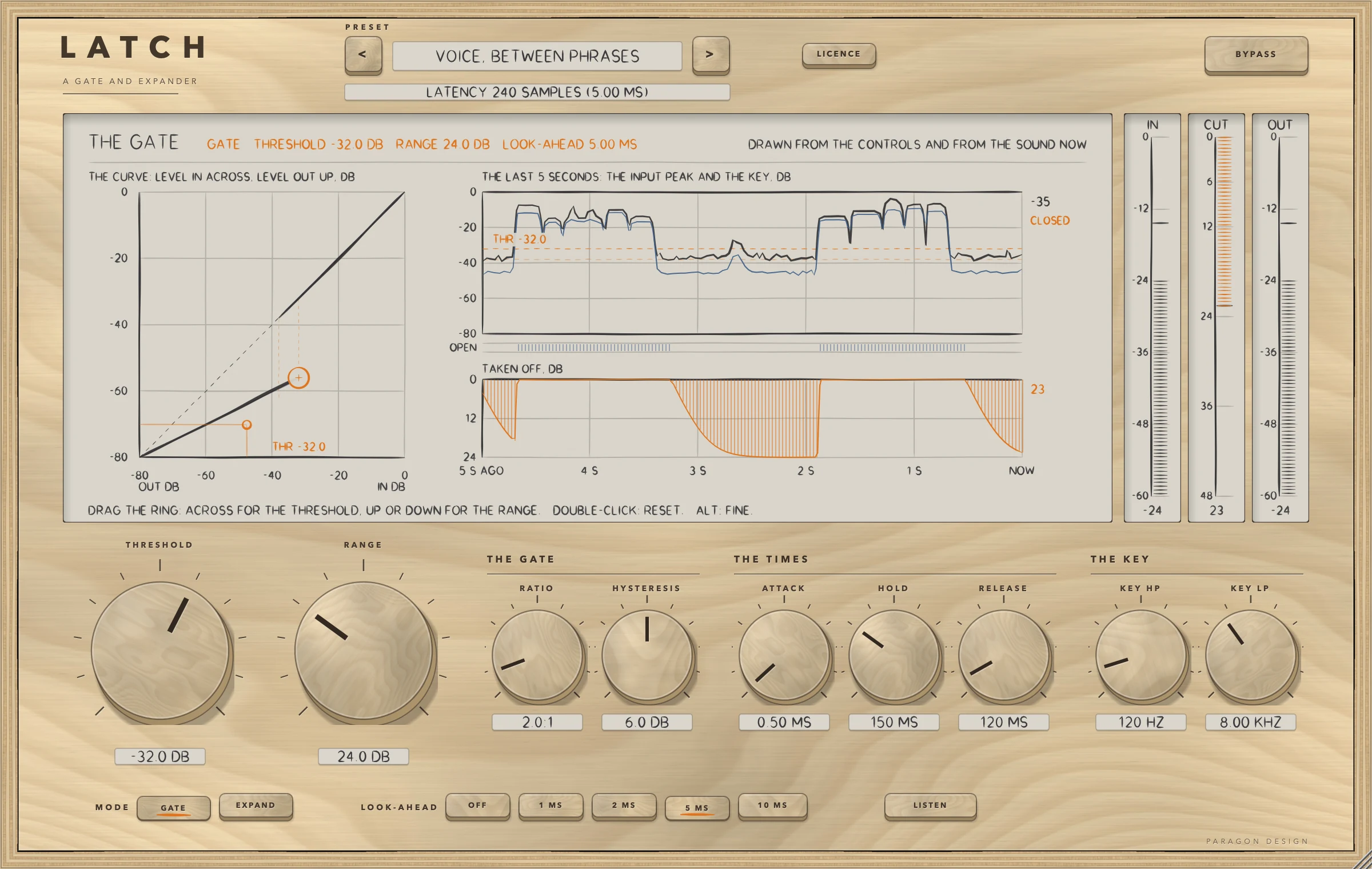
- Put LATCH on a voice with room tone between the phrases. The panel opens with the preset Flat Start: RANGE is 0 dB, so nothing is taken off and the output is the input.
- Click the preset's name to see the menu and choose Voice, Between Phrases. It sets a gate with THRESHOLD -32 dB, RANGE 24 dB and a look-ahead of 5 ms, and the line under the preset name reads LATENCY 240 SAMPLES (5.00 MS).
- Play the track. The display's head line says in orange what LATCH is doing, and the pictures move: the curve at these settings, the last five seconds of the input peak and the key, and the gain taken off.
- Drag the ring on the curve: across for THRESHOLD, up or down for RANGE. A double-click puts both back, and ALT held while dragging gives fine steps.
- Press EXPAND. The curve bends: instead of a step there is a slope of RATIO minus 1 dB per dB, down to RANGE.
- Press LISTEN to hear what the gate listens to, the key after its two filters, and press it again. LISTEN is off whenever a session loads.
- Press BYPASS to compare with the input, delayed by the same look-ahead.
How it works
Top bar and presets
The top bar has LATCH etched on it with A GATE AND EXPANDER under it, the preset bar (the previous and next keys and the name, with a star once a control has moved), the line for the delay, the LICENCE key and BYPASS. A preset sets all 11 sound controls, which is every control but LISTEN and BYPASS. Neither of those is set by a preset.
The display
The display is titled THE GATE, and its head line says in orange the mode, THRESHOLD, RANGE and LOOK-AHEAD. It is drawn from the controls and from the sound now, in three pictures. On the left, the curve: level in across and level out up, in dB, against a dashed diagonal of nothing changed, and while sound passes a dot where the key stands on it. At the top right, the last five seconds: the input peak and the key against THRESHOLD and the closing level (both dashed), with a strip for the decision, open or closed. At the bottom right, the gain taken off in dB over the same five seconds, drawn to the first of 6, 12, 18, 24, 36, 48, 60 and 80 dB that holds RANGE. The history is 512 slots of 10 ms, which is 5.12 s. With no sound the live parts are empty, and the head says what is happening: at Flat Start RANGE IS AT 0 DB: NOTHING IS TAKEN OFF, with BYPASS on BYPASSED and the delay, with LISTEN on LISTENING TO THE KEY, and with the trial over THE TRIAL IS OVER.
One ring on the curve is the handle for THRESHOLD and RANGE together. It stands at the foot of the curve: for a gate, on the closed line at the threshold; for an expander, where its curve has fallen by RANGE, which is RANGE divided by RATIO minus 1 under the threshold. Three meters stand beside the display: IN, CUT (the gain taken off) and OUT.
THRESHOLD, RANGE and the two modes
THRESHOLD and RANGE are the two largest knobs. RANGE is how far the gate closes: the gain of a closed gate, and the most an expander turns down. At 0 dB nothing is taken off. In GATE mode HYSTERESIS is the number of dB under THRESHOLD the key must fall before the gate can close, and it keeps a gate from chattering on a sound that hovers at the threshold. HYSTERESIS has no effect in EXPAND, and RATIO none in GATE.
The times
ATTACK, HOLD and RELEASE time the gain. ATTACK and RELEASE are each the time to cover 63 percent of the way, in the linear domain. HOLD is how long the gate stays open after the key falls under the closing level; in EXPAND the gain is held from falling for the same time after the key was last over the threshold. There is no RELEASE under 5 ms and no ATTACK under 0.05 ms.
The key and LISTEN
KEY HP and KEY LP are a second-order high-pass and a second-order low-pass, 12 dB per octave, on what the gate listens to; the audio itself is not filtered. At the lowest setting of KEY HP (20 Hz) and at the highest of KEY LP (20 kHz) the filter reads OFF. A high-pass keeps a low rumble or a hum from holding the gate open, and a low-pass keeps hiss from doing it. LISTEN replaces the output with the key after its two filters, with a 5 ms crossfade, so you can hear what the gate hears. It is a monitoring state: it is off when a session loads, it is ignored while BYPASS is on, and no preset sets it.
LOOK-AHEAD
LOOK-AHEAD delays the audio and not the detector, so the gate can already be opening when a sound reaches the output. A tone that goes only just over the threshold is read late, because the detector fills a window of 5 ms before the gate opens: 10.8 ms at 0.5 dB over, 3.3 ms at 3 dB over, 0.6 ms at 10 dB over, 0.12 ms at 20 dB over and 0.02 ms at 40 dB over, measured at 48 kHz with the key filters off. LOOK-AHEAD hides up to 10 ms of it.
BYPASS
BYPASS is a crossfade over 5 ms to the input delayed by the look-ahead (239 samples, 4.98 ms at 48 kHz, in the measurement). The gate goes on working inside it, so switching BYPASS off brings in a gate that is already in step: from 300 samples after BYPASS goes off the output is the engine's own, sample for sample.
The controls
| Control | Values | Default | What it does |
|---|---|---|---|
| MODE | GATE, EXPAND | GATE | GATE opens and closes at the threshold, with hysteresis; EXPAND turns down gradually, by RATIO, from the threshold. |
| THRESHOLD | -80.0 dB to 0.0 dB | -50.0 dB | The level, in dB, where the gate opens. A gate closes HYSTERESIS under it once HOLD has run out; in EXPAND every dB the key reads under it costs RATIO minus 1 more dB, down to RANGE. |
| RANGE | 0.0 dB to 80.0 dB | 0.0 dB | How far the gate closes, in dB: the gain of a closed gate, and the most an expander turns down. At 0 dB nothing is taken off, and the output is the input delayed by the look-ahead. |
| RATIO | 1.2:1 to 10.0:1 | 2.0:1 | EXPAND only: every dB the key reads under the threshold costs RATIO minus 1 more dB of gain, down to RANGE. |
| HYSTERESIS | 0.0 dB to 12.0 dB | 4.0 dB | GATE only: the gate opens at the threshold and can close once the key has fallen this many dB under it and HOLD has run out. |
| ATTACK | 0.05 ms to 50.00 ms | 1.00 ms | How fast the gain rises when the gate opens: the time to cover 63 percent of the way, in ms. |
| HOLD | 0 ms to 500 ms | 80 ms | How long the gate stays open after the key falls under the closing level, in ms. The expander holds its gain from falling for as long after the key was last over the threshold. |
| RELEASE | 5 ms to 2.00 s | 200 ms | How fast the gain falls when the gate closes: the time to cover 63 percent of the way, in ms. |
| LOOK-AHEAD | OFF, 1 MS, 2 MS, 5 MS, 10 MS | OFF | How far ahead the gate looks: the audio is delayed by this, and the delay is told to the host. The detector reads the signal before the delay. |
| KEY HP | OFF to 1.00 kHz | 100 Hz | A second-order high-pass, 12 dB per octave, on what the gate listens to, in Hz. The audio is not filtered. At its lowest setting it is off. |
| KEY LP | 1.00 kHz to OFF | 8.00 kHz | A second-order low-pass, 12 dB per octave, on what the gate listens to, in Hz. The audio is not filtered. At its highest setting it is off. |
| LISTEN | ON or OFF | OFF | Hear what the gate listens to: the output is the key after its two filters, with a 5 ms crossfade. It is a monitoring state, off when a session loads and ignored while bypassed. |
| BYPASS | ON or OFF | OFF | Hear the input unchanged, delayed by the look-ahead, after a 5 ms crossfade. The gate goes on working inside, so it is ready when BYPASS is switched off. |
The licence
While the trial is over BYPASS is forced on and the controls are drawn dimmed, as the Getting started manual describes. The BYPASS key itself is not dimmed.
Control reference
Every control on the panel, as the plug-in itself labels it. The description is the tooltip the plug-in shows when you rest the pointer on the control.
Top bar
| No. | Control | What it does | Range | Default |
|---|---|---|---|---|
| 1 | <Key | Previous preset | ||
| 2 | >Key | Next preset | ||
| 3 | LICENCEKey | Shows who the plug-in is licensed to. Click to see the licence. | ||
| 4 | BYPASSKey | Hear the input unchanged, delayed by the look-ahead, after a 5 ms crossfade. The gate goes on working inside, so it is ready when BYPASS is switched off. |
Controls
| No. | Control | What it does | Range | Default |
|---|---|---|---|---|
| 5 | THRESHOLDKnob | The level, in dB, where the gate opens. A gate closes HYSTERESIS under it once HOLD has run out; in EXPAND every dB the key reads under it costs RATIO minus 1 more dB, down to RANGE. | −80 to 0 | −50 |
| 6 | GATEKey | A gate: open or closed, with hysteresis. Closed, the gain is minus RANGE dB. | ||
| 7 | EXPANDKey | An expander: every dB the key reads under the threshold costs RATIO minus 1 more dB of gain, down to RANGE. | ||
| 8 | RANGEKnob | How far the gate closes, in dB: the gain of a closed gate, and the most an expander turns down. At 0 dB nothing is taken off, and the output is the input delayed by the look-ahead. | 0 to 80 | 0 |
| 9 | CHOOSE FILEKey | Choose the licence file you were sent, a .pwlicense file. | ||
| 10 | PASTEKey | Put the text on the clipboard in the field below. | ||
| 11 | REMOVE LICENCEKey | Take this plug-in's licence off this computer. Press twice. | ||
| 12 | OFFKey | No look-ahead and no delay. | ||
| 13 | ACTIVATEKey | Use the licence in the field below: a key, or the whole text of a licence file. | ||
| 14 | RATIOKnob | EXPAND only: every dB the key reads under the threshold costs RATIO minus 1 more dB of gain, down to RANGE. | 1.2 to 10 | 2 |
| 15 | 1 MSKey | The audio is delayed by 1 ms (48 samples at 48 kHz) and the detector reads the signal before the delay, so the gate can be open when a sound arrives. | ||
| 16 | HYSTERESISKnob | GATE only: the gate opens at the threshold and can close once the key has fallen this many dB under it and HOLD has run out. | 0 to 12 | 4 |
| 17 | 2 MSKey | The audio is delayed by 2 ms (96 samples at 48 kHz) and the detector reads the signal before the delay. | ||
| 18 | 5 MSKey | The audio is delayed by 5 ms (240 samples at 48 kHz) and the detector reads the signal before the delay. | ||
| 19 | BUYKey | Open the shop in your browser. | ||
| 20 | ATTACKKnob | How fast the gain rises when the gate opens: the time to cover 63 percent of the way, in ms. | 0.05 to 50 | 1 |
| 21 | 10 MSKey | The audio is delayed by 10 ms (480 samples at 48 kHz) and the detector reads the signal before the delay. | ||
| 22 | GET YOUR LICENCE AGAINKey | Open the page that sends you your licence again, in your browser. | ||
| 23 | HOLDKnob | How long the gate stays open after the key falls under the closing level, in ms. The expander holds its gain from falling for as long after the key was last over the threshold. | 0 to 500 | 80 |
| 24 | LISTENKey | Hear what the gate listens to: the output is the key after its two filters, with a 5 ms crossfade. It is a monitoring state, off when a session loads and ignored while bypassed. | ||
| 25 | CLOSEKey | Close this panel (or press Escape). | ||
| 26 | RELEASEKnob | How fast the gain falls when the gate closes: the time to cover 63 percent of the way, in ms. | 5 to 2000 | 200 |
| 27 | KEY HPKnob | A second-order high-pass, 12 dB per octave, on what the gate listens to, in Hz. The audio is not filtered. At its lowest setting it is off. | 20 to 1000 | 100 |
| 28 | KEY LPKnob | A second-order low-pass, 12 dB per octave, on what the gate listens to, in Hz. The audio is not filtered. At its highest setting it is off. | 1000 to 20000 | 8000 |
Recipes
Between the phrases of a voice
Choose Voice, Between Phrases. It is a gate with 24 dB of RANGE and a look-ahead of 5 ms, so that it is open before a word reaches the output, with KEY HP at 120 Hz. In the preset's measurement it brings the level between the phrases down by 22.9 dB and takes 0.00 dB off the voice itself.
Fast speech and rap
Choose Voice, Fast Words. The hold and the release are shorter, the attack is faster and the look-ahead is the longest, 10 ms, because the pauses are short.
A kick with another drum in its microphone
Choose Kick, Short Gate. KEY LP is at 1 kHz, its lowest setting, so that what the gate listens to is mostly the kick, with a short hold and release and 40 dB of RANGE. The gain stays within 3 dB of 0 dB for about 252 ms after a kick begins in the measurement. Kick, Longer Ring leaves more of the kick's decay: a lower threshold, KEY LP at 2 kHz, a longer release and 30 dB of RANGE, for about 289 ms.
A snare with the bleed taken out
Choose Snare, Bleed Out. KEY HP is at 300 Hz so that the gate does not follow the low burst of another drum, and the level between the snares comes down by 25.6 dB in the measurement.
Hum between guitar notes
Choose Guitar, Hum Gate. With KEY HP at 200 Hz the hum does not hold the gate open, and the hum between the notes comes down by 29.6 dB in the measurement; with the key high-pass off the same settings take off 0.00 dB, which is what KEY HP is for.
A room microphone with an expander
Choose Room Mic, Expander. EXPAND with RATIO 2:1 and 20 dB of RANGE lowers the floor between the sounds, by 12.2 dB in the measurement, and leaves the falling tails at their level until they are near the threshold.
A sound that hovers at the threshold
Choose Special, Wide Hysteresis. On four falling bursts the gate opens 58 times with HYSTERESIS 0 and HOLD 0, and 4 times with HYSTERESIS at 12 dB.
Presets
LATCH has 18 presets in 6 categories. Flat Start is the plug-in's default state: choosing it returns every control to its default, which is rest. Every other preset is written as only what it changes from the defaults and is expanded to all 11 sound controls. Each is held to measurements, 68 in all, on named programmes (a synthetic voice with room tone, bursts, decays, kicks, snares and a guitar): the level in the gaps between the sound, the most taken off the sound itself in any 10 ms, how long after a sound reaches the output the gain is within 1 dB of 0 dB, how many times the gate opens, the lowest gain reached, how long a sound rings, and the delay.
| Category | Presets |
|---|---|
| Start | Flat Start |
| Voice | Voice, Between Phrases; Voice, Fast Words; Voice, Deep Cut; Voice, Gentle Expander |
| Drums | Kick, Short Gate; Kick, Longer Ring; Snare, Bleed Out; Snare, Soft Expander |
| Guitar and Bass | Guitar, Hum Gate; Guitar, Long Sustain; Bass, Low Gate |
| Noise | Noise, Floor Down; Room Mic, Expander; Noise, Hard Gate on Bursts |
| Special | Special, Wide Hysteresis; Special, Soft Attack Hidden; Special, Tail Trim |
Every name says what the preset sets, and a test reads each name against its values. No preset raises the peak or the floor, and every gain stays at or over minus its RANGE. None of the presets has been listened to: they are numbers, not tuned by ear.
Measured
Everything here was run on one Intel Mac (Intel Core i9-10910, macOS 14, x86_64, Release), shared with other work at a load average of 5 to 8, on 16 October 2026.
- LATCH's own test group ran 312 checks in four groups (the engine copy 15, the processor 149, the presets 40, the editor 108) and none failed. LATHE's gate group, which the copy is held to, ran 200 checks and none failed. A run of the whole project's tests ran 14051 checks; the 2 that failed belong to the editor tests of another plug-in that was being built at the time, and none belongs to LATCH or to LATHE.
- The checks of the real editor, made with real mouse events and drawn at 70, 100 and 170 percent, ran 57, 13, 188, 447, 76, 9 and 3 (the control map, overlaps, every word, the fit of every word, the interaction, the cost and the leaks), and none failed.
- Apple's auval tool passes with 13 parameters, one warning ("Parameter did not retain default value when set", for RATIO, which has a skewed scale) and main bus layouts of one in one out and two in two out.
- The host test on the installed, signed release build of the Audio Unit (the Intel half of the universal package) ran 70 checks and none failed, and the allocator's bytes in use went from 284.6 to 279.5 MB over 30 editors. Apple's auval tool passes on the same build, and the Audio Unit's name there is Latch Gate and Expander.
| What was measured | Result | Condition | Kind |
|---|---|---|---|
| The engine copy | Gives the original's output, trace, meter and history, bit for bit, in 240 runs | GATE and EXPAND, every look-ahead, LISTEN on and off, nine sets of settings, four sample rates, noise, bursts and the voice, with the settings moved three times during a run | exact |
| Rest | The output is the input delayed by the look-ahead, bit for bit, in 240 runs; a denormal input number comes out as itself or 0 and a minus zero stays a minus zero | RANGE 0, mono and stereo, GATE and EXPAND, five look-aheads, six sample rates, every other control at its default or its hardest | exact |
| ATTACK and RELEASE | ATTACK 1, 5 and 20 ms measure 1.000, 5.000 and 19.979 ms; RELEASE 5, 20 and 80 ms measure 4.979, 19.979 and 79.979 ms | 48 kHz, RANGE 24 dB, THRESHOLD -40 dB | bound 2 samples |
| HOLD in GATE | 0, 10, 80 and 250 ms close the decision after 0.000, 10.000, 80.000 and 250.000 ms | The same | bound 2 samples |
| HOLD in EXPAND | The gain has fallen 0.5 dB after 20.33, 100.29 and 250.29 ms for a HOLD of 20, 100 and 250 ms | EXPAND, THRESHOLD -40 dB, RATIO 2, RANGE 24 dB, RELEASE 5 ms | bound |
| The expander's curve | The largest difference from its formula is 0.036 dB over five levels | 4 kHz, THRESHOLD -30 dB, RATIO 3, RANGE 40 dB | bound 0.3 dB |
| The processor | Equals the engine, bit for bit, in both layouts and modes | 4 s of voice, THRESHOLD -30 dB, RANGE 30 dB, 5 ms | exact |
| The delay told | The table of delays in Setting it up, worked out again from the milliseconds; 480 samples at 10 MS with no audio running | Six sample rates, five settings | exact |
| BYPASS | The input delayed bit for bit from the start; the crossfade is 239 samples (4.98 ms at 48 kHz) | Look-aheads of 0, 5 and 10 ms, both layouts | exact, and a bound of 236 to 244 samples |
| LISTEN | The processor equals the engine with LISTEN on; a 100 Hz tone through a 1 kHz key high-pass comes out 35 dB or more lower; switched off, the output is the delayed input again 600 samples later | Both layouts | exact, and bounds |
| Blocks | Blocks of 1, 7, 64 and 4096 samples give the output of 512, bit for bit, with nine changes of a control at nine sample positions | 4 s of voice, both layouts | exact |
| Hostile input | Only numbers come out; the largest sample is 2.14 | Not-a-number, infinity, 1e30, denormals, a full-scale square wave and noise, RANGE 80 dB, THRESHOLD -10 dB | bound |
| Memory use | No allocation on the audio thread | Mono and stereo | exact |
| Presets | 68 measurements, all inside their bounds; the processor plays what the audit measured to 6e-8 of full scale | 18 presets | measured against bounds |
| Through the installed Audio Unit | 0 samples differ from the engine's own in 7 presets, 8 s each, on both sides | The host test | exact |
The host test exists because Apple's compiler once made another plug-in's installed build play only part of its sound while every other test passed. In LATCH's own run it found something of a different kind: the value tree a host sets has been through a skewed scale twice, so a test that converts a control once gets a value that differs by 4e-9 to 1.5e-8 on ATTACK; with the conversion made twice the difference is exactly 0.
| Setting | Percent of one core |
|---|---|
| Flat Start | 0.14 |
| The default settings | 0.14 |
| A busy GATE | 0.14 |
| Mono | 0.11 |
| LISTEN | 0.15 |
| BYPASS | 0.15 |
| EXPAND on noise under the threshold | 0.19 |
| The heaviest: EXPAND, 10 ms look-ahead, both key filters, RATIO 10, RANGE 80 dB | 0.18 |
Those costs are thread CPU time at 48 kHz, stereo, in blocks of 512 samples, over 10 s of the synthetic voice, on a shared machine at a load average of 5 to 8; the budget the tests set is 2 percent of one core, and every case meets it. Earlier runs at a load average of 8 to 12 read 0.17 to 0.28.
The display's steady paint with sound running took 4.60, 5.54, 6.90 and 7.90 ms at 2x in four runs at different loads, against a budget of 8 ms, and 2.9 to 3.5 ms at 1x; while a control moves at every paint it took 19.9 to 24.3 ms at 2x. Each meter takes under 0.6 ms, and an idle editor paints 0 times in 1.5 s. Sixty editors made and deleted read the allocator at 173.2 MB and then 156.2 MB.
Limits and what is not verified
- Nothing has been listened to: the presets and the defaults are described by what they were measured to do, not by how they sound.
- Not verified: any host (what one does with the delay, with a delay that changes while it plays, with the absence of a tail, or with the bypass parameter), the VST3 in any host, Apple silicon (the Mac the tests ran on is Intel, and the Apple silicon half of the release package was compiled and never run), sample rates under 44.1 kHz, and the real editor used by hand.
- A tone that goes only just over the threshold is read late: 10.8 ms at 0.5 dB over, 3.3 ms at 3 dB over. LOOK-AHEAD hides up to 10 ms of it.
- The tail told to the host is 0, so the last look-ahead's worth of a sound stays in the delay when the input stops.
- Changing LOOK-AHEAD while audio runs is made under a dip of 3 ms, and the delay told to the host changes with it.
- The gate starts opened: after the plug-in is prepared it takes HOLD and the detector's window before it first closes.
- There is no RELEASE under 5 ms and no ATTACK under 0.05 ms.
- In EXPAND the ring is the foot of the curve, so dragging it hard to the left holds the foot at -80 dB and leaves THRESHOLD above it.
- HYSTERESIS has no effect in EXPAND, and RATIO none in GATE. The tips say so.
- EXPAND on noise under the threshold is the dearest setting, at 0.19 percent of one core.
- The key-filter words ("second-order, 12 dB per octave") and the closing rule rest on LATHE's tests of the original gate, which the copy equals bit for bit; they are not repeated in LATCH's own group. LISTEN's 5 ms crossfade is held by a bound of 600 samples, and BYPASS's is measured at 239 samples.
- The preset intents are written from the settings, and the bounds come from the audit.
- The name LATCH is a working name.
Troubleshooting
The sound does not change. Flat Start has RANGE at 0 dB, so nothing is taken off. Raise RANGE, drag the ring on the display down, or choose a preset. Check that BYPASS is off and that the line under the preset name does not say the trial is over.
The gate cuts the start of every word. The detector needs a moment to read a sound that goes only just over the threshold. Raise LOOK-AHEAD to 5 or 10 ms, shorten ATTACK, or lower THRESHOLD.
The gate chatters on a sound that hovers at the threshold. Raise HYSTERESIS, or raise HOLD. Both apply to GATE mode.
Something keeps the gate open that I do not want. Turn on LISTEN and hear what the gate listens to. A low rumble or a hum can keep it from closing: raise KEY HP. Hiss can too: lower KEY LP.
The track is late with a look-ahead. LOOK-AHEAD delays the audio, and the delay is in the line under the preset name. Use the host's delay compensation to keep tracks in time, or set LOOK-AHEAD to OFF.
There is a short gap when I change LOOK-AHEAD. That is the dip of 3 ms: the delay changes, so LATCH makes the change under a fade.
The panel looks small or large. Drag a corner of the window: it keeps its proportions from 70 to 170 percent of 1200 by 760 pixels, and the width is saved with the project.