Owner’s manual · Version 0.1.0
HUSH owner's manual
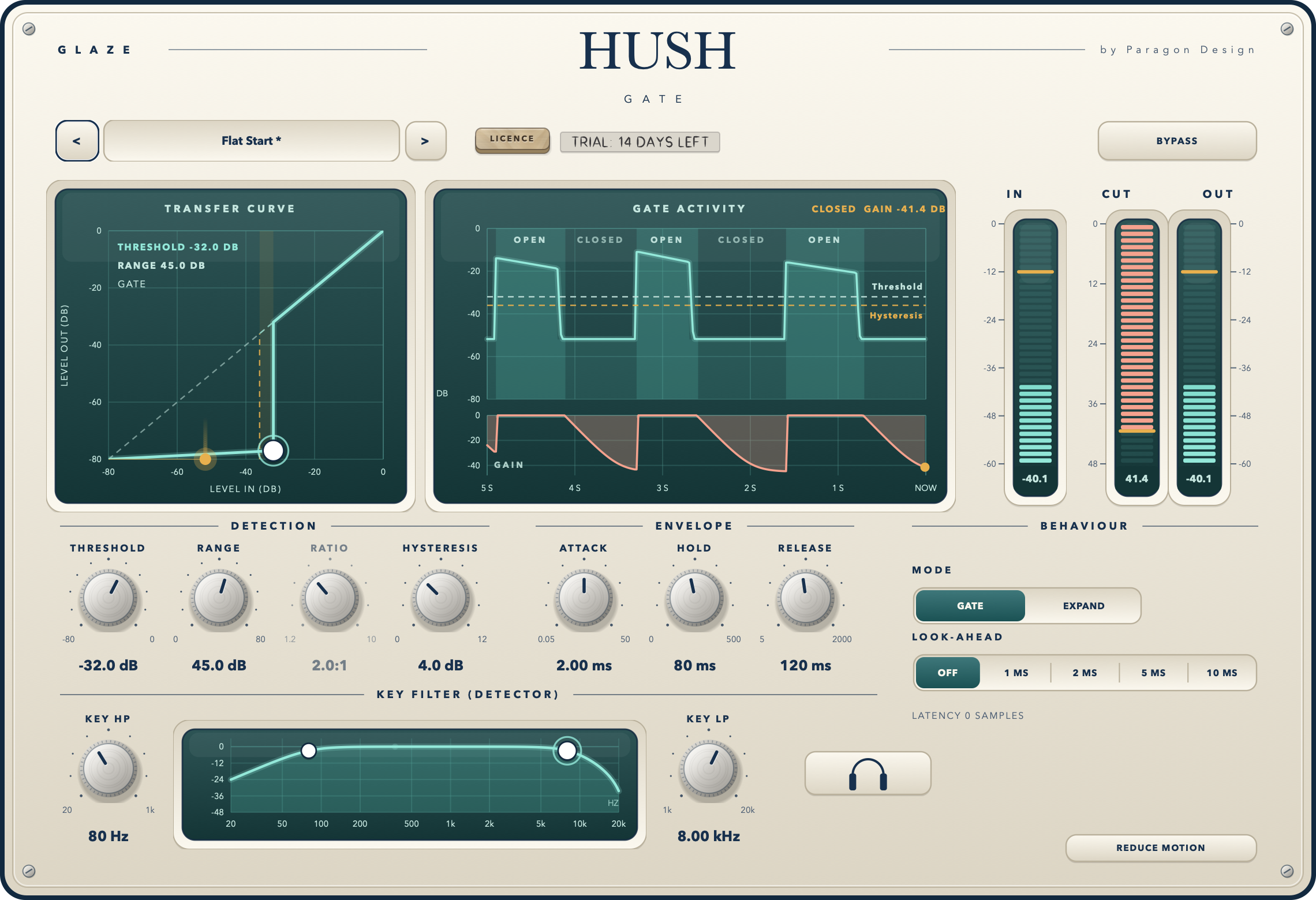
HUSH is a gate and expander with a look-ahead, hysteresis and a filtered key you can listen to, with three glass screens that draw the curve, the last five seconds and the key filters from the engine's own numbers.
What it is
HUSH is a gate and an expander. A gate turns the signal down when it is under a threshold, and HUSH decides what is under it by listening to its own input through two filters, the key, and not to the audio itself. In GATE mode the gate opens when the key reads over THRESHOLD and closes once the key has fallen HYSTERESIS under it and HOLD has run out; while it is closed the gain is minus RANGE dB. In EXPAND mode every dB the key reads under THRESHOLD costs RATIO minus 1 more dB of gain, down to RANGE, and the gain is held from falling for HOLD after the key was last over the threshold.
The detector is a mean-square window of 5 ms of the key, read as the peak level of a sine. The key is the input through a second-order high-pass (KEY HP) and a second-order low-pass (KEY LP), 12 dB per octave, and the two channels are linked by the mean of their power, so one gain is applied to both. The gain moves by one pole in the linear domain: ATTACK going up and RELEASE going down, each the time to cover 63 percent of the way. LOOK-AHEAD delays the audio by 1, 2, 5 or 10 ms while the detector reads the signal before the delay. LISTEN lets you hear the key. BYPASS crossfades to the input over 5 ms.
RANGE starts at 0 dB, so at Flat Start nothing is taken off and the output is the input, bit for bit (delayed by the look-ahead, which is OFF by default). HUSH has 13 host parameters and 18 presets.
HUSH is a premium plug-in: it works for 14 days and then needs a licence (see The licence below).
Setting it up
Formats and channels
HUSH is an effect, in Audio Unit and VST3 formats. A host lists it as Hush Gate, from Paragon Design. It takes one channel in and gives one out, or two in and two out. It has no sidechain and no MIDI.
The panel
The panel is 1140 by 780 pixels at its base and resizes from 70 to 170 percent, with its proportions kept; the width is saved with the project. Every label stays readable at 70 percent (the smallest lettering is 10 base pixels).
Latency
LOOK-AHEAD sets the delay. With OFF there is none and the line under the look-ahead keys reads LATENCY 0 SAMPLES. With 1, 2, 5 or 10 ms the delay is that time in whole samples, told to the host, and the line reads, for example, LATENCY 240 SAMPLES (5.00 MS) at 48 kHz. BYPASS keeps the delay, and so does a trial that is over. The tail told to the host is 0.
A first session
- Put HUSH on a voice with room tone between the phrases. It opens at Flat Start: RANGE is 0 dB, so nothing is taken off.
- Drag the ring at the foot of the transfer curve: across for THRESHOLD, down for RANGE. Hold Alt for a tenth of the move, Shift to move along one direction only, and double-click on the graph to put both back.
- Play the track. The gate activity screen shows what the key read (the bright line) over the input's peaks, the open stretches shaded and named OPEN, THRESHOLD and the closing level as dashed lines, and the gain taken off in the lane below.
- Press EXPAND. The curve bends: instead of a step there is a slope of RATIO minus 1 dB per dB, down to RANGE.
- Press LISTEN (the headphones key) to hear what the gate listens to, and press it again. LISTEN is off whenever a session loads.
- Press BYPASS to compare with the input, delayed by the same look-ahead.
The screens
Transfer curve. Level in across and level out up, in dB, from -80 to 0, against a dashed diagonal of nothing changed. A GATE draws its two states (the closed line, RANGE under the diagonal, and the open one) with the step at THRESHOLD, and the band HYSTERESIS under THRESHOLD, where an open gate stays open. EXPAND draws the engine's own expander curve. While sound passes, an amber dot stands where the key reads now, with the last half second behind it. The ring is at the foot of the curve and sets THRESHOLD and RANGE. In EXPAND the foot is RANGE divided by RATIO minus 1 under the threshold.
Gate activity. The last five seconds, 500 columns of the engine's 10 ms history. Above: the input's peaks (shaded), the key (the line the gate decides on), THRESHOLD and, in GATE mode, the closing level (THRESHOLD less HYSTERESIS), both dashed, and the stretches where the gate was open shaded and named. Below: the gain taken off, on a scale that grows to hold RANGE (6, 12, 18, 24, 36, 48, 60 or 80 dB). With no sound it says WAITING FOR SOUND. Nothing on it is invented: it draws only what the engine records.
Key filter. The response of the two key filters as the engine designs them (second order, Butterworth), from 20 Hz to 20 kHz. The two round handles are the filters' corners: drag one across to set KEY HP or KEY LP. At the far left the high-pass is OFF, at the far right the low-pass is. The audio itself is not filtered. Nothing on this screen moves without a hand.
Meters. IN is the loudest peak at the input, CUT is the gain taken off (it hangs from the top, in dB), OUT is the loudest peak at the output. Each holds its peak mark for a moment.
The controls
| Control | Values | Default | What it does |
|---|---|---|---|
| MODE | GATE, EXPAND | GATE | GATE opens and closes at the threshold, with hysteresis; EXPAND turns down gradually, by RATIO, from the threshold. |
| THRESHOLD | -80.0 to 0.0 dB | -50.0 dB | The level where the gate opens. A gate closes HYSTERESIS under it once HOLD has run out. |
| RANGE | 0.0 to 80.0 dB | 0.0 dB | How far the gate closes: the gain of a closed gate and the most an expander turns down. At 0 dB nothing is taken off. |
| RATIO | 1.2:1 to 10.0:1 | 2.0:1 | EXPAND only. Drawn quieter, not hidden, in GATE. |
| HYSTERESIS | 0.0 to 12.0 dB | 4.0 dB | GATE only. Drawn quieter, not hidden, in EXPAND. |
| ATTACK | 0.05 to 50.00 ms | 1.00 ms | How fast the gain rises when the gate opens (the time to cover 63 percent of the way). |
| HOLD | 0 to 500 ms | 80 ms | How long the gate stays open after the key falls under the closing level. |
| RELEASE | 5 ms to 2.00 s | 200 ms | How fast the gain falls when the gate closes. |
| LOOK-AHEAD | OFF, 1, 2, 5, 10 MS | OFF | The audio is delayed by this; the detector reads the signal before the delay. |
| KEY HP | OFF (20 Hz) to 1.00 kHz | 100 Hz | A second-order high-pass on what the gate listens to. |
| KEY LP | 1.00 kHz to OFF (20 kHz) | 8.00 kHz | A second-order low-pass on what the gate listens to. |
| LISTEN | ON or OFF | OFF | Hear the key: the output is the key after its two filters, with a 5 ms crossfade. Off when a session loads. |
| BYPASS | ON or OFF | OFF | The input, delayed by the look-ahead, after a 5 ms crossfade. The gate goes on working inside. |
REDUCE MOTION (bottom right) switches off the panel's opening movement and the trail behind the live dot. It is a setting of the interface only: it is not saved with the project and is not a host parameter. Idle, HUSH animates nothing.
Keyboard
Click a control to give it keyboard focus (the host keeps its own keys until you do); Tab moves between the 18 controls. On a knob: the arrow keys move it by 1 percent of its travel (Shift 10 percent), Page Up and Page Down 10 percent, Home and End to the ends. On the transfer curve: left and right set THRESHOLD by 0.5 dB, up and down set RANGE by 0.5 dB (Shift 5 dB). On the choosers (MODE, LOOK-AHEAD): the arrow keys. Space, letters and any key with Command, Control or Alt are left to the host. Every keyboard and mouse edit is one change gesture to the host, so automation records it as one move.
The licence
The licence key sits in the top bar, beside the preset, as in every Paragon Design plug-in: it shows the days left of the trial, opens the licence panel (paste a key or choose a file), and a .pwlicense file dropped on the panel is activated. When the trial is over BYPASS is forced on, the controls are drawn dimmed and still answer. A HUSH licence carries the code Ghsh and unlocks HUSH only.
Presets
HUSH has 18 presets in 6 categories (Start, Voice, Drums, Guitar and Bass, Noise, Special). Flat Start is the default state. A preset sets the 11 sound controls and not LISTEN or BYPASS. The strip shows a star after the name once a control has moved.
Verified, and not
Run on one Intel Mac, Release, 29 October 2026, by the project's own check program:
- The gate's engine, processor and 18-preset groups all pass unchanged (the engine's output is bit-identical to the reference gate in 240 runs, and rest is the input bit for bit).
- 548 checks in the whole run (this plug-in's and SIBIL's engine groups and interface checks), 0 failed. The interface checks use real mouse and key handlers: every control reaches its parameter as one gesture; the pictures agree with the engine's own history and with the key-filter biquads to within 0.05 dB; the licence key, panel and expiry behave as before; the output with the editor open equals the output with none, bit for bit; mono and stereo; 70, 100 and 170 percent; idle repaints nothing.
- The moving parts repaint together in about 10 ms at 2x on the test machine (the budget is 12 ms; a busy machine can exceed it).
The HUSH installer is a universal (Intel and Apple silicon) package of the Audio Unit and the VST3, signed with Paragon Design's Developer ID, notarised by Apple and stapled; Gatekeeper accepts it. A HUSH licence issued by the Paragon Design store was accepted by the plug-in's production licence check.
Reported by the plug-in's owner, Mark (a user report, not part of the checks above and not an independent test): the plug-in loaded correctly in Logic Pro, a licence file imported and loaded correctly there, and, in his later report, HUSH "worked perfectly" in his Logic Pro audition. This is one person's report of one successful session in Logic Pro and nothing wider.
Not independently verified: any host other than Logic Pro, the VST3 in any host, bypass or saving and reopening a session in any host (the report does not say), running on Apple silicon hardware, a fresh install on a clean Mac, listening tests under controlled conditions, and the plug-in used by hand in full.
Troubleshooting
The sound does not change. At Flat Start RANGE is 0 dB. Raise RANGE, drag the ring down, or choose a preset. Check BYPASS and the trial.
The gate cuts the start of every word. Raise LOOK-AHEAD to 5 or 10 ms, shorten ATTACK, or lower THRESHOLD.
The gate chatters. Raise HYSTERESIS or HOLD (GATE mode).
Something keeps the gate open. Press LISTEN and hear what the gate hears. A rumble or hum: raise KEY HP. Hiss: lower KEY LP.